
MIX-308 - Audio Mixer Steren - Free user manual and instructions
Find the device manual for free MIX-308 Steren in PDF.


| Product Type | Audio Mixer |
| Brand | Steren |
| Model | MIX-308 |
| Number of Channels | 8 |
| Input Connectors | 8 x XLR/TRS combo jacks, 2 x RCA |
| Output Connectors | 2 x XLR main out, 2 x TRS monitor out, 1 x headphone |
| Power Supply | 12V DC, 1A (adapter included) |
| Dimensions (W x D x H) | 300 x 200 x 100 mm |
| Weight | 2 kg |
| Frequency Response | 20 Hz - 20 kHz |
| Phantom Power | +48V switchable per channel |
| EQ per Channel | 3-band (High, Mid, Low) |
| Built-in Effects | 16 digital effects (reverb, delay, chorus) |
| USB Connectivity | USB-B for recording/playback |
| Main Mix Output | Stereo balanced XLR |
| Monitor Output | 1/4" TRS stereo |
| Headphone Output | 1/4" TRS with volume control |
| Maintenance | Clean with dry cloth; avoid liquids; check cables periodically |
| Safety | Use only supplied power adapter; do not expose to moisture |
| Spare Parts & Repairability | Contact Steren service center for replacement parts |
Frequently Asked Questions - MIX-308 Steren
User questions about MIX-308 Steren
0 question about this device. Answer the ones you know or ask your own.
Ask a new question about this device
Download the instructions for your Audio Mixer in PDF format for free! Find your manual MIX-308 - Steren and take your electronic device back in hand. On this page are published all the documents necessary for the use of your device. MIX-308 by Steren.
USER MANUAL MIX-308 Steren
natural_image
Audio recording device with multiple audio jack knobs and control knobs (no visible text or labels)IMPORTANTE
natural_image
Pure electrical circuit lines without any symbols1. MIC
Restore factory setting
E) Salir
ESPECIFICACIONES
Alimentación: 2 x 17 V\~ 60 Hz 800 mA
STEREN PRODUCTO EMPACADO S.A. DE C.V.
Autopista México-Querétaro. Km 26.5 Sin número, Nave Industrial 3-A, Col. Lomas de Boulevares, Tlalnepantla de Baz, Estado de México, C.P. 54020, RFC: SPE-941215-H43
natural_image
Black audio mixing console with multiple knobs and control buttons (no visible text or labels)IMPORTANT
Please read this instruction carefully to know how to properly use the product.
The information is presented only as a reference; Due to updates there may be differences. Check our website www.steren.com for the most recent version of this manual.reciente of this manual.
CAUTIONS
- This device is not intended for use by persons (including children) whose physical, sensory or mental abilities are different or reduced, or who lack experience or knowledge.
- Children should be supervised to make sure they do not use the device as a toy.
- Do not expose the equipment to extreme temperatures.
- Do not use it or store it in places where there are leaks or splashes of water.
• To clean it, always use a soft, dry cloth; do not use solvents. - Do not use the equipment if the eliminator cable is damaged.
- Do not try to open the equipment; may cause malfunction and voiding the warranty.
- Place the equipment in a place with sufficient ventilation.
- Do not place objects that may block the ventilation slots.
- Before turning on the equipment, make sure that the volume controls are at the minimum level.
CONTENT AND DESCRIPTION
MIXER

REAR PANEL

POWER CORD

natural_image
Pure electrical circuit lines without any symbols1. MIC
XLR inputs for low impedance balanced microphones.
2. LINE
6.3 mm ( 14 ") inputs for musical instruments or other devices.
3. GAIN
Controls the gain level of the microphones or equipment connected in each channel. The internal scale (-16 to -60 dB) corresponds to the microphones; (+10 to -34 dB) corresponds to musical instruments or other devices.
4. HIGH
Adjusts the sounds between -15 and +15 dB, with a center frequency of 12 kHz.
5. MID
Adjusts the signal of all musical instruments and the human voice between -15 and +15 dB, with a central frequency of 2.5 kHz.
6. LOW
Adjust the signal of the male human voice and guitars or drums between -15 and +15 dB, with a central frequency of 80 Hz.
7. AUX SEND
Send the signal to the AUX bus; Ihe signal is pre-cleared so that the auxiliary sending is independent of the general fading. It is ideal for feedback or monitor.
8. AUX EFFECT
Adjusts the echo effect level for the channel.
9. PAN
Distribute the signal level between the left and right channels to make a stereo sound effect.
10. PEAK
Indicates the signal level of some connected equipment (regardless of the output), when the gain is adjusted (GAIN).
11. CHANNEL (for channels 1 - 8)
Adjust the channel volume.
12. PFL (for channels 1 - 8)
If the button corresponding to a channel is activated, it allows monitoring that channel through the output for hearing aids (PHONES). In addition, the other channels are automatically deleted.
13. Balanced outputs
Sends the mixed signal through separate outputs (left / right) of BNC, to connect amplified speakers (baffles) or amplifiers.
14. Unbalanced outputs
Sends the mixed signal by separate outputs (left / right) of 6.3 mm, to connect amplified speakers (baffles) or amplifiers.
15. AUX SEND 1 (jack)
Send the mixed signal through a 6.3 mm output to connect auxiliary amplifiers.
16. PHONES (jack)
Output to monitor, with 6.3 mm connection headphones, the mixed or individual signal of each channel.
17. Level meters
Green LED → Output in optimal condition
Yellow LED → Output in out of range condition
Red LED → Output in exceeded condition
18. PHONE (knob)
Adjusts volume for the headphone output (PHONE).
19. AUX SEND 1 (knob)
Adjusts volume for the auxiliary output (AUX SEND 1).
20. PFL (EFFECT)
If this button is activated, the effect level is selected to send it to the left / right output channels with respect to the activated PFL signals.
21. Master volume control
Adjust the general output level.
22. EFFECT / RETURN volume control
Adjusts the gain level for the echo effect with respect to the signal connected to the RETURN jack.
23. Mp3 player
A. USB port
B. Digital screen
C. Playback controls
24. AUX 2
put to connect, by 6.3 mm plug, an external effects device.
25. OUT MONITOR
It allows to have outputs to amplified monitors or amplifiers, with separate outputs of the left and right channels.
26. EFFECT 2 (jack)
Input to connect, by 6.3 mm plug, an external effects device.
27. TAPE/OUT
RCA type output to connect an audio recorder and capture the mixed output signal.
28. TAPE/IN (jack)
RCA type input to connect an audio recorder.
29. TAPE/IN (knob)
Adjust in volume level for the TAPE IN input.
30. EFFECT 2 (knob)
Adjusts the volume of echo sound, by sending it through the SEND output.
31. DELAYED
Adjusts the repeat frequency for the echo effect.
32. REVERB
Adjust the time intervals for the echo effect.
33. PAN
Distribute the signal level between the left and right channels to make a stereo sound effect.
34. AC
Power input
35. POWER
On (I) / Off (O) switch
HOW TO USE
Due to the variety of uses that can be given to this console, it is recommended to follow these points, in order to achieve the best quality and make the most of the device.
1 Place all the input and output knobs at the minimum level.
2 Adjusts the master volume control to a low level.
3 Connect speakers, headphones or amplifiers to the corresponding connectors.
4 Connect the microphones. Once the console is turned on, you should turn the GAIN knob of the channels to the minimum level (to the left); also every time you connect or disconnect microphones or other devices.
5 Connects external audio devices such as CD players, iPod, smartphones, etc. in the entry lines.
6 Connect the eliminator: first to the electric current and then to the console. The plug connector has only one entry position, marked by the notch; do not force the connection and screw the nut to secure it.
7 Increase the volume level (GAIN) of the channels and the master volume control, in order to listen to the audio signal. Constantly check the level meters to not exceed the recommended limits.
8 Use the HIGH, MID and LOW knobs to equalize the mixes.
Example of connections
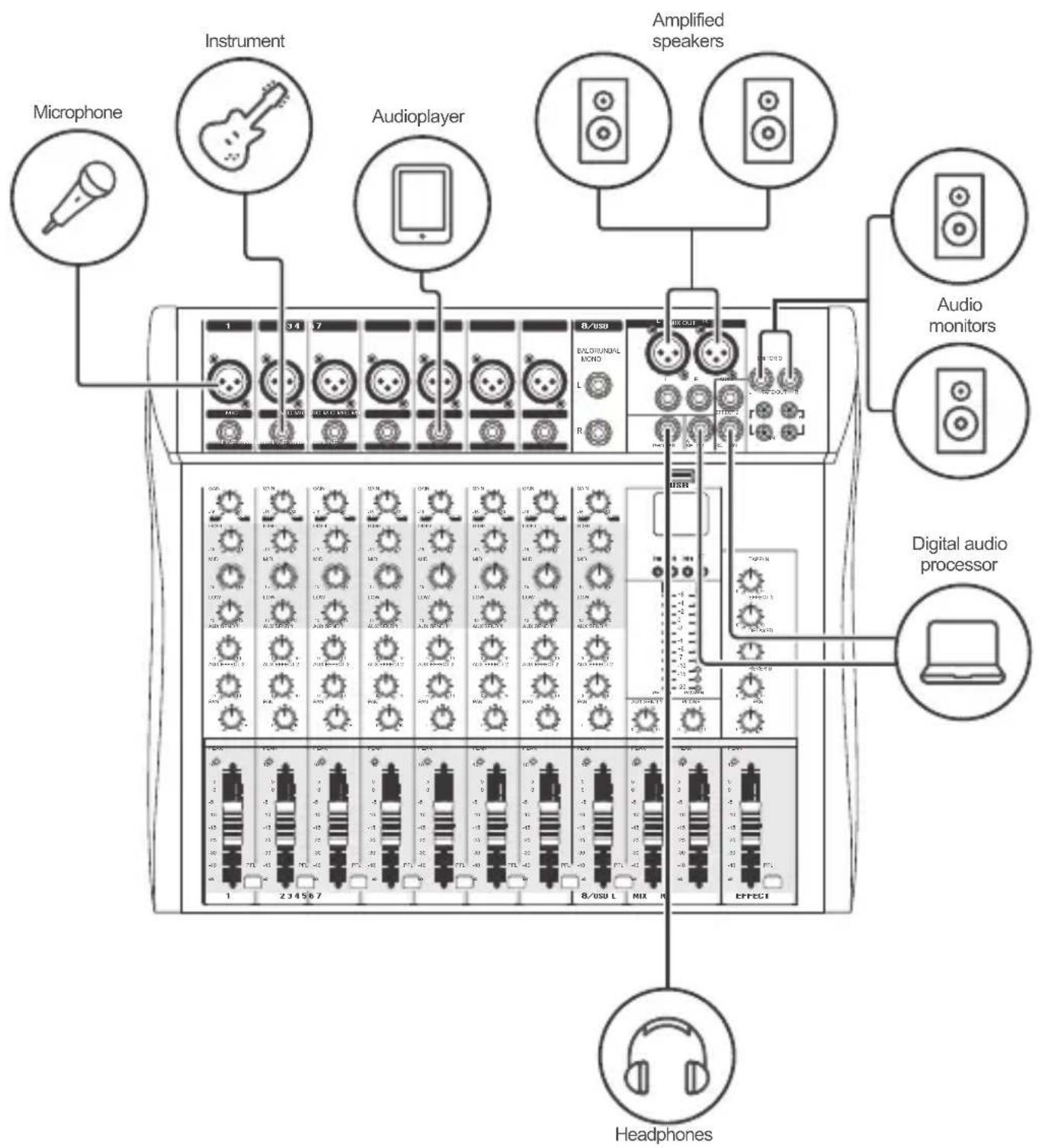
PLAYER
1 Insert a USB flash drive with music in MP3 format. Playback will start automatically.
2 Control the playback or access to configuration with the buttons:

Play / Pause / Select

Previous / Cursor up

Next / Cursor down
SET
Configuration
SET BUTTON
While a track is playing, press SET to access the menu:
A) Repeat mode
Total circulation
Repeat folder
Repeat 1
Shuffle (random)
B) EQ installation
Normal
Popular
rock
Jazz
Classic
Soft
Super bass
C) File Explorer
D) Enter main
Backlight time (Screen illumination between 00 and 240 seconds)
Language
Contrast (Contrast of the screen between 00 and 20)
Firmware (It is recommended not to update it)
Restore factory setting
E) Exit
SPECIFICATIONS
Input: 2 x 17 V\~ 60 Hz 800 mA
Input level: -20 dBm (line/aux/eff) / -60 dBm (mic) / -10 dBm (tape)
EQ HIGH Gain: +15 dB @ 12 kHz
EQ MID Gain: +15 dB @ 2.5 kHz
EQ LOW Gain: +15 dB @ 80 Hz
Frequency response: 20 Hz to 20 kHz
SNR: > 80 dB
THD: <0.03%@1 kHz
Operating temperature: 0 °C – 40 °C
RH: <80% non-condensing
Consumption: 30 W/h
Stand-by power consumption: not applicable
Power converter
Input: 120 V\~60 Hz 30 W
Output: 2 x 17 V\~ 60 Hz 800 mA
Specifications may vary without previous notice
WARRANTY

STEREN
Product: 8-ch professional mixer with USB
Part number: MIX-308
Brand: Steren
This Steren product is warranted under normal usage against defects in workmanship and materials to the original purchaser for one year on the other parts from the date of purchase.
CONDITIONS
1.- This warranty card with all the required information, invoice or purchase ticket, product box or package, and product, must be presented when warranty service is required.
2.- If the product is in the warranty time, the company will repair it free of charge. The supplier will pay for transportation charges.
3.- The repairing time will not exceed 30 natural days, from the day the claim was received.
4.- Steren sell parts, components, consumables and accessories to customer, as well as warranty service, at any of the addresses mentioned later.
THIS WARRANTY IS VOID IN THE NEXT CASES:
If the product has been damaged by an accident, acts of God, mishandling, leaky batteries, failure to follow enclosed instructions, improper repair by unauthorized personnel, improper safe keeping, among others.
a) The consumer can also claim the warranty service in the purchase establishment.
b) If you lose the warranty card, we can reissue it, if you show the invoice or purchase ticket.
RETAILER INFORMATION
Name of the retailer ____
Address
Serial number ____
Product ____
ELECTRÓNICA STEREN S.A. DE C.V.
Biólogo Maximino Martínez No. 3408, San Salvador Xochimanca, Del. Azcapotzalco Ciudad de México 02870, RFC: EST850628-K51
STEREN PRODUCTO EMPACADO S.A. DE C.V.
Autopista México-Querétaro. Km 26.5 Sin número, Nave Industrial 3-A, Col. Lomas de Boulevares, Tlalnepantla de Baz, Estado de México, C.P. 54020, RFC: SPE-941215-H43
In case your product fails or have questions, please contact your nearest dealer.
If you are in Mexico, please call to our Call Center.
Call Center
01 800 500 9000

natural_image
Solid red horizontal bar with no text or symbols
www.steren.com
- IMPORTANTE
- MIC
- E) Salir
- ESPECIFICACIONES
- STEREN PRODUCTO EMPACADO S.A. DE C.V.
- IMPORTANT
- Please read this instruction carefully to know how to properly use the product.
- CAUTIONS
- CONTENT AND DESCRIPTION
- LINE
- GAIN
- HIGH
- MID
- LOW
- AUX SEND
- AUX EFFECT
- PAN
- PEAK
- CHANNEL (for channels 1 - 8)
- PFL (for channels 1 - 8)
- Balanced outputs
- Unbalanced outputs
- AUX SEND 1 (jack)
- PHONES (jack)
- Level meters
- PHONE (knob)
- AUX SEND 1 (knob)
- PFL (EFFECT)
- Master volume control
- EFFECT / RETURN volume control
- Mp3 player
- AUX 2
- OUT MONITOR
- EFFECT 2 (jack)
- TAPE/OUT
- TAPE/IN (jack)
- TAPE/IN (knob)
- EFFECT 2 (knob)
- DELAYED
- REVERB
- PAN
- AC
- POWER
- HOW TO USE
- Example of connections
- PLAYER
- SET BUTTON
- A) Repeat mode
- B) EQ installation
- C) File Explorer
- D) Enter main
- SPECIFICATIONS
- Power converter
- WARRANTY
- STEREN
- CONDITIONS
- THIS WARRANTY IS VOID IN THE NEXT CASES:
- RETAILER INFORMATION
- ELECTRÓNICA STEREN S.A. DE C.V.
Brand : Steren
Model : MIX-308
Category : Audio Mixer