
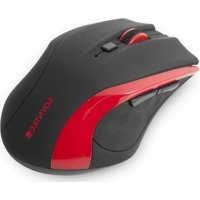
Inpput R450 - Mouse Soyntec - Free user manual and instructions
Find the device manual for free Inpput R450 Soyntec in PDF.


Pick your language and provide your email: we'll send you a specifically translated version.
| Product Type | Wired Mouse |
| Brand | Soyntec |
| Model | Inpput R450 |
| Connectivity | USB 2.0 Wired |
| Sensor Type | Optical LED |
| Resolution | 1000 DPI (Fixed) |
| Number of Buttons | 3 (Left, Right, Scroll/Click) |
| Scroll Wheel | Yes, vertical scrolling |
| LED Indicator | Optional (power/connection) |
| Cable Length | Approx. 1.5 m (5 ft) |
| Dimensions (L x W x H) | 12.5 x 7 x 3.5 cm |
| Weight | 110 g (with cable) |
| Power Supply | Powered via USB (5V, 100 mA) |
| Operating Systems | Windows, macOS, Linux |
| Compatibility | Desktop and laptop with USB port |
| Maintenance | Wipe with dry cloth; avoid liquids |
| Safety | Use only with compliant USB ports |
| Warranty | 1 year from purchase date |
| Spare Parts | Not available separately (non-repairable) |
Frequently Asked Questions - Inpput R450 Soyntec
How do I connect the Soyntec Inpput R450 mouse to my computer?
Simply plug the USB cable into an available USB port on your computer. The mouse should be automatically recognized and ready to use without additional drivers for standard operating systems.
The cursor is not moving. What should I do?
First, check that the USB cable is securely connected. Try a different USB port. If using a USB hub, connect directly to the computer. Restart your computer. If the issue persists, clean the optical lens with a dry cloth.
How do I clean my Soyntec Inpput R450 mouse?
Unplug the mouse. Use a soft, dry lint-free cloth to wipe the exterior. For the optical lens, gently clean with a cotton swab. Do not use liquids or abrasive cleaners.
Is the mouse compatible with Mac computers?
Yes, the Soyntec Inpput R450 works with macOS. Plug it in and it should work as a standard pointing device. Some special buttons may not be programmable.
The scroll wheel is not working properly. How can I fix it?
Dust or debris may have accumulated. Gently blow compressed air into the scroll wheel area. If that fails, the scroll wheel may be defective and the mouse may need replacement.
Can I adjust the mouse sensitivity?
The Soyntec Inpput R450 has a fixed DPI of 1000. You can adjust pointer speed in your computer's mouse settings (Control Panel on Windows or System Preferences on Mac).
Why does the mouse double-click when I single-click?
This is often a sign of a worn-out microswitch. Unfortunately, this mouse is not designed to be opened or repaired. Consider replacing the mouse if the problem persists.
Does the mouse have any special programmable buttons?
No, the Inpput R450 is a basic 3-button mouse. Buttons cannot be reprogrammed.
What is the warranty period for this mouse?
Soyntec offers a 1-year warranty against manufacturing defects from the date of purchase. Keep your receipt.
How long is the USB cable?
The cable length is approximately 1.5 meters (5 feet), sufficient for most desktop setups.
User questions about Inpput R450 Soyntec
0 question about this device. Answer the ones you know or ask your own.
Ask a new question about this device
No questions yet. Be the first to ask one.
Download the instructions for your Mouse in PDF format for free! Find your manual Inpput R450 - Soyntec and take your electronic device back in hand. On this page are published all the documents necessary for the use of your device. Inpput R450 by Soyntec.
USER MANUAL Inpput R450 Soyntec
natural_image
Close-up of a black electronic device with a red circle highlighting a small feature (no text or symbols visible)natural_image
Illustration of a hand holding a computer monitor with an open screen (no text or symbols visible)


Manual assistant
Powered by Anthropic
Waiting for your message
Product information
Brand : Soyntec
Model : Inpput R450
Category : Mouse