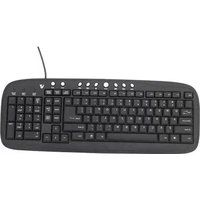
Multimedia Keyboard KM0B1-6E2 - Keyboard V7 - Free user manual and instructions
Find the device manual for free Multimedia Keyboard KM0B1-6E2 V7 in PDF.


| Product Type | Multimedia Keyboard |
| Model Number | KM0B1-6E2 |
| Brand | V7 |
| Dimensions (L x W x H) | 17.5 x 5.1 x 0.8 inches |
| Weight | 1.5 lbs |
| Connectivity | USB Wired (1.5m cable) |
| Power Source | USB bus-powered |
| Compatible Operating Systems | Windows, macOS, Linux |
| Multimedia Keys | Play/Pause, Volume Up/Down, Mute, Internet, Email, Calculator, Sleep |
| Cable Length | 5 feet (1.5m) |
| Key Type | Membrane |
| Number of Keys | 104 keys + multimedia buttons |
| Keyboard Layout | US English |
| Warranty | 1 year limited |
| Cleaning Instructions | Unplug before cleaning. Use a soft, dry cloth. Do not use liquids or sprays. |
| Safety Warnings | Avoid exposure to liquids and extreme temperatures. Do not disassemble. |
| Spare Parts Availability | Contact V7 support for replacement cables or keycaps. |
| Energy Efficiency | Low power consumption; automatically enters sleep mode when not in use. |
Frequently Asked Questions - Multimedia Keyboard KM0B1-6E2 V7
User questions about Multimedia Keyboard KM0B1-6E2 V7
0 question about this device. Answer the ones you know or ask your own.
Ask a new question about this device
Download the instructions for your Keyboard in PDF format for free! Find your manual Multimedia Keyboard KM0B1-6E2 - V7 and take your electronic device back in hand. On this page are published all the documents necessary for the use of your device. Multimedia Keyboard KM0B1-6E2 by V7.
USER MANUAL Multimedia Keyboard KM0B1-6E2 V7


Using your keyboard
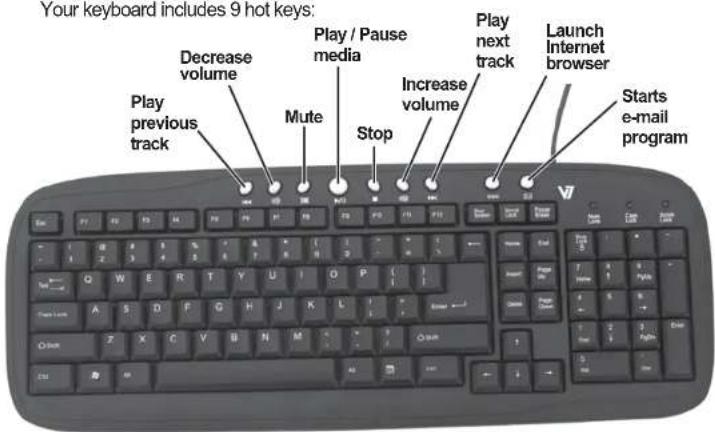
Your keyboard includes 9 hot keys:
Setting up your keyboard
1 Connect the USB cable on the keyboard into an available USB port on your computer.
2 The operating system will automatically detect the keyboard and it will begin working.

One Year Limited Warranty
V7 Limited Manufacturer's Warranty covers this Product against defects in materials or workmanship from the date of purchase for a period of twelve (12) months for parts and labor. Liability under this limited warranty shall in no event exceed the cost of replacement with a similar product or the original cost of the product at the time of purchase, whichever is less. This limited warranty does not cover the repair of cracked, scratched, broken or modified plastic or other cosmetic damage; or parts that have been altered, defaced or removed. Also, it does not apply to repairs or replacement necessitated by any cause beyond the control of the Manufacturer including, but not limited to, any malfunction, defects or failures which in the opinion of Manufacturer were caused by or resulting from unauthorized service or parts, improper maintenance, operation contrary to furnished instructions, shipping or transit accidents, modification or repair by the user, abuse, misuse, neglect, accident, fire, flood, or other acts of God, incorrect line voltage or normal wear and tear. This limited warranty does not apply to damage that occurs during unpacking, setup, or installation; removal of the product for repair; reinstallation of the product after repair, or shipping cost of the product for any purpose. There are no other expressed warranties, whether written or oral, other than this printed limited warranty. All implied warranties. Including without limitation the implied warranties or merchantability or fitness for a particular purpose, are limited to the durations of this limited warranty. In no event shall V7 be liable for incidental or consequential damages of any nature whatsoever, including but not limited to lost profit or commercial loss, to the full extent those damages can be disclaimed by law. This warranty is valid in the United States and Canada. Additional information can be found at www.V7-world.com.
For questions regarding your V7 product, please visit www.V7-world.com.
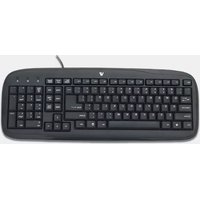


Brand : V7
Model : Multimedia Keyboard KM0B1-6E2
Category : Keyboard