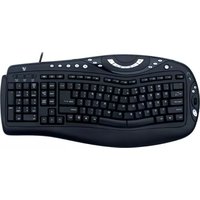
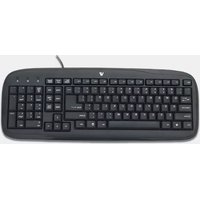
Natural Keyboard KN0B1-6E4 - Keyboard V7 - Free user manual and instructions
Find the device manual for free Natural Keyboard KN0B1-6E4 V7 in PDF.


Pick your language and provide your email: we'll send you a specifically translated version.
| Product Type | Ergonomic Keyboard |
| Dimensions | 18.1 x 8.7 x 1.3 inches |
| Weight | 1.8 lbs (0.82 kg) |
| Color | Black |
| Connectivity | USB 2.0 Type-A |
| Cable Length | 6 ft (1.8 m) |
| Switch Type | Membrane |
| Number of Keys | 104 |
| Erogonomics | Split and curved design with integrated palm rest |
| Compatibility | Windows, macOS, Linux |
| Power Source | USB bus-powered |
| Materials | ABS plastic |
| Cleaning Instructions | Wipe with a soft damp cloth; avoid abrasive cleaners |
| Safety Certifications | CE, FCC, RoHS |
| Repairability | No user-serviceable parts; refer to warranty for defects |
| Included Accessories | Quick start guide |
| Operating Temperature | 0°C to 40°C |
| Storage Temperature | -20°C to 60°C |
| Warranty | 1-year limited warranty |
Frequently Asked Questions - Natural Keyboard KN0B1-6E4 V7
How do I clean the Natural Keyboard KN0B1-6E4?
Unplug the keyboard. Wipe the surface with a soft, damp cloth. Do not use alcohol or abrasive cleaners. Let it dry completely before reconnecting.
Is this keyboard compatible with Windows 10 and 11?
Yes, it works with Windows 7, 8, 10, and 11 as a standard USB keyboard. No additional drivers are required.
Does the keyboard have backlighting?
No, this model does not feature backlit keys. It relies on ambient light.
Can I adjust the tilt or height of the keyboard?
The keyboard has built-in tilt legs at the back to adjust the angle for comfort.
Is this keyboard wireless?
No, it is a wired USB keyboard. It connects via a USB 2.0 Type-A cable.
Some keys are not responding. What should I do?
First, try reconnecting the USB cable. If the issue persists, test on another computer. If still faulty, contact V7 support for warranty.
Can I use this keyboard with a Mac?
Yes, it is compatible with macOS. The modifier keys may need remapping in System Preferences.
What is the advantage of the split design?
The split, curved design promotes a more natural hand and wrist position to reduce strain during long typing sessions.
How do I position my hands for best ergonomics?
Place your hands so that your wrists are straight and fingers rest on the home row. The split design allows shoulders to relax.
Where can I find drivers for this keyboard?
No drivers are needed. The keyboard uses the standard USB HID driver built into your operating system.
User questions about Natural Keyboard KN0B1-6E4 V7
0 question about this device. Answer the ones you know or ask your own.
Ask a new question about this device
No questions yet. Be the first to ask one.
Download the instructions for your Keyboard in PDF format for free! Find your manual Natural Keyboard KN0B1-6E4 - V7 and take your electronic device back in hand. On this page are published all the documents necessary for the use of your device. Natural Keyboard KN0B1-6E4 by V7.
USER MANUAL Natural Keyboard KN0B1-6E4 V7



Manual assistant
Powered by Anthropic
Waiting for your message
Product information
Brand : V7
Model : Natural Keyboard KN0B1-6E4
Category : Keyboard