
CCD421 - Surveillance Camera ELRO - Free user manual and instructions
Find the device manual for free CCD421 ELRO in PDF.


| Product Type | Surveillance Camera |
| Brand | ELRO |
| Model | CCD421 |
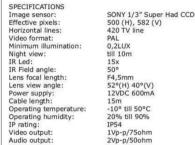
| Image Sensor | SONY 1/2" Super HAD CCD |
| Effective Pixels | 500 (H) x 362 (V) |
| Horizontal Resolution | 420 TV lines |
| Video Format | PAL |
| Minimum Illumination | 0.2 Lux |
| Infrared LEDs | 15 IR LEDs for night vision |
| Lens Focal Length | F4.5mm |
| Lens Viewing Angle | 52° (H) x 63° (V) |
| Power Supply | 12V DC, 600mA |
| Cable Length | 15m |
| IP Rating | IP54 (weatherproof) |
| Operating Temperature | -20°C to 50°C |
| Operating Humidity | 20% to 80% |
| Video Output | 1Vp-p, 75Ω |
| Housing Material | Waterproof metal coating |
| Mounting | Adjustable bracket (up/down 90°, rotation 270°) |
| Cleaning | Use soft dry cloth; no solvents, alcohol, or abrasive tools |
| Safety | Keep 10 ft away from 2.4GHz devices; do not open; only authorized service |
Frequently Asked Questions - CCD421 ELRO
User questions about CCD421 ELRO
0 question about this device. Answer the ones you know or ask your own.
Ask a new question about this device
Download the instructions for your Surveillance Camera in PDF format for free! Find your manual CCD421 - ELRO and take your electronic device back in hand. On this page are published all the documents necessary for the use of your device. CCD421 by ELRO.
USER MANUAL CCD421 ELRO
Safety and Maintenance instructions
- Make sure that all electric connections and connection cables meet the pertaining regulations and are in conformity with the operating instructions.
- Do not overload electrical outlets or extension cords, fire or electric shocks can be the result - Please contact an expert in case you have any doubts about the mode of operation, the safety of
- Please contact an expert in case you have any doubts about the mode of operation, the safety of connecting the appliances.
- Keep all parts away from
- Do not store this item on wet, very cold or warm places, this can damage the electronic circuit boards. - Avoid dropping or shocks, this can damage the electronic boards.
- Avoid dropping or shocks, this can damage the electronic boards - Never replace damaged power cables yourself! In such a case, remove them from the net and take the
devices to a workshop.
- Repairs or opening of this item may only be performed by an authorised workshop.
- Wireless systems are subject to interference from cordless phones, microwaves, and other wireless devices operating in the 2.4GHz range. Keep the system AT LEAST 10 ft away from the devices during
services operating in the EAFE range. Keep the system AT LEAST to it away from the devices during installation and operation.
(1)
Maintenance
The devices are maintenance-free, so never open them. The guarantee becomes void when you open the appliance. Only clean the outside of the devices with a soft, dry cloth or a brush. Prior to cleaning, remove the devices from all voltage sources.
[Non-Text]
Do not use any carboxylic cleaning agents or petrol, alcohol or similar. These attack the
surfaces of the devices. Besides, the vapors are hazardous to your health and explosive. Do not use any sharp edged tools, screw drivers, metal brushes or similar for cleaning.
!
natural_image
Close-up of a metallic cylindrical security camera with a mounted head and circular base (no visible text or symbols)GB USER'S MANUAL
GB USER'S MANUAL
NJ HANDLEFIDING
THE INTERESTORS
S BRUKSANVISNIN
- 本次股东大会的召集和召开程序
DK BRUGSVEJLEDNING
2019
PL PODRE CZNIK UZYTKOWNIKA
:
RUS РУКОВОДСТВО
:
H HASZNELATI BTMUTATY
2
RO MANUALUL UTILIZATORULUI
- UZUVATELSKE PRUDUCKA
SK UHRVATELSKB PRHROCK
HP: URBUTSTVA ZA UROPARU
Because of its features this CCD camera can be used practically
anywhere. The waterproof metal casing provides protection for the
electronics. The CCD sensor guarantees a perfect image as to sharpness and color. Through the infrared LEDs you'll also receive a
good image at twilight. The installation is simple, using a cinch or RNC plus the camera can be connected to a video connection of a
BNC plug the camera can be connected to a video connection of a TV, video, DVR, etc.
PACKAGE CONTENT (1)
a. Weather resistant Color Camera.
b. Adaptor
c. Cinch -BNC adaptor
INSTALLING THE CAMERA (a)
- Screw the camera (a)
- The bottom screw opening is for wall assembly (2a), the
upper one is for ceiling or roof assembly (2b). When the camera is in a different room from the A)4-devi
- Which the camera is in a different room from the AV device or has been placed outside, a lead-through in one or
several walls has to be made. Use for this purpose the
following 'accessory'
- Lay the connection plugs in sequence en fix a thin wire ( ) at the end of it.
- Lead the wire through a tube (3/4") and subsequently le
- Lead the wire through a tube (3/4) and subsequently let the connection plugs through it. 4(
- Drill a hole of 20 mm in the wall and slide the tube through
it from the OUTSIDE to the INSIDE (5).
- Carefully pull the connecting plugs out of the tube (6).
LEAVE THE TUBE IN THE LEAD-THROUGH. Finally, pull the entire cable through the tube and fasten
- Finally, pull the entire cable through the tube and fasten up to the device.
up to the device
CONNECTING THE CAMERA (a)
- Connect the camera (a) to the AV equipment with a
standard video cable, if necessary by means of a cine
- Adaptor (7). - Connect the camera (a) to the adaptor (b) (8).
- Connect the camera (a) to the adaptor (b) (c) - Tune the device on the AV channel.
- 2018
CAMERA TUNING (A)
- Orienting the camera (a) is done with the adjusting screw.
The ball joint is for the up-and-down (9a) and reciprocating motion (0b).
- Afterwards fasten the adjusting screw tightly.
- Arterwards fasten the adjusting screw tightly.
TIP
- Drill the hole in the wall from the outside to the inside at an
upward angle. This way moisture won't be able to enter.
- If the AV device has no provisions for cinch connections, each adopted can be used on the AV/854
scart-adapter can be used e.g. the AVS834. When there is insufficient night view an auxiliary IR spot
When there is insufficient right view an auxiliary IR spot can be used like the CS17.
(1)
NED
CCD421 Q-LINE CCD OBSERVATIE CAMERA
Date: 09/07-01, www.boschrisen.com
Image sensor: SONY 1/3" Super Had CCD
Effective pixels:
Horizontal lines: 420 TV line
Video format: PAL Minimum Illumination: 0.24 L/H
Minimum illumination: 0,2Lux Night view: till 10m
IR Led: 15x
IR Field angle:
Lens focal length: F4,5mm
Lens view angle: 52°(H) 40°(V)
Power supply: 12VDC 600mA Cable longevity: 15m
Cable length: 15m Operating temperature: -10°C till 50°C
Operating humidity: 20% till 90%
IP rating:
Video output: 1Vp-p/75ohm
Audio output:
F
CCD421 CAMERA D'OBSERVATION CCD Q-LINE
- 本报告书(以下简称“本报告”)的披露
commissional check, acquire an adducture score, 68 es. AV5854.
a audio: 2Vp-p/50ohm
2.4 Production
CZ
SLEDOVACÍ KAMERA CCD 421 Q-LINE CCD
The Ground Truth image displays a single, solid horizontal line. According to Rule 2 (UNDERSCORE & LINE RULES), this is a stylistic or background line, not a placeholder underscore. Therefore, the OCR result must ignore it and output nothing or only meaningful text. The provided OCR content is "____", which consists of four underscores. This is an incorrect interpretation of the line as a placeholder, violating the rule that stylistic lines must be ignored. The OCR has hallucinated placeholder underscores where none should exist in the GT. Hence, the OCR result is inconsistent with the Ground Truth.
a audio: 2Vp-p/50ohm
P
CÂMARA DE VIGILÂNCIA CCD 421 Q-LINE
(1) 2017, 3:45, 1986
INSTALAR A CÂMARA (a)
AJUSTE DA CÂMARA (A)
The Ground Truth image displays a single, solid horizontal line. According to Rule 2 (UNDERSCORE & LINE RULES), this is a stylistic or background line, not a placeholder underscore. Therefore, the OCR result must ignore it and output nothing or only meaningful text. The provided OCR content is "____", which consists of four underscores. This is an incorrect interpretation of the line as a placeholder, violating the rule that stylistic lines must be ignored. The OCR has hallucinated underscores where none should exist based on the GT's visual context. Hence, the OCR result is inconsistent with the Ground Truth.
SUGESTÕES

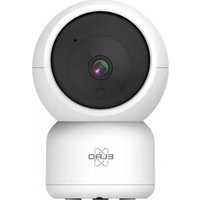
Brand : ELRO
Model : CCD421
Category : Surveillance Camera