L20CTH11 - Heating Logik - Free user manual and instructions
Find the device manual for free L20CTH11 Logik in PDF.


| Product Type | Space Heater |
| Brand | Logik |
| Model | L20CTH11 |
| Heating Element | Ceramic |
| Power Output | 2000 W |
| Heat Settings | 2 (Low / High) + Fan Only |
| Thermostat | Adjustable thermostat |
| Power Supply | 220-240 V ~ 50 Hz |
| Dimensions (H x W x D) | 25.0 x 15.0 x 30.0 cm |
| Weight | 2.5 kg |
| Cable Length | 1.5 m |
| Noise Level | < 45 dB |
| Safety Features | Tip-over switch, overheat protection |
| Control Type | Manual rotary knobs |
| Room Coverage | Up to 20 m² |
| Maintenance | Wipe with a dry cloth; do not use water |
| Repairability | No user-serviceable parts; contact qualified service |
| Environmental Compliance | RoHS, WEEE |
| Package Contents | Heater, user manual |
Frequently Asked Questions - L20CTH11 Logik
User questions about L20CTH11 Logik
0 question about this device. Answer the ones you know or ask your own.
Ask a new question about this device
Download the instructions for your Heating in PDF format for free! Find your manual L20CTH11 - Logik and take your electronic device back in hand. On this page are published all the documents necessary for the use of your device. L20CTH11 by Logik.
USER MANUAL L20CTH11 Logik
For your continued safety and to reduce the risk of injury or electric shock, please follow all the safety precautions listed below. Read all instructions carefully before using the unit and keep them for future reference.
- Retain the manual. If you pass the unit onto a third party, make sure to include this manual.
• This appliance is intended for indoor household use and similar applications such as:
– farm houses and by clients in hotels, motels and other residential type environments;
– bed and breakfast type environments;
– catering and similar non-retail applications.
• Make sure your home voltage matches the voltage displayed on the appliance. If you are not sure, contact an electrician.
- Do not kink or wrap the mains cable and plug around the appliance, as this may cause the insulation to weaken and split, particularly where it enters the appliance.
- Ensure the mains cable is fully extended before use and arrange it so that it is not in contact with any part of the appliance.
- Do not pull on the mains cable. Never move, carry or hang the appliance by the mains cable.
• Always position the appliance with the mains plug in an accessible position and avoid the use of an extension cable as it may overheat and create a potential fire risk.
- The appliance must have a minimum 50 cm clearance around all sides of the appliance.
- Ensure that the unit is used on a stable and level surface. If the floor surface is uneven there is a risk that the appliance could tip over. Also, excessive vibration and noise may occur. If the appliance should be accidentally tipped over, please immediately disconnect from the power supply.
- Do not use the appliance in wardrobes or near fabrics or clothing. Do not stand the appliance on deep pile carpets.
- Do not use the appliance in areas where petrol, paints or other flammable substances are used or stored.
- Do not use in very dusty areas as dust may accumulate on the heating elements and cause overheating.
• Do not use if there are any visible signs of damage to the appliance.
- Do not operate the appliance in direct sunlight, near heat sources, humid environments or in places near water or other liquids such as bathrooms, showers or swimming pools.
- Do not operate with wet hands or spill water or other liquids on to the appliance, the mains cable or plug.
• Always unplug the appliance when not in use.
• Never leave the appliance unattended when in use.
• Some parts can become very hot and cause burns. Particular attention has to be given where children and vulnerable people are present.
• The heater must not be located immediately below a mains socket.
• Do not allow children to play with the appliance or sit, stand, or climb on it.
- Do not leave children alone or unattended in the area where the appliance is in use.
- For safety reasons a broken or damaged mains cable may only be replaced by the manufacturer or a similarly qualified person.
• Children of less than 3 years old should be kept away unless continuously supervised.
- Children aged from 3 years and less than 8 years shall only switch on/off the appliance provided that it has been placed or installed in its intended normal operating position and they have been given supervision or instruction concerning use of the appliance in a safe way and understand the hazards involved. Children aged from 3 years and less than 8 years shall not plug in, regulate and clean the appliance or perform user maintenance
- This appliance can be used by children aged from 8 years and above and persons with reduced physical, sensory or mental capabilities or lack of experience and knowledge if they have been given supervision or instruction concerning use of the appliance in a safe way and understand the hazards involved. Children shall not play with the appliance. Cleaning and user maintenance shall not be made by children without supervision.
- Do not block or restrict the airflow around the appliance. Position the unit so that the air inlet and exhaust grilles are not blocked or restricted in anyway.
- Do not push any objects in the air inlet and exhaust grilles.
WARNING

In order to avoid overheating, do not cover the appliance.
- Do not use the appliance with a programmer, timer or any other device that switches the appliance on automatically. A fire risk exists if the appliance is covered or positioned incorrectly.

IT IS HAZARDOUS FOR ANYONE OTHER THAN AUTHORISED SERVICE PERSONNEL TO CARRY OUT SERVICING OF REPAIRS WHICH INVOLVE THE REMOVAL OF COVERS.

TO AVOID THE RISK OF AN ELECTRICAL SHOCK DO NOT ATTEMPT REPAIRS YOURSELF.

For general information about this appliance
and handy hints and tips, please visit www.knowhow.com/knowledgebank or call 0344 5611234.

Visit Pertmaster.co.uk today for the earliest way to buy electrical spares and accessories. With over 1 million spares and accessories available we can deliver direct to your door the very next day. Visit www.pertmaster.co.uk or call 0344 800 3456 (UK customers only). Calls charged at National Rate.
Notes for battery disposal
The batteries used with this product contain chemicals that are harmful to the environment. To preserve our environment, dispose of used batteries according to your local level or regulations. Do not dispose of batteries with normal household waste.
For more information, please contact the local authority or your retailer where you purchased the product.

The symbol on the product or its packaging indicates that this product must not be disposed of with your other household waste. Instead, it is your responsibility to dispose of your waste equipment by handing it over to a designated collection point for the recycling of waste electrical and electronic equipment. The separate collection and recycling of your waste equipment at the time of disposal will help conserve natural resources and ensure that it is recycled in a manner that protects human health and the environment.
Far more information about where you can drop off your waste for recycling, please contact your local authority, or where you purchased your product.
All trademarks are the property of their respective owners and all rights are acknowledged.
DSG Retail Ltd. (co. no. 504877)
1 Portal Way, London, W3 6RS, UK
IB-L20CTH11-151201V4
LOGIK | Instruction Manual
Ceramic Tower Heater
L20CTH11

natural_image
Black and white LOGIK electric heat exchanger with a mesh grille and two buttons (no visible text or symbols)Thank you for purchasing your new Logik Heater.
We recommend that you spend some time reading this instruction manual in order that you fully understand all the operational features it offers. You will also find some hints and tips to help you resolve any issues. Read all the safety instructions carefully before use and keep this instruction manual for future reference.

Unpacking
Remove all items from the packaging. Retain the packaging. If you dispose of it please do so according to local regulations. The following items are included:

The Main Unit

Front Basex
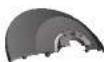
Rear Base x |

Screw x 4

If items are missing or damaged, please contact Partmaster (UK only)
Tel: 0344 800 3456 for assistance.

Product Overview


Control Panel

Power Switch Oscillating Switch

Installation
- Guide the mains cable through the centre of the front base and connect the front base to the main unit.
- Fit the rear base onto the front base and the main unit.
- Screw the four screws through base parts and into the main unit.
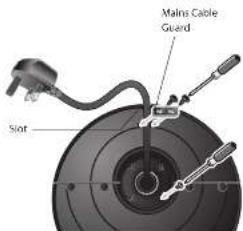
- Attach the power cord guard over the power cord and to the rear base.


Operation
Position the heater upright on the floor away from curtains, furniture or wall coverings before plugging your heater into the mains socket.
- Connect the heater to the mains socket. Be sure the mains plug fits tightly in mains socket. A loose fit will cause overheating and damage the mains plug.
- Switch the heater on by turning the Power Switch, the power indicator will illuminate red.
- Adjust the Power Switch to set the function,
Off mode: The heater is off.
Fan mode: The heating element is off, only the fan is operating.
The heater will blow cool air out from the air outlet.
Low Temp. mode: The heater is in economy mode.
High Temp. mode: The heater is in maximum power.
- To switch the heater off, turn the Power Switch to "Off" position. The power indicator will turn off. Remove the mains plug from mains socket.

It is normal for the heater to emit some smell and tumes when it is turned on for the first time or when turned on after not being used for a long period of time. This smell will disappear when the heater has been turned on for a short while.

Oscillation Function
The heater is equipped with an oscillation feature. If you want to obtain a wider area of heat circulation, turn the Oscillating Switch to the "On" position. To stop the oscillation, turn the Oscillating Switch to the "Off" position.

Safety Protective Devices
Overheat Protection System
The power to the heater will automatically cut off if the temperature of the heater exceeds a certain limit. In the event of overheating, the heater will stop operating. Switch the heater off and allow it to completely cool for at least 30 mins. The heater will then resume operating as normal.

The heater cannot be switched on when it is overheating. Allow it to cool down for at least 30 mins and then switch it on again.

Cleaning
Your heater should be cleaned regularly to prevent dirt and dust from building up which will affect its performance. Ensure the air inlet and the air outlet are not blocked. This can be done with a vacuum cleaner, using the brush attachment.

Ensure you unplug your heater from the mains socket and wait for the heater to cool down completely before cleaning.

Hints & Tips
My heater does not work when I turn it on
- Check that your heater is plugged in and the power is turned on at the mains socket.
- The heater may be overheating. Switch it off and allow it to completely cool down for at least 30 mins, then switch it on again.
Turn the Power Switch to the "High Temp" position. - Try replacing the BSI or AST5 approved 13 Amp BS1362 fuse in the plug.
• If the heater still doesn't work, do not try to repair the heater yourself.
If your heater's power is automatically cut off follow the steps below:
- Unplug your heater and allow it to cool down for at least 30 mins.
- Inspect your heater.
- Plug-in the heater and switch it on again. If it cuts off again, move the heater to a better ventilated location.
- If there is any sign of physical damage (e.g. melting, or burning of the case), do not attempt to use your heater. Please leave all maintenance work to qualified personnel.

Specifications
| Model L20CTH11 | |
| Mains supply | 220-240V --50Hz Class II |
| Power consumption | 1930W (High), 1030W (Low), 30W (Fan) |
Features and specifications are subject to change without prior notice.
- WARNING
- LOGIK | Instruction Manual
- Ceramic Tower Heater
- Unpacking
- Installation
- Operation
- Oscillation Function
- Safety Protective Devices
- Overheat Protection System
- Cleaning
- Hints & Tips
- My heater does not work when I turn it on
- If your heater's power is automatically cut off follow the steps below:
- Specifications
Brand : Logik
Model : L20CTH11
Category : Heating