
Wolverine - Game controller RAZER - Free user manual and instructions
Find the device manual for free Wolverine RAZER in PDF.


| Product Type | Wired gaming controller |
| Brand | Razer |
| Model | Wolverine |
| Compatibility | Xbox Series X|S, Xbox One, Windows 10/11 |
| Connection | USB-C wired |
| Dimensions | Approximately 155 x 105 x 65 mm |
| Weight | Approximately 250 g |
| Power Source | USB bus power (no batteries) |
| Cable Length | 3 meters braided USB-C cable |
| Main Functions | Programmable multi-function buttons, hair trigger locks, interchangeable thumbsticks, Razer Chroma RGB lighting |
| Grip | Rubberized textured grips |
| Button Layout | Standard Xbox layout with additional bumper, trigger, and paddle buttons |
| Software | Razer Controller Setup for remapping and customization |
| Care and Cleaning | Wipe with a soft, dry cloth. Do not use liquid cleaners or immerse in water. |
| Safety | Use only with compatible consoles/PCs. Avoid excessive force on buttons and joysticks. Keep away from heat sources and moisture. |
| Spare Parts and Repairability | Replaceable thumbstick modules and faceplate available online. For other repairs, contact Razer support. |
| Warranty | 2-year limited warranty (may vary by region) |
| Package Contents | Razer Wolverine controller, USB-C cable, 2 additional thumbsticks, quick start guide |
Frequently Asked Questions - Wolverine RAZER
User questions about Wolverine RAZER
0 question about this device. Answer the ones you know or ask your own.
Ask a new question about this device
Download the instructions for your Game controller in PDF format for free! Find your manual Wolverine - RAZER and take your electronic device back in hand. On this page are published all the documents necessary for the use of your device. Wolverine by RAZER.
USER MANUAL Wolverine RAZER
natural_image
Abstract white line drawing of a stylized creature or serpent on a solid green background (no text or symbols)RAZER WOLVERINE TOURNAMENT EDITION
MASTER GUIDE
Compete & win with the Razer Wolverine Tournament Edition, a customizable controller for competitive play both on Xbox One & PC.
Decked out with 4 remappable Multi-Function Buttons, the Razer Wolverine TE can be adapted to suit your individual needs.
Razer Wolverine TE is also the first controller with Razer Chroma lighting,allowing you to further personalize your controller or enjoy an even moreimmersive experience with game-integrated smart lighting.
CONTENTS
- PACKAGE CONTENTS / SYSTEM REQUIREMENTS....3
- REGISTRATION / TECHNICAL SUPPORT....4
- TECHNICAL SPECIFICATIONS....5
- DEVICE LAYOUT....6
- SETTING UP YOUR RAZER WOLVERINE TE....8
- USING YOUR RAZER WOLVERINE TE....10
- INSTALLING RAZER SYNAPSE FOR XBOX....11
- SAFETY AND MAINTENANCE 13
9.LEGALESE....14
1. PACKAGE CONTENTS / SYSTEM REQUIREMENTS
PACKAGE CONTENTS
■ Razer Wolverine TE gaming controller for Xbox One
■ USB to Micro-USB cable + breakaway cable
■ Important Product Information Guide
SYSTEM REQUIREMENTS
- Xbox One / Xbox One S / Xbox One X OR
■ PC (Windows®7 or higher)
SAFETY STATEMENT
IMPORTANT! Before using the Xbox One with this product, read the Xbox One instruction manual for safety, health, and other information regarding the use of the Xbox One.
2. REGISTRATION / TECHNICAL SUPPORT
REGISTRATION
Register your product online at razer-id.razerzone.com/warranty to get real-time information on your product's warranty status.
If you haven't registered for a Razer ID yet, register now at razer-id.razerzone.com to get a wide range of Razer benefits.

natural_image
Line drawing of a game controller with a green line indicating the blade (no text or symbols)Your product's serial number can be found here.
TECHNICAL SUPPORT
■ 1 year limited manufacturer's warranty.
■ Free online technical support at razersupport.com.
3. TECHNICAL SPECIFICATIONS
TECHNICAL SPECIFICATIONS
■ 2 shoulder Multi-Function Bumpers
■ 2 Multi-Function Triggers
■ 4 Tactile Switch ABXY action buttons
■ 4 button Quick Control Panel
■ Multi-Color Razer Chroma Lighting Strip
■ Optional trigger stops for rapid-fire
■ 3.5 mm audio port for stereo audio output and microphone input
■ Quick-release cable feature
- Detachable 3 m / 10 ft lightweight braided fiber cable with Micro-USB connector
APPROXIMATE SIZE & WEIGHT
■ Length: 106 mm / 4.17 in
■ : Width 156 mm / 6.14 in
■ Height: 66 mm / 2.60 in
■ : Weight 260 g / 0.57 lbs
4. DEVICE LAYOUT
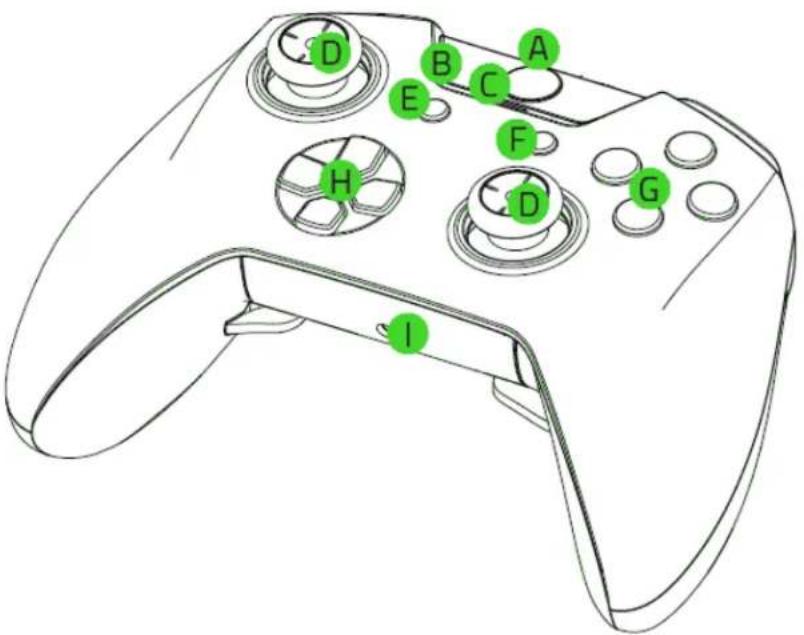
A. Xbox button
B. Razer Chroma lighting
C. Power indicator
D. Analog thumbsticks
E. View button
F. Menu button
G. Action buttons
H. Directional pad
1. 3.5 mm headset port

J. Multi-Function Triggers (M3 / M4)
K. Trigger stop switches
L. Triggers (LT / RT)
M. Multi-Function Bumpers (M1 / M2)
N. Micro-USB port
0. Bumpers (LB / RB)
P. USB to Micro-USB cable
Q. Breakaway cable
5. SETTING UP YOUR RAZER WOLVERINE TE
CONNECTING TO YOUR XBOX ONE
- Connect your Razer Wolverine TE to your Xbox One using the USB to Micro-USB cable.
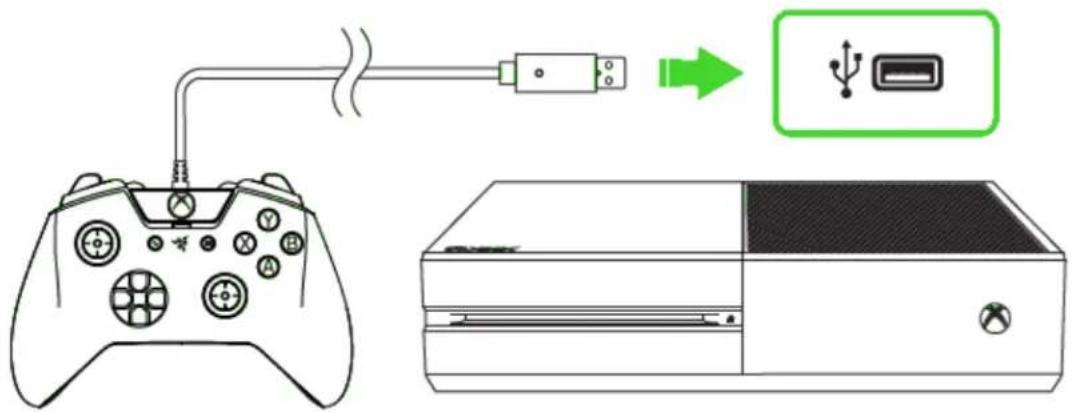
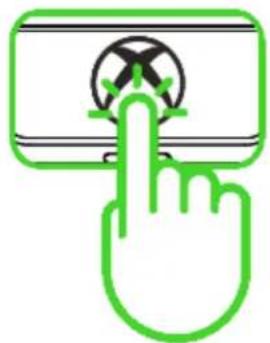
- Press the Xbox button and your Razer Wolverine TE is ready to go.
natural_image
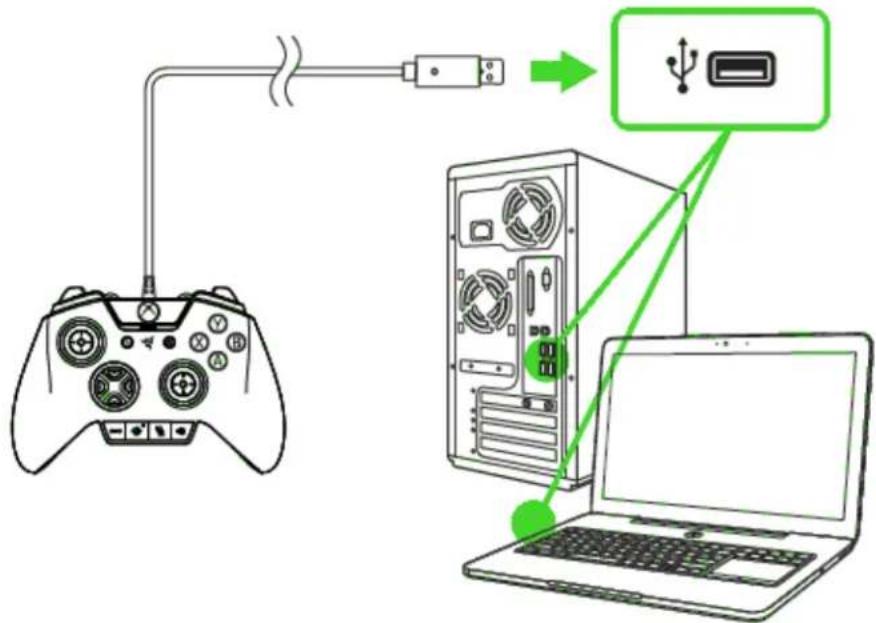
Hand icon pointing at a device with a cross symbol (no text or labels)CONNECTING TO YOUR PC
- Connect your Razer Wolverine TE to your PC using the USB to Micro-USB cable.
flowchart
graph TD
    A["Game Controller"] -->|USB| B["Server"]
    B --> C["Laptop"]
- Wait until the Xbox One Controller drivers are automatically installed or manually update the drivers through the Device Manager.

6. USING YOUR RAZER WOLVERINE TE
REMAPPING THE MULTI-FUNCTION TRIGGERS (MFT) AND BUMPERS (MFB)
By default, each profile is mapped to a specific function as shown here.
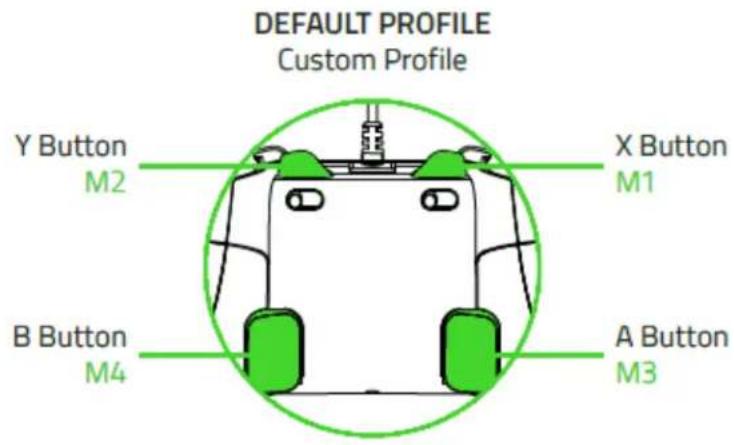
The Xbox button cannot be remapped to the MFB or MFT instead, it will remove the current mapping. The sensitivity settings can be customized through the Razer Synapse for Xbox app.
USING THE TRIGGER STOP SWITCHES
The Trigger Stops allows you to activate the Left and Right Triggers faster by shortening their travel distance and reducing their response time (Active Hair Trigger Mode). To enable the Trigger Stops, simply slide the switches outwards; and to disable the Trigger Stops, slide the switches inwards.
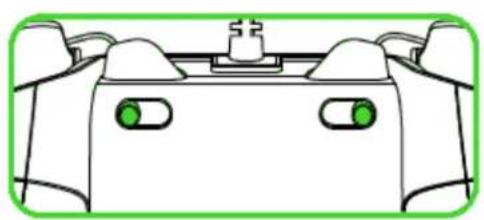
natural_image
Top-down schematic of a game controller with green indicator lights (no text or symbols)Enable
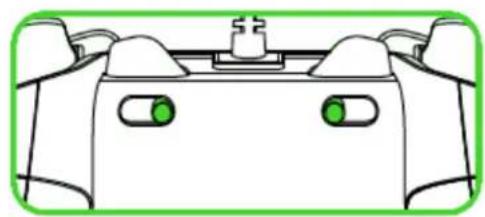
natural_image
Top-down schematic of a game controller with two green buttons and a central screen (no text or symbols)Disable
7. INSTALLING RAZER SYNAPSE FOR XBOX

Step 1: Make sure your Razer device is connected to the USB port of your gaming console or PC.
Step 2: Download and install the Razer Synapse For Xbox app from the Xbox Store of your gaming console or from razerzone.com/software on your PC.
CHROMA LIGHTING EFFECTS
Several lighting effects are made available for your Razer Wolverine TE when you download and install the Razer Synapse For Xbox app. Listed below are the lighting effects which you can customize to your controller:
| Name | Description | How to set up | |
 | Breathing | The lighting fades in and out of the selected color(s) | Select up to 2 colors or randomize colors |
 | Immersive | The LEDs will light up when the controller vibrates. | Select a color |
 | Reactive | The LEDs will light up when a button is pressed and will fade off after a specified period of time. | Select the length of time for the LEDs to remain lit. |
 | Spectrum cycling | The LEDs will cycle between 16.8 million colors indefinitely | No further customization required |
 | Static | The LEDs will remain lit in the selected color | Select a color |
 | Wave | The lighting will scroll in the direction selected | Select a wave direction |
Congratulations, you are now ready to use your Razer Wolverine TE. Have fun!
8. SAFETY AND MAINTENANCE
SAFETY GUIDELINES
In order to achieve maximum safety while using your Razer Wolverine TE, we suggest that you adopt the following guidelines:
Should you have trouble operating the device properly and troubleshooting does not work, unplug the device and contact the Razer hotline or go to razersupport.com for support. Do not attempt to service or fix the device yourself at any time.
Do not take apart the device (doing so will void your warranty) and do not attempt to operate it under abnormal current loads.
Keep the device away from liquid, humidity or moisture. Operate the device only within the specific temperature range of 0^ (32°F) to 40^ (104°F). Should the temperature exceed this range, unplug and/or switch off the device in order to let the temperature stabilize to an optimal level.
MAINTENANCE AND USE
The Razer Wolverine TE requires minimum maintenance to keep it in optimum condition. Once a month we recommend you unplug the device from the computer and clean it using a soft cloth or cotton swab to prevent dirt buildup. Do not use soap or harsh cleaning agents.
9.LEGALESE
COPYRIGHT AND INTELLECTUAL PROPERTY INFORMATION
©2017 Razer Inc. All rights reserved. Razer, the triple-headed snake logo, Razer logo, "For Gamers. By Gamers.", and "Powered by Razer Chroma" logo are trademarks or registered trademarks of Razer Inc. and/or affiliated companies in the United States or other countries. All other trademarks and trade names are the property of their respective owners and other company and product names mentioned herein may be trademarks of their respective companies.
This product is manufactured under license from Microsoft Corporation. Microsoft, Windows, the Windows Logo, Xbox, Xbox LIVE, Xbox One, and the Xbox logos are trademarks of the Microsoft group of companies.
Razer Inc. ("Razer") may have copyright, trademarks, trade secrets, patents, patent applications, or other intellectual property rights (whether registered or unregistered) concerning the product in this guide. Furnishing of this guide does not give you a license to any such copyright, trademark, patent or other intellectual property right. The Razer Wolverine TE (the "Product") may differ from pictures whether on packaging or otherwise. Razer assumes no responsibility for such differences or for any errors that may appear. Information contained herein is subject to change without notice.
LIMITED PRODUCT WARRANTY
For the latest and current terms of the Limited Product Warranty, please visit razerzone.com/warranty.
LIMITATION OF LIABILITY
Razer shall in no event be liable for any lost profits, loss of information or data, special, incidental, indirect, punitive or consequential or incidental damages, arising in any way out of distribution of, sale of, resale of, use of, or inability to use the Product. In no event shall Razer's liability exceed the retail purchase price of the Product.
COSTS OF PROCUREMENT
For the avoidance of doubt, in no event will Razer be liable for any costs of procurement unless it has been advised of the possibility of such damages, and in no case shall Razer be liable for any costs of procurement liability exceeding the retail purchase price of the Product.
GENERAL
These terms shall be governed by and construed under the laws of the jurisdiction in which the Product was purchased. If any term herein is held to be invalid or unenforceable, then such term (in so far as it is invalid or unenforceable) shall be given no effect and deemed to be excluded without invalidating any of the remaining terms. Razer reserves the right to amend any term at any time without notice.

- CONTENTS
- PACKAGE CONTENTS / SYSTEM REQUIREMENTS
- PACKAGE CONTENTS
- SYSTEM REQUIREMENTS
- SAFETY STATEMENT
- REGISTRATION / TECHNICAL SUPPORT
- REGISTRATION
- TECHNICAL SUPPORT
- TECHNICAL SPECIFICATIONS
- TECHNICAL SPECIFICATIONS
- APPROXIMATE SIZE & WEIGHT
- DEVICE LAYOUT
- SETTING UP YOUR RAZER WOLVERINE TE
- CONNECTING TO YOUR XBOX ONE
- CONNECTING TO YOUR PC
- USING YOUR RAZER WOLVERINE TE
- REMAPPING THE MULTI-FUNCTION TRIGGERS (MFT) AND BUMPERS (MFB)
- USING THE TRIGGER STOP SWITCHES
- INSTALLING RAZER SYNAPSE FOR XBOX
- CHROMA LIGHTING EFFECTS
- SAFETY AND MAINTENANCE
- SAFETY GUIDELINES
- MAINTENANCE AND USE
- 9.LEGALESE
- COPYRIGHT AND INTELLECTUAL PROPERTY INFORMATION
- LIMITED PRODUCT WARRANTY
- LIMITATION OF LIABILITY
- COSTS OF PROCUREMENT
- GENERAL
Brand : RAZER
Model : Wolverine
Category : Game controller