
Panthera - Game controller RAZER - Free user manual and instructions
Find the device manual for free Panthera RAZER in PDF.


| Product Type | Arcade Fight Stick for PlayStation 4 and PC |
| Dimensions | 380 x 250 x 130 mm (15 x 10 x 5.1 in) |
| Weight | 2.9 kg (6.4 lbs) |
| Power Source | USB bus-powered (2.0 / 3.0) |
| Main Functions | 8-button layout with Sanwa OBSF-30 buttons, Sanwa JLF-TP-8YT joystick, touchpad, home button, options, share, L3/R3 |
| Compatibility | PlayStation 4, PlayStation 3, PC (Windows 7/8/10) |
| Cable Connection | Detachable USB cable with locking mechanism, cable storage compartment |
| Joystick Features | Sanwa JLF joystick with ball-top, adjustable restrictor gate (square, octagonal) |
| Button Features | Sanwa OBSF-30 screw-in buttons with mechanical microswitches |
| Additional Controls | Touchpad click, L3/R3 via buttons, PS button, share, options |
| Faceplate Design | Interchangeable top panel for custom artwork (standard clear plastic) |
| Build Material | High-impact ABS plastic body with rubber non-slip base |
| LED Indicators | Player LED indicator (1-4), connection status LED |
| Storage & Carrying | Cable compartment, lightweight design for tournament transport |
| Maintenance & Cleaning | Wipe with dry cloth; avoid liquids; replace joystick and buttons as needed |
| Safety | Use only with provided cable; do not expose to moisture; keep away from extreme heat |
| Spare Parts & Repairability | Replacement joystick (Sanwa JLF), buttons (Sanwa OBSF), cable available; easy disassembly with screwdriver |
| Warranty | 1 year manufacturer warranty |
Frequently Asked Questions - Panthera RAZER
User questions about Panthera RAZER
0 question about this device. Answer the ones you know or ask your own.
Ask a new question about this device
Download the instructions for your Game controller in PDF format for free! Find your manual Panthera - RAZER and take your electronic device back in hand. On this page are published all the documents necessary for the use of your device. Panthera by RAZER.
USER MANUAL Panthera RAZER
natural_image
Abstract white line drawing of a flowing, organic shape on black background (no text or symbols)Built on years upon years of collective arcade and console gaming experience from pro gamers and the Razer community alike, the Razer Panthera arcade stick was engineered and refined to perfection through countless prototypes via an extensive beta testing phase and has been crafted to allow the same advanced modification that gamers and modders have come to love over the years. On top of having internals and storage easily accessible at the touch of a button, you can also fully change the joystick and all 10 buttons for complete customizability.
Featuring genuine Sanwa™ hardware and the Vewlix layout, this definitive arcade stick for tournament-grade gaming represents the pinnacle of precision and reliability.
Forged from the fires of an arcade gaming legacy, the Razer Panthera is, in the most primeval sense, Bred to Fight.
TABLE OF CONTENTS
- PACKAGE CONTENTS / SYSTEM REQUIREMENTS.... 3
- REGISTRATION / TECHNICAL SUPPORT....4
- DEVICE LAYOUT .... 5
- USING YOUR RAZER PANTHERA ARCADE STICK FOR PLAYSTATION 8
- CUSTOMIZING YOUR RAZER PANTHERA FOR PLAYSTATION.... 13
- SAFETY AND MAINTENANCE .... 17
- LEGALESE 19
1. PACKAGE CONTENTS / SYSTEM REQUIREMENTS
PACKAGE CONTENTS
- Razer Panthera Arcade Stick
• 3m / 9.84ft. Detachable braided cable - Flat tip and cross tip screwdriver
- Ball top joystick grip
SYSTEM REQUIREMENTS
- PlayStation®3 / PlayStation®4
- Also compatible with PC (Windows 7 and above)
- A free USB port
*For optimum compatibility, ensure your PlayStation®3 or PlayStation®4 is up-to-date. Please refer to your gaming console's user manual for software update instructions.
**PC compatibility not tested nor endorsed by Sony Interactive Entertainment Inc.
2. REGISTRATION / TECHNICAL SUPPORT
REGISTRATION
Visit razer.com/razerid to sign up for a Razer ID now to get a wide range of Razer benefits. For example, get real-time information on your product's warranty status via Razer Synapse. To learn more about Razer Synapse and all its features, visit razer.com/synapse. If you already have a Razer ID, register your product by clicking on your email address within the Razer Synapse application and select Warranty Status from the dropdown list. To register your product online, visit razer.com/registration. Please note that you will not be able to view your warranty status if you register via the website.
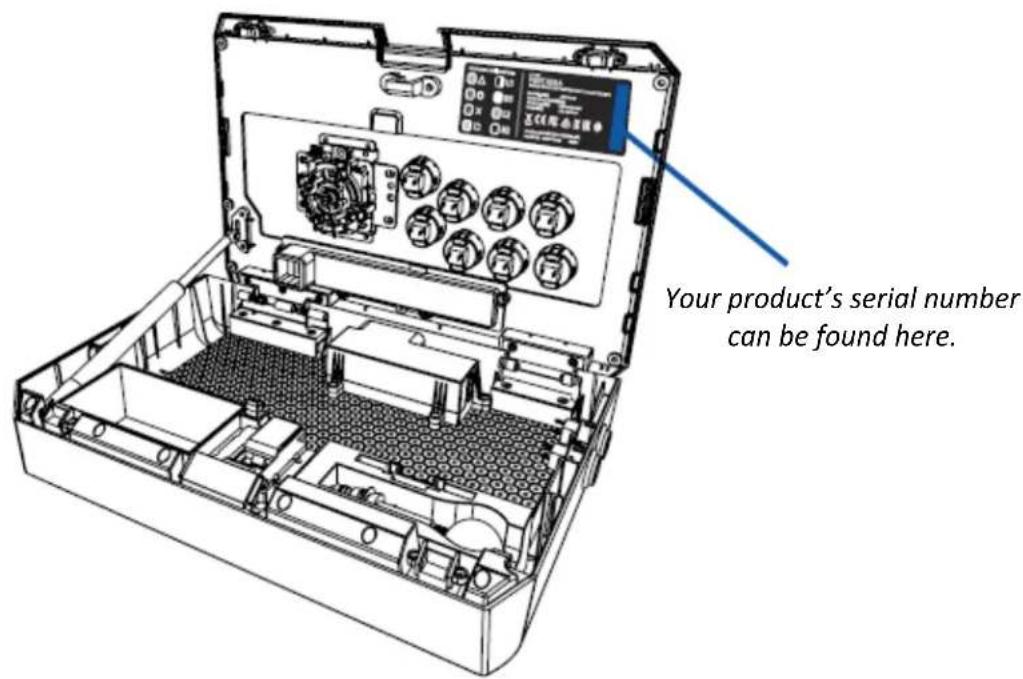
TECHNICAL SUPPORT
What you'll get:
- 1 year limited manufacturer's warranty.
- Access to manual and free online technical support at support.razer.com.
3. DEVICE LAYOUT

A. Ball top joystick grip
B. Authentic Sanwa Denshi™ joystick
C. Authentic Sanwa Denshi™ action buttons
D. SHARE / SELECT button
E. OPTIONS / START button
F. Compartment button

G. PS button
H. Control stick switch (Left Analog Stick, Directional Pad, Right Analog Stick)
I. Player indicator (PS3 only)
J. PS3 / PS4 switch
K. Lock / unlock switch
L. Touch pad button (PS4 only)
M. L3 button
N. R3 button
natural_image
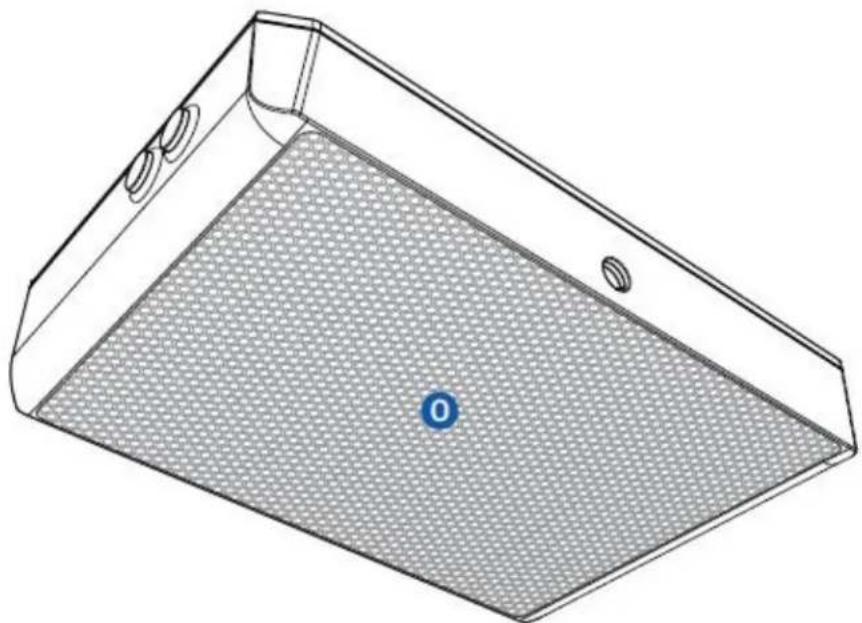
3D technical line drawing of a rectangular device with a mesh panel and circular ports, no text or symbols presentO. Non-slip rubber base
natural_image
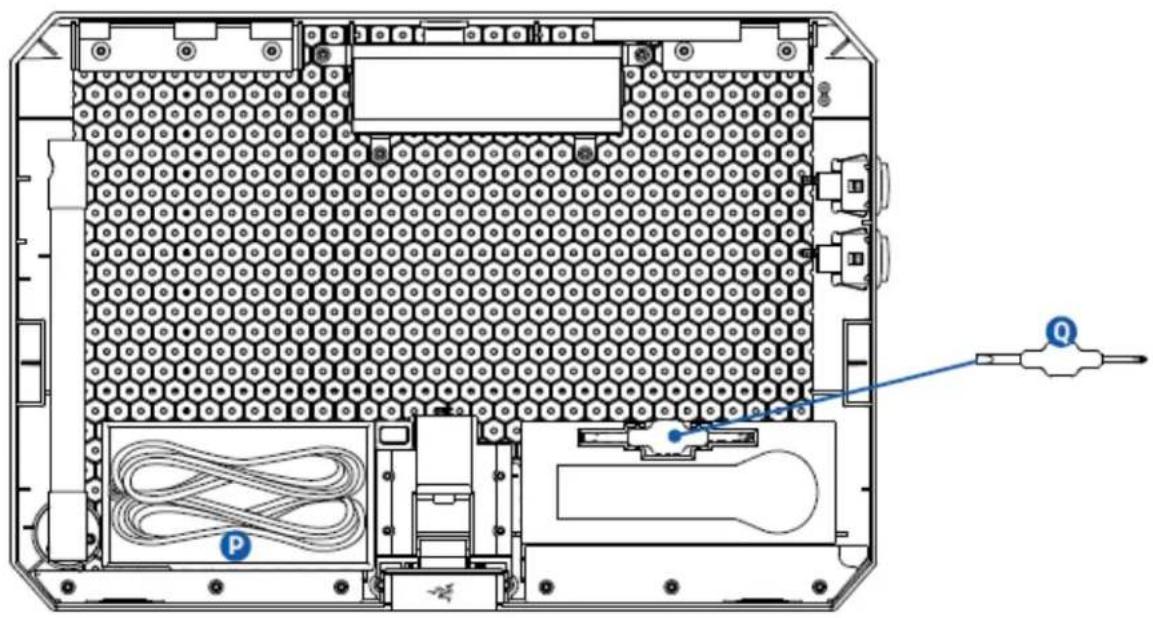
Top-down schematic of a computer chassis showing internal components like CPU socket, drive bays, and cable routing (no text or labels)P. Detachable cable
Q. Flat tip and cross tip screwdriver
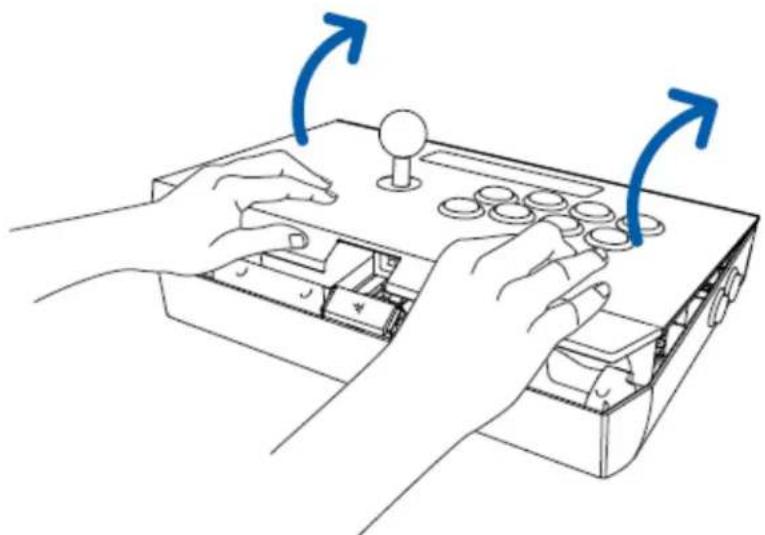
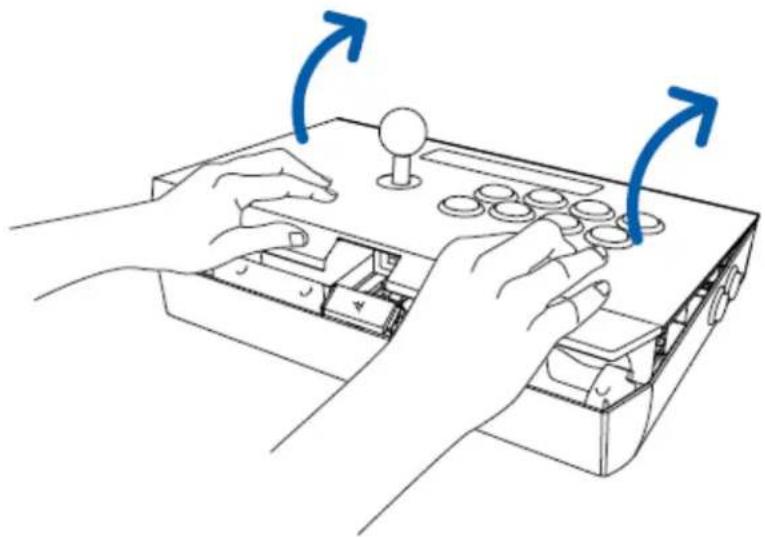
- Press the Compartment Button to unlock the lid.

- Lift the lid to access the multipurpose compartment.
natural_image
Line drawing of hands operating a game console with directional arrows indicating movement (no text or symbols)- Take out the detachable cable with the attached breakaway cable.

natural_image
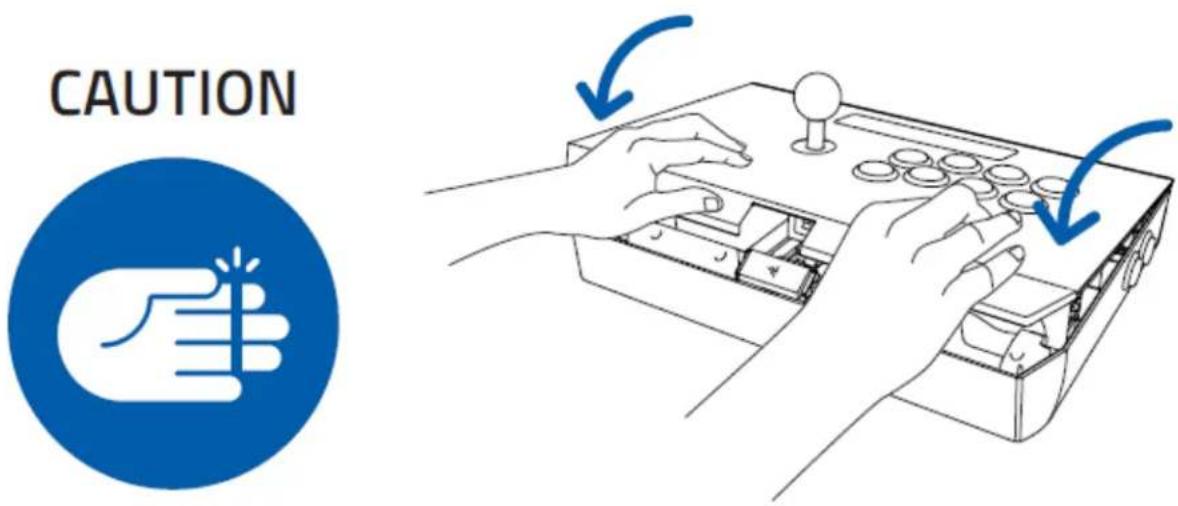
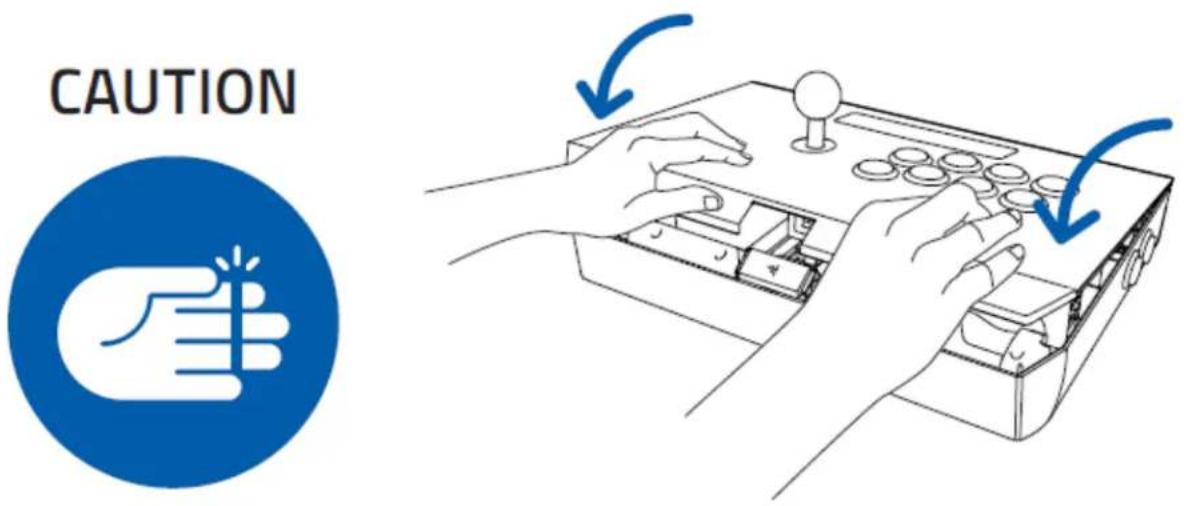
Technical line drawing of an open electronic device with internal components and wiring, showing a blue arrow indicating cable connection (no text or symbols present)- To close and lock the lid, place both hands on the edge of the lid away from the center, and push down.
- Ensure that the marking is facing up when inserting the cable.
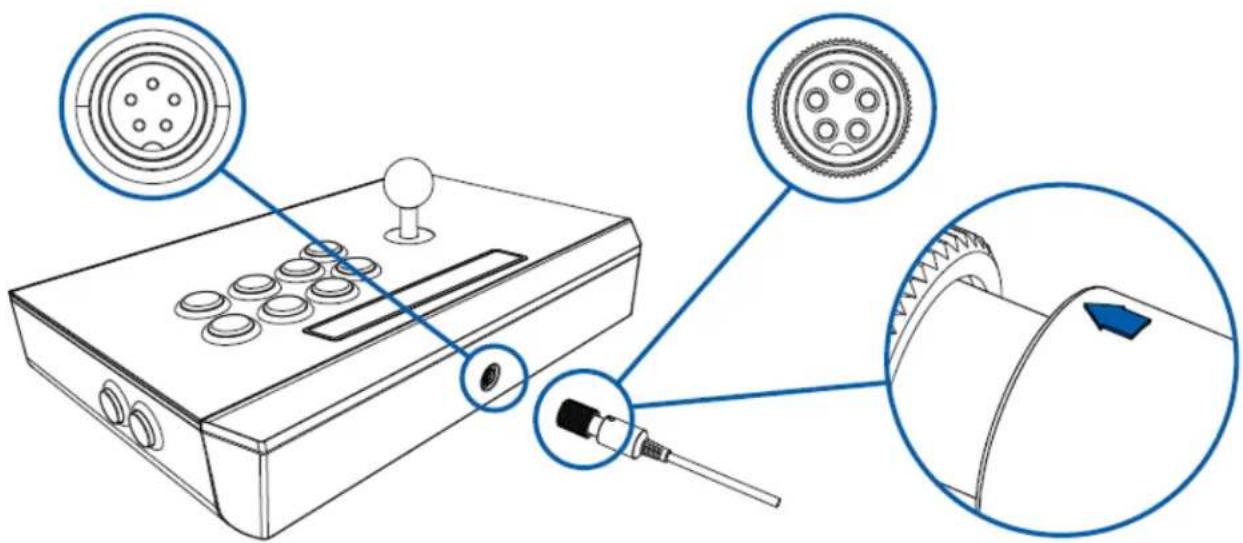
- Rotate the screw collar clockwise until the detachable cable is firmly connected to the Razer Panthera.

natural_image
Line drawing of a joystick controller with a close-up view showing the internal mechanism (no text or symbols present)- Select whether you are using a PlayStation 3 or PlayStation 4.
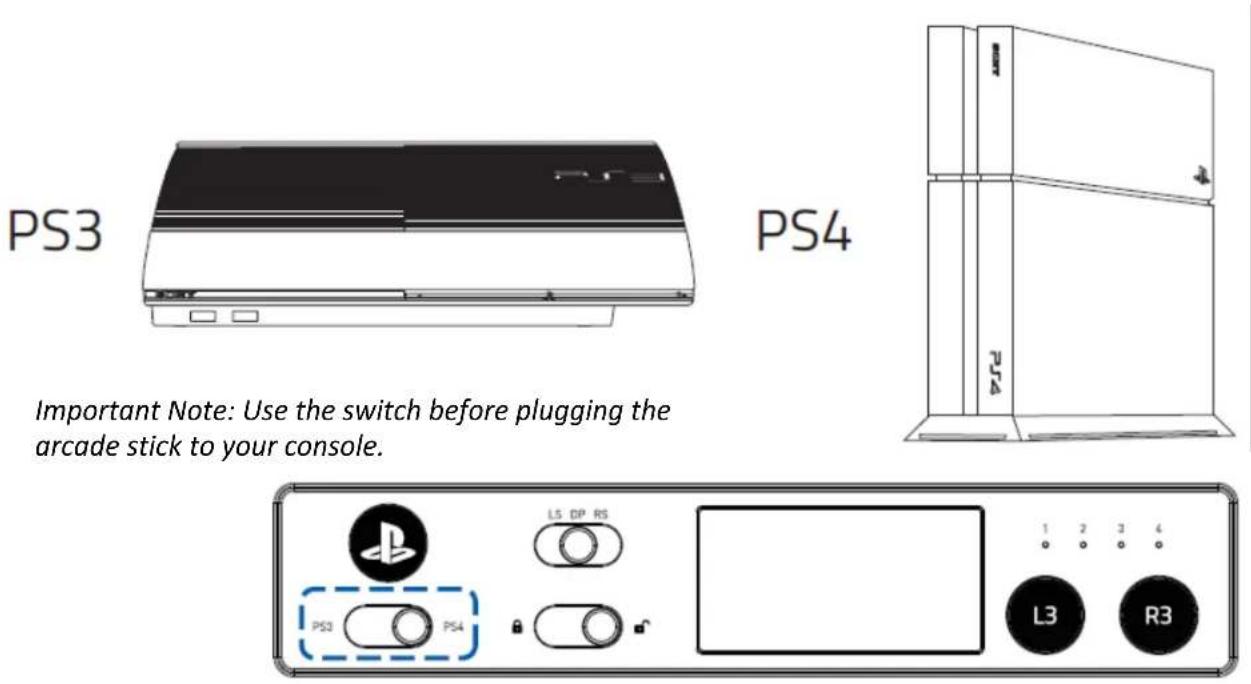
- Connect the Razer Panthera to your video game console.

To remove the detachable cable, rotate the screw collar counterclockwise to loosen, and then gently pull the cable.

natural_image
Diagram showing a joystick controller with a magnified view of its internal mechanism (no text or symbols present)USING THE LOCK / UNLOCK SWITCH
Setting this switch to Lock ( ) will disable the Select / Share, Start / Options, and PS Button.

5. CUSTOMIZING YOUR RAZER PANTHERA FOR PLAYSTATION
CAUTION! Please remove the Detachable Cable before opening the multipurpose compartment or doing any modifications to your Razer Panthera.
CHANGING THE ACTION BUTTONS
- Press the Compartment Button to unlock the lid.

- Lift the lid to access the multipurpose compartment.
natural_image
Line drawing of two hands operating a game console with directional arrows indicating movement (no text or symbols)- Using the flathead of the screwdriver, push each of the small tabs on the Quick Disconnect (QD) wires to easily remove them from the action button.
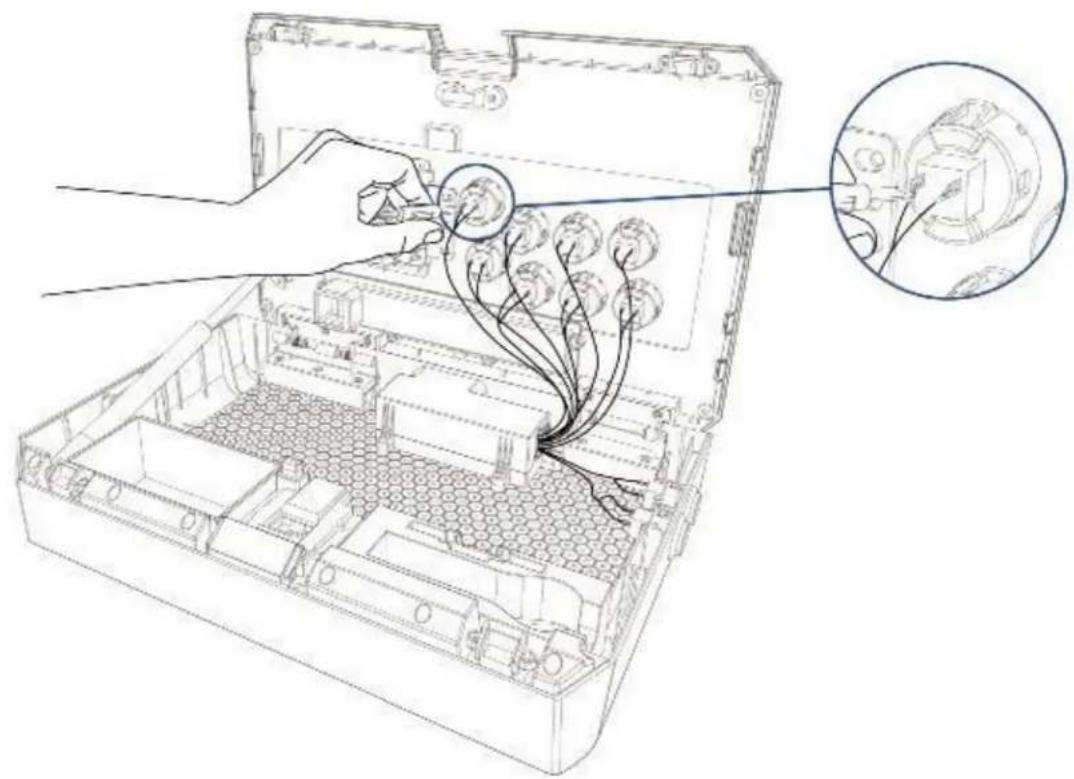
natural_image
Technical line drawing of an open electronic device casing with internal wiring and a magnified inset showing cable routing (no text or symbols)- While holding the action button's fastener, push the action button out. You can use the screwdriver to push the fasteners in more easily, if needed.
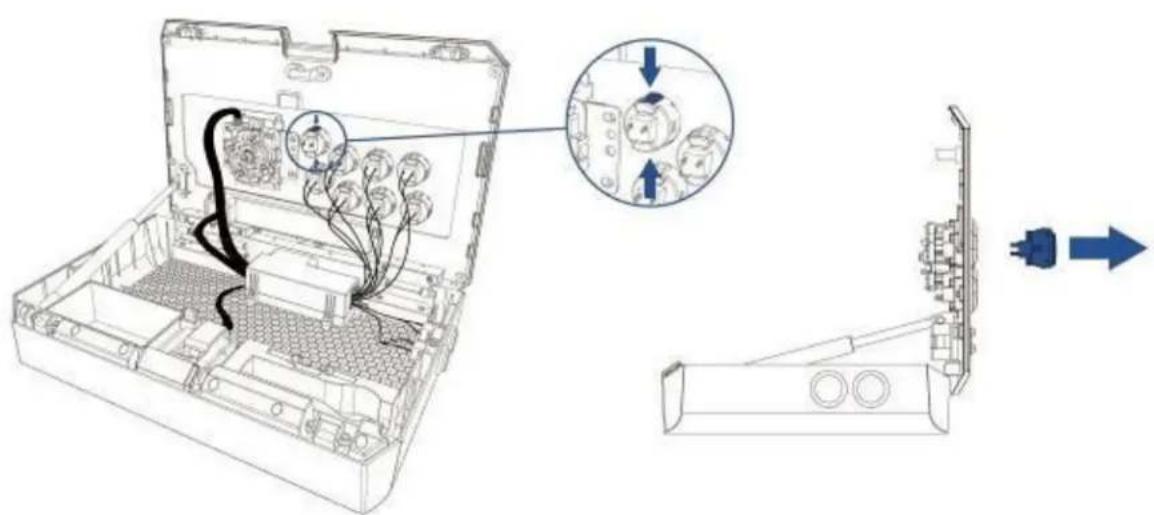
- Repeat steps 3 and 4 for all the buttons you want to change.
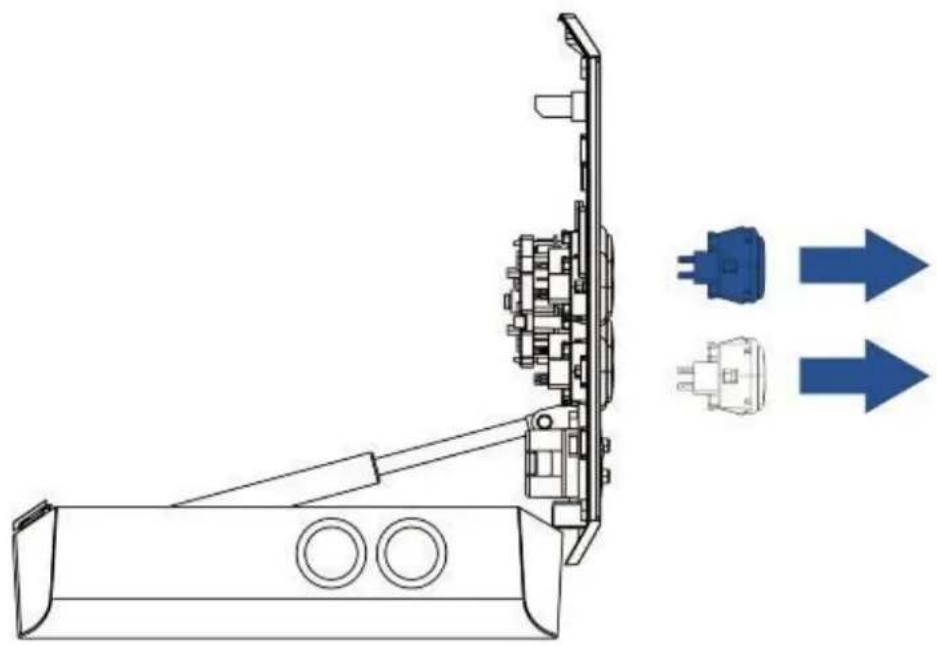
natural_image
Technical line drawing of a mechanical assembly with two blue directional arrows indicating flow or movement (no text or symbols present)- Insert your desired action buttons or button covers* into the slots.

natural_image
Technical line drawing of a mechanical assembly with two blue arrows pointing to component heads (no text or symbols present)*not included
- Reattach the cables to the action buttons.
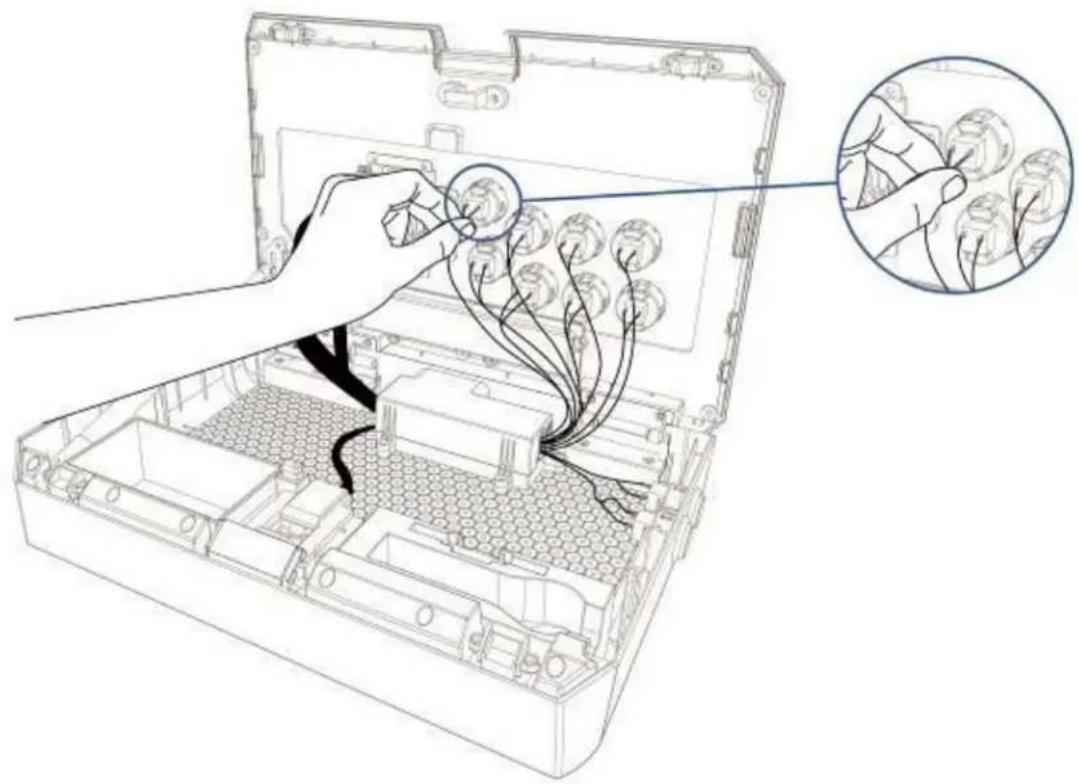
natural_image
Line drawing of an open electronic device with internal wiring and a magnified inset showing hand placement (no text or symbols)- Ensure that all cables are properly connected then close the lid.
6. SAFETY AND MAINTENANCE
SAFETY GUIDELINES
In order to achieve maximum safety while using your Razer Panthera, we suggest that you adopt the following guidelines:
- Should you have trouble operating the device properly and troubleshooting does not work, unplug the device and contact the Razer hotline or go to support.razer.com for support. Do not attempt to service or fix the device yourself at any time.
- Do not take apart the device (doing so will void your warranty) and do not attempt to operate it under abnormal current loads.
- Keep the device away from liquid, humidity or moisture. Operate the device only within the specific temperature range of 0^ C ( 32^ F) to 40^ C ( 104^ F). Should the temperature exceed this range, unplug and switch off the device in order to let the temperature stabilize to an optimal level.
COMFORT
Research has shown that long periods of repetitive motion, improper positioning of your computer peripherals, incorrect body position, and poor habits may be associated with physical discomfort and injury to nerves, tendons, and muscles. Below are some guidelines to avoid injury and ensure optimum comfort while using your Razer Panthera.
- Position the Razer Panthera directly in front of you and within easy reach.
- Adjust the height of your chair and/or table so that the Razer Panthera is at or below elbow height.
- Keep your feet well supported, posture straight and your shoulders relaxed.
-
During gameplay, relax your wrist and keep it straight. If you do the same tasks with your hands repeatedly, try not to bend, extend or twist your hands for long periods.
-
Do not rest your wrists on hard surfaces for long periods. Use a wrist rest to support your wrist while gaming.
- Do not sit in the same position all day. Get up, step away from your desk and do exercises to stretch your arms, shoulders, neck and legs.
- If you should experience any physical discomfort while using your Razer Panthera, such as pain, numbness, or tingling in your hands, wrists, elbows, shoulders, neck or back, please consult a qualified medical doctor immediately.
MAINTENANCE AND USE
The Razer Panthera requires minimum maintenance to keep it in optimum condition. Once a month we recommend you unplug the device from the USB port and clean it using a soft cloth or cotton swab with a bit of warm water to prevent dirt buildup. Do not use soap or harsh cleaning agents.
7. LEGALESE
COPYRIGHT AND INTELLECTUAL PROPERTY INFORMATION
© 2018 Razer Inc. All rights reserved. Razer, For Gamers By Gamers, and the triple-headed snake logo are trademarks or registered trademarks of Razer Inc. and/or affiliated companies in the United States or other countries. All other trademarks are the property of their respective owners. Actual product may differ from pictures. Information is correct at time of printing.
SANWA is a trademark of Sanwa Denshi Co., Ltd.
Manufactured & distributed under license from Sony Interactive Entertainment LLC.
","PlayStation", "", "" and "" are registered PS4
trademarks of Sony Interactive Entertainment Inc. All rights reserved.
Razer Inc. (“Razer”) may have copyright, trademarks, trade secrets, patents, patent applications, or other intellectual property rights (whether registered or unregistered) concerning the product in this guide. Furnishing of this guide does not give you a license to any such copyright, trademark, patent or other intellectual property right. The Razer Panthera for Playstation® (the “Product”) may differ from pictures whether on packaging or otherwise. Razer assumes no responsibility for such differences or for any errors that may appear. Information contained herein is subject to change without notice.
LIMITED PRODUCT WARRANTY
For the latest and current terms of the Limited Product Warranty, please visit razer.com/warranty.
LIMITATION OF LIABILITY
Razer shall in no event be liable for any lost profits, loss of information or data, special, incidental, indirect, punitive or consequential or incidental damages, arising in any way out of distribution of, sale of, resale of, use of, or inability to use the Product. In no event shall Razer's liability exceed the retail purchase price of the Product.
GENERAL
These terms shall be governed by and construed under the laws of the jurisdiction in which the Product was purchased. If any term herein is held to be invalid or unenforceable, then such term (in so far as it is invalid or unenforceable) shall be given no effect and deemed to be excluded without invalidating any of the remaining terms. Razer reserves the right to amend any term at any time without notice.

- TABLE OF CONTENTS
- PACKAGE CONTENTS / SYSTEM REQUIREMENTS
- PACKAGE CONTENTS
- SYSTEM REQUIREMENTS
- REGISTRATION / TECHNICAL SUPPORT
- REGISTRATION
- TECHNICAL SUPPORT
- DEVICE LAYOUT
- USING THE LOCK / UNLOCK SWITCH
- CUSTOMIZING YOUR RAZER PANTHERA FOR PLAYSTATION
- CHANGING THE ACTION BUTTONS
- SAFETY AND MAINTENANCE
- SAFETY GUIDELINES
- COMFORT
- MAINTENANCE AND USE
- LEGALESE
- COPYRIGHT AND INTELLECTUAL PROPERTY INFORMATION
- LIMITED PRODUCT WARRANTY
- LIMITATION OF LIABILITY
- GENERAL
Brand : RAZER
Model : Panthera
Category : Game controller