
Personal CC4-2 - Paper shredder FELLOWES - Free user manual and instructions
Find the device manual for free Personal CC4-2 FELLOWES in PDF.


| Product Type | Paper Shredder |
| Cut Type | Cross-Cut |
| Security Level | P-4 |
| Sheet Capacity | 8 sheets per pass (70 gsm) |
| Bin Volume | 13 liters |
| Shred Size | 4mm x 35mm |
| Throat Width | 220 mm |
| Dimensions (HxWxD) | 440 x 345 x 230 mm |
| Weight | 4.5 kg |
| Power Input | 220-240V, 50/60 Hz |
| Power Consumption | Approx. 120W |
| Duty Cycle | 5 minutes on / 20 minutes off |
| Safety Features | Auto start/stop, reverse function, overload protection |
| Cleaning and Maintenance | Oil blades every month; empty bin regularly; use only approved oil |
| Shreddable Items | Paper, staples, small paper clips, credit cards |
| Warranty | 1 year limited |
| Spare Parts Availability | Official parts: replacement blades, motor, gears via Fellowes service |
| Repairability Index | Moderate; user can replace bin, clean; professional repair for motor/gears |
| Noise Level | Approx. 60 dB |
Frequently Asked Questions - Personal CC4-2 FELLOWES
User questions about Personal CC4-2 FELLOWES
0 question about this device. Answer the ones you know or ask your own.
Ask a new question about this device
Download the instructions for your Paper shredder in PDF format for free! Find your manual Personal CC4-2 - FELLOWES and take your electronic device back in hand. On this page are published all the documents necessary for the use of your device. Personal CC4-2 by FELLOWES.
USER MANUAL Personal CC4-2 FELLOWES
natural_image
Gray plastic toilet with lid and outlet (no text or symbols visible)MODELS
CC4-2
PRODUCT USAGE GUIDE
CC4-2
Sheet capacity*: 5
Shred type: Confetti
Shred size: 5/32" x 2"
Entry width: 9-1/2"
Recommended use: 10-20 shredding passes per day
Maximum running time: 5-7 min. on/15 minutes off
*Sheet capacity measured with 20 lb., 8-1/2" x 11" paper with the shredder operating at rated voltage.
Different paper weights, humidity, and electrical currents will affect capacity.
PLEASE READ AND SAVE THIS MANUAL WITH YOUR ORIGINAL RECEIPT
Customer Service: 1-800-955-0959
WARNING
- NEVER insert hands or fingers into paper entry as serious personal injury may result.
- THIS MACHINE IS NOT A TOY. Keep children and pets away from shredder AT ALL TIMES as serious injury may result. Always unplug shredder when not in use.
- Keep loose objects (jewelry, ties, long hair) away from shredder. These items and others like them may cause serious injury if they accidentally fall into the paper entry.
CAUTION
- Confetti cut shredders contain sharp edges on the underside of the machine. Use caution when positioning the shredder head onto the basket.
- Do not exceed recommended sheet capacity.
- Do not shred plastic, continuous forms, adhesive labels, transparencies, glossy paper, newsprint, or cardboard.
- This personal shredder is intended for paper only. Do not attempt to shred paper clips or other hard materials (except staples).
- Do not place shredder near or over a heat source or water.
- Always turn off and unplug unit before moving or cleaning and when not in use.
- Do not insert aerosol cleaners into or around the shredder. Some agents may combust, causing serious injury.
- Never use flammable synthetic oil, petroleum-based or aerosol lubricants to oil the cutting blades. Some agents may combust, causing serious injury. Use only a recommended oil in a non-aerosol container. See "MAINTENANCE."
- Do not use this product if it or the cord has been damaged in any way.
- Do not open the cover for any reason. Doing so can expose you to dangerous voltages and will void your warranty.
Power Cord Care
- Place power cord in an easily accessible position, because it is the main disconnect switch.
- Do not place machine where adults, children or animals may walk on the cord.
- Do not rest anything on the power cord.
- If an extension cord is used, be sure that all products plugged into the extension cord do not exceed the extension cord ampere rating.

A. Paper entry
B. Basket
C. Red LED
D. Auto-start sensor
E. Power switch
F. Shredder head
ASSEMBLY
NOTE: This shredder will operate only when used with the supplied basket. The supplied basket has a built-in safety feature which prevents the shredder from operating if used with any other basket or if improperly assembled.
To assemble shredder:
CAUTION
This shredder contains sharp edges on the underside of the shredder
head. Use caution when positioning the shredder head onto the basket.
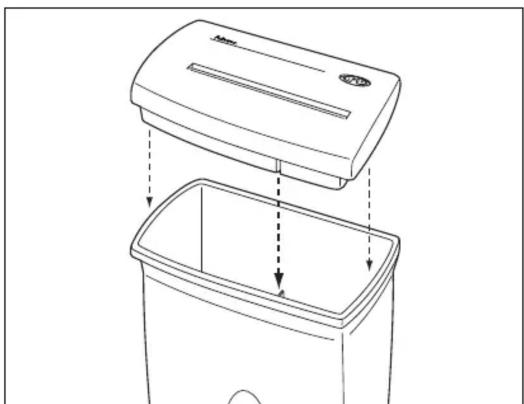
- Position shredder head over basket as shown in Figure 1.
- Align slot on back of shredder head with the tab on the inside rear of the basket.
- Lower shredder head onto basket (while maintaining tab/slot alignment).
natural_image
Line drawing of a trash bin with an upper lid and dashed arrows indicating internal components (no text or symbols)Figure 1
OPERATION
WARNING
This product features an auto-start sensor. This sensor will turn on the cut-
ting blades whenever anything is inserted into the paper entry (while the power switch is in the AUTO position). For the safety of pets and children, we recommend always moving the power switch to OFF and unplugging whenever the shredder is unattended or not in use.
-
Assemble shredder (see "ASSEMBLY").
-
Remove any paper clips or other foreign objects (except staples) from paper. If folding paper to fit paper entry, adjust sheet capacity appropriately.
CAUTION
Do not attempt to shred paper clips or other hard materials (except staples)
with this machine. Extensive use of paper clips or other hard materials will result in damage to the cutting system and will void the manufacturer's warranty.
-
Be sure power switch is in OFF (O) position. Plug shredder into proper power supply outlet.
-
Move power switch to AUTO (I) position. To clear the cutting blades, the shredder will "run" for about 1 second immediately after switching to AUTO (I). When the unit is turned on and in standby mode, the shredder is ready to be fed paper through the paper entry. (See "TROUBLESHOOTING" if red LED is lit.)
WARNING
NEVER insert hands or fingers into paper entry as serious personal injury may result.
CAUTION
Do not exceed recommended sheet capacity (see "Product Usage Guide"
on front cover of this manual).
- Slide paper straight into paper entry until the shredder automatically begins shredding. The shredder automatically stops a few seconds after shredding is complete.
Continue shredding as desired to a MAXIMUM shredding time of 5-7 minutes. At this time, the machine MUST be allowed to "cool down" for a MINIMUM of 15 minutes. (See "Cool-Down Cycle" for more information.)
If the shredder jams or shuts off before the maximum shredding time, see "Clearing a Jam" section for further instructions.
-
Move power switch to OFF (O) position when shredding is complete.
-
Unplug power cord from outlet whenever shredder is unattended or not in use.
-
Check basket to see if it is full. If full, remove shredder head and empty basket contents. Replace shredder head onto basket.
Cool-Down Cycle
This shredder is protected with a special safety feature which prevents the motor from overheating with extensive use. When shredding is attempted beyond the machine's maximum running time, the shredder will automatically shut off its motor until it has cooled to an acceptable operating level. This is normal and the shredder will return to operation after the cool-down or "off" period. See "Product Usage Guide" on front panel for maximum running time and related cooling "off" time.
Clearing a Jam
If the shredder sheet capacity is exceeded or paper is not put in straight, a jam may result. See "Product Usage Guide" on front panel for maximum sheet capacity for your shredder.
To clear a jam:
-
Move the power switch to the REVERSE (R) position. (NOTE: If waste basket is full, empty it before clearing jam.) The shredder will reverse the paper to clear the jam.
-
If the shredder jams in reverse, move the power switch to AUTO (I) and allow to run for about five seconds. If jam does not clear, move power switch to REVERSE (R) again and allow to run for about five seconds. Repeat this procedure until the jam is cleared. If necessary, use care to grasp the paper carefully and pull out to clear the jam.
-
Once the jam is cleared, move the power switch to AUTO (I) for continued shredding or OFF (O) if shredding is complete.
MAINTENANCE
Confetti cut shredders require regular (monthly) oiling of the cutting blades to maintain proper operation. Failure to oil the blades regularly could result in reduced sheet capacity performance, excessive noise during operation, paper jams and possibly shredder failure.
We recommend using only Powershred Lubricant #35250 (available by contacting Fellowes) or a vegetable-based oil (such as corn or canola) in a non-aerosol container with an extension nozzle.
CAUTION
Never use flammable synthetic oil, petroleum- based, or aerosol lubri-
cants to oil the cutting blades. Some agents may combust, causing serious injury.
To oil the cutting blades:
- From the top of the shredder, squeeze the recommended lubricant across the full width of the blades.
- Move the power switch to AUTO (I) position and allow the blades to run at least 3 seconds.
- Move the power switch to REVERSE (R) position and allow it to run for at least 3 seconds.
- Repeat steps 2-3 above at least 3 times.
TROUBLESHOOTING LIMITED WARRANTY
| Shredder will not operate. | a. Shredder is not plugged in.b. Power switch is in the OFF (O) position. Move switch to AUTO (I) position.c. Shredder is jammed. See "Clearing a Jam" section.d. Shredder has exceeded the maximum run time and requires a "cool-down" time. See "Product Usage Guide" on front panel.e. Shredder is not assembled properly. See "Assembly." |
| Shredder makes a loud squeaking or rubbing noise. | a. Cutting blades need to be oiled REGULARLY. See "MAINTENANCE" section. |
| Shredder suddenly stops while shredding. | a. Shredder has exceeded the maximum run time and requires a "cool-down" time. See "Product Usage Guide" on front panel.b. Shredder is jammed. See "OPERATION - Clearing a Jam." |
| Shredder shreds less than capacity. | a. Cutting blades need to be oiled REGULARLY. See "MAINTENANCE" section. |
| Red LED is lit. | a. Shredder is not assembled properly. See "ASSEMBLY." |
| Shredder operates only in REVERSE. | a. A small piece of paper may be blocking the auto-start sensor of this shredder. Move the power switch to the OFF (O) position and unplug the shredder. Turn shredder over and use a toothpick (from the underside of the unit) to clear the paper blockage at the auto-start sensor (center) location. |
| Shredder runs continuously when in AUTO. | a. A small piece of paper may be causing the auto-start feature to run continuously. Move the power switch to the OFF (O) position and unplug the shredder. Use a toothpick (from the top of the unit) to clear the paper blockage at the auto-start sensor (center) location. |
| Shredder runs for a few seconds after the paper has cleared the cutters. | a. This is normal. The shredder runs a few seconds longer than the paper in order to keep the cutters clear of paper particles and reduce the chances of a jam. |
Fellowes warrants all the cutting cylinders of the machine to be free of defects in material and workmanship for 3 years from the date of purchase by the original consumer. Fellowes warrants all other parts of the machine to be free of defects in material and workmanship for 1 year from the date of purchase by the original consumer. If any part is found to be defective during the warrant period, your sole and exclusive remedy will be repair or replacement, at Fellowes' option and expense, of the defective part. This warranty does not apply in cases of abuse, mishandling or unauthorized repair. ANY IMPLIED WARRANTY, INCLUDING THAT OF MERCHANTABILITY OR FITNESS FOR A PARTICULAR PURPOSE, IS HEREBY LIMITED IN DURATION TO THE APPROPRIATE WARRANTY PERIOD SET FORTH ABOVE. In no event shall Fellowes be liable for any consequential or incidental damages attributable to this product. This warranty gives you specific legal rights. You may have other legal rights that vary from state to state. For more detail or to obtain service under this warranty, please contact Fellowes Customer Service at 1-800-955-0959, Monday through Friday, 8 AM - 5 PM (Central Standard Time). For specific instructions on obtaining service under this warranty on machines purchased outside the USA, contact the appropriate location listed in the Contact for Service section of this instruction manual.
Warrantor: Fellowes Manufacturing Company.
Customer Service 1-800-955-0959
www.fellowes.com
Fellowes®
1789 Norwood Avenue • Itasca, Illinois 60143-1095
630-893-1600
Australia Benelux Canada France Germany Italy Japan Poland
Tullamarine, Vic
Vianen, NL
Markham, Ont.
Rennes, I-V
United Kingdom
Garbsen, Han.
Camerano, AN
Tokyo
Warsaw
Doncaster, S. Yorks.

Brand : FELLOWES
Model : Personal CC4-2
Category : Paper shredder