CRMi-19 - Alarm Clock DMTECH - Free user manual and instructions
Find the device manual for free CRMi-19 DMTECH in PDF.


| Product Type | Alarm clock radio with iPod docking station |
| Model | DMTech CRMi-19 |
| Power Supply | DC 9V via AC adapter (100-240V) or 6 x AA/LR06 batteries (optional) |
| Battery Backup (Clock) | 6 x AA/LR06 batteries (for time keeping only) |
| Tuning System | FM 87.5–108 MHz |
| Tuning Sensitivity | FM <18 dB |
| Frequency Response (FM) | 70 Hz – 5 kHz |
| Frequency Response (AUX) | 20 Hz – 20 kHz |
| Signal-to-Noise Ratio | >40 dB |
| Audio Output | Stereo speakers, 1.2W x 2 |
| Audio Inputs | iPod dock, 3.5mm AUX in jack |
| FM Preset Memory | 9 stations |
| Alarm Modes | Wake to iPod, radio, or buzzer |
| Additional Features | Sleep timer, snooze, dimmer (brightness control), 12/24 hour clock |
| Controls | Front: MEM/SET, Power, SLEEP/AL, SKIP -, FUN, ▶//MEM+, SKIP ▶; Top: Volume knob, SNOOZE/LIGHT; Rear: FM antenna, Power input, AUX input |
| Dimensions | Approx. 200 x 130 x 80 mm (estimated based on typical radio alarm design) |
| Weight | Approx. 0.6 kg (with batteries) |
| Safety Warning | Do not expose to rain or moisture. No user-serviceable parts inside. Refer servicing to qualified personnel. |
| Disposal | Do not dispose with household waste. Follow local recycling regulations for electronic equipment. |
Frequently Asked Questions - CRMi-19 DMTECH
User questions about CRMi-19 DMTECH
0 question about this device. Answer the ones you know or ask your own.
Ask a new question about this device
Download the instructions for your Alarm Clock in PDF format for free! Find your manual CRMi-19 - DMTECH and take your electronic device back in hand. On this page are published all the documents necessary for the use of your device. CRMi-19 by DMTECH.
USER MANUAL CRMi-19 DMTECH
natural_image
Line drawing of a rectangular electronic device with circular ports and a central ring (no text or symbols)WARNING: APPARATEN FÅR INTE EXPONERAS FÖR REGN ELLER FUKT, - RISK FÖR KORTSLUTNINGSBRAND OCH ELEKTRISK STÖT.
VIKTIGT: TA INTE BORT KÅPAN (ELLER BAKPANELEN) - RISK FÖR ELEKTRISKA STÖTAR - APPARATHÖLJET DÖLJER INGA KOMPONENTER SOM KRÄVER UNDERHÅLL FRÅN ANVÄNDARENS SIDA. LÅT BEHÖRIG PERSONAL SKÖTA ALL SERVICE. OM ICKE KVALIFICERAD PERSONAL UTFÖR SERVICE MEDFÖR DETTA BORTFALL AV GARANTIN.

natural_image
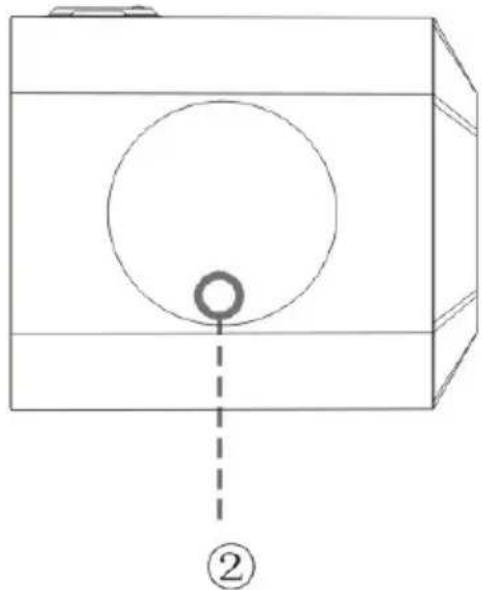
Technical line drawing of a mechanical housing or enclosure with mounting holes and a central circular feature, labeled with number 1 (no text or symbols on the diagram itself)FRÅN SIDAN
natural_image
Simple line drawing of a box with a circle and a small hole, no text or symbols present- Batterifacket undertill (batterityp: 6 st LR06)
- Inbyggd kvalitetshögtalare.
iPod Docking Station with Alarm Clock/Radio
MODEL:CRMi-19

natural_image
Line drawing of a rectangular electronic device with circular ports and a central ring (no text or symbols)
natural_image
Simple line drawing of a trash bin with crossed lines indicating no waste or discharge (no text or symbols)This symbol on the product or in the instructions means that your electrical and electronic equipment should be disposed at the end of its life separately from your household waste. There are separate collection systems for recycling in the EU.
For more information, please contact the local authority or your retailer where you purchased the product.
Main Features
- Integrated universal dock for iPod charges & plays your favorite iPod music
- Digital FM radio with 9-stations preset memory (9 FM)
- Digital clock with independent alarm & snooze/sleep timers
- Wake to your iPod, radio, or buzzer
• Powerful, full-range stereo speakers - 3.5mm audio AUX in jack connected to any portable audio device
- Battery operation:6 x “AA/LR06” batteries (not included)
Controls at glance
Front View
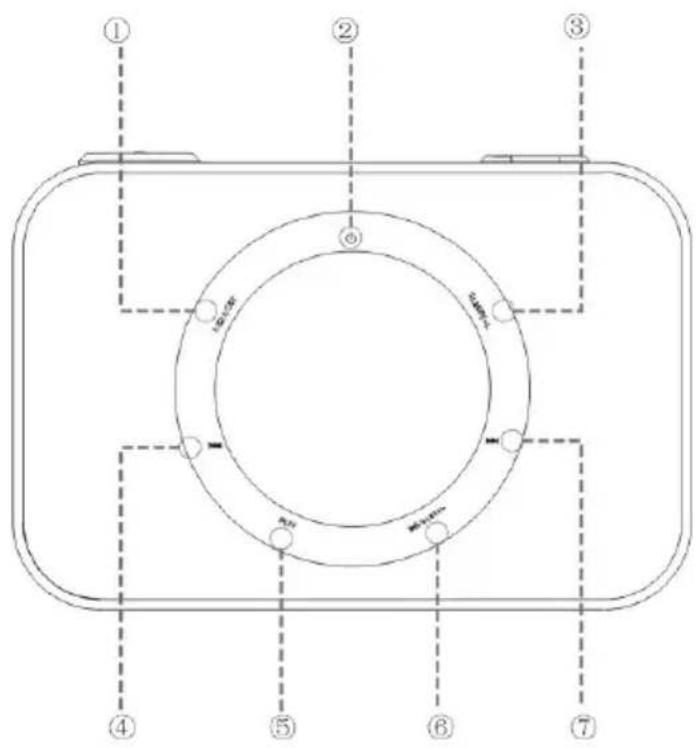
- MEM/SET: memory saving channel/Clock setting
- ⏻ The power on or off
- SLEEP/AL:Set the sleep timer /Set the alarm timer
- Skip to the previous track
- FUN: Switching function (iPod to FM to AUX)
- ▶//MEM+: Playing mode/increasing saving chanel
- ▶▶ Skip to the next track
Top view

Rear view

- VOLUME KNOB: Increase volume level Decrease volume level
2.SNOOZE/LIGHT: For snoozing function/ Brightness control
3.FM antenna lead
4..Power input jack - 3.5mm auxiliary input jack
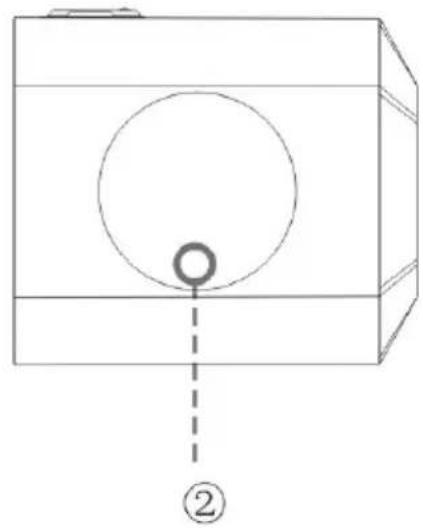
BOTTOM VIEW

natural_image
Technical line drawing of a mechanical housing or enclosure with mounting holes and a central circular component, labeled with number 1 (no text or symbols on the diagram itself)SIDE VIEW
natural_image
Simple line drawing of a box with a circle inside and a small circle at the bottom, labeled with number ② (no text or symbols on the diagram itself)- The battery compartment on the bottom
- (the time keeping batteries style: AA/LR06 *6)
- Built-in quality speaker
Changing the Function Mode
To change the function mode of the player, press“FUN”. The LCD Display will indicate the current function mode.
The available functions are:
iPod: Play an iPod connected to the iPod dock.
RADIO: Listen to FM radio broadcasts.
AUX: Play music from an audio device connected to the AUX in jack. Radio mode:
radioTo enter Radio mode, press“FUN”until the LCD screen displays FM ICON.
Overview of Radio Controls:
For a complete description of all of the features, settings, and controls
One. Time setting up
- Press the button "SET/MEM" for one second to enter the options "12 or 24 hours system", then press "SKIP -/+ " to choose 12 hours or 24 hours system, after that, press "SET/MEM" again to confirm the enter into the time setting up.
- In the time setting mode, first for hours setting up, likewise press the key "SKIP -/+" to choose the preset hours, after that, press "SET/MEM" to confirm, then do the same for minutes setting, after that, press "SET/MEM" to confirm to enter into the setting up for Monday, Tuesday, ....till Sunday.
- After entering the setting up from Monday to Sunday, press "SKIP -/+ " to choose MON, TUE, WED, THU, FRI, SAT, SUN, then press "SET/MEM" again to come back to the time display state.
Two. Alarm clock setting up
In the time state, press "SLEEP/ALARM" for one second to enter the time setting up, the first step is to set up hours, likewise, press "SKIP-/+ " to choose, after that, press "SLEEP/ALARM" to confirm. The second step is to enter the minute setting up, press "SKIP-/+ " to choose, after that, press "SLEEP/ALARM" to confirm. The last step is to enter into the setting up for Monday, Tuesday,... till Sunday, do the same way as for minute setting up, finally enter into the alarm time, power on for iPOd or power on for radio, press "SKIP-/+ " to choose and press "SLEEP/ALARM" to confirm,
Press "Sleep/Alarm" again to cancel the setting up for alarm time, power on for iPod or power on for Radio.
Three. Sleep timer setting up
In the ipod/AUX /FM State press Sleep/AL key in the unit to select (90.60..30..15..10..5..OFF decreasing you want sleep time.
Four. Snooze function
When the alarm or ipod or FM ring in start alarm state, press the Snooze button, the alarm OR IPOD OR FM stopped, then re-arming OR Ring of the 9 minutes delayed, then if the "SNOOZE" button, and then re-arming or ring of the 9 minutes delayed. Press POWER ON / OFF key, to cancel of alarm Snooze function.
Five. In the FM RADIO state,
press "SKIP-/+ " to choose the memory stations, press "SET/MEM" to save the station when wanted, press "PLAY/M+" to choose the memory channels, then press "SET/MEM" to confirm.
For optimal volume control and audio fidelity, set the volume level on.
the iPod to approximately 80%, and then adjust the volume to the desired.
level with the CRMi-19 controls.
Specification
| Power Supply | DC 9V |
| AC 100-240v adapter | |
| 6X"AA/LR06" BATTERIES (OPTIONAL) | |
| Tuning System FM | 87.5~108MHz |
| Tuning Sensitivity : | FM<18dB |
| Response: | 70~5kHz (FM) Frequency |
| 20Hz-20kHz(aux in) | |
| S/N Ratio : >40dB | |
| Audio Output STEREO SPEAKER(1.2Wx2) | |
| Audio Input | iPod Dock |
| 3.5mm Auxiliary Line in | |
Specifications and manual are subject to change without notice.
Brand : DMTECH
Model : CRMi-19
Category : Alarm Clock