B2031 - Satellite receiver Maxview - Free user manual and instructions
Find the device manual for free B2031 Maxview in PDF.


| Product Type | Satellite Receiver |
| Brand | Maxview |
| Model | B2031 |
| Dimensions (W x H x D) | 20 x 15 x 5 cm |
| Weight | 0.5 kg |
| Power Supply | 12V DC, 1A |
| Input Connector | F-type female (75 ohm) |
| Output Connector | HDMI, Composite AV (RCA) |
| Video Resolution | 1080p Full HD |
| Supported Satellite | Any standard DVB-S/S2 transponder |
| Channel Memory | 4000 channels |
| DiSEqC Support | DiSEqC 1.0, 1.2, USALS |
| Functions | Auto scan, manual scan, favorite groups, timer, parental lock, EPG |
| Maintenance | Clean with a soft, dry cloth. Do not use liquids. |
| Safety | Keep away from moisture and heat sources. Disconnect during storms. |
| Spare Parts | Remote control (CR2025 battery), power adapter |
| Repairability | Contact authorized service center for repairs. No user-serviceable parts inside. |
| General Information | Maxview B2031 is a compact satellite receiver for all major satellites. |
Frequently Asked Questions - B2031 Maxview
User questions about B2031 Maxview
0 question about this device. Answer the ones you know or ask your own.
Ask a new question about this device
Download the instructions for your Satellite receiver in PDF format for free! Find your manual B2031 - Maxview and take your electronic device back in hand. On this page are published all the documents necessary for the use of your device. B2031 by Maxview.
USER MANUAL B2031 Maxview
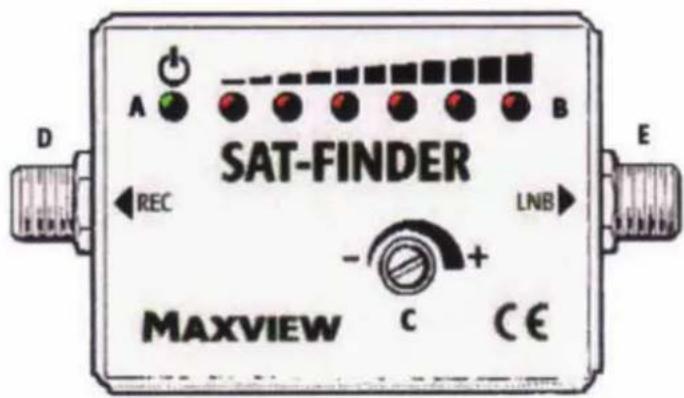
A. Power indicator LED
- Lights up when Satellite Finder is in operation.
B. Satellite signal level LED's - Series of LED's light up to illustrate strength of satellite signal. As signal strength increases, more LED's light up.
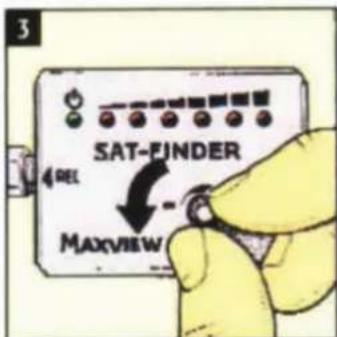
C. Signal sensitivity control knob - For fine tuning satellite signal for ease of dish alignment and adjustment.
D. Receiver F' connector - Connection to satellite receiver (ensure receiver is switched off when connecting/disconnecting).
E. LNB 'F' connector - Connection to LNB (ensure receiver is switched off when connecting/disconnecting).
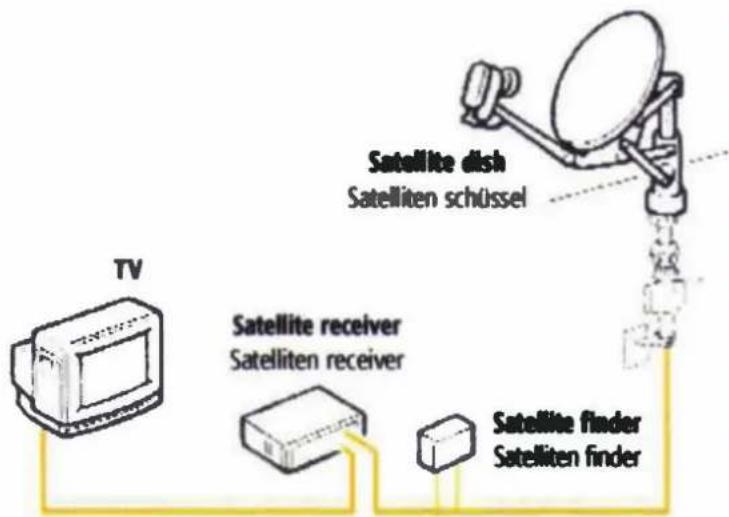
Connecting your Satellite Finder
Refer to set up illustrations and connect your Satellite Finder inline according to your satellite system set up.
When all leads have been connected, switch the satellite receiver on and the power indicator LED A will light up. Point the satellite antenna towards the ground or cover the cap of the LNB with your hand. With the help of the signal sensitivity control knob C, adjust the Satellite Finder so that the built in buzzer gives a deep tone. You are now ready to set up your satellite system.
Setting up your system
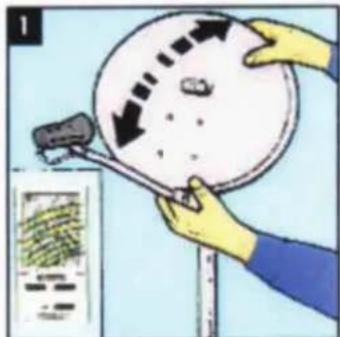
Elevation: Set the satellite system to the correct elevation. Maxview satellite dishes are supplied with a zone map for the angle of elevation to aid satellite dish alignment and adjustment.
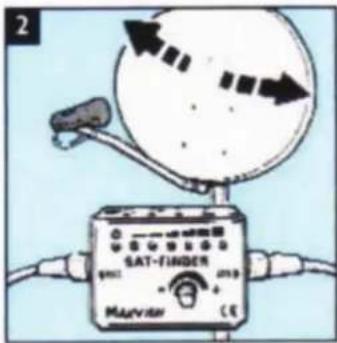
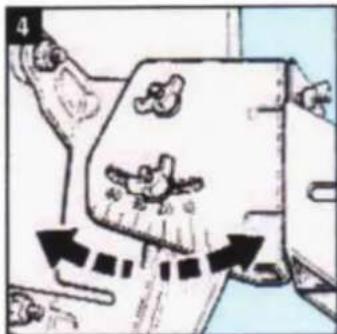
Azimuth: Point the satellite dish in a south easterly direction toward the desired satellite. Slowly rotate the system until you hear a change in tone from the Satellite Finder buzzer (if known, turn the dish to the East then rotate towards the South to locate the satellite signals quickly). As the signal level increases, the tone will increase and more of the satellite signal level LED's B will continue to light up. Rotate the system until the highest tone is reached. As the Satellite Finder only determines the reception level and doesn't know from which satellite the signals actually come from, you should check on the receiver, whether the desired satellite is being received. If this is not the case, then continue to search for the next satellite position. If you are receiving signals from the desired satellite then go to step 3.
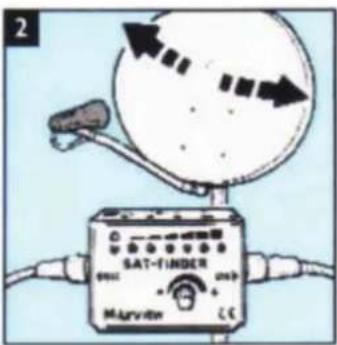
Fine Adjustment: Turn the signal sensitivity control knob C anti-clockwise and finely adjust the satellite system so the number of satellite signal level LED's lit up increases further. Through further fine adjustments of the dish search for the maximum tone. If the satellite signal level LED's B are not fully lit, repeat step 3. If no further increases in tone can be obtained then go to step 4.
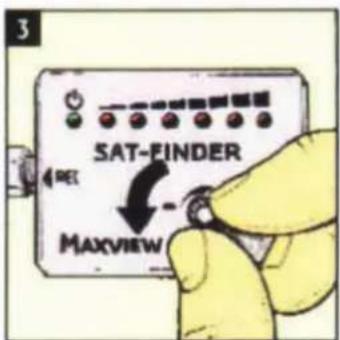
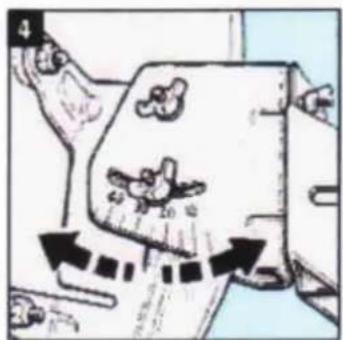
In the same way, you can now fine-tune the height elevation to achieve the best reception. Once fine-tuning is complete, tighten dish mounting bolts and fixing clamp on mast taking great care not to move the dish position. Disconnect the Satellite Finder.
natural_image
Illustration of a car with motion arrows indicating movement, no text or symbols presentSETCHEY, KING'S LYNN
NORFOLK, PE33 OAT, ENGLAND
CUSTOMER HELPLINE
(01553) 811000
e-mail: cust_serv@maxview.ltd.uk
website: www.maxview.ltd.uk
MAXVIEW VERTRIEBS-GmbH
AUGSBURGER STRAße 11
D-82291 MAMMENDORF, GERMANY
TEL 08145-8840 FAX 08145-8845
e-mail: info@maxview.de
website: www.maxview.de

natural_image
Simple pink oval outline on white background (no text or symbols)SAFETY WARNING—before starting
- Protect from deep and moisture
- Do not leave the Satellite Finder constantly connected
- Carefully turn the 'Signal sensitivity' knob. Do not force round. Complete turning circle approx. 300 degrees
- Ensure receiver is switched off when connecting/d disconnecting the Satellite Finder
WAARSONUWING-Averous to beginnen
Essential for locating your satellite signal
Designed to help align satellite dish to the satellite with varying audible tone and ascending visual LED display
Signal sensitivity control for ease of satellite dish adjustment and alignment
Suitable for use with all satellite systems