
RCBR-13020 - Power bank Rosewill - Free user manual and instructions
Find the device manual for free RCBR-13020 Rosewill in PDF.


| Product Type | Power Bank |
| Capacity | 11200 mAh |
| Battery Type | Lithium Ion (Samsung Cell) |
| Input | Micro-USB 5V |
| Output 1 | 5V 2A (for tablets and high-current devices) |
| Output 2 | 5V 1A (for smartphones and low-current devices) |
| Dimensions | 3.07 x 4.17 x 0.91 inches |
| Weight | 9.10 oz (approx. 258 g) |
| Input Charging Time | Approx. 8 hours (depends on power source) |
| Battery Life | >500 charge cycles |
| Number of USB Output Ports | 2 |
| Special Features | Built-in LED flashlight (runs up to 480 hours) |
| Automatic Power Saving | Shuts off output after 60 seconds of inactivity |
| Protection | Short circuit protection |
| Compatible Devices | Smartphones, tablets, MP4, GPS, iPad, and more |
| Box Contents | Power Pack, Micro-USB Charging Cable, User Manual |
| Warranty & Support | Register at www.rosewill.com; Phone: 800-575-9885; Email: techsupport@rosewill.com |
Frequently Asked Questions - RCBR-13020 Rosewill
User questions about RCBR-13020 Rosewill
0 question about this device. Answer the ones you know or ask your own.
Ask a new question about this device
Download the instructions for your Power bank in PDF format for free! Find your manual RCBR-13020 - Rosewill and take your electronic device back in hand. On this page are published all the documents necessary for the use of your device. RCBR-13020 by Rosewill.
USER MANUAL RCBR-13020 Rosewill
RCBR-13020 Power Pack 11200mAh
User Manual
Box Content
| Power Pack | x1 |
| Micro-USB Charging Cable | x1 |
| User Manual | x1 |
Product Overview
① Micro-USB Input Port
2A USB Output Port
② LED Flashlight
④ 1A USB Output Port
⑤ LED Indicator
6 Power Button
Power Button

RCBR-13020 Power Pack 11200mAh User Manual
LED Flashlight
To use the LED flashlight, press the power button two times in quick succession to turn on. Repeat the action to turn off. The light can run continuously for up to 480 hours on a full charge.
Power Indicator
Press the power button once to check the four LED status lights to show how much charge is left.
| Power indicator | One light on Two lights on Three lights | on Four lights on | |
| Battery Charge Left | <25% | 25—50% | 50—75% |
RCBR-13020 Power Pack 11200mAh
User Manual
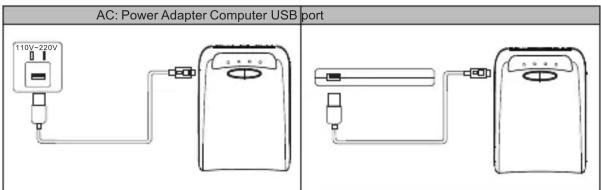
Recharge Power Pack
- Connect the included USB charging cable to a power supply such as an AC adapter, USB wall charger, or a computer USB port.
- Connect the other end to the Power Pack's micro-USB input to recharge.
RCBR-13020 Power Pack 11200mAh User Manual
Charging Other Devices
- Connect the Power Pack's output port to your device's charging port with a USB cable.
- Press the power button to start charging.
- 60 seconds after fully charged or disconnecting your charging device, the Power Pack will automatically enter power savings mode and shut off power to the output port.
The Power pack has two USB output ports capable of charging two devices simultaneously.
1A output port is designed for mobile phones and MP4 or GPS devices. The 2A output port is designed for tablet PCs or other devices requiring a higher charging current, such as an iPad. (please refer to your device's manual for required charging current. Samsung Galaxy Tab needs another special charging connector)
If an incompatible device is not charging after connecting to the Power Pack, there will be no damage to your device. As long as your device charges through USB, either port can be used for charging so there is no need to worry about using the wrong USB port.
If you charge through the 2A port, it will take less time to charge your device due to the higher amperage. However, the battery efficiency will be lower. For example: if charging a certain device with the 1A port, the Power Pack can fully charge it four times, and the charging time is about 120 minutes for each full charge. If charging the same device via the 2A port, it can fully charge the device 3.5 times, but a full charge would take roughly only 80 minutes.
RCBR-13020 Power Pack 11200mAh User Manual
Charging Status Indicator
When charging Power Pack:
- The power indicators will light up in the relating positions showing the current charge status.
- If the power indicator lights are continuously on, the recharge is complete.
When charging other devices, press the power button:
- Power indicators will light up in the relating positions showing available charge capacity.
- If the power indicator does not light up, the Power Pack is out of power and needs to be recharged.

RCBR-13020 Power Pack 11200mAh
User Manual
Technical Specification
| Capacity | 11200 mAh | Weight | 9.10 oz |
| Battery | Lithium Ion Samsung Cell | Dimension | 3.07 × 4.17 × 0.91 inch |
| Input | Micro-USB 5V | Input Charging Time | approx. 8 hours* |
| Output1 / Output2 | 5V 2A / 5V 1A | Battery Life | >500 cycles |
*Depending on power source charging current
Product Caring
- Keep Power Pack dry and away from damp and erosive environments.
- Do not disassemble.
- Do not store Power Pack in extreme temperature environments.
RCBR-13020 Power Pack 11200mAh User Manual
Troubleshooting
Power Pack not charging:
- Ensure Power Pack is properly connected to the power source. Check for loose connections.
- Check the USB charge cable. Is it still working?
- Ensure the power source is functioning. Try a different power source.
- If charging through a computer USB port, ensure the computer is powered on and active.
Devices are not charging:
- Press the power button to check LED Status indicator for available charge capacity.
- The power requirement of the device is not compatible with the Power Pack.
- Ensure the Power Pack is properly connected to the device. Check for loose connections.
- The charging cable may no longer be functioning. Please try using a different cable.
- If you accidentally connected the Power Pack's input port to the output port, the short circuit protection will kick-in. To reset a short circuit-protection, please disconnect all cables and then connect the Power Pack to a source to charge.
RCBR-13020 Power Pack 11200mAh
User Manual
Thank you for purchasing a High-Quality Rosewill Product.
Please register your product at :http://www.rosewill.com
for complete warranty information and future support for your product.
If you have any questions while using our product, please feel free to contact us.
Support Phone Number: 800-575-9885
Support Email: techsupport@rosewill.com
Visit our website: www.rosewill.com

www.rosewill.com

Brand : Rosewill
Model : RCBR-13020
Category : Power bank