Aego 5 - Pregnant Acoustic Energy - Free user manual and instructions
Find the device manual for free Aego 5 Acoustic Energy in PDF.


User questions about Aego 5 Acoustic Energy
0 question about this device. Answer the ones you know or ask your own.
Ask a new question about this device
Download the instructions for your Pregnant in PDF format for free! Find your manual Aego 5 - Acoustic Energy and take your electronic device back in hand. On this page are published all the documents necessary for the use of your device. Aego 5 by Acoustic Energy.
USER MANUAL Aego 5 Acoustic Energy
SMART |ACTIVE |ROUND
TECHNICAL INFORMATION
SATELLITE SPEAKERS:
A patented unvarious technology driver learning a unique heat transfer system: special high excursion suspension and a computer-derived anti-essential core
INPUTS
3xPCA Photo Line lava
1 x Stereo Mini jack - Line level
OUTPUTS:
3.5 Spanish terminals
CONTROLS:
1 a Volume, Power pot
- Cross-reducing Portion
1 e Cachia input w/ter [2 Poinan]
A
2 x 5 remote Speaker cables
1 x 2 more Signal n;u cable
1.4 Speaker level to ire level
adaptor calls
2x Wall tracks
POWER RATING!
120V Model 120V @ 60Hz 90VA
2407 Model - 1476-50 Lc 00%
DIMENEIONE:
Sub Washer - 255mm x 150mm x 350mm
Setelltes 60mm x 100mm x 90mm
WEIGHT
Ekg
FINIHEH:
Black suit worker
Textured black satellites with
mier,grsp qillex
White mix varieties
Textured white saline tea estm
silver, gray, quills
WARRANTY
Your Acoustic Energy loudspeakers are guaranteed against original defects in materials.
manufacture and workmanship for 1 year from the date of purchase.
Please retain all original packaging materials for possible future use.
Under this warranty Acoustic Energy agrees to repair any defect or, at the company's discretion.
replace the faulty component(s) without charge for parts and labour.
This warranty does not imply any acceptance by Acoustic Energy or its agents for consequential
loss damage and specifically excludes fair wear and tear, accident misuse or unauthorised
modification.
This warranty is applicable in the United Kingdom only and does not in any way limit the
customer's legal rights. Claims and enquiries under the warranty for AE products purchased
outside the UK should be addressed to the local importers or distributors.
If you have reason to claim under the warranty please contact your dealer in the
first instance

ACOUSTIC ENERGY
Designed by KOI Inc (USA) Exclusively for Acoustic Energy Limited (UK)
Manufactured in Malaysia.
Acoustic Energy Limited, 16 Bridge Road, Cirencester, Gloucestershire GL7 1NJ. UK
Tel: +44 (0)1285 654032 Fax: +44 (0)1285 654030
WWW.AEG05.COM

ENGLISH
text_image
HOME THEATRE SYSTEM A C O G S®SMART ACTIVE SOUND
text_image
OWNERS MANUALWARNING
To reduce the risk of fire or electric shock, do not expose this system to rain or moisture.
CAUTION
To reduce the risk of shock, do not remove the cover of this system. There are no user-serviceable parts inside. Refer servicing to qualified service personnel.
The CAUTION marks shown on this page are located on the back of your system.

The lightning flash, with arrowhead symbol within an equilateral triangle, is intended to alert the user to the presence of uninsulated "dangerous voltage" within the system enclosure that may be of sufficient magnitude to constitute a risk of electric shock.

The exclamation point within an equilateral triangle as marked on the system is intended to alert the user to the presence of important operating and maintenance instructions in this owner's guide.
IMPORTANT SAFETY INSTRUCTIONS
To ensure your safety, please read these instructions before operating this unit.
-
Follow all instructions and observe warnings marked on the unit.
-
Always use the correct line voltage. Please refer to page 6, and find out the correct power requirements in your area. Please note that different operating voltages may require the use of different adapters.
-
Do not install the unit in an unventilated rack, or directly above heat producing equipment such as power amplifiers.
-
To avoid shock or fire hazard, do not expose the unit to rain or moisture, or operate it where it will be exposed to water.
-
Do not attempt to operate the unit if it has been dropped, damaged, exposed to liquids, or if it exhibits a distinct change in performance indicating the need for service.
-
Only qualified service personnel should open this unit.
-
Removing covers will expose you to hazardous voltages.
-
Do not overload wall outlet, extension cords or integral convenience receptacles, as this can result in a risk of fire or electrical shock.
-
Route power supply cords so that they are not likely to be walked on or pinched by items placed on or against them, paying particular attention to cords at plugs, mains adapters, and the point at which they exit from the unit.
AEG05/P5 OWNERS MANUAL
The Acoustic Energy AEG05 is a powered 5.1 surround sound speaker system designed to give maximum acoustic performance with minimal visual impact. It will enable you to fill your room with sound rather than speakers and get the best from your AV surround system.
This manual will help you to get the best out of your AEGO5 system and explain how to link it up with your existing digital decoder (AEGO5) or straight to your DVD player through the Acoustic Energy Aego decoder (AEGO5).
SECTION ONE
- will deal with the AEG05 speaker system, how to integrate your existing decoder and placement of your Aego satellite speakers.
SECTION TWO
- will provide details of the Acoustic Energy Dolby Digital/DTS decoder that is supplied in the AEGO×5 system. Also, how to connect your DVD player along with other ancillary equipment.
Contents listing:
AEGOS
1 x AEG05 subwoofer
5 x AEG05 Satellite Speakers
5 x Wall Brackets
4 x rubber feet for subwoofer
1 x Multi-way signal cable 3M (6 x RCA Pheno to 1 x Multi-pin)
1 x Speaker lead 3.5M
2 x Speaker leads 5.5M
2 x Speaker leads 10M
1 x Owners manual
1 x Car Sticker
AEGOP5 - AS AEGO5 PLUS
1 x AEGOe5 Dolby Digital / DTS decoder
1 x power supply
1 x remote contro
2 x batteries for remote control
1 x Multi-pin signal cable 3M (G9 multi-pin to G9 multi-pin)
CONTENTS
Important Safety Instructions 2
Introduction 3
Unpacking 3
Connecting AEGO5 (with External Power Amplifier) 4
Key AEG05 Controls 4
AEG05 Speaker Placement 5
AEG05 Speaker Orientation 5
Connecting AEGO#5 7
Key AEGO+5 Controls 7
AEGO+5 Front Panel 8
AEGO#5 Rear Panel 8
AEGO+5 Remote Control 9
AEGO#5 Operation 10
LCD & LEDs 10
LCD Display 10
Mode Selection 10
Input Selection 10
Test Mode 11
Mute Mode 11
Master Volume Control 11
Balance Setting 11
Delay Calibration 12
Time Delay Adjustment on Centre Channel Speaker 12
Time Delay Adjustment on Rear Surround Speakers 12
Pro Logic Mode 13
Speaker Mode with Bass Manager 13
Saving Presets 14
Loading Presets 14
Sound Field Processing 14
Equalization 14
DRC (Dynamic Range Compression) 15
Resetting 15
Technical Information 16
Warranty 16
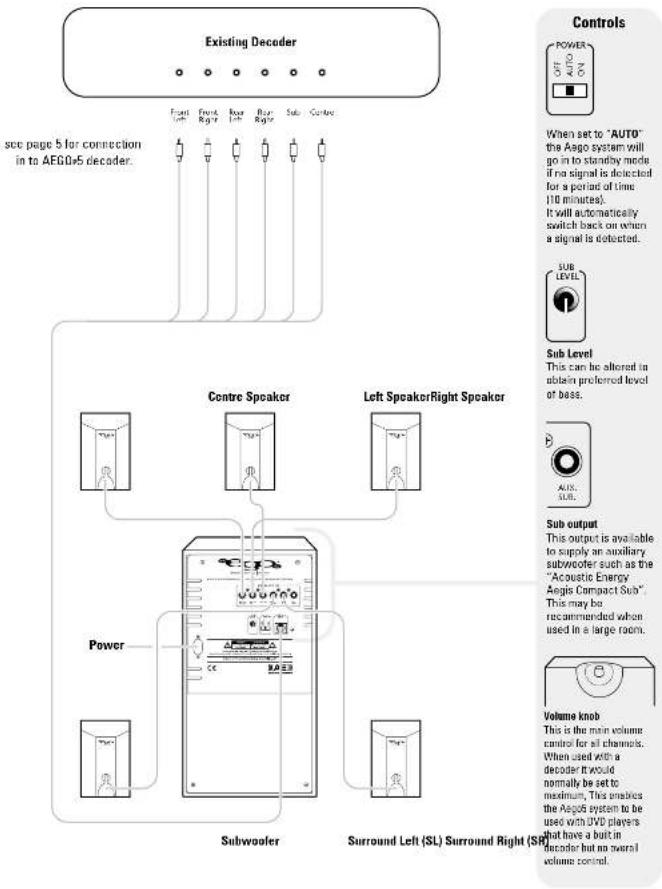
CONNECTING AEGO5
flowchart
graph TD
    A["Existing Decoder"] --> B["See page 5 for connection in to AEGO5 decoder"]
    B --> C["Centre Speaker"]
    B --> D["Left Speaker Right Speaker"]
    C --> E["Power"]
    D --> F["Subwoofer"]
    D --> G["Surround Left (SL) Surround Right (SL)"]
    H["Controls"] --> I["Power OFF AUTO ON"]
    I --> J["When set to "AUTO" the Aego system will go in to standby mode if no signal is detected for a period of time (10 minutes). It will automatically switch back on when a signal is detected."]
    J --> K["Sub Level: SUB LEVEL"]
    K --> L["This can be altered to obtain preferred level of base."]
    L --> M["Sub output: AUX. SUB."]
    M --> N["This output is available to supply an auxiliary subwoofer such as the "Acoustic Energy Aegis Compact Sub". This may be recommended when used in a large room."]
    N --> O["Volume knob: This is the main volume control for all channels. When used with a decoder it would normally be set to maximum. This makes the Aegis system to be used with DVD players that have a built-in decoder but no overall volume control."]
AEGOS SPEAKER PLACEMENT
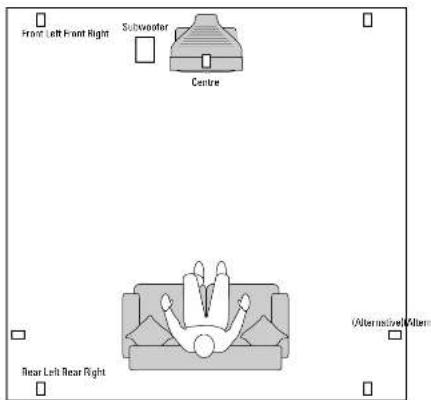
As with all loudspeakers, the placement in relationship to room boundaries (walls etc.) will have a major effect on their overall performance. As the Aega Satellites are so small your choice of positions is far greater and you should use this to maximize the performance of these remarkable little speakers. If a speaker is positioned in free air (not close to any wells etc.) then it will sound brighter. If mounted on or close to a large object (such as a table or on a well) then the mid range will become louder and the speaker will sound warmer and more powerful. In most situations we would recommend that the satellites are mounted on wells at about head height with the brackets provided to give you a warm powerful sound that you will find pleasing and comfortable. However if this is not possible then Aega Speaker Stands are available from your dealer.
text_image
Front Left Front Right Subwoofer Centre (Relternsive) Allerm Rear Left Rear RightSTAND MOUNTING
WALL MOUNTING
SURFACE MOUNTING

text_image
Detachable grille can rotate to suit speaker orientation. * Not supplied


text_image
HOME THEATRE SYSTEM AEGOS® SMART | ACTIVE | SOUND RADIOITAL PROCESSOR COOLY DIGITALACKNOWLEDGMENTS & TRADEMARKS


All contents are subject to change at any time without notice. No responsibility is assumed for its use; or for infringements of patents or other rights of third parties and no parent or license is implied hereby.
All trademarks are the property of their respective owners. Manufactured under license from Dolby Laboratories, "Dolby", "Pro Logic" and the double-D symbol are trademarks of Dolby Laboratories. Confidential Unpublished Works, Inc. 1983 - 1997 Dolby Laboratories, Inc. All rights reserved.
Manufactured under license from Digital Theater Systems, Inc. US Pat. No 5,451,942, 5,055,874, 5,074,380, 5,073,762 and other worldwide parents issued and pending. "OTS" and "DTS Digital Surround" are registered trademarks of Digital Theater Systems, Inc. Copyright 1956, 2000 Digital Theater Systems, Inc. All Rights Reserved.
FCC COMPLIANCE STATEMENT
The equipment has been tested and found to comply with the limits for a Class B digital device, pursuant to Part 15 of the FCC Press. These limits are designed to provide reasonable protection against thermal inter Indiana's electronic devices. This equipment possesses tests and can estimate daily frequency energy and, if not installed and used in accordance with the instructions, may cause thermal inter Indiana's radio communications. However, there is no guarantee that maintenance will not occur in a particular installation. If this equipment does cause interference to radio or television reception, which can be determined by using the equipment off and on, the user is encouraged to try to correct the interference by one or more of the following measures:
- Reorient or relocate the receiving antenna.
- Increase the separation between the equipment and receiver. - Connect the equipment into an outlet on a circuit different from that to which the system is presented.
- Consult the dealer or an experienced radio-TV technician for help.
Notice
This device complies with Part 15 of the FCC miles. Operation is subject to the following two conditions: If the device may not cause harmful interference, and (2) this device must accept any interference received, including interference that may cause undesired operation. Shielded codes and IUC codes must be used for this equipment to comply with the relevant FCC regulations.
CONNECTING AEGOPS
(WITH 5.1 THEATRE SYSTEM)

flowchart
graph TD
    A["Audio Out Audio Out"] --> B["CD PlayerVCRGames Chaserdisc"]
    C["Phone Jack"] --> B
    D["Play Rec"] --> B
    E["L"] --> B
    F["R"] --> B
    G["L"] --> H["Optical"]
    I["R"] --> H
    J["Power"] --> K["AEGO-5 Decoder"]
    L["Subwoofer"] --> K
    M["Surround Left (SL) Surround Right (SR)"] --> K
    N["Sub Level"] --> K
    O["AUX SUB"] --> K
    P["Power"] --> K
    Q["Sub Level"] --> K
    R["Controls"] --> S["Power"]
    T["Controls"] --> U["OFF"]
    T --> V["AL11"]
    T --> W["IN"]
    X["When set to "AUTO", the Aegn system will go in at standby mode if no signal is detected for a period of time (10 minutes). It will automatically switch back on when a signal is detected."] --> Y["SUB LEVEL"]
    Z["Sub Level"] --> AA["This can be altered to obtain preferred level of bass."] --> AB["AUX SUB"]
    AC["Sub output"] --> AD["This output is available to supply an auxiliary subwoofer such as the "Acoustic Energy Aegis Compact Sub". This may be recommended when used in a large room."] --> AE["Volume knob"]
    AF["Volume knob"] --> AG["This is one main volume control for all channels. When used with a decoder it would be required"]
- After properly connecting AEGO+5 to your audio sources and amplifier, plug in AEGO+5's AC adapter to an AC outlet.
- Turn on the power of AEOG v5 by pushing the POWER button on the front panel. Turn on the power of all audio sources, amplifier, or powered subwoofer.
- Installation is now complete, get ready to experience true Dolby Digital or DTS surround sound.
Note: To prevent damage to speakers, when playing music or a movie, ensure the volume is set low initially. Gradually turn the volume up to an appropriate level after the playback has started.

When set to "AUTO" the Aega system will go in to standby mode if no signal is detected for a period of time (10 minutes). It will automatically switch back on when a signal is detected.

Sub Level This can be altered to obtain preferred level of bass.

Sub output This output is available to supply an auxiliary subwoofer such as the "Acoustic Energy Augis Compact Sub". This may be recommended when

Volume knob This is the main volume control for all channels. When used with a decoder it would normally be set to maximum, This enables the Aego5 system to be used with DVD players that have a built in decoder but no overall volume control


AEGOP5 DECODER
text_image
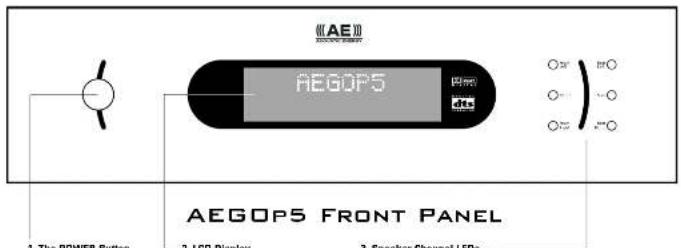
《AE》 AEGOP5 AEGOP5 FRONT PANEL 1. The POWER Button 2. LCD Display 3. Speaker Channel LEDs- The POWER Button Turns AEGOv5 on or off.
- LCD Display Provides you with information regarding the system status and settings.
- Speaker Channel LEDs Each LED represents the status of an individual channel. When a particular channel is active, the LED lights up. The colour of the LED also indicates the frequency range of that channel. * Ret means this particular channel has been set to output a wider frequency range that contains less signal between 2MHz to 12MHz. * Break means the particular channel doesn't contain the less signal between 2MHz to 12MHz.
text_image
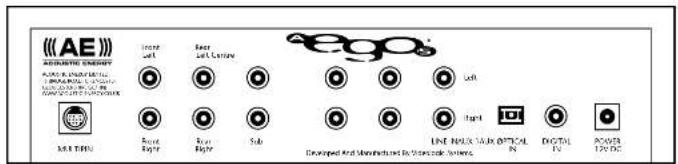
《AE》 ACQUISIC ENERGY M&T 2017 Next Copy Next Copy Sub EGO® Left Right LED MAX. Sub. OFFICIAL Digital TV Power/DCAEGOP5 REAR PANEL
1. MULTIPIN Audio Output:
This output feeds 6 channels audio signals to the matching input on a control centre or power amplifier via a multipin (DIN) cable.
2. Main Outputs (Front Left, Front Right, Rear Left, Rear Right, Centre and Sub):
The Six outputs feed audio signals to the matching inputs on a control centre or power amplifier.
3. AUX1 AUX2 and LINE Inputs:
These inputs accept signals from stereo analog signal sources.
4. OPTICAL and DIGITAL inputs:
Your AEG0e5 has two types of digital inputs. One S/PDIF (OPTICAL) and one coaxial (DIGITAL) input. Connect the digital outputs of the sound sources in these inputs.
5. 12V DC Power Input
Connect the AEGO+5 power adapter to an AC outlet. Please refer to page 6 to determine the correct voltage in your area.
AEGOPS REMOTE CONTROL
text_image
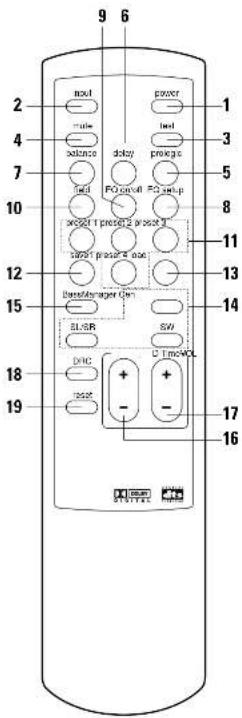
9 6 2 moxt power - rule load balance delay prnega 7 field FO scroll FO app 10 weight I press 2 press 3 12 address power 4 size 15 transfer manager Gen 18 SL/BR SW 19 DAC U TimeWOL 19 reset - 17 + - 161 POWER Button
On/off key
2 INPUT MODE Button
Select from the 5 different source inputs
3 TEST Button
Test signal for the 6 discrete channels
4 MUTE Button
Mute the sound (toggle on and off)
5 PRO LOGIC Button
Select from 4 different surround settings
6 DELAY Button
Select the desired channel to engage the time
delay adjustment
7 BALANCE Button
Set the volume setting for each of the 6 channels
8 EQ SETUP Button
Select up to 5 EQ Band Settings
9 EQ ON/OFF Button
Activate the selected EQ Band Setting
10 FIELD Button
Select from 6 different sound fields
11 PRESET Button (P1, P2, P3, P4)
Recall up to 4 different presets
12 SAVE Button
Store your settings into a selected preset
13 LOAD Button
Activate your saved setting stored in selected preset
14 SPEAKER ON/OFF Buttons (CEN, SL/SR, SW)
CEN Button activates/deactivates the centre
channel speaker.
LS/RS Button simultaneously activates/deactivates
the left and right rear speakers.
SW Button activates/deactivates the subwoofer
15 BASS MANAGER Button
Switches between three bass configurations
(bass config.1, bass config.2 and bass config.3)
16 VOL + and VOL
Increase/decrease the volume
17 D TIME Button
Increase/decrease the delay time.
18 DRC Button
Select among 3 different dynamic range
compression ratios.
19 RESET Button
Resets the system to its factory default settings.
AEGOP5 OPERATION
AEGOP5 OPERATION
The following pages provide information on the operation of AEGOp5. The AEGOp5 was purposely designed to be simple to operate with all functions available from the remote control.
AEGOPS OPERATION - LCD AND LEDs
-
Press the power button to turn the AEGO5 on, press it again to turn it off.
-
When power is turned off but still connected to the mains: a. LCD display and Speaker Configuration LEDs are off. b. Decoder status and user configurations are stored. c. Once the power is turned on again, AEGOv5 will resume to its previous decoder status and user configurations.
-
When power is turned off and the unit unplugged from the mains: a. LCD display and Speaker Configuration LEDs are off. b. Decoder status and user configurations are not stored. c. AEGDr5 will reset to factory defaults if the adaptor is reconnected to the mains.
AEGOPS OPERATION - LCD DISPLAY
Auto Decode Mode (Auto detection of input type)
When AEGD-5 is turned on, it automatically detects and identifies the audio signal coming from source unit.
Playing a DVD title with Dalby Digital (AC3) format, the display shows the following information.

Playing a DVD title with DTS format, the display shows the following information.

Playing DVD, CD, LD, VCR and games consoles connected to the analog inputs (LINE, AUX1 and AUX2), the display shows the following information.

Surround Processing Modes:
The versatile AEGO5 surround sound processor is capable of processing both the digital or analog audio signals from many different types of audio source. With the equipment connected correctly, AEGO5 automatically detects the type of digital signal present at the digital input.
AEGOPS OPERATION - INPUT SELECTION
Input Selection
The AESOr5 can be connected to up to 5 audio sources. Select the input source you want by repeatedly pressing the INPUT Button on the remote control until the desired source is selected.

In the Digital Mode (Dolby Digital / DTS), you can manually select the audio input source either in coaxial or optical form depending on the input type.
If "COAXIAL" is selected, the display shows the following information:

If "Optical" is selected, display of AEOO5 shows the following information:

In the PCM mode, you can switch between 3 audio input sources such as CD Player, VCR, game consoles etc. (See page 8 or page 9 for reference). The display shows the following information:



After connecting up to your source and speakers, you can press the TEST button on the remote to test the system. You can also use the last mode to test the location of the speakers. When the TEST button is pressed, white noise is generated through all satellite speakers in an order of Front Left, Centre, Front Right, Rear Left, and Rear Right channels for 2 seconds each. When completed, the AEGOr5 returns to Auto Decode mode.
When test mode is running, the display shows information in a sequence as below:





AEGOPS OPERATION - MUTE MODE
Mute Mode
Pressing MUTE Button on the remote control will mute all signal outputs (including the multipin and 6 RCA connectors.)
To disable the mute function, press MUTE Button again.

When MUTE Button is pressed, the display shows the following information

AEGOP5 OPERATION
- MASTER VOLUME CONTROL
Volume Setting
To increase or decrease the master volume of your AEGO5, simply press VOL + or VOL - on the remote control.
Example:
Volume being decreased by 3 decibels.

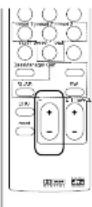
You can set the volume setting of each individual channel.
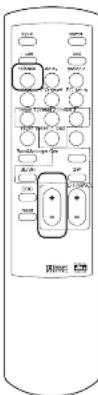
To select a channel, press BALANCE button on the remote control repeatedly until the desired channel is reached.
Adjust volume on selected channel by pressing VOL + or VOL - on the remote control.
Example:
Press the BALANCE button once to display the current balance volume for
channel L (Left)

Press the BALANCE button again to select the next channel.

Press VOL + or VOL - will increase or decrease the balance volume for selected channel.

text_image
USB USB USB USB USB USB USB USB USB USB USB USB USB USB USB USB USB USB USB USB USB USB USB USB USB USB USB USB USB USB USB USB USB USB USB USB USB USB USB USB USB USB USB USB USB USB USB USB USB USB USBAEGOP5 OPERATION
AEGOP5 OPERATION
AEGOP5 OPERATION - DELAY CALIBRATION

The recommended listening position is described below:
■ Centre channel speaker should be placed the same distance as the left and right speakers from your listening position.
- Rear left and right speakers should be placed behind your listening position and above car level.
■ If speaker placement is restricted due to the physical environment of the room, delay calibration is sometimes necessary to achieve the ideal listening environment.
■ if the centre speaker can only be placed nearer to you than the left and right speakers, sound from the centre speaker will arrive before the sound from the left and right speakers. The difference in arrival time could may affect the sound quality and effect. Your AE605 allows you to adjust the speaker time delay to compensate for this problem by increasing the delay time for the centre channel. Thus sound from the centre, left and right speakers will reach you at the same time. If your centre speaker is closer to your listening position than the left and right speakers, press DELAY button repeatedly until the centre channel is selected. To increase or decrease the delay time, press D TIME + or D TIME - until the desired delay is selected. The same procedure can be applied to adjust the delay time of rear surround speakers if necessary.
AEGOPS OPERATION - TIME DELAY ADJUSTMENT ON CENTRE CHANNEL SPEAKER
Delay Calibration Press the DELAY button and repeat to select the length of delay time for the Rear Left (SL), Rear Right (SR) and Centre(C) channels.
The delay range for SL/SR is 0 to 15 ms and 0 to 5 ms for centre.
Adjust the delay time for the selected channel by pressing D TIME + or D TIME - on the remote control.
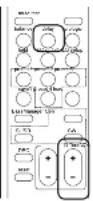
Press the DELAY Button will display the current delay time for channel LS.

Press the DELAY Button again will circle to next channel.

Press the D TIME + or D TIME - button will increase or decrease the delay time for current channel.

Press DELAY Button and repeat to select the length of delay time for SL/SR/C channels.
The delay range for SL/SR is 0 to 15 ms and 0 to 5 ms for centre.
Adjust the delay time on selected channel by pressing D TIME + or D TIME - on the remote control.
Surround Speaker Delay
Delay calibration for the rear surround
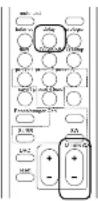
speakers may be necessary if the surround speakers are placed quite close to your listening position. To correct the delay this may cause, press the DELAY button repeatedly until SL or SR appear on the display. Increase the time delay of the surround speakers by pressing D TIME + until you are able to hear a 3D sound effect coming from surround speakers.
Press DELAY Button again to move to the next channel.


Press D TIME + or D TIME - to increase or decrease the delay time for the selected channel.

AEGOPS OPERATION - PRO LOGIC MODE
Pro Logic Mode
Your AEGO+5 will automatically switch to Pro Logic mode when it detects a Pro Logic signal. With other types of input signal, you can select the Dalby Pro Logic mode manually by pressing Pro Logic button on the remote. Repeatedly pressing the Pro Logic Button will switch the Pro Logic mode in between the following modes: AUTO, ALL PCM, ENABLE and DISABLE.

If a Pro Logic signal is detected, AEGO+5 will switch to Pro Logic mode automatically, and the display shows the following information:

If a stereo signal (either analog or digital) is detected, AEG05 will switch to stereo mode automatically. You can then convert the stereo mode to Pro Logic mode by pressing the Prologic button until you see the following on the display:


If you want to convert Pro Logic or 2-channel Dolby Digital signal into Stereo mode, you can press the Prologic button until you see the following on the display:

AEGOPS OPERATION - SPEAKER MODE WITH BASS MANAGER
Speaker Mode with Bass Manager The six LEDs on front panel of your AEGO-5 represent the six discrete audio channels (Left, Right, Centre, Rear Left, Rear Right and Sub). If a particular channel is active, the LED will light up in green. The LED will be red if that particular channel carries bass signal below 120Hz.
Speaker Mode
Pressing the CEN button, switches the centre channel on and off. The LCD will display the following:



Pressing the SL or SR button, switches the surround channels on and off. The LCD will display the following:


Pressing the SW button, switches the subwoofer on and off. The LCD will display the following:


Bass Manager
Pressing the BASS MANAGER button enables you to select from three different settings of Bass; Bass Config.1, Bass Config.2 and Bass Config.3. These selections will feed the bass signal below 120Hz to different speakers as described below.
Bass Config.1
With this setting, the bass signal below 120Hz will be sent to the subwoofer; the LEDs on the front panel indicating SW will be red, and the LCD will show the following:

Bass Config.2
With this setting, the bass signal below 120Hz will be sent to front left and right speakers and the subwoofer, the LEDs on the front panel indicating L/R/SW will be red, and the LCD will show the following information:

Bass Config.3
With this setting, the bass signal below 120Hz will be sent to all the speakers; the LEDs on the front panel indicating L/R/SL/SR/SW channels will be red and the LCD will show the following information

Bass Config. Off
With this setting, the bass signal below 120Hz will be sent to all the speakers; the LEDs on front panel of AEGOP5 indicating L/R/C/SL/SR/SW channels will be red and the LCD will show the following information:

AEGOPS OPERATION
AEGOP5 OPERATION
The AESOr5 enables you to customise up to 4 settings. This function enables you to save and load your favourite settings at any time.
Saving a Preset
Press the PRESET 1 button, the display
will show the following:

Press the SAVE button to save all the current decoder settings into Preset 1.


When complete, your AEGC5 will revert back to Auto Decode mode.

AEGOPS OPERATION - LOADING PRESET
Loading a Preset
You can lead a previously saved preset by pressing LOAD button on the remote.
Loading a Preset
Press any of the 4 preset buttons, (PRESET 1, PRESET 2, PRESET 3 or PRESET 4), the display will show the following:

Press LOAD button to load the preset


When preset loading is complete, your AEGO>5 will revert back to Auto Decode mode.


AEGOPS OPERATION - SOUND FIELD PROCESSING DSP Sound Field
Your AESO45 is equipped with a sound field processor that gives you six different field effects; Disable, Hall, Theater, Stadium, Club, and Church. By pressing Field button on the remote, you can select any of these effects. You can also increase or decrease the Reverb value from 0 - 9 by pressing VOL + or VOL - on the remote control whilst you are selecting the field effect.
Press the Field button and repeat to change the current setting of Sound Field mode.






Your AEGO5 features a 5-band equalizer which enables you to fine tune the sound of your favourite movie or music. Press EQ SETUP button on the remote to activate it. Repeatedly pressing EQ SETUP button will switch between the 5 bands.
Each band of the equalizer enables you to adjust your desired volume to a maximum of =10dB. Press VOL + or VOL - on the remote control to adjust the volume.
After setting the desired volume for each ED band, you
press EQ SETUP button again to store the new setting for that hand.
Press ED ON/OFF button to switch the new ED settings on or off.

Press the EQ SETUP button to display the current setting of EQ Band 1.

Press the EQ SETUP button again to select next EQ Band.

Press the Vol+ or Vol- button to increase or decrease the volume for current EQ Band.

Press EO SETUP button to store the new EO setting.
Press EQ ON/OFF button to switch the new EQ settings on or off.
AEGOPS OPERATION - DRC (DYNAMIC RANGE COMPRESSION)
DBC
Your AEGO-5 features Dynamic Range Compression (IDRC), its sophisticated technology creates realistic sound fields with richly detailed sound that is remarkably free from distortion. Repeatedly pressing DRC button will switch between 3 modes:
"NO" No compression is applied to the original audio signal, this provides the greatest dynamic range.
"HALF" Partial compression is applied, this function is useful if AEGO+5 is connected to an external amplifier.
"FULL" Full compression is applied, this function is useful if AEGO+5 is connected to an external amplifier.
Press the DRC button to display the current setting of Dynamic Range Compression mode.

Press the DRC button again to switch between the DRC modes.


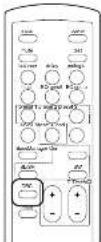
AEGOP5 OPERATION - Resetting
Resetting
Your AEGO-5 can be reset to its factory default settings by pressing RESET button on the remote.
Press the RESET button to reset the AEOOPS to its factory default settings.

When completed, your AEOO>5 reverts to Auto Decode mode.