Primer Pocket SX-SP430A - E-reader Skytex - Free user manual and instructions
Find the device manual for free Primer Pocket SX-SP430A Skytex in PDF.


| Product Type | E-reader |
| Brand | Skytex |
| Model | Primer Pocket SX-SP430A |
| Display Size | 4.2 inches |
| Display Type | Full Color LCD |
| Display Resolution | 160 x 272 pixels |
| Storage | MicroSD card support (up to 16 GB) |
| Connectivity | Mini USB |
| Power Adapter | AC Power Adapter included |
| Battery | Rechargeable lithium-ion battery |
| Supported Formats | ePub, PDF, TXT, and more |
| Dimensions | Approximately 4.5 x 3.0 x 0.5 inches |
| Weight | Approximately 5.6 oz (160 g) |
| Package Contents | E-reader, Mini USB cable, AC adapter, Warranty card, Quick start guide |
| Maintenance | Clean with soft dry cloth; avoid liquids and abrasive cleaners |
| Safety | Keep away from water and extreme temperatures; use only provided charger |
| Spare Parts Availability | Contact Skytex support for replacement cables and adapters |
| General Information | Portable e-reader with color display, ideal for reading on the go |
Frequently Asked Questions - Primer Pocket SX-SP430A Skytex
User questions about Primer Pocket SX-SP430A Skytex
0 question about this device. Answer the ones you know or ask your own.
Ask a new question about this device
Download the instructions for your E-reader in PDF format for free! Find your manual Primer Pocket SX-SP430A - Skytex and take your electronic device back in hand. On this page are published all the documents necessary for the use of your device. Primer Pocket SX-SP430A by Skytex.
USER MANUAL Primer Pocket SX-SP430A Skytex
- Browse the web, from the palm of your hand, anywhere wi-fi* is available.
- Playback support for multiple audio and video formats, including mp3
- Multi-touch interface with pinch-to-zoom for an enjoyable touchscreen
2. Features
- Operating System: Android2.2
• CPU: JZ4760B processors, Frequency 600MHz Support for hardware 2D graphics acceleration.
System Memory: DDR2 256MB
- Storage: Built-in flash memory 4GB External Storage/Micro2D and storage up to 100%
- External storage: Microsoft card storage up to 10GB - Multi touch and C sensor
- External storage: Microsoft card storage up to 10GB - Multi-touch and C sensor
- 4.3" Full Color WideScreen Resolution 480 x 272
3. Specification
• Power Input: 5V, 500mA
• Stock temperature: -20\~60°C
• Stock temperature: -20~60°C
• Operating temperature: 0~40°C
• Unit size: 115 x 78 x 12.5 mm
- System requirement:
- USB OTG Support Win7 / Vista / WinXP / 2003 / 2000
• One year limited Warranty on parts and labor
4. Package Contents
- 4.3"Primer Pocket X 1 - Mini-USB Cable X 1
- AC Power Adapter X 1 - Warranty card X 1
- Quickstart guide X 1 - eMusic gift card X 1
- Micro SD Card Installation

When inserting the Micro SD card,
gently insert the card into the
open slot (Please see image)
When removing the Micro SD card,
gently tap the card, it will pop out
automatically

6. Part name and function
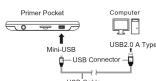
- USB Connector:
Mini-USB: This USB connector connects
USB2.0 A Type: This USB connector connects
to the USB interfaces into a computer
- USB Cable:
Connect the Primer Pocket and a computer.
7. Charging
- LED Indicator:
LED Indicator
Using the AC Power Adapter.
8. Troubleshooting
- There is no sound in cambone
In this case, we have
• Please check there is no problem with the telephone connection.
- How to obtain Apps (Apks).
- You can download via PC and side load apps, or you can download online directly from the device and install the more details (please check www.bits).
with the action and action (or third action),
- The Primer pocket does not turn on
- Plug in the power adapter and try again
- If still does not turn on after battery is fully charged or while the device is
plugged in: please contact customer within tech support.
- Excess noise/distortion
- Please check to see if the earphone plug is clean, dirt may cause noise or
(3) 2014年1月1日
If the issue is widespread. If the file is corrupt, delete it from the device
[Non-Text]
For contact information and/or troubleshooting, please visit our website at "www.skyday.com".
Brand : Skytex
Model : Primer Pocket SX-SP430A
Category : E-reader