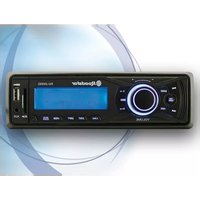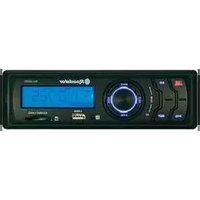
ROADSTAR CD-308MP - Car radio

CD-308MP - Car radio ROADSTAR - Free user manual and instructions

Find the device manual for free CD-308MP ROADSTAR in PDF.

📄 12 pages English EN Download 💬 AI Question 10 questions ⚙️ Specs
Notice ROADSTAR CD-308MP - page 1
Pick your language and provide your email: we'll send you a specifically translated version.
Product Type Car stereo
Brand Roadstar
Model CD-308MP
Dimensions (W x H x D) Approx. 178 x 50 x 160 mm (1 DIN)
Weight Approx. 1.5 kg
Power Supply 12V DC (negative ground)
Maximum Power Output 4 x 50 W
RMS Power Output 4 x 20 W
Supported Disc Formats CD, CD-R, CD-RW, MP3
Radio Bands FM, AM
RDS Function Yes (Radio Data System)
Preset Stations 30 (FM: 18, AM: 12)
Auxiliary Input Front 3.5 mm jack
USB Port Front USB (for MP3 playback)
Display LCD with white backlight
Playback Modes Random, Repeat, Intro, Scan
Equalizer Presets Rock, Pop, Classic, Jazz, Flat
Remote Control Included
Detachable Faceplate Yes (removable for security)
Warranty 1 year

Frequently Asked Questions - CD-308MP ROADSTAR

How do I install the Roadstar CD-308MP in my car?
Refer to the wiring diagram in the manual. Connect the power wires (yellow: constant 12V, red: switched 12V, black: ground), speaker wires (color-coded pairs), and antenna. Use the included mounting sleeve and trim frame. Ensure the unit is securely fastened and all connections are insulated.
Why does the CD player skip or not play?
Ensure the disc is clean and not scratched. Try a different CD. The unit supports CD, CD-R, CD-RW, and MP3 discs. Check if the disc format is compatible. If skipping persists, the laser lens may need cleaning using a CD lens cleaner.
How do I set the clock on the CD-308MP?
Press and hold the 'DISP' or 'CLK' button (depending on model) until the time flashes. Use the tuning knob or preset buttons to adjust hours and minutes. Press again to confirm.
Can I connect my smartphone via Bluetooth?
No, this model does not have built-in Bluetooth. You can connect your smartphone via the front AUX input (3.5mm jack) or USB port for audio playback. For hands-free calling, an external Bluetooth adapter is required.
How do I reset the radio to factory settings?
Press the 'RESET' button located on the front panel (usually near the disc slot) using a thin object like a pen tip. This clears all settings and restores defaults. Note that preset stations and clock will be lost.
What should I do if the radio has no sound?
Check that the volume is not muted or set too low. Verify the speaker wires are correctly connected and not shorted. Test with a different audio source (CD, USB). If no sound from any source, the internal amplifier may be damaged.
How do I program radio stations?
Tune to the desired station manually or via seek. Press and hold one of the preset buttons (1-6) for a few seconds until you hear a beep. Repeat for other stations. The unit stores up to 30 presets (18 FM, 12 AM).
Does the CD-308MP play MP3 files from a USB drive?
Yes, it supports MP3 files from a USB flash drive (FAT32 format, max 32GB). Connect the USB device to the front USB port and select USB mode. The unit will display file/folder names and allows navigation.
My faceplate is stuck, how do I remove it?
Press the 'REL' (release) button on the front panel to unlock the faceplate. Gently pull it off. If stuck, do not force it; check for obstructions. The faceplate is detachable for theft prevention.
What are the fuse specifications?
The unit uses a 10A blade-type fuse (ATO/ATC). It is located on the back of the chassis. Replace only with the same rating to avoid damage. If the fuse blows repeatedly, check for a short circuit.

User questions about CD-308MP ROADSTAR

0 question about this device. Answer the ones you know or ask your own.

Ask a new question about this device

The email remains private: it is only used to notify you if someone responds to your question.

No questions yet. Be the first to ask one.

Download the instructions for your Car radio in PDF format for free! Find your manual CD-308MP - ROADSTAR and take your electronic device back in hand. On this page are published all the documents necessary for the use of your device. CD-308MP by ROADSTAR.

USER MANUAL CD-308MP ROADSTAR

This product meets the essential requirements laid down by EEC Directive 89/336 and has been built in accordance with European standards EN50013, EN50020.

CDP --- CT --- PS --- FREQ --- PTY

CLOCK --- FREQ --- NO PTY

MODALIDAD LECTOR CD/MP3

CDP --- CT --- FREQ --- NO PTY

TP (Traffic Program)

INSTALLATION

VORSICHTSMASSNAHMEN

POP M---ROCK M---CLASS---FLAT M---DSP OFF
Table of contents Click a title to access it
Manual assistant
Powered by Anthropic
Waiting for your message
Product information

Brand : ROADSTAR

Model : CD-308MP

Category : Car radio