KWH62CRC - Air conditioner KELVINATOR - Free user manual and instructions
Find the device manual for free KWH62CRC KELVINATOR in PDF.


| Product Type | Split Air Conditioner |
| Model | KWH62CRC |
| Brand | Kelvinator |
| Cooling Capacity | 6200 BTU/h |
| Heating Capacity | Not Applicable (Cooling Only) |
| Energy Efficiency Ratio (EER) | 11.0 BTU/h/W |
| Power Supply | 220-240 V ~ 50 Hz |
| Power Consumption (Cooling) | 560 W |
| Indoor Unit Dimensions (H x W x D) | 280 x 800 x 195 mm |
| Outdoor Unit Dimensions (H x W x D) | 450 x 700 x 250 mm |
| Weight (Indoor Unit) | 8 kg |
| Weight (Outdoor Unit) | 22 kg |
| Refrigerant Type | R32 |
| Airflow Rate (High) | 450 m³/h |
| Noise Level (Indoor) | 28-40 dB(A) |
| Noise Level (Outdoor) | 50 dB(A) |
| Key Functions | Cooling, Dehumidification, Fan Only, Auto Mode, Sleep Mode, Timer, Remote Control |
| Care and Cleaning | Washable filter, Clean every 2 weeks, Use vacuum for dust |
| Safety Features | Auto restart, Overload protection, Anti-ice control |
| Spare Parts Availability | Filters, Remote control, fan motors available from authorized service centers |
| Repairability Index | 7/10 (based on component accessibility and parts availability) |
| User Manual Languages | English, French, Spanish |
Frequently Asked Questions - KWH62CRC KELVINATOR
User questions about KWH62CRC KELVINATOR
0 question about this device. Answer the ones you know or ask your own.
Ask a new question about this device
Download the instructions for your Air conditioner in PDF format for free! Find your manual KWH62CRC - KELVINATOR and take your electronic device back in hand. On this page are published all the documents necessary for the use of your device. KWH62CRC by KELVINATOR.
USER MANUAL KWH62CRC KELVINATOR
Window Wall (Electronic)
Room Air Conditioner
User Manual
KWH20CRC
KWH20HRC
KWH26CRC
KWH26HRC
KWH39CRC
KWH39HRC
KWH53CRC
KWH53HRC
KWH62CRC
KWH62HRC
Refrigerant R410A
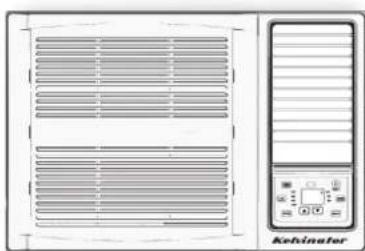
CONTENTS
- SAFETY PRECAUTIONS......2
- UNIT PARTS IDENTIFICATION....5
- OPERATING INSTRUCTIONS ...... 6
- INSTALLATION INSTRUCTIONS....13
- TROUBLESHOOTING ....17
Read This Manual
Inside you will find many helpful hints on how to use and maintain your air conditioner properly. Just a little preventive care on your part can save you a great deal of time and money over the life of your air conditioner. You'll find many answers to common problems in the chart of troubleshooting tips. If you review the chart of Troubleshooting Tips first, you may not need to call for service at all.

CAUTION
- Contact the authorised service technician for repair or maintenance of this unit.
- Contact the installer for installation of this unit.
- The air conditioner is not intended for use by young children or infirmed persons without supervision.
- Young children should be supervised to ensure that they do not play with the air conditioner.
- This air conditioner should be installed in accordance with AS/NZS 3000:2000 and your electricity suppliers rules.
- There are local council rules regarding maximum allowable noise levels emitted by air conditioners.
- If the power cord is to be replaced, replacement work shall be performed by authorised personnel only.
- Installation work must be performed in accordance with the national wiring standards by authorised personnel only. Wrong connection can cause overheating or fire.
Conditions of use
This appliance is intended to be used in household and similar applications such as:
- Staff kitchen areas in shops, offices and other working environments.
- Farm houses.
- By clients in hotels, motels and other residential type environments.
□□□□
SAFETY PRECAUTIONS
To prevent injury to the user or other people and property damage, the following instructions must be followed.
Incorrect operation due to ignoring of instructions may cause harm or damage.
The seriousness is classified by the following indications.
| WARNING | This symbol indicates the possibility of death or serious injury. |
| CAUTION | This symbol indicates the possibility of injury or damage to property. |
■ Meanings of symbols used in this manual are as shown below.
| Never do this. | |
| Always do this. |

WARNING
①Plug in power plug properly.
- Otherwise, it may cause electric shock or fire due to excess heat generation.
Do not operate or stop the unit by inserting or pulling out the power plug.
- It may cause electric shock or fire due to heat generation.
Do not damage or use an unspecified power cord.
- It may cause electric shock or fire.
- If the power cord is damaged, it must be replaced by the manufacturer or an authorised service centre or a similarly qualified person in order to avoid a hazard.
Do not modify power cord length or share the outlet with other appliances.
- It may cause electric shock or fire due to heat generation.
Do not operate with wet hands or in damp environment.
- It may cause electric shock.
Do not direct airflow at room occupants only.
• This could harm your health.
Always ensure effective earthing.
- Incorrect earthing may cause electric shock.
Do not allow water to run into electric parts.
- It may cause failure of unit or electric shock.
① Always install circuit breaker and a dedicated power circuit.
- Incorrect installation may cause fire and electric shock.
©Unplug the unit if strange sounds, smell, or smoke comes from it.
- It may cause fire and electric shock.
Do not use the socket if it is loose or damaged.
- It may cause fire and electric shock.
Do not open the unit during operation.
- It may cause electric shock.
Keep firearms away.
- It may cause fire.
Do not use the power cord close to heating appliances.
- It may cause fire and electric shock.
Do not use the power cord near flammable gas or combustibles, such as gasoline, benzene, thinner, etc.
- It may cause an explosion or fire.
①Ventilate room before operating air conditioner if there is a gas leakage from another appliance.
- It may cause explosion, fire and burns.
Do not disassemble or modify unit.
- It may cause failure and electric shock.

CAUTION
When the air filter is to be removed, do not touch the metal parts of the unit.
- It may cause an injury.
Do not clean the air conditioner with water.
- Water may enter the unit and degrade the insulation. It may cause an electric shock.
- Ventilate the room well when used together with a stove, etc.
- An oxygen shortage may occur.
When the unit is to be cleaned, switch off, and turn off the circuit breaker.
- Do not clean unit when power is on as it may cause fire and electric shock, it may cause an injury.
Do not put a pet or house plant where it will be exposed to direct air flow.
• This could injure the pet or plant.
Do not use for special purposes.
- Do not use this air conditioner to preserve precision devices, food, pets, plants, and art objects. It may cause deterioration of quality, etc.
Stop operation and close the window in storm or hurricane.
• Operation with windows opened may cause wetting of indoor and soaking of household furniture.
Hold the plug by the head of the power plug when taking it out.
- It may cause electric shock and damage.
Turn off the main power switch when not using the unit for a long time.
- It may cause failure of product or fire.
Do not place obstacles around air-inlets or inside of air-outlet.
- It may cause failure of appliance or accident.
☐ Ensure that the installation bracket of the outdoor appliance is not damaged due to prolonged exposure.
- If bracket is damaged, there is concern of damage due to falling of unit.
Always insert the filters securely. Clean filter once every two weeks.
- Operation without filters may cause failure.
Do not use strong detergent such as wax or thinner but use a soft cloth.
- Appearance may be deteriorated due to change of product color or scratching of its surface.
Do not place heavy object on the power cord and ensure that the cord is not compressed.
- There is danger of fire or electric shock.
Do not drink water drained from air conditioner.
- It contains contaminants and could make you sick.
Use caution when unpacking and installing.
- Sharp edges could cause injury.
If water enters the unit, turn the unit off at the power outlet and switch off the circuit breaker. Isolate supply by taking the power-plug out and contact a qualified service technician.
- It may cause electric shock and damage.
Safety Precautions
Prior to Operation
Preparing for operation
- Contact an installation specialist for installation.
- Plug in the power plug properly.
- Do not use a damaged or non-standard power cord.
- Do not share the same outlet with other appliances.
- Do not use an extension cord.
- Do not start/stop operation by plugging/unplugging the power cord.
Usage
- Exposure to direct airflow for an extended period of time could be hazardous to your health. Do not expose occupants, pets, or plants to direct airflow for extended periods of time.
- Due to the possibility of oxygen deficiency, ventilate the room when used together with stoves or other heating devices.
- Do not use this air conditioner for non-specified special purposes (e.g. Preserving precision devices, food, pets, plants, and art objects). Usage in such a manner could harm such property.
Cleaning and maintenance
- Do not touch the metal parts of the unit when removing the filter. Injuries can occur when handling sharp metal edges.
- Do not use water to clean inside the air conditioner. Exposure to water can destroy the insulation, leading to possible electric shock.
- When cleaning the unit, first make sure that the power and circuit breaker are turned off.
Service
For repair and maintenance, contact your authorised service dealer.
Operating Temperature
| COOLING MODE | HEATING MODE | ||||||
| INDOOR | OUTDOOR | INDOOR | OUTDOOR | ||||
| MAX. | MIN. MAX. | MAX. MIN. | MIN. MAX. | MIN. | |||
| 32°C | 17°C | 43°C | 17°C | 27°C | 10°C | 24°C | 1°C |
Note: Performance may be reduced outside of these operating temperatures.
UNIT PARTS IDENTIFICATION
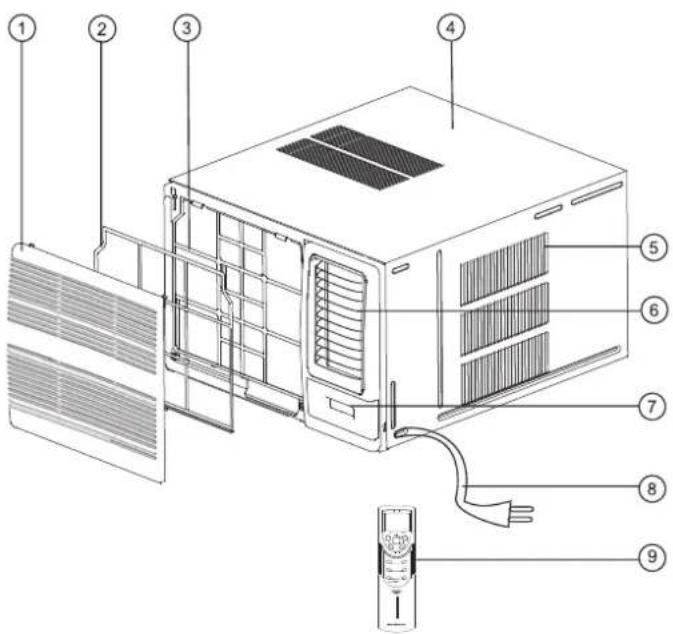
- Front panel
- Air filter
- Frame
- Cabinet
- Air inlet grille (outdoor side)
- Air outlet grille
- Control keypad cover
- Power supply cord and plug
- Remote control
-
Accessories (See page 12)
-
Power cord conductors are distinguished according to color as follows (see Fig.1).
- For your safety and protection, this unit is earthed through the power cord (see Fig.2).
Please contact the manufacturer or its service agent or a similar qualified person if you want to replace it.
- Make sure that the unit is correctly earthed.
The wall outlet should be provided with reliable earth wire.
- The unit should be provided with an individual circuit and the circuit breaker/fuse rating should be the same as that of the power cord and wall outlet.
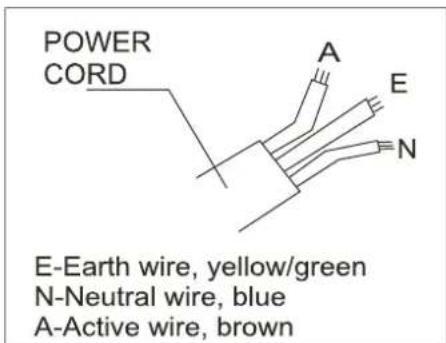
Fig.1
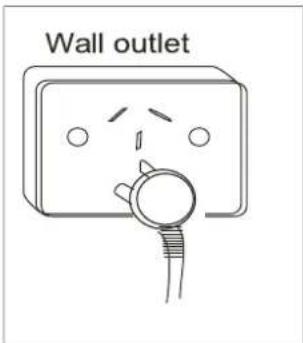
Fig.2
OPERATING INSTRUCTIONS
Controls
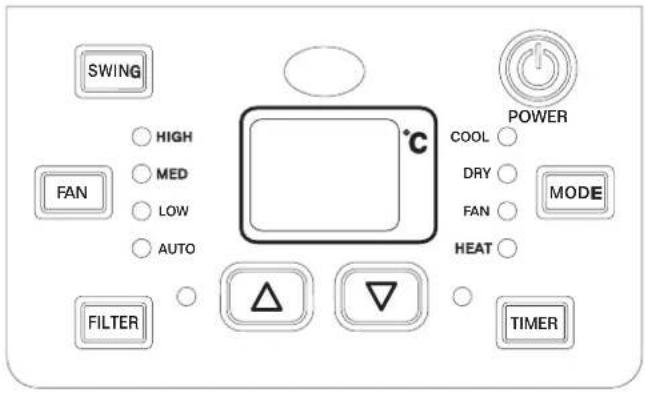
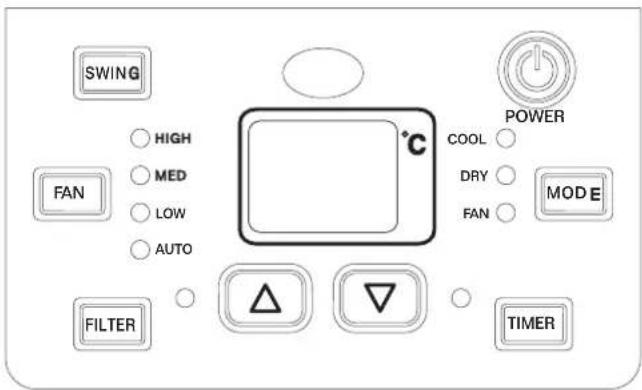
The electronic control keypad will look like one of the following:
Reverse Cycle Models
Cooling Only Models
Vent Control
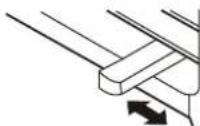
The vent control is located above the control knobs. (see the following figures). For maximum cooling efficiency, CLOSE the vent. This will allow internal air circulation. OPEN the vent to discharge stale air.
CLOSE ◀ VENT ▶ OPEN
To open the vent, set the lever to the right position To close it, set the lever in the left position.
OPERATING INSTRUCTIONS
POWER:
Press the "POWER" keypad to turn the unit on/off.
(The "TIMER" keypad controls the auto start/stop feature of the unit.)
MODE:
Press the "MODE" keypad to select the appropriate operating mode. For the Cooling & Heating models, the mode selection will alternate between "AUTO", "COOL", "DRY", "FAN" or "HEATING." For the Cooling only models, select the operating mode from "AUTO", "COOLING", "DRY" and "FAN." The green indicator light beside the "MODE" option will illuminate, identifying the mode selected. When using the "DRY" mode, you cannot select a fan speed. The fan motor operates on "LOW" speed in "DRY" mode.
Note: There is no green indicator light for "Auto" mode. When you select "Auto" mode, a beep will sound indicating this "MODE" option was selected.
^ :
Press the ▲ keypad to increase the set (operating) temperature of the unit. Each time the keypad is pressed the temperature increases as follows: 1°C (Celsius Scale) Maximum Setting 30°C.
Press the ▲ keypad also to increase the selected time in 1/2 hour increments within 0\~10 hours and 1 hour increments within 10\~24 hours. Maximum Setting 24 hour.
V :
Press the ▼ keypad to decrease the set (operating) temperature of the unit. Each time the keypad is pressed the temperature decreases as follows:
1°C (Celsius Scale) Minimum Setting 16°C. Press the ▼ keypad also to decrease the selected time in 1/2 hour decrements within 0\~10 hours and 1 hour decrements within 10\~24 hours.
FAN:
Press the "FAN" keypad to activate the appropriate fan speed setting. Each depression of the keypad will alternate through "AUTO","LOW","MED","HIGH" fan speed options. The green indicator light beside the FAN speed option will illuminate, identifying the fan speed selected.
SWING:
Press the "SWING" keypad to activate the automatic air swing (oscillation) feature. A beep will sound indicating that this command is operational. The vertical louvres will oscillate back and forth (side to side) automatically sweeping air alternately for comfortable cooling/heating (Reverse cycle models only). To stop the air swing feature, press the "SWING" keypad again.
TIMER:
Press the "TIMER" keypad to activate the auto start/auto stop timer function. Auto start/stop programs can be set from 1/2\~24 hours. Each depression of the "TIMER" keypad will increase the selected time in 1/2 hour increments within 0\~10 hours and 1 hour increments within 10\~24 hours.
DRY:
This mode is used to decrease the humidity in the room.
COOL:
The temperature setting are adjustable between 16° C to 30° C. Cooling begins automatically when the room temperature is 1° C above the set point, and stops when the room temperature is 1° C below the set point. The fan will not stop running.
HEAT:
The temperature settings are adjustable between 16° C to 30° C in heating mode. the fan speed is optional.
Note: When heating stops, there may be a slight delay of 30 seconds for the fan motor to stop.
AUTO:
For the cooling only models, after selecting "AUTO" by "MODE" keypad, the unit will select the appropriate operating mode from "FAN", "COOL" or "DRY" based upon the temperature difference between the actual and desired room temperature. For the cooling and heating models, after selecting "AUTO" by "MODE" keypad, the unit will select the appropriate operating mode for Cool, Heat or Dry based upon the temperature difference between the actual and desired room temperature. The default heating temperature set point is 20° C, the default cooling temperature set point is 25° C.
SLEEP:
Note: This Function can only be activated by remote control, Please refer to remote operating instruction for more detail information
FILTER:
This feature is a reminder to clean the Air Filter (See Air Filter) for more efficient operation. The light will illuminate after 250 hours of operation. To reset after cleaning the filter, press the "FILTER" button and the light will go off.
DEFROST:
Under heating mode, when there is "H1" on the LED display indicates the unit is under defrost function. In this case, any set on main unit or remote controller will not be carried out until the defrost is completed.
FAILURE INDICATOR DISPLAY:
F Indicates a malfunction of the indoor room temperature sensor
F Indicates a malfunction of the evaporator temperature sensor
F 4 Indicates a malfunction of the outdoor condenser temperature sensor
Note: When one of the above malfunctions occurs, turn off the unit, and check for any obstructions. Restart the unit, if the malfunction is still present, turn off the unit and unplug the power cord. Contact the manufacturer or its service agents or a similar qualified person for service.
OPERATING INSTRUCTIONS CONTINUED
Remote Control functions:
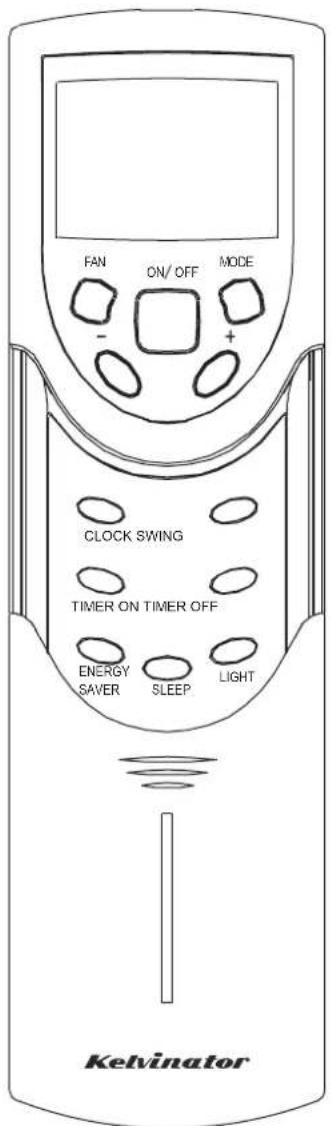
REMOTE CONTROL FEATURES:
The hand held remote control unit allows you to control all operational aspects of your Air Conditioner, from the convenience of your favorite armchair. Here are some things you should know about operating your Air Conditioner with the hand held remote control.
+ , -
Increases / Decreases operating
ON/OFF:
Turns the power to the main unit "ON/OFF" only.
MODE:
Activates the "AUTO", "HEAT" (if applicable), "COOL", "FAN" or "DRY" function.
TIMER ON/TIMER OFF:
Activates the auto "START" or auto "STOP" program from 1/2-24 hours (1/2 hour increments).
SLEEP:
Activates the "SLEEP" mode.
SWING:
Activates the automatic air "SWING" louvre oscillation feature.
FAN:
Activates the "FAN" speed settings ("LOW", "MED", "HIGH", "AUTO").
LIGHT:
Turn the unit LED light on or off only.
ENERGY SAVER:
Activate the "ENERGY SAVER" mode.
CLOCK:
Press this button to set clock.
Batteries:
To operate the hand held remote control, you will require two "AAA" 1.5Volt batteries (included).
NOTE: Batteries should be replaced when:
a) No signal (beep) is heard from the main unit when initiating program commands from the remote control to the main unit.
b) The main unit does not respond to the remote control program commands.
Battery Replacement:
1) Slide the lower (battery) cover down (Located on rear of remote control unit).
2) Insert two "AAA" Batteries inside the battery chamber (as depicted inside the battery chamber).
3) Re-install lower (battery) cover.
4) If the remote control is not being used for extended time periods, (vacation, off season) the batteries should be removed from the remote control unit.
Remote Control Operating Instructions:
The hand held remote control unit operates within a range of 7 metres (23 ft) from the receiver located inside the indoor unit. Any obstruction between the receiver and hand held remote may cause signal interference, limiting the ability to program the main unit. Each time a remote control button is pressed, a beep will sound indicating a command (signal) is transmitted and received on the main unit. When the command is received, the appropriate function will be displayed (temporarily) in the LED display window and the green indicator light corresponding to the selection mode will illuminate on the main control panel.
ON/OFF:
To turn the (air conditioner) power on/off, aim the remote control at the receiver (window) on the main unit and press the "ON/OFF" button.
MODE:
Press the "MODE" button to select either "AUTO (△)", "COOLING (※)", "DRY (♦)", "FAN (✿)" or "HEATING (☀)" mode (Cooling & Heating models) or "AUTO (△)", "COOLING (※)", "DRY (♦)", "FAN (✿)" mode (Cooling only models).
SET COOLING/HEATING TEMPERATURE:
Press the " + " " - " buttons to select (increase/decrease) the required operating temperature, the selected temperature will appear (temporarily) in the LED display. The temperature settings are adjustable between 16°C to 30°C.
FAN:
Press the "FAN" button to select the required operating fan speed ("AUTO" or "LOW", "MED", "HIGH"). (AUTO or ▲, ▶, ▶)
SWING:
Press the "SWING" button to activate the swing feature (the vertical louvres will oscillate automatically from side to side). Press the "SWING" button again to deactivate the "SWING" feature.
TIMER ON :(only available when unit off)
Press the "TIMER ON" button to activate the auto start timer function. Auto start can be set from 1/2-24 hours. At unit off, press "TIMER ON" button, "HOUR ON" on the display will blink and during 5 seconds blinking, the value can be adjusted by pressing "+" or "-" - " button, every press of this button, 1/2 hours will be increased or decreased within 0-10 hours, one hour will be increased or decreased within 10-24 hours, if continuously press the "+" or "-" - " button, 2 seconds later, the value will be changed quickly. During blinking, press the "TIMER ON" button to confirm the time. After "TIMER ON" set up, when repressing the "TIMER ON" button, the "TIMER ON" setting will be canceled.
TIMER OFF:(only available when unit on)
Press the "TIMER OFF" button to activate the auto stop timer function. The method of setting is the same as above for "TIMER ON".
SLEEP:
Press the "SLEEP" button to activate the "SLEEP" feature.
Press the "SLEEP" button to deactivate the "SLEEP" feature. In the Cooling mode, the cooling temperature set point will increase 1°C per hour after the "SLEEP" mode is selected. Two hours later, the set point will continue at this temperature. In the Heating mode, the heating temperature set point will decrease 1°C per hour after the mode is selected. Two hours later, the set point will continue at this temperature.
ENERGY SAVER:(only available in "COOLING" and "DRY" mode)
Press "ENERGY SAVER" to activate or disactivate the "ENERGY SAVER" Function. In this mode, the fan will continue to run for 1 minute after compressor shuts off.
LIGHT:
Press this button at unit On, the light on the main unit will be turned on or off. Light On is defaulted when power on.
CLOCK
Press this button, the clock can be set up, icon ⏻ blinks. Within 5 seconds, the value can be adjusted by pressing " + " or " - " button, if continuously press this button for 2 seconds above, in every 1/2 seconds, one minute will be increased or decreased, if you are still pressing the button after ten minutes increased or decreased, ten minutes will be increased or decreased every 1/2 seconds. Druing blinking, repress the Clock button, icon ⏻ will be constantly displayed and it denotes the setting succeeded.

CAUTION

NEVER operate the air conditioner without the air filter, as dust/dirt particles can contribute to equipment failure.
INTRODUCTION FOR SPECIAL FUNCTION
ABOUT LOCK
Press +and - buttons simultaneously to lock or unlock the keypad. If the remote controller is locked, the icon will be displayed on it, in that case, press any button, the mark will flicker for three times. Repress the combination to unlock.
About switch between Fahrenheit and Centigrade
Under status of unit off, press "MODE" and "-" buttons simultaneously to switch ℃ and ℉.
Vertical air flow adjustment (manually)
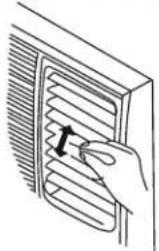
To adjust vertical air flow direction, adjust any one of the horizontal louvre blades. Always try to keep blades horizontal as this can effectively prevent water droplets condensing on the front panel of the unit.
Air Filter
The air filter behind the inlet grille should be checked and cleaned at least once every 2 weeks (or as necessary) to maintain optimal performance of the air conditioner.
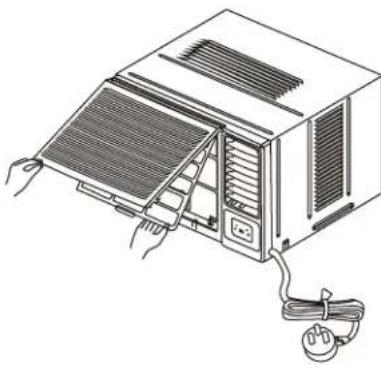
How to remove the air filter
- The grille may be opened from the bottom for easy maintenance after installation.
- Open the inlet grille by pulling from the apertures on the bottom of the unit.
- Pull the tab slightly to release the filter. Pull the filter in the same direction as the opening.
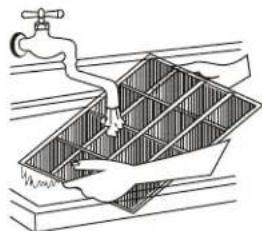
- Clean the filter with warm, soapy water. The water should be below 40° C to prevent distortion of the filter.
- Rinse off and gently shake off excess water from the filter. Allow the filter to dry before replacing it. To prevent distortion of the filter, do not dry in direct sunlight.
Auto-Restart
Auto-restart function
Power failure during operation will stop the unit completely.
When the power restores, the unit restarts automatically with all the previous settings preserved by the memory function.
INSTALLATION INSTRUCTIONS
ACCESSORIES
Drain pan
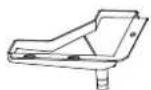
1
Screw

2
Foam strip
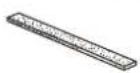
1
Drainage
For Reverse Cycle Models:
To prevent frosting on the condenser when operating in Heat Mode, the unit should be fitted with a drain pan on the bottom of the unit. See the following procedures to perform bottom drainage:
- Take out the drain pan and screws (Supplied with the unit).
- Install the drain pan at the bottom of the unit and secure with screws (Supplied).
- Connect the drain hose to the outlet located at one side of the drain pan. You can purchase the drain hose or tubing locally to satisfy your particular needs (Drain hose is not supplied).

For cooling only modes:
Take out the rubber plug from the basepan first and install drain pan and connect the drain hose.
INSTALLATION INSTRUCTIONS
Select the best location
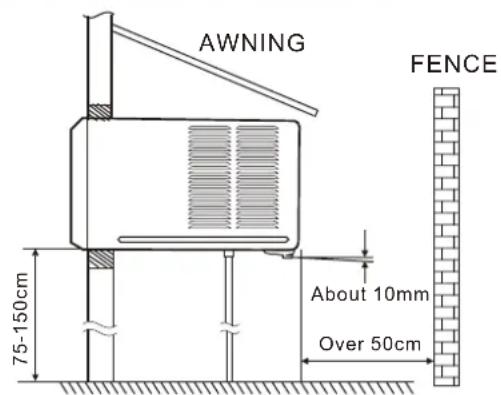
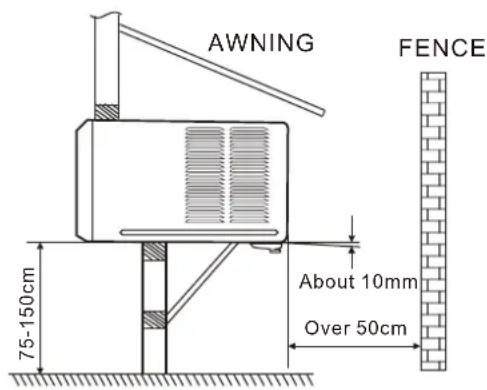
- To avoid vibration and noise, make sure the unit is installed securely and firmly.
- Install the unit where the sunlight does not shine directly on the unit.
If the unit receives direct sunlight, build an awning to shade the cabinet.
- There should be no obstacle, such as a fence or wall, within 50cm from the back of the cabinet because it will prevent heat radiation of the condenser.
Restriction of outside air will greatly reduce the cooling and heating (reverse cycle models only) efficiency of the air conditioner.
- Install the unit with a slight angle down towards the rear to allow condensate to run to the rsebcoutth@rain conl(d)table with level).
- Install the unit with its bottom portion 75\~150cm above the floor level.
- The power cord must be connected to an independent circuit. The yellow/green wire must be earthed.
- In some light construction walls there may be a requirement for the addition of a foam or rubber strip between the air conditioner housing and the wall cavity. The addition of a foam or rubber strip will assist in isolating transmission of normal operation vibration into the wall.
CAUTION
All side louvres of the cabinet must not be obstructed and must be positioned outside of the structure.
Installation of the Housing
Step 1
Remove the air conditioner from it's packaging, remove fixing screws and slide the air conditioner out of it's housing (Refer to Installation Steps).
Step 2
Prepare the hole in the wall so that the bottom of the housing is well supported, the top has minimum clearance and the air inlet louvres have clearance as shown in options A and B. Holes from the outside through to the cavity should be sealed. The housing should slope down towards the rear by about 10mm to allow water formed during operation to drain.
Step 3
Install the housing into the wall and secure. Ensure the foam seals are not damaged. Flash, seal or fill gaps around the inside and outside to provide satisfactory appearance and protection against the weather, insects and rodents.
Note: To assist in isolating transmission of normal operation vibration into the wall, use the foam strip.
Fit the foam strip between the air conditioner housing and the wall cavity.
NOTE: UNIT MAY BE SUPPORTED BY A SOLID FRAME FROM BELOW OR BY A HANGER FROM A SOLID OVERHEAD SUPPORT.
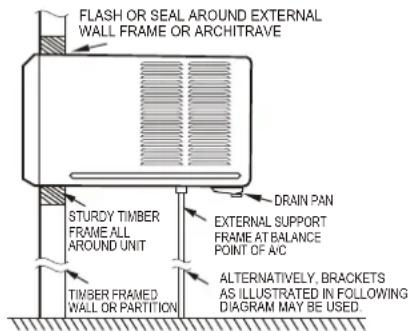
Preferred method of installation into a timber framed wall, partition or window.
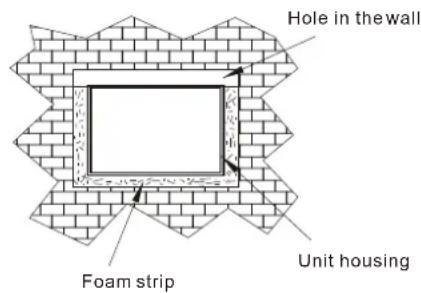
Installation of the unit into the Housing
- Remove the front panel as per the installation instruction and slide the unit into the housing until it is firmly against the rear of the housing. Care is required to ensure the foam sealing strips on the inside of the housing remain in position.
- Connect the air conditioner to the power and position excess cord length beneath the air conditioner base.
- Engage the chassis fixing brackets into the bottom housing rail and secure to the base with the screw provided.
- Re-install the front panel as per the installation instruction.
- Switch the unit on. Check for operation of the unit and check for vibration in the installation.
- Fit the drain pan to the housing and run a drain line to a suitable location if required.
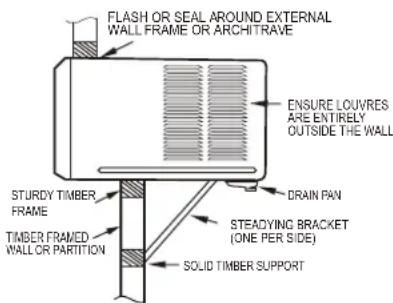
Alternative method of installation if external support cannot be provided.
Installations of the unit into the wall
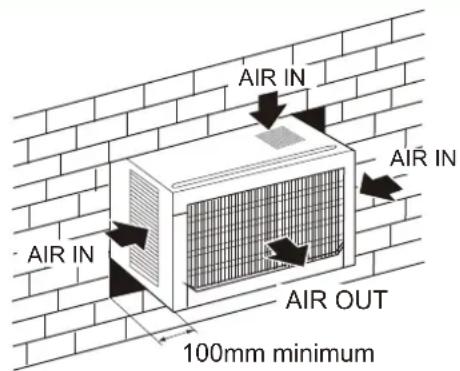
OPTION A
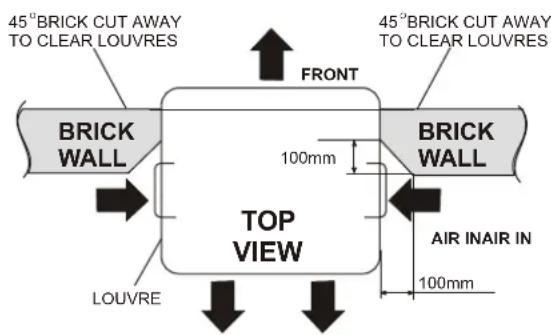
AIR OUT OPTION B
Installation Steps
Step 1. Remove the front panel and the air filter
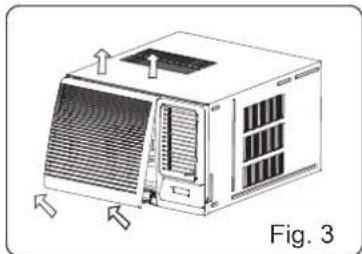
- Hold the slot under the front panel, then uplift it outwards, and remove the front panel (See Fig.3).
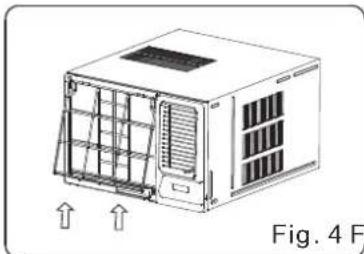
- Pinch the handle under the air filter and make the air filter arched, remove it from the slot from underside to upside (See Fig.4).
Step 2. Remove the frame.
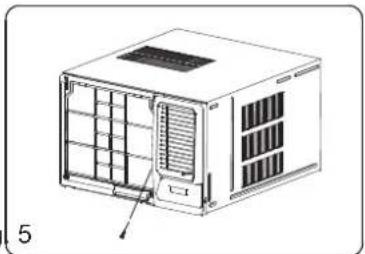
- Remove the one fixing screws from the frame (See Fig.5).
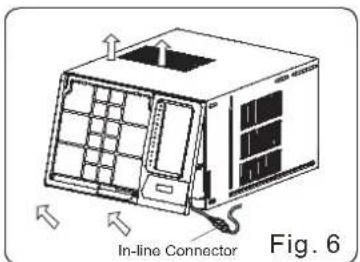
- Grasp the left corner of the frame's underside, then loosen the frame and carefully disconnect the connector (See Fig.6).
Step 3. Installation.
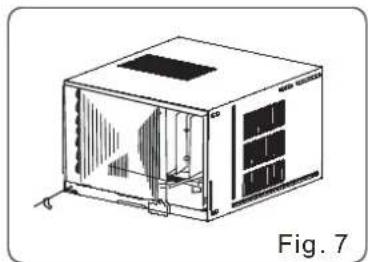
- Remove the fixing screws on the chassis fixing brackets and remove the two screws on the back of cabinet (If fitted. These screws are not needed to install in later installation), then remove the chassis fixing brackets (See Fig.7).
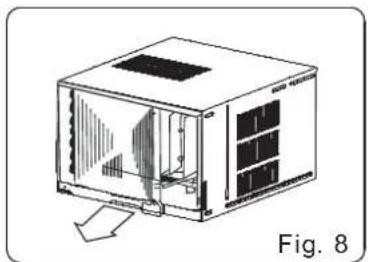
- Grasp the handle on the chassis and carefully slide the air conditioner out of the cabinet (See Fig.8).
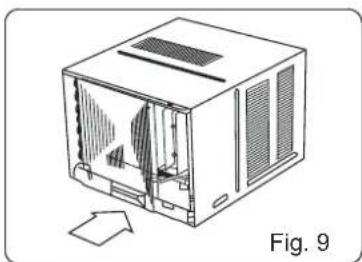
- Push the unit chassis into the cabinet (See Fig.9).
- Fix the chassis with the screws previously removed as they were prior to removal.
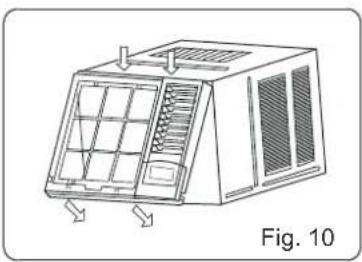
Step 4. Install the frame.
- Install the frame making sure not to interfere with the temperature sensor (See Fig.10).
- Fix the screws on the frame (See Fig.5). For 3.5kW/h models, the screws are supplied with the unit.
Step 5. Install the air filter and front panel.
- Install the air filter into the frame's slot from upside to underside (See Fig.4).
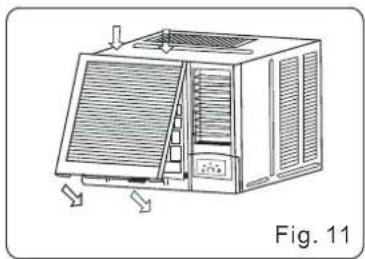
- Hang the front panel on the frame's buckle, then press the front panel into the frame's slot until you hear a click (See Fig11).
TROUBLESHOOTING
Troubleshooting Tips
Save time and money! Review the chart below first and you may not need to call for service.
Normal Operation
- You may hear a pinging noise caused by water being picked up and thrown against the condenser on rainy days or when the humidity is high. This design feature helps remove moisture and improve cooling efficiency.
- Water will collect in the base pan during high humidity or on rainy days. The water may overflow and drip from the outdoor side of the unit.
- The fan may continue to operate when the compressor has cycled off.
Abnormal Operation
| Problem | Possible Causes | What To Do |
| Air conditioner does not start | ■The air conditioner is unplugged. | ● Make sure the air conditioner plug is pushed completely into the outlet and switched on. |
| ■The fuse is blown/circuit breaker is tripped. | ● Check the house fuse/circuit breaker box and replace the fuse or reset the breaker. | |
| ■Power failure. | ● If power failure occurs, switch off and disconnect /unplug the power cord. When power is restored, reconnect (plug in) the power cord, switch on the power and wait 3 minutes to restart the air conditioner to prevent tripping of the compressor overload. | |
| Air conditioner does not cool or heat as it should | ■Airflow is restricted. | ● Make sure there are no curtains, blinds, or furniture blocking the front of the air conditioner. |
| ■The air filter is dirty. | ● Clean the filter at least every 2 weeks. See the operating instructions section. | |
| ■The room may have been hot. | ● When the air conditioner is first turned on you need to allow time for the room to cool down. | |
| ■Cold/hot air is escaping. | ● Check for open furnace floor registers and cold or hot air returns. ● Set the air conditioner's vent to the closed position. | |
| ■Coils have iced up. | ● See Air Conditioner Freezing Up below. | |
| Air conditioner freezing up | ■Ice blocks the air flow and stops the air conditioner from cooling the room. | ● Set the fan at MED or HIGH until the ice melts. |
Electrolux Warranty
FOR SALES IN AUSTRALIA
APPLIANCE: WINDOW WALL AIR CONDITIONER
This document sets out the terms and conditions of the product warranties for Electrolux Appliances. It is an important document. Please keep it with your proof of purchase documents in a safe place for future reference should you require service for your Appliance.
1. In this warranty
(a) ‘acceptable quality’ as referred to in clause 10 of this warranty has the same meaning referred to in the ACL;
(b) ‘ACL’ means Trade Practices Amendment (Australian Consumer Law) Act (No.2) 2010;
(c) 'Appliance' means any Electrolux product purchased by you accompanied by this document;
(d) 'ASC' means Electrolux' authorised serviced centres;
(e) 'Electrolux' means Electrolux Home Products Pty Ltd of 163 O'Riordan Street, Mascot, NSW 2020, ABN 51 004 762 341 in respect of Appliances purchased in Australia;
(f) ‘major failure’ as referred to in clause 10 of this warranty has the same meaning referred to in the ACL and includes a situation when an Appliance cannot be repaired or it is uneconomic for Electrolux, at its discretion, to repair an Appliance during the Warranty Period;
(g) 'Warranty Period' means:
(i) where the Appliance is used for personal, domestic or household use (i.e. normal single family use) as set out in the instruction manual, the Appliance is warranted against manufacturing defects in Australia for 24 months following the date of original purchase of the Appliance;
(ii) where the Appliance is used for commercial purposes (including being used to directly assist a business or where the Appliance is used in a multi-family communal or share type environment), the Appliance will then be warranted against manufacturing defects in Australia for 3 months, following the date of original purchase of the Appliance.
(h) 'you' means the purchaser of the Appliance not having purchased the Appliance for re-sale, and 'your' has a corresponding meaning.
- This warranty only applies to Appliances purchased and used in Australia and is in addition to (and does not exclude, restrict, or modify in any way) any non-excludable statutory warranties in Australia.
- During the Warranty Period Electrolux or its ASC will, at no extra charge if your Appliance is readily accessible for service, without special equipment and subject to these terms and conditions, repair or replace any parts which it considers to be defective. Electrolux or its ASC may use remanufactured parts to repair your Appliance. You agree that any replaced Appliances or parts become the property of Electrolux. This warranty does not apply to light globes, batteries, filters or similar perishable parts.
- Parts and Appliances not supplied by Electrolux are not covered by this warranty.
- You will bear the cost of transportation, travel and delivery of the Appliance to and from Electrolux or its ASC. If you reside outside of the service area, you will bear the cost of:
(a) travel of an authorised representative;
(b) transportation and delivery of the Appliance to and from Electrolux or its ASC,
In all instances, unless the Appliance is transported by Electrolux or an Electrolux authorised representative, the Appliance is transported at the owner's cost and risk while in transit to and from Electrolux or its ASC.
- Proof of purchase is required before you can make a claim under this warranty.
- You may not make a claim under this warranty unless the defect claimed is due to faulty or defective parts or workmanship. Electrolux is not liable in the following situations (which are not exhaustive):
(a) the Appliance is damaged by:
(i) accident
(ii) misuse or abuse, including failure to properly maintain or service
(iii) normal wear and tear
(iv) power surges, electrical storm damage or incorrect power supply
(v) incomplete or improper installation
(vi) incorrect, improper or inappropriate operation
(vii) insect or vermin infestation
(viii) failure to comply with any additional instructions supplied with the Appliance;
(b) the Appliance is modified without authority from Electrolux in writing;
(c) the Appliance's serial number or warranty seal has been removed or defaced;
(d) the Appliance was serviced or repaired by anyone other than Electrolux, an authorised repairer or ASC.
- This warranty, the contract to which it relates and the relationship between you and Electrolux are governed by the law applicable where the Appliance was purchased.
- To the extent permitted by law, Electrolux excludes all warranties and liabilities (other than as contained in this document) including liability for any loss or damage whether direct or indirect arising from your purchase, use or non use of the Appliance.
- For Appliances and services provided by Electrolux in Australia, the Appliances come with a guarantee by Electrolux that cannot be excluded under the Australian Consumer Law. You are entitled to a replacement or refund for a major failure and for compensation for any other reasonably foreseeable loss or damage. You are also entitled to have the Appliance repaired or replaced if the Appliance fails to be of acceptable quality and the failure does not amount to a major failure. The benefits to you given by this warranty are in addition to your other rights and remedies under a law in relation to the Appliances or services to which the warranty relates.
- At all times during the Warranty Period, Electrolux shall, at its discretion, determine whether repair, replacement or refund will apply if an Appliance has a valid warranty claim applicable to it.
- To enquire about claiming under this warranty, please follow these steps: (a) carefully check the operating instructions, user manual and the terms of this warranty;
(b) have the model and serial number of the Appliance available;
(c) have the proof of purchase (eg an invoice) available;
(d) telephone the numbers shown below. - You accept that if you make a warranty claim, Electrolux and its ASC may exchange information in relation to you to enable Electrolux to meet its obligations under this warranty.
Important Notice
Before calling for service, please ensure that the steps listed in point 12 above have been followed.
FOR SERVICE
or to find the address of your nearest state service centre in Australia
PLEASE CALL 13 13 49
For the cost of a local call (Australia only)
SERVICE AUSTRALIA
Electrolux
ELECTROLUX HOME PRODUCTS
www.electrolux.com.au
FOR SPARE PARTS
or to find the address of your nearest state spare parts centre in Australia
PLEASE CALL 13 13 50
For the cost of a local call (Australia only)
If you'd like further information about Kelvinator appliances, please visit your retailer, phone or email our Customer Care team or visit our website.
telephone: 1300 363 640
fax: 1800 350 067
email: customercare@electrolux.com.au
web: www.kelvinator.com.au
Kelvinator. We are part of the Electrolux family.
Share more of our thinking at www.electrolux.com.au
- CONTENTS
- READ THIS MANUAL
- CAUTION
- CONDITIONS OF USE
- SAFETY PRECAUTIONS
- WARNING
- PRIOR TO OPERATION
- PREPARING FOR OPERATION
- USAGE
- CLEANING AND MAINTENANCE
- SERVICE
- UNIT PARTS IDENTIFICATION
- OPERATING INSTRUCTIONS
- CONTROLS
- VENT CONTROL
- POWER
- MODE
- V
- FAN
- SWING
- TIMER
- DRY
- COOL
- HEAT
- AUTO
- SLEEP
- FILTER
- DEFROST
- FAILURE INDICATOR DISPLAY
- OPERATING INSTRUCTIONS CONTINUED
- REMOTE CONTROL FEATURES
- ON/OFF
- TIMER ON/TIMER OFF
- LIGHT
- ENERGY SAVER
- CLOCK
- BATTERIES
- BATTERY REPLACEMENT
- REMOTE CONTROL OPERATING INSTRUCTIONS
- SET COOLING/HEATING TEMPERATURE
- TIMER ON :(ONLY AVAILABLE WHEN UNIT OFF)
- TIMER OFF:(ONLY AVAILABLE WHEN UNIT ON)
- ENERGY SAVER:(ONLY AVAILABLE IN "COOLING" AND "DRY" MODE)
- INTRODUCTION FOR SPECIAL FUNCTION
- ABOUT LOCK
- ABOUT SWITCH BETWEEN FAHRENHEIT AND CENTIGRADE
- VERTICAL AIR FLOW ADJUSTMENT (MANUALLY)
- AIR FILTER
- HOW TO REMOVE THE AIR FILTER
- AUTO-RESTART
- INSTALLATION INSTRUCTIONS
- ACCESSORIES
- DRAINAGE
- FOR REVERSE CYCLE MODELS
- FOR COOLING ONLY MODES
- INSTALLATION OF THE HOUSING
- STEP 1
- STEP 2
- STEP 3
- INSTALLATION OF THE UNIT INTO THE HOUSING
- INSTALLATIONS OF THE UNIT INTO THE WALL
- INSTALLATION STEPS
- STEP 1. REMOVE THE FRONT PANEL AND THE AIR FILTER
- STEP 2. REMOVE THE FRAME
- STEP 3. INSTALLATION
- STEP 4. INSTALL THE FRAME
- STEP 5. INSTALL THE AIR FILTER AND FRONT PANEL
- TROUBLESHOOTING
- TROUBLESHOOTING TIPS
- NORMAL OPERATION
- ELECTROLUX WARRANTY
- THIS DOCUMENT SETS OUT THE TERMS AND CONDITIONS OF THE PRODUCT WARRANTIES FOR ELECTROLUX APPLIANCES. IT IS AN IMPORTANT DOCUMENT. PLEASE KEEP IT WITH YOUR PROOF OF PURCHASE DOCUMENTS IN A SAFE PLACE FOR FUTURE REFERENCE SHOULD YOU REQUIRE SERVICE FOR YOUR APPLIANCE
- IN THIS WARRANTY
- IMPORTANT NOTICE
- FOR SERVICE
- PLEASE CALL 13 13 49
- SERVICE AUSTRALIA
- ELECTROLUX
- FOR SPARE PARTS
- PLEASE CALL 13 13 50
Brand : KELVINATOR
Model : KWH62CRC
Category : Air conditioner