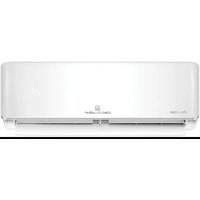
KSD71HWJ - Air conditioner KELVINATOR - Free user manual and instructions
Find the device manual for free KSD71HWJ KELVINATOR in PDF.


Pick your language and provide your email: we'll send you a specifically translated version.
| Product Type | Window Air Conditioner |
| Brand | Kelvinator |
| Model | KSD71HWJ |
| Cooling Capacity (BTU) | 7,100 |
| Room Coverage (sq. ft.) | Up to 350 |
| Energy Efficiency Ratio (EER) | 11.0 |
| Voltage / Frequency | 115 V / 60 Hz |
| Power Consumption (Cooling) | 650 W |
| Dimensions (W x H x D) | 20 x 12 x 18 in |
| Weight | 55 lbs |
| Refrigerant Type | R32 |
| Controls | Remote control and manual touch buttons |
| Modes | Cool, Fan, Dry, Energy Saver |
| Fan Speeds | High, Medium, Low, Auto |
| Thermostat | Electronic, 60-86°F (16-30°C) |
| Timer | 24-hour on/off timer |
| Air Filter | Washable, removable (mesh type) |
| Noise Level (dB) | 52-58 dB (indoor) |
| Installation Type | Window mount (double hung window) |
| Window Kit Included | Yes (side panels, weather seal) |
| Safety Features | Auto restart, child lock, tip-over shut-off |
| Maintenance | Clean filter every 2 weeks, coil cleaning annually |
| Warranty | 1 year parts and labor, 5 years on compressor |
| Repairability Index | 8.0/10 (based on spare part availability) |
Frequently Asked Questions - KSD71HWJ KELVINATOR
How to clean the air filter of Kelvinator KSD71HWJ?
Remove the filter by pulling it out from the front grille. Wash it with lukewarm water and mild detergent. Let it dry completely before reinstalling. Clean every two weeks for optimal performance.
What is the recommended room size for KSD71HWJ?
The unit is suitable for rooms up to 350 square feet (approx. 20x17 ft). For best results, ensure proper insulation and minimal direct sunlight.
Does KSD71HWJ have a remote control?
Yes, the air conditioner comes with a remote control that allows you to adjust temperature, fan speed, mode, and timer from across the room.
How to set the timer on Kelvinator KSD71HWJ?
Press the Timer button on the remote or control panel. Use the +/- buttons to set the desired hours (1-24). The unit will turn on or off automatically at the set time.
What does the 'Energy Saver' mode do?
Energy Saver mode cycles the fan on and off based on the cooling demand. The compressor runs only when needed, reducing power consumption by up to 30% compared to continuous fan.
Why is my KSD71HWJ not cooling properly?
Check if the filter is dirty (clean it). Ensure the window is properly sealed. Verify the set temperature is lower than room temp. If still not cooling, the unit may need refrigerant recharge (contact a technician).
Can I install KSD71HWJ in a sliding window?
The standard installation kit is designed for double hung windows. For sliding windows, you may need an optional adapter. Check the manual for compatibility.
How to use the 'Dry' mode?
Use Dry mode to reduce humidity without overcooling. The fan runs at low speed to draw moisture from the air. Ideal for damp climates (operating temp above 60°F).
What is the noise level of this air conditioner?
The indoor noise level ranges from 52 to 58 dB, similar to a quiet conversation. Outdoor unit noise is about 62 dB due to compressor and fan.
How do I reset the filter reminder?
After cleaning the filter, press and hold the Filter Reset button (if available) for 3 seconds until the indicator light turns off. Refer to manual if your model lacks this button.
User questions about KSD71HWJ KELVINATOR
0 question about this device. Answer the ones you know or ask your own.
Ask a new question about this device
No questions yet. Be the first to ask one.
Download the instructions for your Air conditioner in PDF format for free! Find your manual KSD71HWJ - KELVINATOR and take your electronic device back in hand. On this page are published all the documents necessary for the use of your device. KSD71HWJ by KELVINATOR.
USER MANUAL KSD71HWJ KELVINATOR
Manual assistant
Powered by Anthropic
Waiting for your message
Product information
Brand : KELVINATOR
Model : KSD71HWJ
Category : Air conditioner