XKKITAMICEW - Keyboard Hamlet - Free user manual and instructions
Find the device manual for free XKKITAMICEW Hamlet in PDF.


User questions about XKKITAMICEW Hamlet
0 question about this device. Answer the ones you know or ask your own.
Ask a new question about this device
Download the instructions for your Keyboard in PDF format for free! Find your manual XKKITAMICEW - Hamlet and take your electronic device back in hand. On this page are published all the documents necessary for the use of your device. XKKITAMICEW by Hamlet.
USER MANUAL XKKITAMICEW Hamlet
natural_image
Black desktop computer keyboard and mouse (no visible text or labels)Manuale Utente
XKKITAMICEW
www.hamletcom.com
Gentile Cliente.
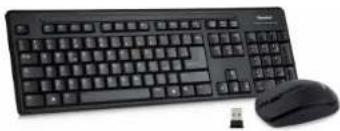
Mouse + Keyboard Wireless Kit
natural_image
Black desktop computer keyboard and mouse with a USB cable (no visible text or labels)User Manual
XKKITAMICEW
www.hamletcom.com
Dear Customer.
thanks for choosing an Hamlet product. Please carefully follow the instructions for its use and maintenance and, once this item has run its life span, we kindly ask You to dispose of it in an environmentally friendly way, by putting it in the separate bins for electrical/electronic waste, or to bring it back to your retailer who will collect it for free.
We inform You this product is manufactured with materials and components in compliance with RoHS Directive 2011/65/EU; with WEEE Directive 2002/96/CE, 2003/108/CE Italian Legislative Decree 2005/151 and EMC 2004/108/EC, LVD 2006/95/EC, R&TTE 1999/5/EC for the following standards:
EN 55022: 2010, EN 55024: 2010
EN 61000-3-2: 2014. EN 61000-3-3: 2013
EN 60950-1:2006+A11:2009+A1:2010+A12:2011
+ A2: 2013, EN 62479: 2010
EN 301 489-1 V1.9.2: 2011-09 EN 301 489-2 V1.6.1: 2012-09
EN 301 489-5 V1.6.1:2013-08 EN 300 440-1 V1.6.1:2010-08
EN 300 440-1 V1.6.1:2010-08 EN 300 440-2 V1.4.1:2010-08
The complete CE declaration of conformity of the product can be obtained by contacting Hamlet at e-mail address info@hamletcom.com. The information on the importer for your country can be found in the "About Us" section of the website www.hamletcom.com.
CE Mark Warning
This is a Class B product. In a domestic environment, this product may cause radio interference, in which case the user may be required to take adequate measures.
All trademarks and company names mentioned in this manual are used for description purpose only and remain property of their respective owners. The material in this document is for information only and subject to change without notice. Specifications and appearance of the product are subject to change without prior notice.
Introduction
Hamlet Wireless Desktop oers the easiest way to get rid of the cables and make space on the desk. The keyboard and mouse use the advanced 2.4 GHz wireless RF technology to connect to the computer through a nano receiver (included) occupying only one PC's USB port. The full-size keyboard oers maximum comfort of use while typing and the 3-button optical mouse ensures comfortable support for your hand for precise pointing. Hamlet Wireless Desktop has an operating range of 10 meters and the included batteries offer a prolonged use of the device.
Features
• 2.4 GHz wireless technology up to 10 meters range
• Full-size keyboard with 105 keys Italian layout
- 3-button + scroll wheel optical mouse suitable for
right and left handed users
• Nano receiver with USB interface
- Batteries included
• Keyboard dimension: 445 x 145 x 23 mm
- Mouse dimension: 101 x 56 x 34 mm
- Compatible with Windows XP/Vista/7/8 and 10, Mac,
Linux
Package contents
- Keyboard
- Mouse
• USB nano receiver
• 1 AAA (keyboard) and 1 AA (mouse) batteries - User manual
Mouse overview
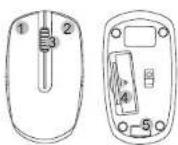
- Left button
- Right button
- Scrolling wheel
- Battery compartment
- USB Nano receiver
storage
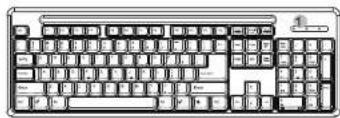
Keyboard overview
natural_image
Front view of a standard computer keyboard with no visible text or labels on the keys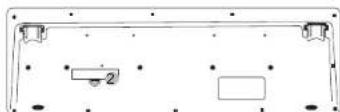
- LED indicators (Num lock, Caps lock, Battery)
- Battery compartment
Instructions for use
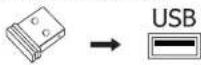
- Take out the nano receiver from mouse and plug it into the USB port of your computer.
- Remove the battery cover and insert the batteries into the battery compartment of mouse and keyboard following the + and - polarity (after you insert the battery into the keyboard, the battery LED indicator will blink one time).
- Replace the battery cover.
- Tum on the mouse switch.
The wireless keyboard and mouse are now ready for use. Please remember that the operating range of the wireless kit is about 10 meters.