OPT-TX1-RS485U - Extendeur AV Webgate - Free user manual and instructions
Find the device manual for free OPT-TX1-RS485U Webgate in PDF.


| Product Type | AV Extender |
| Brand | Webgate |
| Model | OPT-TX1-RS485U |
| Dimensions (approx.) | 100 mm x 50 mm x 20 mm |
| Weight (approx.) | 100 g |
| Power Supply | 5 V DC via USB or barrel jack |
| Power Consumption | 2.5 W (max) |
| Video Input | HDMI (up to 1080p @ 60 Hz) |
| Video Output | HDMI (up to 1080p @ 60 Hz) |
| Audio Support | Stereo audio via HDMI |
| Control Interface | RS-485 |
| Maximum Transmission Distance | 100 m over Cat5e/6 cable |
| Supported Protocols | HDMI 1.4, HDCP 1.4 |
| Main Functions | Extends AV signal with RS-485 control pass-through |
| Maintenance | Wipe with a dry, soft cloth; avoid moisture |
| Safety Instructions | Do not expose to water or extreme temperatures; use only supplied power adapter |
| Spare Parts | Internal components are not user-serviceable; contact support for repairs |
| Repairability | Limited; no user-replaceable parts |
| Operating Temperature | 0°C to 50°C |
| Storage Temperature | -20°C to 60°C |
Frequently Asked Questions - OPT-TX1-RS485U Webgate
User questions about OPT-TX1-RS485U Webgate
0 question about this device. Answer the ones you know or ask your own.
Ask a new question about this device
Download the instructions for your Extendeur AV in PDF format for free! Find your manual OPT-TX1-RS485U - Webgate and take your electronic device back in hand. On this page are published all the documents necessary for the use of your device. OPT-TX1-RS485U by Webgate.
USER MANUAL OPT-TX1-RS485U Webgate
The World's first certified by HDcctv Alliance
Instruction Manual
FIBER OPTIC CONVERTER
OPT-RX1-RS485U / OPT-TX1-RS485U OPT-RX16-RS485U / OPT-TX4-RS485U
※ Please read instruction manual carefully before installing or using this product.
Product Features
- Converting between HD SDI signal and Optical signal. Optical signal transmission.
- Video/Data (RS485) transmission up to 20Km through single mode fiber-optic cable.
- Supports 15Gbps, 750Mbps for optical signal, and max. 115200bps for data.
- Supports 1080p25/30 or 1080i50/60 video.
- LED indicators for Power, Video, Data and Fiber-optic Status.
- 1U 19" rack type (OPT-RX16-RS485U model only).
- Advanced surge arrestor and ESD protection circuit for HD-SDI port.
Accessories
| Fiber Optic Converter | ||
| 16Ch TX/RX | 4Ch TX | 16Ch RX |
| Accessories | ||
| Installation | Power Cable | Adapter |
| ※ | ※ | |
※ Power cord and adapter are supplied only for OTP-RX4-RS485U and OPT-RX16-RS485U
WEBGATE HD-CCTV solution provider
WEBGATE Div. Dacmyung Enterprise Co., Ltd. 6F, Hanlin Venture Town B/D, 689-6, Geumjinong-Dong Gunpo-Si. Gyeonggi-do, Korea TEL: +82-1644-3421 FAX: +82-31-428-9400 sales@webgateinc.com support@webgateinc.com www.webgateinc.com Premium to your HD-CCTV solution
Device connection method
| HD-SDIRS485 | TransmitterCamera | Refer topicture No.1 | Fiber Optic CableMax. 20km | Receiver | HD-SDIRS485 | DVR |
| Refer to picture No.1 |
- Connect camera's video output to Transmitter's "HD-SDLIn" using coaxial cable.
- To control camera OSD or PTZ, connect RS485 line between Transmitter and camera.
-
Please refer to "NOTICE of coaxial cable" regarding the maximum transmission distance of HD-SDL.
-
Connect Transmitter and Receiver using Single mode LC Type fiber-optic cable.
- When connecting optical cable to the converter, insert fully until you hear a click sound.
-
As shown in Figure 1, pull the lever to lock the optical cable not to fall off from the converter.
-
Connect Receiver's "HD-SDI Out" to DVR's "HD-SDI In" using coaxial cable.
-
To control camera OSD or PTZ, connect RS485 line between Receiver and DVR.
-
Check the status of LED indicators to confirm the correct connections
- Power : Red LED will be lit if the power is on.
- HD-SDI : Green LED will be lit if the video signal enters.
- Optic : Green LED will be lit if Transmitter and Receiver are connected each other.
-
RS485 : Green LED will be blinking during data is being entered.
-
Check the monitor that is connected to DVR whether all channels are properly displayed
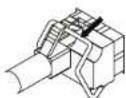
Picture No.1
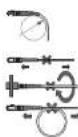
LC Type Connector
Precautions
Fiber-Optic Cable
- For cable connection, do not bend the cable narrower than 30mm
(Minimum allowable refraction range). - Do not pull the cable from both ends.
- Do not spin the optical cable while the
cable is connected to connector. - Do not knot the optical cable.
Coax Cable
- HD-SDI maximum transmission distance depends on the cable manufacturer or installation environment.
The impedance of the coaxial cable and BNC
connectors must be 75 Ohm. For your reference, please refer to the below table of cable recommendation.
| Cable Type | Length of HD-SDT | Details of usage |
| 5C2V | About 100M | For analog signal |
| 4C-FB(T), 4C-HFB(T), RG59 | About 150M | High foamed, double or triple shielded cable is recommended |
| 5C-FB(T), 5C-HFB(T), L-GCHD, RG6 | About 200M | Dedicated cable for HD-SDT |
Note) When selecting a cable, consider the maximum transmission distance of the cable which depends on its attenuation at 750MHz. (dB/100m <25dB of attenuation is recommended.)
Trouble Shooting
| Trouble & Symptom Way to Solve | |
| Can not turn on the equipment, and LED indicators do not work. | √ Check the power is properly connected to the equipment√ Check the input power voltage√ If it does not work, please check the power adapter or replace it |
| Nothing shows on the screen. | √ Check video of camera that is connected to Transmitter. If there is no video output from camera, nothing could be shown on the screen√ Check the power connection of camera√ Check the cable connections between camera, converter and DVR |
| Can not control camera's OSD menu and PTZ | √ Check the RS485 connection among camera, converter and DVR√ Check the polarity of RS485(+-)√ Check the setting of DVR and camera. If the setting values such as Readrate. Protocol. Address are not properly configured. camera control can not be achieved. |
Note) Foamed or High-foamed insulation cable is recommended.
Note) Double or Triple shielded cable is recommended
Specification
| Model OPT-RX1-RS485U OPT-TX1-RS485U OPT-TX4-RS485U OPT-RX16-RS485U | ||||
| Function | 1Ch Receiver | 1Ch Transmitter | 4Ch Transmitter | 16Ch Receiver |
| Video Standard | HD-SDI SMPTE 292M | |||
| Resolution | 5MPTE 274M(1080p25/30, 1080f50/60), SMPTE 296M(720p25/30/50/60) | |||
| Impedance | 75 ohm | |||
| Fiber Optic Type | Single-mode | |||
| Connector | IC | |||
| HD-SDI Length | Approx 150m@L 4CF3(Canare) | |||
| Fiber Length | Approx 20Km at 1.5Gbps | |||
| Data Channel | RS485 Upscreen(Remote control from DVR to Camera) | |||
| Indicator LED | Power(Red) Link-Opt(Green), Link-SDI(Green), RS485(Green) | |||
| Input Voltage/Current | 12 VDC (Acceptable Input Voltage Range 6V ~ 25V) | |||
| Operating Temperature / Humidity | -0°C to +50°C (+32°F to +122°F) 20%RH to 80%RH | |||
| Power consumption Max 6.2W Max 30W Max 2.0W | ||||
| Dimension (W x D x H) | 65 X 117 X 26 mm | 140 X 239 X 54 mm | 361 X 483 X 44 mm | |
| Weight | 160g | 150g | 1Kg | 4.5Kg |
| Certifications | KC, FCC, CF, RoHS, HDcrey(TBD) | |||
Appearance & Dimension (Unit : mm)
OPT-RX16-RS485U
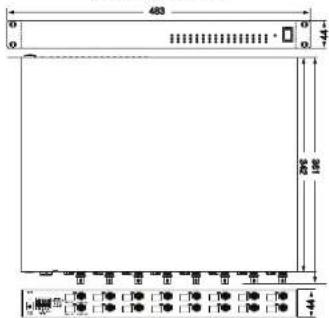
① Power Input(DC12V 2A) Ⓧ LED(RED) : Power
② RS485 (1) HD-SDI IN
③ LED/Green): HD-SDI, ④ Fibro TX
① LED, Green: HD 361 (⑥ Fiber 17)
(⑦ LED Green): PS485 (M) Fiber RX
⑤ LED(Green) : Optic ⑥ HD-SDI Out
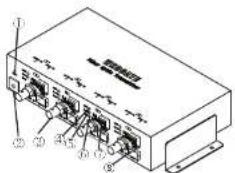
① LED(RED) : Power ⑤ LED(Green) : RS485
② Power Input(DC12V 5A) ◎ LED(1 HD-SDI
① HD-SDC In ② RS485
④ LED(Green): Optic (5) Fiber TX
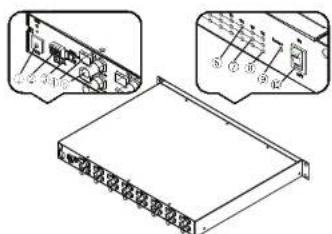
① Power Input(DCL2V 5A) ⑥ LED(Green): Optic
① RS485 ② LED(Green) : HD SDI
③ Termination ④ LED(Green): RS485
④ Fiber Rx
② LED(Green) : Power
① HD SDF Out ② Power Switch
Warranty
| Product name | FIBER OPTIC CONVERTER | Warranty term | ||
| Model name | OPT-RX1-RS485U, OPT-TX1-RS485UOPT-TX4-RS485U, OPT-RX16-RS485U | 2 years after purchase | ||
| Date of purchase | Year | Month | Day | |
| Warranty term | Year | Month | Day | |
| Serial number | ||||
| Customer's address | Name | |
| Contact | ||
| Address of shop(Company name) | Name | |
| Contact |
◆ Please fill out vacant area before sending products.
★ For customer service ★
Please read this manual again before requesting customer service.
Any simple malfunctions due to customer's misunderstanding on the product could be resolved by customer.
How to request service?
Please inform details of malfunctions correctly.
Free or non free repair will be decided based on details of warranty card.
WebGate Division Daemyung Enterprise Co., Ltd.
6F Hanlim Venture Town B/D 689-6, Geumjeong Dong, Gunposi, Gyeonggido,Korea
Main : +82-31-428-9300
Client Service : +82-1644-3421
The damages caused from following conditions will be repaired by customer's cost.
- Any damage comes from customer's carelessness
- When improper power is entered
- When you repair unit by yourself
- Any damage comes from natural disaster like lightning, flood, etc.
- Consumable parts replacement

ENTERPRISE
WEBGATE