
8350N - Hi-Fi System SPC - Free user manual and instructions
Find the device manual for free 8350N SPC in PDF.


| Product Type | Car Bluetooth FM Transmitter |
| Brand | SPC |
| Model | 8350N |
| Bluetooth Version | V3.0 with A2DP |
| FM Transmission Band | 87.6 MHz - 107.9 MHz |
| Input Voltage | 12V (cars) / 24V (lorries) |
| USB Output | 5V, 1A for charging devices |
| Display | Screen showing frequency and Bluetooth status |
| Control Buttons | Play/Pause, Next/Previous, Frequency adjustment (+/-) |
| Power Source | Car cigarette lighter socket |
| Dimensions | Approximately 80 x 40 x 20 mm |
| Weight | Approximately 30 g |
| Compatibility | Smartphones, MP3 players, and other Bluetooth devices |
| Usage | Stream music to car radio via FM; charge devices via USB |
| Safety Note | Remove from car outlet when not in use to prevent battery drain |
| Package Content | FM Transmitter, User Manual, Guarantee Certificate |
Frequently Asked Questions - 8350N SPC
User questions about 8350N SPC
0 question about this device. Answer the ones you know or ask your own.
Ask a new question about this device
Download the instructions for your Hi-Fi System in PDF format for free! Find your manual 8350N - SPC and take your electronic device back in hand. On this page are published all the documents necessary for the use of your device. 8350N by SPC.
USER MANUAL 8350N SPC
natural_image
Silhouette of a rocket inside a circular frame (no text or symbols)Transmisor FM
CAR BLUETOOTH
Copyright © 2014 SPC
www.spc-universe.com
This guide includes all the information to make the most out of your SPC Car Bluetooth.
Copyright © 2014 SPC
www.spc-universe.com
The information that this guide contains cannot be transmitted, played or distributed in any case without the written authorization of SPC.
COMERCIAL BRANDNAMES
SPC is a registered brandname of Telecom y Novatecno S.A.
NOTE: SPC reserves the right to modify the information of this guide in any moment. All the information and recommendations that we can find here do not guarantee anything.
BOX CONTENT
FM Transmitter
User Manual
Guarantee Certificate
FEATURES
Stream your music and listen to it in your car.
Bluetooth V3.0 and A2DP stereo music profile.
FM Transmission Band: 87.6MHz - 107.9MHz.
- Charge your mobile phone and other devices via USB.
- Compatible with car outlets or cigarette lighters (12V) and lorries (24V).
CONTROL LOCATIONS
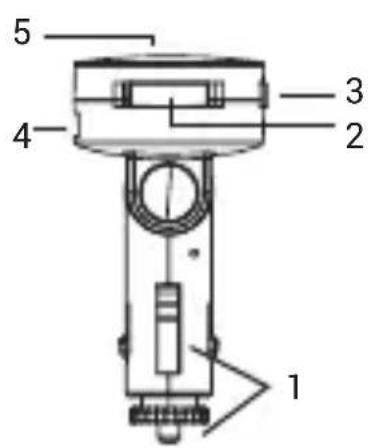
- Car cigarette lighter connection
- Key - Return to previous song / decrease channel frequency by 0.1 Mhz
- Key + Move to the next song / increase channel frequency by 0.1 Mhz
- Play / pause key
- USB output to charge other devices
- Screen
DEVICE OPERATION
TURN THE DEVICE ON / OFF
To turn this device on you just need to connect it to the car's cigarette lighter. When connected the transmitter display will light up and you'll be able to use the transmitter normally.
To turn it off you need to remove the car's cigarette lighter.
Do not forget to remove it to avoid depleting the car battery.
BLUETOOTH CONNECTION TO OTHER DEVICES
- When you connect the device to the car connector, it will automatically enter Bluetooth mode, the screen will display "bt" flashing.
- Select the Bluetooth option on your phone and activate device search.
- Select the SPC8350 device from the list and wait for the devices to be connected.
When this happens, "bt" will stop showing and instead the number of the FM frequency will be displayed, e.g. 87.6.
FMTRANSMISSIONOFAUDIOFILES
This device, thanks to its FM transmission function, allows you to listen to songs from devices connected to it via Bluetooth, (such as mobile or mp3 player) in your car's FM radio:
Select the transmission frequency:
- First look for a clear frequency (manually) in the radio receiver in your car.
- Enter the frequency in the FM transmitter by: Pressing the + or - key (2) and selecting the desired station for the songs to be heard. Hold down the + or - key to move forward or backward faster.
- You will begin to hear the song being sent to the transmitter through the speakers of your car.
-
To raise or lower the volume use the volume control on your mobile or car radio.
-
To pause a song, press the ▶key (3) once, to resume playback press the ▶key (3).
WARNING: If you are travelling in your car through different provinces/regions and there are other radio stations using the frequency selected on the transmitter, you will be unable to hear what is being played. You will need to re-set another unused frequency on the FM transmitter and car radio.
Advice: It is recommended to remove the car antenna to avoid the above effect.
CHARGE OTHER DEVICES
This device has a USB 5V/1A output (4) to charge other devices such as; phones, MP3 players, etc.
BEM-VINDO!
Copyright © 2014 SPC
www.spc-universe.com
Marca/Brand/Marca: SPC
Denominación comercial/Commercial Name/Nome comercial: 8350N
NORMAS APLICADAS/APPLICABLE NORMS/NORMAS APLICÁVEIS
EN 60950-1:2006+A11:2009/+A1:2010+A12:2011/ETSI EN 301 489-9 V1.4.1 (2007-11)/ETSI EN 301 489-1
V1.9.2 (2011-09) / ETSI EN 301 489-17 V2.2.1 (2012-09) / EN 62479: 2010 / ETSI EN 300 328 V1.7.1 (2006-10) / ETSI
EN 301 357-1 V1.4.1 (2008-11) / ETSI EN 301 357-2 V1.4.1 (2008-11)
FUNCIONALIDADES/FEATURES/CARACTERÍSTICAS
Director General/General Manager/Diretor-geral
Brand : SPC
Model : 8350N
Category : Hi-Fi System