BABYVIEW20 - Baby monitor Levana - Free user manual and instructions
Find the device manual for free BABYVIEW20 Levana in PDF.


Pick your language and provide your email: we'll send you a specifically translated version.
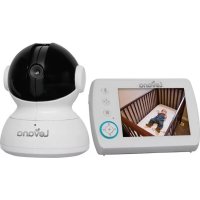
| Product Type | Baby Monitor |
| Brand | Levana |
| Model | BABYVIEW20 |
| Display | 2.4-inch LCD Color Screen |
| Camera Resolution | 640x480 pixels |
| Zoom | 2x Digital Zoom |
| Night Vision | Infrared LEDs, up to 15 feet |
| Temperature Sensor | Yes, displays room temperature |
| Talk-Back Feature | Two-way audio communication |
| Range | Up to 600 feet (open area) |
| Power Source - Parent Unit | Rechargeable Lithium-Ion Battery (3.7V, 1000mAh) or AC Adapter |
| Power Source - Baby Unit | AC Adapter (5V, 1A) |
| Battery Life (Parent Unit) | Up to 4.5 hours |
| Dimensions - Baby Unit | Approx. 2.6 x 3.5 x 3.0 inches |
| Dimensions - Parent Unit | Approx. 5.0 x 2.8 x 1.0 inches |
| Weight - Baby Unit | Approx. 4.4 oz (125 g) |
| Weight - Parent Unit | Approx. 5.3 oz (150 g) |
| Cleaning Instructions | Wipe with a dry, soft cloth; do not use liquid cleaners |
| Safety Certifications | FCC, IC |
| Spare Parts Available | Contact Levana customer service for replacement adapters and batteries |
Frequently Asked Questions - BABYVIEW20 Levana
How do I pair the parent unit with the baby unit?
The units come pre-paired. If you lose connection, press the PAIR button on the baby unit, then press the PAIR button on the parent unit. You should see a confirmation on the screen.
Can I add additional cameras to this monitor?
Yes, the BABYVIEW20 supports up to two additional cameras (sold separately). You can cycle through cameras using the CAM button on the parent unit.
How long does the parent unit battery last?
The rechargeable battery provides up to 4.5 hours of continuous use. Battery life may vary depending on usage and settings.
What is the range of the monitor?
The operating range is up to 600 feet in open air. Walls and obstacles can reduce the range.
How do I adjust the volume of the parent unit?
Use the volume buttons on the side of the parent unit to increase or decrease the speaker volume. There are 5 levels.
Does it have night vision?
Yes, the baby unit has infrared LEDs that automatically switch on in low light conditions. The parent unit displays a black-and-white image in night mode.
Can I talk to my baby through the monitor?
Yes, press and hold the TALK button on the parent unit to speak to your baby. Your voice will be heard through the baby unit's speaker.
How do I clean the camera and parent unit?
Wipe the devices with a soft, dry cloth. Do not use water, cleaning solvents, or abrasive materials. Ensure the power is unplugged before cleaning.
What should I do if the screen is blank or frozen?
Try resetting both units: unplug the baby unit and remove the battery from the parent unit. Wait 30 seconds, then plug in the baby unit and reinsert the battery in the parent unit.
Is the monitor secure from hacking?
This monitor uses FHSS (Frequency Hopping Spread Spectrum) technology, which provides a secure connection between units. However, connect only to your home network if using Wi-Fi features (not available on this model).
User questions about BABYVIEW20 Levana
0 question about this device. Answer the ones you know or ask your own.
Ask a new question about this device
No questions yet. Be the first to ask one.
Download the instructions for your Baby monitor in PDF format for free! Find your manual BABYVIEW20 - Levana and take your electronic device back in hand. On this page are published all the documents necessary for the use of your device. BABYVIEW20 by Levana.