IRE-1.0 - Remote control SpeakerCraft - Free user manual and instructions
Find the device manual for free IRE-1.0 SpeakerCraft in PDF.


| Product Type | Remote Control |
| Brand | SpeakerCraft |
| Model | IRE-1.0 |
| Compatibility | SpeakerCraft audio systems |
| Dimensions (approx.) | 45 x 25 x 10 mm |
| Weight | 30 g (with battery) |
| Power Source | 1 x CR2032 lithium coin cell |
| Battery Life | Approximately 12 months with normal use |
| Wireless Technology | Infrared (IR) |
| Range | Up to 10 meters (line of sight) |
| Frequency | 380-940 nm IR |
| Number of Buttons | Approximately 10-15 |
| Main Functions | Power on/off, volume control, source selection, playback control |
| Programming Method | Direct code entry or learning function (if applicable) |
| Indicator Light | LED for transmission indication |
| Material | ABS plastic |
| Color | Black (typical) |
| Operating Temperature | +5°C to +40°C |
| Storage Temperature | -10°C to +50°C |
| Cleaning Instructions | Wipe with a soft, dry cloth; avoid liquids |
| Safety Precautions | Keep away from water and heat sources; do not disassemble |
| Spare Parts Availability | Battery (CR2032) easily replaceable; other parts not user-serviceable |
| Warranty | 1 year limited warranty (verify with retailer) |
Frequently Asked Questions - IRE-1.0 SpeakerCraft
User questions about IRE-1.0 SpeakerCraft
0 question about this device. Answer the ones you know or ask your own.
Ask a new question about this device
Download the instructions for your Remote control in PDF format for free! Find your manual IRE-1.0 - SpeakerCraft and take your electronic device back in hand. On this page are published all the documents necessary for the use of your device. IRE-1.0 by SpeakerCraft.
USER MANUAL IRE-1.0 SpeakerCraft
The IEF-1.6 represents the highest level in sophistication for attachable IR Emitters. It features a unique EZ Dockers port that permits instant removal of the emitter when reamanging or servicing components. An improved achievable reduces callouts for replacement of "make" emitters. The case may also be taken apart so that the tiny internal emitter can be placed inside a component, when desired, light IR outputs from the top curves surface allows emitter to be mounted on a nearby surface below, above or no a confined dose, rather than directly on the sensor of the unit where conditions permit.
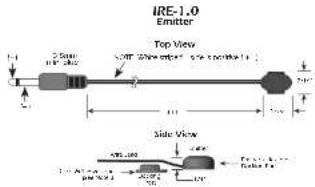
Fig. 1
ATTACHMENT
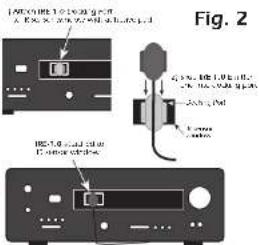
First, locate the component's IR sensor window (see Note 1) and thoroughly clean it of any fingerorms or other greasy substances. The E/Z-Works™ port has a clear adhesive layer on its bottom surfaces. Feel the protective layer off, exposing the adhesive. IR Controlled Components
Onem the port ventral (see Fig. 7) and press it over the center of the component's sensor window. Press and hold for several seconds to ensure maximum contact of the adhesive.
Side the emitter from the top down, into the E/Docker ^TM port. You should feel it "snap" into place. It removes the emitter at any time, simply push upward until it "oops" out!
IR Controlled Components
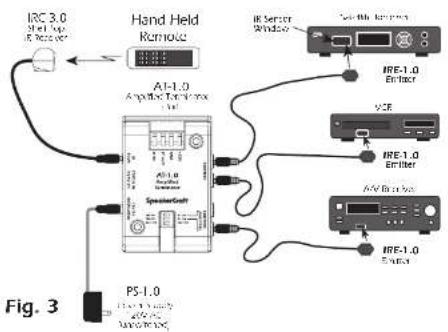
Insert one 3.5mm plug into an Emitter jack on a SpeakerCra® Terminator or other source of IR (see Fig. 3).
CAUTION: Do not plug into an emitter jack that is set to Blaster Power (BLON) or to the ITG1 OUT of other connecting blocks. To do so will smoke the emitters!!
Note 1: If you have difficulty finding the component's IS sensor, try using a flashlight. Sometimes the owner's manual is helpful. You may need to contact the manufacturer direct.
Note 2: You may also access the earlier without the EZ-Docker port. Use one of the 'were adhesives [inlucex], applying it directly to the bottom surface of the RC-1.0 shell.
Note 3: If you need to remove the EZ Doctor™ port or smlter previously stuck to a component's surface, use a fresh adhesive (included) before reusing.
Note 4: The emitter shell and F7-Docke" port, through clerk in appearance, are transparent to infrared. This allows I3 commands to pass through them, permitting local hand held remote control as well as through the IR-1.0.
TYPICAL INSTALLATION
[Unreadable]

INSTALLATION INSTRUCTIONS
IR Emitter
IRE-1.0
SmartPath™
30分 H
SpeakerCraft
Fig. 4
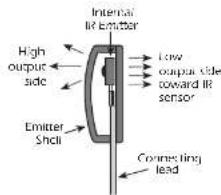
Other Emitter Placements
Since the IKE-1.0 has high output from its curved top [See Fig. 4], you may take it to other surfaces nearby. If the installation permits, (See Fig. 5)
Use the higher power setting (NOT Blaster Power) on the connecting block or terminal, ISG provides.
Some installers like the option of pacing the emitter completely inside a component, as near as possible to the IR sensor, for a clear external appearance. In some cases, the whole other can be so placed.
In others, it may be necessary to remove the internal emitter from a shell so that it will fit in tiny chess places. In this case, use the thin edge of a knife to carefully pry the lower cover from the shell of the emitter. Cently ease the tiny emitter and lead from its nest within the shell. The real work is being, or other invading motions, to prevent shooting of the exposed leads.
IR Controlled Components
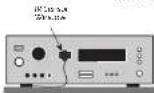
Fig. 5a IRE 1.0 anchored 4 vent;
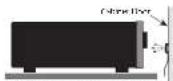
Fig. 51 (IE-1.0) is a new model of carbon core and core composition. Rescience study
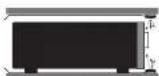
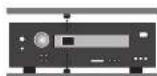
Fig. 5c & d m=1.0 and a b=1.0 in the right side of the left side of the right side of the left side of the right side of the left side of the right side of the left side of the right side of the left side of the right side of the left side of the right side of the left side of the right side of the left side of the right side of the left side of the right side of the left side of the right side of the left side of the right side of the left side of the right side of the left side of the right side
Fig. 5
LIMITED 5-YEAR WARRANTY
SpeakerCraft Inc. warrants to the original retail purchaser only that the SpeakerCraft product will be free from defers in materials and workmanship, for a period of 5 years, provided it was purchased from a SpeakerCraft Authorized Dealer.
Defective products must be shipped, together with proof of purchase, prepaid issued to the SpeakerCraft Authorized Dealer from whom they were purchased, or to the SpeakerCraft Academy at the address list on this installation from a transactional stage collect shipments will be returned. It is preferable to ship the product in the original shipping counter set to lessen the chance of unpaid damage. In any case, the risk of loss or damage to repair is to be borne by the purchaser. In our examination at the Factory or SpeakerCraft Authorized Dealer is deemed and that the unit was defective in order as well as partnership at any time during the warranty period. SpeakerCraft is the SpeakerCraft Authorized Dealer will be accepted, replace or replace this product, or no additional charge, surplus, as set forth below. This model is no longer available and can not be repaired effectively. SpeakerCraft is also active may replace the unit with a current model of equal or greater value. In some cases where a new model is substituted, a modification to the mounting surface may be required. If amounting surface modification is required, SpeakerCraft assumes no responsibility by or inability for such modifications. All replaced parts and products become the property of SpeakerCraft Inc. Products repressed or received under this warranty will be returned to the original retail purchaser, within a reasonable time, freight prepaid.
This warranty does not include service or sums to repair damage caused by accident distress, moisture abuse, sequence, inadequate docking or shipping procedures, commercial use, voltage inputs in excess of the rated maximum of the unit or service, repair or modification of the product which has not been accounted or approved by speakers' law. The warranty also excludes normal cosmetic deterioration or used by environmental conditions. The warranty will be void if the serial number on the product has been removed, acquired with or delivered.
This warranty is limited to all other expressed warranties. If the product is adequate or in excess of workmanship warren and above, the purchase sole remedy should be repair or replacement as provided above. In no event will Socon's Can't be liable for any incident or correspondence damages arising out to the use or inability to use if the product, even if 'speaker' call, or a Speaker Call, Inc., Authorized Dealer has been issued at the possibility of such damages, or for any claim by any other party. Some states do not allow the exclusion of limitation of consequential damages, so the above limitation and exhaustion may not apply. A limited warranty on the product is limited to the duration of this expressed warranty. Some states do not allow limitation on the length of an implied Warranty. If the original rate 'purchase resale is in such a store, the limitation does not apply.
SpeakerCraft
2431:61 104.587: 46: 11:25'07 - 4144 - 423-+4.076 - 73 15 -263.42+