VSI45 - Remote control SpeakerCraft - Free user manual and instructions
Find the device manual for free VSI45 SpeakerCraft in PDF.


| Product Type | Remote Control |
| Brand | SpeakerCraft |
| Model | VSI45 |
| Dimensions (Approx.) | 18 x 5 x 2 cm |
| Weight | 150 g |
| Power Source | 2 x AAA batteries (not included) |
| Compatible Devices | SpeakerCraft audio/video systems, universal IR devices |
| Control Type | Infrared (IR) |
| Learning Capability | Yes, can learn commands from other remotes |
| Number of Devices | Up to 4 devices |
| Keypad Layout | Standard navigation with volume, channel, and source buttons |
| Range | Up to 10 meters |
| Battery Life | Approximately 6 months with normal use |
| Programming Method | Automatic code search or direct code entry |
| Cleaning | Wipe with a soft, dry cloth. Do not use liquids. |
| Safety Precautions | Avoid exposure to moisture, heat, and direct sunlight. |
| Spare Parts Available | Replacement batteries (AAA) |
| Repairability | Not user-serviceable; contact authorized service center. |
Frequently Asked Questions - VSI45 SpeakerCraft
User questions about VSI45 SpeakerCraft
0 question about this device. Answer the ones you know or ask your own.
Ask a new question about this device
Download the instructions for your Remote control in PDF format for free! Find your manual VSI45 - SpeakerCraft and take your electronic device back in hand. On this page are published all the documents necessary for the use of your device. VSI45 by SpeakerCraft.
USER MANUAL VSI45 SpeakerCraft
The SpeakerCraft VSI45 is a wall mounted impedance matching stereo volume control, which connects between the speaker level output of an amplifier, receiver or speaker selector and a pair of speakers.
Volume Control Placement
When deciding where the volume control will be mounted in the wall, consider the various ways it will be used. The primary listening area and the ease of running the wire to your chosen location are the important things to keep in mind. The most common locations to mount volume controls are by the door as you walk into the room, next to existing wall fixtures, or in the area that you will be listening to music. If you do not understand any part of these instructions, please contact your SpeakerCraft dealer. Improper wiring could cause damage to your audio system.
Do not put the volume control into the same box as a 110v AC circuit. (i.e. light switch, electrical
outlet, etc.). Speaker wires can act as an "antenna" for electrical noise. Locating speaker wires too close to a light switch or dimmer may cause a buzzing or popping sound to be heard through the speakers. If you must locate the VSI45 near electrical devices, use a separate electrical box.
Once a location has been chosen, you may install the volume control after you have first installed a standard single gang plaster ring, or a single gang electrical box (light switch type).
Wiring the VSI45
CAUTION: Please make sure your amplifier or receiver is turned off before proceeding.
The VSI45 features a Removable Wire Block Terminal, which allows for quick and easy wiring. You may find it easier to remove the wire block terminal from the volume control before proceeding.
For best results, strip the speaker wire no more than 14 from the end. Loosen the screws on the underside of the wire block terminal to allow the wire to be pushed completely into the opening, then tighten the screws to secure the wire. (See Figure #1) Once all wires have been connected, replace the wire block terminal onto the volume control. If you need to remove the wire, simply loosen the screws on the underside of the wire block terminal.
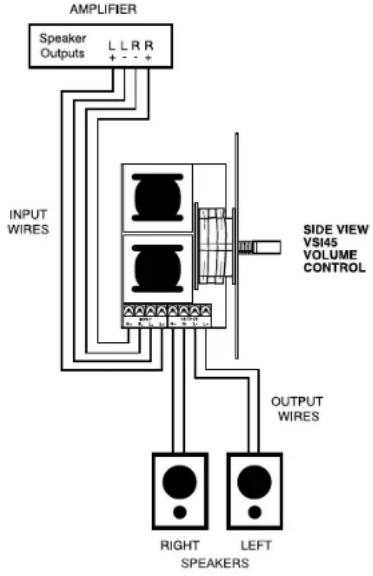
Refer to Figure #2 when wiring the VSI45:
- Connect the amplifier or receiver's left speaker output to the left input terminals on the removable wire block terminal. Please observe proper polarity of the connections (+ amplifier to + input on the volume control).
- Repeat step 1 for the right side.
- Connect the wires from the left speaker to the left speaker output terminals on the removable wire block terminal. Please observe proper polarity of the wires for correct speaker phase (+ speaker to + output).
- Repeat step 3 for right speaker connection.
CAUTION: If the input and output connections are reversed, the minimum setting on the volume control will cause a short across the amplifier or receiver output terminals, resulting in serious damage to your amplifier or receiver. Please double check steps 1 through 4. This volume control cannot be connected in series with another volume control.
Figure #1
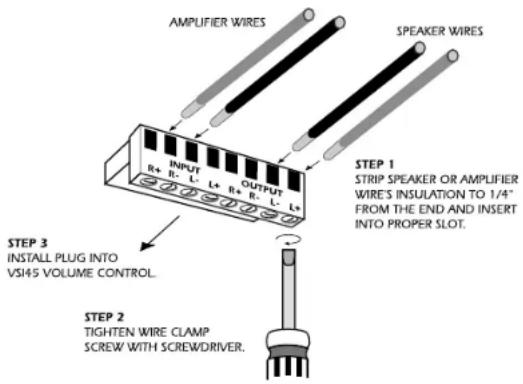
Figure #2
Adjusting the Bridge Clips for Multiple Speakers (See Figure #3)
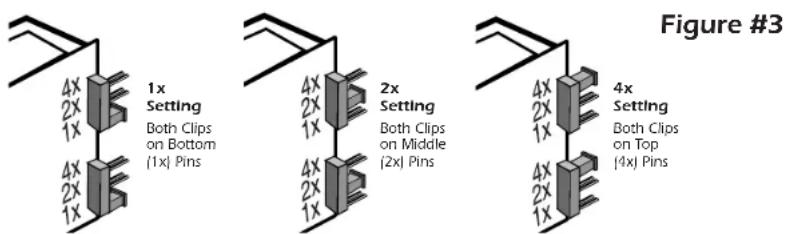
The VSI45 is designed to run multiple pairs of speakers without dam-made by using bridge clips that can be easily changed. NOTE: Both 2x or 4x. Failure to properly set the bridge clips may result in Please follow the recommendations in this section carefully. to your amplifier or receiver.
Use the chart in Figure #4 to determine a) the maximum number of b) the appropriate bridge clip setting (1x, 2x or 4x) to use on the volume control.
- In the first column, determine the minimum impedance capability of your amplifier or receiver.
- Move across the row to the number of 80hm speaker pairs you wish to use.
- The resulting number (1x, 2x or 4x) is the bridge clip setting appropriate for your configuration. NOTE: Both bridge clips must have the same setting.
- The gray area indicates a setting that is slightly below the amplifier or receiver's minimum impedance but will most likely work.
aging your amplifier or receiver. The adjustment is bridge clips must have the same setting - i.e. 1x, damage to your amplifier or receiver.
Failure to properly set the bridge clips may result in damage
speaker pairs that can be connected to your amplifier or receiver and

heatmap
Number of 8ohm Speaker Pairs | Minimum Amplifier Impedance Capability | 1 | 2 | 3 | 4 | 5 | 6 | 7 | 8 | 9 | |---|---|---|---|---|---|---|---|---|---| | 8ohm | 1x | 2x | 4x | 4x | 4x | | | | | | 6ohm | 1x | 2x | 4x | 4x | 4x | 4x | | | | | 4ohm | 1x | 1x | 2x | 2x | 4x | 4x | 4x | 4x | 4x |Figure #5
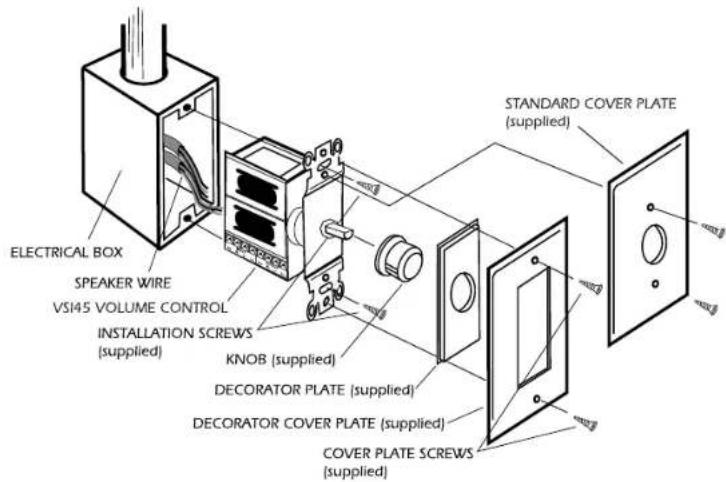
Mounting the VSI45
Once the control has been wired, it is ready to be mounted into the wall. Referring to Figure #5, place the components of the volume control into the wall in the order illustrated. Use the enclosed screws to hold the components in place.
NOTE: The rotary switch is shipped with the control turned as far counterclockwise as it will turn off. If you changed this, return it to the full counterclockwise position before starting installation.
Limited Lifetime Warranty
SpeakerCraft Inc. warrants to the original retail purchaser only that this SpeakerCraft product will be free from defects in materials and workmanship, provided it was purchased from a SpeakerCraft Authorized Dealer.
Defective products must be shipped, together with proof of purchase, prepaid insured to the SpeakerCraft Authorized Dealer from whom they were purchased, or to the SpeakerCraft factory at the address listed on this installation instruction manual. Freight collect shipments will be refused. It is preferable to ship this product in the original shipping container to lessen the chance of transit damage. In any case, the risk or loss or damage in transit is to be borne by the purchaser. If, upon examination at the Factory or SpeakerCraft Authorized Dealer, it is determined that the unit was defective in materials or workmanship at any time during this warranty period, SpeakerCraft or the SpeakerCraft Authorized Dealer will, at its option, repair or replace this product at no additional charge, except as set forth below. If this model is no longer available and can not be repaired effectively, SpeakerCraft, at its sole option, may replace the unit with a current model of equal or greater value.
In some cases where a new model is substituted, a modification to the mounting surface may be required. If mounting surface modification is required, SpeakerCraft assumes no responsibility or liability for such modification. All replaced parts and product become the property of SpeakerCraft Inc. Products replaced or repaired under this warranty will be returned to the original retail purchaser, within a reasonable time, freight prepaid.
This Warranty does not include service or parts to repair damage caused by accident, disaster, misuse, abuse, negligence, inadequate packing or shipping procedures, commercial use, voltage inputs in excess of the rated maximum of the unit, or service, repair or modification of the product which has not been authorized or approved by SpeakerCraft. This Warranty also excludes normal cosmetic deterioration caused by environmental conditions. This Warranty will be void if the Serial Number on the product has been removed, tampered with or defaced.
This Warranty is in lieu of all other expressed warranties. If the product is defective in materials or workmanship as warranted above, the purchaser's sole remedy shall be repair or replacement as provided above. In no event will SpeakerCraft be liable for any incidental or consequential damages arising out of the use or inability to use the product, even if SpeakerCraft Inc. or a SpeakerCraft Inc. Authorized Dealer has been advised of the possibility of such damages, or for any claim by any other party. Some states do not allow the exclusion or limitation of consequential damages so the above limitation and exclusion may not apply.
All implied warranties on the product are limited to the duration of this expressed warranty. Some states do not allow limitation on the length of an implied warranty. If the original retail purchaser resides in such a state, this limitation does not apply.

SpeakerCraft offers a variety of accessories to make your installation of these speakers and other SpeakerCraft products easy, economical, and professional. Contact your authorized SpeakerCraft Dealer for more information.
Should you have any questions regarding this, or any other SpeakerCraft product, please call our toll-free service hotline at 1-800-448-0976. We are available to assist you every weekday, except holidays, between the hours of 7:00 a.m. and 5:00 p.m. PST.