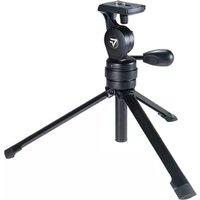
SP-31 - Tripod Vanguard - Free user manual and instructions
Find the device manual for free SP-31 Vanguard in PDF.


| Product Type | Tripod |
| Brand | Vanguard |
| Model | SP-31 |
| Material | Aluminum alloy |
| Maximum Height | 150 cm |
| Minimum Height | 50 cm |
| Folded Length | 50 cm |
| Weight | 2.0 kg |
| Load Capacity | 3.0 kg |
| Leg Sections | 3 |
| Leg Lock Type | Quick lock system |
| Center Column | Quick lock with locking disk |
| Head Type | Pan and tilt with 90° tilt lock and 360° swivel handle |
| Pan Range | 360° |
| Tilt Range | +90° / -90° |
| Compressible Pin | Yes, for versatile equipment attachment |
| Platform | Modifiable for different equipment |
| Foot Features | Rubber feet |
| Color | Black |
| Maintenance | Wipe with a dry cloth; avoid solvents |
| Safety | Ensure all locks are tight before use |
Frequently Asked Questions - SP-31 Vanguard
User questions about SP-31 Vanguard
0 question about this device. Answer the ones you know or ask your own.
Ask a new question about this device
Download the instructions for your Tripod in PDF format for free! Find your manual SP-31 - Vanguard and take your electronic device back in hand. On this page are published all the documents necessary for the use of your device. SP-31 by Vanguard.
USER MANUAL SP-31 Vanguard
- Thank you for purchasing a VANGUARD SP-31 tripod.
- This unit features an innovative quick lock system to assist you in capturing life's greatest moments.
- Platform is modifiable to accept a variety of different equipment.

- Compressible pin makes this tripod versatile for different types of equipment.


- Locking knob for 90° tilt.
- Locking handle for 360° swivel.


● Center Column Locking System.
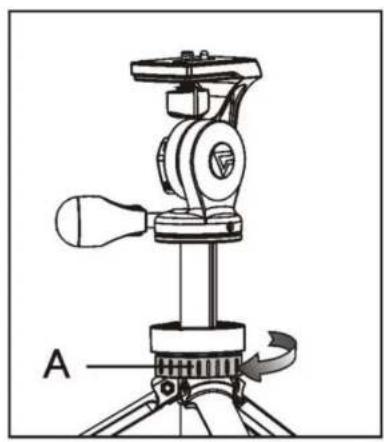
- Adjust the height of the column as required, then lock the center column lock(A).
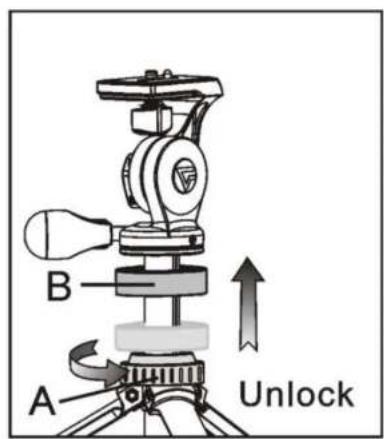
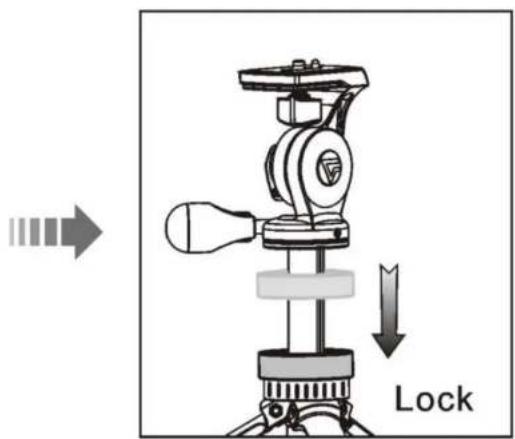
- Release the center column lock(A), the quick lock system makes instant height adjustments possible. Simply lift the locking disk(B); adjust to the correct height, release the disk and the head is locked in place.
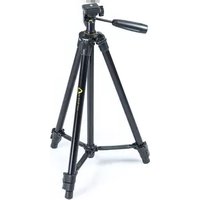


Brand : Vanguard
Model : SP-31
Category : Tripod