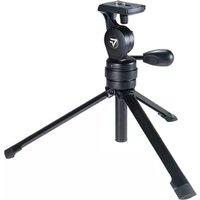
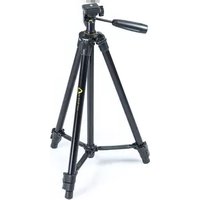
Veo 2PRO 233 APV - Tripod Vanguard - Free user manual and instructions
Find the device manual for free Veo 2PRO 233 APV Vanguard in PDF.


| Product Type | Video Tripod with Fluid Head |
| Maximum Height | 165 cm |
| Minimum Height | 30 cm |
| Folded Length | 60 cm |
| Weight | 1.8 kg |
| Load Capacity | 5 kg |
| Leg Sections | 3 |
| Leg Material | Aluminum |
| Leg Lock Type | Twist Lock |
| Head Type | Fluid Pan Head (included) |
| Quick Release Plate | Yes, with 1/4" screw |
| Bubble Level | Yes |
| Warranty | 2 years |
| Care Instructions | Wipe clean with dry cloth; avoid solvents |
| Compatibility | Most DSLR, mirrorless, and camcorders |
Frequently Asked Questions - Veo 2PRO 233 APV Vanguard
User questions about Veo 2PRO 233 APV Vanguard
0 question about this device. Answer the ones you know or ask your own.
Ask a new question about this device
Download the instructions for your Tripod in PDF format for free! Find your manual Veo 2PRO 233 APV - Vanguard and take your electronic device back in hand. On this page are published all the documents necessary for the use of your device. Veo 2PRO 233 APV by Vanguard.
USER MANUAL Veo 2PRO 233 APV Vanguard
natural_image
Line drawings of a tripod-mounted camera with tripod legs and camera module (no text or symbols)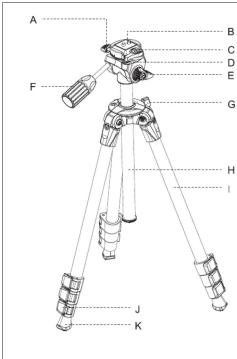






English
THANK YOU FOR PURC
PART DESCRIPTION
A: Top Fan Lock Knob B: Quick Shoe (QS-29
C: Quick Shoe Release D: Bubble Level
E: PanLock Knob
F: Handle to Lock/Un G: Center Column Lo
H: Center Column I: Tripod Leg (1 Legs)
J: Quick Flip Leg Level
K: Anti-slip rubber
① ATTACHING QUICK SHOE TO CAMERA Pull the quick shoe release lever (C) counter
Pull the quick shoe release lever (C) counter clockwise to remove quick shoe (B). Line up the quick shoe 1/4"-20 screw with your camera or equipment and insert. Using a coin, the D-Ring or a standard slot screw driver turn the screw clockwise to tighten. When it is fully tightened the plate should be completely secured to your camera and should not rotate. When mounting your equipment to the camera head please make sure the quick shoe release lever (C) is in the 'Lock' position after your gear is attached.
② TILTADJUSTME
Loosen handle (F) in a
the head. To secure yo
③ PAN ROTATION
Loosen knob (E) in a c
④ PANORAMIC PH Before attaching the
before attaching the camera, use the double level (b) to make sure the head is level for panoramic function. Mount your equipment and double check to make sure you are still level. Turn top pan lock knob (A) in a counter clockwise direction to enable 360° movement of the platform for panoramic photography. Ensure pan lock (E) and handle (F) are locked to avoid any unwanted movement.
⑤ CENTRAL COLUMN
CENTRAL COLOR The rapid action style
or tightening the center column lock knob (G) to achieve the desired height for you to get the right shot.
⑥ LEG EXTENSION
⑤ LEG EXTENSION Open the tripod legs -
extensions that can be extended or retracted by opening the Quick Flip leg lever locks (J).
③ LOOSE LEG
If by chance of over time a leg becomes loose, use an Allan Wrench to tighten the bolts near the top of the spider cast (canopy). (Fig. 6B) (Allan Wrench not included)
English
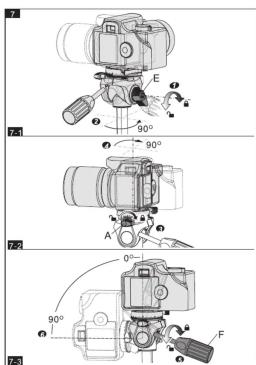
⑦ PORTRAIT PHOTOGRAPHY
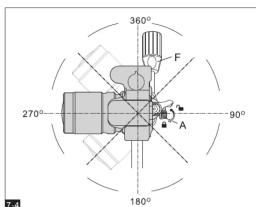
7.1 Loosen knob (E) in a counter clockwise direction so that you can easily rotate the camera.
7.2 Loosen top pan lock knob (A) in a counter clockwise direction and turn the environment to the right pole left 60°. Tighten pan lock knob (A).
equipment to the right or left 90°. Tighten pan lock knob (A). 7.3 & 7.4 Loosen pan/tilt handle (E) in a counter clockwise direction to tilt the camera
forward +90° for portrait photography. In this direction, the camera can also have up or down tilt adjustments by beginning lightning top can be shot (A).
down the ad
ATTENTION
Protection of your camera and equipment. To help prevent damage to the tripod and
hazardous weather conditions or on unstable ground. VANGUARD is not responsible for
damage to your camera or equipment incurred while using your VANGUARD tripod
Remember for increased stability of your tripod, increase height of the tripod by extending the leg sections successively from the top down. Begin with the section
closest to the top of the tripod and work your way down until the desired height is
attained.
Français
| Español | 日本語 | 日本語 | 簡体中文 | 簡体中文 |
| 6 EXTENSIÓN DE LAS PATASEstendra las patas del Tripode: Para ajustar la atturé de tripode, cada pata tiene secciones teledricas que pueden extenderar o reviesare abrendo los bloques de palencia de pata Quicks 4 (L)7 PATA FLOJA.1.3.1.2.3.4.5.6.7.8.9.10.11.12.13.14.15.16.17.18.19.20.21.22.23.24.25.26.27.28.29.30.31.32.33.34.35.36.37.38.39.40.41.42.43.44.45.46.47.48.49.50.51.52.53.54.55.56.57.58.59.60.61.62.63.64.65.66.67.68.69.70.71.72.73.74.75.76.77.78.79.80.81.82.83.84.85.86.87.88.89.90.91.92.93.94.95.96.97.98.99.100.101.102.103.104.105.106.107.108.109.110.111.112.113.114.115.116.117.118.119.120.121.122.123.124.125.126.127.128.129.130.131.132.133.134.135.136.137.138.139.140.141.142.143.144.145.146.147.148.149.150.151.152.153.154.155.156.157.158.159.160.161.162.163.164.165.166.167.168.169.170.171.172.173.174.175.176.177.178.179.180.181.182.183.184.185.186.187.188.189.190.191.192.193.194.195.196.197.198.199.200.201.202.203.204.205.206.207.208.209.210.211.212.213.214.215.216.217.218.219.220.221.222.223.224.225.226.227.228.229.230.231.232.233.234.235.236.237.238.239.240.241.242.243.244.245.246.247.248.249.250.251.252.253.254.255.256.257.258.259.260.261.262.263.264.265.266.267.268.269.270.271.272.273.274.275.276.277.278.279.280.281.282.283.284.285.286.287.288.289.290.291.292.293.294.295.296.297.298.299.300.301.302.303.304.305.306.307.308.309.310.311.312.313.314.315.316.317.318.319.320.321.322.323.324.325.326.327.328.329.330.331.332.333.334.335.336.337.338.339.340.341.342.343.344.345.346.347.348.349.350.351.352.353.354.355.356.357.358.359.360.361.362.363.364.365.366.367.368.369.370.371.372.373.374.375.376.377.378.379.380.381.382.383.384.385.386.387.388.389.390.391.392.393.394.395.396.397.398.399.400.401.402.403.404.405.406.407.408.409.410.411.412.413.414.415.416.417.418.419.420.421.422.423.424.425.426.427.428.429.430.431.432.433.434.435.436.437.438.439.440.441.442.443.444.445.446.447.448.449.450.451.452.453.454.455.456.457.458.459.460.461.462.463.464.465.466.467.468.469.470.471.472.473.474.475.476.477.478.479.480.481.482.483.484.485.486.487.488.489.490.491.492.493.494.495.496.497.498.499.500.501.502.503.504.505.506.507.508.509.510.511.512.513.514.515.516.517.518.519.520.521.522.523.524.525.526.527.528.529.530.531.532.533.534.535.536.537.538.539.540.541.542.543.544.545.546.547.548.549.550.551.552.553.554.555.556.557.558.559.560.561.562.563.564.565.566.567.568.569.570.571.572.573.574.575.576.577.578.579.580.581.582.583.584.585.586.587.588.589.590.591.592.593.594.595.596.597.598.599.600.601.602.603.604.605.606.607.608.609.610.611.612.613.614.615.616.617.618.619.620.621.622.623.624.625.626.627.628.629.630.631.632.633.634.635.636.637.638.639.640.641.642.643.644.645.646.647.648.649.650.651.652.653.654.655.656.657.658.659.660.661.662.663.664.665.666.667.668.669.670.671.672.673.674.675.676.677.678.679.680.681.682.683.684.685.686.687.688.689.690.691.692.693.694.695.696.697.698.699.700.701.702.703.704.705.706.707.708.709.710.711.712.713.714.715.716.717.718.719.720.721.722.723.724.725.726.727.728.729.730.731.732.733.734.735.736.737.738.739.740.741.742.743.744.745.746.747.748.749.750.751.752.753.754.755.756.757.758.759.760.761.762.763.764.765.766.767.768.769.770.771.772.773.774.775.776.777.778.779.780.781.782.783.784.785.786.787.788.789.790.791.792.793.794.795.796.797.798.799.800.801.802.803.804.805.806.807.808.809.810.811.812.813.814.815.816.817.818.819.820.821.822.823.824.825.826.827.828.829.830.831.832.833.834.835.836.837.838.839.840.841.842.843.844.845.846.847.848.849.850.851.852.853.854.855.856.857.858.859.860.861.862.863.864.865.866.867.868.869.870.871.872.873.874.875.876.877.878.879.880.881.882.883.884.885.886.887.888.889.890.891.892.893.894.895.896.897.898.899.900.901.902.903.904.905.906.907.908.909.910.911.912.913.914.915.916.917.918.919.920.921.922.923.924.925.926.927.928.929.930.931.932.933.934.935.936.937.938.939.940.941.942.943.944.945.946.947.948.949.950.951.952.953.954.955.956.957.958.959.960.961.962.963.964.965.966.967.968.969.970.971.972.973.974.975.976.977.978.979.980.981.982.983.984.985.986.987.988.989.990.991.992.993.994.995.996.997.998.999.9A: 台合第 360 印欧紫菱组B: A: 台合第 360 印欧紫菱组C: B: 指要器取扱扣D: C: 指要器取扱扣E: D: 指要器取扱扣F: E: 指要器取扱扣G: F: 指要器取扱扣H: G: 指要器取扱扣I: H: H: H: H: H: H: H: H: H: H: H: H: H: H: H: H: H: H: H: H: H: H: H: H: H: H: H: H: H: H: H: H: H: H: H: H: H: H: H: H: H: H: H: H: H: H: H: H: H: H: |