
XG-PH70X - Video projector SHARP - Free user manual and instructions
Find the device manual for free XG-PH70X SHARP in PDF.


| Product Type | Video Projector |
| Brand | Sharp |
| Model | XG-PH70X |
| Display Technology | DLP |
| Native Resolution | XGA (1024 x 768) |
| Brightness | 3000 ANSI Lumens |
| Contrast Ratio | 2000:1 |
| Aspect Ratio | 4:3 (native), 16:9 compatible |
| Lamp Life | 2000 hours (Normal) / 3000 hours (Eco) |
| Dimensions (W x H x D) | 310 x 89 x 229 mm |
| Weight | 3.1 kg |
| Power Consumption | 300 W (Normal), 230 W (Eco) |
| Inputs | VGA x 1, S-Video x 1, Composite x 1, Audio (3.5mm) x 1 |
| Outputs | Monitor Out (VGA), Audio Out (3.5mm) |
| Lens | Manual zoom & focus |
| Keystone Correction | Vertical ±15° |
| Noise Level | 34 dB (Normal) |
| Security | Kensington lock slot |
| Maintenance | Clean air filter every 100 hours; replace lamp when needed |
| Replacement Parts | Lamp unit (AN-P70LP), air filter |
Frequently Asked Questions - XG-PH70X SHARP
User questions about XG-PH70X SHARP
0 question about this device. Answer the ones you know or ask your own.
Ask a new question about this device
Download the instructions for your Video projector in PDF format for free! Find your manual XG-PH70X - SHARP and take your electronic device back in hand. On this page are published all the documents necessary for the use of your device. XG-PH70X by SHARP.
USER MANUAL XG-PH70X SHARP
OPERATION MANUAL
MODEL
XG-PH70X
(Standard zoom lens attached)
XG-PH70X-N
(No lens attached)
MULTIMEDIA PROJECTOR
Conference Series


natural_image
Exterior view of a silver projector with IXP branding and remote control (no visible text or symbols on the device itself)IMPORTANT
- For your assistance in reporting the loss or theft of your Projector, please record the Model and Serial Numbers located on the bottom of the projector and retain this information.
- Before recycling the packaging, please ensure that you have checked the contents of the carton thoroughly against the list of "Supplied accessories" on page 11.
Model No.:
Serial No.:
SPECIAL NOTE FOR USERS IN THE U.K.
The mains lead of this product is fitted with a non-rewireable (moulded) plug incorporating a 13A fuse. Should the fuse need to be replaced, a BSI or ASTA approved BS 1362 fuse marked 🌐 or 🔒 and of the same rating as above, which is also indicated on the pin face of the plug, must be used.
Always refit the fuse cover after replacing the fuse. Never use the plug without the fuse cover fitted.
In the unlikely event of the socket outlet in your home not being compatible with the plug supplied, cut off the mains plug and fit an appropriate type.
DANGER:
The fuse from the cut-off plug should be removed and the cut-off plug destroyed immediately and disposed of in a safe manner. Under no circumstances should the cut-off plug be inserted elsewhere into a 13A socket outlet, as a serious electric shock may occur.
To fit an appropriate plug to the mains lead, follow the instructions below:
WARNING:
THIS APPARATUS MUST BE EARTHED.
IMPORTANT:
The wires in this mains lead are coloured in accordance with the following code:
Green-and-yellow : Earth
Blue : Neutral
Brown : Live
As the colours of the wires in the mains lead of this apparatus may not correspond with the coloured markings identifying the terminals in your plug proceed as follows:
- The wire which is coloured green-and-yellow must be connected to the terminal in the plug which is marked by the letter E or by the safety earth symbol for coloured green or green-and-yellow.
- The wire which is coloured blue must be connected to the terminal which is marked with the letter N or coloured black.
• The wire which is coloured brown must be connected to the terminal which is marked with the letter L or coloured red.
IF YOU HAVE ANY DOUBT, CONSULT A QUALIFIED ELECTRICIAN.
The supplied CD-ROM contains operation instructions in English, German, French, Swedish, Spanish, Italian, Dutch, Portuguese, Chinese, Korean and Japanese. Carefully read through the operation instructions before operating the projector.
There are two important reasons for prompt warranty registration of your new SHARP Projector, using the REGISTRATION CARD packed with the projector.
1. WARRANTY
This is to assure that you immediately receive the full benefit of the parts, service and labor warranty applicable to your purchase.
2. CONSUMER PRODUCT SAFETY ACT
To ensure that you will promptly receive any safety notification of inspection, modification, or recall that SHARP may be required to give under the 1972 Consumer Product Safety Act, PLEASE READ CAREFULLY THE IMPORTANT "LIMITED WARRANTY" CLAUSE. [U.S.A. ONLY]
WARNING:
High brightness light source. Do not stare into the beam of light, or view directly. Be especially careful that children do not stare directly into the beam of light.

WARNING: To reduce the risk of fire or electric shock, do not expose this product to rain or moisture.
See bottom of projector.

CAUTION
RISK OF ELECTRIC SHOCK. DO NOT REMOVE SCREWS EXCEPT SPECIFIED USER SERVICE SCREW.

CAUTION: TO REDUCE THE RISK OF ELECTRIC SHOCK, DO NOT REMOVE COVER.
NO USER-SERVICEABLE PARTS EXCEPT LAMP UNIT. REFER SERVICING TO QUALIFIED SERVICE PERSONNEL.

The lightning flash with arrowhead symbol, within an equilateral triangle, is intended to alert the user to the presence of uninsulated “dangerous voltage” within the product’s enclosure that may be of sufficient magnitude to constitute a risk or electric shock to persons.

The exclamation point within a triangle is intended to alert the user to the presence of important operating and maintenance (servicing) instructions in the literature accompanying the product.
WARNING:
FCC Regulations state that any unauthorized changes or modifications to this equipment not expressly approved by the manufacturer could void the user's authority to operate this equipment. U.S.A. ONLY
INFORMATION
This equipment has been tested and found to comply with the limits for a Class A digital device, pursuant to Part 15 of the FCC Rules. These limits are designed to provide reasonable protection against harmful interference when the equipment is operated in a commercial environment. This equipment generates, uses, and can radiate radio frequency energy and, if not installed and used in accordance with the operation manual, may cause harmful interference to radio communications. Operation of this equipment in a residential area is likely to cause harmful interference, in which case the user will be required to correct the interference at his own expense. U.S.A. ONLY
The enclosed computer cable must be used with the device. The cable is provided to ensure that the device complies with FCC Class A verification. U.S.A. ONLY
WARNING:
This is a Class A product. In a domestic environment this product may cause radio interference in which case the user may be required to take adequate measures.
WARNING:
The cooling fan in this projector continues to run for about 90 seconds after the projector enters the standby mode. During normal operation, when putting the projector into standby mode always use the STANDBY button on the projector or on the remote control.
DURING NORMAL OPERATION, NEVER TURN THE PROJECTOR OFF BY DISCONNECTING THE POWER CORD. FAILURE TO OBSERVE THIS WILL RESULT IN PREMATURE LAMP FAILURE.
PRODUCT DISPOSAL
This projector utilizes tin-lead solder, and a pressurized lamp containing a small amount of mercury. Disposal of these materials may be regulated due to environmental considerations. For disposal or recycling information, please contact your local authorities or, if you are located in the United States of America, the Electronic Industries Alliance: www.eiae.org.
Caution Concerning Lamp Replacement
See "Replacing the Lamp" on page 96.
This SHARP projector uses a DLP ^® chip. This very sophisticated panel contains 786,432 pixels (micromirrors). As with any high technology electronic equipment such as large screen TVs, video systems and video cameras, there are certain acceptable tolerances that the equipment must conform to.
This unit has some inactive pixels within acceptable tolerances which may result in inactive dots on the picture screen. This will not affect the picture quality or the life expectancy of the unit.
- DLP® and the DLP logo are registered trademarks of Texas Instruments.
- Microsoft® and Windows® are registered trademarks of Microsoft Corporation in the United States and/or other countries.
• PC/AT is a registered trademark of International Business Machines Corporation in the United States. - Adobe ^ Reader ^ is a trademark of Adobe Systems Incorporated.
• Macintosh® is a registered trademark of Apple Computer, Inc. in the United States and/or other countries. - All other company or product names are trademarks or registered trademarks of their respective companies.
- Some IC chips in this product include confidential and/or trade secret property belonging to Texas Instruments. Therefore you may not copy, modify, adapt, translate, distribute, reverse engineer, reverse assemble or discompile the contents thereof.
Authorized representative responsible for the European Union Community Market
SHARP ELECTRONICS (Europe) GmbH
How to Read This Operation Manual
- In this operation manual, the illustrations and on-screen displays are simplified for explanation. This may differ from the actual on-screen display.


Info ......Indicates safeguards when using the projector.

Note ......Indicates additional information for setting up and operating the projector.
For Future Reference
Maintenance
→ Page 93
Troubleshooting
→ Pages 102 and 103
Index
→ Page 107
Preparing
Introduction
How to Read This Operation Manual ...... 3
Contents...... 4
How to Access the PDF Operation Manuals ..... 7
IMPORTANT SAFEGUARDS 8
Accessories 11
Part Names and Functions .... 13
Using the Remote Control 17
Usable Range 17
Inserting the Batteries 17
Using the Remote Control with a Signal Cable .. 18
Switching the Remote Control Mode 18
Using the Remote Control as a Wireless Computer Mouse 19
Quick Start
Quick Start 20
Setup
Setting Up the Projector 22
Setting Up the Projector 22
Projecting a Reversed Image 23
Connections
Connections 24
INPUT/OUTPUT Terminals and Connectable Main Equipment 24
Samples of Cables for Connection .... 25
Connecting to a Computer 27
Connecting with the RGB Cable 27
Connecting with a 5 BNC to 15-pin D-sub Cable 28
Connecting with a DVI Digital Cable 29
Connecting to Video Equipment 30
Connecting to Video Equipment That Has an HDMI Output Terminal with a DVI to HDMI Cable 30
Connecting to Video Equipment That Has a DVI Output Terminal with a DVI Digital Cable... 31
Connecting to RGB Video Equipment with a 5 RCA RGB Cable 32
Connecting to Video Equipment That Has Component Output Terminals .... 33
Connecting with an S-video Cable or a Composite Video Cable 34
Controlling the Projector by a Computer ... 35
Connecting to a Monitor That Has an RGB Input Terminal 36
Connecting to an Amplifier or Other Audio Equipment 36
Basic Operation
Turning the Projector On/Off 37
Image Projection 38
Shifting the Lens.... 38
Using the Adjustment Feet 39
Adjusting the Focus 40
Adjusting the Projected Image Size 40
Correcting Trapezoidal Distortion 41
Switching the Input Mode 45
Adjusting the Volume 46
Tuming Off the Sound Temporarily 46
Displaying an Enlarged Portion of an Image ..... 46
Freezing a Moving Image 47
Selecting the Picture Mode 47
Resize Mode 48
Displaying the Black Screen.... 50
Displaying and Setting the Break Timer 50
Useful Features
Menu Items 51
Using the Menu Screen 56
Menu Selections (Adjustments) 56
Menu Selections (Settings) 58
Picture Adjustment ("Picture" menu) ...... 60
Selecting the Picture Mode 60
Adjusting the Image 60
Adjusting the Color Temperature 61
Emphasizing the Contrast 61
Selecting the Progressive Mode 62
Reducing Image Noise (DNR) 62
Signal Type Setting 63
Color Management System ("C. M. S." menu) 64
Selecting the Color Reproduction Mode ..... 64
Selecting the Target Color 64
Setting the Brightness of the Target Color ..... 65
Setting the Chromatic Value of the Target Color ... 65
Setting the Hue of the Target Color 66
Resetting User-defined Color Settings 66
Overview of All Color Settings 67
Computer Image Adjustment ("Fine Sync" menu) 68
Adjusting the Computer Image 68
Saving Adjustment Settings.... 68
Selecting Adjustment Settings... 69
Special Mode Setting 69
Checking the Input Signal 70
Auto Sync Adjustment 70
Auto Sync Display Function 71
Audio Adjustment ("Audio" menu) 72
Adjusting the Audio 72
Setting the Audio Output Type 72
Speaker Setting 73
Using the "Options (1)" Menu 74
Displaying Dual Pictures (Pict in Pict) 74
Setting the Resize Mode 74
Shifting the Projected Image Vertically (Digital Shift) 75
Setting On-screen Display 75
Setting the Video System.... 76
Capturing Projected Images 76
Selecting the Background Image 77
Selecting the Startup Image 77
Eco Mode 78
Detecting the Input Signals Automatically ..... 78
Auto Power Off Function 79
System Lock Function 79
Helpful Functions Set during Installation ("Options (2)" menu) 82
Setting a Password 82
Checking the Lamp Life Status 83
Setting the Lamp Mode 83
Reversing/Inverting Projected Images 84
Controlling Multiple Projectors with the One Remote Control 84
Shortcut to Make Projector Stack Settings ..... 85
Locking the Operation Buttons on the Projector ... 85
Bypassing Unused Input Selections 86
Selecting the Fan Mode 86
Direct Power On Function 87
Selecting the Transmission Speed (RS-232C)..... 87
Monitor Output Settings 88
LAN/RS232C Setting 88
DHCP Client Setting 89
TCP/IP Setting 89
Service Mode 90
Returning to the Default Settings 91
Using the Other Menus (“Language” and “Status” menus) 92
Selecting the On-screen Display Language ..... 92
Overview of All Menu Settings 92
Reference
Appendix
Maintenance 93
Maintenance Indicators 94
Regarding the Lamp 96
Lamp 96
Caution Concerning the Lamp 96
Replacing the Lamp 96
Removing and Installing the Lamp Unit 97
Resetting the Lamp Timer 99
Computer Compatibility Chart .... 100
Troubleshooting 102
For SHARP Assistance 104
Specifications 105
Glossary 106
Index 107
The optional lenses are introduced on page 12. Please purchase the lens for your desired usage.
How to Access the PDF Operation Manuals
PDF operation manuals in several languages are included in the CD-ROM, so that you can work with the projector. To utilize these manuals, you need to install Adobe Reader® on your computer (Windows® or Macintosh®).
Please download Adobe ^® Reader ^® from the Internet (http://www.adobe.com).
Accessing the PDF manuals
For Windows®:
①Insert the CD-ROM in the CD-ROM drive.
②Double click the "My Computer" icon.
③Double click the "CD-ROM" drive.
④ When you want to view the operation manual
1) Double click the "MANUALS" folder.
2) Double click the language (name of the folder) that you want to view.
3) Double click the "PH70_" pdf file to access the projector manuals.
When you want to view the setup manual
1) Double click the "SETUP" folder.
2) Double click the language (name of the folder) that you want to view.
3) Double click the "S_PH7_" pdf file to access the setup manual.
For Macintosh®:
①Insert the CD-ROM in the CD-ROM drive.
②Double click the "CD-ROM" icon.
③ When you want to view the operation manual
1) Double click the "MANUALS" folder.
2) Double click the language (name of the folder) that you want to view.
3) Double click the "PH70_" pdf file to access the projector manuals.
When you want to view the setup manual
1) Double click the "SETUP" folder.
2) Double click the language (name of the folder) that you want to view.
3) Double click the "S_PH7_" pdf file to access the setup manual.

Info
- If the desired pdf file cannot be opened by double clicking the mouse, start Adobe® Reader® first, then specify the desired file using the "File", "Open" menu.
SETUP MANUAL
Refer to the "SETUP MANUAL" contained on the supplied CD-ROM for details.
Setting up the Screen 2
Screen Size and Projection Distance ...... 3
Connecting Pin Assignments 10
RS-232C Specifications and Commands ... 12
Setting up the Projector Network Environment 17
Controlling the Projector via LAN 23
Setting the Projector Using RS-232C or Telnet ...... 28
Controlling the Projector Using RS-232C or Telnet .... 31
Stack Projection 38
Video Wall Projection 41
Resetting the Lamp Timer of the Projector via LAN.... 50
Troubleshooting 52
Dimensions 55
CAUTION: Please read all of these instructions before you operate this product and save these instructions for later use.
Electrical energy can perform many useful functions. This product has been engineered and manufactured to assure your personal safety. BUT IMPROPER USE CAN RESULT IN POTENTIAL ELECTRICAL SHOCK OR FIRE HAZARDS. In order not to defeat the safeguards incorporated in this product, observe the following basic rules for its installation, use and servicing.
1. Read Instructions
All the safety and operating instructions should be read before the product is operated.
2. Retain Instructions
The safety and operating instructions should be retained for future reference.
3. Heed Warnings
All warnings on the product and in the operating instructions should be adhered to.
4. Follow Instructions
All operating and use instructions should be followed.
5. Cleaning
Unplug this product from the wall outlet before cleaning. Do not use liquid cleaners or aerosol cleaners. Use a damp cloth for cleaning.
6. Attachments
Do not use attachments not recommended by the product manufacturer as they may cause hazards.
7. Water and Moisture
Do not use this product near water-for example, near a bath tub, wash bowl, kitchen sink, or laundry tub; in a wet basement; or near a swimming pool; and the like.
8. Accessories
Do not place this product on an unstable cart, stand, tripod, bracket, or table. The product may fall, causing serious injury to a child or adult, and serious damage to the product. Use only with a cart, stand, tripod, bracket, or table recommended by the manufacturer, or sold with the product. Any mounting of the product should follow the manufacturer's instructions, and should use a mounting accessory recommended by the manufacturer.
9. Transportation
A product and cart combination should be moved with care. Quick stops, excessive force, and uneven surfaces may cause the product and cart combination to overturn.

10. Ventilation
Slots and openings in the cabinet are provided for ventilation to ensure reliable operation of the product and to protect it from overheating, and these openings must not be blocked or covered. The openings should never be blocked by placing the product on a bed, sofa, rug, or other similar surface. This product should not be placed in a built-in installation such as a bookcase or rack unless proper ventilation is provided or the manufacturer's instructions have been adhered to.
11. Power Sources
This product should be operated only from the type of power source indicated on the marking label. If you are not sure of the type of power supply to your home, consult your product dealer or local power company. For products intended to operate from battery power, or other sources, refer to the operating instructions.
12. Grounding or Polarization
This product is provided with one of the following types of plugs. If the plug should fail to fit into the power outlet, please contact your electrician.
Do not defeat the safety purpose of the plug.
a. Two-wire type (mains) plug
b. Three-wire grounding type (mains) plug with a grounding terminal.
This plug will only fit into a grounding type power outlet.
13. Power-Cord Protection
Power-supply cords should be routed so that they are not likely to be walked on or pinched by items placed upon or against them, paying particular attention to cords at plugs, convenience receptacles, and the point where they exit from the product.
14. Lightning
For added protection for this product during a lightning storm, or when it is left unattended and unused for long periods of time, unplug it from the wall outlet and disconnect the cable system. This will prevent damage to the product due to lightning and power-line surges.
15. Overloading
Do not overload wall outlets, extension cords, or integral convenience receptacles as this can result in a risk of fire or electric shock.
16. Object and Liquid Entry
Never push objects of any kind into this product through openings as they may touch dangerous voltage points or short-out parts that could result in a fire or electric shock. Never spill liquid of any kind on the product.
17. Servicing
Do not attempt to service this product yourself as opening or removing covers may expose you to dangerous voltage or other hazards. Refer all servicing to qualified service personnel.
18. Damage Requiring Service
Unplug this product from the wall outlet and refer servicing to qualified service personnel under the following conditions:
a. When the power-supply cord or plug is damaged
b. If liquid has been spilled, or objects have fallen into the product.
c. If the product has been exposed to rain or water.
d. If the product does not operate normally by following the operating instructions. Adjust only those controls that are covered by the operating instructions, as an improper adjustment of other controls may result in damage and will often require extensive work by a qualified technician to restore the product to normal operation.
e. If the product has been dropped or damaged in any way.
f. When the product exhibits a distinct change in performance, this indicates a need for service.
19. Replacement Parts
When replacement parts are required, ensure that the service technician has used replacement parts specified by the manufacturer or have the same characteristics as the original part. Unauthorized substitutions may result in fire, electric shock, or other hazards.
20. Safety Check
Upon completion of any service or repairs to this product, ask the service technician to perform safety checks to determine that the product is in proper operating condition.
21. Wall or Ceiling Mounting
This product should be mounted to a wall or ceiling only as recommended by the manufacturer.
22. Heat
This product should be situated away from heat sources such as radiators, heat registers, stoves, or other products (including amplifiers) that produce heat.
Ensure that you read the following safeguards when setting up your projector.
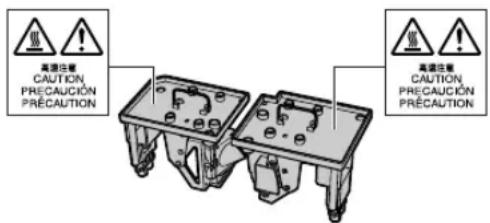
Caution concerning the lamp unit
■Potential hazard of glass particles if lamp ruptures. In case of lamp rupture, contact your nearest Sharp Authorized Projector Dealer or Service Center for replacement. See “Replacing the Lamp” on page 96.
Caution concerning the setup of the projector
■For minimal servicing and to maintain high image quality, SHARP recommends that this projector be installed in an area free from humidity, dust and cigarette smoke. When the projector is subjected to these environments, the vents and lens must be cleaned more often. As long as the projector is regularly cleaned, use in these environments will not reduce the overall operation life of the unit. Internal cleaning should only be performed by a Sharp Authorized Projector Dealer or Service Center.
Do not set up the projector in places exposed to direct sunlight or bright light.
■Position the screen so that it is not in direct sunlight or room light. Light falling directly on the screen washes out the colors, making viewing difficult. Close the curtains and dim the lights when setting up the screen in a sunny or bright room.
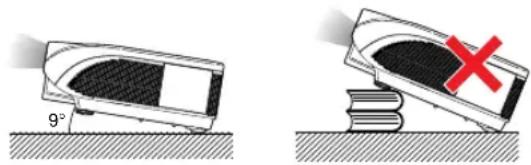
The projector may be safely tilted to a maximum angle of 9 degrees.
■Placement should be within 9 degrees of horizontal.
If you have application requiring tilt angle exceeding 9 degrees, please check with your local Sharp sales office.
When using the projector in high-altitude areas such as mountains (at altitudes of approximately 1,500 meters (4,900 feet) or more)
■When you use the projector in high-altitude areas with thin air, set "Fan Mode" to "High". Neglecting this can affect the longevity of the optical system.
Warning about placing the projector in a high position
■When placing the projector in a high position, make certain it is carefully secured to avoid personal injury caused by the projector falling down.
Do not subject the projector to hard impact and/or vibration.
■ Take care with the lens so as not to hit or damage the surface of the lens.
Rest your eyes occasionally.
■Continuously watching the screen for long hours will cause eye strain. Take regular breaks to rest your eyes.
Avoid locations with extremes of temperature.
■The operating temperature of the projector is from 41°F to 104°F (+5°C to +40°C).
■The storage temperature of the projector is from -4^ to 140^ ( -20^ to +60^ ).
Do not block the intake and exhaust vents.
■Allow at least 11 ^13/16 inches (30 cm) of space between the exhaust vent and the nearest wall or obstruction.
■Ensure that the intake vents and the exhaust vent are not obstructed.
If the cooling fan becomes obstructed, a protection circuit will automatically put the projector into standby mode to prevent overheat damage. This does not indicate a malfunction (See pages 94 and 95.). Remove the projector power cord from the wall outlet and wait at least 10 minutes. Place the projector where the intake and exhaust vents are not blocked, plug the power cord back in and turn on the projector. This will return the projector to the normal operating condition.
Caution regarding usage of the projector
- When using the projector, take care not to subject it to hard impact and/or vibration, as this can result in damage. Take extra care with the lens. If you are not to use the projector for a long time, make certain you unplug the power cord from the wall outlet, and disconnect any other cables connected to it.
■Do not carry the projector by holding the lens.
■When storing the projector, ensure you attach the lens cap to the projector. (See page 13.)
■Do not expose the projector to direct sunlight or near heat sources. The projector may change color or become deformed.
Other connected equipment
■When connecting a computer or other audio-visual equipment to the projector, make the connections AFTER unplugging the power cord of the projector from the AC outlet and turning off the equipment to be connected.
■Please read the operation manuals of the projector and the equipment to be connected for instructions on how to make the connections.
Using the projector in other countries
■The power supply voltage and the shape of the plug may vary depending on the region or country you are using the projector in. When using the projector overseas, make sure you use an appropriate power cord for the country you are in.
Temperature monitor function
If the projector starts to overheat due to setup problems or blockage of the air vents, and "TEMP. luminate in

the lower left corner of the picture. If the temperature continues to rise, the lamp will turn off, the temperature warning indicator on the projector will blink, and after a 90-second cooling-off period the projector will enter the standby mode. Refer to “Maintenance Indicators” on page 94 for details.

Info
- The cooling fan regulates the internal temperature, and its performance is automatically controlled. The sound of the fan may change during projector operation due to changes in the fan speed. This does not indicate malfunction.
- Even if you unplug the power cord after projector operation, the cooling fan continues to run for a while. When you place the projector into the storage case, make sure that the cooling fan has stopped.
Optional lens installation
■Be sure to have service personnel install the optional lenses.
Supplied accessories

Remote control 9NK5041808700
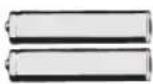
Two R-6 batteries ("AA" size, UM/SUM-3, HP-7 or similar)
Power cord*
(1)

For U.S., Canada, etc. (6' (1.8 m)) 9NK3090204900
(2) (3)
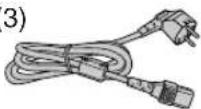
For Europe, except U.K. (6' (1.8 m)) 9NK3090152700

For U.K., Hong Kong and Singapore (6' (1.8 m)) 9NK3090152900
(4)

For Australia, New Zealand and Oceania (6' (1.8 m)) 9NK3090152600
*Use the power cord that corresponds to the wall outlet in your country.

RGB cable (10' (3.0 m)) 9NK3080431000
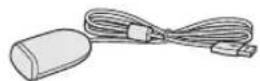
Remote mouse receiver (5'3" (1.6 m)) 9NK3790197000

Cap for the standard zoom lens (Only supplied with XG-PH70X) 9NK3797200400
Projector manual and technical reference CD-ROM 9NK3534022800
Operation manual (this manual) 9NK5010057700
Optional accessories
Cable
3 RCA to 15-pin D-sub cable (10' (3.0 m)) AN-C3CP2
Lamp
Lamp unit 1 AN-PH7LP1 Lamp unit 2 AN-PH7LP2

Note
- Some of the optional accessories may not be available depending on the region. Please check with your nearest Sharp Authorized Projector Dealer or Service Center.
Optional lenses
■Lens Projection distance for 100" screen size
| Fixed wide lens (× 0.8) AN-PH10EX 5'4" (1.6 m) | ||
| Wide-zoom lens (× 1.5 – 1.8) | AN-PH20EZ | 10' – 12' (3.0 m – 3.7 m) |
| Standard zoom lens (× 1.8 – 2.2) | AN-PH31EZ | 12' – 14'8" (3.7 m – 4.5 m) |
| (attached to XG-PH70X) | ||
| Tele-zoom lens (× 2.25 – 3.00) | AN-PH40EZ | 15' – 20' (4.6 m – 6.1 m) |
| Tele-zoom lens (× 3.0 – 4.5) | AN-PH50EZ | 20' – 30' (6.1 m – 9.1 m) |
| Tele-zoom lens (× 4.5 – 7.0) | AN-PH60EZ | 30' – 46'8" (9.1 m – 14.2 m) |
No lens is attached to XG-PH70X-N. The standard zoom lens is attached to XG-PH70X. The optional lenses from Sharp are also available for specialized application. Please see your nearest Sharp Authorized Projector Dealer for details on all the lenses. (Refer to the lens operation manual when using a lens.) Also, be sure to have service personnel install the optional lenses.
Throw Distance
The graph below is for 100 inches (254 cm) screen with 4:3 normal mode.
Screen

bar
| Lens Type | Size (ft) | Throw distance ratio | | :--- | :--- | :--- | | Fixed wide lens (AN-PH10EX) | 5'4" | 1.6 | | Throw distance ratio 1:0.8 | | | | Wide-zoom lens (AN-PH20EZ) | 10'-12' | 3.0 | | Throw distance ratio 1:1.5-1.8 | | | | Standard zoom lens (AN-PH31EZ : Standard equipment with XG-PH70X) | 12'-14'8" | 3.7 | | Throw distance ratio 1:1.8-2.2 | | | | Tele-zoom lens (AN-PH40EZ) | 15'-20' | 4.6 | | Throw distance ratio 1:2.25-3.00 | | | | Tele-zoom lens (AN-PH50EZ) | 20'-30' | 6.1 | | Throw distance ratio 1:3.0-4.5 | | | | Tele-zoom lens (AN-PH60EZ) | 30'-46'8" | 9.1 | | Throw distance ratio 1:4.5-7.0 | | |Part Names and Functions
Numbers in refer to the main pages in this operation manual where the topic is explained.
Projector
Top View

- Attaching the lens cap
Push the lens cap on until it clicks into position. - Removing the lens cap
Pull the lens cap directly outward.
About the Indicators on the Projector
Power indicator
Red on … Normal (Standby)
Green on … Normal (Power on)
Red blinks … The intake vent cover is open.
(See page 93.)
Lamp indicators 1, 2
Green on … Normal
Green blinks … The lamp is warming up.
Red on … The lamp has been shut down abnormally or needs to be changed. (See pages 94 and 95.)
Temperature warning indicator
Off … Normal
Red blinks/on …The internal temperature is abnormally high. (See pages 94 and 95.)

Numbers in refer to the main pages in this operation manual where the topic is explained.
Projector (Side View)
Terminals
Refer to "INPUT/OUTPUT Terminals and Connectable Main Equipment" on page 24.

Using the Kensington Lock
- This projector has a Kensington Security Standard connector for use with a Kensington MicroSaver Security System. Refer to the information that came with the system for instructions on how to use it to secure the projector.
Numbers in refer to the main pages in this operation manual where the topic is explained.
Remote Control
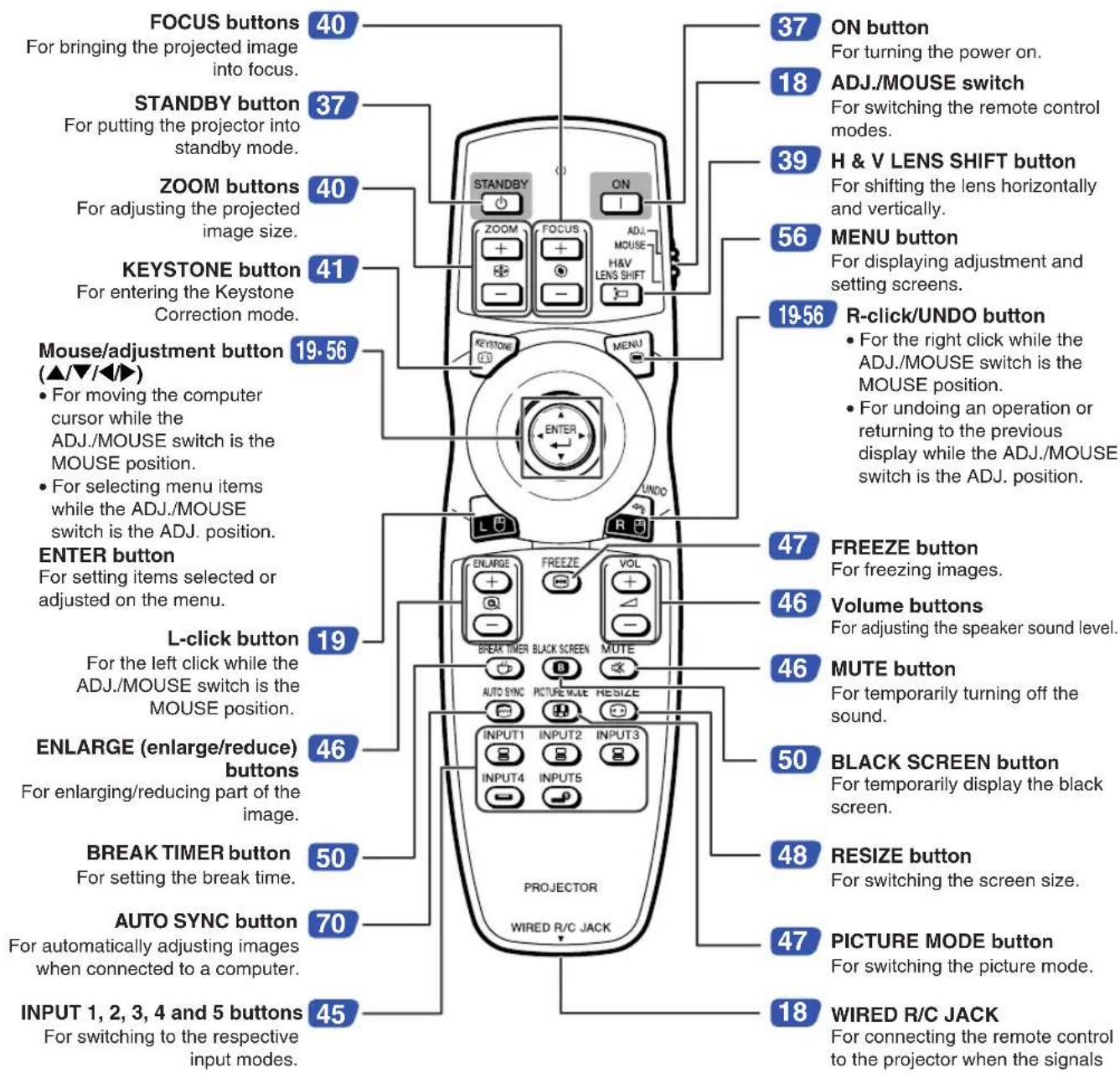

Note
- All the buttons on the remote control, except the mouse/adjustment button and the ADJ./MOUSE switch, are made of luminous material that is visible in the dark. Visibility will diminish over time. Exposure to light will recharge the luminous buttons.
Using the Remote Control
Usable Range
The remote control can be used to control the projector within the ranges shown in the illustration.

Note
- The signal from the remote control can be reflected off a screen for easy operation. However, the effective distance of the signal may differ depending on the screen material.
When using the remote control:
- Ensure that you do not drop it or expose it to moisture or high temperature.
- The remote control may malfunction under a fluorescent lamp. In this case, move the projector away from the fluorescent lamp.
Inserting the Batteries
1
Press the tab and lift open the battery cover in the direction of the arrow.
2
Insert the batteries.
- Insert the batteries making sure the polarities correctly match the and marks inside the battery compartment.
3
Insert the tabs on the end of the battery cover into their slots and press the cover into position.
Front View

Rear View


natural_image
Three views of a remote control device showing internal components and battery insertion (no text or symbols)Incorrect use of the batteries may cause them to leak or explode. Please follow the precautions below.

Caution
- Danger of explosion if battery is incorrectly replaced. Replace only with the same or equivalent type.
- Insert the batteries making sure the polarities correctly match the + and - marks inside the battery compartment.
- Batteries of different types have different properties, therefore do not mix batteries of different types.
- Do not mix new and old batteries.
This may shorten the life of new batteries or may cause old batteries to leak. -
Remove the batteries from the remote control once they have run out, as leaving them in can cause them to leak. Battery fluid from leaked batteries is harmful to skin, therefore ensure you wipe them first and then remove them using a cloth.
-
The batteries included with this projector may run down in a short period, depending on how they are kept. Be sure to replace them as soon as possible with new batteries.
- Remove the batteries from the remote control if you will not be using the remote control for a long time.
- Comply with the rules (ordinance) of each local government when disposing of worn-out batteries.
Using the Remote Control with a Signal Cable
When the signals from the remote control cannot be reached due to the positioning of the projector, use a 3.5 mm minijack cable to connect the remote control to the projector. Now you can control the projector with the remote control.
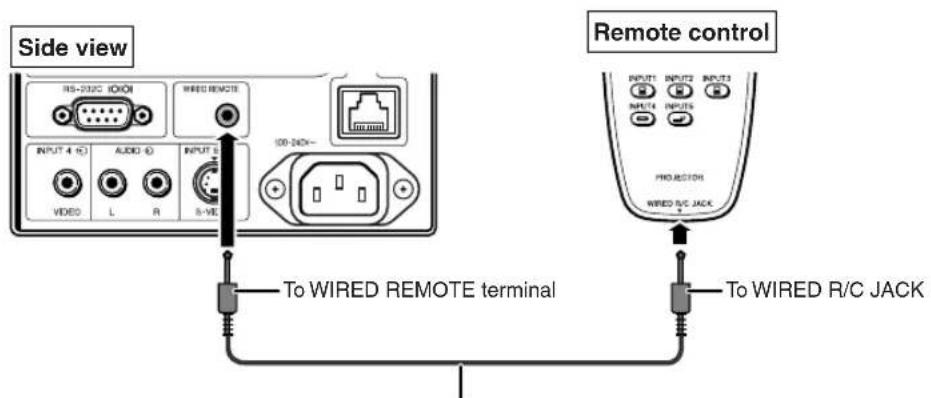
ø3.5 mm minijack cable (commercially available or available as Sharp service part QCNWGA038WJPZ)

Note
- The wireless remote function is not possible when the 3.5mm minijack cable is connected to the projector. Should the wireless remote operation be required, the 3.5mm minijack cable should be disconnected from the projector.
Switching the Remote Control Mode
The remote control has two functions. One is projector control and the other is wireless computer mouse. Slide the ADJ./MOUSE switch on the remote control to other side compatible to the desired usage.
Projector control Wireless computer mouse


Info
- When using the remote control as the wireless computer mouse, connect the supplied remote mouse receiver to the computer. (See page 19.)
Using the Remote Control as a Wireless Computer Mouse
When connecting the supplied remote mouse receiver to the computer, you can use the remote control as the wireless computer mouse.
1 Connect the supplied remote mouse receiver to the USB terminal on the computer.
2 Slide the ADJ./MOUSE switch on the remote control to the MOUSE position.
3 Use the mouse function.
• Point the remote control at the remote mouse receiver.
■When moving the cursor
Press ▲/▼/◄/►.
■When left-clicking
Press
■When right-clicking
Press
■When your computer supports only a one-click mouse (such as Macintosh®)
Press 📄 or 📋. ( 📋 and 📋 have common function.)

Note
- This function only works with the Microsoft® Windows® OS and Mac OS®. However, this function does not work with the following operation systems that do not support USB.
- Versions earlier than Windows® 95.
- Versions earlier than Windows® NT4.0.
- Versions earlier than Mac OS® 8.5.
- Confirm that the computer recognizes the USB connection.
- While the remote control is connected to the projector with a signal cable, you cannot use the wireless computer mouse function.


Quick Start
This section shows the basic operation (projector connecting with the computer). For details, see the page described below for each step.
Setup and Projection
In this section, connection of the projector and the computer is explained using one example.


1. Place the projector facing a screen

natural_image
Simple line drawing of a box with an upward arrow, no text or symbols present→ Page 22
2. Connect the projector to the computer and plug the power cord into the AC socket of the projector
When connecting equipment other than the computer, see pages 30–36.
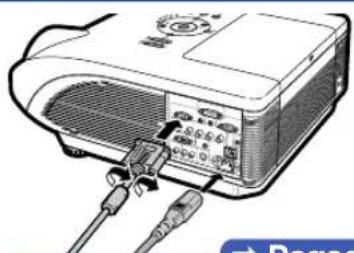
natural_image
Illustration of a projector with cables and ports, no visible text or symbols→ Pages 27–29, 37
3. Remove the lens cap and turn the projector on

natural_image
Diagram showing a mechanical component with arrows indicating direction of movement, no text or symbols presentPress ON on the projector or ON the remote control.
→ Page 37
4. Adjust the angle
Adjust the projector angle
- Shift the lens horizontally and vertically.
① Press HWLNS shift ⊕ on the projector or HWLNS shift on the remote control.
② Press ▲, ▼, ◀ or ▶ on the projector or the remote control.
- Adjust the projector angle by rotating the adjustment feet.

natural_image
Illustration of a projector with control knob and two base terminals (no text or symbols)→ Pages 38, 39
5. Adjust the focus and the zoom

→ Page 40
6. Correcting the image distortion due to the projection angle
① Press ⏻ on the projector or 📋 on the remote control.
② Press 📋 on the projector or 🌐 on the remote control.
③ Press ▲, ▼, ◀ or ▶ to move the position for the upper left of the image.
④ Press 📋 or 🌐 to set the position.
⑤ Repeat the same procedure with the positions for the upper right, lower right and lower left of the image.
- When the position of the lower left is set, the correction is made and the display disappears.
→ Page 41
7. Select the input mode
Press the projector or on the INPUT1 remote control to select the "INPUT 1" mode.
▼▼n-screen Display (RGB)
- When pressing INPUT 12.3 on the projector, input mode switches in order of: [INPUT 1 INPUT 2 INPUT 3]. Pressing INPUT 45 on the projector switches between "INPUT 4" and "INPUT 5".
- When using the remote control, press 8/8/8/9 to switch the input mode.
→ Page 45
8. Turn the power off
Press STANDBY on the projector or STANDBY on the remote control. While the confirmation message is displayed,
press 📍 STANDBY or 📍 again.
▼▼On-screen Display
Enter STANDBY mode? Yes: Press Again No: Please Wait
- You can unplug the power cord even if the projector is operating.
• Even if you unplug the power cord from the AC outlet, the cooling fan continues to run for a while.
→Page 37
Setting Up the Projector
Setting Up the Projector
For optimal image quality, position the projector perpendicular to the screen with the projector's feet flat and level. Doing so will eliminate the need for Keystone correction and provide the best image quality.

Note
- The projector lens should be centered in the middle of the screen. If the horizontal line passing through the lens center is not perpendicular to the screen, the image will be distorted, making viewing difficult.
- For an optimal image, position the screen so that it is not in direct sunlight or room light. Light falling directly on the screen washes out the colors, making viewing difficult. Close the curtains and dim the lights when setting up the projector in a sunny or bright room.
Standard Setup (Front Projection)
Place the projector at the required distance from the screen according to the desired picture size. (For details, refer to "SETUP MANUAL" contained on the supplied CD-ROM.)

natural_image
Line drawing of a meeting scene with three people, one standing and gesturing, the other seated at a table with a whiteboard (no text or symbols)Indication of the Projection Image Size and Projection Distance
For details, refer to “SETUP MANUAL” contained on the supplied CD-ROM. Example: NORMAL Mode (4:3) for the standard zoom lens (AN-PH31EZ)

Projecting a Reversed Image
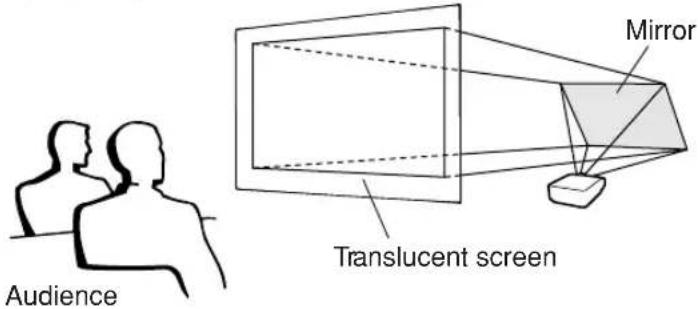
Projection from behind the Screen
■Place a translucent screen between the projector and the audience.
■ Reverse the image by setting "Rear" in the "PRJ Mode" menu. (See page 84.)

Projection Using a Mirror
■Place a mirror (normal flat type) in front of the lens.
When the translucent screen is placed between the mirror and audience, set to "Front" in the "PRJ Mode" menu. (See page 84.)
■ When the mirror is placed on the audience side, set to "Rear" in the "PRJ Mode" menu. (See page 84.)
Set to "Front"
Set to "Rear"


Info
- When using a mirror, ensure that both the projector and the mirror are carefully placed so the projected light does not shine into the eyes of the audience.
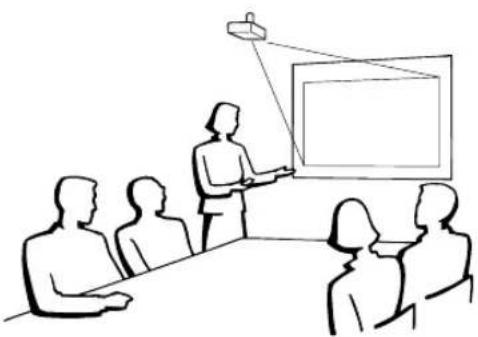
Ceiling-mount Setup
■It is recommended that you use the optional Sharp ceiling-mount bracket for this installation.
Before mounting the projector, contact your nearest Sharp Authorized Projector Dealer or Service Center to obtain the recommended ceiling-mount bracket (sold separately).
- AN-PHCM20 ceiling-mount bracket, its AN-EP101AP extension tube (for the U.S.A.).
- AN-NV6T ceiling-mount bracket, its AN-TK201 and AN-TK202 extension tubes (for countries other than the U.S.A.).
■Invert the image by setting "Ceiling + Front" in "PRJ Mode". See page 84 for use of this function.
natural_image
Line drawing of a meeting scene with a presenter pointing at a blank board and audience members seated (no text or symbols)INPUT/OUTPUT Terminals and Connectable Main Equipment

flowchart
graph TD
    A["INPUT 1, 2 terminal"] --> B["CONNECTING the computer. (See pages 27 and 28)"]
    A --> C["CONNECTING video equipment with component output terminal (DVD player, DTV decoder, DVD recorder with hard disc, etc.). (See page 33)."]
    D["RS-232C terminal"] --> E["CONNECTING the computer to control the projector. (See page 35)."]
    F["INPUT 4 terminal"] --> G["CONNECTING video equipment without S-video output terminal. (See page 34.)"]
    H["AUDIO input (1) terminal"] --> I["Connecting an audio cable. (Audio input terminal dedicated to INPUT 1.) (See page 27)."]
    J["AUDIO input (2, 3) terminal"] --> K["Connecting an audio cable. (Shared audio input terminal for INPUT 2 and 3.) (See pages 28 and 29)."]
    L["AUDIO OUTPUT terminal"] --> M["Connecting an audio cable. (Shared audio output terminal for INPUT 1 - 5.) (See page 36)."]
    N["LAN terminal"] --> O["Connecting the computer or the hub using a LAN cable. (See page 35)."]
    P["OUTPUT (FOR INPUT 1, 2) terminal"] --> Q["Connecting the monitor when you want to simultaneously watch the projection image on the monitor. (See page 36)."]
    R["WIRED REMOTE terminal"] --> S["For connecting the remote control when the signals from the remote control cannot reach the remote control sensor. (See page 18)."]
    T["INPUT 5 terminal"] --> U["Connecting video equipment with S-video output terminal (VCR, DVD player, etc.). (See page 34)."]
Samples of Cables for Connection
- For more details of connection and cables, refer to the operation manual of the connecting equipment.
- You may need other cables or connectors not listed below.
| Equipment | Terminal on connected equipment | Cable | Terminal on the projector |
Computer | RGB output terminal | RGB cable (supplied) | INPUT 1 |
5 BNC to 15-pin D-sub cable (commercially available) | INPUT 2 | ||
| DVI digital video output terminal | DVI Digital cable (commercially available) | INPUT 3 | |
| Audio output terminal | ø3.5 mm stereo or mono audio cable (commercially available or available as Sharp service part QCNWGA038WJPZ) | AUDIO (for INPUT 1)[VCCW]AUDIO (for INPUT 2, 3)[HC54] | |
Audio-visual equipment [67H2] [67H2]   | HDMI output terminal | DVI to HDMI cable (commercially available)[886] | INPUT 3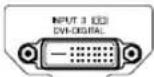 |
| DVI digital video output terminal | DVI Digital cable (commercially available)[846] | ||
| RGB output terminal | 5 RCA RGB cable (commercially available)BNC to RCA adaptors (commercially available) | INPUT 2[CC7T] | |
| Component video output terminal | 3 RCA to 15-pin D-sub cable (optional: AN-C3CP2) | INPUT 1 | |
BNC to RCA adaptors (commercially available)Component video cable (commercially available) | INPUT 2 | ||
Audio-visual equipment     | Video output terminal | Video cable (commercially available) | INPUT 4 |
| S-video output terminal | S-video cable (commercially available) | INPUT 5 | |
| Audio output terminal | ø3.5 mm stereo minijack to RCA audio cable (commercially available) | AUDIO (for INPUT 1) AUDIO (for INPUT 2, 3) AUDIO (for INPUT 2, 3) | |
RCA audio cable (commercially available) | AUDIO (for INPUT 4, 5) | ||
Monitor | RGB input terminal | RGB cable (supplied or commercially available) | OUTPUT |
Amplifier | Audio input terminal | ø3.5 mm stereo minijack to RCA audio cable (commercially available) | AUDIO OUTPUT |
Connecting to a Computer
Before connecting, ensure the power cord of the projector from the AC outlet is unplugged, and that the devices to be connected are turned off. After making all connections, turn on the projector and then the other devices. When connecting a computer, ensure that it is the last device to be turned on after all the connections are made.
Ensure the operation manuals of the devices to be connected have been read before making connections.

Note
- See page 100 "Computer Compatibility Chart" for a list of computer signals compatible with the projector. Use with computer signals other than those listed may cause some of the functions to not work.
- Connecting computers other than the recommended types may result in damage to the projector, the computer, or both.
- A Macintosh adaptor may be required for use with some Macintosh computers. Contact your nearest Macintosh Dealer.
- Depending on the computer you are using, an image may not be projected unless the computer's external output port is switched on. (e.g. Press "Fn" and "F5" keys simultaneously when using a SHARP notebook computer). Refer to the specific instructions in your computer's operation manual to enable your computer's external output port.
Connecting with the RGB Cable


Note
- With this connection, the projector is not compatible to the sync on green signals.
- When using the 3.5mm mono audio cable, the volume level will be half of when using the 3.5mm stereo audio cable.
Connecting with a 5 BNC to 15-pin D-sub Cable
The projector employs a 5 BNC computer input to prevent deterioration of image quality. When connecting the input terminals on the projector to the computer directly, Connect the R (PR), G/G sync (Y), B (PB), HD/C sync and VD cables of the 5 BNC to 15-pin D-sub cable (commercially available) to the INPUT 2 terminals on the projector.


Note
- When connecting the projector to a compatible computer other than a PC (VGA/SVGA/XGA/SXGA/UXGA) or Macintosh (i.e. Workstation), a separate cable may be needed. Please contact your dealer for more information.
- When using the 3.5mm mono audio cable, the volume level will be half of when using the 3.5mm stereo audio cable.
• The HD/C sync terminal is only for TTL signal.
Connecting with a DVI Digital Cable
The projector employs the DVI digital input terminal for direct input of digital video signals from a computer.
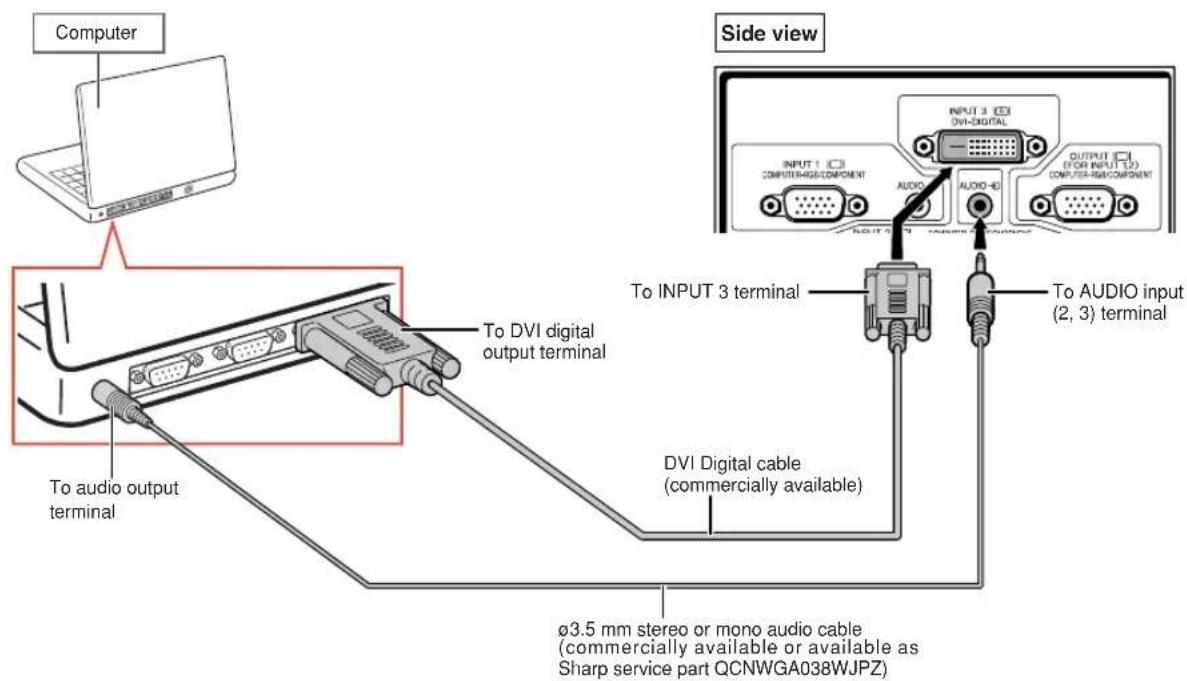

Note
- When connecting the projector to a computer in this way, select "D. PC RGB" for "Signal Type" in the "Picture" menu.
- When using the 3.5mm mono audio cable, the volume level will be half of when using the 3.5mm stereo audio cable.
Connecting to Video Equipment
Before connecting, ensure the power cord of the projector from the AC outlet is unplugged, and that the devices to be connected are turned off. After making all connections, turn on the projector and then the other devices.
The projector has a DVD digital terminal, computer-RGB/component terminal, S-video terminal and video terminal for video input. Refer to the listed illustrations on how to connect audio-visual equipment.
If your audio-visual equipment has an RGB output terminal or component output terminal, use the computer-RGB/component terminals (INPUT 1 or 2) on the projector for video connection.
Connecting to Video Equipment That Has an HDMI Output Terminal with a DVI to HDMI Cable
Use a DVI to HDMI cable when connecting HDMI video equipment such as DVD players to the INPUT 3 terminal.


Note
- Select the input signal type of the video equipment. See page 63.
- While the projector is connected to video equipment that has an HDMI output terminal, only the video signal can be input to the projector. (Connect the AUDIO input (2, 3) terminal for audio input.)
- Depending on specifications of video equipment or DVI to HDMI digital cable, the signal transmission may not work property. (The HDMI specification does not support all connections to video equipment that has HDMI digital output terminal using a DVI to HDMI digital cable.)
- For details on compatibility for connection, see support information on DVI connection provided by the video equipment manufacturer.
Connecting to Video Equipment That Has a DVI Output Terminal with a DVI Digital Cable
Use a DVI Digital cable when connecting video equipment with the DVI output terminal such as DVD players to the INPUT 3 terminal.


Note
- Select the input signal type of the video equipment. See page 63.
Connecting to RGB Video Equipment with a 5 RCA RGB Cable
Use a 5 RCA RGB cable when connecting the RGB video equipment such as DVD players and DTV* decoders to the INPUT 2 terminals.
* DTV is the umbrella term used to describe the new digital television system in the United States.
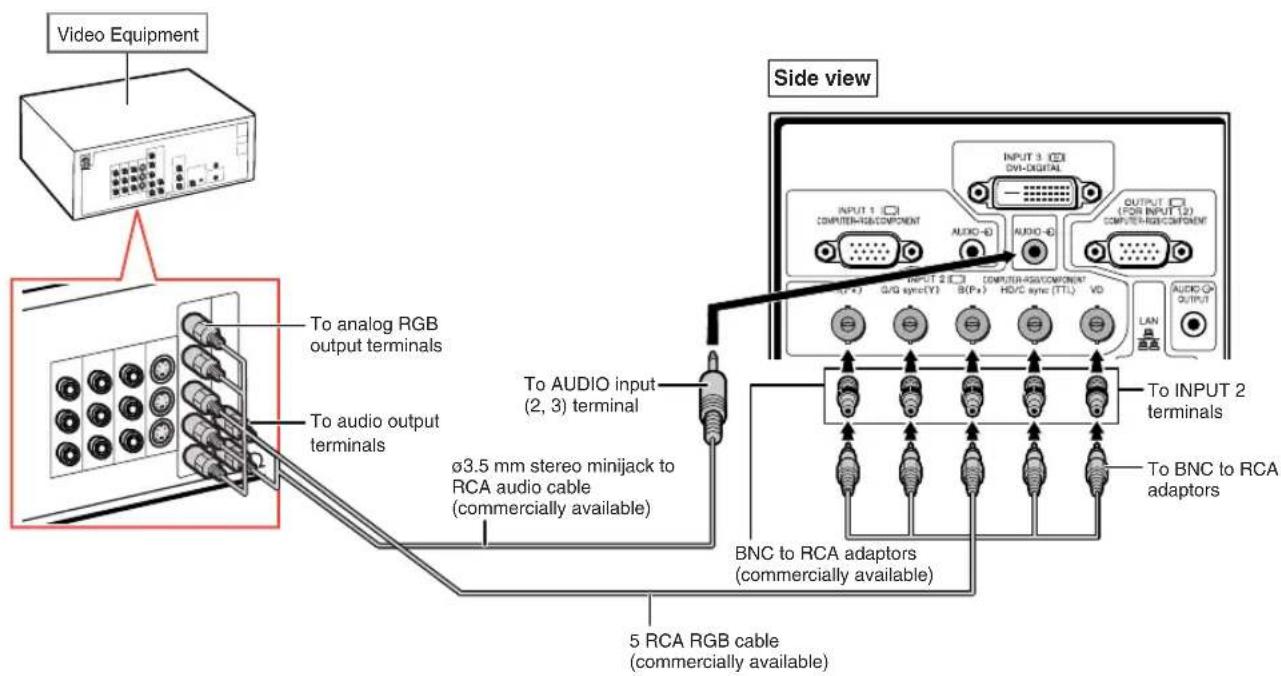

Note
- When connecting the projector to the video equipment in this way, select "RGB" for "Signal Type" in the "Picture" menu. See page 63.
- The HD/C sync and VD terminals may be used depending on the specifications of the DTV decoder connected to this projector. Please refer to the operation manual of the DTV decoder for details.
•The HD/C sync terminal is only for TTL signal.
Connecting to Video Equipment That Has Component Output Terminals
When connecting the video equipment that has component output terminals to the INPUT 1 terminal, use the 3 RCA to 15-pin D-sub cable (optional: AN-C3CP2).

When connecting the video equipment that has component output terminals to the INPUT 2 terminals, use the BNC to RCA adaptors (commercially available).
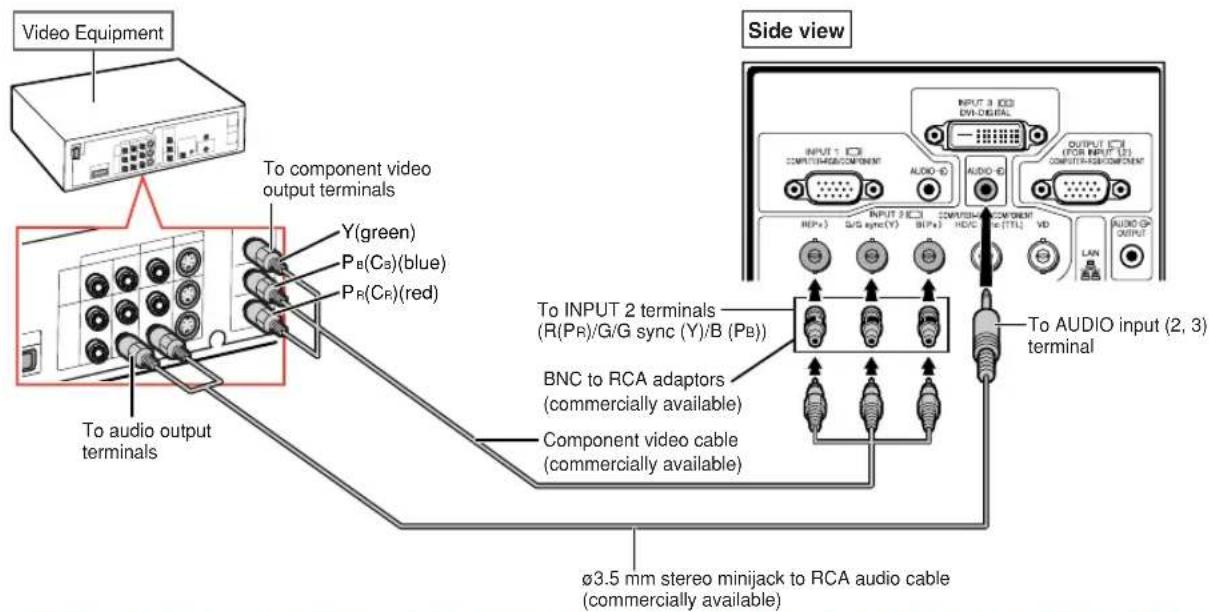

Note
- 3.5 mm stereo minijack to RCA audio cable (commercially available) is required for audio input.
- Select "480P/525P" or "576P/625P" for "Special Modes" on the "Fine Sync" menu, if necessary. (See page 69.)
- When you connect video equipment with a 21-pin RGB output (Euro-scart) to the projector, use a commercially available cable that fits in the projector terminal you want to connect.
•The projector does not support RGBC signals via the Euro-scart.
Connecting with an S-video Cable or a Composite Video Cable
Connect the video equipment to the INPUT 4 or 5 terminal using the S-video cable or composite video cable (commercially available).


Note
- The S-video signal input to the S-VIDEO terminal is separated into color and luminance signals for realizing a higher-quality image.
- An RCA audio cable (commercially available) is required for audio input.
- When you connect video equipment with a 21-pin RGB output (Euro-scart) to the projector, use a commercially available cable that fits in the projector terminal you want to connect.
Controlling the Projector by a Computer
When the RS-232C terminal on the projector to the RS-232C serial terminal on the computer, or when the LAN terminal on the projector to the LAN terminal on the computer, the computer can be used to control the projector. Refer to the “SETUP MANUAL” contained on the supplied CD-ROM for details.
When connecting to a computer using an RS-232C serial control cable


Note
- The RS-232C function may not operate if your computer terminal is not correctly set up. Refer to the operation manual of the computer for details.
- Refer to "SETUP MANUAL" contained on the supplied CD-ROM for the RS-232C specifications and commands.

Info
- Do not connect the RS-232C cable to a terminal other than the RS-232C terminal on the computer. This may damage your computer or projector.
- Do not connect or disconnect an RS-232C serial control cable to or from the computer while it is on. This may damage your computer.
When connecting to the LAN terminal using a LAN cable


Note
- When connecting to a hub, use straight-through Category 5 (CAT.5) type cable (commercially available).
- When connecting to a computer, use cross-over Category 5 (CAT.5) type cable (commercially available).

Connecting to a Monitor That Has an RGB Input Terminal
You can display computer images on a monitor using the RGB cables.
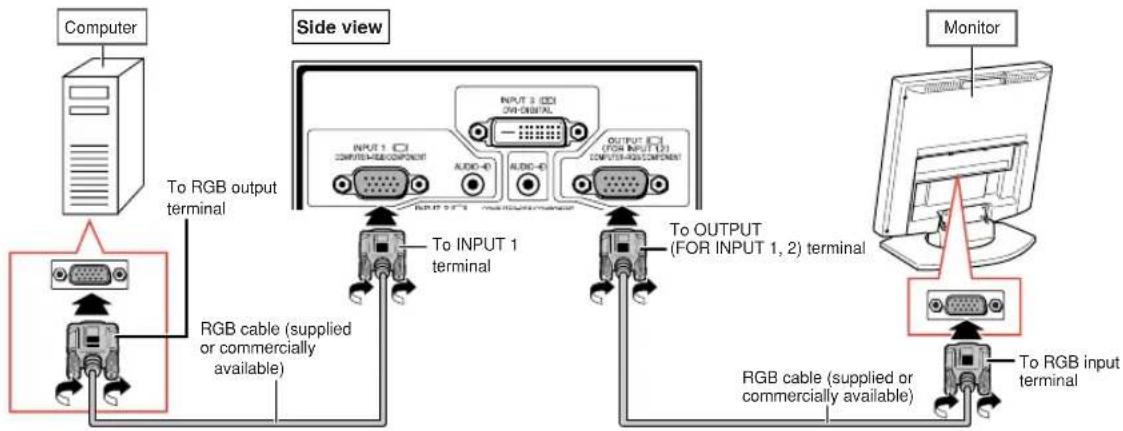

Note
- RGB signals and component signals input from the INPUT 1 or INPUT 2 terminals can be output to the monitor.
- For inputting video signals from the INPUT 1 terminal, another RGB cable (commercially available) is required.

Connecting to an Amplifier or Other Audio Equipment
Audio signals input from equipment connected to each audio input terminal of the projector can be output to audio equipment.


Note
- 3.5 mm stereo minijack to RCA audio cable (commercially available) is required for audio input.
- When turning off the power in the case of connecting an amplifier or other audio equipment, first turn off the power of the amplifier and then turn off the power of the projector.
- By using external audio components, the volume can be amplified for better sound.
- For details on Variable Audio Output (VAO) and Fixed Audio Output (FAO), see page 72.
Turning the Projector On/Off
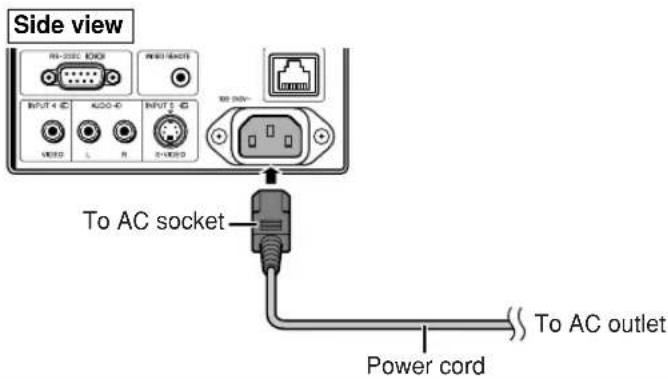
Connecting the Power Cord
Plug the supplied power cord into the AC socket on the rear of the projector. Then plug into the AC outlet.
Turning the Projector On
Before performing the steps in this section, connect any equipment that you use with the projector. (See pages 27–36.)
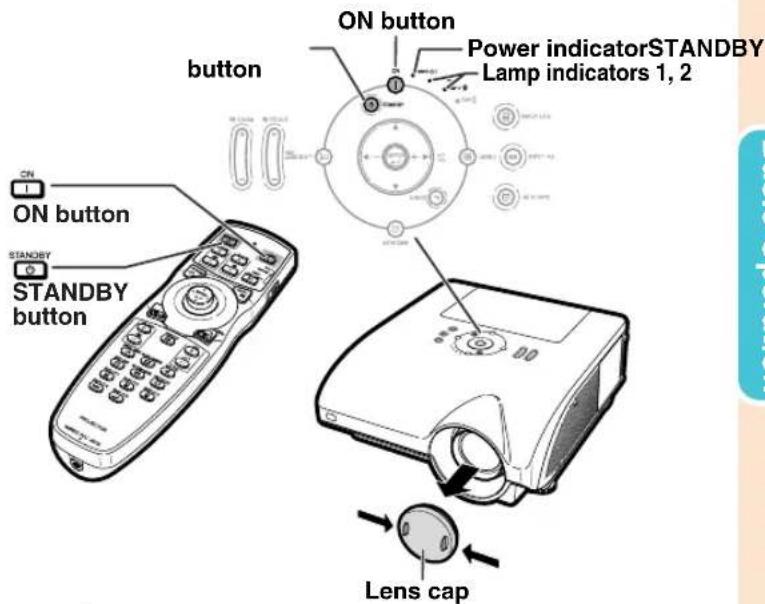
Remove the lens cap and press ☑ on the projector or ☑ on the remote control.
•The power indicator illuminates green.
• After the lamp indicator illuminates, the projector is ready to start operation.
- When System Lock is set, the keycode input screen appears. Enter the right keycode to start projection. See page 79 for details.

Note
-
The lamp indicator illuminates or blinks, indicating the status of the lamp.
Green: The lamp is on.
Blinking green: The lamp is warming up.
Red: The lamp is shut down abnormally or the lamp should be replaced. -
When switching on the projector, a slight flickering of the image may be experienced within the first minute after the lamp has been illuminated. This is normal operation as the lamp's control circuitry is stabilizing the lamp output characteristics. This does not indicate malfunction.
- If the projector is put into standby mode and immediately turned on again, the lamp may take some time to illuminate.
Turning the Power Off (Putting the Projector into Standby Mode)
1
Press STANDBY on the projector or on the remote control, then press that button again while the confirmation message is displayed, to put the projector into standby mode.


Info
- If "Direct Power On" is set to "ON", the projector will be turned on automatically when you plug the power cord into the AC outlet. (See page 87.)
- English is the factory preset language. If you want to change the on-screen display to another language, change the language according to the procedure on page 92.
▼On-screen Display

Enter STANDBY mode?
Yes: Press Again No: Please Wait

Info
- You can unplug the power cord even if the projector is operating.
- Even if you unplug the power cord from the projector, the cooling fan continues to run for a while.
Shifting the Lens
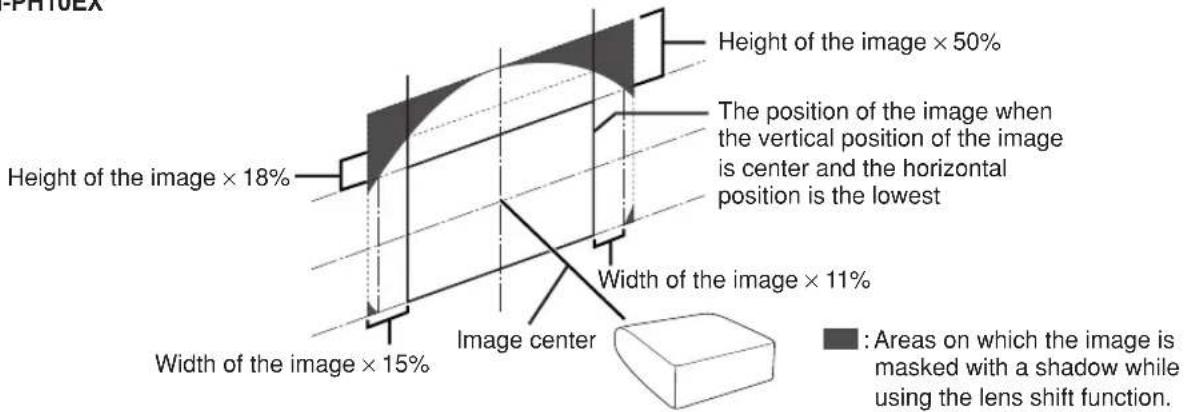
In addition to the zoom function and adjustment of projection angle using the adjustment feet, you can adjust the position of the projection using the lens shift function. This is a useful function in cases such as when the screen cannot be moved.
When moving upward or downward When moving in the left and right direction


Adjustable range
The adjustable range is shown below.
Horizontal range: ±15%
Vertical range: +50% (to the upper side)
The adjustable range has limitations even within the range shown above.
The image can be adjusted as shown on the diagram.
AN-PH20EZ, AN-PH31EZ, AN-PH40EZ, AN-PH50EZ, AN-PH60EZ

AN-PH10EX
1
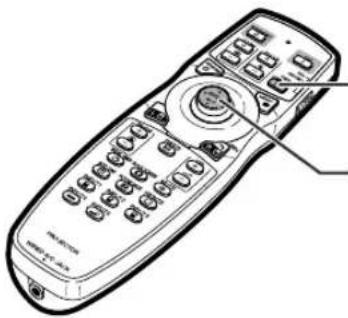
Press on the projector or lens shift on the remote control.
- Pressing ☐ the projector or on the remote control displays the test pattern. Checking the test pattern is useful for more accurate adjustment.
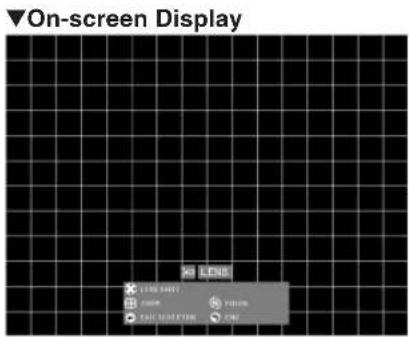
2
Press ▲, ▼, ◀ or ▶ on the projector or the remote control to adjust the image position.
natural_image
Line drawing of a remote control with keypad and buttons (no text or symbols)H & V LENS SHIFT button
Mouse/adjustment button
(▲/▼/◄/►) ENTER button

Using the Adjustment Feet
- When the position of the projected image cannot be adjusted with the lens shift function, use the adjustment feet to adjust the projected angle.
- The height of the projector can be adjusted using the adjustment feet when the screen is located higher than the projector, the screen is inclined or when the installation site is slightly inclined.
• Install the projector so that it is as perpendicular to the screen as possible.
1
While lifting the projector, rotate the adjustment feet.
• The projector is adjustable up to approximately 9 degrees.
2
Lower the projector, and then rotate the adjustment feet for the fine adjustment.
- When lowering the projector, be careful not to get your fingers caught in the area between the adjustment feet and the projector.

Adjusting the Focus
Press 📋 on the projector or 📋 on the remote control to adjust the focus.
▼On-screen Display

LENS

LENS SHIFT

ZOOM

TEST PTRN

FOCUS

END


Adjusting the Projected Image Size
Press 📋 on the projector or 📋 on the remote control to adjust the projected image size.
▼On-screen Display

LENS

LENS SHIFT

ZOOM

TEST PTRN

FOCUS

END

Note
• After you have pressed the FOCUS buttons or the ZOOM buttons on the remote control or the projector, you can display the test pattern by pressing the ENTER button. The test pattern is useful for making more accurate adjustments.
- For fine adjustments, when pressing the H & V LENS SHIFT buttons, the FOCUS buttons or the ZOOM buttons, the projected image moves a small amount toward the desired direction for approximately one second. Hold down the buttons to move the projected image quickly.
Correcting Trapezoidal Distortion
When the image is projected either from the top or from the bottom towards the screen at an angle, the image becomes distorted trapezoidally.
The function for correcting trapezoidal distortion is called Keystone Correction.
There are the two types of the Keystone Correction.
1) "GEOMETRIC ADJUSTMENT" for correcting an image designating the corner of the projected image
2) "H & V KEYSTONE" for designating the correction of the horizontal and vertical axes
Selecting the Type of the Correction
Select the type of the keystone correction.
Press ☑ on the projector or ☑ on the remote control.
- "GEOMETRIC ADJUSTMENT" will be displayed.
• Each time 📄 or 🖱️ is pressed, the display toggles as follows:

flowchart
graph TD
    A["GEOMETRIC → H & V KEYSTONE ADJUSTMENT"] --> B["↓"]
    C["The display ← IMAGE:RESIZING * disappears."] --> D["↑"]
| GEOMETRIC ADJUSTMENT | For correcting an image designating the corner of the projected image |
| H & V KEYSTONE | For correcting an image designating the horizontal or vertical axes |
| IMAGE RESIZING | For correcting the image distortion which cannot be corrected with “H & V KEYSTONE”.*Only when “H & V KEYSTONE” is set to the values other than “0”, “IMAGE RESIZING” can be adjusted. (This function cannot be used when correcting with “GEO-METRIC ADJUSTMENT”.) |


GEOMETRIC ADJUSTMENT
1
Press Ⓗ on the projector or Ⓜ️ on the remote control repeatedly until “GEOMETRIC ADJUSTMENT” is displayed.
2
Press the buttons below to adjust the position, size or focus of the projected image.
- Match screen's four sides to green test pattern.
- Pressing ▲,▼,▼ or ▶ on the projector or □ on the remote control allows you to shift the lens.
- Pressing ☐ on the projector or ☐ on the remote control allows you to adjust the projected image size.
- Pressing 📄 on the projector or 📋 on the remote control allows you to adjust the focus.
3
Press on the projector or on the remote control.

4
Press ▲, ▼, ◀ or ▶ to move the position for the upper left of the image.
- Move the upper left of the yellow frame onto the upper left of the screen.
5
Press 📋 or 📋 to set the position.
6
Repeat the same procedure with the positions for the upper right, lower right and lower left of the image.
- At this time, pressing UNDO on the projector or 📋 on the remote control returns to the previous screen.
- Before correcting the upper left of the image, pressing UNDO or UNDO returns to the reset confirmation screen.
- When the position of the lower left is set, the correction is made and the display disappears.
▼On-screen Display

Geometric Adjustment
Upper Left Upper Right Lower Right

flowchart
graph TD
    A["Top-Left Object"] --> B["Top-Right Object"]
    B --> C["Bottom-Left Object"]
    style A fill:#f9f,stroke:#333
    style B fill:#bbf,stroke:#333
    style C fill:#dfd,stroke:#333
    subgraph Top-Left
        D["Top-Left Object"]
        E["Top-Right Object"]
    end
    subgraph Bottom-Left
        F["Bottom-Left Object"]
        G["Bottom-Right Object"]
    end
    D --> H["Arrow to Top-Left"]
    E --> I["Arrow to Bottom-Left"]
    G --> J["Arrow to Bottom-Left"]
H & V KEYSTONE
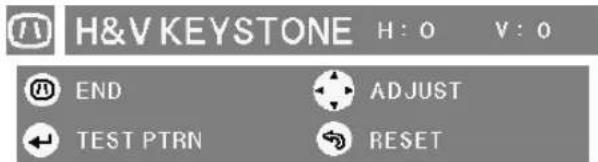
1 Press ON the projector or on the remote control repeatedly until "H & V KEYSTONE" is displayed.
- When the correction has already been made with "GEOMETRIC ADJUSTMENT", the confirmation message for resetting the correction before "H & V KEYSTONE" is displayed, and then reset.
2 Press ▲ or ▼ to parallelize the left and right sides of the projected image.
3 Press ◀ or ▶ to parallelize the upper and lower sides of the projected image.
4 Press 📄 or 📋 to display "IMAGE RESIZING".
- Only when "H & V KEYSTONE" is set to the values other than "0", "IMAGE RESIZING" works.
▼On-screen Display
Vertical Keystone Correction (Adjustment with ▲ / ▼)

flowchart
graph TD
    A["3D Cube with shaded faces"] --> B["Rectangular Cube with shaded faces"]
    style A fill:#f9f,stroke:#333
    style B fill:#bbf,stroke:#333
Horizontal Keystone Correction (Adjustment with ◀/▶)

flowchart
graph TD
    A["3D Rectangle"] --> B["2D Square"]
    style A fill:#f9f,stroke:#333
    style B fill:#bbf,stroke:#333
    D["Arrow"] --> E["2D Square"]
▼On-screen Display


Image Projection
5
Press ▲, ▼, ◀ or ▶ to correct the image distortion.
IMAGE RESIZING
(Adjustment with ▲ / ▼ / ◀ / ▶)

flowchart
graph TD
    A["3D Cube with diagonal lines"] --> B["Transformation"]
    B --> C["2D Cube with dashed lines"]
6
Press 📄 or 📋 to set the position.
Switching the Input Mode
Select the appropriate input mode for the connected equipment.
Press INPUT1, INPUT2, INPUT3, INPUT4, or INPUT5 on the remote control to select the input mode.
- When pressing Ⓗ INPUT 12.3 on the projector, the input mode switches in order of :
→ INPUT 1 INPUT 2 INPUT 3
- When pressing Ⓗ INPUT40 on the projector, the input mode switches between "INPUT 4" and "INPUT 5".

Note
- When no signal is received, "NO SIGNAL" will be displayed. When non-supported signal is received, "NOT REG." is displayed.
- When "Auto Search" of the "Options (1)" menu is set to "ON", the input mode with signal can automatically be detected and displayed. (See page 78.)
- The input mode is not displayed when "OSD Display" of the "Options (1)" menu is set to "Level A" or "Level B". (See page 75.)
About the Input mode
| INPUT 1/INPUT 2(RGB/component) | Used for projecting images from equipment that sends RGB signals or component signals connected to the INPUT 1 or 2 terminals. |
| INPUT 3(digital PC RGB/digital PC component/digital video RGB/digital video component) | Used for projecting images from equipment connected to the INPUT 3 terminal. |
| INPUT 4(video) | Used for projecting images from equipment connected to the INPUT 4 terminal. |
| INPUT 5(S-video) | Used for projecting images from equipment connected to the INPUT 5 terminal. |

▼On-screen Display of Input Mode (Example)

When pressing

INPUT 12.3
INPUT 1/2/3 mode
Using RGB
* The "INPUT 3" display is an example. (When "Signal Type" is set to "D. PC RGB")

INPUT 1
RGB

INPUT2
RGB

INPUT3
-D. PC RGB
Using component
* The "INPUT 3" display is an example. (When "Signal Type" is set to "D. PC Comp.")

INPUT 1
Component

INPUT2
Component

INPUT3
-D. PC Comp.

When pressing

INPUT AA
INPUT 4 mode
Using video

INPUT4
Video
INPUT 5 mode
Using S-video

INPUT5
S-Video
When "Auto Search" is set to "ON"
- Pressing Ⓐ INPUT 1.23 or Ⓞ once displays the current input mode.
- Pressing 📄 INPUT 1.23 or 📄 again starts the automatic input search.
Adjusting the Volume
Press ◀/▶ on the projector or 📄 on the remote control to adjust the volume.

Note
- Pressing - or ◀ will lower the volume. Pressing + or ▶ will raise the volume.
Turning Off the Sound Temporarily
Press MUTE on the remote control to temporarily turn off the sound.

Note
- Pressing again will turn the sound back on.
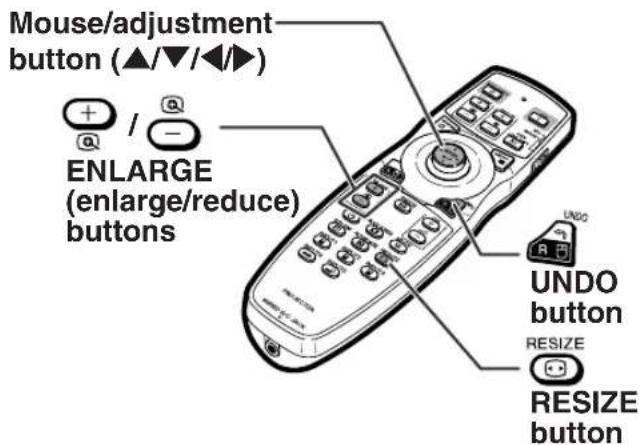
Displaying an Enlarged Portion of an Image
Graphs, tables and other portions of projected images can be enlarged. This is helpful when providing more detailed explanations.
1
Press 🧑 on the remote control.
- Enlarges the image.
- Pressing + or - enlarges or reduces the projected image.

Note
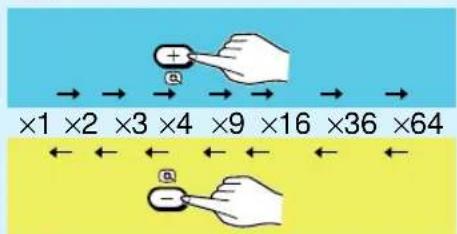
- You can change the location of the enlarged image using ▲, ▼, ◀ and ▶.
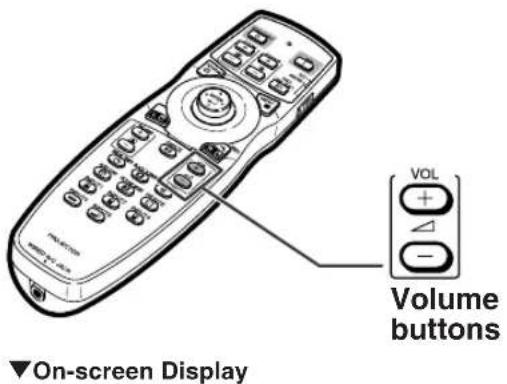

VOLUME
25


▼On-screen Display

MUTE
2
Press in the remote control to cancel the operation.
• The magnification then returns to ×1.

Note
In the following cases, the image will return to the normal size ( ×1 ).
- When switching the input mode.
- When has been pressed.
- When the input signal is changed.
- When the input signal resolution and refresh rate (vertical frequency) change.
- When size has been pressed.
Freezing a Moving Image
1
Press FREEZ the remote control.
•The projected image is frozen.
2
Press FREEZ Main to return to the moving image from the currently connected equipment.
Selecting the Picture Mode
You can select the suitable picture mode for the projected image, such as movie or video game.
Press PICTURE MODE the remote control.
- When pressing a picture mode changes in order of
→STANDARD→PRESENTATION→CINEMA→CUSTOM

Note
- Press return to the "STANDARD" mode.
- This function can also be accessed from the OSD menu (see page 60).


This function allows you to modify or customize the resize mode to enhance the input image. Depending on the input signal, you can choose a desired image.
Resize Mode
RESIZE
Press ☑ on the remote control.
- Pressing changes the display as shown.
- Toreturn to the standard image, press "RESIZE" is displayed on the screen.
- This function can also be accessed from the OSD menu (see page 74).
Mouse/adjustment button

COMPUTER
| NORMAL FULL | BORDER STRETCHDOT BY DOT | |||||
| 4:3 aspect ratio | SVGA (800 × 600) | 1024 × 768 | 1024 × 768 | 800 × 600 | 768 × 576 | 1024 × 576 |
| XGA (1024 × 768) | 1024 × 768 | |||||
| SXGA (1280 × 960) | 1280 × 960 | |||||
| SXGA+ (1400 × 1050) | 1400 × 1050 | — | ||||
| Other aspect ratios | SXGA (1280 × 1024) | 968 × 768 | 1280 × 1024 | 720× 576 | ||
| 1280 × 720 | 1024 × 576 | 1280 × 720 | — | — | ||
| 1360 × 768 | 1024 × 578 | 1360 × 768 | ||||
| 1366 × 768 | 1024 × 576 | 1366 × 768 | ||||
| 1280 × 768 | 1024 × 614 | 1280 × 768 | 960 × 576 | 1024 × 576 | ||
| 1280 × 800 | 1024 × 640 | 1280 × 800 | 922 × 576 | |||
| Input signal | For 4:3 screen For 16:9 screen | |||||
| Computer | Image type | NORMAL FULL BORDER | DOT BY DOT | STRETCH | ||
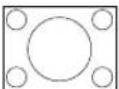
| Resolution lower than XGA |  4:3 aspect ratio 4:3 aspect ratio |  | — |  |  |  |
| XGA | — | |||||
| SXGA (1280 × 960) |  | — | ||||
| Resolution higher than SXGA | 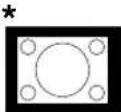 | |||||
| SXGA (1280 × 1024) |  5:4 aspect ratio 5:4 aspect ratio | 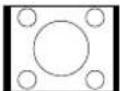 | ||||
| 1280 × 720 |  16:9 aspect ratio 16:9 aspect ratio |  |  | Select “Normal” | ||
| 1360 × 7681366 × 768 | 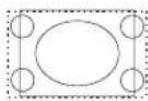 | |||||
| 1280 × 768 | 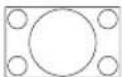 16:10 aspect ratio 16:10 aspect ratio |  | 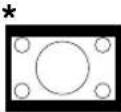 |  | ||
| 1280 × 800 | ||||||
■: Cutout area on which images cannot be projected
:Area where the signals are off screen
*The Digital Shift function can be used for these images.
VIDEO
| Input signal | For 4:3 screen For 16:9 screen | |||||
| Image type NOR | MAL FULLDTV/video | BORDER STRETCH SMART STRETCH | ||||
| 480I, 480P,576I, 576P,NTSC, PAL, SECAM |  4:3 aspect ratio 4:3 aspect ratio | 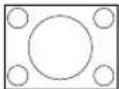 | — | * | *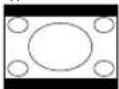 | *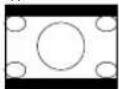 |
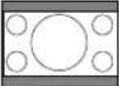 Letter box Letter box |  | * | *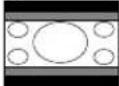 | *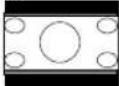 | ||
 Squeeze Squeeze | 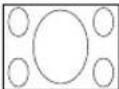 | * | *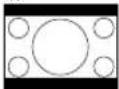 | *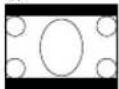 | ||
| 540P |  16:9 aspect ratio 16:9 aspect ratio | Select “Stretch” |  | — | * | — |
 4:3 aspect ratioin 16:9 4:3 aspect ratioin 16:9 | Select “Full” | 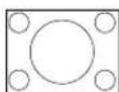 | * | |||
| 720P, 1035I, 1080I | 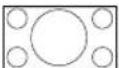 16:9 aspect ratio 16:9 aspect ratio | Select “Stretch” |  | *[IMAGE] | * | |
 4:3 aspect ratio 4:3 aspect ratio | Select “Full” |  | *[IMAGE] | * | ||

: Cutout area on which images cannot be projected

: Area on which the image is not included in the original signals
*The Digital Shift function can be used for these images.
Displaying the Black Screen
This function allows you to temporarily display the black screen.
1 Press . BLACK SCREEN
2 Pressing again will turn the projected image back on.
Displaying and Setting the Break Timer
This function allows you to show the remaining time for break during meeting.
1 Press . BREAK TIMER
2 While “” is displayed, press ▲, ▼, ◀ or ▶ to set the break timer.
- You can set anywhere between 1 and 60 minutes (in 1 units).
- The break timer starts to count down as soon as ▲,▼ or ▶ is pressed.
Note
- Pressing will cancel the break timer.
• Auto Power Off function will be temporarily disabled during the break timer.
When no input signal is detected for more than 15 minutes, the projector will automatically enter the standby mode if the break timer has elapsed. - The break timer will be displayed on the startup image. To change the screen displayed during the break timer, change the setting of "Startup Image" (see page 77).
- When "Slave" is set for "Stack Setting", the break timer is not displayed. (See page 84.)


BLACK SCREEN button
▼Projected Image

bar
| Category | Value | |---|---| | Red Bar | 100 | | Yellow Bar | 200 | | Green Bar | 300 | | Blue Bar | 400 | | Dark Blue Bar | 500 |
▼On-screen Display

4:50
The following shows the items that can be set in the projector.
"Picture" menu
INPUT 1 / INPUT 2 / INPUT 3

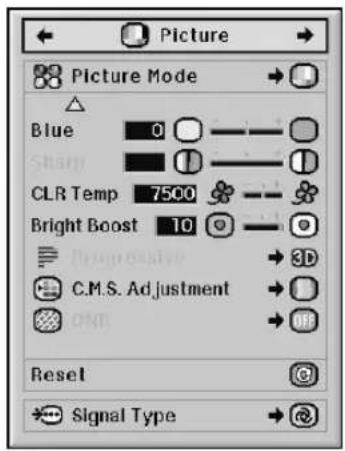
Main Menu Sub Menu
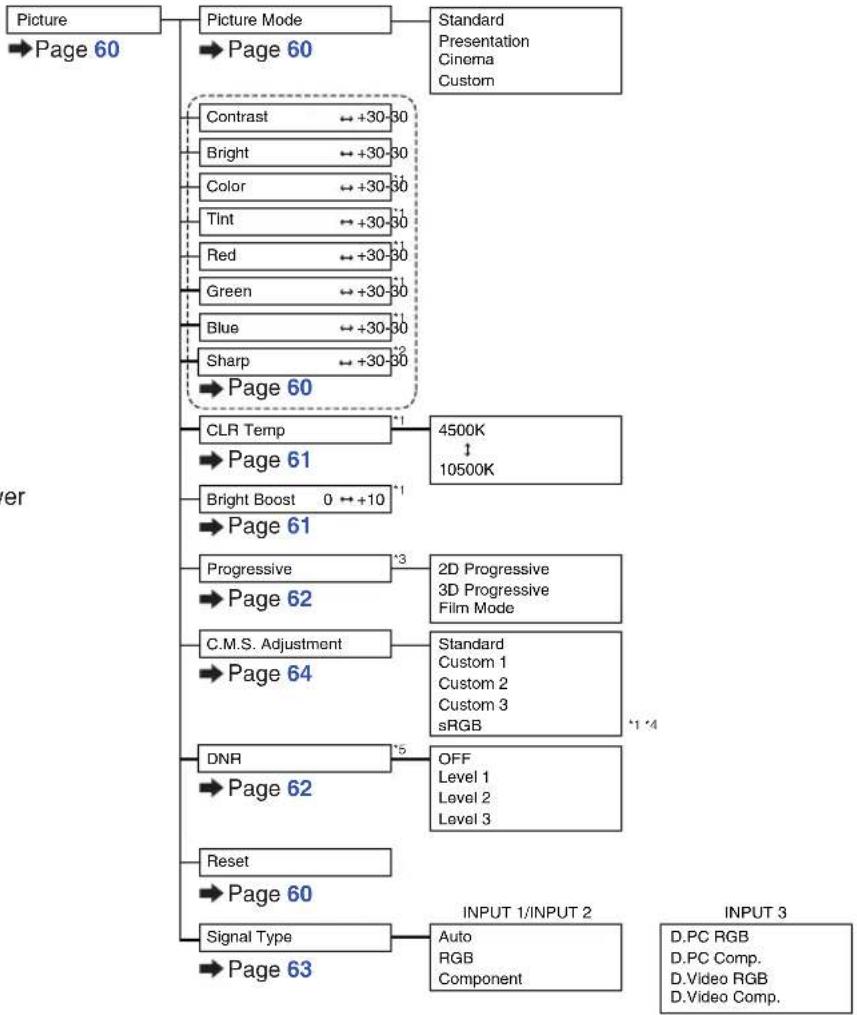
flowchart
graph TD
    A["Picture"] --> B["Picture Mode"]
    B --> C["Standard Presentation Cinema Custom"]
    B --> D["Contrast +30-30"]
    D --> E["Bright +30-30"]
    E --> F["Color +30-30"]
    F --> G["Tint +30-30"]
    G --> H["Red +30-30"]
    H --> I["Green +30-30"]
    I --> J["Blue +30-30"]
    J --> K["Sharp +30-30"]
    K --> L["Page 60"]
    L --> M["CLR Temp +1"]
    M --> N["Page 61"]
    N --> O["Bright Boost 0 →+10 +1"]
    O --> P["Page 61"]
    P --> Q["Progressive +3"]
    Q --> R["Page 62"]
    R --> S["C.M.S. Adjustment +1"]
    S --> T["Page 64"]
    T --> U["DNR +5"]
    U --> V["Page 62"]
    V --> W["Reset"]
    W --> X["Page 60"]
    X --> Y["Signal Type +1"]
    Y --> Z["Page 63"]
    Z --> AA["INPUT 1/INPUT 2"]
    AA --> AB["Auto RGB Component"]
    AA --> AC["D.PC RGB D.PC Comp. D.Video RGB D.Video Comp."]
*1 "Color", "Tint", "Red", "Green", "Blue", "CLR Temp" and "Bright Boost" cannot be adjusted when "C. M. S. Adjustment" is set to "sRGB".
*2 "Sharp" can be adjusted only when 480 I, 480P, 540P, 576, 576P, 720P, 1035, or 1080I signal is input.
*3 "Progressive" can be adjusted only when 480 I or 576I signal is input.
*4 "sRGB" can be selected under the conditions below.
- When "Signal Type" is set to "RGB", "D. PC. RGB" or "D. Video RGB".
- When "Signal Type" is set to "Auto" and the input signal is distinguished as "RGB".
*5 "DNR" can be adjusted only when 480 I, 480P, 576 or 576P signal is input.
"Picture" menu
INPUT 4 / INPUT 5

flowchart
graph TD
    A["Main Menu Sub Menu"] --> B["Picture Mode"]
    B --> C["Page 60"]
    C --> D["Standard Presentation Cinema Custom"]
    B --> E["Contrast +30-30"]
    B --> F["Bright +30-30"]
    B --> G["Color +30-30"]
    B --> H["Tint +30-30"]
    B --> I["Red +30-30"]
    B --> J["Green +30-30"]
    B --> K["Blue +30-30"]
    B --> L["Sharp +30-30"]
    B --> M["Page 60"]
    M --> N["CLR Temp 4500K ↑ 10500K"]
    M --> O["Page 61"]
    O --> P["Bright Boost 0 ← +10"]
    O --> Q["Page 61"]
    Q --> R["Progressive 2D Progressive 3D Progressive Film Mode"]
    Q --> S["Page 62"]
    S --> T["C.M.S. Adjustment Standard Custom 1 Custom 2 Custom 3"]
    S --> U["Page 64"]
    U --> V["DNR OFF Level 1 Level 2 Level 3"]
    S --> W["Page 62"]
    W --> X["Reset Page 60"]
"C.M.S." menu


flowchart
graph TD
    A["C.M.S."] --> B["Page 64"]
    B --> C["C.M.S. Adjustment"]
    C --> D["Page 64"]
    C --> E["Target"]
    E --> F["Page 64"]
    F --> G["Lightness ← +30-30"]
    G --> H["Page 65"]
    H --> I["Chroma ← +30-30"]
    I --> J["Page 65"]
    J --> K["Hue ← +30-30"]
    K --> L["Page 66"]
    L --> M["Reset (This Color)"]
    M --> N["Page 66"]
    N --> O["Reset (All Colors)"]
    O --> P["Page 66"]
    P --> Q["View Settings"]
    Q --> R["Page 67"]
"Fine Sync" menu
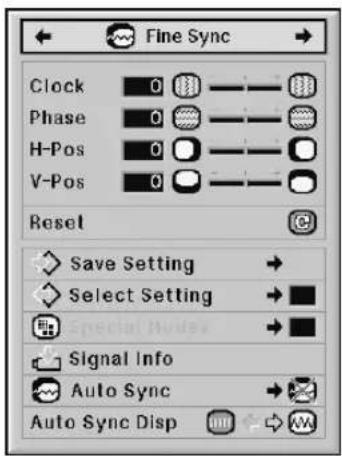

flowchart
graph TD
    A["Main Menu"] --> B["Fine Sync"]
    B --> C["Page 68"]
    C --> D["Clock"]
    D --> E["+150-150"]
    D --> F["Phase"]
    F --> G["+30-30"]
    D --> H["H-Pos"]
    H --> I["+150-150"]
    D --> J["V-Pos"]
    J --> K["+60-30"]
    D --> L["Reset"]
    L --> M["Page 68"]
    M --> N["Save Setting"]
    N --> O["Page 68"]
    O --> P["Select Setting"]
    P --> Q["Page 69"]
    Q --> R["Special Modes"]
    R --> S["Page 69"]
    S --> T["Signal Info"]
    T --> U["Page 70"]
    U --> V["Auto Sync"]
    V --> W["Page 70"]
    V --> X["Auto Sync Disp"]
    X --> Y["Page 71"]
    Y --> Z["OFF Normal High Speed"]
*6 The "Fine Sync" menu is displayed only while the input mode is INPUT 1, INPUT 2 or INPUT 3.
*7 "Clock", "Phase", "H-Pos", "V-Pos", "Reset", "Save Setting", "Select Setting" and "Special Modes" can be adjusted only while the input mode is INPUT 1 or INPUT 2.
"Audio" menu


flowchart
graph TD
    A["Main Menu"] --> B["Audio"]
    B --> C["Page 72"]
    C --> D["Sub Menu"]
    D --> E["Balance ←+30-80"]
    D --> F["Treble ←+30-80"]
    D --> G["Bass ←+30-80"]
    D --> H["Reset ←+30-80"]
    H --> I["Page 72"]
    I --> J["Audio Out"]
    J --> K["FAO"]
    J --> L["VAO"]
    J --> M["Speaker [ON/OFF"]]
    M --> N["Page 73"]
"Options (1)" menu
INPUT 1 / INPUT 2 / INPUT 3

Main Menu Sub Menu
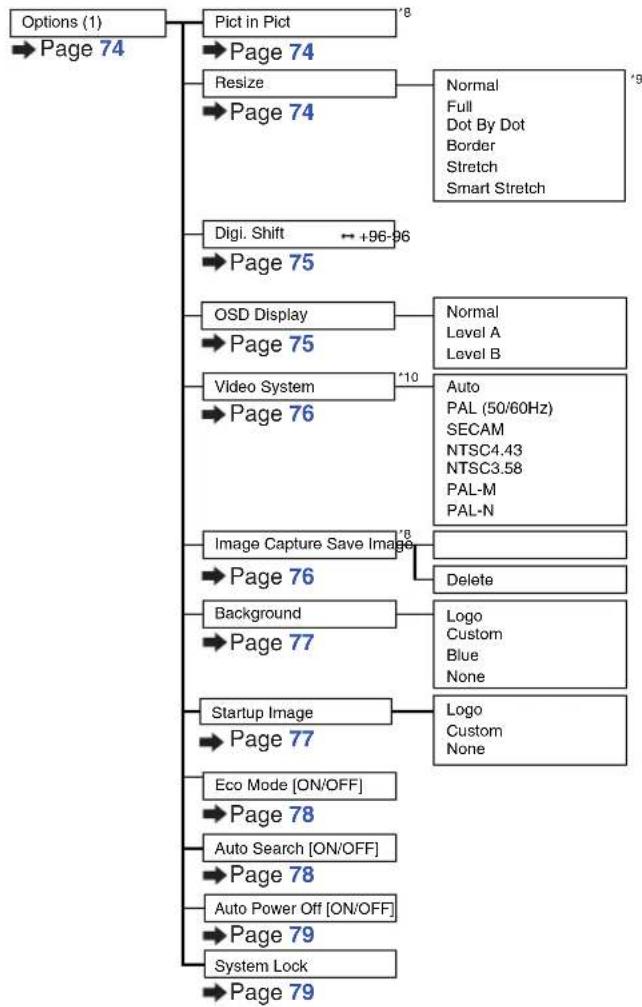
flowchart
graph TD
    A["Options (1)"] --> B["Page 74"]
    B --> C["Pict in Pict"]
    C --> D["Page 74"]
    D --> E["Resize"]
    E --> F["Page 74"]
    F --> G["Normal\nFull\nDot By Dot\nBorder\nStretch\nSmart Stretch"]
    C --> H["Digi. Shift"]
    H --> I["Page 75"]
    I --> J["OSD Display"]
    J --> K["Page 75"]
    K --> L["Video System"]
    L --> M["Page 76"]
    M --> N["Image Capture Save Image"]
    N --> O["Page 76"]
    O --> P["Background"]
    P --> Q["Page 77"]
    Q --> R["Startup Image"]
    R --> S["Page 77"]
    S --> T["Eco Mode [ON/OFF"]]
    T --> U["Page 78"]
    U --> V["Auto Search [ON/OFF"]]
    V --> W["Page 78"]
    W --> X["Auto Power Off [ON/OFF"]]
    X --> Y["Page 79"]
    Y --> Z["System Lock"]
    Z --> AA["Page 79"]
    style A fill:#f9f,stroke:#333
    style AA fill:#f9f,stroke:#333
INPUT 4 / INPUT 5
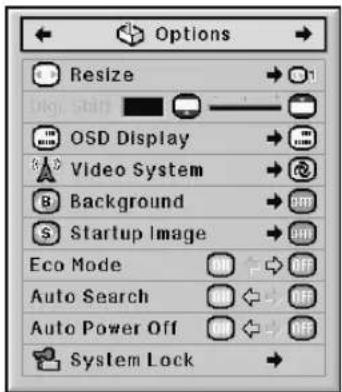
*8 Item when inputting RGB signal through INPUT 1, INPUT 2 or INPUT 3
*9 Selectable items in "Resize" mode may differ depending on the signal.
*10 Item when selecting INPUT 4 or INPUT 5
"Options (2)" menu
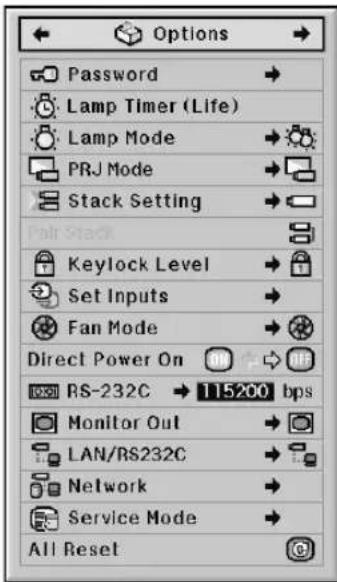
Main Menu Sub Menu

flowchart
graph TD
    A["Options (2)"] --> B["Page 82"]
    B --> C["Password"]
    C --> D["Page 82"]
    D --> E["Old Password\nNew Password\nReconfirm"]
    C --> F["Lamp Timer (Life)"]
    F --> G["Page 83"]
    G --> H["Lamp 1\nLamp 2"]
    C --> I["Lamp Mode"]
    I --> J["Page 83"]
    J --> K["Both Lamps\nLamp 1 Only\nLamp 2 Only\nEqual Use"]
    C --> L["PRJ Mode"]
    L --> M["Page 84"]
    M --> N["Front\nCeiling + Front\nRear\nCeiling + Rear"]
    C --> O["Stack Setting"]
    O --> P["Page 84"]
    P --> Q["Normal\nMaster\nSlave"]
    C --> R["Pair Stack"]
    R --> S["Page 85"]
    S --> T["Keylock Level"]
    T --> U["Page 85"]
    U --> V["Normal\nLevel A\nLevel B"]
    C --> W["Set Inputs"]
    W --> X["Page 86"]
    X --> Y["INPUT 1 [ON/OFF"]\nINPUT_2["ON/OFF"]\nINPUT_3["ON/OFF"]\nINPUT_4["ON/OFF"]\nINPUT_5["ON/OFF"]]
    C --> Z["Fan Mode"]
    Z --> AA["Page 86"]
    AA --> AB["Normal\nHigh"]
    Z --> AC["Direct Power On [ON/OFF"]]
    AC --> AD["Page 87"]
    AD --> AE["RS-232C"]
    AE --> AF["Page 87"]
    AF --> AG["9600 bps\n38400 bps\n115200 bps"]
    Z --> AH["Monitor Out"]
    AH --> AI["Page 88"]
    AI --> AJ["Enable\nDisable"]
    Z --> AK["LAN/RS232C"]
    AK --> AL["Page 88"]
    AL --> AM["Enable\nDisable"]
    Z --> AN["Network"]
    AN --> AO["Page 89"]
    AO --> AP["DHCP Client [ON/OFF"]]
    AP --> AQ["TCP/IP"]
    AQ --> AR["'11'"]
    AR --> AS["IP Address\nSubnet Mask\nGateway"]
    Z --> AT["Service Mode"]
    AT --> AU["Page 90"]
    AU --> AV["*11 Adjustable only when DHCP Client is set to "OFF""]
    Z --> AW["All Reset"]
    AW --> AX["Page 91"]
"Language" menu

Main Menu Sub Menu

"Status" menu
Main menu
Status
→Page 92
Using the Menu Screen
The menu can be operated to achieve two functions, adjustments and settings. (For setting the menu items, see pages 58 and 59.)


Menu Selections (Adjustments)
Example: Adjusting "Bright"
- This operation can also be performed by using the buttons on the projector.
1 Press

- The "Picture" menu screen for the selected input mode is displayed.
2
Press ◀ or ▶ to display the other menu items.

• There are eight menu items as shown below.
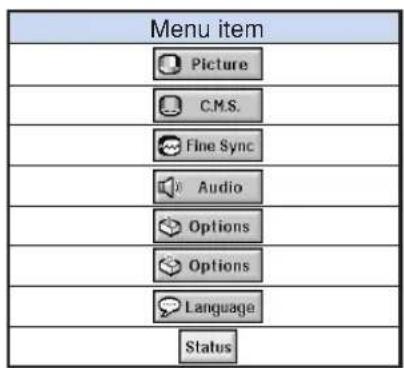
Example: "Picture" screen menu for INPUT 1 (RGB) mode


Note
- The "Fine Sync" menu is not available for selecting INPUT 4 or INPUT 5.
3
Press ▲▲r ▼▼ to select the item you want to adjust.
- Pressing displays the items on the lower part of the "Picture" menu.
To adjust the projected image while viewing it
Press

- The selected single adjustment item (e.g. "Bright") appears instead of the menu.
- When pressing ▲▲or▼, the following item ("Color" after "Bright") will be displayed.

Note
- Press return to the previous screen.

4
Press ◀ or ▶ to adjust the item selected.
•The adjustment is stored.
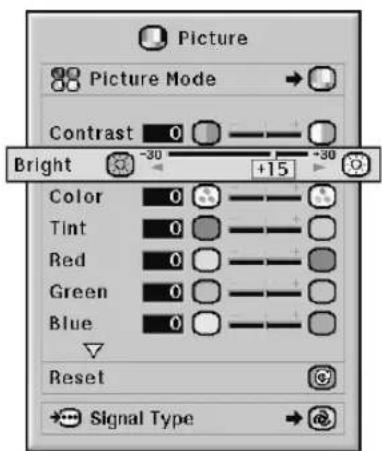
5
Press

•The menu screen will disappear.
The menu can be operated to achieve two functions, adjustments and settings. (For adjusting the menu items, see pages 56 and 57.)
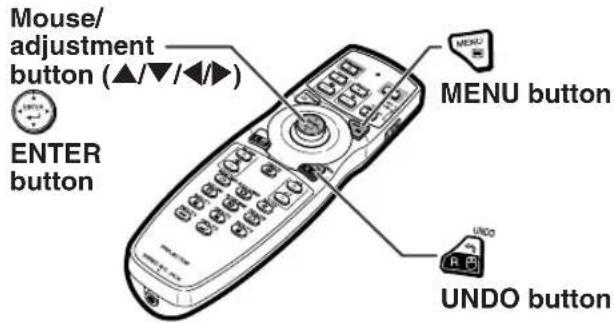
Menu Selections (Settings)
Example: Setting "OSD Display"
- This operation can also be performed by using the buttons on the projector.
1 Press

- The "Picture" menu screen for the selected input mode is displayed.
2
Press ◀ or ▶ to display the other menu items.

• There are eight menu items as shown below.


Note
- The "Fine Sync" menu is not available for selecting INPUT 4 or INPUT 5.
Example: "Picture" screen menu for INPUT 1 (RGB) mode

Example: "Options (1)" screen menu
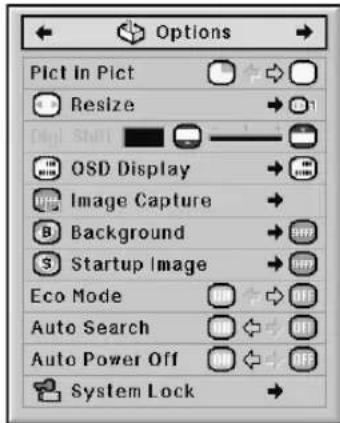
3 Press ▲▲r ▼▼ to select the item you want to set.

Note
- Press to return to the previous screen.
- In some menu, select the icon using

4 Press ▶ to shift the cursor to the sub menu.
5 Press ▲▲r ▼▼o select the setting of the item displayed in the sub menu.

6 Press
•The selected item is set.

Note
- Some adjustment items will display a confirmation message. When setting an item, press ◀ or ▶ to select "Yes" or "OK", press 📋.
7 Press .
•The menu screen will disappear.
Picture Adjustment (“Picture” menu)
You can adjust the projector's picture to your preferences using the "Picture" menu.
Selecting the Picture Mode
This function allows you to select the picture mode in accordance with brightness of the room or content of the image to be projected. In all picture modes, items on the “Picture” menu can be adjusted and saved.
Menu operation → Page 58
Example: "Picture" screen menu for INPUT 1 (RGB) mode

Description of Picture Modes
| Selectable items | Description |
| Standard | For standard image |
| Presentation | Brightens darker portions of image for more enhanced presentations. |
| Cinema | Gives greater depth to darker portions of image for a more exciting theater experience. |
| Custom | The factory preset value is the same as the one of “Standard”.Using the dedicated software allows you to adjust the gamma curve.Visit “http://sharp-world.com/projector/” for details. |

Note
- You can also press 📄 on the remote control to select the picture mode. (See page 47.)
Adjusting the Image
Select a picture mode before adjusting the image.
Menu operation → Page 56
Example: "Picture" screen menu for INPUT 1 (RGB) mode

Description of Adjustment Items
| Selectable items | Press ◀ | Press ▶ |
| Contrast | For less contrast | For more contrast |
| Bright | For less brightness | For more brightness |
| Color*1 | For less color intensity | For more color intensity |
| Tint*1 | For making skin tones purplish | For making skin tones greenish |
| Red*1 | For weaker red | For stronger red |
| Green*1 | For weaker green | For stronger green |
| Blue*1 | For weaker blue | For stronger blue |
| Sharp*2 | For less sharpness | For more sharpness |
*1 "Color", "Tint", "Red", "Green" and "Blue" cannot be adjusted when "C.M.S. Adjustment" on the "C.M.S." menu is set to "sRGB". (See page 64.)
*2 "Sharp" can be adjusted only when 480I, 480P, 540P, 576I, 576P, 720P, 1035I or 1080I DTV signal is input during the INPUT 1, 2 or 3 mode; or the input mode is set to INPUT 4 or 5.

Note
- To reset all adjustment items, select "Reset" and press 🔒.
Adjusting the Color Temperature
Menu operation → Page 56
Example: "Picture" screen menu for INPUT 1 (RGB) mode

Description of Color Temperature Settings
| Selectable items | Description |
| 4500K | For lower color temperature for warmer, reddish incandescent-like images. |
| 10500K | For higher color temperature for cooler, bluish, fluorescent-like images. |

Note
- "CLR Temp" cannot be set when "C.M.S. Adjustment" on the "C.M.S." menu is set to "sRGB". (See page 64.)
Emphasizing the Contrast
This function emphasizes the bright portions of images to obtain a higher contrast image.
Menu operation → Page 56
Example: "Picture" screen menu for INPUT 1 (RGB) mode
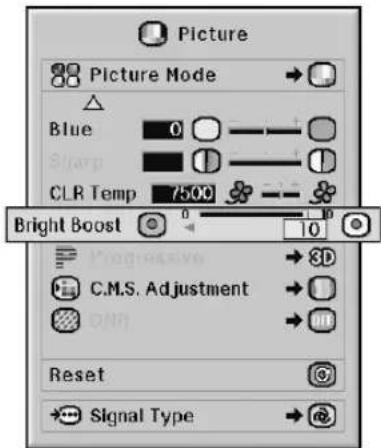
Description of Bright Boost Setting
| Press ◀ | Press ▶ |
| To improve color reproduction, lower bright boost setting. | To increase brightness, increase bright boost setting. |

Note
- "Bright Boost" cannot be set when "C.M.S. Adjustment" on the "C.M.S." menu is set to "sRGB". (See page 64.)
Selecting the Progressive Mode
Menu operation → Page 58
Example: "Picture" screen menu for INPUT 1 (RGB) mode

Description of Progressive
| Selectable items | Description |
| 2D Progressive | Useful to display fast-moving images such as sports and action films. |
| 3D Progressive | Useful to display relatively slowmoving images such as drama and documentary more clearly. |
| Film Mode | Reproduces the image of film source* clearly. Displays the optimized image of film transformed with three-two pull down (NTSC and PAL60Hz) or two-two pull down (PAL50Hz and SECAM) enhancement to progressive mode images. |
* The film source is a digital video recording with the original encoded as is at 24 frames/second. The projector can convert this film source to progressive video at 60 frames/second with NTSC and PAL60Hz or at 50 frames/second with PAL50Hz and SECAM to play back a high-definition image.

Note
- In NTSC or PAL60Hz, even if the 3D Progressive mode has been set, the three-two pull down enhancement will be enabled automatically when the film source has been entered.
- When the image is blurred or noisy, switch to the optimal mode.
- When using progressive inputs, inputs are directly displayed so that "2D Progressive", "3D Progressive" and "Film Mode" cannot be selected.
Reducing Image Noise (DNR)
Video digital noise reduction (DNR) provides high quality images with minimal dot crawl and cross color noise.
Menu operation → Page 58
Example: "Picture" screen menu for INPUT 1 (RGB) mode

Description of DNR
| Selectable items | Description |
| OFF | DNR does not function. |
| Level 1–3 | Sets the DNR level. |

Note
- Set a level so as to view a clearer picture. Make sure to set “DNR” to “OFF” in the following cases:
- When the image is blurry.
- When the contours and colors of moving images drag.
- When TV broadcasts with weak signals are projected.

Info
- This function is available for all signals with INPUT 4 and 5.
- This function is available for 480I, 480P, 576I and 576P signals with INPUT 1, 2 and 3.
Signal Type Setting
This function allows you to select the input signal type RGB or component for INPUT 1, INPUT 2 or INPUT 3.
Menu operation → Page 58
Example: "Picture" screen menu for INPUT 1 (RGB) mode
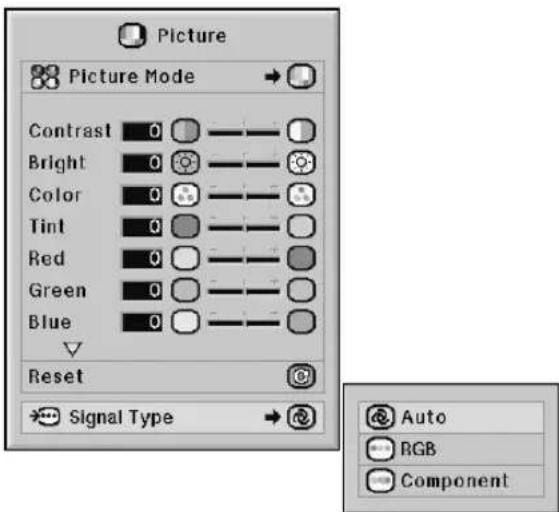
Description of Signal Type Settings
INPUT 1/INPUT 2
| Selectable items | Description |
| Auto | Input signals are automatically recognized as RGB or component. |
| RGB | Set when RGB signals are received. |
| Component | Set when component signals are received. |
INPUT 3
| Selectable items | Description |
| D. PC RGB | Set when digital PC RGB signals are received from a computer. |
| D. PC Comp. | Set when digital PC component signals are received from a computer. |
| D. Video RGB | Set when digital video RGB signals are received from video equipment. |
| D. Video Comp. | Set when digital video component signals are received from video equipment. |
Color Management System ("C. M. S." menu)
This function allows you to individually adjust the display characteristics of six colors (R: Red, Y: Yellow, G: Green, C: Cyan, B: Blue, M: Magenta).
Selecting the Color Reproduction Mode
This function allows you to select the color reproduction mode for the projected images.
Menu operation → Page 58
Example: "C.M.S." screen menu

Description of C.M.S. Adjustment
| Selectable items | Description |
| Standard | Standard settings |
| Custom 1 – 3 | “Lightness”, “Chroma” and “Hue” can be adjusted for each of the six colors. |
| sRGB | A natural tint based on an original image from the computer. |

Note
- sRGB is an international standard of color reproduction regulated by the IEC (International Electrotechnical Commission). As the fixed color area has been decided by the IEC, the images are displayed in a natural tint based on an original image, when "C.M.S. Adjustment" is set to "sRGB".
- You cannot set "Color", "Tint", "Red", "Green", "Blue", "CLR Temp", "Bright Boost" on the "Picture" menu, when "C.M.S. Adjustment" is set to "sRGB".
- For additional information about the sRGB function, visit "http://www.srgb.com/".

Info
- When "C.M.S. Adjustment" is set to "sRGB", the projected image may become dark, but this does not indicate a malfunction.
Selecting the Target Color
This function allows you to select the target color for adjusting the display characteristics.
Menu operation → Page 56
Example: "C.M.S." screen menu
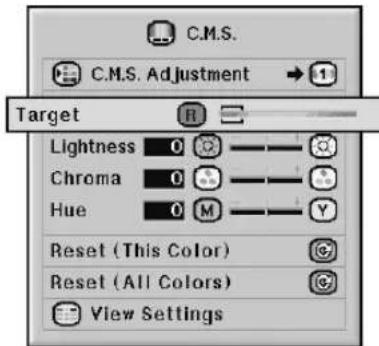
Description of Target Colors
| R | Red | C | Cyan |
| Y | Yellow | B | Blue |
| G | Green | M | Magenta |
Setting the Brightness of the Target Color
This function allows you to set the brightness of the selected target color.
Menu operation → Page 56
Example: "C.M.S." screen menu
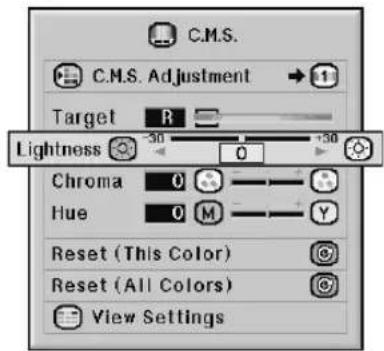
Description of Brightness
| Press◀Press▶ | |
| For less brightness of the target color | For more brightness of the target color |
Setting the Chromatic Value of the Target Color
This function allows you to set the chromatic value of the selected target color.
Menu operation → Page 56
Example: "C.M.S." screen menu

Description of Chromatic Value
| Press◀ | Press▶ |
| For less chromatic value of the target color | For more chromatic value of the target color |
Setting the Hue of the Target Color
This function allows you to set the hue of the selected target color.
Menu operation → Page 56
Example: "C.M.S." screen menu

Description of Hue
| Press◀Press▶ | |
| For stronger red of the target color | For stronger yellow of the target color |
Resetting User-defined Color Settings
This function allows you to reset the specific target color or all of the six colors.
Menu operation → Page 56
Example: "C.M.S." screen menu

Description of Reset
| Selectable items | Description |
| Reset (This Color) | “Lightness”, “Chroma” and “Hue” of the color selected for “Target” are reset. |
| Reset (All Colors) | “Lightness”, “Chroma” and “Hue” of all colors are reset. |
Overview of All Color Settings
This function allows you to confirm the settings of all the colors.
Menu operation → Page 56
Example: "C.M.S." screen menu


Computer Image Adjustment ("Fine Sync" menu)
You can adjust the computer image, match the computer display mode, and confirm the input signal using the "Fine Sync" menu.
Adjusting the Computer Image
Use the Fine Sync function in case of irregularities such as vertical stripes or flickering in portions of the screen.
Menu operation → Page 56
Example: "Fine Sync" screen menu for INPUT 1 (RGB) mode
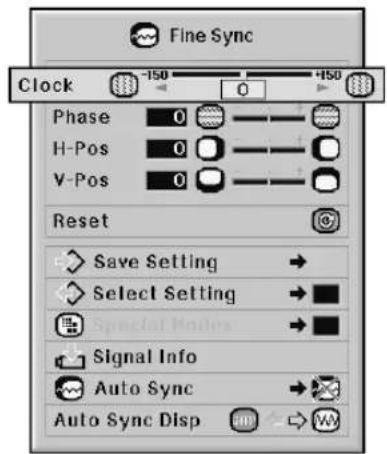
Description of Adjustment Items
| Selectable items | Description |
| Clock | Adjusts vertical noise. |
| Phase | Adjusts horizontal noise (similar to tracking on your VCR). |
| H-Pos | Centers the on-screen image by moving it to the left or right. |
| V-Pos | Centers the on-screen image by moving it up or down. |

Note
- You can automatically adjust the computer image by setting "Auto Sync" on the "Fine Sync" menu to "Normal" or "High Speed", or pressing on the projector or on the remote control. See page 70 for details.
- Toreset all adjustment items, select "Reset" and press 🔊.
Saving Adjustment Settings
This projector allows you to store up to seven adjustment settings for use with various computers.
Menu operation → Page 58
Example: "Fine Sync" screen menu for INPUT 1 (RGB) mode
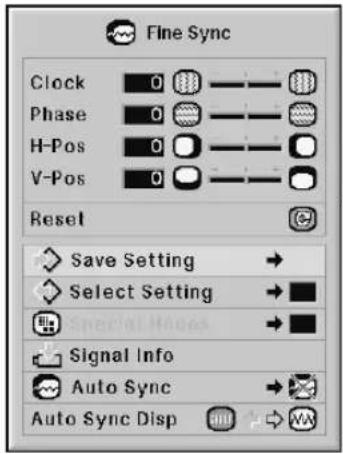

Selecting Adjustment Settings
Adjustment settings stored in the projector can be easily accessed.
Menu operation → Page 58
Example: "Fine Sync" screen menu for INPUT 1 (RGB) mode


Note
- If a memory has not been set, a resolution and frequency setting will not be displayed.
- When selecting a stored adjustment setting with "Select Setting", you can set the projector in the stored adjustments.
Special Mode Setting
Ordinarily, the type of input signal is detected and the correct resolution mode is automatically selected. However, for some signals, the optimal resolution mode in "Special Modes" on the "Fine Sync" menu may need to be selected to match the computer display mode.
Menu operation → Page 58
Example: "Fine Sync" screen menu for INPUT 1 (RGB) mode


Note
- If your computer displays patterns which repeat every other line (horizontal stripes), flickering may occur which makes the image hard to see.
- See "Checking the Input Signal" on page 70 for information on the currently selected input signal.
Checking the Input Signal
Menu operation → Page 56
Example: "Fine Sync" screen menu for INPUT 1 (RGB) mode
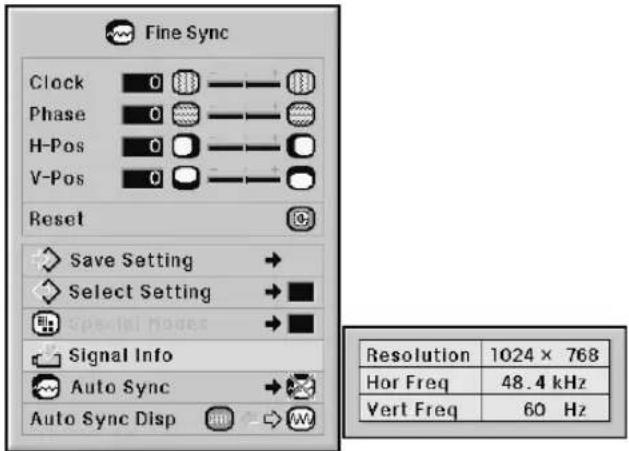

Note
- The projector will display the number of scanned lines available from audio-visual equipment such as a DVD player or Digital Video.
- The projector will display the resolution when connecting the computer.
Auto Sync Adjustment
Used to automatically adjust a computer image.
Menu operation → Page 58
Example: "Fine Sync" screen menu for INPUT 1 (RGB) mode
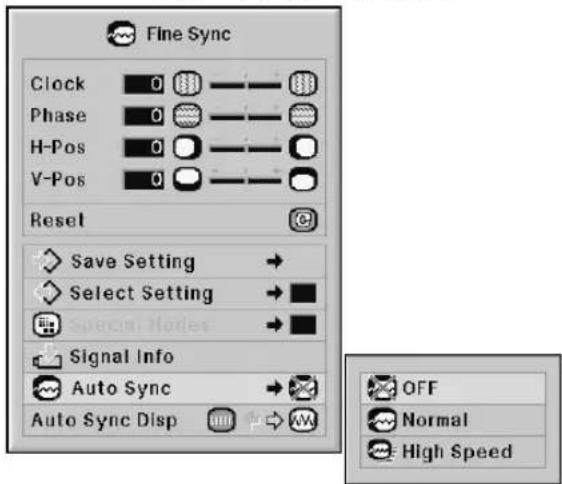
Description of Auto Sync Adjustment
| Selectable items | Description |
| OFF | Auto Sync adjustment is not automatically performed. |
| Normal | Auto Sync adjustment will occur when the projector is turned on or when the input signals are switched, when connected to a computer.“Normal” takes more time than “High Speed” for more accurate Auto Sync adjustment. |
| High Speed |

Note
- Auto Sync adjustment is also performed by pressing 📄 on the projector or 📄 on the remote control.
- The Auto Sync adjustment may take some time to complete, depending on the image of the computer connected to the projector.
- When the optimum image cannot be achieved with Auto Sync adjustment, use manual adjustments. (See page 68.)
- When AUTO Sync is pressed while "Auto Sync" is "OFF" or "High Speed", Auto Sync will be executed in "High Speed" mode. If the button is pressed again within one minute, Auto Sync will be executed in "Normal" mode.
Auto Sync Display Function
Used to set the display during Auto Sync.
Menu operation → Page 56
Example: "Fine Sync" screen menu for INPUT 1 (RGB) mode

Description of Auto Sync Display
| Selectable items | Description |
| — | The image set as a background image is projected. See page 77. |
| The computer image being adjusted is displayed. |
Audio Adjustment (“Audio” menu)
You can adjust the projector's audio to your preferences using the "Audio" menu.
Adjusting the Audio
This function allows you to adjust the projector's audio.
Menu operation → Page 56
Example: "Audio" screen menu

Description of Adjustment Items
| Selectable items | Press ▶Press ▶ | |
| Balance | Increased audio from the left speaker | Increased audio from the right speaker |
| Treble | For weaker treble | For stronger treble |
| Bass | For weaker bass | For stronger bass |

Note
- Toreset all adjustment items, select "Reset" and press 😊.
Setting the Audio Output Type
This function determines whether the audio level output from the AUDIO OUTPUT terminal is fixed or variable by linking with VOLUME.
Menu operation → Page 58
Example: "Audio" screen menu

Description of Audio Out Settings
| Selectable items | Description |
| FAO(Fixed Audio Output) | Audio output that does not vary in strength with the volume level of the source projector. |
| VAO(Variable Audio Output) | Audio output that varies in strength with the volume level of the source projector. |

Info
- When "Audio Out" has been set to "VAO", first make sure to lower the volume of the projector before turning the power on or off and when switching the input.

Note
When the projector is connected to audio equipment:
- It is recommended that "FAO" be selected on "Audio Out". Because the audio signal from the audio equipment does not vary in strength with the volume level of the projector, you can enjoy better sound.
- When "FAO" be selected on "Audio Out", video and audio may not synchronize.
- When connecting audio equipment that has a function for adjusting audio delay time, adjust the delay time for synchronizing video and audio.
- When the audio equipment does not have such a function and the unsynchronized video and audio bothers you, select "VAO" on "Audio Out". Selecting "VAO" synchronizes video and audio automatically.
Speaker Setting
This function allows you to turn the audio output of the internal speaker on or off when the projector is connected to an external amplifier.
Menu operation → Page 56
Example: "Audio" screen menu

Description of Speaker Settings
| Selectable items | Description |
| ON | The audio signal is output from the internal speaker. |
| OFF | The audio signal is not output from the internal speaker. |
You can use the "Options (1)" menu to enhance the usage for the projector.
Displaying Dual Pictures (Pict in Pict)
The Pict in Pict (picture in picture) function allows you to display two pictures on the same screen. You can display the image input from INPUT 4 or 5 as an inset picture overlapping the main picture input from INPUT 1, 2 or 3.
Menu operation → Page 56
Example: "Options (1)" screen menu for INPUT 1 (RGB) mode


Note
- You can press Ⓗ INPUT4 on the projector or Ⓞ, Ⓥ on the remote control to select the inset picture image.
- You can press ▲ / ▼ / ◀ / ▶ on the projector or on the remote control to change the location of the inset picture image.
(The inset picture frame will be displayed. To display the inset picture to the desired position, move the frame and press 🤨 on the projector or 🌐 on the remote control.)
- Inset picture can only be displayed in composite video or S-video signal of NTSC/PAL/SECAM.
- The audio of the inset picture will come out of the projector's speakers.
- While the "Pict in Pict" function is working, the "FREEZE" function only works for the inset picture.
- The "Pict in Pict" function does not work when the following signals are input to the main picture.
-UXGA/SXGA+/SXGA/WXGA signal
-480I/480P/540P/576I/576P/720P/1035P/1080I signal
-Interlaced RGB signal
- All signals (when "Resize" is set to "Dot by Dot")
- No signal (or when the resolution or refresh rate (vertical frequency) of the signal is changed)
Setting the Resize Mode
Depending on the input signal, you can select the screen image.
Menu operation → Page 58
Example: "Options (1)" screen menu for INPUT 1 (RGB) mode

Selectable Items of Resize Mode
| When inputting RGB signal | When inputting DTV/video signal |
| Normal | Normal |
| Full | Full |
| Dot By Dot | Border |
| Border | Stretch |
| Stretch | Smart Stretch |

Note
- For details of the Resize mode, see pages 48 and 49.
- You can also press 📊 on the remote control to change the resize mode. (See page 48.)
Shifting the Projected Image Vertically (Digital Shift)
For easier viewing, this function shifts the image projected on the screen up or down eliminating either the upper or lower black band found in 16:9 and other wide aspect ratios.
Menu operation → Page 56
Example: "Options (1)" screen menu for INPUT 1 (RGB) mode
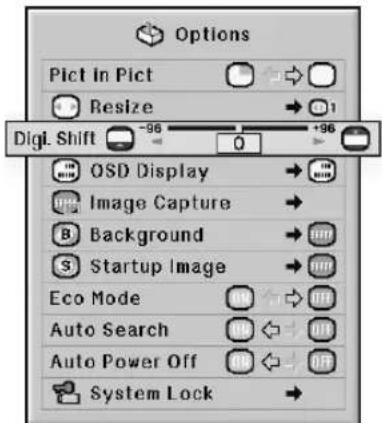
Description of Digital Shift
| Press◀ | Press▶ |
| Shifts the projected image down. | Shifts the projected image up. |

Note
- The "Digital Shift" function works with the "NORMAL", "BORDER", "STRETCH" or "SMART STRETCH" image. (See page 49.)
Setting On-screen Display
This function allows you to turn the on-screen messages on or off.
Menu operation → Page 58
Example: "Options (1)" screen menu for INPUT 1 (RGB) mode

Description of OSD Display Settings
| Selectable items | Description |
| Normal | All on-screen displays are displayed. |
| Level A | INPUT/VOLUME/MUTE/BLACK SCREEN/FREEZE/AUTO SYNC/ENLARGE/ “An invalid button has been pressed.” are not displayed. |
| Level B | All on-screen displays are not displayed. (except the menu, H & V LENS SHIFT, KEYSTONE, FOCUS, ZOOM, “All buttons on Projector are locked.” and warning displays) |

Note
- While "Keylock Level" is "Level A" or "Level B", pressing 📄STANDBY displays "All buttons on Projector are locked." despite the "OSD Display" setting.
Setting the Video System
The video input system mode is factory preset to "Auto"; however, a clear picture from the connected audio-visual equipment may not be received, depending on the video signal difference. In that case, switch the video signal.
Menu operation → Page 58
Example: "Options (1)" screen menu for INPUT 4 (video) mode
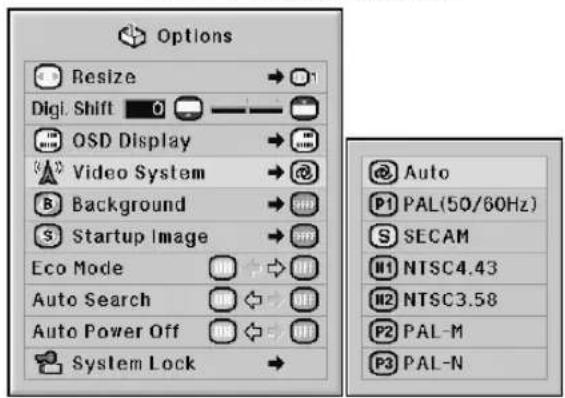
Description of Video Systems
| Selectable items | Description |
| PAL (50/60 Hz) | When connected to PAL video equipment. |
| SECAM | When connected to SECAM video equipment. |
| NTSC4.43 | When reproducing NTSC signals in PAL video equipment. |
| NTSC3.58 | When connected to NTSC video equipment. |

Note
• The video signal can only be set in INPUT 4 or INPUT 5 mode.
- When "Video System" is set to "Auto", you may not receive a clear picture due to signal differences. Should this occur, switch to the video system of the source signal.
- While "Video System" is set to "Auto", when PAL-M or PAL-N signal is input, the image from PAL signal will be displayed.
Capturing Projected Images
This projector allows you to capture projected images (RGB signals) and set them as a startup image, or background image when no signals are being received.
Menu operation → Page 58
Example: "Options (1)" screen menu for INPUT 1 (RGB) mode


Note
- Images can be captured only when they are from XGA (1024 × 768) non-interlace signals in INPUT 1, INPUT 2 or INPUT 3 mode with "RESIZE" set to "Normal".
• The saved image is reduced to 256 colors. - Images from equipment connected to INPUT 4 or INPUT 5 terminal cannot be captured.
- Only one image can be captured and saved.
- The color of images may differ before and after saving if an image is captured on which image adjustment has been performed using the "C.M.S." function.
- To delete the captured image, select "Delete", and then press 🔊.
Selecting the Background Image
Menu operation → Page 58
Example: "Options (1)" screen menu for INPUT 1 (RGB) mode
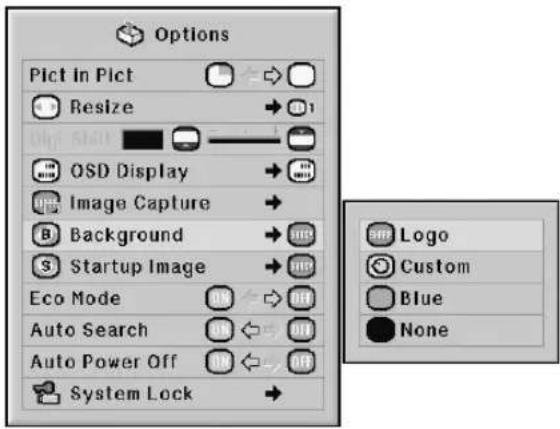
Description of Background Images
| Selectable items | Description |
| Logo | Default image |
| Custom | User customized image (e.g. company logo) |
| Blue | Blue screen |
| None | Black screen |

Note
- You can set a captured image as a background image by selecting "Custom".
- When "Custom" is selected, an image saved using "Image Capture" can be displayed as a background image.
Selecting the Startup Image
Menu operation → Page 58
Example: "Options (1)" screen menu for INPUT 1 (RGB) mode
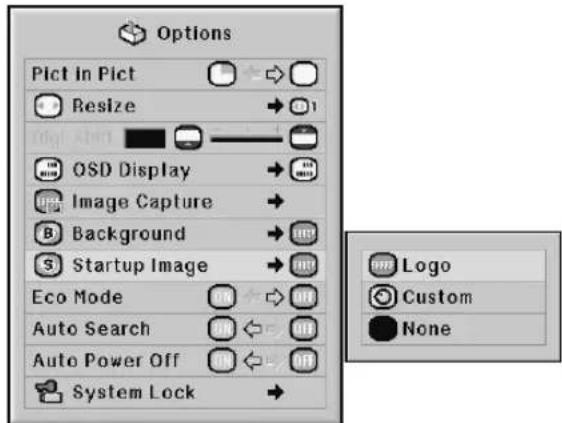
Description of Startup Images
| Selectable items | Description |
| Logo | Default image |
| Custom | User customized image (e.g. company logo) |
| None | Black screen |

Note
- You can set a captured image as a startup image by selecting "Custom".
- When "Custom" is selected, an image saved using "Image Capture" can be displayed as a startup image.
Eco Mode
Menu operation → Page 56
Example: "Options (1)" screen menu for INPUT 1 (RGB) mode

Description of Eco Mode
| Selectable items | Brightness | Power consumption(When using AC 100V) | Lamp life |
| ON | Approx.86% | Approx. 570 W | Approx.2,500 hours* |
| OFF | 100% | 650 W | Approx.2,000 hours* |
* This is a reference value and is not guaranteed.

Note
- When "Eco Mode" is set to "ON", the power consumption will decrease and the lamp life will extend. (Projection brightness decreases approximately 14%.)
Detecting the Input Signals Automatically
Menu operation → Page 56
Example: "Options (1)" screen menu for INPUT 1 (RGB) mode
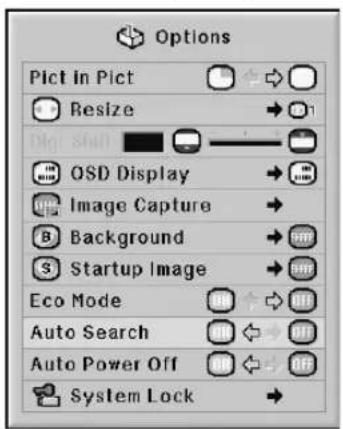
Description of Auto Search
| Selectable items | Description |
| ON | Automatically searches for and switches to the input mode in which signals are being received. |
| OFF | “Auto Search” does not function. |

Note
- While the "Auto Search" function is detecting the input signal, pressing a button on the projector or the remote control stops the "Auto Search" function. After the "Auto Search" function finishes completely, press the desired button.
Auto Power Off Function
Menu operation → Page 56
Example: "Options (1)" screen menu for INPUT 1 (RGB) mode

Description of Auto Power Off
| Selectable items | Description |
| ON | The projector automatically enters the standby mode when no input signal is detected for 15 minutes or longer. |
| OFF | The “Auto Power Off” function will be disabled. |

Note
- When "Auto Power Off" is set to "ON", 5 minutes before the projector enters the standby mode, the message "Enter STANDBY mode in X min." will appear on the screen to indicate the remaining minutes.
System Lock Function
This function prevents unauthorized use of the projector. Once this function is activated, users must enter the correct keycode each time the projector is turned on. We suggest you record the keycode in a safe place where only authorized users have access.

Info
- If you lose or forget your keycode, contact your nearest Sharp Authorized Projector Dealer or Service Center (see page 104). Even if the product warranty is valid, the keycode reset will incur a charge.
Menu operation → Page 58
Example: "Options (1)" screen menu for INPUT 1 (RGB) mode
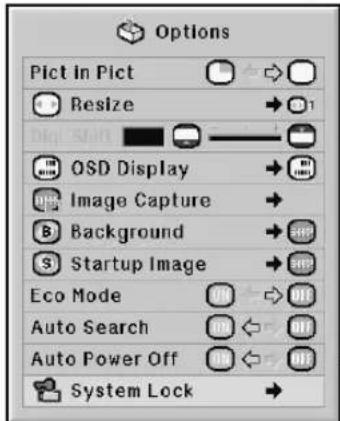
| Old Code | - - - - |
| New Code | - - - - |
| Reconfirm | - - - - |
Setting the keycode
1 Select "System Lock" on the "Options (1)" menu, then press ▶.
• A message is displayed.
- Read this message, and press 📂.
2 Press the 4 buttons on the remote control or on the projector to enter the preset keycode in "Old Code".
- When setting the keycode for the first time, press ▼ on the projector for four times.
| Old Code | - - - - |
| New Code | - - - - |
| Reconfirm | - - - - |

Note
- If you input a wrong keycode, the cursor returns to the first point of the "Old Code".
- The preset keycode is 4 ▼ buttons on the projector. If this keycode is set, the keycode input screen does not appear when turning the power on.
3
Press the 4 buttons on the remote control or on the projector to enter the new keycode in "New Code".

Note
- You cannot use the following buttons for keycode:
•ON button
•STANDBY button - ENTER button
•L-click button
•R-click/UNDO button
•MENU button
•ZOOM buttons - FOCUS buttons
•H & V LENS SHIFT button
- System Lock function recognizes each button on the remote control or on the projector as an individual button, even if they share the same button name. If you set the keycode with the buttons on the projector, use only those buttons on the projector. If you set the keycode with the buttons on the remote control, use only those buttons on the remote control.
4
Enter the same keycode in "Reconfirm".

Note
Not displaying the keycode input screen when turning the projector on
- Press ▼ on the projector for four times in steps 2 and 3 above.
When the System Lock is set
- When System Lock is set, the keycode input screen appears after the power is turned on. When it appears, enter the right keycode to start projection. Failure to enter the keycode will cause images not to be projected even when signals are entered to the projector.
Changing the keycode
| Old Code | - - - - |
| New Code | - - - - |
| Reconfirm | - - - - |
1 Press the 4 buttons on the remote control or on the projector to enter the preset keycode in "Old Code".
2 Press the 4 buttons on the remote control or on the projector to enter the new keycode in "New Code".
3 Enter the same keycode in "Reconfirm".
When the system lock is set
If you have set the system lock, enter the keycode and follow the procedure below to release the system lock.
▼Input screen for keycode


Note
- When System Lock is set, the keycode input screen appears after the power is turned on.
- If no keycode is entered, the image will not be displayed, even if the projector receives the input signal.
1
Press ON the remote control or ON on the projector to turn on the projector.
2
When the keycode input screen appears, enter the right keycode to start projection.

Note
- System Lock function recognizes each button on the remote control or on the projector as an individual button, even if they share the same button name. If you set the keycode with the buttons on the projector, use only those buttons on the projector. If you set the keycode with the buttons on the remote control, use only those buttons on the remote control.
Setting a Password
- There is no factory preset for the password, so the “Options (2)” menu is enabled.
- If you do not want others to operate the "Options (2)" menu, set a password.
Menu operation → Page 58
Example: "Options (2)" screen menu


1 Select "Password" from the "Options (2)" menu, and press▶.
2 Press ▲▲r▼▼o set the first digit in "New Password" and then press▶.
3 Enter the remaining 3 digits and press 📄.
4 Enter the same password in "Reconfirm" and press 🔒.

Info
- The password must be entered to use the "Options (2)" menu when a password has been set.
Changing the password
| Old Password | - - - - |
| New Password | - - - - |
| Reconfirm | - - - - |
1 Press ▲, ▼ and ▶ to enter the password in “Old Password” and press
2 Press ▲▲▼▼ and ▶ to set the new password in “New Password” and press 🔒.
3 Enter the same 4-digit password in "Reconfirm" and press

Note
- If you do not want to set a password, leave the fields blank in steps 2 and 3 and press 📋.
• To cancel the password settings, press
If You Forget Your Password
If you forget the password, delete it using the following procedure and set a new password.
Press. ① → Ⓜ️ → ① → Ⓜ️ → ① → Ⓜ️ → Ⓜ️
Checking the Lamp Life Status
You can confirm the cumulative lamp usage time and the remaining lamp life (percentage).
Menu operation → Page 56
Example: "Options (2)" screen menu

Description of Lamp Timer (Life)
| Lamp usage condition | Remaining lamp life | |
| 100% 5% | ||
| Operated exclusively while “Eco Mode” is “ON”. | Approx. Approx. 2,500 hours* | 125 hours* |
| Operated exclusively while “Eco Mode” is “OFF”. | Approx. Approx. 2,000 hours* | 100 hours* |
* This is a reference value and is not guaranteed.

Note
- It is recommended that the lamp be changed when the remaining lamp life becomes 5%.
• The table above indicates rough estimates in the case of using only in each mode shown.
• The lamp life may vary depending on the usage condition.
Setting the Lamp Mode
This function allows you to select the usage of the two lamps installed in the projector.
Menu operation → Page 58
Example: "Options (2)" screen menu

Description of Lamp Mode
| Selectable items | Description |
| Both Lamps | Both lamps are used for greater brightness. |
| Lamp 1 Only | The lamp 1 is used.When the lamp 1 burns out, the lamp 2 automatically switches in use. |
| Lamp 2 Only | The lamp 2 is used.When the lamp 2 burns out, the lamp 1 automatically switches in use. |
| Equal Use | Both lamps are used alternately for certain periods. |
Reversing/Inverting Projected Images
This projector is equipped with a reverse/invert image function that allows you to reverse or invert the projected image for various applications.
Menu operation → Page 58
Example: "Options (2)" screen menu

Description of PRJ Modes
| Selectable items | Description |
| Front | Normal image |
| Ceiling + Front | Inverted image |
| Rear | Reversed image |
| Ceiling + Rear | Reversed and inverted image |

Note
- This function is used for the reversed image and ceiling-mount setups. (See page 23.)
Controlling Multiple Projectors with the One Remote Control
This function allows you to control multiple projectors with the one remote control during the stack projection or the video wall projection. When using this function, connect the projectors with LAN cables and assign a projector as the master and the other projectors as the slaves. See page 35 for connecting LAN cables.
Menu operation → Page 58
Example: "Options (2)" screen menu

Description of Stack Setting
| Selectable items | Description |
| Normal | The stack setting is not available. |
| Master | Set the projector as the master. |
| Slave | Set the projector as the slave. |

Note
- When controlling multiple projectors with the one remote control, settings via web browser are required. Refer to the "SETUP MANUAL" contained on the supplied CD-ROM for details.
- Only when controlling two projectors with the one remote control, using "Pair Stack" allows you to skip settings via web browser. (See page 85.)
- When "Slave" is selected on "Stack Setting", the slave projector cannot be controlled with the remote control. To control the slave projector with the remote control, connect the remote control to the projector. (See page 18.)
Shortcut to Make Projector Stack Settings
Normally, settings via web browser are required for the stack projection. You can skip the settings via web browser by using "Pair Stack", only when you use the two projectors for the stack projection.
Menu operation → Page 56

Note
- Before setting "Pair Stack", select "Master" or "Slave" on "Stack Setting".
Example: "Options (2)" screen menu

1 Select "Pair Stack" on the "Option
(2)" menu, and then press ⏱️.
•The confirmation screen will be displayed.
2 Select "OK", and then press ENTER.
- The network settings of the projector will change as shown below.
| Master Slave | ||
| IP Address 192.16 | 8.150.2 192.168.1 | 50.3 |
| Subnet Mask 255. | 255.255.0 255.255. | 255.0 |
| DHCP Client OFF | OFF | |
| Gateway 0.0.0.0 0. | 0.0.0 | |
| User Name (Reset) (Reset) | ||
| Password (Reset) (Reset) | ||
| Data Port 10002 10002 | ||
Locking the Operation Buttons on the Projector
This function can be used to lock the use of certain operation buttons on the projector.
Menu operation → Page 58
Example: "Options (2)" screen menu

Description of Keylock Level
| Selectable items | Description |
| Normal | All operation buttons are functional. |
| Level A | Only INPUT/VOLUME buttons on the projector are available. |
| Level B | All operation buttons on the projector are unavailable. |
Bypassing Unused Input Selections
This function allows you to skip the input mode that you rarely use. You can skip the input modes when pressing INPUT 1, 2, 3 button or INPUT 4, 5 button on the projector.
Menu operation → Page 58
Example: "Options (2)" screen menu

Description of Set Inputs
| Selectable items Description | ||
| INPUT 1-5 | ON | Sets the INPUT 1-5 mode selectable respectively. |
| OFF | Sets the INPUT 1-5 mode unavailable respectively. | |
Selecting the Fan Mode
This function changes the fan rotation speed.
Menu operation → Page 58
Example: "Options (2)" screen menu

Description of Fan Mode
| Selectable items | Description |
| Normal | Suitable for normal environments. |
| High | Select this when using the projector at attitudes of approximately 1,500 meters (4,900 feet) or more. |

Note
- When "Fan Mode" is set to "High", the fan rotation speeds up, and the fan noise becomes louder.
Direct Power On Function
Menu operation → Page 56
Example: "Options (2)" screen menu

Description of Direct Power On
| Selectable items | Description |
| ON | The projector automatically turns on when the power cord is plugged into the AC outlet or the breaker switch is turned on. |
| OFF | The projector is turned on manually (see page 37), and does not turn on automatically when the power cord is plugged into the AC outlet or the breaker switch is turned on. |
Selecting the Transmission Speed (RS-232C)
Make sure that both the projector and computer are set for the same baud rate.
Menu operation → Page 58
Example: "Options (2)" screen menu
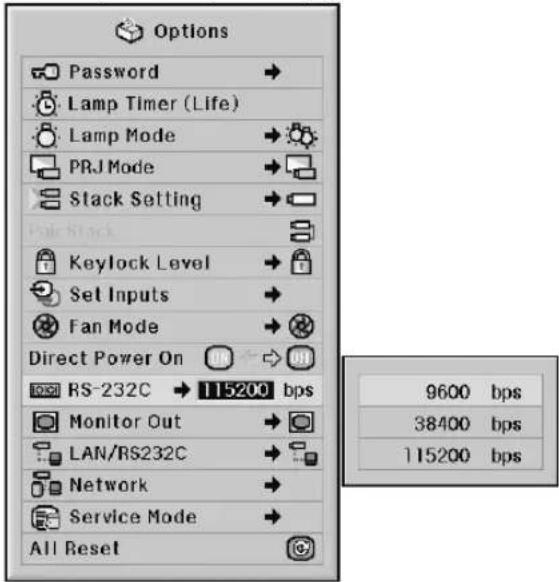
Description of RS-232C
| Selectable items | Description |
| 9600 bps | Transmission speed is slow. |
| 38400 bps | |
| 115200 bps | Transmission speed is rapid. |
Note
- Refer to the "SETUP MANUAL" contained on the supplied CD-ROM for RS-232C Specifications and Command Settings.
- Refer to the computer's operation manual for instructions for setting the computer's baud rate.
Monitor Output Settings
When the Monitor Out has been set to "Enable", the monitor output is activated and power is consumed even in the standby mode. It is recommended that the Monitor Out be set to "Disable" when it is not connected. This reduces power consumption when the projector is in the standby mode.
Menu operation → Page 58
Example: "Options (2)" screen menu

Description of Monitor Out
| Selectable items | Description |
| Enable | The monitor output function is activated even if the projector is in standby mode. |
| Disable | The monitor output function is switched off when the projector is in standby mode. |
LAN/RS232C Setting
When the LAN/RS232C has been set to "Enable", the LAN/RS232C is activated and power is consumed even in the standby mode. It is recommended that the LAN/RS232C be set to "Disable" when it is not connected. This reduces power consumption when the projector is in the standby mode.
Menu operation → Page 58
Example: "Options (2)" screen menu
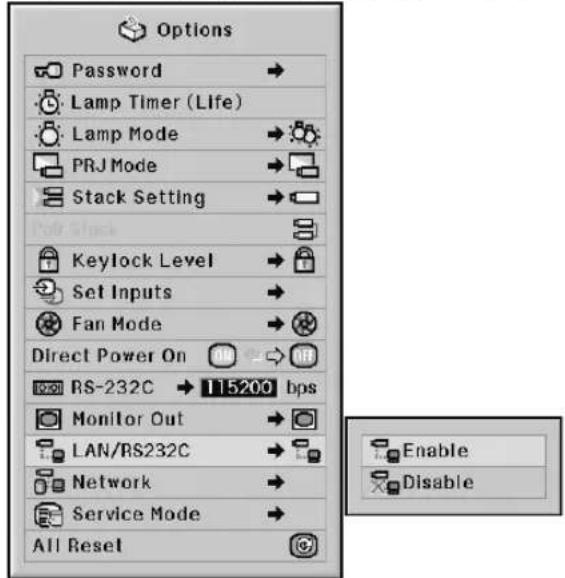
Description of LAN/RS232C
| Selectable items | Description |
| Enable | The LAN/RS232C function is activated even if the projector is in standby mode. |
| Disable | The LAN/RS232C function is switched off when the projector is in standby mode. |

Note
- When you want to control the projector using the LAN/RS232C function, select "Enable."
- The item "LAN/RS232C" will be made unavailable for setting when "Master" or "Slave" is selected on "Stack Setting". ("LAN/RS232C" will be set to "Enable" automatically.) (See page 84.)
DHCP Client Setting
Connect the LAN cable before turning the projector on. If not, the DHCP Client function does not work.
Menu operation → Page 58
Example: "Options (2)" screen menu
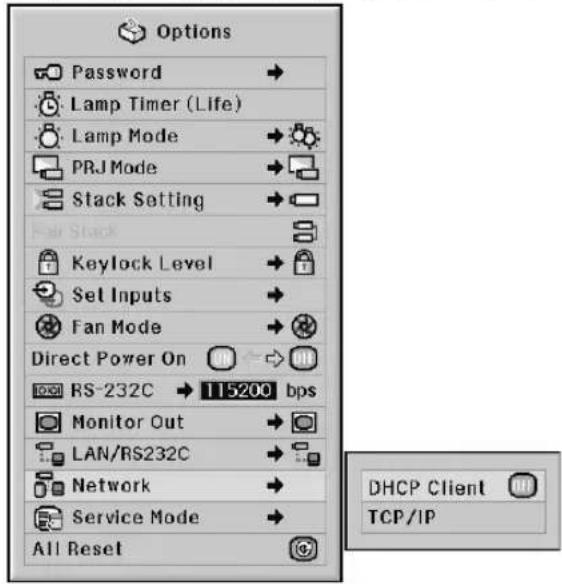
Description of DHCP Client
| Selectable items | Description |
| ON | Obtains configuration parameters for TCP/IP network automatically. |
| OFF | Sets the TCP/IP manually. |

Note
- Select "ON" for "DHCP Client". "Obtaining IP Address..." appears, then the message "The network settings have been changed.", IP Address, Subnet Mask and Gateway will be displayed.
- If the DHCP server is not available, "Could not obtain IP Address." appears. In this case, set the TCP/IP manually. (See "TCP/IP Setting" at right.)
TCP/IP Setting
Set the TCP/IP manually.
Menu operation → Page 58
Example: "Options (2)" screen menu
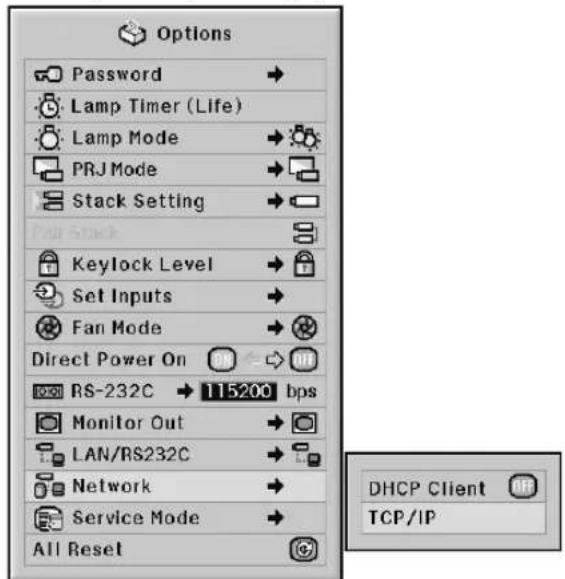
1 Select "TCP/IP", then press ONCO.
2 Enter "IP Address" using ▲, ▼, ▶ and ◀, then press ⚫.
| TCP/IP | |
| IP Address | 1 9 2.1 6 8.1 5 0.0 0 2 |
| Subnet Mask | 2 5 5.2 5 5.2 5 5.0 0 0 |
| Gateway | 0 0 0.0 0 0.0 0 0.0 0 |
3 Enter "Subnet Mask" using ▲, ▼, ▶ and ◀, then press Ⓗ.
4
Enter "Gateway" using ▲,▼,► and ◀, then press Ⓤ.
Description of TCP/IP
| Selectable items | Description |
| IP Address | Factory default setting:192.168.150.002Enter an IP address appropriate for the network. |
| Subnet Mask | Factory default setting:255.255.255.000Set the subnet mask to the same as that of the computer and equipment on the network. |
| Gateway | Factory default setting:000.000.000.000* When not in use, set to:“000.000.000.000”. |

Note
- Before setting "TCP/IP", select "OFF" for "DHCP Client".
- Confirm the existing network's segment (IP address group) to avoid setting an IP address that duplicates the IP addresses of other network equipment or computers. If "192.168.150.002" is not used in a network with an IP address of "192.168.150.XXX", you don't have to change the projector IP address.
- For details about each setting, consult your network administrator.
Service Mode
Only the service centers use the menu. Do not use the menu.
Example: "Options (2)" screen menu

Returning to the Default Settings
This function allows you to initialize the settings you have made in the projector.
Menu operation → Page 56
Example: "Options (2)" screen menu


Note
About the network settings
- "IP Address", "Subnet Mask", "Gateway" and other network setting items are initialized.
The following items or menu cannot be initialized.
• "C. M. S." menu
"Lightness", "Chroma" and "Hue" respectively saved for Custom 1-3 on the "C.M.S." menu.
- "Fine Sync" menu Special Modes
- "Options (1)" menu System Lock
- "Options (2)" menu Lamp Timer (Life)
- "Language" menu
• Image stored using "Image Capture"
Selecting the On-screen Display Language
The projector can switch the on-screen display language among 11 languages: English, German, Spanish, Dutch, French, Italian, Swedish, Portuguese, Chinese, Korean or Japanese.
Menu operation → Page 58
Example: "Language" screen menu

Overview of All Menu Settings
This function can be used to display all the adjusted settings as a list on the screen.
Menu operation → Page 56
Example: "Status" screen menu
| Picture / Audio | Fine Sync | Options / Other | ||||
| Picture Mode | 7500 | Clock | Risztze | On (100%) | 115200bps | |
| Lamp 1 | RS-232C | |||||
| Contrast | 88 | Phase | Digi Shift | On (100%) | ||
| Bright | C.R.S. Adjustment | H-Pos | GSD Display | Lamp 2 | Projector | |
| Color | DNI | Y-Pos | Background | Lamp Mode | DHCP Client | |
| Tint | Signal Type | Select Setting | Startup Image | PRJ Mode | 192,168,150.2IF Address | |
| Sharp | Balance | Special Modes | Eco Mode | Stack Setting | 255,255,255.0Subset Mask | |
| Red | Tremble | Auto Sync | Auto Search | Keylock Level | 0.0.0.Gateway | |
| Green | Bass | Auto Sync Disp | Auto Power Off | Set Inputs | MAC Address | |
| Blue | Audio Out | Direct Power On | Fan Mode | 1.00Firmware1 | ||
| Bright Boost | Speaker | Monitor Out | 1.00Firmware2 | |||
| LAN/BS232C | Serial Number | |||||
Maintenance
Cleaning the projector
■Ensure the power cord is unplugged before cleaning the projector.
■The cabinet as well as the operation panel is made of plastic. Avoid using benzene or thinner, as these can damage the finish on the cabinet.
■Do not use volatile agents such as insecticides on the projector.
Do not attach rubber or plastic items to the projector for long periods.
The effects of some of the agents in the plastic may cause damage to the quality or finish of the projector.
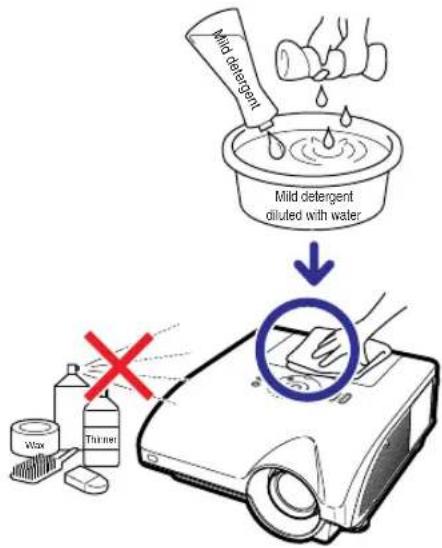
■Wipe off dirt gently with a soft flannel cloth.
■When the dirt is hard to remove, soak a cloth in a mild detergent diluted with water, wring the cloth well and then wipe the projector.
Strong cleaning detergents may discolor, warp or damage the coating on the projector. Make sure to test on a small, inconspicuous area on the projector before use.
Cleaning the lens
■Use a commercially available blower or lens cleaning paper (for glasses and camera lenses) for cleaning the lens. Do not use any liquid type cleaning agents, as they may wear off the coating film on the surface of the lens.
■As the surface of the lens can easily get damaged, be careful not to scrape or hit the lens.
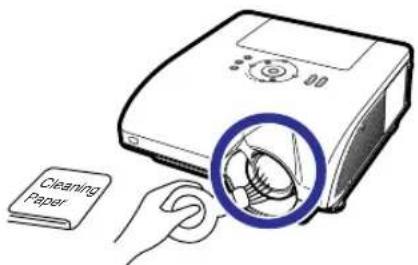
Cleaning the air vents and the intake vent cover
■Use a vacuum cleaner to clean dust from the exhaust vent, the intake vents and the intake vent cover (on the bottom of the projector).

Info
- If you want to clean the air vents and the intake vent cover during projector operation, ensure you press 📄 STANDBY on the projector or 📄 on the remote control and put the projector into standby mode. After the cooling fan has stopped, unplug the power cord from the AC socket and clean the air vents and the intake vent cover.
Cleaning the exhaust and intake vents

natural_image
Diagram of a medical device with three blue-circled parts highlighting internal components (no text or symbols present)Cleaning the intake vent cover
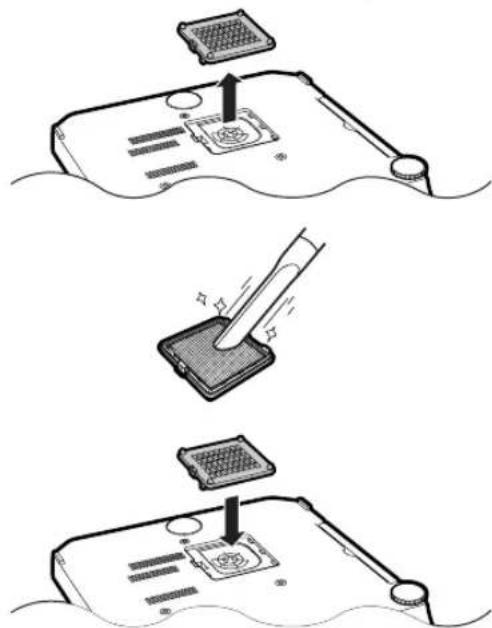

Note
• The air vents and the intake vent cover should be cleaned every 100 hours of use. Clean the air vents and the intake vent cover more often when the projector is used in a dusty or smoky location.
- Ensure the intake vent cover is securely installed. The power will not turn on unless it is correctly installed.
Maintenance Indicators
■The warning lights on the projector indicate problems inside the projector.
If a problem occurs, either the temperature warning indicator or the lamp indicator will illuminate red, and the projector will enter the standby mode. After the projector has entered the standby mode, follow the procedures given below.

About the temperature warning indicator

TEMP.
If the temperature inside the projector increases, due to blockage of the air vents, or the setting location, "TEMP." will illuminate in the lower left corner of the picture. If the temperature keeps on rising, the lamp will turn off and the temperature warning indicator will blink, the cooling fan will run for a further 90 seconds, and then the projector will enter the standby mode. After "TEMP." appears, ensure you perform the measures described on page 95.
About the lamp indicator

Change The Lamp. (LAMP 1)
"Change The Lamp. (LAMP 2)" is displayed when the remaining life of the lamp 2 becomes 5% or less.
■ When the remaining lamp life becomes 5% or less, “☒” (yellow) and “Change The Lamp. (LAMP 1/2)” will be displayed on the screen.
■When the percentage becomes 0%, it will change to “☒” (red), the lamp will automatically turn off. At this time, the lamp indicator will illuminate in red.
If you try to turn on the projector a fourth time without replacing the lamp, the lamp whose life is 0% will not light up.
| Maintenance indicator | Problem | Cause Possible solution | ||
| Normal | Abnormal | |||
| Temperature warning indicator | Off | Red on (Standby) | The internal temperature is abnormally high. | • Blocked air intake |
| • Cooling fan break-down• Internal circuit failure• Clogged air intake• Clogged intake vent cover | ||||
| Lamp indicators 1, 2 | Green on (Green blinks when the lamp is warming up.) | Red on | The lamp does not illuminate. | • The lamp is shut down abnormally. |
| Time to change the lamp. | • Remaining lamp life becomes 5% or less. | |||
| Red on (Standby) | The lamp does not illuminate. | • Burnt-out lamp• Lamp circuit failure | ||
| Power indicator | Green on/ Red on | Red blinks | The power indicator blinks in red when the projector is on. | • The intake vent cover is open. |

Info
- If the temperature warning indicator blinks and the projector enters the standby mode, the temperature warning indicator starts to illuminate. Check whether any of the ventilation holes are blocked (see page 10) and then try turning the power back on. Wait until the projector has cooled down completely before plugging in the power cord and turning the power back on. (At least 10 minutes.)
- If the power is turned off for a brief moment due to power outage or some other cause while using the projector, and the power supply recovers immediately after that, the lamp indicator will illuminate in red and the lamp may not be lit. In this case, unplug the power cord from the AC outlet, replace the power cord in the AC outlet and then turn the power on again.
- The cooling fan keeps the internal temperature of the projector constant and this function is controlled automatically. The sound of the cooling fan may change during operation because the fan speed may change and this is not a malfunction.
Regarding the Lamp
Lamp
It is recommended that the lamp units (optional: AN-PH7LP1 and AN-PH7LP2) be replaced when the remaining lamp life becomes 5% or less, or when you notice a significant deterioration in the picture and color quality. The lamp life (percentage) can be checked with the on-screen display. See page 83.
■ Purchase a replacement lamp unit of type AN-PH7LP1 and AN-PH7LP2 from your place of purchase, nearest Sharp Authorized Projector Dealer or Service Center.
IMPORTANT NOTE TO U.S. CUSTOMERS:
The lamp included with this projector is backed by a 90-day parts and labor limited warranty. All service of this projector under warranty, including lamp replacement, must be obtained through a Sharp Authorized Projector Dealer or Service Center. For the name of the nearest Sharp Authorized Projector Dealer or Service Center, please call toll-free: 1-888-GO-SHARP (1-888-467-4277).
Hg LAMP CONTAINS MERCURY For State Lamp Disposal Information
www.lamprecycle.org or 1-800-BE-SHARP
U.S.A. ONLY
Caution Concerning the Lamp
This projector utilizes a pressurized mercury lamp. A loud sound may indicate lamp failure. Lamp failure can be attributed to numerous sources such as: excessive shock, improper cooling, surface scratches or deterioration of the lamp due to a lapse of usage time.
The period of time up to failure largely varies depending on the individual lamp and/or the condition and the frequency of use. It is important to note that failure can often result in the bulb cracking.
■ When the lamp indicator and on-screen display icon are illuminated, it is recommended that the lamp be replaced with a new one immediately, even if the lamp appears to be operating normally.
■ Should the lamp break, the glass particles may spread inside the lamp cage or gas contained in the lamp may be vented into the room from the exhaust vent. Because the gas in this lamp includes mercury, ventilate the room well if the lamp breaks and avoid all exposure to the released gas. In case of exposure to the gas, consult a doctor as soon as possible.
■ Should the lamp break, there is also a possibility that glass particles may spread inside of the projector. In such a case, it is recommended you contact your nearest Sharp Authorized Projector Dealer or Service Center to assure safe operation.
Replacing the Lamp

Caution
- Do not remove the lamp unit from the projector right after use. The lamp will be very hot and may cause burn or injury.
- Wait at least one hour after the power cord is disconnected to allow the surface of the lamp unit to fully cool before removing the lamp unit.
■ Carefully change the lamp by following the instructions described in this section. *If you wish, you may have the lamp replaced at your nearest Sharp Authorized Projector Dealer or Service Center.
* If the new lamp does not illuminate after replacement, take your projector to the nearest Sharp Authorized Projector Dealer or Service Center for repair.
Removing and Installing the Lamp Unit

Info
- Ensure the lamp unit is removed using the handle. Ensure the glass surface of the lamp unit or the inside of the projector are not touched.
• To avoid injury to yourself and damage to the lamp, make sure you carefully follow the steps below. - Do not loosen other screws except for the lamp unit cover and lamp unit. (Only the silver screws are loosened.)
1
Press

the projector or
STANDBY

on the remote control to put rojector into standby mode.
- Wait until the cooling fan stops.

Warning!
- Do not remove the lamp unit from the projector right after use. The lamp and parts around the lamp will be very hot and may cause burn or injury.
2
Disconnect the power cord.
- Unplug the power cord from the AC socket.
- Leave the lamp until it has fully cooled down (about 1 hour).
3
Remove the lamp unit cover.
- Loosen the user service screw (①) that secures the lamp unit cover. Remove the lamp unit cover (②).
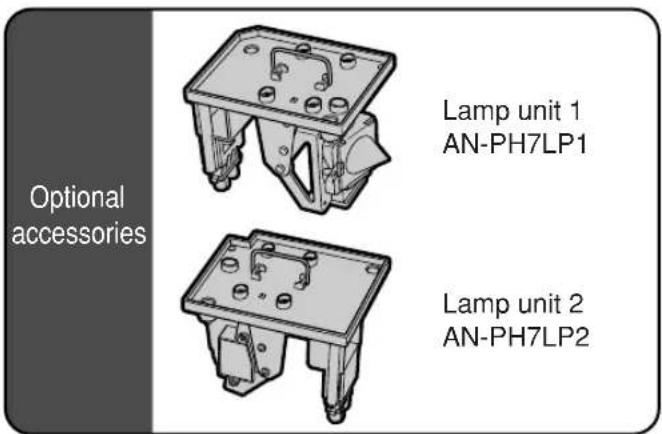


Regarding the Lamp
4
Remove the lamp unit.
- Loosen the securing screws (two for each lamp) from the lamp unit. Hold the lamp unit by the handle and pull it in the direction of the arrow. At this time, keep the lamp unit horizontal and do not tilt it.
5
Insert the new lamp unit.
- Press the lamp unit firmly into the lamp unit compartment. Fasten the securing screws.
- Be sure that AN-PH7LP1 and AN-PH7LP2 are respective type.
6
Replace the lamp unit cover.
- Align the lamp unit cover and slide it to close. Then tighten the user service screw to secure the lamp unit cover.

Info
- If the lamp unit and lamp unit cover are not correctly installed, the power will not turn on, even if the power cord is connected to the projector.
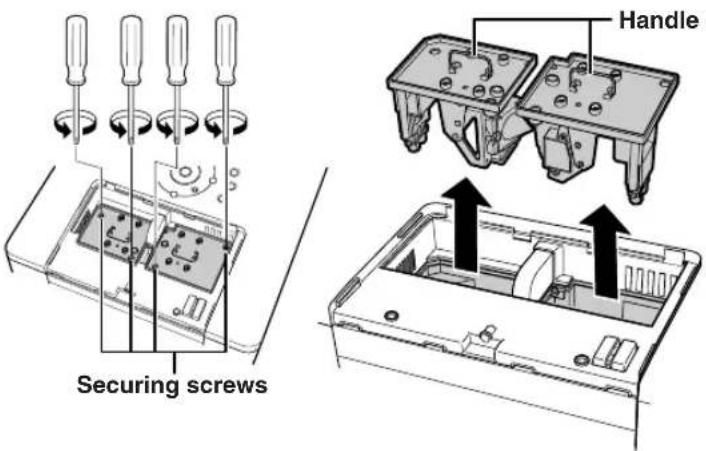
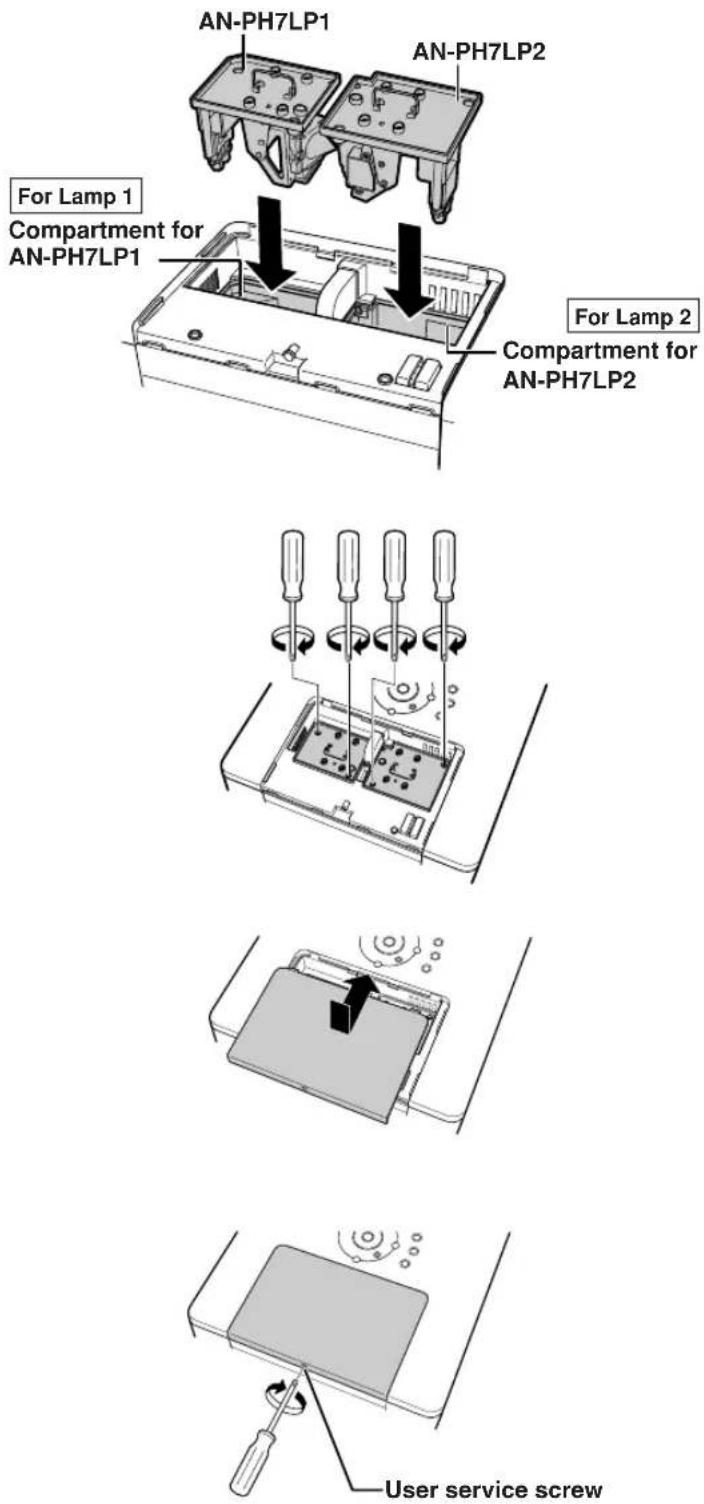
Resetting the Lamp Timer
Reset the lamp timer after replacing the lamp.

Info
- Make sure to reset the lamp timer only when replacing the lamp. If you reset the lamp timer and continue to use the same lamp, this may cause the lamp to become damaged or explode.
1 Connect the power cord.
- Plug the power cord into the AC socket of the projector.
2 Reset the lamp timer.
For Lamp
- When you reset the timer for AN-PH7LP1, while simultaneously holding down ON SHFT and ON press ON on the projector.
- “LAMP 1 100%” is displayed, indicating that the lamp timer is reset.
For Lamp 2
- When you reset the timer for AN-PH7LP2, while simultaneously holding down ⏻ MENU and ⏻ press ON ⏱ on the projector.
- “LAMP 2 100%” is displayed, indicating that the lamp timer is reset.


Computer Compatibility Chart
The table below lists signal codes that are compatible with the projector. When the images are distorted or cannot be projected, adjust the output signal of your computer and so forth while referring to the table below.
Computer
•Multiple signal support
Horizontal Frequency: 15–126 kHz
Vertical Frequency: 43–200 Hz
Pixel Clock: 12–230 MHz
Sync signal: Compatible with TTL level
- Compatible with sync on green signal
- UXGA, SXGA+ and SXGA compatible in advanced intelligent compression
•AICS (Advanced Intelligent Compression and Expansion System) resizing technology
The following is a list of modes that conform to VESA. However, this projector supports other signals that are not VESA standards.
| PC/MAC/WS | Resolution | Horizontal Frequency (kHz) | Vertical Frequency (Hz) | VESA Standard | DVI Support | Display | |
| PC | VGA | 640×350 | 27.0 60 | Upscale | |||
| 31.5 70 | |||||||
| 37.9 85 | √ | ||||||
| 720×350 | 27.0 60 | ||||||
| 31.5 70 | |||||||
| 640×400 | 27.0 60 | √ | |||||
| 31.5 70 | √ | ||||||
| 37.9 | 85 | √ | √ | ||||
| 720×400 | 27.0 | 60 | √ | ||||
| 31.5 | 70 | √ | |||||
| 37.9 | 85 | √ | √ | ||||
| 640×480 | 26.2 | 50 | |||||
| 31.5 | 60 | √ | |||||
| 34.7 | 70 | ||||||
| 37.9 | 72 | √ | √ | ||||
| 37.5 | 75 | √ | √ | ||||
| 43.3 | 85 | √ | √ | ||||
| 47.9 | 90 | ||||||
| 53.0 | 100 | ||||||
| 61.8 | 120 | ||||||
| 78.5 | 150 | ||||||
| 80.9 | 160 | ||||||
| 100.4 200 | |||||||
| SVGA | 800×600 | 31.4 50 | |||||
| 35.1 56 | √ | √ | |||||
| 37.9 60 | √ | √ | |||||
| 44.5 70 | |||||||
| 48.1 72 | √ | √ | |||||
| 46.9 75 | √ | √ | |||||
| 53.7 85 | √ | √ | |||||
| 56.8 90 | |||||||
| 64.0 100 | |||||||
| 77.2 120 | |||||||
| 98.3 150 | |||||||
| 102.1 160 | |||||||
| 125.6 200 | |||||||
| XGA | 1,024×768 | 35.5 43 | √ | True | |||
| 40.3 50 | |||||||
| 48.4 60 | √ | √ | |||||
| 56.5 70 | √ | √ | |||||
| 58.1 72 | |||||||
| 60.0 75 | √ | √ | |||||
| 68.7 85 | √ | √ | |||||
| 73.5 90 | |||||||
| 77.2 96 | |||||||
| 80.6 100 | |||||||
| 98.8 120 | |||||||
| 113.2 140 | |||||||
| PC/MAC/WS | Resolution Disp | Horizontal Frequency (kHz) | Vertical Frequency (Hz) | VESA Standard | DVI Support | ||
| PC | WXGA | 1,280 × 720 | 45.0 60 | √ | √ | Advanced Intelligent Compression | |
| 1,280 × 768 | 47.8 60 | √ | √ | ||||
| 1,280 × 800 | 62.7 75 | ||||||
| 1,360 × 768 | 47.6 60 | √ | |||||
| 1,366 × 768 | 47.8 60 | ||||||
| SXGA | 1,152 × 864 | 54.3 60 | √ | ||||
| 64.0 70 | |||||||
| 64.1 72 | |||||||
| 67.5 75 | √ | √ | |||||
| 75.7 80 | |||||||
| 77.3 85 | |||||||
| 90.2 100 | |||||||
| 1,152 × 882 | 54.8 60 | ||||||
| 65.9 72 | |||||||
| 67.4 74 | |||||||
| 1,280 × 1,024 | 64.0 60 | √ | √ | ||||
| 74.6 70 | |||||||
| 78.1 74 | |||||||
| 80.0 75 | √ | ||||||
| 91.1 85 | √ | ||||||
| 108.4 100 | |||||||
| SXGA+ | 1,400 × 1,050 | 64.0 60 | √ | √ | |||
| UXGA | 1,600 × 1,200 | 74.7 52 | |||||
| 75.0 60 | √ | ||||||
| 81.3 65 | √ | Intelligent Compression | |||||
| 87.5 70 | √ | ||||||
| 90.1 72 | |||||||
| 93.8 75 | √ | ||||||
| 106.3 85 | √ | ||||||
| MAC 13* | VGA | 640 × 480 | 34.9 | 67 | Upscale | ||
| MAC 16* | SVGA | 832 × 624 | 49.6 75 | ||||
| MAC 19* | XGA | 1,024 × 768 | 48.4 60 | True | |||
| 60.0 | 75 | ||||||
| MAC 21* | SXGA | 1,152 × 870 | 68.5 | 75 | Advanced Intelligent Compression | ||
| HP (WS) | SXGA | 1,280 × 1,024 | 78.1 72 | ||||
| PC (WS) | 1,280 × 960 | 60.0 60 | √ | ||||
| WS | 85.9 85 | ||||||
| SUN (WS) | 1,152 × 900 | 60.9 66 | |||||
| 71.9 76 | |||||||

Note
- Depending on the notebook computer, the image cannot be displayed or noise may appear in simultaneous (CRT/LCD) mode. In this case, turn off the LCD display on the notebook computer. For more details, refer to the operation manual of the notebook computer.
- When this projector receives 640 × 350 VESA format VGA signals, "640 × 400" appears on the screen.
- When projecting the RGB interlace signal using INPUT 1/2 with "Signal Type" set to "Auto" or "RGB", the image may not be projected as desired. In this case, select either INPUT 4 (video) or INPUT 5 (S-video).
DTV
| Signal Vertical Frequency (Hz) DVI Support (Compatible with HDCP) Horizontal Frequency (kHz) | |||
| 480I/525I | 15.7 | 60 | |
| 480P/525P | 31.5 | 60 | √ |
| 540P | 33.8 | 60 | |
| 576I/625I | 15.6 | 50 | |
| 576P/625P | 31.3 | 50 | √ |
| 720P/750P | 45.0 | 60 | √ |
| 720P/750P | 37.5 | 50 | √ |
| 1035I/1125I | 33.8 | 60 | √ |
| 1080I/1125I | 33.8 | 60 | √ |
| 1080I/1125I | 28.1 | 50 | √ |
| Problem | Check | Page | |
 No picture and no sound or projector does not start. No picture and no sound or projector does not start. | •Projector power cord is not plugged into the wall outlet. | 37 | |
| •Power to the external connected devices is off. | — | ||
| •The selected input mode is wrong. | 45 | ||
| •Cables incorrectly connected to side panel of the projector. | 27-36 | ||
| •Remote control batteries have run out. | 17 | ||
| •External output has not been set when connecting notebook computer. | 27 | ||
 Sound is heard but no picture appears. Sound is heard but no picture appears. | •Cables incorrectly connected to the side panel of the projector. | 27-36 | |
| •“Bright” is set to minimum position. | 60 | ||
| •The “BLACK SCREEN” function is working. | 50 | ||
 Color is faded or poor. Color is faded or poor. | •Image adjustments are incorrectly set. | 60 | |
| (INPUT 1, INPUT 2, INPUT 3 only)•Input signal type (RGB/Component) is incorrectly set.(INPUT 4, INPUT 5 only)•Video Input system is incorrectly set. | 6376 | ||
 Picture is blurred; noise appears. Picture is blurred; noise appears. | •Adjust the focus. | 40 | |
| •The projection distance exceeds the focus range. | 22 | ||
| •There is fog on the lens. If the projector is carried from a cold room into a warm room, or if it is suddenly heated, condensation may form on the surface of the lens and the image will become blurred. Please set up the projector at least one hour before it is to be used. If condensation should form, remove the power cord from the wall outlet and wait for it to clear. | — | ||
| (Computer Input only)•Perform “Fine Sync” Adjustments. (“Clock” Adjustment)•Perform “Fine Sync” Adjustments. (“Phase” Adjustment) | 6868 | ||
| •Turn off the LCD display of the notebook computer. | 101 | ||
| •Noise may appear depending on the computer. | — | ||
 Picture appears but no sound is heard. Picture appears but no sound is heard. | •Cables incorrectly connected to side panel of the projector. | 27-36 | |
| •Volume is set to minimum. | 46 | ||
| •The “MUTE” function is working. | 46 | ||
| •The “Speaker” menu is set to “OFF”. | 73 | ||
| An unusual sound is occasionally heard from the cabinet. | •If the picture is normal, the sound is due to cabinet shrinkage caused by room temperature changes. This will not affect operation or performance. | — | |
| Maintenance indicator illuminates or blinks in red. | •See “Maintenance Indicators”. | 94 | |
| CheckProblem Page | |||
| The projector cannot be turned on or put into the standby mode using the ON or STANDBY button on the projector. | ·If the “Keylock Level” menu is set to “Level A” or “Level B”, all or specific buttons on the projector are unavailable. Use the remote control to operate the projector. | 85 | |
| All buttons on the projector and the remote control are unavailable. | ·If the “Stack Setting” menu is set to “Slave” and the “Keylock Level” menu is set to “Level B”, all buttons on the projector and the remote control are unavailable. Connect the remote control to the projector, and then use the remote control to operate the projector. | 188485 | |
| Picture is green on INPUT 1or 2 (COMPONENT). | ·Change the input signal type setting. | 63 | |
| Picture is pink (no green) on INPUT 1, 2 or 3 (RGB). | |||
| Picture is too bright and whitish. | ·Image adjustments are incorrectly set. | 60 | |
| The cooling fan becomes noisy. | ·When temperature inside the projector increases, the cooling fan runs faster. | 9, 1093–95 | |
| The lamp does not light up even after the projector turns on. | ·The lamp indicator is illuminating in red.Replace the lamp. | 94 | |
| The lamp suddenly turns off during projection. | |||
| The image sometimes flickers. | ·Cables incorrectly connected to the projector or the connected equipment works improperly.·If this happens frequently, replace the lamp. | 27–3697 | |
| The lamps take a long time to turn on. | ·The lamps will eventually need to be changed.The lamps have reached the end of its life. Replace the lamps. | 97 | |
| Picture is dark. | |||
| The remote control cannot be used. | ·Operate the remote control while pointing it at the projector’s remote control sensor.·The remote control may be too far away from the projector.·If direct sunlight or a strong fluorescent light is shining on the projector’s remote control sensor, place the projector where it will not be affected by strong light. | 17 | |
| ·The batteries may be depleted or inserted incorrectly. Make sure the batteries are inserted correctly or insert new ones. | 17 | ||
This projector is equipped with a microprocessor. Its performance could be adversely affected by incorrect operation or interference. If this should happen, unplug the projector and plug it in again after more than 5 minutes.
If you encounter any problems during setup or operation of this projector, first refer to the "Troubleshooting" section on pages 102 and 103. If this operation manual does not answer your question, please contact the SHARP Service departments listed below.
U.S.A. Sharp Electronics Corporation
1-888-GO-SHARP (1-888-467-4277)
lcdsupport@sharpsec.com
http://www.sharplcd.com
Canada Sharp Electronics of Canada Ltd.
(905) 568-7140
http://www.sharp.ca
Mexico Sharp Electronics Corporation Mexico
Branch
(525) 716-9000
http://www.sharp.com.mx
Latin America Sharp Electronics Corp. Latin American
Group
(305) 264-2277
www.servicio@sharpsec.com
http://www.siempresharp.com
Germany Sharp Electronics (Europe) GMBH
01805-234675
http://www.sharp.de
U.K. Sharp Electronics (U.K.) Ltd.
08705274277
http://www.sharp.co.uk/customersupport
Italy Sharp Electronics (Italy) S.P.A.
(39) 02-89595-1
http://www.sharp.it
France Sharp Electronics France
01 49 90 35 40
hotlineced@sef.sharp-eu.com
http://www.sharp.fr
Spain Sharp Electronica Espana, S.A.
93 5819700
sharplcd@sees.sharp-eu.com
http://www.sharp.es
Switzerland Sharp Electronics (Schweiz) AG
0041 1 846 63 11
cattaneo@sez.sharp-eu.com
http://www.sharp.ch
Sweden Sharp Electronics ( Nordic ) AB
(46) 8 6343600
vision.support@sen.sharp-eu.com
http://www.sharp.se
Austria Sharp Electronics (Europe) GMBH
Branch Office Austria
0043 1 727 19 123
pogats@sea.sharp-eu.com
http://www.sharp.at
Benelux SHARP Electronics Benelux BV
0900-SHARPCE (0900-7427723)
Nederland
9900-0159 Belgium
http://www.sharp.nl
http://www.sharp.be
http://www.sharp.lu
Australia Sharp Corporation of Australia
Pty. Ltd.
1300-135-022
http://www.sharp.net.au
New Zealand Sharp Corporation of New Zealand
(09) 634-2059, (09) 636-6972
http://www.sharp.net.nz
Singapore Sharp-Roxy Sales (S) Pte. Ltd.
65-226-6556
ckng@srs.global.sharp.co.jp
http://www.sharp.com.sg
Hong Kong Sharp-Roxy (HK) Ltd.
(852) 2410-2623
dcmktg@srh.global.sharp.co.jp
http://www.sharp.com.hk
Taiwan Sharp Corporation (Taiwan)
0800-025111
http://www.sharp-scot.com.tw
Malaysia Sharp-Roxy Sales & Service Co.
(60) 3-5125678
U.A.E. Sharp Middle East Fze
971-4-81-5311
helpdesk@smef.global.sharp.co.jp
Thailand Sharp Thebnakorn Co. Ltd.
02-236-0170
svc@stcl.global.sharp.co.jp
http://www.sharp-th.com
Korea Sharp Electronics Incorporated of Korea
(82) 2-3660-2002
lcd@sharp-korea.co.kr
http://www.sharpkorea.co.kr
India Sharp Business Systems (India) Limited
(91) 11-6431313
service@sharp-oa.com
Specifications
| Product type | Multimedia Projector |
| Model | XG-PH70X (standard zoom lens attached)/XG-PH70X-N (no lens attached) |
| Video system | NTSC3.58/NTSC4.43/PAL/PAL-M/PAL-N/PAL-60/SECAM/DTV480I/DTV480P/DTV540P/DTV576I/DTV576P/DTV720P/DTV1035I/DTV1080I |
| Display device | 0.7" DLP® chip × 1No. of dots: 786,432 dots (1,024 [H] × 768 [V]) |
| Standard zoom lens | 1.2 × electric zoom/focus lens, F1.8-F2.0, f = 25.6-31.3 mm (standard equipment with XG-PH70X) |
| Projection lamp | 260 W × 2 |
| Component input (INPUT 1)/output (OUTPUT) signal | 15-pin mini D-sub connectorY: 1.0 Vp-p, sync negative, 75 Ω terminatedPB: 0.7 Vp-p, 75 Ω terminatedPR: 0.7 Vp-p, 75 Ω terminated |
| Horizontal resolution | 750 TV lines (DTV720P) |
| Component input (INPUT 2) | BNC connector |
| signal | Y: 1.0 Vp-p, sync negative, 75 Ω terminatedPB: 0.7 Vp-p, 75 Ω terminatedPR: 0.7 Vp-p, 75 Ω terminated |
| RGB input (INPUT 1/2)/output (OUTPUT) signal | 15-pin mini D-sub connector, 5 BNC connector: RGB separate/composite sync (TTL)/sync on green type analog input: 0-0.7 Vp-p, positive, 75 Ω terminatedHorizontal sync. signal: TTL level (positive/negative) or composite sync (Apple only)Vertical sync. signal: Same as above |
| RGB digital input signal (INPUT 3) | DVI connector (24-pin), RGB (digital), 250 -1,000 mV, 50 Ω (Compatible with HDCP) |
| Video input signal (INPUT 4) | RCA connector: VIDEO, composite video, 1.0 Vp-p, sync negative, 75 Ω terminated |
| S-video input signal (INPUT 5) | 4-pin mini DIN connectorY (luminance signal): 1.0 Vp-p, sync negative, 75 Ω terminatedC (chrominance signal): Burst 0.286 Vp-p, 75 Ω terminated |
| Audio input signal | ø3.5 mm stereo minijack, RCA terminal0.5 Vrms, more than 22 kΩ |
| Audio output signal (AUDIO OUTPUT 1-5) | ø3.5 mm minijack0.5 Vrms, less than 2.2 kΩ |
| RS-232C terminal | 9-pin D-sub connector |
| LAN terminal | 8-pin RJ-45 modular connector |
| Pixel clock | 12-230 MHz |
| Vertical frequency | 43-200 Hz |
| Horizontal frequency | 15-126 kHz |
| Audio output | 3.0 W (stereo) |
| Speaker system | 3.3 cm round × 2 |
| Rated voltage | AC 100-240 V |
| Input current | 6.6 A (AC 100 V)-2.7 A (AC 240 V) |
| Rated frequency | 50/60 Hz |
| Power consumption | 650 W (when "Eco Mode" is "OFF")/570 W (when "Eco Mode" is "ON") with AC 100 V620 W (when "Eco Mode" is "OFF")/550 W (when "Eco Mode" is "ON") with AC 240 V |
| Power consumption (standby) | 0.8 W (AC 100 V) - 1.1 W (AC 240 V) (When "Monitor Out" and "LAN/RS232C" are set to "Disable".) |
| Heat dissipation | 2,440 BTU/hour (when "Eco Mode" is "OFF")/2,140 BTU/hour (when "Eco Mode" is "ON") with AC 100 V2,330 BTU/hour (when "Eco Mode" is "OFF")/2,070 BTU/hour (when "Eco Mode" is "ON") with AC 240 V |
| Operating temperature | 41°F to 104°F (+5°C to +40°C) |
| Storage temperature | -4°F to 140°F (-20°C to +60°C) |
| Cabinet | Plastic |
| I/R carrier frequency | 38 kHz |
| Dimensions (approx.) | 16 5/32" × 7 3/32" × 18 35/64" (410 (W) × 180 (H) × 471 (D) mm) (main body only)16 5/32" × 7 37/64" × 18 35/64" (410 (W) × 192.1 (H) × 471 (D) mm) (including adjustment foot and projecting parts) |
| Weight (approx.) | XG-PH70X: 32.9 lbs. (14.9 kg)XG-PH70X-N: 30.3 lbs. (13.7 kg) |
| Replacement parts | Remote control, Power cord for U.S., Canada, etc., Power cord for Europe, except U.K., Power cord for U.K., Hong Kong and Singapore, Power cord for Australia, New Zealand and Oceania, RGB cable, Remote mouse receiver, Cap for the standard zoom lens, Projector manual and technical reference CD-ROM, Operation manual |
As a part of policy of continuous improvement, SHARP reserves the right to make design and specification changes for product improvement without prior notice. The performance specification figures indicated are nominal values of production units. There may be some deviations from these values in individual units.
Glossary
Advanced intelligent compression (Page 100)
High quality resizing of lower and higher resolution images to fit the projector's native resolution.
Aspect ratio (Page 48)
Width and height ratio of an image. The normal aspect ratio of a computer and video image is 4:3. There are also wide images with an aspect ratio of 16:9 and 21:9.
Auto Sync (Page 70)
Optimizes projected computer images by automatically adjusting certain characteristics.
Background (Page 77)
Initial setting image projected when no signal is being output.
Border (Page 48)
Projects a 4:3 image fully within a 16:9 screen by keeping the aspect ratio at 4:3.
Clock (Page 68)
Clock adjustment is used to adjust vertical noise when clock level is incorrect.
CLR Temp (Color temperature) (Page 61)
Function that can be used to adjust the color temperature to suit the type of image input to the projector. Decrease the color temperature to create warmer, reddish images for natural flesh tones, or increase to create cooler, bluish images for a brighter picture.
C.M.S. (Color Management System) (Page 64)
Function allows you individually adjust the display characteristics of six colors (R: Red, Y: Yellow, G: Green, C: Cyan, B: Blue, M: Magenta)
Dot by Dot (Page 48)
Mode that projects images in their native resolution.
Keylock Level (Page 85)
Mode that can lock the operation of projector buttons to prevent unauthorized adjustment.
Keystone Correction (Page 41)
Function to digitally correct a distorted image when the projector is set up at an angle, smoothens out jaggies on keystone images and compresses the image not only horizontally but vertically keeping the 4:3 aspect ratio.
Phase (Page 68)
Phase shift is a timing shift between isomorphic signals with the same resolution. When phase level is incorrect, the projected image typically displays horizontal flicker.
Pict in Pict (Page 74)
The Pict in Pict (picture in picture) function allows you to display two pictures on the same screen. You can display the image input from a video as an inset picture overlapping the main picture input from a computer.
Picture Mode (Page 60)
Image quality enhancement function that offers a richer image by brightening the darker portions of the image without altering the brightness of the brighter portions. You can select four different modes: STANDARD, PRESENTATION, CINEMA and CUSTOM.
Progressive (Page 62)
The progressive display projects a smoother video image. You can select three different modes: 2D Progressive, 3D Progressive and Film Mode.
Resize (Page 48)
Allows you to modify or customize the picture display mode to enhance the input image. You can select six different modes: NORMAL, FULL, DOT BY DOT, BORDER, STRETCH and SMART STRETCH.
Shifting the lens (Page 38)
Function to adjust the position of the projected image for the position of the screen by shifting the lens horizontally and vertically.
Smart Stretch (Page 49)
Projects the image fully in a 16:9 screen by enlarging only the surrounding areas while keeping the aspect ratio in the middle part of the image at 4:3.
sRGB (Page 64)
An international standard of color reproduction regulated by the IEC (International Electrotechnical Commission). As the fixed color area has been decided by the IEC, the color changes according to DLP features, so that the images are displayed in a natural tint based on an original image, when "C.M.S. Adjustment" is set to "sRGB".
Stack Setting (Page 84)
Setting for the stack projection that allows you to increase the brightness of an image by stacking multiple projectors and projecting same image simultaneously. You can control projectors for the stack projection by assigning a projector as the master and the other projectors as the slaves.
Stretch (Page 48)
Mode that stretches the 4:3 image horizontally to display it fully on a 16:9 screen.
System Lock (Page 79)
If the "Keycode" set in the projector is not correctly entered, the projector will not operate even if signals are entered.
Index
AC socket 37
ADJ./MOUSE switch 18
Adjustment buttons 56
Adjustment feet 39
Advanced intelligent compression 100
All Reset 91
Aspect ratio 48
Audio 72
AUDIO input (1) terminal 27
AUDIO input (2, 3) terminal 28
AUDIO input (4, 5) terminals 34
Audio Out 72
AUDIO OUTPUT terminal 36
Auto Power Off 79
Auto Search 78
Auto Sync (Auto Sync adjustment) 70
AUTO SYNC button 70
Auto Sync Disp 71
Background....77
BLACK SCREEN button 50
Border 48
BREAK TIMER button 50
Bright Boost 61
C.M.S. (Color Management System) 64
C.M.S. Adjustment 64
Carrying handle 13
Clock 68
CLR Temp (Color Temperature) 61
DHCP Client 89
Digi. Shift 75
Direct Power On 87
DNR 62
Dot By Dot 48
Eco Mode 78
ENLARGE buttons 46
ENTER button.... 56
Exhaust vent 93
Fan Mode 86
Fine Sync 68
FOCUS buttons 40
FREEZE button 47
Gateway 90
Geometric adjustment 42
H & V keystone 43
H & V LENS SHIFT button 39
Image Capture 76
Image resizing 44
INPUT 1 - 5 modes 45
INPUT 1 terminal 27
INPUT 2 terminals 28
INPUT 3 terminal 29
INPUT 4 terminal 34
INPUT 5 terminal 34
INPUT buttons 45
Intake vent 93
IP Address 90
Kensington Security Standard connector 15
Keycode 79
Keylock Level 85
KEYSTONE button 41
Keystone Correction 41
Lamp 96
Lamp indicators 1, 2 94
Lamp Mode 83
Lamp Timer (Life) 83
Lamp unit cover 97
LAN terminal 35
LAN/RS232C 88
Language 92
L-click button 19
Lens cap 13
MENU button 56
Monitor Out 88
Mouse button 19
MUTE button 46
Network 89
Normal 48
ON button 37
Options (1) 74
Options (2) 82
OSD Display 75
OUTPUT (FOR INPUT 1, 2) terminal 36
Pair Stack 85
Password 82
Phase 68
Pict in Pict 74
Picture 60
Picture Mode 60
PICTURE MODE button 47
Power cord 37
Power indicator 14
PRJ Mode 84
Progressive 62
R-click button 19
Remote control 17
Remote control sensor 17
Remote mouse receiver 19
Resize 48
RESIZE button 48
RGB cable 27
RS-232C 87
RS-232C terminal 35
Save Setting 68
Select Setting 69
Service Mode 90
Set Inputs....86
Signal Info 70
Signal Type 63
Smart Stretch 49
Speaker....73
Special Modes 69
sRGB 64
Stack Setting 84
STANDBY button 37
Startup Image 77
Status 92
Stretch 48
Subnet Mask 90
System Lock 79
TCP/IP 89
Temperature warning indicator 94
UNDO button 56
Video System 76
Volume buttons 46
WIRED R/C JACK 18
WIRED REMOTE terminal 18
ZOOM buttons 40
SHARP®
SHARP CORPORATION
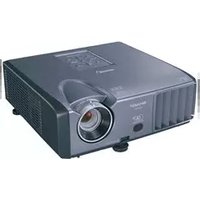
- OPERATION MANUAL
- XG-PH70X
- XG-PH70X-N
- MULTIMEDIA PROJECTOR
- IMPORTANT
- SPECIAL NOTE FOR USERS IN THE U.K.
- DANGER:
- WARNING:
- IMPORTANT:
- WARRANTY
- CONSUMER PRODUCT SAFETY ACT
- CAUTION
- INFORMATION
- PRODUCT DISPOSAL
- Caution Concerning Lamp Replacement
- How to Read This Operation Manual
- For Future Reference
- Preparing
- Introduction
- Quick Start
- Setup
- Connections
- Basic Operation
- Turning the Projector On/Off 37
- Image Projection 38
- Useful Features
- Menu Items 51
- Using the Menu Screen 56
- Picture Adjustment ("Picture" menu) ...... 60
- Color Management System ("C. M. S." menu) 64
- Computer Image Adjustment ("Fine Sync" menu) 68
- Audio Adjustment ("Audio" menu) 72
- Using the "Options (1)" Menu 74
- Helpful Functions Set during Installation ("Options (2)" menu) 82
- Using the Other Menus (“Language” and “Status” menus) 92
- Reference
- Appendix
- How to Access the PDF Operation Manuals
- Accessing the PDF manuals
- For Windows®:
- For Macintosh®:
- Info
- SETUP MANUAL
- CAUTION: Please read all of these instructions before you operate this product and save these instructions for later use.
- Read Instructions
- Retain Instructions
- Heed Warnings
- Follow Instructions
- Cleaning
- Attachments
- Water and Moisture
- Accessories
- Transportation
- Ventilation
- Power Sources
- Grounding or Polarization
- Power-Cord Protection
- Lightning
- Overloading
- Object and Liquid Entry
- Servicing
- Damage Requiring Service
- Replacement Parts
- Safety Check
- Wall or Ceiling Mounting
- Heat
- Ensure that you read the following safeguards when setting up your projector.
- Caution concerning the lamp unit
- Caution concerning the setup of the projector
- Do not set up the projector in places exposed to direct sunlight or bright light.
- The projector may be safely tilted to a maximum angle of 9 degrees.
- When using the projector in high-altitude areas such as mountains (at altitudes of approximately 1,500 meters (4,900 feet) or more)
- Warning about placing the projector in a high position
- Do not subject the projector to hard impact and/or vibration.
- Rest your eyes occasionally.
- Avoid locations with extremes of temperature.
- Do not block the intake and exhaust vents.
- Caution regarding usage of the projector
- Other connected equipment
- Using the projector in other countries
- Temperature monitor function
- Optional lens installation
- Supplied accessories
- Optional accessories
- Cable
- Lamp
- Note
- Optional lenses
- Throw Distance
- Screen
- Part Names and Functions
- Projector
- Top View
- About the Indicators on the Projector
- Power indicator
- Lamp indicators 1, 2
- Temperature warning indicator
- Projector (Side View)
- Terminals
- Using the Kensington Lock
- Remote Control
- Using the Remote Control
- Usable Range
- When using the remote control:
- Inserting the Batteries
- 1
- 2
- 3
- Incorrect use of the batteries may cause them to leak or explode. Please follow the precautions below.
- Using the Remote Control with a Signal Cable
- Switching the Remote Control Mode
- Using the Remote Control as a Wireless Computer Mouse
- Setup and Projection
- Place the projector facing a screen
- Connect the projector to the computer and plug the power cord into the AC socket of the projector
- Remove the lens cap and turn the projector on
- Adjust the angle
- Adjust the projector angle
- Adjust the focus and the zoom
- Correcting the image distortion due to the projection angle
- Select the input mode
- Turn the power off
- Setting Up the Projector
- Standard Setup (Front Projection)
- Indication of the Projection Image Size and Projection Distance
- Projecting a Reversed Image
- Projection from behind the Screen
- Projection Using a Mirror
- Ceiling-mount Setup
- INPUT/OUTPUT Terminals and Connectable Main Equipment
- Samples of Cables for Connection
- Connecting to a Computer
- Connecting with a 5 BNC to 15-pin D-sub Cable
- Connecting with a DVI Digital Cable
- Connecting to Video Equipment
- Connecting to Video Equipment That Has an HDMI Output Terminal with a DVI to HDMI Cable
- Connecting to Video Equipment That Has a DVI Output Terminal with a DVI Digital Cable
- Connecting to RGB Video Equipment with a 5 RCA RGB Cable
- Connecting to Video Equipment That Has Component Output Terminals
- Connecting with an S-video Cable or a Composite Video Cable
- Controlling the Projector by a Computer
- When connecting to the LAN terminal using a LAN cable
- Connecting to a Monitor That Has an RGB Input Terminal
- Connecting to an Amplifier or Other Audio Equipment
- Turning the Projector On/Off
- Connecting the Power Cord
- Turning the Projector On
- Remove the lens cap and press ☑ on the projector or ☑ on the remote control.
- Turning the Power Off (Putting the Projector into Standby Mode)
- Shifting the Lens
- Adjustable range
- Using the Adjustment Feet
- Adjusting the Focus
- Adjusting the Projected Image Size
- Correcting Trapezoidal Distortion
- Selecting the Type of the Correction
- GEOMETRIC ADJUSTMENT
- 4
- 5
- 6
- H & V KEYSTONE
- Image Projection
- Switching the Input Mode
- When pressing
- INPUT 1/2/3 mode
- Using RGB
- Using component
- INPUT 4 mode
- INPUT 5 mode
- When "Auto Search" is set to "ON"
- Adjusting the Volume
- Turning Off the Sound Temporarily
- Displaying an Enlarged Portion of an Image
- VOLUME
- MUTE
- Press in the remote control to cancel the operation.
- Freezing a Moving Image
- Press FREEZ the remote control.
- Selecting the Picture Mode
- Press PICTURE MODE the remote control.
- Resize Mode
- Press ☑ on the remote control.
- VIDEO
- Displaying the Black Screen
- Displaying and Setting the Break Timer
- "Picture" menu
- "C.M.S." menu
- "Fine Sync" menu
- "Audio" menu
- "Options (1)" menu
- Using the Menu Screen
- Menu Selections (Adjustments)
- Press
- Press ▲▲r ▼▼ to select the item you want to adjust.
- To adjust the projected image while viewing it
- Press
- Press ◀ or ▶ to adjust the item selected.
- Menu Selections (Settings)
- Example: Setting "OSD Display"
- Press ◀ or ▶ to display the other menu items.
- Press ▲▲r ▼▼ to select the item you want to set.
- Press ▶ to shift the cursor to the sub menu.
- Press ▲▲r ▼▼o select the setting of the item displayed in the sub menu.
- Press
- Press .
- Picture Adjustment (“Picture” menu)
- Adjusting the Image
- Adjusting the Color Temperature
- Emphasizing the Contrast
- Selecting the Progressive Mode
- Reducing Image Noise (DNR)
- Signal Type Setting
- Description of Signal Type Settings
- Color Management System ("C. M. S." menu)
- Selecting the Color Reproduction Mode
- Selecting the Target Color
- Setting the Brightness of the Target Color
- Setting the Chromatic Value of the Target Color
- Setting the Hue of the Target Color
- Resetting User-defined Color Settings
- Overview of All Color Settings
- Computer Image Adjustment ("Fine Sync" menu)
- Adjusting the Computer Image
- Saving Adjustment Settings
- Selecting Adjustment Settings
- Special Mode Setting
- Checking the Input Signal
- Auto Sync Adjustment
- Auto Sync Display Function
- Audio Adjustment (“Audio” menu)
- Adjusting the Audio
- Setting the Audio Output Type
- Speaker Setting
- Displaying Dual Pictures (Pict in Pict)
- Setting the Resize Mode
- Shifting the Projected Image Vertically (Digital Shift)
- Setting On-screen Display
- Setting the Video System
- Capturing Projected Images
- Selecting the Background Image
- Selecting the Startup Image
- Eco Mode
- Detecting the Input Signals Automatically
- Auto Power Off Function
- System Lock Function
- Setting the keycode
- Changing the keycode
- When the system lock is set
- Setting a Password
- Changing the password
- If You Forget Your Password
- Checking the Lamp Life Status
- Setting the Lamp Mode
- Reversing/Inverting Projected Images
- Controlling Multiple Projectors with the One Remote Control
- Shortcut to Make Projector Stack Settings
- Select "Pair Stack" on the "Option
- Select "OK", and then press ENTER.
- Locking the Operation Buttons on the Projector
- Bypassing Unused Input Selections
- Selecting the Fan Mode
- Direct Power On Function
- Selecting the Transmission Speed (RS-232C)
- Monitor Output Settings
- LAN/RS232C Setting
- DHCP Client Setting
- TCP/IP Setting
- Service Mode
- Returning to the Default Settings
- Selecting the On-screen Display Language
- Overview of All Menu Settings
- Maintenance
- Cleaning the projector
- Cleaning the lens
- Cleaning the air vents and the intake vent cover
- Maintenance Indicators
- About the temperature warning indicator
- About the lamp indicator
- Regarding the Lamp
- IMPORTANT NOTE TO U.S. CUSTOMERS:
- Caution Concerning the Lamp
- Replacing the Lamp
- Removing and Installing the Lamp Unit
- Warning!
- Disconnect the power cord.
- Remove the lamp unit cover.
- Remove the lamp unit.
- Insert the new lamp unit.
- Replace the lamp unit cover.
- Resetting the Lamp Timer
- Connect the power cord.
- Reset the lamp timer.
- For Lamp
- For Lamp 2
- Computer Compatibility Chart
- Computer
- Specifications
- Glossary
- Advanced intelligent compression (Page 100)
- Aspect ratio (Page 48)
- Auto Sync (Page 70)
- Background (Page 77)
- Border (Page 48)
- Clock (Page 68)
- CLR Temp (Color temperature) (Page 61)
- C.M.S. (Color Management System) (Page 64)
- Dot by Dot (Page 48)
- Keylock Level (Page 85)
- Keystone Correction (Page 41)
- Phase (Page 68)
- Pict in Pict (Page 74)
- Picture Mode (Page 60)
- Progressive (Page 62)
- Resize (Page 48)
- Shifting the lens (Page 38)
- Smart Stretch (Page 49)
- sRGB (Page 64)
- Stack Setting (Page 84)
- Stretch (Page 48)
- System Lock (Page 79)
- Index
- SHARP®
- SHARP CORPORATION
Brand : SHARP
Model : XG-PH70X
Category : Video projector