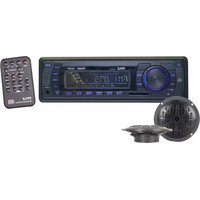
PLMRKT12BK - Car radio Pyle - Free user manual and instructions
Find the device manual for free PLMRKT12BK Pyle in PDF.


| Product Type | Car Stereo Receiver |
| Model | PLMRKT12BK |
| Brand | Pyle |
| Dimensions (W x H x D) | 7.09 x 2.05 x 4.53 inches |
| Weight | 1.5 lbs |
| Power Supply | 12V DC (negative ground) |
| Maximum Power Output | 4 x 50 Watts |
| RMS Power Output | 4 x 22 Watts |
| Radio Tuner | AM/FM with 30 presets |
| Bluetooth | Built-in for hands-free calling and audio streaming |
| USB Port | Front USB for MP3/WMA playback |
| AUX Input | 3.5mm front auxiliary input |
| SD Card Slot | Micro SD card slot for music playback |
| Display | LED backlit LCD display |
| Remote Control | Included wireless remote |
| EQ Settings | Preset equalizer (Rock, Pop, Classic, Flat) |
| Subwoofer Output | RCA preamp output |
| Steering Wheel Control Compatible | Yes (requires adapter, not included) |
| Maintenance | Clean with a soft dry cloth; avoid liquids |
| Safety | Built-in fuse (10A) for overload protection |
| Spare Parts & Repairability | Contact Pyle customer service or authorized dealers |
| Warranty | Limited 1-year warranty |
Frequently Asked Questions - PLMRKT12BK Pyle
User questions about PLMRKT12BK Pyle
0 question about this device. Answer the ones you know or ask your own.
Ask a new question about this device
Download the instructions for your Car radio in PDF format for free! Find your manual PLMRKT12BK - Pyle and take your electronic device back in hand. On this page are published all the documents necessary for the use of your device. PLMRKT12BK by Pyle.
USER MANUAL PLMRKT12BK Pyle
natural_image
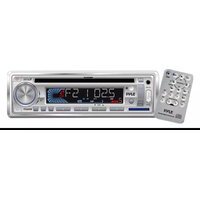
Front view line drawing of a device control panel with buttons and display (no text or symbols)- PLL Synthesizer Stereo Radio
• Automatic Memory Storing - Preset Equalization
- USB Interface
• Auxiliary Input Function - Remote Control
Installation ....3
Take out screw before installation.....3
DIN Front-Mount (Method A) .....3
Installing the unit ....3
Removing the unit....4
DIN Rear-Mount (Method B) .....5
Wiring Connection ......6
Operation 7
Location of keys....7
Switching on/off the unit......8
Sound adjustment......8
Loudness 8
Display 8
Mute....8
Equalization....8
Remote sensor....8
Reset function....8
Radio operation 8
Switching to radio mode 8
Selecting the frequency band......8
Selecting station 8
Automatic memory storing & program scanning....8
Station storing 9
Scan....9
Mono/Stereo....9
Weather band selection....9
USB play operation....9
SD/MMC operation .....11
Specification......12
Trouble shooting ....13
Notes:
- Choose the mounting location where the unit will not interfere with the normal driving function of the driver.
- Before finally installing the unit, connect the wiring temporarily and make sure it is all connected up properly and the unit and the system work properly.
- Use only the parts included with the unit to ensure proper installation. The use of unauthorized parts can cause malfunctions.
- Consult with your nearest dealer if installation requires the drilling of holes or other modifications of the vehicle.
- Install the unit where it does not get in the driver's way and cannot injure the passenger if there is a sudden stop, like an emergency stop.
- If installation angle exceeds 30^ from horizontal, the unit might not give its optimum performance.

- Avoid installing the unit where it would be subject to high temperature, such as from direct sunlight, or from hot air, from the heater, or where it would be subject to dust, dirt or excessive vibration.
DIN FRONT/REAR-MOUNT
This unit can be properly installed either from “Front” (conventional DIN Front-mount) or “Rear” (DIN Rear-mount installation, utilizing threaded screw holes at the sides of the unit chassis). For details, refer to the following illustrated installation methods.
TAKE OUT SCREW BEFORE INSTALLATION
Before install the unit, please remove the two screws.
Take out screw before installation

natural_image
Diagram of a mechanical setup with a pin inserted into a block and a magnified inset showing a pin inserted into a cylindrical component (no text or symbols present)DIN FRONT-MOUNT (Method A) Installation Opening
This unit can be installed in any dashboard having an opening as show below:

Installing the unit
Be sure you test all connections first, and then follow these steps to install the unit.
- Make sure the ignition is turned off, and then disconnect the cable from the vehicle battery's negative (-) terminal.
- Disconnect the wire harness and the antenna.
- Press the release button on the front panel and remove the control panel (see the steps of "to detach front panel").
- Lift the top of the outer trim ring then pull it out to remove it.
- The two supplied keys release tabs inside the unit's sleeve so you can remove it. Insert the keys as far as they will go (with the notches facing up) into the appropriate slots at the middle left and right sides of the unit. Then slide the sleeve off the back of the unit.
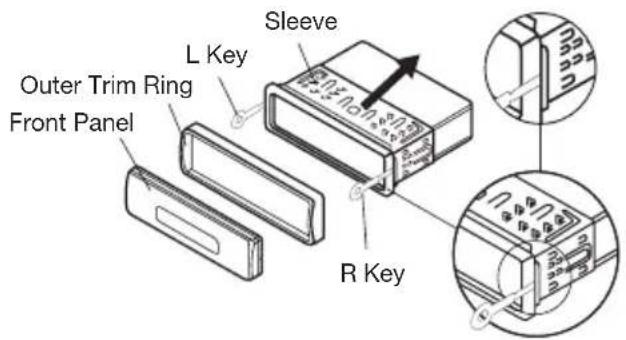
- Mount the sleeve by inserting the sleeve into the opening of the dashboard and bend open the tabs located around the sleeve with a screwdriver. Not all tabs will be able to make contact, so examine which ones will be most effective. Bending open the appropriate tabs behind the dashboard to secure the sleeve in place.

-
Reconnect the wire harness and the antenna and be careful not to pinch any wires or cables.
-
Slide the unit into the sleeve until it locks into place.
-
To further secure the unit, use the supplied metal strap to secure the back of the unit in place. Use the supplied hardware (Hex Nut (M5mm) and Spring Washer) to attach one end of the strap to the mounting bolt on the back of the unit. If necessary, bend the metal strap to fit your vehicle's mounting area. Then use the supplied hardware (Tapping Screw (5x25mm) and Plain Washer) to attach the other end of metal strap to a solid metal part of the vehicle under the dashboard. This strap also helps ensure proper electrical grounding of the unit.
Note: to install the short threading terminal of the mounting bolt to the back of the unit and the other long threading terminal to the dashboard.

- Reconnect the cable to the vehicle battery's negative (-) terminal. Then replace the outer trim ring and install the unit's front panel. (see the steps of "to install the front panel").
Removing the unit
- Make sure the ignition is turned off, then disconnect the cable from the vehicle battery's negative (-) terminal.
- Remove the metal strap attached the back of the unit (if attached).
- Press the release button to remove the front panel.
- Lift the top of the outer trim ring then pull it out to remove it.
- Insert both of the supplied keys into the slots at the middle left and right sides of the unit, then pull the unit out of the dashboard.

natural_image
Diagram showing a tool interacting with a block, illustrating the process of cutting or disassembly (no text or symbols present)DIN REAR-MOUNT (Method B)
If your vehicle is a Nissan, Toyota, follow these mounting instructions.
Use the screw holes marked T (Toyota), N (Nissan) located on both sides of the unit to fasten the unit to the factory radio mounting brackets supplied with your vehicle.
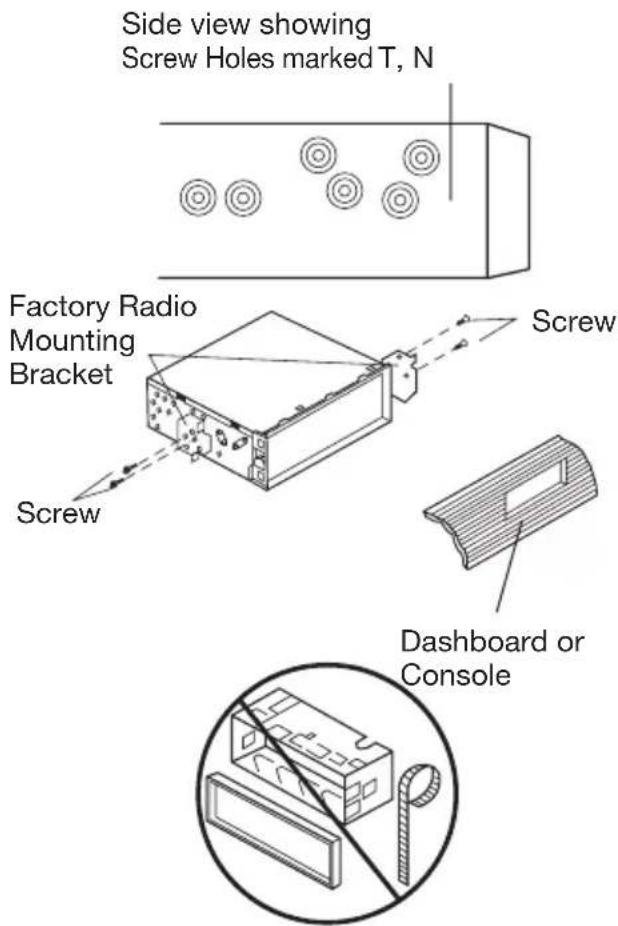
To fasten the unit to the factory radio mounting brackets.
Align the screw holes on the bracket with the screw holes on the unit, and then tighten the screws (5x5mm) on each side.
Note: the outer trim ring, sleeve and the metal strap are not used for method B installation.
flowchart
graph TD
    A["MAIN UNIT"] --> B["ANTENNA CONNECTOR"]
    A --> C["IGNITION SWITCH (ACC+)"]
    A --> D["MEMORY BACK-UP (B+)"]
    A --> E["GROUND (B-)"]
    A --> F["POWER ANTENNA"]
    A --> G["FRONT Lch SPEAKER"]
    A --> H["REAR Lch SPEAKER"]

    B --> I["RED"]
    B --> J["FUSE"]

    C --> K["YELLOW"]
    C --> L["FUSE"]

    D --> M["BLACK"]

    F --> N["BLUE"]

    G --> O["WHITE"]
    H --> P["GREEN"]

    G --> Q["WHITE/BLACK"]

    H --> R["GREEN/BLACK"]

    S["RCA CABLE"] --> T["(GREY) Rch RED"]
    S --> U["Lch WHITE"]

    V["GREY"] --> W["+"]
    X["GREY/BLACK"] --> Y["+"]
    Z["VIOLET"] --> AA["+"]
    AB["VIOLET/BLACK"] --> AC["+"]
    AD["FRONT Rch SPEAKER"] --> AE["+"]
    AF["REAR Rch SPEAKER"] --> AG["+"]
LOCATION OF KEYS

• SWITCHCHING ON/OFF THE UNIT
Switch on the unit by pressing any button. When system is on, press ⏻ button (1) to turn off the unit.
• SOUND ADJUSTMENT
Press SEL button (3) shortly to select the desired adjustment mode.
The adjustment mode will change in the following order:

flowchart
graph TD
    A["VOL BAS TRE BAL FAD"] --> B["(Volume) (Bass) (Treble) (Balance) (Fader)"]
    B --> C["↓"]
By rotating the audio knob (3) it is possible to adjust the desired sound quality.
- LOUDNESS
Press BND/LOU button (4) for several seconds to reinforce the bass output. Press it for several seconds again to release this function.
- DISPLAY
Exhibit current frequency and activated functions on the display (6).
- AUXILIARY INPUT
This unit can be connected to a portable audio player through the AUX IN jack (13).
• MUTE
Press to mute the sound, press it (8) again to resume the sound.
• EQUALIZATION
Press EQ button (7) to turn on equalization function and to select desired audio mode. There are five kinds of mode as below:

- REMOTE SENSOR
Point the remote control handset to the remote sensor IR (5). Press the function keys on the handset to control the system.
- RESET FUNCTION
RESET button (25) must be activated with either a ball point pen or thin metal object. The RESET button is to be activated for the following reasons:
- Initial installation of the unit when all wiring is completed.
- All the function buttons do not operate.
- Error symbol on the display.
Note: If press RESET button (25), the unit can't work yet, please use a cotton swab soaked in isopropyl alcohol to clean the socket on the back of the front panel.
RADIO OPERATION
• SWITCHING TO RADIO MODE
Press MODE button (11) shortly to select radio mode, the radio mode appears in the display together with the memory band and frequency.
- SELECTING THE FREQUENCY BAND
At radio mode, press BND/LOU(ENT) button (4) shortly to select the desired band.
The reception band will change in the following order:

- SELECTING STATION
Press ▶ button (2) or ◀ button (24) shortly to activate automatic seek function. Press for several seconds until “MANUAL” appears on the display, the manual tuning mode is selected. If both buttons have not been pressed for several seconds, they will return to seek tuning mode and “AUTO” appears on the display.
• AUTOMATIC MEMORY STORING & PROGRAM SCANNING
- Automatic Memory Storing Press AS/PS button (10) for several seconds, the radio searches from the current frequency and checks the signal strength until one cycle search is finished. And then 6 strongest stations are stored into the corresponding preset number button.
- Program Scanning
Press AS/PS button (10) shortly to scan preset station. When the field strength level is more than the threshold level of stop level, the radio is holding at that preset number for several seconds with releasing mute, then searches again.
• STATION STORING
Press any one of the preset button(18) (1 to 6) to select a station, which had been stored in the memory. Press this button for several seconds (until 2ND beeps come out), current station is stored into the number button.
• SCAN
Press it to set the function to scan (23) mode, which scanning to higher frequency station with receivable signal and keep on each station for several seconds.
• MONO/STEREO
Press the button to set the reception between mono (14) mode or stereo mode.
USB PLAY OPERATION
In the front panel of the unit, there is an USB interface (12). You can connect an USB driver through this interface (12).
For the unit with no SD/MMC interface, when you connect an USB driver through the interface, the unit will search the MP3 files or WMA files in the USB driver and start to play MP3 files or WMA files automatically. If in other mode, you can also press MODE button (11) to select USB mode.
It supports the MP3/WMA file in the device, the operation please refer to the following instruction.
- SELECTING TRACKS IN SINGLE STEP
Press ◀ button (24) or ▶ button(2) to move to the previous track or the following track. Track number shows on display.
- SELECTING TRACKS IN SINGLE STEP
Press M5 button (16) or M6 button (15) to select directory downward or upward. If the MP3/WMA fold does not contain any directory, there is no function of pressing M5 button (16) or M6 button (15).
• PAUSING PLAYING
Press ▶/□ button (21) to pause CD player. Press it again to resume play.
• PREVIEWING ALL TRACKS
Shortly press SCN button (20) to play first several seconds of each track stored in USB device. Shortly press again to stop intro and listen to track. Press and hold SCN button (20) to intro the tracks stored in the current directory. Press and hold it will exit the intro.
• REPEATING THE SAME TRACK
Shortly press RPT button (19) to continuously repeat the same track. Shortly press it again to stop repeat. Press and hold RPT button (19) will repeat all the tracks stored in the current directory. Press and hold it again to stop repeat.
- PLAYING ALL TRACKS IN RANDOM
Shortly press SHF button (17) to play all tracks stored in USB device in random order. Shortly press it again to cancel the function. Press and hold SHF button (17) will play all tracks in the current directory in the random order, press and hold it again will exit this mode.
- SELECTING TRACKS BY AS/PS/Navi-SCH BUTTON
AS/PS (Navi-SCH) button is assigned as file searching button in MP3 file operation.
When pressed, it is activated as selecting each mode of Digital Audio. "Searching track number" => "Navigation" from root by volume knob => "Navigation" from current directory by volume knob.
Searching Track Directly
Press AS/PS (Navi-SCH) button for one time. It enters into “Selecting track number” mode. You can use the volume knob (3) to search the track number. Rotate the knob clockwise or counter-clockwise to increase or decrease the track number in a sequence. The corresponding track number, such as “TRACK 12” will appear on the display. You can also use the M6 (15) and M5 (16) buttons to fast select the track number. Each time when you press M6 button (15) or M5 button (16), you can increase or decrease ten track numbers. Such as track 12 will skip to track 22.
Searching Directory or File Name
Press AS/PS (Navi-SCH) button for two times. The unit searches file or directory from root by volume knob (3). Display will list all available directories and songs. Select the desired directory/songs by using volume knob and BND/LOU/ENT button to confirm. If the selected title is a song, it starts to play. If the selected title is a directory name, then use the volume knob to list all songs under this directory and select the title. Press BND/LOU/ENT button to confirm and start to play. Repeat the above steps if the newly selected title is again a directory.
Searching From Current Directory
Press AS/PS (Navi-SCH) button for three times. The unit searches file or directory from current directory by the volume knob. The current directory name and the currently playing file
name are displayed (selected). The user can select the directory or file in the directory by volume knob. The selected file can be played by pressing BND/LOU/ENT button.
• DISPLAY INFORMATION
Press DISP button (9) to show following information, such as the clock, ID3 TAG (if available: song title, directory name, artist name, other contents...) and other information.
Note:
- The main unit can only support the standard USB-memory disc which is approved by Microsoft.
- USB MP3 player is not a standard which means different brand name or different models have their own standard. So our product cannot support every MP3 player.
- When connecting an MP3 player and there has normal battery in the player (non rechargeable battery), you should remove the battery from the MP3 player then connect it to the USB interface. Otherwise, it may cause battery burst.
- When in USB play mode, be sure not to remove the USB driver from the USB interface.
SUPPORTED MP3/WMA DECODING MODES
The main unit supports MP3/WMA (Windows Media Audio) decoding modes as below.
| Standard | Bit Rate (kbps) | Supports Mode |
| MPEG1 Audio Layer 3 (44.1kHz) | 32, 48, 64, 96, 128, 192, 256, 320 | Stereo |
| Windows Media Audio (44.1kHz) | 64, 96, 128, 192 | Stereo |
The USB solution can support:
- Folder: 500 max.
- File: 999 max.
- Depth of folder: 8 layers
- Size: 1 GB
CAUTION:
When there are important files in the USB device, do not connect it to the main unit to play. And don't play the CD-R/RW disc that has important files in it. Because any wrong operation may cause files loss.
And our company assumes no responsibility for this.
SD/MMC OPERATION
There is a SD/MMC interface (22) on the front panel of the unit.
When you insert a SD/MMC card in the SD/MMC interface, the unit will search the MP3 files or WMA files in the card and start to play MP3 files or WMA files automatically. The operation is the same with the MP3 operation described above. If in other mode, you can also press
MODE button (11) to select SD/MMC mode.
When there is no USB driver in the USB interface, you cannot record to SD/MMC directly.
When there are important files in the SD/MMC card, do not connect it to the main unit to play.
GENERAL
Power Supply Requirements : DC 12 Volts, Negative Ground
Chassis Dimensions : 178 (W) x 160 (D) x 50 (H)
Tone Controls
- Bass (at 100 Hz) : ± 10 dB
- Treble (at 10 KHz) : ± 10 dB
Maximum Output Power : 4 x 40 Watts
Current Drain : 15 Ampere (max.)
CD PLAYER
Signal to Noise Ratio : More than 55 dB
Channel Separation : More than 45 dB
Frequency Response : 40 Hz - 18 KHz
RADIO
FM
Frequency Coverage : 87.5 to 107.9 MHz
IF : 10.7 MHz
Sensitivity (S/N = 30 dB) : 4 μV
Stereo Separation : > 25 dB
AM
Frequency Coverage : 530 to 1710 KHz
IF : 450 KHz
Sensitivity (S/N = 20 dB) : 36 dBu
Before going through the checklist, check wiring connection. If any of the problems persist after checklist has been made, consult your nearest service dealer.
| Symptom Cause Solution | ||
| No power. The car ignition switch is If the power supply is not on. connected to the car accessory circuits, but the engine is not moving, switch the ignition key to “ACC”. | ||
| The fuse is blown. Replace the fuse. | ||
| No sound. Volume is in minimum. | Adjust volume to a desired level. | |
| Wiring is not properly Check wiring connection. connected. | ||
| The operation keys do not work. is not operating properly Front panel due to noise. into its place. | Press the RESET button. is not properly fixed | |
| The radio does not work. The radio station automatic selection does not work. | The antenna cable is not Insert connected. | the antenna cable firmly. |
| The signals are too weak. | Select a station manually. | |
- Installation ....3
- Wiring Connection ......6
- Operation 7
- Specification......12
- Trouble shooting ....13
- Notes:
- DIN FRONT/REAR-MOUNT
- TAKE OUT SCREW BEFORE INSTALLATION
- DIN FRONT-MOUNT (Method A) Installation Opening
- Installing the unit
- Removing the unit
- DIN REAR-MOUNT (Method B)
- LOCATION OF KEYS
- • SWITCHCHING ON/OFF THE UNIT
- • SOUND ADJUSTMENT
- - LOUDNESS
- - DISPLAY
- - AUXILIARY INPUT
- • MUTE
- • EQUALIZATION
- - REMOTE SENSOR
- - RESET FUNCTION
- RADIO OPERATION
- • SWITCHING TO RADIO MODE
- - SELECTING THE FREQUENCY BAND
- - SELECTING STATION
- • AUTOMATIC MEMORY STORING & PROGRAM SCANNING
- • STATION STORING
- • SCAN
- • MONO/STEREO
- USB PLAY OPERATION
- - SELECTING TRACKS IN SINGLE STEP
- • PAUSING PLAYING
- • PREVIEWING ALL TRACKS
- • REPEATING THE SAME TRACK
- - PLAYING ALL TRACKS IN RANDOM
- - SELECTING TRACKS BY AS/PS/Navi-SCH BUTTON
- Searching Track Directly
- Searching Directory or File Name
- Searching From Current Directory
- • DISPLAY INFORMATION
- Note:
- SUPPORTED MP3/WMA DECODING MODES
- CAUTION:
- SD/MMC OPERATION
- GENERAL
- CD PLAYER
- RADIO
- FM
- AM
Brand : Pyle
Model : PLMRKT12BK
Category : Car radio