CMP100 - Receiver PHILIPS - Free user manual and instructions
Find the device manual for free CMP100 PHILIPS in PDF.


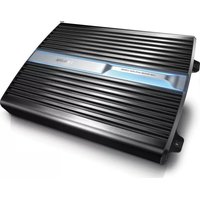
| Product Type | Car Power Amplifier |
| Brand | Philips |
| Model | CMP100 |
| Power Output (RMS) | 250W x 1 at 4 Ohm, 400W x 1 at 2 Ohm |
| Total Harmonic Distortion | 0.08% |
| Signal-to-Noise Ratio | 105 dB |
| Channel Separation | 50 dB |
| Frequency Response | 5 - 320 Hz |
| Input Sensitivity | 300 mV - 6 V |
| Input Impedance | 22 kOhm |
| Fuse Rating | 30 A x 2 |
| Dimensions (D x W x H) | 54.4 x 336.5 x 240.2 mm |
| Power Supply | 12 V DC (negative ground) |
| Input Types | RCA line input, High-level input (with included connector) |
| Speaker Impedance | 2 - 8 Ohm (stereo), 4 - 8 Ohm (bridged) |
| Bass Boost | 0 to 12 dB at 40 Hz |
| Subwoofer Frequency Adjustment | 30 Hz to 320 Hz |
| Subsonic Filter | On/Off switch |
| Protector Indicator | Red LED for protection activation |
| Installation Options | Under seat or on rear tray |
| Mounting Screws | 4 x 14 mm (included) |
Frequently Asked Questions - CMP100 PHILIPS
User questions about CMP100 PHILIPS
0 question about this device. Answer the ones you know or ask your own.
Ask a new question about this device
Download the instructions for your Receiver in PDF format for free! Find your manual CMP100 - PHILIPS and take your electronic device back in hand. On this page are published all the documents necessary for the use of your device. CMP100 by PHILIPS.
USER MANUAL CMP100 PHILIPS
Register your product and get support at
www.philips.com/welcome
CMP100
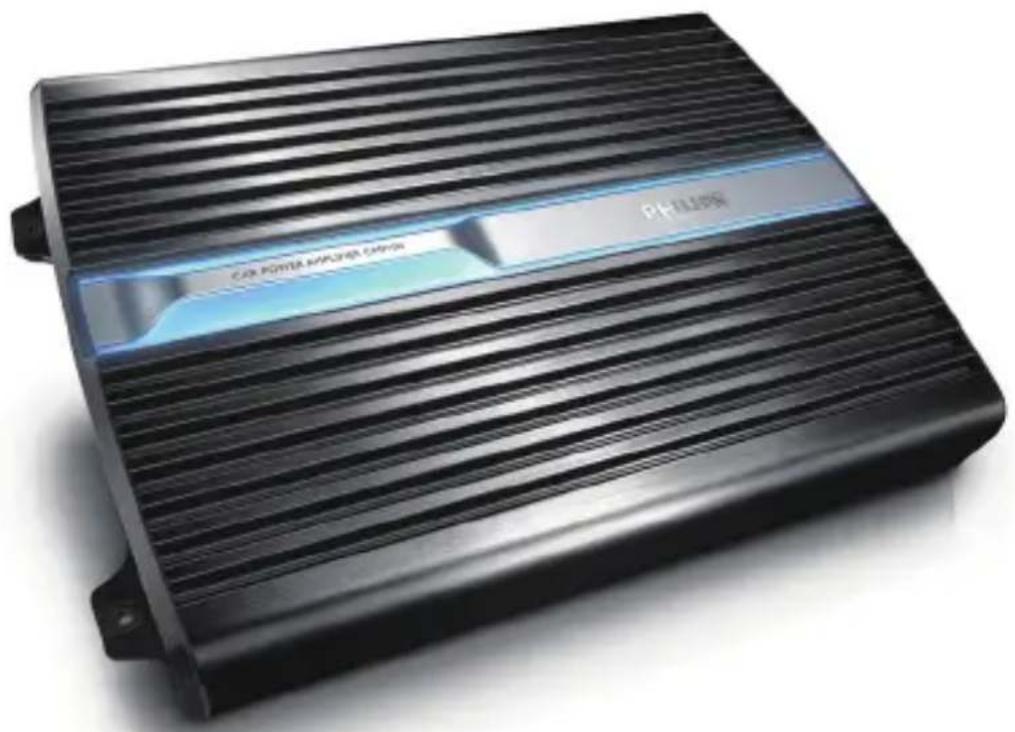
natural_image
Black rectangular electronic device with horizontal ribbed top and 'PHILIPS' branding on the side (no readable text or symbols beyond branding)EN User manual
PHILIPS
1. Important
Safety
- Read and understand all instructions before you use the apparatus. If damage is caused by failure to follow instructions, the warranty does not apply.
- This unit is designed for negative ground (earth) 12 V DC operation only. Use only the supplied mounting hardware for a safe and secure • installation.
Do not connect any active speakers (with built-in amplifier) to the • speaker terminals of the unit. Doing so may damage the active speakers.
• To ensure safe driving, adjust the volume to a safe and comfortable level.
• To avoid short circuit, do not expose the apparatus to rain or water. Never expose the apparatus to direct sunlight, naked flames or heat. - Clean the apparatus with soft, damp cloth. Never use substances such as alcohol, chemicals or household cleaners on the apparatus.
Notice
Environmental information
All unnecessary packaging has been omitted. We have tried to make the packaging easy to separate into three materials: cardboard (box), polystyrene foam (buffer) and polyethylene (bags, protective foam sheet.) Your system consists of materials which can be recycled and reused if disassembled by a specialized company. Please observe the local regulations regarding the disposal of packaging materials, exhausted batteries and old equipment.
Any changes or modifications made to this device that are not expressly approved by Philips Consumer Lifestyle may void the user's authority to operate the equipment.
Your car power amplifier
Congratulations on your purchase, and welcome to Philips! To fully benefit from the support that Philips offers, register your product at www.philips.com/welcome.
Introduction
With the amplifier, you can enjoy high quality sound performance with powerful bass and beats.
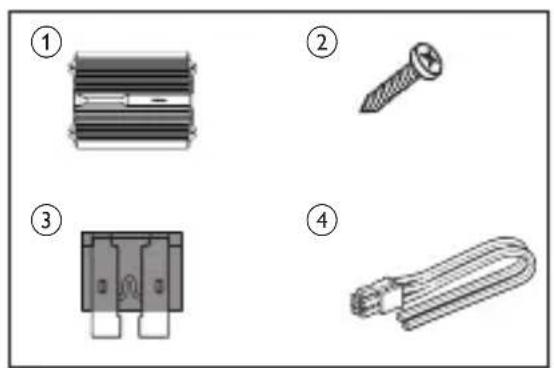
What's in the box
Check and identify the contents of your package:
① Amplifier
② Screw_4×14mm (×4)
③ Fuse (×2)
④ Hi input connector (×1)
natural_image
Four technical illustrations of electronic components: a heat sink, screw, connector pin, and cable (no text or symbols)Overview of the main unit
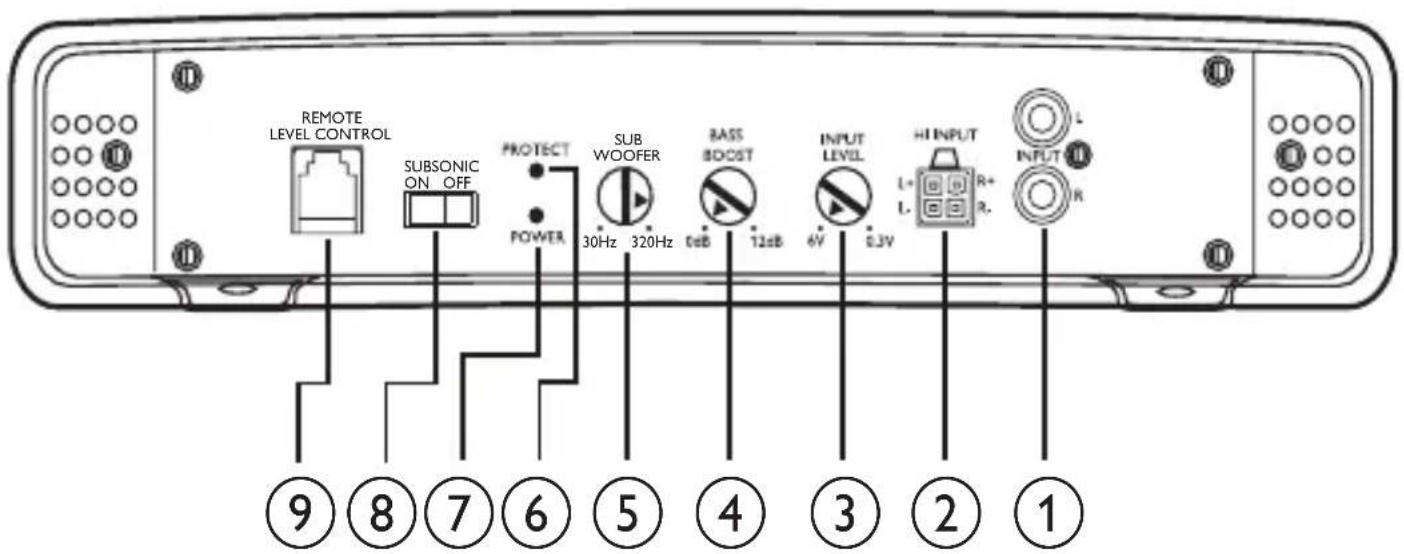
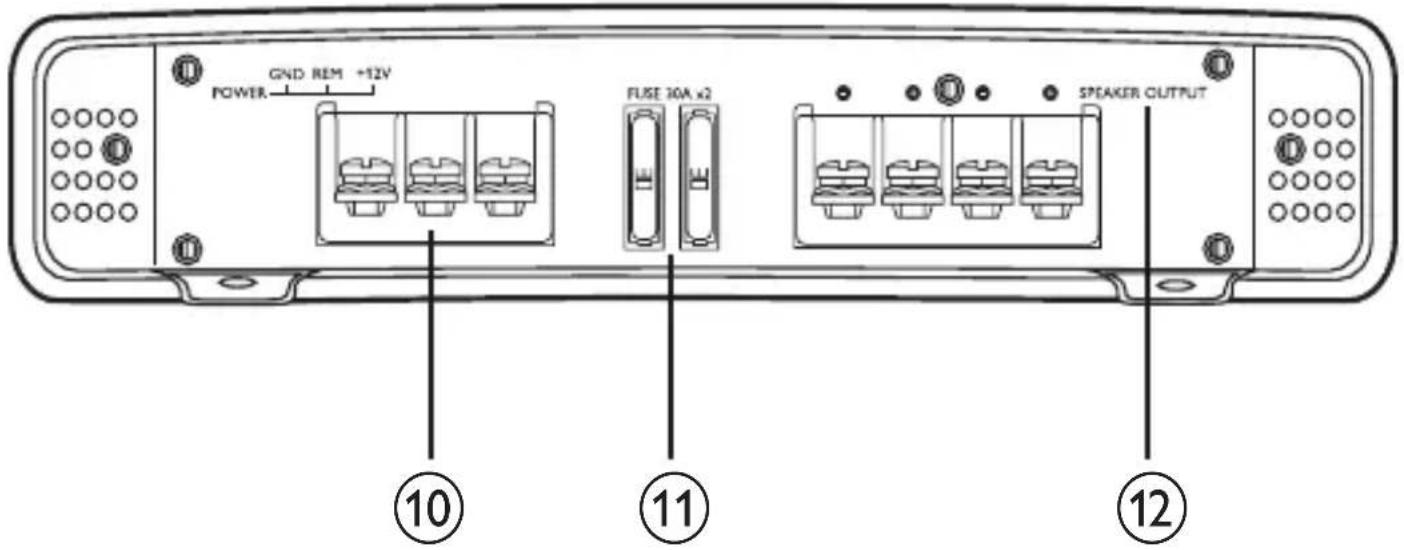
① INPUT L/R
- Connect car audio with RCA cable.
② HI INPUT
- Connect car audio with the supplied high input connector.
③ INPUT LEVEL
• Adjust input level (0.3V to 6V).
④ BASS BOOST
- Boost the frequencies at around 40Hz to a maximum of 12dB.
⑤ SUBWOOFER
- Adjust frequency of subwoofer from 30Hz to 320Hz.
⑥ PROTECT
• Light in red when the PROTECTOR is activated.
⑦ POWER
• Light in blue when power is turned on.
⑧ SUB SONIC ON/OFF
- Switch on or off the subsonic filter.
• external from volume level control.
⑩ POWER (GND/REM/+12V)
- Connect +12V DC power cable, ground wire and remote wire.
⑪ Fuse
⑫ SPEAKER OUTPUT
- Connect to subwoofers.
2. Installation
Installation
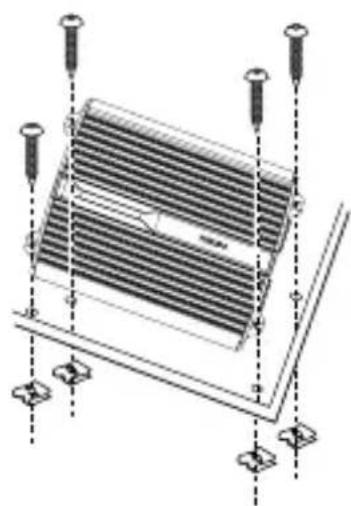
You can mount the amplifier either under a seat or on the rear tray.

Note
•To avoid interference, do not place the amplifier too close to the car audio or antenna.
•The supplied mounting screws are 14mm long. Make sure that the mounting board is thicker than 14mm.
1 Place the unit on the location for installation.
2 Mark the positions of the four screw holes.
3 Drill the holes with driller of approximately 3mm in diameter.
4 Mount the unit with the supplied screws.
natural_image
Technical line drawing of a heat exchanger or cooling unit with mounting screws and structural supports (no text or symbols)Connect speakers

Note
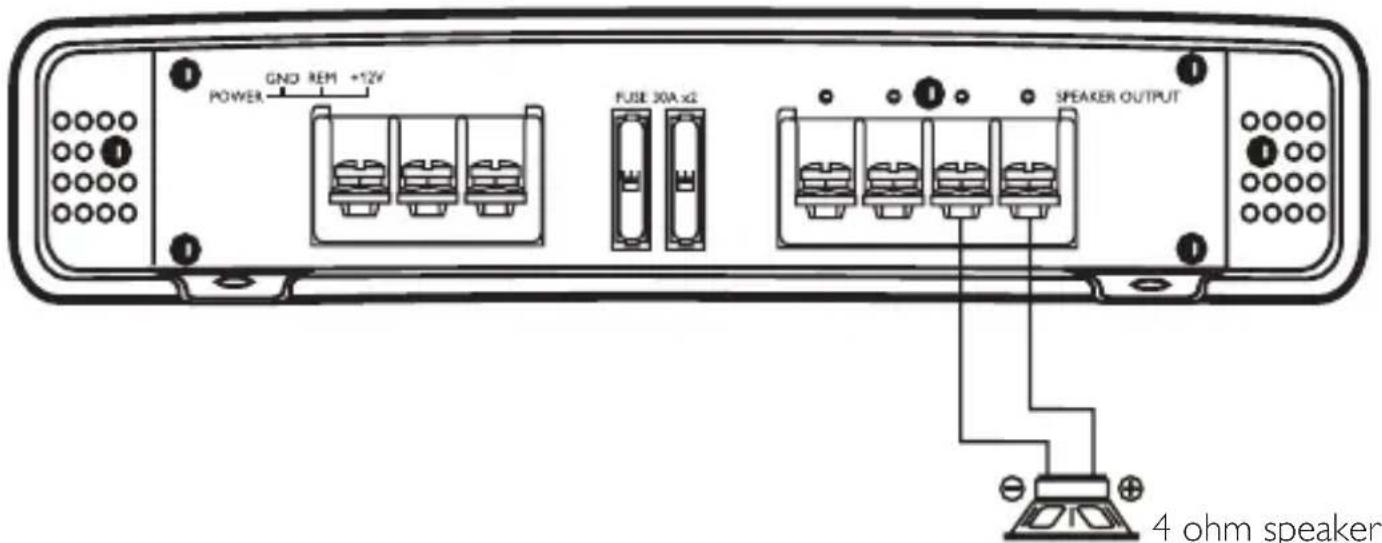
Use speakers with an impedance of 2 to 8 ohm (4 to 8 ohm when used as a bridged amplifier).
- Match the “left”, “right”, “+” and “-” terminals correctly. Revised polarity may degrade sound quality.
Option 1: Mono bridged mode: connect 1 speaker
Option 2: Stereo mode: connect 2 speakers
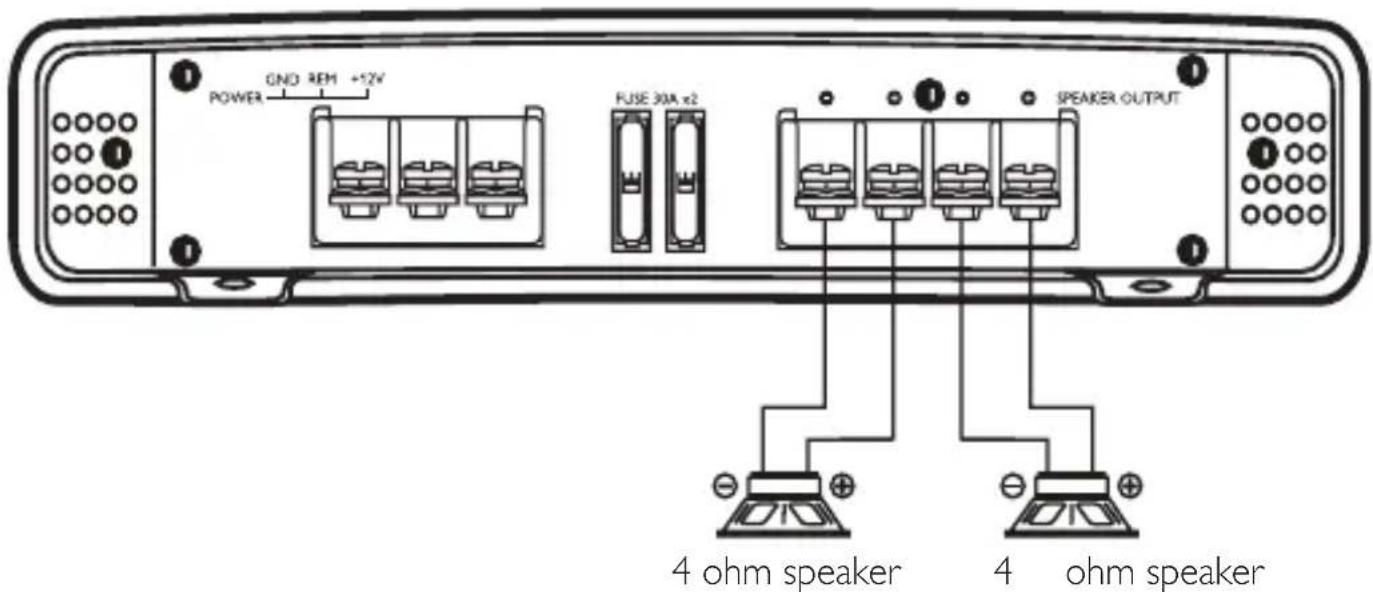
Make the terminal connection as illustrated below: •

Connect car audio
Option 1: High level input connection
Connect the amplifier to your car audio with the supplied High level input connector.
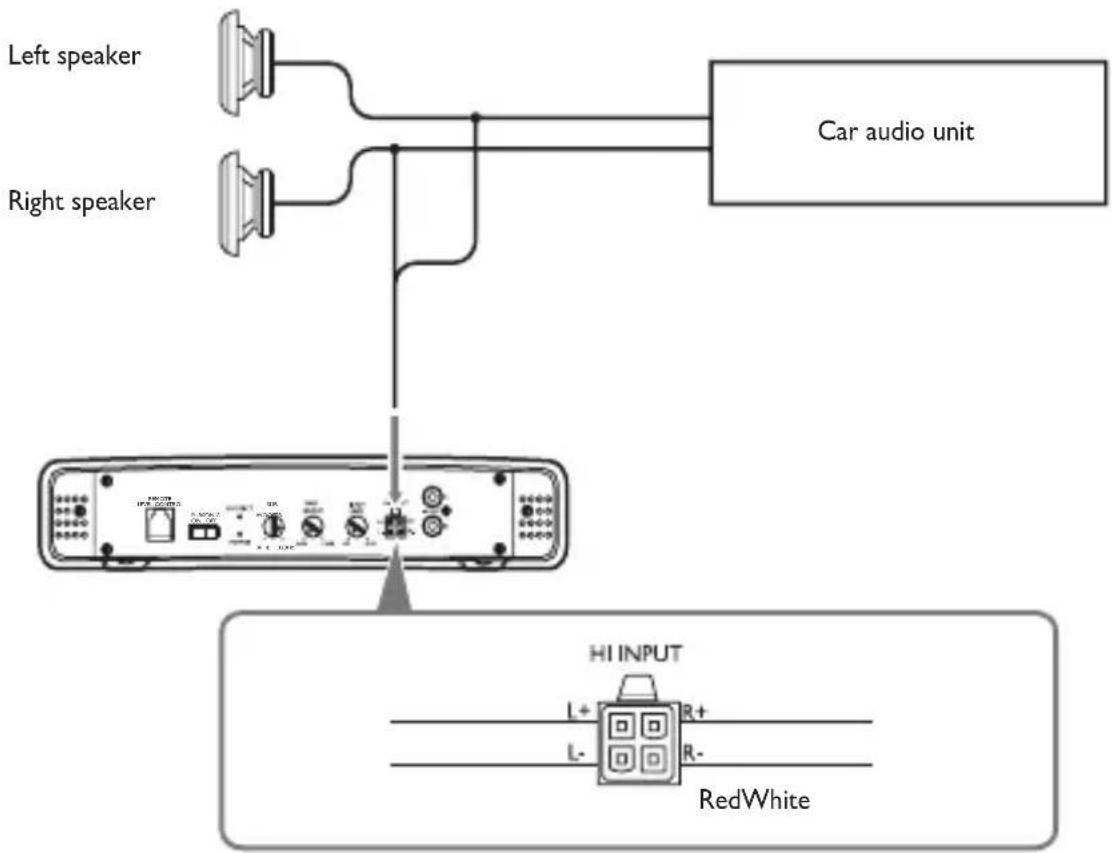
flowchart
graph TD
    A["Left speaker"] --> B["Car audio unit"]
    C["Right speaker"] --> B
    B --> D["HI INPUT"]
    D --> E["RedWhite"]
    D --> F["L+"]
    D --> G["R+"]
    D --> H["L-"]
    D --> I["R-"]
Option 2: Line input connection
Connect the amplifier to the car audio with a RCA cable (not supplied).

Connect power
1 Make the power connection as illustrated below:
- Connect the ground wire from the car to the GND socket.
- REM connect the remote wire from the car audio to the socket.
√ With this connection, you can turn on/off the amplifier with the car audio.
- +12V connect the power wire from the car battery to the socket.

- If your car audio does not have remote output, connect the remote input terminal (REM) to the accessory power supply.
3. Use your power amplifier
Adjust input level
You can adjust the input voltage from 0.3V to 6V.
1 Rotate INPUT LEVEL to adjust input voltage.
INPUT LEVEL

Adjust bass boost
You can punch extra bass for 0 to 12dB.
1 Rotate BASS BOOST to punch for extra bass.
BOOST

About the protector indicator
The amplifier has a built-in protection circuit to protect the transistors and speakers when:
- The unit is overheated. Or A DC current is generated. Or• The battery voltage is over low or over high. Or• The speaker terminals are short circuited. When the PROTECTOR indicator lights up in red, the unit shuts down automatically. If this happens, please:
PROTECT


POWER
1 Take out the disc or tape and turn off the car audio.
2 Check the cause of the malfunction (see above).
3 If the amplifier has overheated, wait until the unit cools down before use.
Adjust subwoofer frequency
You can adjust the frequency of connected subwoofer.
1 Rotate SUBWOOFER to adjust frequency: 30Hz to 320Hz.
SUB
WOOFER

30Hz 320Hz
Turn subsonic on or off
1 Slide the SUBSONIC switch to ON position.
The subsonic is turned on.
To turn off the subsonic feature, slide the •
SUBSONIC switch to OFF position.
SUBSONIC ON OFF

Replace fuse
If there is no power, the fuse may be damaged and need to be replaced.
1 Pull out the damaged fuse.
2 Replace the fuse with the supplied fuses or to buy two fuse that matches the voltage of the damaged fuse (60A).

If the fuse gets damaged immediately after it has been replaced, there may be an internal malfunction. In such case, consult your Philips dealer.
4. Product information

Note
Product information is subject to change without prior notice.
| Power Output (RMS) | |
| - 4 ohm | 250W × 1 |
| - 2 ohm | 400W × 1 |
| Total harmonic distortion 0.08% | |
| Signal to noise ratio 105dB | |
| Channel separation 50dB | |
| Frequency response 5-320Hz | |
| Input sensitivity 300mV-6V | |
| Input impedance 22k ohm | |
| Fuse rating 30A × 2 | |
| Dimensions (DxWxH) 54.4 × 336.5 × 240.2mm | |
5. Troubleshooting
To keep the warranty valid, never try to repair the system yourself. If you encounter problems when using this apparatus, check the following points before requesting service. If the problem remains unsolved, go to the Philips web site (www.philips.com/welcome). When you contact Philips, ensure that the apparatus is nearby and the model number and serial number are available.
Power indicator does not light up.
The connected car audio is not turned on. •
The fuse is blown. Replace the fuse with a new one. •
The sound is too low.
- The input level is not set correctly (see 'Adjust input level').
The sound is interrupted or stopped suddenly.
The thermal protector is activated. Reduce the volume. •
The ventilation outlet is blocked. Remove any obstructions from the outlet. •
Alternate noise is heard.
The power connecting wires are installed too close to the RCA pin cords. •
The ground wire is not securely connected to a metal point of the car. •
Negative speaker wires touch the car chassis. •
The protector indicator lights up in red.
The speaker terminals are short circuited. Check the speaker connections. •
The amplifier is overheated. Cool down the amplifier before use. •
The amplifier is overloaded. •
The unit becomes abnormally hot.
- Place the amplifier in a well ventilated location.
• Use speakers with suitable impedance: 2-8 ohm (stereo), 4-8 ohm (bridged).
| Name of the Parts | Hazardous/toxic Substance | |||||
| Pb, Lead | Hg, Mercury | Cd, cadmium | Chromium 6+ | PBB | PBDE | |
| Housing ○○○○○○ | ||||||
| Loudspeakers ○○○○○○ | ||||||
| PWBs ×○○○○○○ | ||||||
| Accessories (Remote control & cables) | ×○○○○○ | |||||
O: Indicates that this toxic or hazardous substance contained in all of the homogeneous materials for this part is below the limit requirement in SJ/T11363 - 2006.
X: Indicates that this toxic or hazardous substance contained in at least one of the homogeneous materials used for this part is above the limit requirement in SJ/T11363 - 2006.

Environmental Protection Use Period
This logo refers to the period (10 years) during which the toxic or hazardous substances or elements contained in electronic information products will not leak or mutate so that the use of these [substances or elements] will not result in any severe environmental pollution, any bodily injury or damage to any assets.
- www.philips.com/welcome
- PHILIPS
- Important
- Safety
- Notice
- Environmental information
- Your car power amplifier
- Introduction
- What's in the box
- Installation
- Installation
- Note
- Connect speakers
- Connect car audio
- Option 1: High level input connection
- Option 2: Line input connection
- Connect power
- Use your power amplifier
- Adjust input level
- Adjust bass boost
- About the protector indicator
- Adjust subwoofer frequency
- Turn subsonic on or off
- Replace fuse
- Product information
- Troubleshooting
- Power indicator does not light up.
- The sound is too low.
- The sound is interrupted or stopped suddenly.
- Alternate noise is heard.
- The protector indicator lights up in red.
- The unit becomes abnormally hot.
- Environmental Protection Use Period
Brand : PHILIPS
Model : CMP100
Category : Receiver