
RD3354 - Security Camera Clover Electronics - Free user manual and instructions
Find the device manual for free RD3354 Clover Electronics in PDF.


Pick your language and provide your email: we'll send you a specifically translated version.
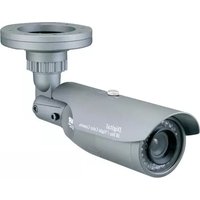
| Product Type | Security Camera |
| Brand | Clover Electronics |
| Model | RD3354 |
| Dimensions (approx.) | 7.0 x 7.0 x 15.0 cm |
| Weight (approx.) | 300 g |
| Power Supply | 12V DC, 1A |
| Video Output | Composite Video (1.0 Vp-p, 75 ohms) |
| Resolution | 700 TVL (typical) |
| Night Vision | IR LEDs, up to 20m range |
| Motion Detection | Yes, built-in |
| Weatherproof Rating | IP66 (estimated) |
| Lens | 3.6 mm fixed lens |
| Mounting | Bracket included for wall/ceiling |
| Operating Temperature | -10°C to 50°C |
| Maintenance | Clean lens with soft, dry cloth |
| Safety Instructions | Install securely; use approved power adapter |
| Spare Parts / Repairability | Power adapter and mounting kit available |
| Warranty | 1 year limited |
Frequently Asked Questions - RD3354 Clover Electronics
How do I reset the Clover Electronics RD3354 camera?
To reset the camera, locate the reset button (usually a small pinhole) on the camera body. Press and hold it for 10 seconds using a paperclip. This will restore factory defaults.
What is the night vision range of the RD3354?
The RD3354 features infrared LEDs that provide night vision up to approximately 20 meters in complete darkness.
Can this camera be used outdoors?
Yes, the camera has an estimated IP66 weatherproof rating, making it suitable for outdoor use. Ensure the mounting bracket is properly sealed.
How do I connect the RD3354 to a DVR?
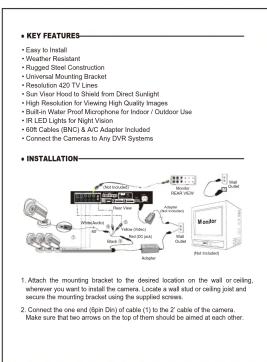
The camera uses a standard composite video output (BNC or RCA). Connect the video cable to a compatible DVR input and power the camera with a 12V DC adapter.
What is the resolution of the RD3354 camera?
The camera typically provides 700 TVL resolution, offering clear and detailed images for surveillance.
Does the camera support audio?
No, the RD3354 is a video-only security camera. It does not have a built-in microphone or audio output.
How do I clean the camera lens?
Use a soft, dry cloth to gently wipe the lens. Avoid using harsh chemicals or abrasive materials to prevent scratches.
What power supply does the RD3354 require?
The camera requires a 12V DC power supply with at least 1A current. Use the adapter included or a compatible one.
Can I mount the camera upside down?
Yes, the camera supports ceiling mounting. The image can be flipped in the DVR settings, or you can physically rotate the camera mount.
How long is the warranty for the RD3354?
Clover Electronics typically offers a 1-year limited warranty against manufacturing defects. Check your purchase documentation for details.
User questions about RD3354 Clover Electronics
0 question about this device. Answer the ones you know or ask your own.
Ask a new question about this device
No questions yet. Be the first to ask one.
Download the instructions for your Security Camera in PDF format for free! Find your manual RD3354 - Clover Electronics and take your electronic device back in hand. On this page are published all the documents necessary for the use of your device. RD3354 by Clover Electronics.
USER MANUAL RD3354 Clover Electronics
| Troubleshooting | |
| If the unit does not link function, check, the following points before contacting the service center: | |
| Problem | Cause & Remedies |
| NO Power | Check the AC outlet; AC Adapter and lock the power switch ON |
| NO Picture | Connected by the PV line using the Monitor or TV control |
| NO Computer | Connected by the Monitor or TV control |
| Picture/Rendering | Remove strong spots in the field of view |
| Picture, light, and footprint | Please about lightweight level for your monitor or TV property |
| Light and purple Picture | Please use a medium level of photo monitor or TV property |
| How to Obtain Factory Service | |
| 1. Original Manufacturer must fit a warranty and recall with the Lower Declaration USA (with model number; additional details of product lines) | |
| 2. Please check the products carefully and ensure to use the original packaging materials, and send it to impact and return to 100% (500x, 600x, Gamma, GB/80). Please indicate a note regarding the unit's details. | |
| 3. The unit is not limited within the mandatory period, please include your purchase and check if 2.00. | |
| 4. The unit is not warranty, please indicate a check if2.00 is over the cost of print polyester and fabric. If you have received an estimate, please refer to your approval before repair work at the site. | |
| 6. Clear scope or replace the results to the products under the limited warranty. | |
| Limited 2 year Warranty | |
| This warranty gives the original purchase specific legal rights and you may have no rights to any other person or if required to be sold. | |
| For products do not function because any defect of material or renovation, we will repair for how far from orders and shall be used for the date of original purchase. | |
| This warranty does not cover modifications, abuse, incidental or consequential damages unless a date of warranty indicates temporary prohibition on incident or consequential damages. | |
| Available Accessories | |
| 1. GROWD - All the Common License No. 17-19-1998 - BRC - New York Times LLC | |
| 2. GROWD - All the Common License No. 17-19-1998 - BRC - New York Times LLC | |
| 3. GROWD - All the Common License No. 17-19-1998 - BRC - New York Times LLC | |
| 4. GROWD - All the Common License No. 17-19-1998 - BRC - New York Times LLC | |
| 5. GROWD - All the Common License No. 17-19-1998 - BRC - New York Times LLC | |

5.5
8.5"

Manual assistant
Powered by Anthropic
Waiting for your message
Product information
Brand : Clover Electronics
Model : RD3354
Category : Security Camera