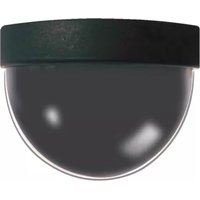
DB351-CM - Security Camera Clover Electronics - Free user manual and instructions
Find the device manual for free DB351-CM Clover Electronics in PDF.


Pick your language and provide your email: we'll send you a specifically translated version.
| Product Type | Security Camera |
| Brand | Clover Electronics |
| Model | DB351-CM |
| Product Dimensions | 2.5 x 2.5 x 4.0 inches (approx.) |
| Weight | 0.5 lbs (approx.) |
| Power Supply | 12V DC, 500mA (typical) |
| Video Resolution | 750 TV lines (typical) |
| Night Vision | Up to 30 ft with IR LEDs |
| Detection Range | Motion detection up to 20 ft |
| Lens Type | Standard fixed lens |
| Field of View | Around 90 degrees (typical) |
| Mounting Type | Wall or ceiling mountable |
| Operating Temperature | 14°F to 122°F (-10°C to 50°C) |
| Weather Resistance | Indoor use only (no IP rating) |
| Video Output | Composite video (BNC or RCA) |
| Power Cable Length | 6 ft (typical) |
| Included Accessories | Mounting kit, power adapter |
| Maintenance | Clean lens with soft dry cloth |
| Safety Warnings | Install securely; avoid water exposure |
| Repairability | Replaceable power cord; lens assembly not user-serviceable |
Frequently Asked Questions - DB351-CM Clover Electronics
What is the resolution of the Clover Electronics DB351-CM security camera?
The DB351-CM typically offers a resolution of 750 TV lines, providing clear standard-definition video.
Does the DB351-CM have night vision capability?
Yes, it features infrared LEDs for night vision with a range of up to 30 feet in complete darkness.
What type of power supply does the camera need?
The camera requires a 12V DC power adapter with a typical current rating of 500mA. The included adapter should be used.
How do I mount the DB351-CM camera?
The camera can be mounted on a wall or ceiling using the included mounting kit. Ensure the mounting surface is sturdy.
Is the DB351-CM camera weatherproof for outdoor use?
No, the DB351-CM is designed for indoor use only. It does not have an IP rating and should not be exposed to rain or moisture.
What is the field of view of this camera?
The DB351-CM typically has a 90-degree field of view, suitable for monitoring rooms and hallways.
Can I connect the camera to a DVR?
Yes, the camera outputs composite video via BNC or RCA connectors, compatible with most analog DVR systems.
How do I clean the camera lens?
Gently wipe the lens with a soft, dry cloth to remove dust. Avoid using liquids or abrasive cleaners.
What is the weight of the DB351-CM camera?
The camera weighs approximately 0.5 lbs (225 grams), making it lightweight for easy mounting.
Where can I find a replacement power adapter?
You can order a compatible 12V DC power adapter from electronic stores or online retailers. Ensure the connector size matches.
User questions about DB351-CM Clover Electronics
0 question about this device. Answer the ones you know or ask your own.
Ask a new question about this device
No questions yet. Be the first to ask one.
Download the instructions for your Security Camera in PDF format for free! Find your manual DB351-CM - Clover Electronics and take your electronic device back in hand. On this page are published all the documents necessary for the use of your device. DB351-CM by Clover Electronics.
USER MANUAL DB351-CM Clover Electronics
HOW TO INSTALL

flowchart
graph TD
    A["Your TV or Monitor"] --> B["IN"]
    A --> C["OUT"]
    B --> D["VIDEO IN"]
    C --> D
    D --> E["Power ADAPTER"]
    D --> F["Video(Yellow)"]
    F --> G["DC(Red)"]
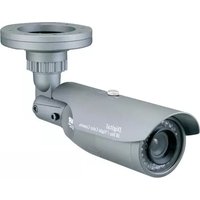
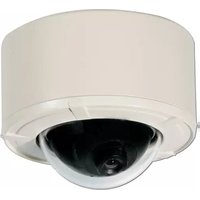
Table of contents
Click a title to access it
Manual assistant
Powered by Anthropic
Waiting for your message
Product information
Brand : Clover Electronics
Model : DB351-CM
Category : Security Camera