CXCD236 - CD Player COBY - Free user manual and instructions
Find the device manual for free CXCD236 COBY in PDF.


| Product Type | Portable CD Player |
| Brand | Coby |
| Model | CXCD236 |
| Dimensions | Approx. 5.5 x 5.5 x 1.0 inches (140 x 140 x 25 mm) |
| Weight | Approx. 7 oz (200 g) without batteries |
| Power Source | 2x AA batteries or AC adapter (not included) |
| Power Consumption | Approx. 1.5 W |
| Battery Life | Up to 8 hours with alkaline batteries |
| Playback Formats | CD-DA, CD-R, CD-RW |
| Audio Output | 3.5 mm stereo headphone jack |
| Headphone Jack | Yes, 3.5 mm |
| Anti-shock Protection | Electronic anti-shock (approx. 45 seconds) |
| Repeat Mode | One/All/Off |
| Shuffle Play | Yes |
| Programmable Playback | Up to 20 tracks |
| Display | LCD with track number and elapsed time |
| Control Buttons | Play/Pause, Stop, Skip Forward/Back, Volume, Hold |
| Disc Loading | Top-loading manual lid |
| Additional Features | CD-R/RW compatible, 3D sound enhancement |
| Maintenance | Clean lens with soft brush; avoid dust and moisture |
| Safety Precautions | Do not expose to water or extreme temperatures; remove batteries if not used for long periods |
| Package Contents | CD player, earbuds, user manual |
Frequently Asked Questions - CXCD236 COBY
User questions about CXCD236 COBY
0 question about this device. Answer the ones you know or ask your own.
Ask a new question about this device
Download the instructions for your CD Player in PDF format for free! Find your manual CXCD236 - COBY and take your electronic device back in hand. On this page are published all the documents necessary for the use of your device. CXCD236 by COBY.
USER MANUAL CXCD236 COBY
Portable CD Player with AM/FM Radio
CX-CD236
natural_image
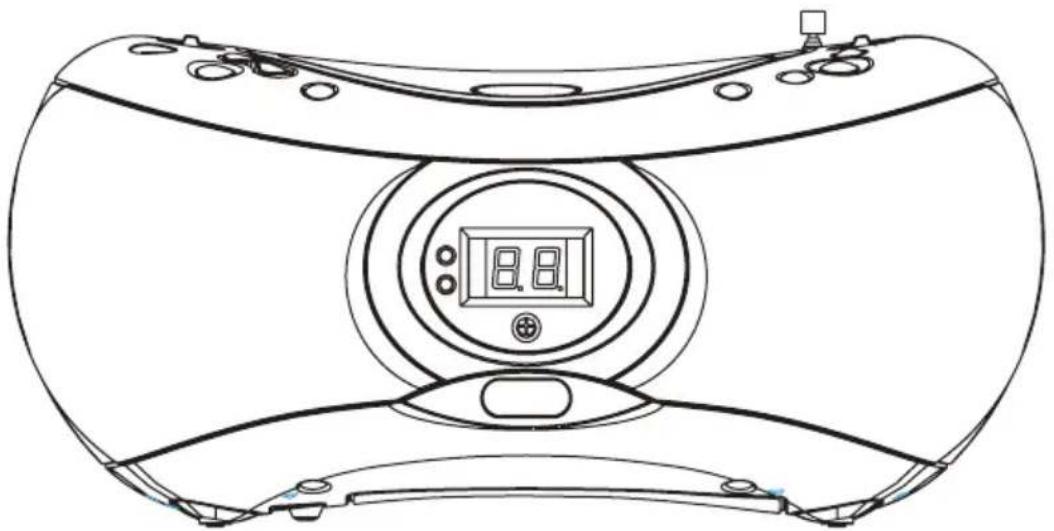
Line drawing of a vintage electronic device with a central display and control buttons (no text or symbols)Instruction Manual
SAFETY INSTRUCTIONS
CAUTION
RISK OF ELECTRIC SHOCK DO NOT OPEN
CAUTION: TO REDUCE THE RISK OF FIRE AND ELECTRIC SHOCK, DO NOT REMOVE THE COVER (OR BACK) OF THE UNIT. REFER SERVICING ONLY TO QUALIFIED SERVICE PERSONNEL.
For Customer Use:
Enter below the serial number that is located on the bottom of the unit. Retain this information for future reference.
Model No. CX-CD236
Serial No.
The lightning flash with arrowhead symbol within an equilateral triangle is intended to alert the user to the presence of uninsulated “dangerous voltage” within the product’s enclosure that may be of sufficient magnitude to constitute a risk of electric shock.
The exclamation point within an equilateral triangle is intended to alert the user to the presence of important operation and servicing instructions in the literature accompanying the appliance.
WARNING:
To prevent fire or shock hazard, do not expose this device to rain or moisture.
WARNING:
Handling the cords on this product will expose you to lead, a chemical known to the State of California to cause cancer, and birth defects or other reproductive harm. Wash hands after handling.
CAUTION:
To prevent electric shock, match wide blade of plug to wide slot of outlet and fully insert.

natural_image
Simple line drawing of three chasing arrows forming a recycling symbol (no text or labels)CLASS1
LASERPRODUCT
For recycling or disposal information about this product, please contact your local authorities or the Electronics Industries Alliance: www.eiae.org.
This unit incorporates a safety interlock mechanism that switches the laser beam on and off. When the disc holder is open, the laser beam stops automatically. Do not attempt to defeat the safety interlock.
SAFETY INSTRUCTIONS (Cont.)
- Read these instructions carefully. Keep these instructions for future reference.
- Heed all warnings and follow all instructions.
- Do not expose to water or moisture.
- Clean only with a dry cloth.
- Keep objects away from ventilation openings. Do not block ventilation openings at any time.
- Do not install near any apparatus that produces heat such as stoves, radiators, amplifiers, etc.
- Do not force the power plug into a wall outlet. If the plug provided does not fit into your outlet, consult an electrician for replacement of the obsolete outlet. (A polarized plug has two blades where one is wider than the other; the wide blade is provided for your safety.)
- Do not place heavy objects on the power cord. Protect the cord from being walked on, pinched by objects, or torn and exposed to liquids (especially at plugs, convenience receptacles, and the point at which they exit from the device).
- Use only with attachments/accessories specified by the manufacturer. Use of attachments/accessories not recommended by the product manufacturer may be hazardous.
- Use only with a cart, stand, tripod, bracket, or table specified by the manufacturer or sold with the device. If a cart is used, use caution when moving the cart/device combination to avoid injury from tip over.
- Unplug the unit during lightning storms. Unplug the device and remove any batteries when the device will be unused for long periods of time.
- Do not use headphones/earphones at high volume.
- Do not open or attempt to repair this device. Refer all repairs to authorized service personnel.
Positioning the Unit:
- The ventilation openings should not be impeded by covering them with items such as newspapers, table cloths, curtains, etc. Do not stand the unit on a thick pile carpet or otherwise install it in a place with inadequate air flow.
• Do not use the unit in excessively hot, cold, dusty, damp, or humid locations. - Condensation may form inside the CD player if the unit is left anywhere warm and damp, or if you move the unit from a cold location to a warm room. In this case, let the unit stand for 1 to 2 hours or gradually increase the room temperature so that the unit will be dry before use.
- Place the unit on a flat, even surface.
• Do not place the unit where it is subject to vibration.
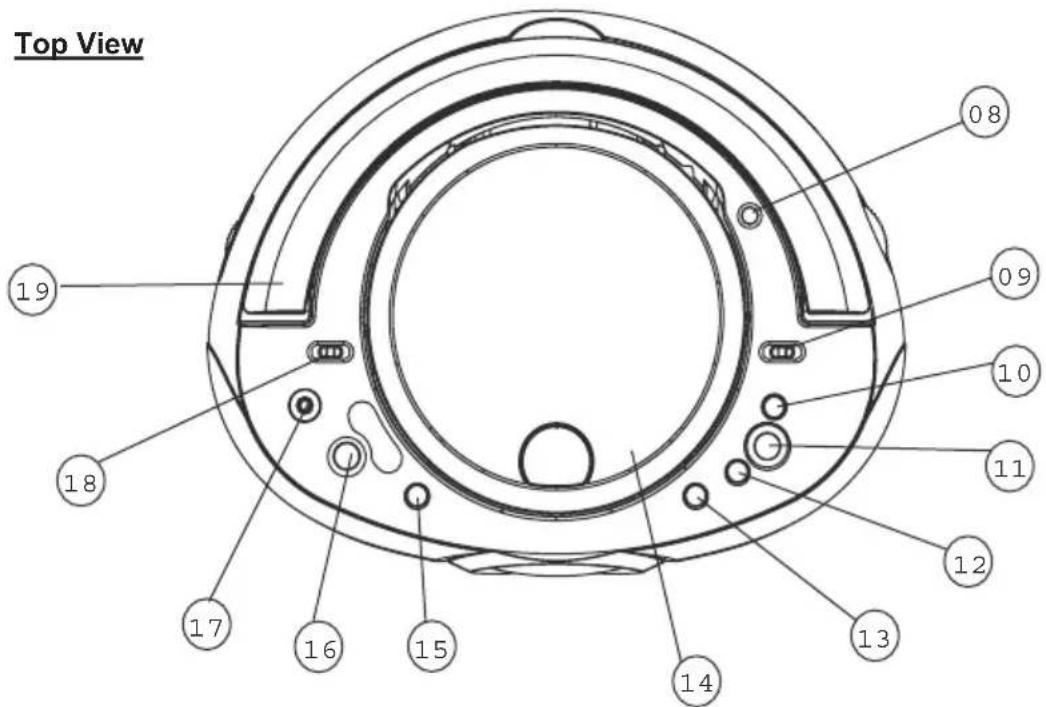
LOCATION OF CONTROLS
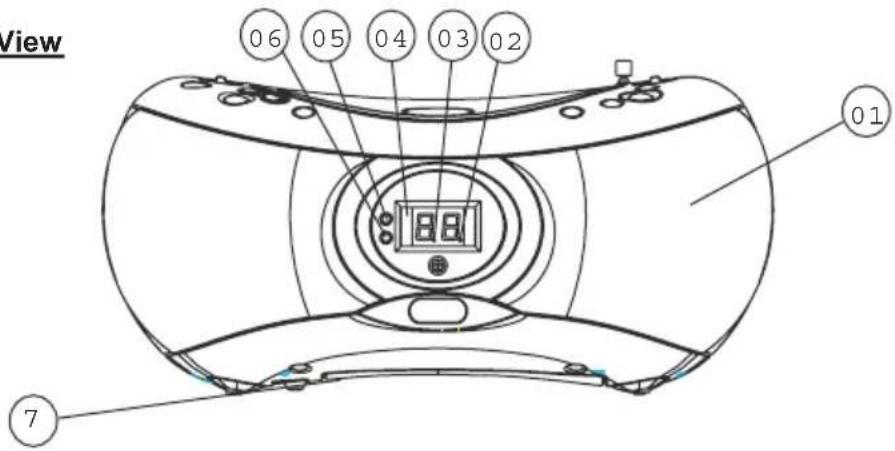
Front View
Rear View
LOCATION OF CONTROLS (Cont.)
- Speaker
- Play (steady light) / Pause (blinking light) Indicator
- Repeat All (steady light) / Repeat One (blinking light) Indicator
- LED Display
- FM Stereo Indicator
- Program Play (steady light) / Program Store (blinking light) Indicator
-
Voltage Selector Switch (110/220 V) (bottom)
-
Telescopic FM Antenna
-
Radio Band Switch (FM Stereo / FM / AM)
-
Next/Fast Forward Button
-
Play/Pause Button ▷00
-
Previous/Fast Reverse Button
-
Stop Button ☐
-
Open/Close CD Door
-
Repeat Mode Button
-
Program Button
-
Headphone Jack
-
Function Switch (CD / Off / Radio)
-
Handle
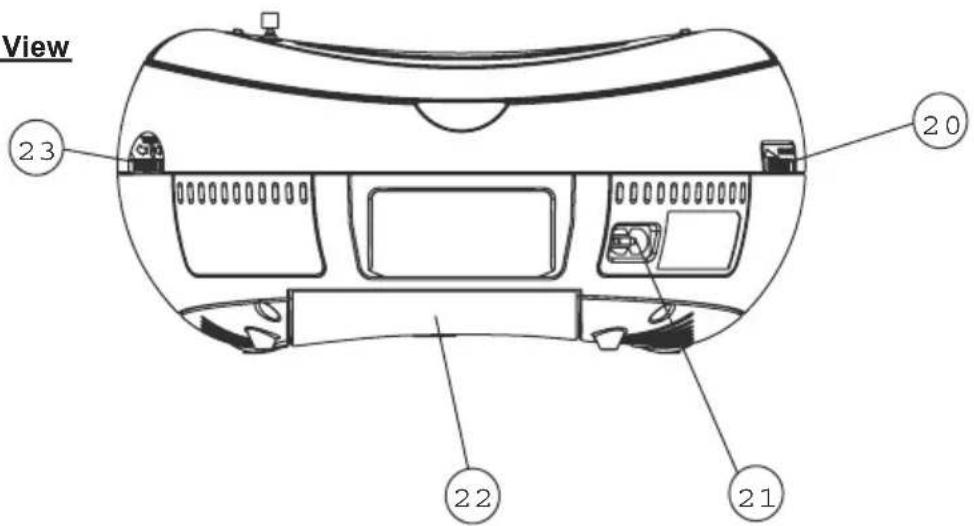
-
Volume Dial
-
AC Power Jack
-
Battery Compartment
-
Tuning Dial
PACKAGE CONTENTS
Carefully unpack the main unit from its carton (do not attempt to connect anything at this stage). The carton should contain the following items:
- Instruction Manual
- Main Unit
If any of these items are missing, please consult your local retailer. Please retain the original packaging for future transport of this unit.
CARE & MAINTENANCE
Handling CDs
Hold a CD by its edges. Avoid touching the recorded side of the disc. To remove a CD from its storage case, press down on the center retention mechanism of the case and lift the disc out.
Cleaning CDs
Use a dry, soft cloth to wipe off any fingerprints and dusts from the playing surface of the disc. Wipe in a straight line radially from the center to the outside edge of the disc. Small dust particles and light stains will not affect playback quality.
• Never use chemicals such as record sprays, anti-static sprays, benzene, or thinners to clean your CDs.
• To reduce the risk of scratches, always put CDs back in their case after use.
• Do not subject CDs to prolonged exposure to direct sunlight, high humidity, or high temperatures.
• Do not place stickers or labels on either side of the CD.
Cleaning the CD Player Lens
A dirty lens can cause CD playback to skip. If the lens is very dirty, the CD may not work at all. Unplug the power supply, open the CD door, and clean the lens as follows:
- For Dust or Dry Particles - use a camera lens brush/blower to blow on the lens a few times. Then, wipe the lens gently with the brush, and blow on the lens once more.
- For Fingerprints - use a dry cotton swab to wipe the lens in a straight line radially from the center to the outside edge.
GENERAL OPERATION
Power Sources
AC Power
Before connecting the unit to an AC outlet, make sure that the operating voltage of the unit has been properly set to match the voltage of your local power supply (110V or 220V). The voltage switch can be found on the bottom of the unit.
When you have confirmed that the proper voltage has been set, use the supplied AC power cord to connect the unit to an AC outlet.
DC Power (Battery Operation)
Remove the battery compartment cover on the rear of the unit and insert 8 "C" batteries. Make sure that the polarity of the batteries (+/-) match the markings on the inside of the battery compartment. Replace the battery compartment cover.
Stereo Headphone Jack
Make sure to lower the volume on the unit prior to use with headphones to avoid damage to your hearing or the headphones.
For private listening, connect a pair of headphones to the headphone jack on the unit. The speakers on the unit will be disconnected during headphone use.
Power On / Function Modes
Use the Function switch to change the operation mode of the unit. Set the switch to "CD" to turn on the CD mode, set the switch to "Radio" to turn on the radio mode, and set the switch to "Off" to turn off the unit.
RADIO OPERATION
Set the Function switch to the RADIO position.
- To listen to FM broadcasts, set the Band switch to the FM or FM ST position (FM ST = FM Stereo). The FM Stereo indicator will light up when the tuner is receiving an FM Stereo broadcast. To listen to AM broadcasts, set the Band switch to the AM position.
- Extend the telescopic rod antenna fully and adjust its position to obtain the best FM broadcast reception. The AM antenna is built into the unit; turn or move the entire unit to obtain the best AM reception.
• Turn the tuning dial to change the radio station.
CD OPERATION
Set the Function switch to the CD position.
Loading a CD
- Press the OPEN/CLOSE CD Door button to open the CD door.
- Place the CD in the compartment with the label side facing up.
- Close the CD door. Once the door is closed, the CD will spin briefly and the total number of tracks on the CD will be shown on the LED Display.
Playing a CD
Load a CD and press ▶th start playback. The LED Display will show the track number being played.
• To pause playback, press ▶ resume play-back, press ▶ again.
• To select the next track, press ▶▶□ fast forward through a track, press and hold ▶▶▶
• To select the previous track, press K to reverse through a track, press and hold K
• To stop playback, press □
Notes
- Do not force the CD door open or closed at any time.
- Keep the CD door closed when the unit is not in use to prevent dirt and dust from entering the CD compartment.
- Do not put anything other than a CD in the CD compartment as other objects may damage the play mechanism.
- Never insert more than one CD at a time.
- If a CD is deeply scratched or too dirty, it may not play (see the Care & Maintenance section for more information).
- Never remove a CD from the compartment while it is still spinning.
Repeat Play Modes
You can set the unit to play a tracks repeatedly. Press REPEAT to cycle through the different Repeat mode options. To cancel Repeat mode, press REPEAT until the Repeat All/One indicator on the display turns off.
- Repeat All (Steady LED): Plays the entire CD repeatedly. If the unit is in Program mode, the unit will play the entire Program list repeatedly (see the Program Mode section for more information).
• Repeat One (Blinking LED): Plays a single track repeatedly.
Program Mode
You can set the unit to play tracks on the CD in a predetermined order. To create a programmed track list:
- Press to make sure that the CD has stopped playing.
- Press PROG once. The Program LED indicator will start blinking and the LED Display will show "0".
- Press FWD or PREV to select a track to program (the LED display will show the track number) and then press PROG to add the track to the program list.
-
Repeat Step 3 until you have finished adding tracks to the program list.
-
Press to start Program mode playback. To cancel Program mode playback, press twice or open the CD door.
Notes
- The program list can store a maximum of 20 tracks.
- The program list will be lost if STOP is pressed twice, the CD door is opened, or the unit is turned off.
- If is pressed before PROG during track selection, the track will not be added to the program list. The unit will start playing the CD from the first selected track instead.
SPECIFICATIONS
Power Supply AC: 110/220V 50/60Hz Dual Voltage
DC: 12V (8 x C Batteries) (Not Included)
Frequency Range AM: 530 - 1710 kHz
FM: 88 - 108 MHz
Power Consumption 14W
Output Power 1.2W RMS x 2 channels
CD Player
Optical Pickup 3-beam, semi-conductor laser
Frequency Response 100Hz - 16 kHz
General
Headphones: 3.5mm stereo plug, 8 - 32 Ohms
Product Size: 10.1" x 4.6" x 7.9" (WHD)