PRTHW-N - Thermostat Heatmiser - Free user manual and instructions
Find the device manual for free PRTHW-N Heatmiser in PDF.


| Product Type | Programmable Room Thermostat |
| Brand | Heatmiser |
| Model | PRTHW-N |
| Dimensions | 86 x 86 x 30 mm |
| Weight | 200 g |
| Power Supply | 230V AC, 50Hz |
| Display Type | LCD with backlight |
| Temperature Range | 5°C - 35°C |
| Accuracy | ±0.5°C |
| Programmable Schedules | 7-day, 4 time periods per day |
| Compatibility | Underfloor heating, electric, gas, oil systems |
| Control Type | Touch button or dial |
| Installation | Wall-mounted, flush or surface box |
| Maintenance | Clean with dry cloth; avoid water ingress |
| Safety | Frost protection, child lock, overheat protection |
| Spare Parts | Available from authorized dealers |
| Repairability | Designed for professional servicing |
| Warranty | 2 years |
| Certifications | CE, RoHS |
Frequently Asked Questions - PRTHW-N Heatmiser
User questions about PRTHW-N Heatmiser
0 question about this device. Answer the ones you know or ask your own.
Ask a new question about this device
Download the instructions for your Thermostat in PDF format for free! Find your manual PRTHW-N - Heatmiser and take your electronic device back in hand. On this page are published all the documents necessary for the use of your device. PRTHW-N by Heatmiser.
USER MANUAL PRTHW-N Heatmiser
| Product Image | 1 | Temperature Hold | 15 |
| Table of Contents | 2 | Holiday Programming | 16 |
| What is a Programmable | 3-4 | Frost Protection | 17 |
| Room Thermostat? | Power On / Off | 18 | |
| Installation Procedure | 5-6 | Setting the Hot Water | 19 |
| LCD Display | 7-8 | Switching Times | |
| Setting the Clock | 9 | Hot Water Override | 20 |
| Temperature Display | 10 | Optional Features | 21-24 |
| Setting the Comfort Levels | 11-12 | Re-calibrating the Thermostat | 25 |
| Locking the Thermostat | 13 | Factory Reset | 26 |
| Setting the Temperature | 14 | Wiring Diagram | 27-29 |
? What is a Programmable Room Thermostat?
A programmable room thermostat is both a programmer and a room thermostat.
The programmer allows you to set "On" and "Off" periods to suit your own lifestyle. The room thermostat works by sensing the air temperature, switching on the heating when the air temperature falls below the thermostat setting, and switching it off once this set temperature has been reached.
So a programmable room thermostat lets you choose what times you want the heating to be on, and what temperature it should reach while it is on. It will allow you to select different temperatures in your home at different times of the day (and days of the week) to meet your particular needs and preferences.
Setting a programmable room thermostat to a higher temperature will not make the room heat up any faster. How quickly the room heats up depends on the design & size of the heating system.
Similarly reducing the temperature setting does not affect how quickly the room cools down. Setting a programmable room thermostat to a lower temperature will result in the room being controlled at a lower temperature, and saves energy.
The way to set and use your programmable room thermostat is to find the lowest temperature settings that you are comfortable with at the different times you have chosen, and then leave it alone to do its job.
The best way to do this is to set the room thermostat to a low temperature - say 18^ , and then turn it up by 1^ each day until you are comfortable with the temperature. You won't have to adjust the thermostat further. Any adjustment above this setting will waste energy and cost you more money.
If your heating system is a boiler with radiators, there will usually be only one programmable room thermostat to control the whole house. But you can have different temperatures in individual rooms by installing thermostatic radiator valves (TRVs) on individual radiators.
If you don't have TRVs, you should choose a temperature that is reasonable for the whole house. If you do have TRVs, you can choose a slightly higher setting to make sure that even the coldest room is comfortable, then prevent any overheating in other rooms by adjusting the TRVs.
You are able to temporarily adjust the heating program by overriding or using the temperature hold feature. These features are explained further on pages 14 and 15 of this manual.
Programmable room thermostats need a free flow of air to sense the temperature, so they must not be covered by curtains or blocked by furniture. Nearby electric fires, televisions, wall or table lamps may also prevent the thermostat from working properly.

Installation Procedure

Do
Mount the thermostat at eye level.
Read the instructions fully so you get the best from our product.

Don't
Do not install near to a direct heat source as this will affect functionality.
Do not push hard on the LCD screen as this may cause irreparable damage.
This Slimline Series thermostat is designed to be flush mounted and requires a back box of 35mm (minimum depth) to be sunk into the wall prior to installation.
Step 1
Carefully separate the front half of the thermostat from the back plate by placing a small flat head terminal driver into the slots on the bottom face of the thermostat.
Step 2
Place the thermostat front somewhere safe.
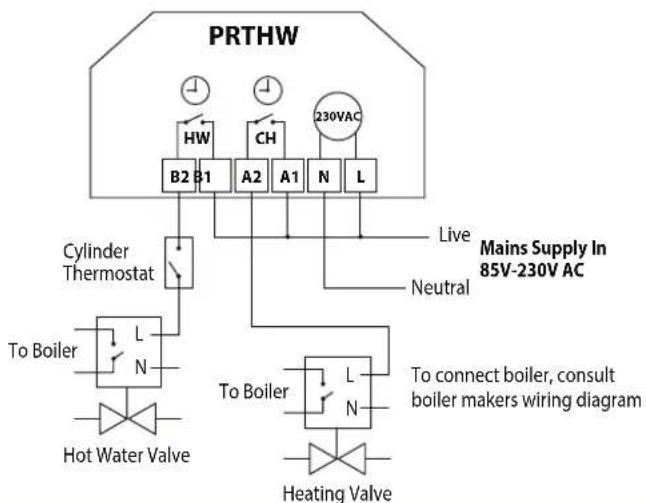
Terminate the thermostat as shown in the diagrams on pages 27-29 of this booklet.
Step 3
Screw the thermostat back plate securely into the back box.
Step 4
Clip the front of the thermostat back onto the thermostat back plate.

natural_image
White medical device with screen and control buttons, no visible text or symbols
natural_image
Interior view of a white electronic device showing internal components and wiring (no text or symbols visible)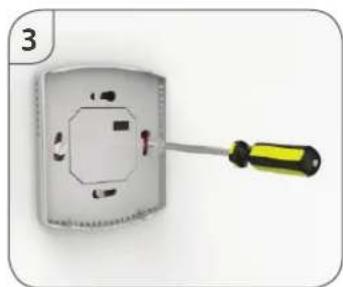
natural_image
Close-up of a screwdriver inserted into an open electrical socket (no text or symbols visible)
text_image
healthfilter 0101H 4A1P
text_image
Sun Mon Tue Wed Thu Fri Sat ROOM TEMP SET 88 WAKE LEAVE RETURN SLEEP 67891011 HOLD FOR 88:88h TIMER ON TIMER OFF °C °F 13 12LCD
LCD Display
- Room Temp - Indicates the current temperature sensor mode.
- Day Indicator - Displays the current day.
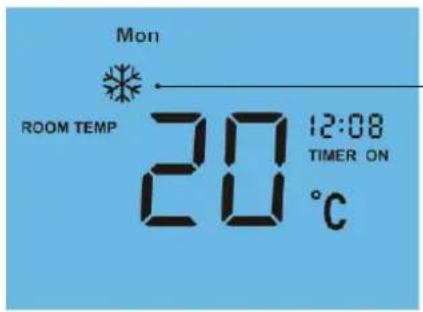
- Frost Icon - Displayed when the thermostat is in frost protection mode.
- Flame Icon - Displayed when the thermostat is calling for heat, the flame icon will flash when the optimum start function is in operation.
- Temperature Hold - When a Temp Hold is active, HOLD FOR and the remaining time period is displayed.
- Set - Indicates when changes are being made to programs or temperature set points.
- Holiday Indicator - Displayed when the thermostat is in holiday mode.
- Current Temp - Indicates the current sensor temperature.
- Program Cycle Indicator - Displayed during programming only to show which period is being altered.
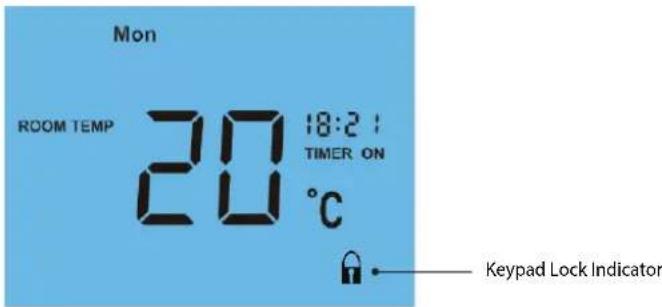
- Keypad Lock Indicator - Displayed when the keypad is locked.
- Units of Temperature - Degrees Celsius or Fahrenheit.
- Timer Status – Displays the current state of the timed output.
- Clock - Digital clock display in 24h format.

Setting the Clock
To set the clock, follow these steps.
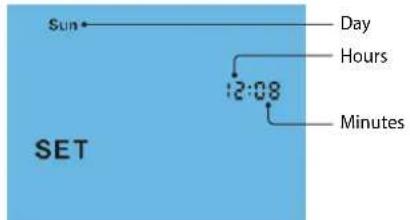
- With the thermostat turned ON, press the Clock key three times ....
• Use the Up/Down keys to set the hours ____ - Press H to confirm settings ...... H
- Use the Up/Down keys to set the minutes ....
- Press H to confirm settings ....H
• Use the Up/Down keys to set the day of the week ____ - Press A to confirm settings and return to main display ....A
text_image
Sun Day Hours 12:08 Minutes SET
Temperature Display
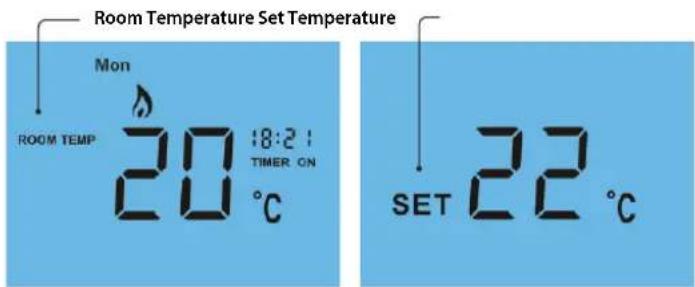
The temperature display information is driven by two different inputs; the sensor measurement and the target temperature you have set.
text_image
Room Temperature Set Temperature Mon ROOM TEMP 20:18:21 TIMER ON 20 °C SET 22 °CThis is the current room temperature. This is the temperature you are trying to achieve in your home.

Comfort Levels Explained
The thermostat provides Weekday/Weekend or 7 Day Programming options. You should consult the "Optional Features" section to select the required mode.
The thermostat is supplied with comfort levels already programmed, but these can be changed easily. The default times and temperatures are;
08.00 - 21°C (Wake) 09.30 - 16°C (Leave) 16.30 - 22°C (Return) 23.00 - 17°C (Sleep)
If you only want to use 2 levels, you should program the unused levels to --.--
Note: For Weekday/Weekend programming, the 4 comfort levels are the same for all weekdays but can be different for the weekends.
For 7 Day programming, each day can have 4 different comfort levels.
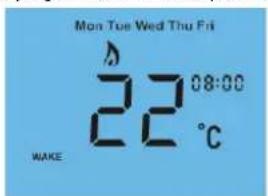
• To program comfort levels, press the Clock key twice
text_image
Mon Tue Wed Thu Fri 22 08:00 C MAKEFor Weekday/Weekend programming, Mon Tue Wed Thu Fri are displayed on screen.
text_image
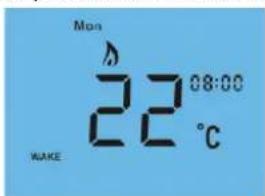
Mon 22°C 08:00 WAKEFor 7 Day programming, only Mon is displayed in the day indicator field.
• Use the Up/Down keys to enter the required WAKE time ....
- Press H to confirm settings ......
• Use the Up/Down keys to enter the required WAKE temperature .....
- Press H to confirm settings ......
• You will now see "LEAVE" displayed on screen.
- Repeat the programming steps for each period until complete.
• For unused periods enter --,-- and the thermostat will ignore the setting.
- Press A to confirm settings and return to main display ....A
Note:
• In 7 Day programming mode you can repeat for each day independently.
- In Weekday/Weekend programming mode you will see Sat Sun displayed on screen and can repeat for the weekend.
• To change the programming mode please refer to pages 21-24.

Locking the Thermostat
The thermostat has a keypad lock facility. To activate the lock follow these steps.
- Press and hold the A and Down keys together for 10 seconds .....
• You will see the lock symbol appear on screen ____
• To unlock, repeat the steps above until the lock symbol disappears.


Note: The keypad lock indicator is only displayed when the lock is active.
text_image
Mon ROOM TEMP 20 18:2 : TIMER ON °C Keypad Lock Indicator
Temperature Control
The Up/Down keys allow you to adjust the set temperature ....
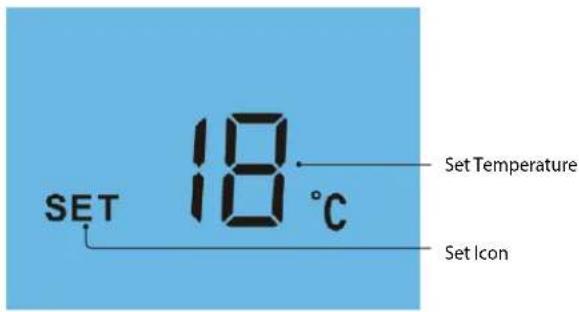
When you press either key, you will see the word SET and the desired temperature will be displayed on screen.
Use the Up/Down keys to adjust the SET value ....
Press A to confirm settings and return to main display ....A
Note: This override will be maintained until the next programmed comfort level.
text_image
SET 18 °C Set Temperature Set Icon
Temperature Hold
The temperature hold function allows you to manually override the current operating program and set a different temperature for a desired period.
- Press H to commence temperature hold ....H
- Use the Up/Down keys to enter the required Hold time....
- Press H to confirm settings ____ H
• Use the Up/Down keys to enter the required Hold temperature..... - Press A to confirm settings and return to main display ....A
You will see the Hold For indication is displayed on screen.
The time will countdown the set duration and then revert to the normal program.

text_image
SET 16 °C HOLD FOR 0:00h Hold ON Indicator Hold Time RemainingTo cancel temperature hold, follow the same steps but reduce the Hold time to 00:00 hours.

Holiday
The holiday function reduces the set temperature in your home to the frost protection temperature setting (see page 21).
The thermostat will maintain this temperature for the duration of the holiday and will then automatically return to the program mode on your return.
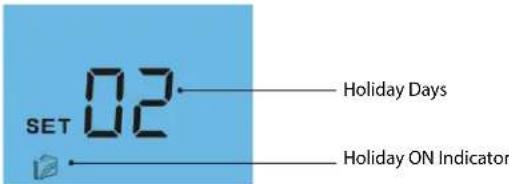
- Press H three times (until you see the suitcase on screen) ....H
• Use the Up/Down keys to enter the number of days holiday .... - Press A to confirm settings and return to main display ....A
The display will show a suitcase indicating the thermostat is in holiday mode.
Note: A holiday period does not start until 00:00 the next day. For example, if you set a holiday period on Friday for 2 days, Saturday will be counted as the first day and the thermostat will revert back to the programmed schedule at 00:00 on Monday.
text_image
SET 02 Holiday Days Holiday ON IndicatorTo cancel, follow the same steps but reduce the Holiday duration to 00 days.

Frost Mode
Pressing the Power button once will place the thermostat in frost protect mode. In this mode, the thermostat will display the frost icon and will only turn the heating on should the room temperature drop below the set frost temperature (see page 21). Should the heating be turned on whilst in frost mode, the flame icon will be displayed. To cancel the frost protect mode, press the Power button once again.
text_image
Mon ROOM TEMP 20 12:08 TIMER ON °CFrost Protection Mode Enabled

Heating & Hot Water ON/OFF
The heating is indicated ON when the flame icon is displayed, the hot water is indicated ON when TIMER ON is displayed.
When the flame icon is absent, there is no requirement for heating to achieve the set temperature but the thermostat remains active.
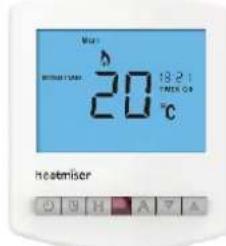
To turn the thermostat OFF completely, press and hold the Power button.... The display, heating and hot water output will be turned OFF completely.*
To turn the thermostat back ON, press the Power button once again ....
Thermostat completely OFF

text_image
heateriser G G H A 7 AThermostat powered ON
text_image
Mn 20℃ 18:21 FRESH CO. heatmiser*See Feature 3 on page 21

Setting the Hot Water Switching Times
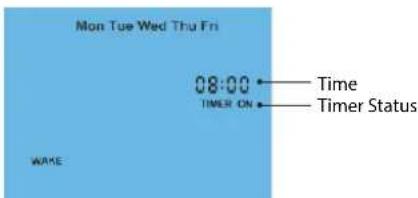
- Press the Clock key once ....
- If your thermostat is setup for Weekday/Weekend programming, Mon-Fri will be displayed on screen. For 7 day programming Mon will be displayed on screen.
- Using the Up/Down keys, enter the required start time for Hot Water Time 1
- Press H to confirm settings ...... H
- Use the Up/Down keys, enter the required end time for Hot Water Time 1 .....
- Press H to confirm settings ....
Repeat the programming steps for each switching time, entering ---- for any unused periods.
text_image
Mon Tue Wed Thu Fri 08:00 TIMER ON Time Timer Status WAME
Hot Water Override
You can override the hot water override by pressing the A key. If the hot water is OFF, pressing the A key will switch the hot water ON and similarly pressing the A key when the hot water is ON will switch it OFF. Timer ON or OFF will flash to show when the hot water has been overridden. This override will last until the next programmed setting.

text_image
Mon ROOM TEMP 20 08:30h TIMER ON Timer Status 20°C
Optional Features Explained
THE FOLLOWING SETTINGS ARE OPTIONAL AND IN MOST CASES NEED NOT BE ADJUSTED
Feature 01 - Temperature Format: This function allows you to select between °C and °F.
Feature 02 - Switching Differential: This function allows you to increase the switching differential of the thermostat. The default is 1^ which means that with a set temperature of 20^ , the thermostat will switch the heating on at 19^ and off at 20^ . With a 2^ differential, the heating will switch on at 18^ and off at 20^ .
Feature 03 – Frost Protect: You can set whether the thermostat will maintain the frost temperature when the thermostat display is turned off. As a default, this is enabled.
Feature 04 – Frost Protect Temperature: This is the temperature maintained when the thermostat is in frost mode. The range is 07 - 17°C. The default is 12°C and is suitable for most applications.
Feature 05 - Output Delay: To prevent rapid switching, an output delay can be entered. This can be set from 00 - 15 minutes. The default is 00 which means there is no delay.
Feature 06 - Communication Address: This setting is used when you have connected your thermostat to a network system. Each thermostat on your network must have a unique communication address. This can be set from 01-32.
Feature 07 - Temperature Up/Down Limit: This function allows you to limit the use of the Up and Down keys. This limit is also applicable when the thermostat is locked and so allows you to give others limited control over the heating system.
Feature 08 – Sensor Selection: This thermostat has a built in air sensor.
Feature 09 – Floor Temp Limit: This function is not available on this model.
Feature 10 – Optimum Start: Optimum start will delay the start up of the heating system to the latest possible moment to avoid unnecessary heating and ensure the building is warm at the programmed time. The thermostat uses the rate of change information to calculate how long the heating needs to raise the building temperature 1^ C (with a rate of change of 20, the thermostat has calculated the heating needs 20 minutes to raise the building temperature 1^ C) and starts the heating accordingly.
Feature 11 – Rate of Change: For information only.
Feature 12 - Programming Mode: The thermostat offers 2 programming methods. Weekday/Weekend allows you to program 4 comfort levels for the weekdays and 4 different comfort levels for the weekend. In 7 Day program mode, each day has 4 comfort levels that can be programmed independently.

Adjusting the Optional Settings
To adjust the optional settings, follow these steps.
- Press and hold the Power button to turn the thermostat OFF ....
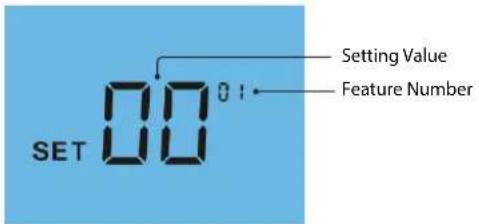
- Press and hold the Clock key until the display appears as shown below ....
text_image
SET 00 Setting Value Feature Number• Use the Clock key to cycle through the features ____
• Use the Up/Down keys to change the setting ....
- Press A to confirm settings ....A
- Press the Power button once again to turn the thermostat back ON ....

Optional Settings - Feature Table
FEATURE
DESCRIPTION
SETTING
| 01 | Temperature Format | 00 = °C, 01 = °F (°C = Default) |
| 02 | Switching Differential | 01° - 03°C (01°C = Default) |
| 03 | Frost Mode | 00 = Enabled, 01 = Disabled (00 = Default) |
| 04 | Frost Protection Temperature | 07" - 17°C (12°C = Default) |
| 05 | Output Delay | 00 - 15 Minutes (00 = Default) |
| 06 | Communications ID No. | Set unique comms address 01-32 |
| 07 | Up/Down Temperature Limit | 00" - 10°C (00 = Default) |
| 08 | Sensor Selection | Built in Sensor |
| 09 | Floor Temperature Limit | Not used in this model |
| 10 | Optimum Start | 00 - 03 Hours (00 = Default) |
| 11 | Rate of Change | Minutes to raise by 1°C |
| 12 | Program Mode | 00 = Weekday/Weekend01 = 7 Day Programming |

Re-calibrating the Thermostat
If you need to re-calibrate the thermostat, follow these steps.
- Press and hold the Power button to turn the thermostat OFF ....
- Press and hold BOTH the Power and Down keys together until the temperature appears on the screen ____
- Use the Up/Down keys to configure the new temperature ....
- Press A to confirm settings ....A
- Press the Power button once to turn the thermostat back ON ....
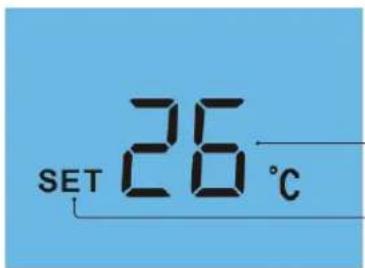
text_image
SET 26 °CCalibration Temperature Setting
Set Icon

Factory Reset
The thermostat has a reset function to restore all settings to their factory defaults.
To perform a factory reset, follow these steps.
- Press and hold the Power button to turn the thermostat OFF ....
- Press and hold the Power and Up keys together until the LCD powers up. All of the icons will be displayed on screen ____
- When the icons have disappeared from the screen, the thermostat has been successfully reset.
- Press the Power button once to turn the thermostat back ON ____
All icons displayed simultaneously.

text_image
Sun Mon Tue Wed Thu Fri Sat ROOM TEMP 88 SET 88 °C F WAKE LEAVE RETURN SLEEP HOLD FOR 88:88hFactory reset is complete.

natural_image
Solid light blue background with no text, symbols, or discernible features.
Wiring Diagram - PRTHW
flowchart
graph TD
    A["PRTHW"] --> B["B2 B1"]
    A --> C["A2"]
    A --> D["A1"]
    A --> E["N"]
    A --> F["L"]
    B --> G["Cylinder Thermostat"]
    C --> G
    D --> G
    E --> G
    F --> G
    G --> H["To Boiler"]
    H --> I["Hot Water Valve"]
    G --> J["To Boiler"]
    J --> K["Heating Valve"]
    L["230VAC"] --> M["HW"]
    L --> N["CH"]
    L --> O["Live"]
    L --> P["Neutral"]
    Q["Mains Supply In 85V-230V AC"] --> R["To connect boiler, consult boiler makers wiring diagram"]

Wiring Diagram - PRTHW-N to UH1

flowchart
graph TD
    A["PRTHW-N"] --> B["Network"]
    B --> C["Y B"]
    B --> D["B2 B1"]
    B --> E["A2 A1"]
    B --> F["- +"]
    B --> G["HW"]
    B --> H["CH"]
    B --> I["12VDC"]
    J["Connecting PRTHW-N to the UH1"] --> K["Zone 1"]
    J --> L["Zone 2"]
    M["The UH1 allows connection of up to eight 12 volt network thermostats. When connecting network thermostats to the UH1 use CAT5-FTP or BELDEN 9538. Connect the screen to Earth at the UH1."] --> N["+ A1 Y"]
    N --> O["- A2 B"]
    P["The UH1 allows connection of up to eight 12 volt network thermostats. When connecting network thermostats to the UH1 use CAT5-FTP or BELDEN 9538. Connect the screen to Earth at the UH1."] --> Q["+ A1 Y"]
    Q --> R["- A2 B"]

Wiring Diagram
PRTHW-N to PRC Voltfree Switching

flowchart
graph TD
    A["PRTHW-N"] --> B["Network"]
    A --> C["HW"]
    A --> D["CH"]
    A --> E["12VDC"]
    A --> F["COMMS CABLE"]
    A --> G["POWERED RELAY CARD"]
    G --> H["230V SUPPLY IN"]
    G --> I["B2 Volt Free Output"]
    G --> J["A2 Volt Free Output"]
    G --> K["NONCCNONCCNEL"]
    style A fill:#f9f,stroke:#333
    style G fill:#ccf,stroke:#333
    note right of A: Recommendations Max Cable Size - 1.5MM, Back Box Depth - 35MM, Max Load - 3 Amps
    note right of G: For 230V switched live output, link mains L to C

Notes

text_image
heatmiser™ PRODUCT INSTALLATION GUIDEHeating Professionals:
Request a copy of our product installation guide containing detailed technical specifications for our complete product range: www.heatmiser.com/guide
Want More Information?
Call our support team on: +44 (0)1254 669090
Or view technical specifications directly on our website: www.heatmiser.com

natural_image
Abstract orange line drawing on white background (no text or symbols)PDF FAQ

natural_image
Orange question mark icon inside a rounded square (no text or symbols)31 Slimline Series

natural_image
Orange play button icon with white triangle (no text or symbols)Video

text_image
Follow us on: twitterTwitter: heatmiseruk

text_image
Find us on: facebook.Facebook:
facebook.com/thermostats