
CP-X4021NGF - Video projector HITACHI - Free user manual and instructions
Find the device manual for free CP-X4021NGF HITACHI in PDF.


| Product Type | Video Projector |
| Brand | Hitachi |
| Model | CP-X4021NGF |
| Display Technology | 3LCD |
| Native Resolution | XGA (1024 x 768) |
| Brightness | 4000 ANSI Lumens |
| Contrast Ratio | 2000:1 |
| Lamp Life | Up to 5000 hours (Normal Mode) |
| Projection Size | 30 – 300 inches |
| Keystone Correction | Vertical and Horizontal |
| Built-in Speaker | 16W Mono |
| Input Terminals | HDMI, VGA, Composite, S-Video, Audio |
| Output Terminals | VGA, Audio, USB (Service) |
| Dimensions (W x H x D) | 317 x 98 x 243 mm |
| Weight | 3.2 kg |
| Power Consumption | 310W (Normal Mode) |
| Power Supply | AC 100-240V, 50/60Hz |
| Security | Kensington Lock Slot |
| Filter Cleaning | Every 100 hours (user-replaceable) |
| Lamp Replacement | User-accessible, model DT01271 |
Frequently Asked Questions - CP-X4021NGF HITACHI
User questions about CP-X4021NGF HITACHI
0 question about this device. Answer the ones you know or ask your own.
Ask a new question about this device
Download the instructions for your Video projector in PDF format for free! Find your manual CP-X4021NGF - HITACHI and take your electronic device back in hand. On this page are published all the documents necessary for the use of your device. CP-X4021NGF by HITACHI.
USER MANUAL CP-X4021NGF HITACHI
CP-X4021N/CP-X5021N/
CP-WX4021N
natural_image
Line drawing of a projector with a circular lens and ventilation grille (no text or symbols)VOLUME, LUIDSPREKER, AUDIOBRON,
HDMI AUDIO, MIC NIVEAU, MIC VOLUME
SCHERM menu 48
TAAL, POSITIE MENU, BLANK, OPSTARTEN, Mijn Scherm, Mijn Sch. VAST, M ELDING, NAAM VAN BRON, PATROON, G.B.
OPTIE menu 54
AUTOM. ZOEKEN, AUTO KEYSTONE, DIRECT AAN, AUTOM. UIT, USB TYPE B, LAMPTIJD, FILTERTIJD, MIJN KNOP, SIGNAALBRON, SERVICE
NETWERK menu 64
INSTELLEN, PROJECTORNAAM, MIJN BEELD, AMX D.D., PRESENTATIE, INFORMATIE, SERVICE
VEILIGHEID menu .....7 1
VEILIGH. PASW. VERANDEREN, Mijn Scherm PASWOORD, P IN LOCK, TRANSITIE DETECTOR, WACHTW. MIJN TEKST, MIJN TEKST WEERG., MIJN TEKST BIJW. VEILIGHEID.INDICAT, O VERLAP VERGRENDEL
natural_image
Interior view of a room with two lighting fixtures and a battery, no text or symbols visibleOpstellen
T-1: CP-X4021N, CP-X5021N
(1024X768) (±10%)
CP-X4021N, CP-X5021N: 4:3 (fixed)
CP-WX4021N: 16:10 (fixed)
natural_image
Line drawing of a projector with a mounted screen (no text or symbols)
CP-X4021N, CP-X5021N: 1700
CP-WX4021N: 0100
flowchart
graph TD
    A["Food and dishes"] <--> B["Landscape"]
    B <--> C["Animal"]
    C --> D["Animal in a protected area"]
    D -.-> E["Animal in a protected area"]
    A --> F["Animal in a protected area"]
    F --> G["Animal in a protected area"]
CP-X4021N, CP-X5021N: 1024X768 (XGA)
CP-WX4021N: 1280 x 800
natural_image
Line drawing of a projector with ventilation slots and a label (no text or symbols on the device itself)

natural_image
Line drawing of a projector with ventilation slots and a blue laser beam (no text or symbols)natural_image
Line drawing of a projector with a screen and lens, showing internal components and a hand inserting a cable (no text or symbols)
natural_image
Technical line drawing of a mechanical component with a grid-patterned base and mounting bracket (no text or symbols)natural_image
Diagram of a mechanical component with arrows indicating motion or force direction (no text or symbols)natural_image
Illustration of three steps to remove a component: adding a grid, removing a heat sink, and removing a heat sink (no text or symbols present)CP-X4021N/CP-X5021N/ CP-WX4021N
natural_image
Line drawing of a projector with a circular lens and ventilation grille (no text or symbols)CP-X4021N, CP-X5021N: 1024 x 768 (XGA)
CP-WX4021N: 1280 x 800

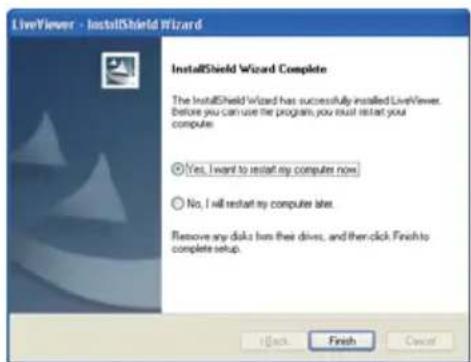
1.2.2 "LiveViewer" updaten
■ Are you sure that you want to turn on the network adapter? (Weet u zeker dat u de netwerkadaptor in wilt schakelen?)
Enter PassCode (Voer de Passcode in)
natural_image
Diagram showing a projector connected to a laptop via a cable, with a lightning bolt symbol indicating power (no text or labels)3) Klik op [Connect].
1.6.1 Profielverbinding
natural_image
Diagram showing a projector connected to a laptop via a power cord, with a lightning bolt symbol indicating connection (no text or labels)Mode (modus): INFRASTRUCTURE

2) Klik op [Next].
4) Klik op [Connect].
2) Klik op [Connect].


De verbinding is verbroken

Niet
aangesloten

Hold

① “Not displaying confirmation dialog for adding Network settings”
flowchart
graph TD
    A[" projector"] --> B[" Laptop 1"]
    A --> C[" Laptop 2"]
    A --> D[" Laptop 3"]
    A --> E[" Laptop 4"]
    A --> F[" Laptop 5"]
    G[" Fruit (grain) "] --> A
    H[" Fruit (orange) "] --> A
    I[" Fruit (red) "] --> A
    J[" Fruit (green) "] --> A
N.B. • Internet Explorer 6.0 of later is vereist.
| Date | ||
| Time | ||
| IP | Address | <Projector |
| MAC | Address | <Projector |
IP-adres> MAC-ac
7.2 Projectorbeheer m.b.v. SNMP
CP-X4021N/CP-X5021N/
CP-WX4021N
Model nummer CP-X4021N, CP-X5021N, CP-WX4021N
natural_image
Interior view of a room with two lighting fixtures and a battery, no text or symbols visible

natural_image
Diagram of a vehicle with a 12° angle indicator and side-mounted panel array (no text or symbols)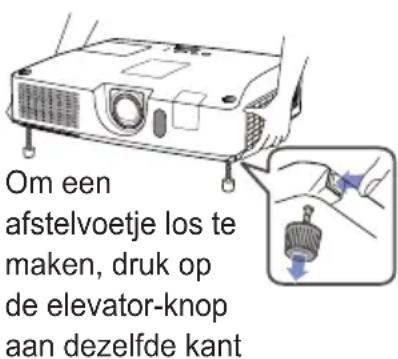
natural_image
Line drawing of a projector with ventilation slots and a blue arrow indicating a component (no text or symbols present)
natural_image
Line drawing of a projector with a label pointing to the front panel (no text or symbols on the device itself)natural_image
Line drawing of a projector with a lens and screen, showing internal components (no text or symbols)
natural_image
Technical line drawing of a mechanical component with a grid-patterned base and mounting bracket (no text or symbols)natural_image
Diagram of a mechanical component with directional arrows indicating motion or force (no text or symbols)natural_image
Line drawing of a hand inserting a grid into a device (no text or symbols)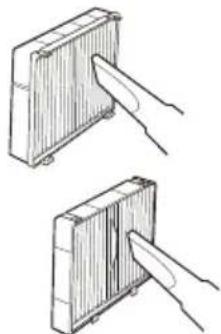
natural_image
Two hand-drawn diagrams showing a mechanical component being inserted into a housing (no text or symbols)
CP-X4021N/CP-X5021N/
CP-WX4021N
User's Manual (detailed)
Operating Guide – Technical
Example of computer signal
| Resolution (H x V) | H. frequency (kHz) | V. frequency (Hz) | Rating Signal | mode |
| 720 x 400 | 37.9 85.0 VESA TEXT | |||
| 640 x 480 31.5 | 59.9 VESA VGA (60Hz) | |||
| 640 x 480 37.9 | 72.8 VESA VGA (72Hz) | |||
| 640 x 480 37.5 | 75.0 VESA VGA (75Hz) | |||
| 640 x 480 43.3 | 85.0 VESA VGA (85Hz) | |||
| 800 x 600 35.2 | 56.3 VESA SVGA (56Hz) | |||
| 800 x 600 37.9 | 60.3 VESA SVGA (60Hz) | |||
| 800 x 600 48.1 | 72.2 VESA SVGA (72Hz) | |||
| 800 x 600 46.9 | 75.0 VESA SVGA (75Hz) | |||
| 800 x 600 53.7 | 85.1 VESA SVGA (85Hz) | |||
| 832 x 624 49.7 | 74.5 Mac 16" mode | |||
| 1024 x 768 48.4 | 60.0 VESA XGA (60Hz) | |||
| 1024 x 768 56.5 | 70.1 VESA XGA (70Hz) | |||
| 1024 x 768 60.0 | 75.0 VESA XGA (75Hz) | |||
| 1024 x 768 68.7 | 85.0 VESA XGA (85Hz) | |||
| 1152 x 864 67.5 | 75.0 VESA | 1152 x 864 (75Hz) | ||
| 1280 x 768 47.7 | 60.0 VESA W-XGA (60Hz) | |||
| 1280 x 800 49.7 | 60.0 VESA | 1280 x 800 (60Hz) | ||
| 1280 x 960 60.0 | 60.0 VESA | 1280 x 960 (60Hz) | ||
| 1280 x 1024 | 64.0 60.0 VESA SXGA (60Hz) | |||
| 1280 x 1024 | 80.0 75.0 VESA SXGA (75Hz) | |||
| 1280 x 1024 | 91.1 85.0 VESA SXGA (85Hz) | |||
| 1400 x 1050 | 65.2 60.0 VESA SXGA+ (60Hz) | |||
| 1600 x 1200 | 75.0 60.0 VESA UXGA (60Hz) | |||
NOTE • Be sure to check jack type, signal level, timing and resolution before connecting this projector to a PC.
- Some PCs may have multiple display screen modes. Use of some of these modes will not be possible with this projector.
- Depending on the input signal, full-size display may not be possible in some cases. Refer to the number of display pixels above.
- Although the projector can display signals with resolution up to UXGA (1600x1200), the signal will be converted to the projector's panel resolution before being displayed. The best display performance will be achieved if the resolutions of the input signal and projector panel are identical.
• Automatic adjustment may not function correctly with some input signals. - The image may not be displayed correctly when the input sync signal is a composite sync or a sync on G.
Initial set signals
The following signals are used for the initial settings. The signal timing of some computer models may be different. In such case, adjust the items V POSITION and H POSITION in the IMAGE menu.

| Resolution (H x V) | Horizontal signal timing (μs) | Vertical signal timing (lines) | Signal mode | ||||||
| (A) | (B) | (C) | (D) | (a) | (b) | (c) | (d) | ||
| 720 x 400 | 2.0 | 3.0 | 20.3 | 1.0 | 3 | 42 | 400 | 1 | TEXT |
| 640 x 480 | 3.8 | 1.9 | 25.4 | 0.6 | 2 | 33 | 480 | 10 | VGA (60Hz) |
| 640 x 480 | 1.3 | 4.1 | 20.3 | 0.8 | 3 | 28 | 480 | 9 | VGA (72Hz) |
| 640 x 480 | 2.0 | 3.8 | 20.3 | 0.5 | 3 | 16 | 480 | 1 | VGA (75Hz) |
| 640 x 480 | 1.6 | 2.2 | 17.8 | 1.6 | 3 | 25 | 480 | 1 | VGA (85Hz) |
| 800 x 600 | 2.0 | 3.6 | 22.2 | 0.7 | 2 | 22 | 600 | 1 | SVGA (56Hz) |
| 800 x 600 | 3.2 | 2.2 | 20.0 | 1.0 | 4 | 23 | 600 | 1 | SVGA (60Hz) |
| 800 x 600 | 2.4 | 1.3 | 16.0 | 1.1 | 6 | 23 | 600 | 37 | SVGA (72Hz) |
| 800 x 600 | 1.6 | 3.2 | 16.2 | 0.3 | 3 | 21 | 600 | 1 | SVGA (75Hz) |
| 800 x 600 | 1.1 | 2.7 | 14.2 | 0.6 | 3 | 27 | 600 | 1 | SVGA (85Hz) |
| 832 x 624 | 1.1 | 3.9 | 14.5 | 0.6 | 3 | 39 | 624 | 1 | Mac 16" mode |
| 1024 x 768 | 2.1 | 2.5 | 15.8 | 0.4 | 6 | 29 | 768 | 3 | XGA (60Hz) |
| 1024 x 768 | 1.8 | 1.9 | 13.7 | 0.3 | 6 | 29 | 768 | 3 | XGA (70Hz) |
| 1024 x 768 | 1.2 | 2.2 | 13.0 | 0.2 | 3 | 28 | 768 | 1 | XGA (75Hz) |
| 1024 x 768 | 1.0 | 2.2 | 10.8 | 0.5 | 3 | 36 | 768 | 1 | XGA (85Hz) |
| 1152 x 864 | 1.2 | 2.4 | 10.7 | 0.6 | 3 | 32 | 864 | 1 | 1152 x 864 (75Hz) |
| 1280 x 768 | 1.7 | 2.5 | 16.0 | 0.8 | 3 | 23 | 768 | 1 | W-XGA (60Hz) |
| 1280 x 800 | 1.6 | 2.4 | 15.3 | 0.8 | 3 | 24 | 800 | 1 | 1280 x 800 (60Hz) |
| 1280 x 960 | 1.0 | 2.9 | 11.9 | 0.9 | 3 | 36 | 960 | 1 | 1280 x 960 (60Hz) |
| 1280 x 1024 | 1.0 | 2.3 | 11.9 | 0.4 | 3 | 38 | 1024 | 1 | SXGA (60Hz) |
| 1280 x 1024 | 1.1 | 1.8 | 9.5 | 0.1 | 3 | 38 | 1024 | 1 | SXGA (75Hz) |
| 1280 x 1024 | 1.0 | 1.4 | 8.1 | 0.4 | 3 | 44 | 1024 | 1 | SXGA (85Hz) |
| 1400 x 1050 | 1.2 | 2.0 | 11.4 | 0.7 | 3 | 33 | 1050 | 1 | SXGA+ (60Hz) |
| 1600 x 1200 | 1.2 | 1.9 | 9.9 | 0.4 | 3 | 46 | 1200 | 1 | UXGA (60Hz) |
Connection to the ports
NOTICE ▶ Use the cables with straight plugs, not L-shaped ones, as the input ports of the projector are recessed.
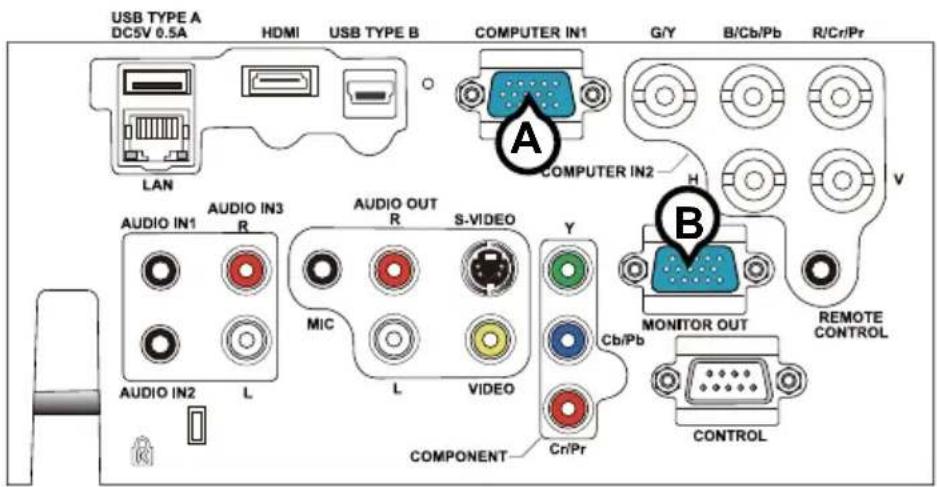
ⒶCOMPUTER IN1, ⒷMONITOR OUT
• Video signal: RGB separate, Analog, 0.7Vp-p, 75Ω terminated (positive)
• H/V. sync. signal: TTL level (positive/negative)
- Composite sync. signal: TTL level
- Video signal:
-Y, Analog, 1.0±0.1Vp-p with composite sync, 75Ω terminated
-Cb/Pb, Analog, 0.7±0.1Vp-p, 75Ω terminated
-Cr/Pr, Analog, 0.7±0.1Vp-p 75Ω terminated
- System: 480i@60, 480p@60, 576i@50, 720p@50/60, 1080i@50/60
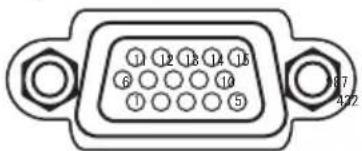
| Pin | Signal Pin Signal | ||
| 1 | Video Red, Cr/Pr | 9 | (No connection) |
| 2 | Video Green, Y 10 Ground | ||
| 3 | Video Blue, Cb/Pb | 11 | (No connection) |
| 4 | (No connection) | 12 | A: SDA (DDC data), (No connection)B: (No connection) |
| 5 | Ground | ||
| 6 | Ground Red, Ground Cr/Pr | 13 | H. sync / Composite sync., (No connection) |
| 7 | Ground Green, Ground Y 14 V. sync., (No connection) | ||
| 8 | Ground Blue, Ground Cb/Pb | 15 | A: SCL (DDC clock), (No connection)B: (No connection) |
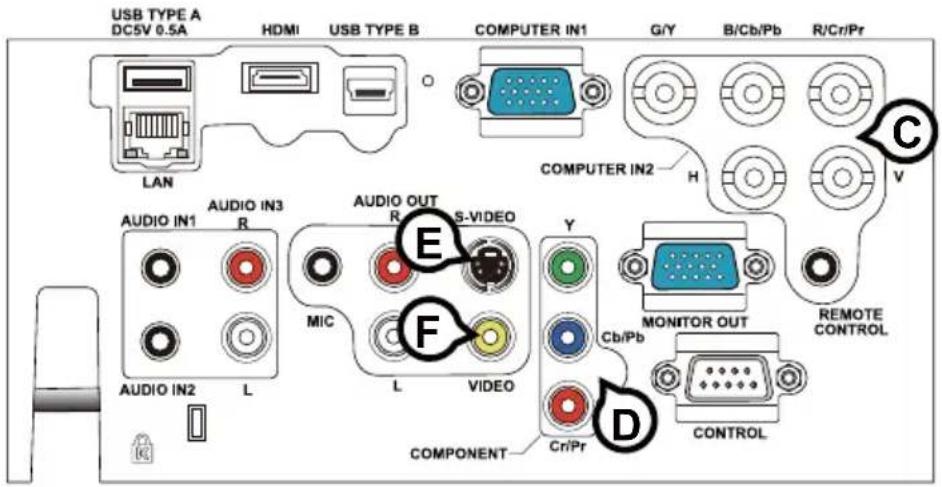
©COMPUTER IN2 (G/Y, B/Cb/Pb, R/Cr/Pr, H, V)
- BNC jack x 5
• Video : Analog 0.7Vp-p, 75Ω terminator
• H/V, sync, : TTL level (positive/negative)
• Composite sync, : TTL level
(D)COMPONENT (Y, Cb/Pb, Cr/Pr)
RCA jack x3
- System: 480i@60, 480p@60, 576i@50, 720p@50/60, 1080i@50/60, 1080p@50/60
| Port Signal | |
| Y | Component video Y, 1.0±0.1Vp-p with composite sync, 75Ω terminator |
| Cb/Pb | Component video Cb/Pb, 0.7±0.1Vp-p, 75Ω terminator |
| Cr/Pr | Component video Cr/Pr, 0.7±0.1Vp-p, 75Ω terminator |
ES-VIDEO
Mini DIN 4pin jack

• System: NTSC, PAL, SECAM, PAL-M, PAL-N, NTSC4.43, PAL(60Hz)
| Pin Signal | |
| 1 | Color signal 0.286Vp-p (NTSC, burst), 75Ω terminatorColor signal 0.300Vp-p (PAL/SECAM, burst) 75Ω terminator |
| 2 Brightness signal, 1.0Vp-p, 75Ω terminator | |
| 3 Ground | |
| 4 Ground | |
FVIDEO
RCA jack
- System: NTSC, PAL, SECAM, PAL-M, PAL-N, NTSC4.43, PAL(60Hz)
• 1.0±0.1Vp-p, 75Ω terminator

©GHDMI
- Type :Digital audio/video connector
• Audio signal : Linear PCM (Sampling rate; 32/44.1/48 kHz)

| Pin | Signal Pin Signal Pin Signal | ||||
| 1 | T.M.D.S. Data2 + | 8 | T.M.D.S. Data0 Shield | 15 | SCL |
| 2 T | M.D.S. Data2 Shield 9 T.M.D.S. D | Data0 - 16 SDA | |||
| 3 | T.M.D.S. Data2 - | 10 | T.M.D.S. Clock + | 17 | DDC/CEC Ground |
| 4 | T.M.D.S. Data1 + | 11 | T.M.D.S. Clock Shield | 18 | +5V Power |
| 5 | T.M.D.S. Data1 Shield | 12 | T.M.D.S. Clock - | 19 | Hot Plug Detect |
| 6 T | M.D.S. Data1 - 13 CEC | ||||
| 7 T | M.D.S. Data0 + | 14 Reserved(N.C. on device) | |||
①AUDIO IN1, ①AUDIO IN2
MREMOTE CONTROL K IN L OUT
• To be connected with the remote control that came with the projector.
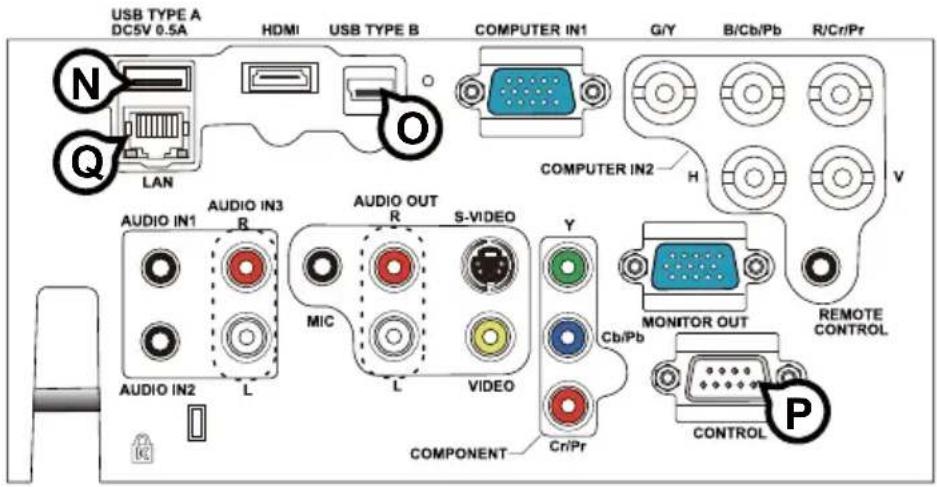
NUSB TYPE A
USB A type jack
| Pin | Signal |
| 1 +5V | |
| 2 - Data | |
| 3 + Data | |
| 4 Ground | |

©USB TYPE B
USB B type jack
| Pin $ignal |
| 1 +5V |
| 2 - Data |
| 3 + Data |
| 4 Ground |

©CONTROL
D-sub 9pin plug
- About the details of RS-232C communication, please refer to the section "RS-232C Communication".
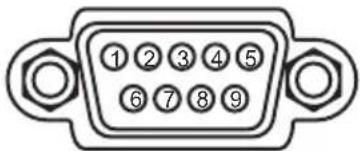
| Pin Signal Pin Signal Pin Signal | |||||
| 1 (No connection) 4 (No connection) 7 RTS | |||||
| 2 | RD | 5 | Ground | 8 | CTS |
| 3 TD 6 (No connection) 9 (No connection) | |||||
©LAN
RJ-45 jack
| Pin | Signal Pin | Signal Pin | Signal | |
| 1 | TX+ | 4 | - | 7 |
| 2 | TX- | 5 | - | 8 |
| 3 | RX+ | 6 | RX- |

To input SCART RGB signal;
ex.

To input SCART RGB signal to the projector, use a SCART to RCA cable. Connect the plugs refer to above ex.. For more reference, please consult your dealer.
RS-232C Communication
When the projector connects to the computer by RS-232C communication, the projector can be controlled with RS-232C commands from the computer. For details of RS-232C commands, refer to RS-232C Communication / Network command table (17).
Connection
- Turn off the projector and the computer.
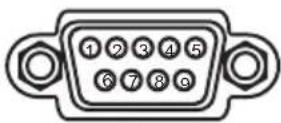
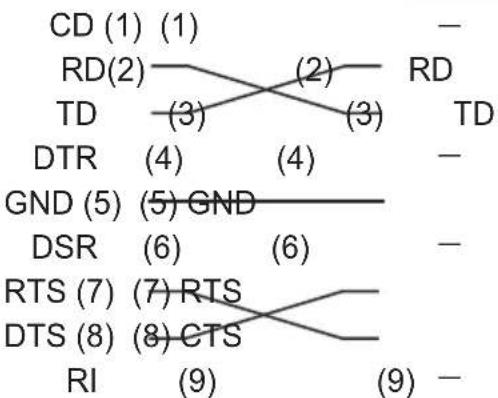
- Connect the projector's CONTROL port and the computer's RS-232C port with a RS-232C cable (cross). Use the cable that fulfills the specification shown in figure
- Turn the computer on, and after the computer has started up turn the projector on.
- Set the COMMUNICATION TYPE to OFF. (OPTION menu - SERVICE - COMMUNICATION in the User's Manual - Operating Guide)

RS-232C Cable (cross)
RS-232C port of the computer

CONTROL port of the projector
flowchart
graph TD
    CD["CD (1) (1)"] --> RD2["RD(2)"]
    RD2 --> TD2["TD (3)"]
    RD2 --> TD3["TD (3)"]
    RD2 --> TD4["TD (3)"]
    TD2 --> DTR["DTR (4)"]
    TD3 --> DTR
    TD4 --> DTR
    DTR --> GND["GND (5)"]
    GND --> DSR["DSR (6)"]
    GND --> DSR
    GND --> RTS["RTS (7)"]
    RTS --> DTS["DTS (8)"]
    RTS --> RTS
    RTS --> CTS["CTS (8)"]
    CTS --> RI["RI (9)"]
    CTS --> RI
    RD2 --> TD4
    TD3 --> TD4
    TD4 --> DTR
    DTR --> GND
    GND --> DSR
    DSR --> RTS
    RTS --> CTS
    CTS --> RI
Communication settings
1. Protocol
19200bps,8N1
2. Command format ("h" shows hexadecimal)
| Byte Number | 0 1 | 2 3 4 | 5 6 | 7 | 8 | 9 | 1 | 0 | 1 | 1 1 | 2 | ||||
| CommandAction | Header Data | ||||||||||||||
| Header code | Packet L | Data size | CRC flag | Action Type | Setting code | ||||||||||
| L | H | L | H | L | H | L | H | L | H | L | H | L | H | ||
| Change setting to desired value [(cL)(cH)] by [(eL)(eH)]. | BEh | EFh 03h 06h | 00h | (aL) | (aH) | 01h | 00h | (bL) | (bH) | (cL) | (cH) | ||||
| Read projector internal setup value [(bL) (bH)]. | (aL) | (aH) | 02h | 00h | (bL) | (bH) | 00h | 00h | |||||||
| Increment setup value [(bL)(bH)] by 1. | (aL) | (aH) | 04h | 00h | (bL) | (bH) | 00h | 00h | |||||||
| Decrement setup value [(bL)(bH)] by 1. | (aL) | (aH) | 05h | 00h | (bL) | (bH) | 00h | 00h | |||||||
| Run a command [(bL)(bH)]. | (aL) | (aH) | 06h | 00h | (bL) | (bH) | 00h | 00h | |||||||
[Header code] [Packet] [Data size]
Set [BEh, EFh, 03h, 06h, 00h] to byte number 0\~4.
[CRC flag]
For byte number 5, 6, refer to RS-232C Communication / Network command table (17).
[Action]
Set functional code to byte number 7, 8.
Refer to the Communication command table (above).
[Type] [Setting code]
For byte number 9\~12, refer to RS-232C Communication / Network command table (17).
3. Response code / Error code ("h" shows hexadecimal)
(1) ACK reply : 06h
When the projector receives the Set, Increment, Decrement or Execute command correctly, the projector changes the setting data for the specified item by [Type], and it returns the code.
(2) NAK reply : 15h
When the projector cannot understand the received command, the projector returns the error code. In such a case, check the sending code and send the same command again
(3) Error reply : 1Ch + 0000h
When the projector cannot execute the received command for any reasons, the projector returns the error code. In such a case, check the sending code and the setting status of the projector.
(4) Data reply : 1Dh + xxxxh
When the projector receives the GET command correctly, the projector returns the response code and 2 bytes of data.
NOTE • For connecting the projector to your devices, please read the manual for each device and connect them correctly with suitable cables.
- Operation cannot be guaranteed when the projector receives an undefined command or data.
- Provide an interval of at least 40ms between the response code and any other code.
- The projector outputs test data when the power supply is switched ON and when the lamp is lit. Ignore this data.
- Commands are not accepted during warm-up.
- When the data length is greater than indicated by the data length code, the projector ignore the excess data code. Conversely when the data length is shorter than indicated by the data length code, the projector returns the error code to the computer.
Command Control via the Network
When the projector connects network, the projector can be controlled with RS-232C commands from the computer with web browser.
For details of RS-232C commands, refer to RS-232C Communication / Network command table (17).
Connection
- Turn off the projector and the computer.
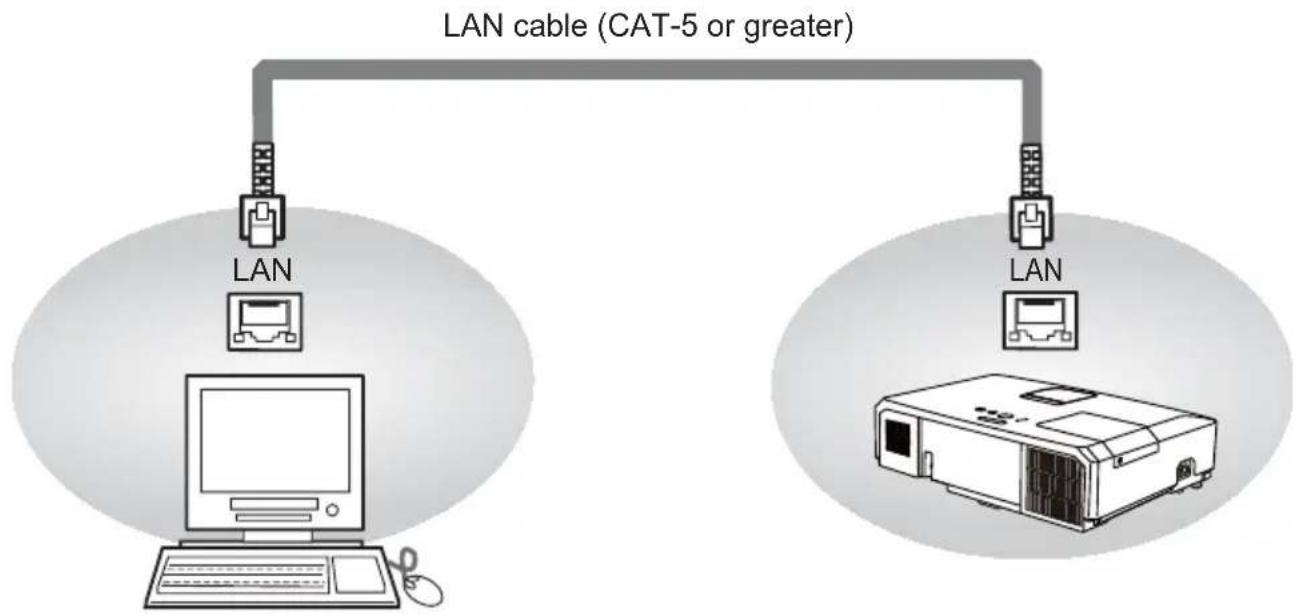
- Connect the projector's LAN port and the computer's LAN port with a LAN cable. Use the cable that fulfills the specification shown in figure (Use CAT-5 or greater LAN Cable when LAN ports are used)
- Turn the computer on and after the computer has started up turn the projector on.
flowchart
graph TD
    A["LAN"] --> B["CAT-5 or greater"]
    C["LAN"] --> D["CAT-5 or greater"]
    E["Computer"] --> F["Pod"]
Communication Port
The following two ports are assigned for the command control.
TCP #23
TCP #9715
Configure the following items form a web browser when command control is used.
| Port Settings | ||
| Network Control Port1 (Port: 23) | Port open | Click the [Enable] check box to open [Network Control Port1 (Port: 23)] to use TCP #23. Default setting is “Enable”. |
| Authentication | Click the [Enable] check box for the [Authentication] setting when authentication is required. Default setting is “Disable”. | |
| Network Control Port2 (Port: 9715) | Port open | Click the [Enable] check box to open [Network Control Port2 (Port: 9715)] to use TCP #9715. Default setting is “Enable”. |
| Authentication | Click the [Enable] check box for the [Authentication] setting when authentication is required. Default setting is “Enable”. | |
When the authentication setting is enabled, the following settings are required.
| Security Settings | ||
| Network Control | Authentication Password | Enter the desired authentication password. This setting will be the same for [Network Control Port1 (Port: 23)] and [Network Control Port2 (Port: 9715)]. Default setting is blank. |
| Re-enter Authentication Password | ||
Command control settings
[TCP #23]
1. Command format
Same as RS-232C communication, refer to RS-232C Communicaton command format.
2. Response code / Error code ("h" shows hexadecimal)
Four of the response / error code used for TCP#23 are the same as RS-232C Communication (1)\~(4). One authentication error reply (5) is added.
(1) ACK reply : 06h
Refer to RS-232C communication (10).
(2) NAK reply : 15h
Refer to RS-232C communication (10).
(3) Error reply : 1Ch + 0000h
Refer to RS-232C communication (10).
(4) Data reply : 1Dh + xxxxh
Refer to RS-232C communication (10).
(5) Authentication error reply : 1Fh + 0400h
When authentication error occurred, the projector returns the error code.
[TCP #9715]
1. Command format
The commands some datum are added to the head and the end of the ones of TCP#9715 are used.
| Header Data | length RS-232 | C command Check sum | Connection ID | |
| 0×02 0×0D | 13 bytes 1 byte | 1 byte |
[Header]
02, Fixed
[Data Length]
RS-232C commands byte length (0×0D, Fixed)
[RS-232C commands]
Refer to RS-232C Communication command format (10).
[Check Sum]
This is the value to make zero on the addition of the lower 8 bits from the header to the checksum.
[Connection ID]
Random value from 0 to 255 (This value is attached to the reply data).
NOTE • Operation cannot be guaranteed when the projector receives an undefined command or data.
- Provide an interval of at least 40ms between the response code and any other code.
- Commands are not accepted during warm-up.
2. Response code / Error code ("h" shows hexadecimal)
The connection ID is attached for the TCP#23's response / error codes are used. The connection ID is same as the sending command format.
(××h : connection ID)
(1) ACK reply : 06h + xxh
(2) NAK reply : 15h + xxh
(3) Error reply : 1Ch + 0000h + xxh
(4) Data reply : 1Dh + xxxxh + xxh
(5) Authentication error reply : 1Fh + 0400h + xxh
(6) Projector busy reply: 1Fh + xxxxh + xxh
When the projector is too busy to receive the command, the projector returns the error code.
In such a case, check the sending code and send the same command again.
Automatic Connection Break
The TCP connection will be automatically disconnected after there is no communication for 30 seconds after being established.
Authentication
The projector does not accept commands without authentication success when authentication is enabled. The projector uses a challenge response type authentication with an MD5 (Message Digest 5) algorithm. When the projector is using a LAN, a random 8 bytes will be returned if authentication is enabled. Bind this received 8 bytes and the authentication password and digest this data with the MD5 algorithm and add this in front of the commands to send.
Following is a sample if the authentication password is set to “password” and the random 8 bytes are “a572f60c”.
1) Select the projector.
2) Receive the random 8 bytes "a572f60c" from the projector.
3) Bind the random 8 bytes "a572f60c" and the authentication password "password" and it becomes "a572f60cpassword".
4) Digest this bind "a572f60cpassword" with MD5 algorithm.
It will be "e3d97429adffa11bce1f7275813d4bde".
5) Add this "e3d97429adffa11bce1f7275813d4bde" in front of the commands and send the data.
Send “e3d97429adffa11bce1f7275813d4bde”+command.
6) When the sending data is correct, the command will be performed and the reply data will be returned. Otherwise, an authentication error will be returned.
NOTE • As for the transmission of the second or subsequent commands, the authentication data can be omitted when the same connection.
Network Bridge Communication
This projector is equipped with NETWORK BRIDGE function.
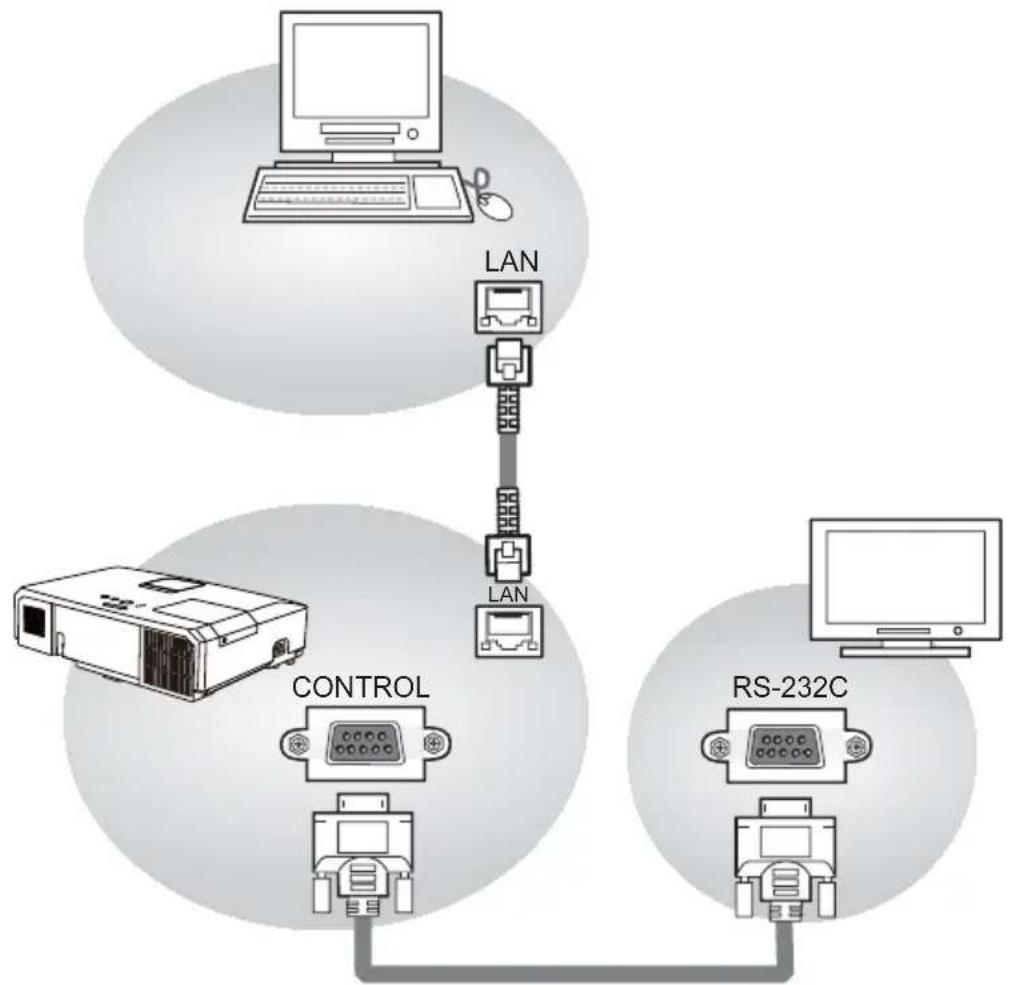
When the projector connects to the computer by LAN communicaton, an external device that is connected with this projector by RS-232C communication can be controlled from the computer as a network terminal.
For details, see the 3.7 Controlling the external device via the projector(using the NETWORK BRIDGE function) - Network Guide.
Connection
- Connect the computer's LAN port and the projector's LAN port with a LAN cable.
- Connect the projector's CONTROL port and the RS-232C port of the devices that you want to control with a RS-232C cable.
- Turn the computer on and after the computer has started up turn the projector on.
- Set the COMMUNICATION TYPE to NETWORK BRIDGE. (OPTION menu - SERVICE - COMMUNICATION in the User's Manual - Operating Guide)
flowchart
graph TD
    A["Computer"] -->|LAN| B["Printer"]
    B --> C["Router"]
    D["Printer"] -->|LAN| E["Control Unit"]
    E --> F["RS-232C"]
    F --> G["Router"]
Communication settings
For communication setting, use the OPTION - SERVICE - COMMUNICATION menu. (OPTION menu - SERVICE - COMMUNICATION in the User's Manual - Operating Guide)
| Item Condition | |
| BAUD RATE 4800bps / 9600bps / 19200bps / 38400bps | |
| Data length 8 bit (fixed) | |
| PARITY NONE/ODD/EVEN | |
| Start bit 1 bit (fixed) | |
| Stop bit 1 bit (fixed) | |
| Transmission method HALF-DUPLEX/FULL-DUPLEX | |
NOTE • For connecting the projector to your devices, please read the manual for each device and connect them correctly with suitable cables.
- Turn off (the power of) both the projector and other devices and unplug before connecting them.
- For details of Transmission method, refer to 3.8.4 Transmission method-Network Guide.
RS-232C Communication / Network command table
| Names Operation Type Header | Command Data | |||||||||
| CRC A | action Type | Setting code | ||||||||
| Power | Set | Turn off BE EF 03 06 00 2A D3 01 00 00 60 00 00 | ||||||||
| Turn on BE EF 03 06 00 BA D2 01 00 00 60 01 00 | ||||||||||
| Get | BE EF 03 06 00 19 D3 02 00 00 60 00 00 | |||||||||
| [Example return]00 00 01 00 02 00[Off] [On] [Cool down] | ||||||||||
| Input Source | Set | COMPUTER IN1 BE EF 03 06 00 FE D2 01 00 00 20 00 00 | ||||||||
| COMPUTER IN2 BE EF 03 06 00 3E D0 01 00 00 20 04 00 | ||||||||||
| HDMI BE EF 03 06 00 0E D2 01 00 00 20 03 00 | ||||||||||
| COMPONENT BE EF 03 06 00 AE D1 01 00 00 20 05 00 | ||||||||||
| S-VIDEO BE EF 03 06 00 9E D3 01 00 00 20 02 00 | ||||||||||
| VIDEO BE EF 03 06 00 6E D3 01 00 00 20 01 00 | ||||||||||
| USB TYPE A BE EF 03 06 00 5E D1 01 00 00 20 06 00 | ||||||||||
| LAN BE EF 03 06 00 CE D5 01 00 00 20 0B 00 | ||||||||||
| USB TYPE B BE EF 03 06 00 FE D7 01 00 00 20 0C 00 | ||||||||||
| Get | BE EF 03 06 06 00 CD D2 02 00 00 20 00 00 | |||||||||
| Error Status | Get | BE EF 03 06 00 D9 D8 02 00 20 60 00 00 | ||||||||
| [Example return]00 00 01 00 02 00 03 00[Normal] [Cover error] [Fan error] [Lamp error]04 00 05 00 07 00 08 00[Temp error] [Air flow error] [Cold error] [Filter error] | ||||||||||
| MAGNIFY | Get | BE EF 03 06 00 7C D2 02 00 07 30 00 00 | ||||||||
| Increment BE EF | 03 06 00 1A D2 04 00 07 30 00 00 | |||||||||
| Decrement | BE EF 03 06 00 CB D3 05 00 07 30 00 00 | |||||||||
| FREEZE | Set | NORMAL | BE EF 03 06 00 83 D2 01 00 02 30 00 00 | |||||||
| FREEZE | BE EF 03 06 00 13 D3 01 00 02 30 01 00 | |||||||||
| Get | BE EF 03 06 00 B0 D2 02 00 02 30 00 00 | |||||||||
| PICTURE MODE | Set | NORMAL | BE EF 03 06 00 23 F6 01 00 BA 30 00 00 | |||||||
| CINEMA | BE EF 03 06 00 B3 F7 01 00 BA 30 01 00 | |||||||||
| DYNAMIC | BE EF 03 06 00 E3 F4 01 00 BA 30 04 00 | |||||||||
| BOARD(BLACK) | BE EF 03 06 00 E3 EF 01 00 BA 30 20 00 | |||||||||
| BOARD(GREEN) | BE EF 03 06 00 73 EE 01 00 BA 30 21 00 | |||||||||
| WHITEBOARD | BE EF 03 06 00 83 EE 01 00 BA 30 22 00 | |||||||||
| DAYTIME | BE EF 03 06 00 E3 C7 01 00 BA 30 40 00 | |||||||||
| Get | BE EF 03 06 00 10 F6 02 00 BA 30 00 00 | |||||||||
| [Example return]00 00 01 00 04 00 10 00[Normal] [Cinema] [Dynamic] [Custom]20 00 21 00 22 00 40 00[BOARD(BLACK)][BOARD(GREEN)][WHITEBOARD][DAY TIME] | ||||||||||
| BRIGHTNESS | Get | BE EF 03 06 00 89 D2 02 00 03 20 00 00 | ||||||||
| Increment BE EF | 03 06 00 EF D2 04 00 03 20 00 00 | |||||||||
| Decrement | BE EF 03 06 00 3E D3 05 00 03 20 00 00 | |||||||||
| BRIGHTNESS Reset | Execute BE EF | 03 06 00 58 D3 06 00 00 70 00 00 | ||||||||
| CONTRAST | Get | BE EF 03 06 00 FD D3 02 00 04 20 00 00 | ||||||||
| Increment BE EF | 03 06 00 9B D3 04 00 04 20 00 00 | |||||||||
| Decrement | BE EF 03 06 00 4A D2 05 00 04 20 00 00 | |||||||||
| CONTRAST Reset | Execute BE EF | 03 06 00 | A4 D2 | 06 00 01 | 70 00 00 | |||||
| GAMMA | Set | 1 DEFAULT BE | EF 03 06 | 00 07 | E9 01 00 | A1 30 20 | 00 | |||
| 1 CUSTOM BE | EF 03 06 | 00 07 | FD 01 00 | A1 30 10 | 00 | |||||
| 2 DEFAULT BE | EF 03 06 | 00 97 | E8 01 00 | A1 30 21 | 00 | |||||
| 2 CUSTOM BE | EF 03 06 | 00 97 | FC 01 00 | A1 30 11 | 00 | |||||
| 3 DEFAULT BE | EF 03 06 | 00 67 | E8 01 00 | A1 30 22 | 00 | |||||
| 3 CUSTOM BE | EF 03 06 | 00 67 | FC 01 00 | A1 30 12 | 00 | |||||
| 4 DEFAULT BE | EF 03 06 | 00 F7 | E9 01 00 | A1 30 23 | 00 | |||||
| 4 CUSTOM BE | EF 03 06 | 00 F7 | FD 01 00 | A1 30 13 | 00 | |||||
| 5 DEFAULT BE | EF 03 06 | 00 C7 | EB 01 00 | A1 30 24 | 00 | |||||
| 5 CUSTOM BE | EF 03 06 | 00 C7 | FF 01 00 | A1 30 14 | 00 | |||||
| 6 DEFAULT BE | EF 03 06 | 00 57 | EA 01 00 | A1 30 25 | 00 | |||||
| 6 CUSTOM BE | EF 03 06 | 00 57 | FE 01 00 | A1 30 15 | 00 | |||||
| Get BE EF 03 | 06 00 F4 | F0 02 | 00 A1 30 | 00 00 | ||||||
| User Gamma Pattern | Set | Off BE EF | 03 06 00 | FB FA | 01 00 80 | 30 00 00 | ||||
| 9 steps gray scale | BE EF 03 | 06 00 | 6B FB 01 | 00 80 30 | 01 00 | |||||
| 15 steps gray scale | BE EF 03 | 06 00 | 00 9B FB | 01 00 80 | 30 02 00 | |||||
| Ramp | BE EF 03 | 06 00 | 00 0B FA | 01 00 80 | 30 03 00 | |||||
| Get BE EF 03 | 06 00 C8 | FA | 02 00 80 | 30 00 00 | ||||||
| User Gamma Point 1 | Get BE EF | 03 06 00 | 08 FE | 02 00 90 | 30 00 00 | |||||
| Increment | BE EF | 03 | 06 00 | 6E FE | 04 00 | 90 30 | 00 00 | |||
| Decrement | BE EF | 03 | 06 00 | BF FF | 05 00 | 90 30 | 00 00 | |||
| User Gamma Point 1 Reset | Execute BE EF | 03 06 00 | 58 C2 | 06 00 50 | 70 00 00 | |||||
| User Gamma Point 2 | Get BE EF | 03 06 00 | F4 FF | 02 00 91 | 30 00 00 | |||||
| Increment | BE EF | 03 06 | 00 92 | FF 04 00 | 91 30 00 | 00 | ||||
| Decrement | BE EF | 03 06 | 00 43 | FE 05 00 | 91 30 00 | 00 | ||||
| User Gamma Point 2 Reset | Execute BE EF | 03 06 00 | A4 C3 | 06 00 51 | 70 00 00 | |||||
| User Gamma Point 3 | Get BE EF | 03 06 00 | B0 FF | 02 00 92 | 30 00 00 | |||||
| Increment | BE EF | 03 | 06 00 | D6 FF | 04 00 | 92 30 | 00 00 | |||
| Decrement | BE EF | 03 06 | 00 07 | FE 05 00 | 92 30 00 | 00 | ||||
| User Gamma Point 3 Reset | Execute BE EF | 03 06 00 | E0 C3 | 06 00 52 | 70 00 00 | |||||
| User Gamma Point 4 | Get BE EF | 03 06 00 | 4C FE | 02 00 93 | 30 00 00 | |||||
| Increment | BE EF | 03 06 | 00 2A | FE 04 00 | 93 30 00 | 00 | ||||
| Decrement | BE EF | 03 | 06 00 | FB FF | 05 00 | 93 30 | 00 00 | |||
| User Gamma Point 4 Reset | Execute BE EF | 03 06 00 | 1C | C2 06 00 | 53 70 00 | 00 | ||||
| User Gamma Point 5 | Get BE EF | 03 06 00 | 38 FF | 02 00 94 | 30 00 00 | |||||
| Increment | BE EF | 03 06 | 00 5E | FF 04 00 | 94 30 00 | 00 | ||||
| Decrement | BE EF | 03 06 | 00 8F | FE 05 00 | 94 30 00 | 00 | ||||
| User Gamma Point 5 Reset | Execute BE EF | 03 06 00 | 68 C3 | 06 00 54 | 70 00 00 | |||||
| User Gamma Point 6 | Get BE EF | 03 06 00 | C4 FE | 02 00 95 | 30 00 00 | |||||
| Increment | BE EF | 03 | 06 00 | A2 FE | 04 00 | 95 30 | 00 00 | |||
| Decrement | BE EF | 03 06 | 00 73 | FF 05 00 | 95 30 00 | 00 | ||||
| User Gamma Point 6 Reset | Execute BE EF | 03 06 00 | 94 C2 | 06 00 55 | 70 00 00 | |||||
RS-232C Communication / Network command table (continued)
| Names Operation Type Header | Command Data | ||||||||||
| CRC A | Action Type | Setting code | |||||||||
| User Gamma Point 7 | Get BE EF 03 | 06 00 80 | FE 02 | 00 96 | 3 | 0 00 00 | |||||
| Increment BE EF | 03 06 00 | E6 FE | 04 00 96 | 6 | 30 00 00 | ||||||
| Decrement BE EF | 03 06 00 | 37 FF | 05 00 96 | 6 | 30 00 00 | ||||||
| User Gamma Point 7 Reset | Execute BE EF | 03 06 00 | D0 C2 | 06 00 56 | 7 | 00 00 | |||||
| User Gamma Point 8 | Get BE EF 03 | 06 00 70 | FF 02 | 00 97 | 3 | 00 00 | |||||
| Increment BE EF | 03 06 00 | 1A FF | 04 00 97 | 3 | 00 00 | ||||||
| Decrement BE EF | 03 06 00 | CB FE | 05 00 97 | 3 | 00 00 | ||||||
| User Gamma Point 8 Reset | Execute BE EF | 03 06 00 | 2C C3 | 06 00 57 | 7 | 00 00 | |||||
| COLOR TEMP | Set | 1 HIGH BE EF | 03 06 00 | 0B F5 | 01 00 | B0 30 03 | 00 | ||||
| 1 CUSTOM | BE EF 03 06 | 00 CB F8 | 01 00 B0 | 30 13 00 | |||||||
| 2 MID BE EF | 03 06 00 | 9B F4 | 01 00 B0 | 30 02 00 | |||||||
| 2 CUSTOM | BE EF 03 06 | 00 5B F9 | 01 00 B0 | 30 12 00 | |||||||
| 3 LOW | BE EF 03 06 | 00 6B F4 | 01 00 B0 | 30 01 00 | |||||||
| 3 CUSTOM | BE EF 03 06 | 00 AB F9 | 01 00 B0 | 30 11 00 | |||||||
| 4 Hi-BRIGHT-1 | BE EF 03 06 | 00 3B F2 | 01 00 B0 | 30 08 00 | |||||||
| 4 CUSTOM | BE EF 03 06 | 00 FB FF | 01 00 B0 | 30 18 00 | |||||||
| 5 Hi-BRIGHT-2 | BE EF 03 06 | 00 AB F3 | 01 00 B0 | 30 09 00 | |||||||
| 5 CUSTOM | BE EF 03 06 | 00 6B FE | 01 00 B0 | 30 19 00 | |||||||
| 6 Hi-BRIGHT-3 | BE EF 03 06 | 00 5B F3 | 01 00 B0 | 30 0A 00 | |||||||
| 6 CUSTOM | BE EF | 03 | 06 00 | 9B FE | 01 00 | B0 30 | 1A 00 | ||||
| Get BE EF 03 | 06 00 C8 | F5 02 | 00 B0 | 30 00 | 00 | ||||||
| COLOR TEMP GAIN R | Get BE EF 03 | 06 00 34 | F4 02 | 00 B1 | 30 00 00 | ||||||
| Increment BE EF | 03 06 00 | 52 F4 | 04 00 B1 | 30 00 00 | |||||||
| Decrement BE EF | 03 06 00 | 83 F5 | 05 00 B1 | 30 00 00 | |||||||
| COLOR TEMP GAIN R Reset | Execute BE EF | 03 06 00 | 10 C6 | 06 00 46 | 70 00 00 | ||||||
| COLOR TEMP GAIN G | Get BE EF 03 | 06 00 70 | F4 02 | 00 B2 | 30 00 00 | ||||||
| Increment BE EF | 03 06 00 | 16 F4 | 04 00 B2 | 30 00 00 | |||||||
| Decrement BE EF | 03 06 00 | C7 F5 | 05 00 B2 | 30 | 00 00 | ||||||
| COLOR TEMP GAIN G Reset | Execute BE EF | 03 06 00 | EC C7 | 06 00 47 | 70 00 00 | ||||||
| COLOR TEMP GAIN B | Get BE EF 03 | 06 00 8C | F5 02 | 00 B3 | 30 00 | 00 | |||||
| Increment BE EF | 03 06 00 | EA F5 | 04 00 B3 | 30 | 00 00 | ||||||
| Decrement BE EF | 03 06 00 | 3B F4 | 05 00 B3 | 30 00 | 00 | ||||||
| COLOR TEMP GAIN B Reset | Execute BE EF | 03 06 00 | F8 C4 | 06 00 | 48 70 00 | 00 | |||||
| COLOR TEMP OFFSET R | Get BE EF 03 | 06 00 04 | F5 02 | 00 B5 | 30 00 00 | ||||||
| Increment BE EF | 03 06 00 | 62 F5 | 04 00 B5 | 30 00 00 | |||||||
| Decrement BE EF | 03 06 00 | B3 F4 | 05 00 B5 | 30 00 00 | |||||||
| COLOR TEMP OFFSET R Reset | Execute BE EF | 03 06 00 | 40 C5 | 06 00 4A | 70 00 00 | ||||||
| COLOR TEMP OFFSET G | Get BE EF 03 | 06 00 40 | F5 02 | 00 B6 | 30 00 00 | ||||||
| Increment BE EF | 03 06 00 | 26 F5 | 04 00 B6 | 30 00 00 | |||||||
| Decrement BE EF | 03 06 00 | F7 F4 | 05 00 B6 | 30 00 00 | |||||||
| COLOR TEMP OFFSET G Reset | Execute BE EF | 03 06 00 | BC C4 | 06 00 4B | 70 | 00 00 | |||||
| COLOR TEMP OFFSET B | Get BE EF 03 | 06 00 BC | F4 02 | 00 B7 | 30 00 00 | ||||||
| Increment BE EF | 03 06 00 | DA F4 | 04 00 B7 | 30 00 00 | |||||||
| Decrement BE EF | 03 06 00 | 0B F5 | 05 00 B7 | 30 00 00 | |||||||
| COLOR TEMP OFFSET B Reset | Execute BE EF | 03 06 00 | C8 C5 | 06 00 4C | 70 00 00 | ||||||
| COLOR | Get BE EF 03 | 06 00 B5 | 72 02 | 00 02 | 22 00 00 | ||||||
| Increment BE EF | 03 06 00 | D3 | 72 04 00 | 02 22 00 | 00 | ||||||
| Decrement BE EF | 03 06 00 | 02 73 | 05 00 02 | 22 00 00 | |||||||
| COLOR Reset | Execute BE EF | 03 06 00 | 80 | D0 06 | 00 0A 70 | 00 00 | |||||
| TINT | Get BE EF 03 | 06 00 49 | 73 02 | 00 03 | 22 00 00 | ||||||
| Increment BE EF | 03 06 00 | 2F 73 | 04 00 03 | 22 00 00 | |||||||
| Decrement BE EF | 03 06 00 | FE 72 | 05 | 00 03 | 22 00 00 | ||||||
| TINT Reset | Execute BE EF | 03 06 00 | 7C D1 | 06 00 0B | 70 00 00 | ||||||
| SHARPNESS | Get BE EF 03 | 06 00 F1 | 72 02 | 00 01 | 22 00 00 | ||||||
| Increment BE EF | 03 06 00 | 97 72 | 04 00 01 | 22 00 00 | |||||||
| Decrement BE EF | 03 06 00 | 46 73 | 05 00 01 | 22 00 00 | |||||||
| SHARPNESS Reset | Execute BE EF | 03 06 00 | C4 D0 | 06 00 09 | 70 00 00 | ||||||
| ACTIVE IRIS | Set | OFF | BE EF | 03 06 | 00 0B | 22 01 00 | 04 33 00 | 00 | |||
| THEATER | BE EF | 03 06 | 00 CB 2F | 01 00 04 | 33 | 10 00 | |||||
| PRESENTATION | BE EF | 03 | 06 00 | 5B 2E | 01 00 | 04 33 | 11 00 | ||||
| Get BE EF 03 | 06 00 38 | 22 02 | 00 04 | 33 00 | 00 | ||||||
| MY MEMORY Load | Set | 1 | BE EF | 03 | 06 00 | 0E D7 | 01 00 | 14 20 | 00 00 | ||
| 2 | BE EF | 03 06 | 00 9E D6 | 01 00 14 | 20 | 01 00 | |||||
| 3 | BE EF | 03 | 06 00 | 6E D6 | 01 00 | 14 20 | 02 00 | ||||
| 4 | BE EF | 03 06 | 00 FE D7 | 01 00 14 | 20 | 03 00 | |||||
| MY MEMORY Save | Set | 1 | BE EF | 03 | 06 00 | F2 D6 | 01 00 | 15 20 | 00 00 | ||
| 2 | BE EF | 03 | 06 00 | 62 D7 | 01 00 | 15 20 | 01 00 | ||||
| 3 | BE EF | 03 | 06 00 | 92 D7 | 01 00 | 15 20 | 02 00 | ||||
| 4 | BE EF | 03 | 06 00 | 02 D6 | 01 00 | 15 20 | 03 00 | ||||
| ASPECT | Set | 4:3 BE EF | 03 06 00 | 9E D0 | 01 00 08 | 20 | 00 00 | ||||
| 16:9 | BE EF | 03 06 | 00 0E D1 | 01 00 08 | 20 01 00 | ||||||
| 16:10 | BE EF | 03 06 | 00 3E D6 | 01 00 08 | 20 0A 00 | ||||||
| 14:9 | BE EF | 03 06 | 00 CE D6 | 01 00 08 | 20 09 00 | ||||||
| (*) NATIVE | BE EF | 03 | 06 00 | 5E D7 | 01 00 | 08 20 | 08 00 | ||||
| NORMAL | BE EF | 03 06 | 00 5E DD | 01 00 08 | 20 | 10 00 | |||||
| Get BE EF 03 | 06 00 AD | D0 02 | 00 08 | 20 00 | 00 | ||||||
| OVER SCAN | Get BE EF 03 | 06 00 91 | 70 02 | 00 09 | 22 00 | 00 | |||||
| Increment BE EF | 03 06 00 | F7 70 | 04 00 09 | 22 | 00 00 | ||||||
| Decrement BE EF | 03 06 00 | 26 71 | 05 00 09 | 22 | 00 00 | ||||||
| OVER SCAN Reset | Execute BE EF | 03 06 00 | EC D9 | 06 00 27 | 70 00 00 | ||||||
| V POSITION | Get BE EF 03 | 06 00 | 0D 83 | 02 00 00 | 21 | 00 00 | |||||
| Increment BE EF | 03 06 00 | 6B | 83 04 00 | 00 21 | 00 00 | ||||||
| Decrement BE EF | 03 06 00 | BA | 82 05 00 | 00 21 | 00 00 | ||||||
| V POSITION Reset | Execute BE EF | 03 06 00 | E0 D2 | 06 00 02 | 70 | 00 00 | |||||
(*) only for CP-WX4021N
RS-232C Communication / Network command table (continued)
| Names Operation Type Header | Command Data | |||||||||
| CRC Action Type | Setting code | |||||||||
| H POSITION | Get BE EF 03 | 06 00 F1 | 82 02 | 00 01 2 | 1 00 00 | |||||
| Increment BE EF | 03 06 00 | 97 82 | 04 00 01 | 21 00 00 | ||||||
| Decrement BE EF | 03 06 00 | 46 83 | 05 00 01 | 21 00 00 | ||||||
| H POSITION Reset | Execute BE EF | 03 06 00 | 1C D3 | 06 00 03 | 70 00 00 | |||||
| H PHASE | Get BE EF 03 | 06 00 49 | 83 02 | 00 03 2 | 1 00 00 | |||||
| Increment BE EF | 03 06 00 | 2F 83 | 04 00 03 | 21 00 00 | ||||||
| Decrement BE EF | 03 06 00 | FE 82 | 05 00 03 | 21 00 00 | ||||||
| H SIZE | Get BE EF 03 | 06 00 B5 | 82 02 | 00 02 2 | 1 00 00 | |||||
| Increment BE EF | 03 06 00 | D3 82 | 04 00 02 | 21 00 00 | ||||||
| Decrement BE EF | 03 06 00 | 02 83 | 05 00 02 | 21 00 00 | ||||||
| H SIZE Reset | Execute BE EF | 03 06 00 | 68 D2 | 06 00 04 | 70 00 00 | |||||
| AUTO ADJUST EXECUTE | Execute BE EF | 03 06 00 | 91 D0 | 06 00 0A | 20 00 00 | |||||
| PROGRESSIVE | Set | OFF BE EF | 03 06 00 | 4A 72 | 01 00 07 | 22 00 00 | ||||
| TV | BE EF | 03 06 | 00 DA 73 | 01 00 07 | 22 01 00 | |||||
| FILM BE EF | 03 06 00 | 2A 73 | 01 00 07 | 22 02 00 | ||||||
| Get BE EF 03 | 06 00 79 | 72 02 | 00 07 2 | 20 00 00 | ||||||
| VIDEO NR | Set | LOW BE EF | 03 06 00 | 26 72 | 01 00 06 | 22 01 00 | ||||
| MID | BE EF | 03 06 | 00 D6 72 | 01 00 06 | 22 02 00 | |||||
| HIGH | BE EF | 03 06 | 00 46 73 | 01 00 06 | 22 03 00 | |||||
| Get BE EF 03 | 06 00 85 | 73 02 | 00 06 2 | 20 00 00 | ||||||
| COLOR SPACE | Set | AUTO | BE EF | 03 06 | 00 0E 72 | 01 00 04 | 22 00 00 | |||
| RGB BE EF | 03 06 00 | 9E 73 | 01 00 04 | 22 01 00 | ||||||
| SMPTE240 | BE EF | 03 06 | 00 6E 73 | 01 00 04 | 22 02 00 | |||||
| REC709 | BE EF | 03 06 | 00 FE 72 | 01 00 04 | 22 03 00 | |||||
| REC601 | BE EF | 03 06 | 00 CE 70 | 01 00 04 | 22 04 00 | |||||
| Get BE EF 03 | 06 00 3D | 72 02 | 00 04 2 | 20 00 00 | ||||||
| COMPONENT | Set | COMPONENT BE | EF 03 06 | 00 4A | D7 01 | 00 17 20 | 00 00 | |||
| SCART RGB | BE EF | 03 06 | 00 DA D6 | 01 00 17 | 20 01 00 | |||||
| Get BE EF 03 | 06 00 79 | D7 02 | 00 17 2 | 20 00 00 | ||||||
| S-VIDEO FORMAT | Set | AUTO | BE EF | 03 06 | 00 E6 70 | 01 00 12 | 22 0A 00 | |||
| NTSC BE EF | 03 06 00 | 86 74 | 01 00 12 | 22 04 00 | ||||||
| PAL | BE EF | 03 06 | 00 16 75 | 01 00 12 | 22 05 00 | |||||
| SECAM | BE EF | 03 06 | 00 16 70 | 01 00 12 | 22 09 00 | |||||
| NTSC4.43 | BE EF | 03 06 | 00 26 77 | 01 00 12 | 22 02 00 | |||||
| M-PAL | BE EF | 03 06 | 00 86 71 | 01 00 12 | 22 08 00 | |||||
| N-PAL | BE EF | 03 06 | 00 76 74 | 01 00 12 | 22 07 00 | |||||
| Get BE EF 03 | 06 00 75 | 76 02 | 00 12 2 | 20 00 00 | ||||||
| C-VIDEO FORMAT | Set | AUTO | BE EF | 03 | 06 00 | A2 70 | 01 00 | 11 22 | OA 00 | |
| NTSC BE EF | 03 06 00 | C2 74 | 01 00 11 | 22 04 00 | ||||||
| PAL | BE EF | 03 | 06 00 | 52 75 | 01 00 | 11 22 | 05 00 | |||
| SECAM | BE EF | 03 06 | 00 52 70 | 01 00 11 | 22 09 00 | |||||
| NTSC4.43 | BE EF | 03 06 | 00 62 77 | 01 00 11 | 22 02 00 | |||||
| M-PAL | BE EF | 03 | 06 00 | C2 71 | 01 00 | 11 22 | 08 00 | |||
| N-PAL | BE EF | 03 | 06 00 | 32 74 | 01 00 | 11 22 | 07 00 | |||
| Get BE EF 03 | 06 00 31 | 76 02 | 00 11 22 | 20 00 00 | ||||||
RS-232C Communication / Network command table (continued)
| Names Operation Type Header | Command Data | ||||||||||
| CRC A | Action Type | Setting code | |||||||||
| HDMI FORMAT | Set | AUTO BE EF 03 06 00 BA 77 01 00 13 22 00 00 | |||||||||
| VIDEO BE EF 03 06 00 2A 76 01 00 13 22 01 00 | |||||||||||
| COMPUTER BE EF 03 06 00 D A 76 01 00 13 22 02 00 | |||||||||||
| Get BE EF 03 06 00 89 77 02 00 13 22 00 00 | |||||||||||
| HDMI RANGE | Set | AUTO BE EF 03 06 00 86 D 8 01 00 2 20 00 00 | |||||||||
| NORMAL | BE EF 03 06 00 16 D 9 01 00 22 20 01 00 | ||||||||||
| ENHANCED | BE EF 03 06 00 E 6 D 9 01 00 22 20 02 00 | ||||||||||
| Get BE EF 03 06 00 B 5 D 8 02 00 22 20 00 00 | |||||||||||
| COMPUTER IN1 | Set | AUTO BE EF 03 06 00 CE D 6 01 00 10 20 03 00 | |||||||||
| SYNC ON G OFF | BE EF 03 06 00 5E D 7 01 00 10 20 02 00 | ||||||||||
| Get BE EF 03 06 00 0D D 6 02 00 10 20 00 00 | |||||||||||
| COMPUTER IN2 | Set | AUTO BE EF 03 06 00 32 D 7 01 00 1 1 20 03 00 | |||||||||
| SYNC ON G OFF | BE EF 03 06 00 A 2 D 6 01 00 11 20 02 00 | ||||||||||
| Get BE EF 03 06 00 F 1 D 7 02 00 1 1 20 00 00 | |||||||||||
| FRAME LOCK - COMPUTER IN1 | Set | OFF | BE EF 03 06 00 3B C 2 01 00 50 30 00 00 | ||||||||
| ON | BE EF 03 06 00 AB C 3 01 00 50 30 01 00 | ||||||||||
| Get BE EF 03 06 00 08 C 2 02 00 50 30 00 00 | |||||||||||
| FRAME LOCK - COMPUTER IN2 | Set | OFF | BE EF 03 06 00 0B C 3 01 00 54 30 00 00 | ||||||||
| ON | BE EF 03 06 00 9B C 2 01 00 54 30 01 00 | ||||||||||
| Get BE EF 03 06 00 38 C 3 02 00 54 30 00 00 | |||||||||||
| FRAME LOCK - HDMI | Set | OFF | BE EF 03 06 00 7F C 2 01 00 53 30 00 00 | ||||||||
| ON | BE EF 03 06 00 EF C 3 01 00 53 30 01 00 | ||||||||||
| Get BE EF 03 06 00 4C C 2 02 00 53 30 00 00 | |||||||||||
| AUTO KEYSTONE V EXECUTE | Execute BE EF 03 06 00 E 5 D 1 06 00 0D 20 00 00 | ||||||||||
| KEYSTONE V | Get BE EF 03 06 00 B 9 D 3 02 00 07 20 00 00 | ||||||||||
| Increment | BE EF 03 06 00 DF D 3 04 00 07 20 00 00 | ||||||||||
| Decrement | BE EF 03 06 00 0E D 2 05 00 07 20 00 00 | ||||||||||
| KEYSTONE V Reset | Execute BE EF 03 06 00 08 D 0 06 00 0C 70 00 00 | ||||||||||
| KEYSTONE H | Get BE EF 03 06 00 E 9 D 0 02 00 0B 20 00 00 | ||||||||||
| Increment | BE EF 03 06 00 00 8F D 0 04 00 0B 20 00 00 | ||||||||||
| Decrement | BE EF 03 06 00 06 00 5E D 1 05 00 0B 20 00 00 | ||||||||||
| KEYSTONE H Reset | Execute BE EF 03 06 00 98 D 8 06 00 20 70 00 00 | ||||||||||
| PERFECT FIT | Set | Disable | BE EF 03 06 00 FE 88 01 00 20 21 00 00 | ||||||||
| Enable BE EF 03 06 00 6E 89 01 00 20 21 00 00 | |||||||||||
| Get BE EF 03 06 00 CD 88 02 00 20 21 00 00 | |||||||||||
| PERFECT FIT Left Top -H | Get BE EF 03 06 00 31 89 02 00 21 21 00 00 | ||||||||||
| Increment | BE EF 03 06 00 57 89 04 00 21 21 00 00 | ||||||||||
| Decrement | BE EF 03 06 00 86 88 05 00 21 21 00 00 | ||||||||||
| PERFECT FIT Left Top -V | Get BE EF 03 06 00 75 89 02 00 22 21 00 00 | ||||||||||
| Increment | BE EF 03 06 00 13 89 04 00 22 21 00 00 | ||||||||||
| Decrement | BE EF 03 06 00 C 2 88 05 00 22 21 00 00 | ||||||||||
| PERFECT FIT Right Top -H | Get BE EF 03 06 00 89 88 02 00 23 21 00 00 | ||||||||||
| Increment | BE EF 03 06 00 EF 88 04 00 23 21 00 00 | ||||||||||
| Decrement | BE EF 03 06 00 3E 89 05 00 23 21 00 00 | ||||||||||
| PERFECT FIT Right Top -V | Get BE EF 03 06 00 FD 89 02 00 24 21 00 00 | ||||||||||
| Increment | BE EF 03 06 00 9B 89 04 00 24 21 00 00 | ||||||||||
| Decrement | BE EF 03 06 00 4A 88 05 00 24 21 00 00 | ||||||||||
| PERFECT FIT Left Bottom -H | Get BE EF 03 | 06 00 01 | 88 02 | 00 25 | 21 | 00 00 | |||||
| Increment BE EF | 03 06 00 | 67 88 | 04 00 | 25 | 21 00 00 | ||||||
| Decrement BE EF | 03 06 00 | B6 | 89 | 05 00 | 25 | 21 00 00 | |||||
| PERFECT FIT Left Bottom -V | Get BE EF 03 | 06 00 45 | 88 02 | 00 26 | 21 | 00 00 | |||||
| Increment BE EF | 03 06 00 | 23 88 | 04 00 | 26 | 21 00 00 | ||||||
| Decrement BE EF | 03 06 00 | F2 | 89 | 05 00 | 26 | 21 00 00 | |||||
| PERFECT FIT Right Bottom -H | Get BE EF 03 | 06 00 B9 | 89 02 | 00 27 | 21 | 00 00 | |||||
| Increment BE EF | 03 06 00 | DF | 89 | 04 00 | 27 | 21 00 00 | |||||
| Decrement BE EF | 03 06 00 | OE | 88 | 05 00 | 27 | 21 00 00 | |||||
| PERFECT FIT Right Bottom -V | Get BE EF 03 | 06 00 AD | 8A | 02 | 00 28 | 21 | 00 00 | ||||
| Increment BE EF | 03 06 00 | CB | 8A | 04 00 | 28 | 21 00 00 | |||||
| Decrement BE EF | 03 06 00 | 1A | 8B | 05 00 | 28 | 21 00 00 | |||||
| PERFECT FIT Reset | Execute BE EF | 03 06 00 | D5 | 8A | 06 00 | 29 | 21 00 00 | ||||
| PERFECT FIT Left Side Distortion | Get BE EF 03 | 06 00 31 | 97 | 02 | 00 41 | 21 | 00 00 | ||||
| Increment BE EF | 03 06 00 | 57 | 97 | 04 00 | 41 | 21 00 00 | |||||
| Decrement BE EF | 03 06 00 | 86 | 96 | 05 00 | 41 | 21 00 00 | |||||
| PERFECT FIT Right Side Distortion | Get BE EF 03 | 06 00 75 | 97 | 02 | 00 42 | 21 | 00 00 | ||||
| Increment BE EF | 03 06 00 | 13 | 97 | 04 00 | 42 | 21 00 00 | |||||
| Decrement BE EF | 03 06 00 | C2 | 96 | 05 00 | 42 | 21 00 00 | |||||
| PERFECT FIT Distortion Position V | Get BE EF 03 | 06 00 89 | 96 | 02 | 00 43 | 21 | 00 00 | ||||
| Increment BE EF | 03 06 00 | EF | 96 | 04 00 | 43 | 21 00 00 | |||||
| Decrement BE EF | 03 06 00 | 3E | 97 | 05 00 | 43 | 21 00 00 | |||||
| PERFECT FIT Top Side Distortion | Get BE EF 03 | 06 00 FD | 97 | 02 | 00 44 | 21 | 00 00 | ||||
| Increment BE EF | 03 06 00 | 9B | 97 | 04 00 | 44 | 21 00 00 | |||||
| Decrement BE EF | 03 06 00 | 4A | 96 | 05 00 | 44 | 21 00 00 | |||||
| PERFECT FIT Bottom Side Distortion | Get BE EF 03 | 06 00 01 | 96 | 02 | 00 45 | 21 | 00 00 | ||||
| Increment BE EF | 03 06 00 | 67 | 96 | 04 00 | 45 | 21 00 00 | |||||
| Decrement BE EF | 03 06 00 | B6 | 97 | 05 00 | 45 | 21 00 00 | |||||
| PERFECT FIT Distortion Position H | Get BE EF 03 | 06 00 45 | 96 | 02 | 00 46 | 21 | 00 00 | ||||
| Increment BE EF | 03 06 00 | 23 | 96 | 04 00 | 46 | 21 00 00 | |||||
| Decrement BE EF | 03 06 00 | F2 | 97 | 05 00 | 46 | 21 00 00 | |||||
| PERFECT FIT All Sides Reset | Execute BE EF | 03 06 00 | 3D | 96 | 06 00 | 47 | 21 00 00 | ||||
| AUTO ECO MODE | Set | OFF BE EF | 03 06 00 | FB | 27 | 01 00 | 10 | 33 00 00 | |||
| ON | BE EF | 03 06 | 00 6B | 26 | 01 00 10 | 33 01 00 | |||||
| Get BE EF 03 | 06 00 C8 | 27 | 02 | 00 10 | 33 00 00 | ||||||
| ECO MODE | Set | NORMAL | BE EF | 03 06 | 00 3B | 23 | 01 00 00 | 33 00 00 | |||
| ECO BE EF | 03 06 00 | AB | 22 | 01 00 | 00 | 33 01 00 | |||||
| Get BE EF 03 | 06 00 08 | 23 | 02 | 00 00 | 33 00 00 | ||||||
| MIRROR | Set | NORMAL | BE EF | 03 06 | 00 C7 | D2 | 01 00 01 | 30 00 00 | |||
| H:INVERT | BE EF | 03 06 | 00 57 | D3 | 01 00 01 | 30 01 00 | |||||
| V:INVERT | BE EF | 03 06 | 00 A7 | D3 | 01 00 01 | 30 02 00 | |||||
| H&V:INVERT | BE EF | 03 06 | 00 37 | D2 | 01 00 01 | 30 03 00 | |||||
| Get BE EF 03 | 06 00 F4 | D2 | 02 | 00 01 | 30 00 00 | ||||||
| STANDBY MODE | Set | NORMAL | BE EF | 03 06 | 00 D6 | D2 | 01 00 01 | 60 00 00 | |||
| SAVING | BE EF | 03 06 | 00 46 | D3 | 01 00 01 | 60 01 00 | |||||
| Get BE EF 03 | 06 00 E5 | D2 | 02 | 00 01 | 60 00 00 | ||||||
| MONITOR OUT - COMPUTER IN1 | Set | COMPUTER IN1 BE EF 03 | 06 00 | 3E F4 01 | 00 B0 20 | 00 00 | |||||
| OFF BE EF | 03 06 00 | CE B5 01 00 B | 0 20 FF | 00 | |||||||
| Get BE EF 03 | 06 00 0D | F4 02 | 00 B0 20 | 00 00 | |||||||
| MONITOR OUT - COMPUTER IN2 | Set | COMPUTER IN2 BE EF 03 | 06 00 | CE F7 01 | 00 B4 20 | 04 00 | |||||
| OFF BE EF | 03 06 00 | FE B4 01 00 B | 20 FF | 00 | |||||||
| Get BE EF 03 | 06 00 3D | F5 02 | 00 B4 20 | 00 00 | |||||||
| MONITOR OUT - COMPONENT | Set | COMPUTER IN1 BE EF 03 | 06 00 | F2 F4 01 | 00 B5 20 | 00 00 | |||||
| COMPUTER IN2 BE EF 03 | 06 00 | 32 F6 01 | 00 B5 20 | 04 00 | |||||||
| OFF BE EF | 03 06 00 | 02 B5 01 00 B | 20 FF | 00 | |||||||
| Get BE EF 03 | 06 00 C1 | F4 02 | 00 B5 20 | 00 00 | |||||||
| MONITOR OUT - S-VIDEO | Set | COMPUTER IN1 BE EF 03 | 06 00 | 86 F5 01 | 00 B2 20 | 00 00 | |||||
| COMPUTER IN2 BE EF 03 | 06 00 | 46 F7 01 | 00 B2 20 | 04 00 | |||||||
| OFF BE EF | 03 06 00 | 76 B4 01 00 B | 20 FF | 00 | |||||||
| Get BE EF 03 | 06 00 B5 | F5 02 | 00 B2 20 | 00 00 | |||||||
| MONITOR OUT - VIDEO | Set | COMPUTER IN1 BE EF 03 | 06 00 | C2 F5 01 | 00 B1 20 | 00 00 | |||||
| COMPUTER IN2 BE EF 03 | 06 00 | 02 F7 01 | 00 B1 20 | 04 00 | |||||||
| OFF BE EF | 03 06 00 | 32 B4 01 00 B | 20 FF | 00 | |||||||
| Get BE EF 03 | 06 00 F1 | F5 02 | 00 B1 20 | 00 00 | |||||||
| MONITOR OUT - HDMI | Set | COMPUTER1 BE EF 03 06 | 00 7A | F4 01 | 00 B3 20 | 00 00 | |||||
| COMPUTER2 BE EF 03 06 | 00 BA | F6 01 | 00 B3 20 | 04 00 | |||||||
| OFF BE EF | 03 06 00 | 8A B5 01 00 B | 20 FF | 00 | |||||||
| Get BE EF 03 | 06 00 49 | F4 02 | 00 B3 20 | 00 00 | |||||||
| MONITOR OUT - LAN | Set | COMPUTER1 BE EF 03 06 | 00 1A | F6 01 | 00 BB 20 | 00 00 | |||||
| COMPUTER2 BE EF 03 06 | 00 DA | F4 01 | 00 BB 20 | 04 00 | |||||||
| OFF BE EF | 03 06 00 | EA B7 01 00 B | B 20 | FF 00 | |||||||
| Get BE EF 03 | 06 00 29 | F6 02 | 00 BB 20 | 00 00 | |||||||
| MONITOR OUT - USB TYPE A | Set | COMPUTER1 BE EF 03 06 | 00 B6 | F4 01 | 00 B6 20 | 00 00 | |||||
| COMPUTER2 BE EF 03 06 | 00 76 | F6 01 | 00 B6 20 | 04 00 | |||||||
| OFF BE EF | 03 06 00 | 46 B5 01 00 B | 20 FF | 00 | |||||||
| Get BE EF 03 | 06 00 85 | F4 02 | 00 B6 20 | 00 00 | |||||||
| MONITOR OUT - USB TYPE B | Set | COMPUTER1 BE EF 03 06 | 00 6E | F7 01 | 00 BC 20 | 00 00 | |||||
| COMPUTER2 BE EF 03 06 | 00 AE | F5 01 | 00 BC 20 | 04 00 | |||||||
| OFF BE EF | 03 06 00 | 9E B6 01 00 B | C 20 | FF 00 | |||||||
| Get BE EF 03 | 06 00 5D | F7 02 | 00 BC 20 | 00 | 00 | ||||||
| MONITOR OUT - STANDBY | Set | COMPUTER IN1 BE EF 03 | 06 00 | 2A F7 01 | 00 BF 20 | 00 00 | |||||
| COMPUTER IN2 BE EF 03 | 06 00 | EA F5 01 | 00 BF 20 | 04 00 | |||||||
| OFF BE EF | 03 06 00 | DA B6 01 00 B | F 20 FF | 00 | |||||||
| Get BE EF 03 | 06 00 19 | F7 02 | 00 BF 20 | 00 00 | |||||||
| VOLUME - COMPUTER IN1 | Get | BE EF | 03 | 06 00 | CD CC | 02 00 | 60 20 | 00 00 | |||
| Increment | BE EF | 03 06 | 00 AB CC | 04 00 | 60 20 00 | 00 | |||||
| Decrement | BE EF | 03 06 | 00 7A CD | 05 00 60 | 20 00 00 | ||||||
| VOLUME - COMPUTER IN2 | Get BE EF 03 | 06 00 FD | CD | 02 00 64 | 20 00 00 | ||||||
| Increment | BE EF | 03 06 | 00 9B CD | 04 00 64 | 20 | 00 00 | |||||
| Decrement | BE EF | 03 06 | 00 4A CC | 05 00 64 | 20 00 00 | ||||||
| VOLUME - COMPONENT | Get BE EF 03 | 06 00 01 | CC 02 | 00 65 20 | 00 | 00 | |||||
| Increment | BE EF | 03 06 | 00 67 CC | 04 00 65 | 20 | 00 00 | |||||
| Decrement | BE EF | 03 06 | 00 B6 CD | 05 00 65 | 20 | 00 00 | |||||
| VOLUME - S-VIDEO | Get BE EF 03 | 06 00 75 | CD 02 | 00 62 20 | 00 | 00 | |||||
| Increment | BE EF | 03 06 | 00 13 CD | 04 00 62 | 20 | 00 00 | |||||
| Decrement | BE EF | 03 06 | 00 C2 CC | 05 00 62 | 20 | 00 00 | |||||
| VOLUME -VIDEO | Get BE EF 03 | 06 00 31 | CD 02 | 00 61 | 20 00 00 | ||||||
| Increment BE EF | 03 06 00 | 57 CD | 04 00 61 | 20 00 00 | |||||||
| Decrement BE EF | 03 06 00 | 86 CC | 05 00 61 | 20 00 00 | |||||||
| VOLUME - HDMI | Get BE EF 03 | 06 00 89 | CC 02 | 00 63 | 20 00 00 | ||||||
| Increment BE EF | 03 06 00 | EF CC | 04 00 63 | 20 00 00 | |||||||
| Decrement BE EF | 03 06 00 | 3E CD | 05 00 63 | 20 00 00 | |||||||
| VOLUME - LAN | Get BE EF 03 | 06 00 E9 | CE 02 | 00 6B | 20 00 00 | ||||||
| Increment BE EF | 03 06 00 | 8F CE | 04 00 6B | 20 00 00 | |||||||
| Decrement BE EF | 03 06 00 | 5E CF | 05 00 6B | 20 00 00 | |||||||
| VOLUME - USB TYPE A | Get BE EF 03 | 06 00 45 | CC 02 | 00 66 | 20 00 00 | ||||||
| Increment BE EF | 03 06 00 | 23 CC | 04 00 66 | 20 00 00 | |||||||
| Decrement BE EF | 03 06 00 | F2 CD | 05 00 66 | 20 00 00 | |||||||
| VOLUME - USB TYPE B | Get BE EF 03 | 06 00 9D | CF 02 | 00 6C | 20 00 00 | ||||||
| Increment BE EF | 03 06 00 | FB CF | 04 00 6C | 20 00 00 | |||||||
| Decrement BE EF | 03 06 00 | 2A CE | 05 00 6C | 20 00 00 | |||||||
| VOLUME - STANDBY | Get BE EF 03 | 06 00 D9 | CF 02 | 00 6F | 20 00 00 | ||||||
| Increment BE EF | 03 06 00 | BF CF | 04 00 6F | 20 00 00 | |||||||
| Decrement BE EF | 03 06 00 | 6E CE | 05 00 6F | 20 00 00 | |||||||
| MUTE | Set | OFF | BE EF | 03 06 | 00 46 D3 | 01 00 | 02 20 00 | 00 | |||
| ON | BE EF | 03 06 | 00 D6 D2 | 01 00 02 | 20 01 00 | ||||||
| Get BE EF 03 | 06 00 | 75 D3 | 02 00 02 | 20 00 00 | |||||||
| SPEAKER | Set | ON | BE EF | 03 06 | 00 FE D4 | 01 00 | 1C 20 01 | 00 | |||
| OFF | BE EF | 03 | 06 00 | 6E D5 | 01 00 | 1C 20 | 00 00 | ||||
| Get BE EF 03 | 06 00 5D | D5 02 | 00 1C | 20 00 00 | |||||||
| AUDIO SOURCE - COMPUTER IN1 | Set | AUDIO IN1 | BE EF | 03 06 | 00 6E DC | 01 00 30 | 20 01 00 | ||||
| AUDIO IN2 | BE EF | 03 06 | 00 9E DC | 01 00 30 | 20 02 00 | ||||||
| AUDIO IN3 | BE EF | 03 06 | 00 0E DD | 01 00 30 | 20 03 00 | ||||||
| OFF | BE EF | 03 06 | 00 FE DD | 01 00 30 | 20 00 00 | ||||||
| Get BE EF 03 | 06 00 | CD DD | 02 00 | 30 20 00 | 00 | ||||||
| AUDIO SOURCE - COMPUTER IN2 | Set | AUDIO IN1 | BE EF | 03 06 | 00 5E DD | 01 00 34 | 20 01 00 | ||||
| AUDIO IN2 | BE EF | 03 | 06 00 | AE DD | 01 00 | 34 20 | 02 00 | ||||
| AUDIO IN3 | BE EF | 03 06 | 00 3E DC | 01 00 34 | 20 03 00 | ||||||
| OFF | BE EF | 03 | 06 00 | CE DC | 01 00 | 34 20 | 00 00 | ||||
| Get BE EF 03 | 06 00 | FD DC | 02 00 | 34 20 00 | 00 | ||||||
| AUDIO SOURCE LAN | Set | OFF | BE EF | 03 06 | 00 DA DF | 01 00 3B | 20 00 00 | ||||
| AUDIO1 | BE EF | 03 | 06 00 | 4A DE | 01 00 | 3B 20 | 01 00 | ||||
| AUDIO2 | BE EF | 03 06 | 00 BA DE | 01 00 3B | 20 02 00 | ||||||
| AUDIO3 | BE EF | 03 06 | 00 2A DF | 01 00 3B | 20 03 00 | ||||||
| Get BE EF 03 | 06 00 E9 | DF 02 | 00 3B | 20 00 00 | |||||||
| AUDIO SOURCE - USB TYPE A | Set | OFF | BE EF | 03 06 | 00 76 DD | 01 00 36 | 20 00 00 | ||||
| AUDIO1 | BE EF | 03 06 | 00 E6 DC | 01 00 36 | 20 01 00 | ||||||
| AUDIO2 | BE EF | 03 06 | 00 16 DC | 01 00 36 | 20 02 00 | ||||||
| AUDIO3 | BE EF | 03 06 | 00 86 DD | 01 00 36 | 20 03 00 | ||||||
| Get BE EF 03 | 06 00 45 | DD 02 | 00 36 | 20 00 00 | |||||||
| AUDIO SOURCE USB TYPE B | Set | OFF | BE EF | 03 | 06 00 | AE DE | 01 00 | 3C 20 | 00 00 | ||
| AUDIO1 | BE EF | 03 06 | 00 3E DF | 01 00 | 3C 20 | 01 00 | |||||
| AUDIO2 | BE EF | 03 | 06 00 | CE DF | 01 00 | 3C 20 | 02 00 | ||||
| AUDIO3 | BE EF | 03 06 | 00 5E DE | 01 00 3C | 20 | 03 00 | |||||
| Get BE EF 03 | 06 00 9D | DE 02 | 00 3C | 20 00 00 | |||||||
| AUDIO SOURCE - HDMI | Set | OFF BE EF | 03 06 00 | BA D | D 01 00 33 | 20 00 00 | |||||
| AUDIO1 BE EF | 03 06 00 | DA 2A | DC 01 00 | 33 20 01 | 00 | ||||||
| AUDIO2 BE EF | 03 06 00 | DA | DC 01 00 | 33 20 02 | 00 | ||||||
| AUDIO3 BE EF | 03 06 00 | DA | DD 01 00 | 33 20 03 | 00 | ||||||
| AUDIO_HDMI BE | EF 03 06 00 | 7A C4 | 01 00 33 | 20 20 00 | |||||||
| Get | BE EF 03 06 | 00 89 DD | 02 00 33 | 20 00 00 | |||||||
| AUDIO SOURCE - COMPONENT | Set | AUDIO IN1 | BE EF 03 06 | 00 A2 DC | 01 00 35 | 20 01 00 | |||||
| AUDIO IN2 | BE EF 03 06 | 00 52 DC | 01 00 35 | 20 02 00 | |||||||
| AUDIO IN3 | BE EF 03 06 | 00 C2 DD | 01 00 35 | 20 03 00 | |||||||
| OFF BE EF | 03 06 00 | 32 D | D 01 00 35 | 20 00 00 | |||||||
| Get | BE EF 03 06 | 00 01 DD | 02 00 35 | 20 00 00 | |||||||
| AUDIO SOURCE - S-VIDEO | Set | AUDIO IN1 | BE EF 03 06 | 00 D6 DD | 01 00 32 | 20 01 00 | |||||
| AUDIO IN2 | BE EF 03 06 | 00 26 DD | 01 00 32 | 20 02 00 | |||||||
| AUDIO IN3 | BE EF 03 06 | 00 B6 DC | 01 00 32 | 20 03 00 | |||||||
| OFF BE EF | 03 06 00 | 46 D | C 01 00 32 | 20 00 00 | |||||||
| Get | BE EF 03 06 | 00 75 DC | 02 00 32 | 20 00 00 | |||||||
| AUDIO SOURCE - VIDEO | Set | AUDIO IN1 | BE EF 03 06 | 00 92 DD | 01 00 31 | 20 01 00 | |||||
| AUDIO IN2 | BE EF 03 06 | 00 62 DD | 01 00 31 | 20 02 00 | |||||||
| AUDIO IN3 | BE EF 03 06 | 00 F2 DC | 01 00 31 | 20 03 00 | |||||||
| OFF BE EF | 03 06 00 | 02 D | C 01 00 31 | 20 00 00 | |||||||
| Get | BE EF 03 06 | 00 31 DC | 02 00 31 | 20 00 00 | |||||||
| AUDIO SOURCE STANDBY | Set | AUDIO IN1 | BE EF 03 06 | 00 7A DF | 01 00 3F | 20 01 00 | |||||
| AUDIO IN2 | BE EF 03 06 | 00 8A DF | 01 00 3F | 20 02 00 | |||||||
| AUDIO IN3 | BE EF 03 06 | 00 1A DE | 01 00 3F | 20 03 00 | |||||||
| OFF BE EF | 03 06 00 | EA DE | 01 00 3F | 20 00 00 | |||||||
| Get | BE EF 03 06 | 00 D9 DE | 02 00 3F | 20 00 00 | |||||||
| HDMI AUDIO | Set | 1 | BE EF | 03 | 06 00 | AE C6 | 01 00 | 40 20 | 01 00 | ||
| 2 | BE EF | 03 06 | 00 5E C6 | 01 00 | 40 20 02 | 00 | |||||
| Get | BE EF | 03 06 | 00 0D C7 | 02 00 40 | 20 00 00 | ||||||
| MIC LEVEL | Set | LOW | BE EF | 03 | 06 00 | 02 F1 | 01 00 | A1 20 | 00 00 | ||
| HIGH | BE EF | 03 | 06 00 | 92 F0 | 01 00 | A1 20 | 01 00 | ||||
| Get | BE EF | 03 | 06 00 | 31 F1 | 02 00 | A1 20 | 00 00 | ||||
| MIC VOLUME | Get | BE EF | 03 | 06 00 | 75 F1 | 02 00 | A2 20 | 00 00 | |||
| Increment | BE EF | 03 | 06 00 | 13 F1 | 04 00 | A2 20 | 00 00 | ||||
| Decrement | BE EF | 03 | 06 00 | C2 F0 | 05 00 | A2 20 | 00 00 | ||||
| LANGUAGE | Set | ENGLISH | BE EF | 03 | 06 00 | F7 D3 | 01 00 | 05 30 | 00 00 | ||
| FRANÇAIS | BE EF | 03 | 06 00 | 67 D2 | 01 00 | 05 30 | 01 00 | ||||
| DEUTSCH | BE EF | 03 | 06 00 | 97 D2 | 01 00 | 05 30 | 02 00 | ||||
| ESPAÑOL | BE EF | 03 | 06 00 | 07 D3 | 01 00 | 05 30 | 03 00 | ||||
| ITALIANO | BE EF | 03 | 06 00 | 37 D1 | 01 00 | 05 30 | 04 00 | ||||
| NORSK | BE EF | 03 06 | 00 A7 D0 | 01 00 | 05 30 05 | 00 | |||||
| NEDERLANDS | BE EF | 03 | 06 00 | 57 D0 | 01 00 | 05 30 | 06 00 | ||||
| PORTUGUÊS | BE EF | 03 06 | 00 C7 D1 | 01 00 05 | 30 07 00 | ||||||
| 日本語 | BE EF | 03 06 | 00 37 D4 | 01 00 | 05 30 08 00 | ||||||
| 简体中文 | BE EF | 03 06 | 00 A7 D5 | 01 00 | 05 30 09 | 00 | |||||
| 繁體中文 | BE EF | 03 06 | 00 37 DE | 01 00 | 05 30 10 | 00 | |||||
| 한글 | BE EF | 03 06 | 00 57 D5 | 01 00 | 05 30 0A 00 | ||||||
| SVENSKA | BE EF | 03 06 | 00 C7 D4 | 01 00 05 | 30 OB 00 | ||||||
| PYCCKIЙ | BE EF | 03 | 06 00 | F7 D6 | 01 00 | 05 30 | OC 00 | ||||
| SUOMI | BE EF | 03 | 06 00 | 67 D7 | 01 00 | 05 30 | OD 00 | ||||
| NOTE) Not all of the languages in this table are supported. | |||||||||||
| LANGUAGE | Set | POLSKI BE EF 03 06 00 97 D7 01 00 05 30 0E | 00 | ||||||||
| TÜRKÇE BE EF 03 06 00 07 D6 01 00 05 30 0F | 00 | ||||||||||
| DANSK BE EF 03 06 00 A7 DF 01 00 05 30 11 | 00 | ||||||||||
| ČESKY BE EF 03 06 00 57 DF 01 00 05 30 12 | 00 | ||||||||||
| MAGYAR BE EF 03 06 00 C7 DE 01 00 05 30 13 00 | |||||||||||
| ROMÂNĂ BE EF 03 06 00 F7 DC 01 00 05 30 14 00 | |||||||||||
| SLOVENSKI BE EF 03 06 00 67 DD 01 00 05 30 15 00 | |||||||||||
| HRVATSKI BE EF 03 06 00 00 97 DD 01 00 05 30 16 00 | |||||||||||
| ΕΛΛΗΝΙΚΑ BE EF 03 06 00 00 07 DC 01 00 05 30 17 00 | |||||||||||
| LIETUVIŲ BE EF 03 06 00 00 F7 D9 01 00 05 30 18 00 | |||||||||||
| EESTI BE EF 03 06 00 67 D8 01 00 05 30 19 00 | |||||||||||
| LATVIEŠU BE EF 03 06 00 00 97 D8 01 00 05 30 1A 00 | |||||||||||
| Inu BE EF 03 06 00 07 D9 01 00 05 30 1B 00 | |||||||||||
| قىب رەلا قىللا BE EF 03 06 00 37 DB 01 00 05 30 1C 00 | |||||||||||
| كىسراف BE EF 03 06 00 A7 DA 01 00 05 30 1D 00 | |||||||||||
| PORTUGUÊS BRA BE EF 03 06 00 57 DA 01 00 05 30 1E 00 | |||||||||||
| Get | BE EF 03 06 00 C4 D3 02 00 05 30 00 00 | ||||||||||
| NOTE) Not all of the languages in this table are supported. | |||||||||||
| MENU POSITION H | Get | BE EF 03 06 00 04 D7 02 00 15 30 00 00 | |||||||||
| Increment | BE EF 03 06 00 62 D7 04 00 15 30 00 00 | ||||||||||
| Decrement | BE EF 03 06 00 B3 D6 05 00 15 30 00 00 | ||||||||||
| MENU POSITION H Reset | Execute BE EF 03 06 00 DC C6 06 00 43 70 00 00 | ||||||||||
| MENU POSITION V | Get | BE EF 03 06 00 40 D7 02 00 16 30 00 00 | |||||||||
| Increment | BE EF 03 06 00 26 D7 04 00 16 30 00 00 | ||||||||||
| Decrement | BE EF 03 06 00 F7 D6 05 00 16 30 00 00 | ||||||||||
| MENU POSITION V Reset | Execute BE EF 03 06 00 A8 C7 06 00 44 70 00 00 | ||||||||||
| BLANK | Set | MyScreen | BE EF 03 06 00 FB CA 01 00 00 30 20 00 | ||||||||
| ORIGINAL | BE EF 03 06 00 FB E2 01 00 00 30 30 40 00 | ||||||||||
| BLUE | BE EF 03 06 00 CB D3 01 00 00 30 03 00 | ||||||||||
| WHITE | BE EF 03 06 00 6B D0 01 00 00 30 05 00 | ||||||||||
| BLACK | BE EF 03 06 00 9B D0 01 00 00 30 06 00 | ||||||||||
| Get | BE EF 03 06 00 08 D3 02 00 00 30 00 00 | ||||||||||
| BLANK On/Off | Set | OFF | BE EF 03 06 00 FB D8 01 00 20 30 00 00 | ||||||||
| ON | BE EF 03 06 00 6B D9 01 00 20 30 01 00 | ||||||||||
| Get | BE EF 03 06 00 C8 D8 02 00 20 30 00 00 | ||||||||||
| START UP | Set | MyScreen | BE EF 03 06 00 6B CB 01 00 04 30 20 00 | ||||||||
| ORIGINAL | BE EF 03 06 00 6B D2 01 00 04 30 00 00 | ||||||||||
| OFF | BE EF 03 06 00 9B D3 01 00 04 30 01 00 | ||||||||||
| Get | BE EF 03 06 00 38 D2 02 00 04 30 00 00 | ||||||||||
| MyScreen Lock | Set | OFF | BE EF 03 06 00 3B EF 01 00 C0 30 00 00 | ||||||||
| ON | BE EF 03 06 00 AB EE 01 00 C0 30 01 00 | ||||||||||
| Get | BE EF 03 06 00 08 EF 02 00 C0 30 00 00 | ||||||||||
| MESSAGE | Set | OFF | BE EF 03 06 00 6B D6 01 00 17 30 00 00 | ||||||||
| ON | BE EF 03 06 00 1F D7 01 00 17 30 01 00 | ||||||||||
| Get | BE EF 03 06 00 BC D6 02 00 17 30 00 00 | ||||||||||
| TEMPLATE | Set | TEST PATTERN BE EF 03 06 00 43 D9 01 00 22 30 00 00 | |||||||||
| DOT-LINE1 BE EF 03 06 00 D3 D8 01 00 22 30 01 00 | |||||||||||
| DOT-LINE2 BE EF 03 06 00 23 D8 01 00 22 30 02 00 | |||||||||||
| DOT-LINE3 BE EF 03 06 00 B3 D9 01 00 22 30 03 00 | |||||||||||
| DOT-LINE4 BE EF 03 06 00 83 DB 01 00 22 30 04 00 | |||||||||||
| CIRCLE 1 BE EF 03 06 00 13 DA 01 00 22 30 05 00 | |||||||||||
| CIRCLE 2 BE EF 03 06 00 E3 DA 01 00 22 30 06 00 | |||||||||||
| MAP 1 BE EF 03 06 00 83 D4 01 00 22 30 10 00 | |||||||||||
| MAP 2 BE EF 03 06 00 13 D5 01 00 22 30 11 00 | |||||||||||
| STACK BE EF 03 06 00 83 C0 01 00 22 30 20 00 | |||||||||||
| Get | BE EF 03 06 00 70 D9 02 00 22 30 00 00 | ||||||||||
| TEMPLATE On/Off | Set | OFF | BE EF 03 06 00 BF D8 01 00 23 30 00 00 | ||||||||
| ON | BE EF 03 06 00 2F D9 01 00 23 30 01 00 | ||||||||||
| Get | BE EF 03 06 00 8C D8 02 00 23 30 00 00 | ||||||||||
| C. C. - DISPLAY | Set | OFF | BE EF 03 06 00 FA 62 01 00 00 37 00 00 | ||||||||
| ON | BE EF 03 06 00 6A 63 01 00 00 37 01 00 | ||||||||||
| AUTO | BE EF 03 06 00 9A 63 01 00 00 37 02 00 | ||||||||||
| Get | BE EF 03 06 00 C9 62 02 00 00 37 00 00 | ||||||||||
| C. C. - MODE | Set | CAPTIONS BE EF 03 06 00 06 63 01 00 01 37 00 00 | |||||||||
| TEXT | BE EF 03 06 00 96 62 01 00 01 37 01 00 | ||||||||||
| Get | BE EF 03 06 00 35 63 02 00 01 37 00 00 | ||||||||||
| C. C. - CHANNEL | Set | 1 | BE EF 03 06 00 62 01 00 02 37 01 00 | ||||||||
| 2 | BE EF 03 06 00 22 62 01 00 02 37 02 00 | ||||||||||
| 3 | BE EF 03 06 00 B2 63 01 00 02 37 03 00 | ||||||||||
| 4 | BE EF 03 06 00 82 61 01 00 02 37 04 00 | ||||||||||
| Get | BE EF 03 06 00 71 63 02 00 02 37 00 00 | ||||||||||
| AUTO SEARCH | Set | OFF | BE EF 03 06 00 B6 D6 01 00 16 20 00 00 | ||||||||
| ON | BE EF 03 06 00 26 D7 01 00 16 20 01 00 | ||||||||||
| Get | BE EF 03 06 00 85 D6 02 00 16 20 00 00 | ||||||||||
| AUTO KEYSTONE | Set | OFF | BE EF 03 06 00 EA D1 01 00 0F 20 00 00 | ||||||||
| ON | BE EF 03 06 00 7A D0 01 00 0F 20 01 00 | ||||||||||
| Get | BE EF 03 06 00 D9 D1 02 00 0F 20 00 00 | ||||||||||
| DIRECT POWER ON | Set | OFF | BE EF 03 06 00 00 89 3B 89 01 00 20 31 00 00 | ||||||||
| ON | BE EF 03 06 00 AB 88 01 00 20 31 01 00 | ||||||||||
| Get | BE EF 03 06 00 89 02 00 20 31 00 00 | ||||||||||
| AUTO POWER OFF | Get | BE EF 03 06 00 86 02 00 10 31 00 00 | |||||||||
| Increment | BE EF 03 06 00 6E 86 04 00 10 31 00 00 | ||||||||||
| Decrement | BE EF 03 06 00 BF 87 05 00 10 31 00 00 | ||||||||||
| USB TYPE B | Set | MOUSE | BE EF 03 06 00 FF 23 01 00 50 26 00 00 | ||||||||
| USB DISPLAY | BE EF 03 06 00 6F 22 01 00 50 26 01 00 | ||||||||||
| Get | BE EF 03 06 00 CC 23 02 00 50 26 00 00 | ||||||||||
| LAMP TIME | Get | BE EF 03 06 00 C2 FF 02 00 90 10 00 00 | |||||||||
| LAMP TIME Reset | Execute BE EF | 03 06 00 58 DC 06 00 30 70 00 00 | |||||||||
| FILTER TIME | Get | BE EF 03 06 00 C2 F0 02 00 A0 10 00 00 | |||||||||
| FILTER TIME Reset | Execute BE EF | 03 06 00 98 C6 06 00 40 70 00 00 | |||||||||
RS-232C Communication / Network command table (continued)
| Names Operation Type Header | Command Data | ||||||||
| CRC Action Type | Setting code | ||||||||
| MY BUTTON-1 | Set | COMPUTER IN1 BE EF 03 06 00 3A 33 01 00 00 36 00 00 | |||||||
| COMPUTER IN2 BE EF 03 06 00 FA 31 01 00 00 36 04 00 | |||||||||
| LAN BE EF 03 06 00 0A 34 01 00 00 36 0B 00 | |||||||||
| USB TYPE A BE EF 03 06 00 9A 30 01 00 00 36 06 00 | |||||||||
| USB TYPE B BE EF 03 06 00 3A 36 01 00 00 36 0C 00 | |||||||||
| HDMI BE EF 03 06 00 CA 33 01 00 00 36 03 00 | |||||||||
| COMPONENT BE EF 03 06 00 6A 30 01 00 00 36 05 00 | |||||||||
| S-VIDEO BE EF 03 06 00 5A 32 01 00 00 36 02 00 | |||||||||
| VIDEO BE EF 03 06 00 AA 32 01 00 00 36 01 00 | |||||||||
| SLIDESHOW BE EF 03 06 00 9A 2B 01 00 00 36 22 00 | |||||||||
| MY IMAGE BE EF 03 06 00 5A 3D 01 00 00 36 16 00 | |||||||||
| MESSENGER BE EF 03 06 00 AA 29 01 00 00 36 25 00 | |||||||||
| INFORMATION BE EF 03 06 00 06 00 FA 3E 01 00 00 36 11 00 | |||||||||
| AUTO KEYSTONE V BE EF 03 06 00 6A 3F 01 00 00 36 11 00 | |||||||||
| MY MEMORY BE EF 03 06 00 9A 3F 01 00 00 36 12 00 | |||||||||
| ACTIVE IRIS BE EF 03 06 00 06 00 AA 3D 01 00 00 36 15 00 | |||||||||
| PICTURE MODE BE EF 03 06 00 00 0A 3E 01 00 00 36 13 00 | |||||||||
| FILTER RESET BE EF 03 06 00 3A 3C 01 00 00 36 14 00 | |||||||||
| AV MUTE BE EF 03 06 00 06 00 AA 38 01 00 00 36 19 00 | |||||||||
| TEMPLATE BE EF 03 06 00 06 00 CA 39 01 00 00 36 19 00 | |||||||||
| RESOLUTION BE EF 03 06 00 9A 3A 01 00 00 36 1E 00 | |||||||||
| MIC VOLUME BE EF 03 06 00 9A 24 01 00 00 36 36 00 | |||||||||
| ECO MODE BE EF 03 06 00 0A 25 01 00 00 36 37 00 | |||||||||
| Get | BE EF 03 06 00 09 33 02 00 00 36 00 00 | ||||||||
| MY BUTTON-2 | Set | COMPUTER IN1 BE EF 03 06 00 C6 32 01 00 01 36 00 00 | |||||||
| COMPUTER IN2 BE EF 03 06 00 06 30 01 00 01 36 04 00 | |||||||||
| LAN BE EF 03 06 00 F6 35 01 00 01 36 0B 00 | |||||||||
| USB TYPE A BE EF 03 06 00 06 00 66 31 01 00 01 36 06 00 | |||||||||
| USB TYPE B BE EF 03 06 00 C6 37 01 00 01 36 0C 00 | |||||||||
| HDMI BE EF 03 06 00 36 32 01 00 01 36 03 00 | |||||||||
| COMPONENT BE EF 03 06 00 96 31 01 00 01 36 05 00 | |||||||||
| S-VIDEO BE EF 03 06 00 A6 33 01 00 01 36 02 00 | |||||||||
| VIDEO BE EF 03 06 00 56 33 01 00 01 36 01 00 | |||||||||
| SLIDESHOW BE EF 03 06 00 66 2A 01 00 01 36 22 00 | |||||||||
| MY IMAGE, BE EF 03 06 00 A6 3C 01 00 01 36 16 00 | |||||||||
| MESSENGER BE EF 03 06 00 06 00 56 28 01 00 01 36 16 00 | |||||||||
| INFORMATION BE EF 03 06 00 06 3F 01 00 01 36 10 00 | |||||||||
| AUTO KEYSTONE V BE EF 03 06 00 96 3E 01 00 01 36 11 00 | |||||||||
| MY MEMORY BE EF 03 06 00 66 3E 01 00 01 36 12 00 | |||||||||
| ACTIVE IRIS BE EF 03 06 00 06 00 56 3C 01 00 01 36 12 00 | |||||||||
| PICTURE MODE BE EF 03 06 00 F6 3F 01 00 01 36 13 00 | |||||||||
| FILTER RESET BE EF 03 06 00 C6 3D 01 00 01 36 14 00 | |||||||||
| AV MUTE BE EF 03 06 00 56 39 01 00 01 36 19 00 | |||||||||
| TEMPLATE BE EF 03 06 00 36 38 01 00 01 36 1B 00 | |||||||||
| RESOLUTION BE EF 03 06 00 66 3B 01 00 01 36 1E 00 | |||||||||
| MIC VOLUME BE EF 03 06 00 66 25 01 00 01 36 36 00 | |||||||||
| ECO MODE BE EF 03 06 00 F6 24 01 00 01 36 37 00 | |||||||||
| Get | BE EF 03 06 00 F5 32 02 00 01 36 00 00 | ||||||||
RS-232C Communication / Network command table (continued)
| Names Operation Type Header | Command Data | |||||||||
| CRC Action Type | Setting code | |||||||||
| MY SOURCE | Set | COMPUTER IN1 BE EF 03 | 06 00 | FA 38 01 | 00 20 36 | 00 00 | ||||
| COMPUTER IN2 BE EF 03 | 06 00 | 3A 3A 01 | 00 20 36 | 04 00 | ||||||
| LAN BE EF | 03 06 00 | CA 3F 01 00 2 | 0 36 0B 00 | |||||||
| USB TYPE A BE | EF 03 06 | 00 5A 3B 01 | 00 20 36 | 06 00 | ||||||
| USB TYPE B BE | EF 03 06 | 00 F A 3D 01 | 00 20 36 | 0C 00 | ||||||
| HDMI | BE EF | 03 06 | 00 0A 38 | 01 00 20 | 36 03 00 | |||||
| COMPONENT BE | EF 03 06 | 00 AA 3B 01 | 00 20 36 | 05 00 | ||||||
| S-VIDEO | BE EF | 03 06 | 00 9A 39 | 01 00 20 | 36 02 00 | |||||
| VIDEO | BE EF | 03 06 | 00 6A 39 | 01 00 20 | 36 01 00 | |||||
| Get | BE EF | 03 06 | 00 C9 38 | 02 00 20 | 36 00 00 | |||||
| Magnify Position H | Get | BE EF | 03 06 | 00 C8 D7 | 02 00 10 | 30 00 00 | ||||
| Increment | BE EF | 03 06 | 00 AE D7 | 04 00 10 | 30 00 00 | |||||
| Decrement | BE EF | 03 06 | 00 7F D6 | 05 00 10 | 30 00 00 | |||||
| Magnify Position V | Get | BE EF | 03 | 06 00 | 34 D6 | 02 00 | 11 30 | 00 00 | ||
| Increment | BE EF | 03 | 06 00 | 52 D6 | 04 00 | 11 30 | 00 00 | |||
| Decrement | BE EF | 03 | 06 00 | 83 D7 | 05 00 | 11 30 | 00 00 | |||
| REMOTE FREQ. NORMAL | Set | OFF BE EF | 03 06 00 | FF 3D | 01 00 3 | 26 00 00 | ||||
| ON | BE EF | 03 06 | 00 6F 3C | 01 00 30 | 26 01 00 | |||||
| Get | BE EF | 03 06 | 00 CC 3D | 02 00 30 | 26 00 00 | |||||
| REMOTE FREQ. HIGH | Set | OFF BE EF | 03 06 00 | 03 3C | 01 00 3 | 26 00 00 | ||||
| ON | BE EF | 03 06 | 00 93 3D | 01 00 31 | 26 01 00 | |||||
| Get | BE EF | 03 06 | 00 30 3C | 02 00 31 | 26 00 00 | |||||
| MY IMAGE | Set | OFF BE EF | 03 06 00 | 3A C3 | 01 00 0 | 35 00 00 | ||||
| IMAGE-1 | BE EF | 03 06 | 00 AA C2 | 01 00 00 | 35 01 00 | |||||
| IMAGE-2 | BE EF | 03 06 | 00 5A C2 | 01 00 00 | 35 02 00 | |||||
| IMAGE-3 | BE EF | 03 06 | 00 CA C3 | 01 00 00 | 35 03 00 | |||||
| IMAGE-4 | BE EF | 03 06 | 00 FA C1 | 01 00 00 | 35 04 00 | |||||
| Get | BE EF | 03 06 | 00 09 C3 | 02 00 00 | 35 00 00 | |||||
| MY IMAGE IMAGE-1 Delete | Execute BE EF | 03 06 00 | 71 C3 | 06 00 01 | 35 00 00 | |||||
| MY IMAGE IMAGE-2 Delete | Execute BE EF | 03 06 00 | 35 C3 | 06 00 02 | 35 00 00 | |||||
| MY IMAGE IMAGE-3 Delete | Execute BE EF | 03 06 00 | C9 C2 | 06 00 03 | 35 00 00 | |||||
| MY IMAGE IMAGE-4 Delete | Execute BE EF | 03 06 00 | BD C3 | 06 00 04 | 35 00 00 | |||||
PJLink command
| Commands | Control Description Parameter or Response | |
| POWR Power Control | Power Contorol | 0 = Standby |
| 1 = Power On | ||
| POWR ? Power Status inquiry | Power Status inquiry | 0 = Standby |
| 1 = Power On | ||
| 2 = Cool Down | ||
| INPT Input Source selection | Source selection | 11 = COMPUTER IN 1 |
| 12 = COMPUTER IN 2 | ||
| 21 = COMPONENT | ||
| 22 = S-VIDEO | ||
| 23 = VIDEO | ||
| 31 = HDMI | ||
| 41 = USB TYPE A | ||
| 51 = LAN | ||
| 52 = USB TYPE B | ||
| INPT ? Input Source inquiry | Source inquiry | 11 = COMPUTER IN 1 |
| 12 = COMPUTER IN 2 | ||
| 21 = COMPONENT | ||
| 22 = S-VIDEO | ||
| 23 = VIDEO | ||
| 31 = HDMI | ||
| 41 = USB TYPE A | ||
| 51 = LAN | ||
| 52 = USB TYPE B | ||
| AVMT AV | Mute | 10 = BLANK off |
| 11 = BLANK on | ||
| 20 = Mute off | ||
| 21 = Mute on | ||
| 30 = AV Mute off | ||
| 31 = AV Mute on | ||
| AVMT ? AV | Mute inquiry | 10 = BLANK off |
| 11 = BLANK on | ||
| 20 = Mute off | ||
| 21 = Mute on | ||
| 30 = AV Mute off | ||
| 31 = AV Mute on | ||
| ERST ? Error Status inquiry | 1st byte: Refers to Fan error; one of 0 to 2 | |
| 2nd byte: Refers to Lamp error; one of 0 to 2 | ||
| 3rd byte: Refers to Temptrature error; one of 0 to 2 | ||
| 4th byte: Refers to Cover error; one of 0 to 2 | ||
| 5th byte: Refers to Filter error; one of 0 to 2 | ||
| 6th byte: Refers to Other error; one of 0 to 2 | ||
| The meaning of 0 to 2 is as given below | ||
| 0 = Error is not detected; 1 = Warning; 2 = Error | ||
| LAMP ? Lamp Status inquiry | 1st number (digits 1 to 5): Lamp Time | |
| 2nd number : 0 = Lamp off, 1 = Lamp on | ||
| INST ? Input Source List inquiry 11 12 | 21 22 23 31 41 51 52 | |
| NAME ? Projector Name inquiry | Responds with the name set in "PROJECTOR NAME" of "NETWORK" | |
| INF1 ? | Manufacturer's Name inquiry | HITACHI |
| INF2 ? Model Name inquiry | Your model name, "CP-X4021N", "CP-X5021N" or "CP-WX4021N". | |
| INFO ? Other Information inquiry | Responds with the factory information and so on | |
| CLSS ? Class Information inquiry 1 | ||
NOTE • The password used in PJLink™ is the same as the password set in the Web Browser Control. To use PJLink™ without authentication, do not set any password in Web Browser Control.
- For specifications of PJLink™, see the web site of the Japan Business Machine and Information System Industries Association.
End User License Agreement for the Projector Software
Software in the projector consists of the plural number of independent software modules and there exist our copyright or/and third party copyrights for each of such software modules. The projector also uses software modules that we have developed or/and produced. And there exist our copyright and intellectual property for each of such software and related items including but not limited to the software related documents.
These rights above are protected by copyright law and other applicable laws. And the projector uses software modules licensed as Freeware upon GNU GENERAL PUBLIC LICENSE Version 2 and GNU LESSER GENERAL PUBLIC LICENSE Version 2.1 established by Free Software Foundation, Inc. (U.S.) or license agreements for each software.
Refer following web page for license agreements for such software modules and other software.
web page address: http://av.hitachi.com/projector/index.html
Contact dealer in your region for inquiry regarding licensed software. Refer to license agreement of each software in following pages (15 -) and license agreements of each software on the web page for detail of the license conditions and so on. (The original in English is carried since the license agreement following is established by third party other than us.)
Because the program (the software module) is licensed free of charge, the program is provided "as is" without warranty of any kind, either expressed or implied, to the extent permitted by applicable law. And we do not take any responsibility or compensate for loss of any kind (including but not limited to loss of data, loss of accuracy or loss of compatibility with interface between other programs) by the software concerned or/and use of the software concerned to the extent permitted by applicable law.
URL: http://av.hitachi.com/projector/index.html
GNU GENERAL PUBLIC LICENSE Version 2, June 1991
Copyright © 1989, 1991 Free Software Foundation, Inc.
51 Franklin St, Fifth Floor, Boston, MA 02110-1301 USA
Everyone is permitted to copy and distribute verbatim copies of this license document, but changing it is not allowed.
Preamble
The licenses for most software are designed to take away your freedom to share and change it. By contrast, the GNU General Public License is intended to guarantee your freedom to share and change free software—to make sure the software is free for all its users. This General Public License applies to most of the Free Software Foundation's software and to any other program whose authors commit to using it. (Some other Free Software Foundation software is covered by the GNU Library General Public License instead.) You can apply it to your programs, too.
When we speak of free software, we are referring to freedom, not price. Our General Public Licenses are designed to make sure that you have the freedom to distribute copies of free software (and charge for this service if you wish), that you receive source code or can get it if you want it, that you can change the software or use pieces of it in new free programs; and that you know you can do these things.
To protect your rights, we need to make restrictions that forbid anyone to deny you these rights or to ask you to surrender the rights. These restrictions translate to certain responsibilities for you if you distribute copies of the software, or if you modify it.
For example, if you distribute copies of such a program, whether gratis or for a fee, you must give the recipients all the rights that you have. You must make sure that they, too, receive or can get the source code. And you must show them these terms so they know their rights.
We protect your rights with two steps: (1) copyright the software, and (2) offer you this license which gives you legal permission to copy, distribute and/or modify the software.
Also, for each author's protection and ours, we want to make certain that everyone understands that there is no warranty for this free software. If the software is modified by someone else and passed on, we want its recipients to know that what they have is not the original, so that any problems introduced by others will not reflect on the original authors' reputations.
Finally, any free program is threatened constantly by software patents. We wish to avoid the danger that redistributors of a free program will individually obtain patent licenses, in effect making the program proprietary. To prevent this, we have made it clear that any patent must be licensed for everyone's free use or not licensed at all.
The precise terms and conditions for copying, distribution and modification follow.
GNU GENERAL PUBLIC LICENSE TERMS AND CONDITIONS FOR COPYING, DISTRIBUTION AND MODIFICATION
- This License applies to any program or other work which contains a notice placed by the copyright holder saying it may be distributed under the terms of this General Public License. The "Program", below, refers to any such program or work, and a "work based on the Program" means either the Program or any derivative work under copyright law: that is to say, a work containing the Program or a portion of it, either verbatim or with modifications and/or translated into another language.
(Hereinafter, translation is included without limitation in the term
"modification".) Each licensee is addressed as "you".
Activities other than copying, distribution and modification are not covered by this License; they are outside its scope. The act of running the Program is not restricted, and the output from the Program is covered only if its contents constitute a work based on the Program (independent of having been made by running the Program). Whether that is true depends on what the Program does.
- You may copy and distribute verbatim copies of the Program's source code as you receive it, in any medium, provided that you conspicuously and appropriately publish on each copy an appropriate copyright notice and disclaimer of warranty; keep intact all the notices that refer to this License and to the absence of any warranty; and give any other recipients of the Program a copy of this License along with the Program.
You may charge a fee for the physical act of transferring a copy, and you may at your option offer warranty protection in exchange for a fee.
- You may modify your copy or copies of the Program or any portion of it, thus forming a work based on the Program, and copy and distribute such modifications or work under the terms of Section 1 above, provided that you also meet all of these conditions:
a) You must cause the modified files to carry prominent notices stating that you changed the files and the date of any change.
b) You must cause any work that you distribute or publish, that in whole or in part contains or is derived from the Program or any part thereof, to be licensed as a whole at no charge to all third parties under the terms of this License.
c) If the modified program normally reads commands interactively when run, you must cause it, when started running for such interactive use in the most ordinary way, to print or display an announcement including an appropriate copyright notice and a notice that there is no warranty (or else, saying that you provide a warranty) and that users may redistribute the program under these conditions, and telling the user how to view a copy of this License. (Exception: if the Program itself is interactive but does not normally print such an announcement, your work based on the Program is not required to print an announcement.)
These requirements apply to the modified work as a whole. If identifiable sections of that work are not derived from the Program, and can be reasonably considered independent and separate works in themselves, then this License, and its terms, do not apply to those sections when you distribute them as separate works. But when you distribute the same sections as part of a whole which is a work based on the Program, the distribution of the whole must be on the terms of this License, whose permissions for other licensees extend to the entire whole, and thus to each and every part regardless of who wrote it.
Thus, it is not the intent of this section to claim rights or contest your rights to work written entirely by you; rather, the intent is to exercise the right to control the distribution of derivative or collective works based on the Program.
In addition, mere aggregation of another work not based on the Program with the Program (or with a work based on the Program) on a volume of a storage or distribution medium does not bring the
other work under the scope of this License.
- You may copy and distribute the Program (or a work based on it, under Section 2) in object code or executable form under the terms of Sections 1 and 2 above provided that you also do one of the following:
a) Accompany it with the complete corresponding machinereadable source code, which must be distributed under the terms of Sections 1 and 2 above on a medium customarily used for software interchange; or,
b) Accompany it with a written offer, valid for at least three years, to give any third party, for a charge no more than your cost of physically performing source distribution, a complete machine-readable copy of the corresponding source code, to be distributed under the terms of Sections 1 and 2 above on a medium customarily used for software interchange; or,
c) Accompany it with the information you received as to the offer to distribute corresponding source code. (This alternative is allowed only for noncommercial distribution and only if you received the program in object code or executable form with such an offer, in accord with Subsection b above.)
The source code for a work means the preferred form of the work for making modifications to it. For an executable work, complete source code means all the source code for all modules it contains, plus any associated interface definition files, plus the scripts used to control compilation and installation of the executable. However, as a special exception, the source code distributed need not include anything that is normally distributed (in either source or binary form) with the major components (compiler, kernel, and so on) of the operating system on which the executable runs, unless that component itself accompanies the executable.
If distribution of executable or object code is made by offering access to copy from a designated place, then offering equivalent access to copy the source code from the same place counts as distribution of the source code, even though third parties are not compelled to copy the source along with the object code.
- You may not copy, modify, sublicense, or distribute the Program except as expressly provided under this License. Any attempt otherwise to copy, modify, sublicense or distribute the Program is void, and will automatically terminate your rights under this License. However, parties who have received copies, or rights, from you under this License will not have their licenses terminated so long as such parties remain in full compliance.
- You are not required to accept this License, since you have not signed it. However, nothing else grants you permission to modify or distribute the Program or its derivative works. These actions are prohibited by law if you do not accept this License. Therefore, by modifying or distributing the Program (or any work based on the Program), you indicate your acceptance of this License to do so, and all its terms and conditions for copying, distributing or modifying the Program or works based on it.
- Each time you redistribute the Program (or any work based on the Program), the recipient automatically receives a license from the original licensor to copy, distribute or modify the Program subject to these terms and conditions. You may not impose any further restrictions on the recipients' exercise of the rights granted herein. You are not responsible for enforcing compliance by third parties to this License.
- If, as a consequence of a court judgment or allegation of patent infringement or for any other reason (not limited to patent issues), conditions are imposed on you (whether by court order, agreement or otherwise) that contradict the conditions of this License, they do not excuse you from the conditions of this License. If you
cannot distribute so as to satisfy simultaneously your obligations under this License and any other pertinent obligations, then as a consequence you may not distribute the Program at all.
For example, if a patent license would not permit royalty-free redistribution of the Program by all those who receive copies directly or indirectly through you, then the only way you could satisfy both it and this License would be to refrain entirely from distribution of the Program. If any portion of this section is held invalid or unenforceable under any particular circumstance, the balance of the section is intended to apply and the section as a whole is intended to apply in other circumstances.
It is not the purpose of this section to induce you to infringe any patents or other property right claims or to contest validity of any such claims; this section has the sole purpose of protecting the integrity of the free software distribution system, which is implemented by public license practices. Many people have made generous contributions to the wide range of software distributed through that system in reliance on consistent application of that system; it is up to the author/donor to decide if he or she is willing to distribute software through any other system and a licensee cannot impose that choice.
This section is intended to make thoroughly clear what is believed to be a consequence of the rest of this License.
- If the distribution and/or use of the Program is restricted in certain countries either by patents or by copyrighted interfaces, the original copyright holder who places the Program under this License may add an explicit geographical distribution limitation excluding those countries, so that distribution is permitted only in or among countries not thus excluded. In such case, this License incorporates the limitation as if written in the body of this License.
- The Free Software Foundation may publish revised and/or new versions of the General Public License from time to time. Such new versions will be similar in spirit to the present version, but may differ in detail to address new problems or concerns.
Each version is given a distinguishing version number. If the Program specifies a version number of this License which applies to it and "any later version", you have the option of following the terms and conditions either of that version or of any later version published by the Free Software Foundation. If the Program does not specify a version number of this License, you may choose any version ever published by the Free Software Foundation.
- If you wish to incorporate parts of the Program into other free programs whose distribution conditions are different, write to the author to ask for permission. For software which is copyrighted by the Free Software Foundation, write to the Free Software Foundation; we sometimes make exceptions for this. Our decision will be guided by the two goals of preserving the free status of all derivatives of our free software and of promoting the sharing and reuse of software generally.
NO WARRANTY
-
BECAUSE THE PROGRAM IS LICENSED FREE OF CHARGE, THERE IS NO WARRANTY FOR THE PROGRAM, TO THE EXTENT PERMITTED BY APPLICABLE LAW. EXCEPT WHEN OTHERWISE STATED IN WRITING THE COPYRIGHT HOLDERS AND/OR OTHER PARTIES PROVIDE THE PROGRAM "AS IS" WITHOUT WARRANTY OF ANY KIND, EITHER EXPRESSED OR IMPLIED, INCLUDING, BUT NOT LIMITED TO, THE IMPLIED WARRANTIES OF MERCHANTABILITY AND FITNESS FOR A PARTICULAR PURPOSE. THE ENTIRE RISK AS TO THE QUALITY AND PERFORMANCE OF THE PROGRAM IS WITH YOU. SHOULD THE PROGRAM PROVE DEFECTIVE, YOU ASSUME THE COST OF ALL NECESSARY SERVICING, REPAIR OR CORRECTION.
-
IN NO EVENT UNLESS REQUIRED BY APPLICABLE LAW OR AGREED TO IN WRITING WILL ANY COPYRIGHT HOLDER, OR ANY OTHER PARTY WHO MAY MODIFY AND/OR REDISTRIBUTE THE PROGRAM AS PERMITTED ABOVE, BE LIABLE TO YOU FOR DAMAGES, INCLUDING ANY GENERAL, SPECIAL, INCIDENTAL OR CONSEQUENTIAL DAMAGES ARISING OUT OF THE USE OR INABILITY TO USE THE PROGRAM (INCLUDING BUT NOT LIMITED TO LOSS OF DATA OR DATA BEING RENDERED INACCURATE OR LOSSES SUSTAINED BY YOU OR THIRD PARTIES OR A FAILURE OF THE PROGRAM TO OPERATE WITH ANY OTHER PROGRAMS), EVEN IF SUCH HOLDER OR OTHER PARTY HAS BEEN ADVISED OF THE POSSIBILITY OF SUCH DAMAGES.
END OF TERMS AND CONDITIONS
How to Apply These Terms to Your New Programs
If you develop a new program, and you want it to be of the greatest possible use to the public, the best way to achieve this is to make it free software which everyone can redistribute and change under these terms.
To do so, attach the following notices to the program. It is safest to attach them to the start of each source file to most effectively convey the exclusion of warranty; and each file should have at least the "copyright" line and a pointer to where the full notice is found.
This program is free software; you can redistribute it and/or modify it under the terms of the GNU General Public License as published by the Free Software Foundation; either version 2 of the License, or (at your option) any later version.
This program is distributed in the hope that it will be useful, but WITHOUT ANY WARRANTY; without even the implied warranty of MERCHANTABILITY or FITNESS FOR A PARTICULAR PURPOSE. See the GNU General Public License for more details.
You should have received a copy of the GNU General Public License along with this program; if not, write to the Free Software Foundation, Inc., 51 Franklin St, Fifth Floor, Boston,
MA 02110-1301 USA
Also add information on how to contact you by electronic and paper mail.
If the program is interactive, make it output a short notice like this when it starts in an interactive mode:
Gnomovision version 69, Copyright © year name of author Gnomovision comes with ABSOLUTELY NO WARRANTY; for details type 'show w'. This is free software, and you are welcome to redistribute it under certain conditions; type 'show c' for details.
The hypothetical commands 'show w' and 'show c' should show the appropriate parts of the General Public License. Of course, the commands you use may be called something other than 'show w' and 'show c'; they could even be mouse-clicks or menu items—whatever suits your program.
You should also get your employer (if you work as a programmer) or your school, if any, to sign a "copyright disclaimer" for the program, if necessary. Here is a sample; alter the names:
Yoyodyne, Inc., hereby disclaims all copyright interest in the
program `Gnomovision' (which makes passes at compilers) written by James Hacker.
This General Public License does not permit incorporating your program into proprietary programs. If your program is a subroutine library, you may consider it more useful to permit linking proprietary applications with the library. If this is what you want to do, use the GNU Library General Public License instead of this License.
GNU LESSER GENERAL PUBLIC LICENSE Version 2.1, February 1999
Copyright © 1991, 1999 Free Software Foundation, Inc. 51 Franklin St, Fifth Floor, Boston, MA 02110-1301 USA Everyone is permitted to copy and distribute verbatim copies of this license document, but changing it is not allowed.
[This is the first released version of the Lesser GPL. It also counts as the successor of the GNU Library Public License, version 1.1.1.1.1.1.1.1.1.1.1.1.1.1.1.1.1.1.1.1]
Preamble
The licenses for most software are designed to take away your freedom to share and change it. By contrast, the GNU General Public Licenses are intended to guarantee your freedom to share and change free software—to make sure the software is free for all its users.
This license, the Lesser General Public License, applies to some specially designated software packages—typically libraries—of the Free Software Foundation and other authors who decide to use it. You can use it too, but we suggest you first think carefully about whether this license or the ordinary General Public License is the better strategy to use in any particular case, based on the explanations below.
When we speak of free software, we are referring to freedom of use, not price. Our General Public Licenses are designed to make sure that you have the freedom to distribute copies of free software (and charge for this service if you wish); that you receive source code or can get it if you want it; that you can change the software and use pieces of it in new free programs; and that you are informed that you can do these things.
To protect your rights, we need to make restrictions that forbid distributors to deny you these rights or to ask you to surrender these rights. These restrictions translate to certain responsibilities for you if you distribute copies of the library or if you modify it.
For example, if you distribute copies of the library, whether gratis or for a fee, you must give the recipients all the rights that we gave you. You must make sure that they, too, receive or can get the source code. If you link other code with the library, you must provide complete object files to the recipients, so that they can relink them with the library after making changes to the library and recompiling it. And you must show them these terms so they know their rights.
We protect your rights with a two-step method: (1) we copyright the library, and (2) we offer you this license, which gives you legal permission to copy, distribute and/or modify the library.
To protect each distributor, we want to make it very clear that there is no warranty for the free library. Also, if the library is modified by someone else and passed on, the recipients should know that what they have is not the original version, so that the original author's reputation will not be affected by problems that might be introduced by others.
Finally, software patents pose a constant threat to the existence of any free program. We wish to make sure that a company cannot effectively restrict the users of a free program by obtaining a restrictive license from a patent holder. Therefore, we insist that any patent license obtained for a version of the library must be consistent with the full freedom of use specified in this license.
Most GNU software, including some libraries, is covered by the ordinary GNU General Public License. This license, the GNU Lesser General Public License, applies to certain designated libraries, and is quite different from the ordinary General Public License. We use this license for certain libraries in order to permit linking those libraries into non-free programs.
When a program is linked with a library, whether statically or using a shared library, the combination of the two is legally speaking a combined work, a derivative of the original library. The ordinary General Public License therefore permits such linking only if the entire combination fits its criteria of freedom. The Lesser General Public License permits more lax criteria for linking other code with the library.
We call this license the "Lesser" General Public License because it does Less to protect the user's freedom than the ordinary General Public License. It also provides other free software developers Less of an advantage over competing non-free programs. These disadvantages are the reason we use the ordinary General Public License for many libraries. However, the Lesser license provides advantages in certain special circumstances.
For example, on rare occasions, there may be a special need to encourage the widest possible use of a certain library, so that it becomes a de-facto standard. To achieve this, non-free programs must be allowed to use the library. A more frequent case is that a free library does the same job as widely used non-free libraries. In this case, there is little to gain by limiting the free library to free software only, so we use the Lesser General Public License.
In other cases, permission to use a particular library in non-free programs enables a greater number of people to use a large body of free software. For example, permission to use the GNU C Library in non-free programs enables many more people to use the whole GNU operating system, as well as its variant, the GNU/Linux operating system.
Although the Lesser General Public License is Less protective of the users' freedom, it does ensure that the user of a program that is linked with the Library has the freedom and the wherewithal to run that program using a modified version of the Library.
The precise terms and conditions for copying, distribution and modification follow. Pay close attention to the difference between a "work based on the library" and a "work that uses the library". The former contains code derived from the library, whereas the latter must be combined with the library in order to run.
GNU LESSER GENERAL PUBLIC LICENSE TERMS AND CONDITIONS FOR COPYING, DISTRIBUTION AND MODIFICATION
- This License Agreement applies to any software library or other program which contains a notice placed by the copyright holder or other authorized party saying it may be distributed under the terms of this Lesser General Public License (also called "this License"). Each licensee is addressed as "you".
A "library" means a collection of software functions and/or data prepared so as to be conveniently linked with application programs (which use some of those functions and data) to form executables.
The "Library", below, refers to any such software library or work which has been distributed under these terms. A "work based on the Library" means either the Library or any derivative work under copyright law: that is to say, a work containing the Library or a portion of it, either verbatim or with modifications and/or translated straightforwardly into another language. (Hereinafter, translation is included without limitation in the term "modification".)
"Source code" for a work means the preferred form of the work for making modifications to it. For a library, complete source code
means all the source code for all modules it contains, plus any associated interface definition files, plus the scripts used to control compilation and installation of the library.
Activities other than copying, distribution and modification are not covered by this License; they are outside its scope. The act of running a program using the Library is not restricted, and output from such a program is covered only if its contents constitute a work based on the Library (independent of the use of the Library in a tool for writing it). Whether that is true depends on what the Library does and what the program that uses the Library does.
- You may copy and distribute verbatim copies of the Library's complete source code as you receive it, in any medium, provided that you conspicuously and appropriately publish on each copy an appropriate copyright notice and disclaimer of warranty; keep intact all the notices that refer to this License and to the absence of any warranty; and distribute a copy of this License along with the Library
You may charge a fee for the physical act of transferring a copy, and you may at your option offer warranty protection in exchange for a fee.
- You may modify your copy or copies of the Library or any portion of it, thus forming a work based on the Library, and copy and distribute such modifications or work under the terms of Section 1 above, provided that you also meet all of these conditions:
a) The modified work must itself be a software library.
b) You must cause the files modified to carry prominent notices stating that you changed the files and the date of any change.
c) You must cause the whole of the work to be licensed at no charge to all third parties under the terms of this License.
d) If a facility in the modified Library refers to a function or a table of data to be supplied by an application program that uses the facility, other than as an argument passed when the facility is invoked, then you must make a good faith effort to ensure that, in the event an application does not supply such function or table, the facility still operates, and performs whatever part of its purpose remains meaningful. (For example, a function in a library to compute square roots has a purpose that is entirely well-defined independent of the application. Therefore, Subsection 2d requires that any application-supplied function or table used by this function must be optional: if the application does not supply it, the square root function must still compute square roots.)
These requirements apply to the modified work as a whole. If dentifiable sections of that work are not derived from the Library, and can be reasonably considered independent and separate works in themselves, then this License, and its terms, do not apply to those sections when you distribute them as separate works. But when you distribute the same sections as part of a whole which is a work based on the Library, the distribution of the whole must be on the terms of this License, whose permissions for other licensees extend to the entire whole, and thus to each and every part regardless of who wrote it.
Thus, it is not the intent of this section to claim rights or contest your rights to work written entirely by you; rather, the intent is to exercise the right to control the distribution of derivative or collective works based on the Library.
In addition, mere aggregation of another work not based on the Library with the Library (or with a work based on the Library) on a volume of a storage or distribution medium does not bring the other work under the scope of this License.
- You may opt to apply the terms of the ordinary GNU General
Public License instead of this License to a given copy of the Library. To do this, you must alter all the notices that refer to this License, so that they refer to the ordinary GNU General Public License, version 2, instead of to this License. (If a newer version than version 2 of the ordinary GNU General Public License has appeared, then you can specify that version instead if you wish.) Do not make any other change in these notices.
Once this change is made in a given copy, it is irreversible for that copy, so the ordinary GNU General Public License applies to all subsequent copies and derivative works made from that copy.
This option is useful when you wish to copy part of the code of the Library into a program that is not a library.
- You may copy and distribute the Library (or a portion or derivative of it, under Section 2) in object code or executable form under the terms of Sections 1 and 2 above provided that you accompany it with the complete corresponding machine-readable source code, which must be distributed under the terms of Sections 1 and 2 above on a medium customarily used for software interchange.
If distribution of object code is made by offering access to copy from a designated place, then offering equivalent access to copy the source code from the same place satisfies the requirement to distribute the source code, even though third parties are not compelled to copy the source along with the object code.
- A program that contains no derivative of any portion of the Library, but is designed to work with the Library by being compiled or linked with it, is called a "work that uses the Library". Such a work, in isolation, is not a derivative work of the Library, and therefore falls outside the scope of this License.
However, linking a "work that uses the Library" with the Library creates an executable that is a derivative of the Library (because it contains portions of the Library), rather than a "work that uses the library". The executable is therefore covered by this License. Section 6 states terms for distribution of such executables.
When a "work that uses the Library" uses material from a header file that is part of the Library, the object code for the work may be a derivative work of the Library even though the source code is not. Whether this is true is especially significant if the work can be linked without the Library, or if the work is itself a library. The threshold for this to be true is not precisely defined by law.
If such an object file uses only numerical parameters, data structure layouts and accessors, and small macros and small inline functions (ten lines or less in length), then the use of the object file is unrestricted, regardless of whether it is legally a derivative work. (Executables containing this object code plus portions of the Library will still fall under Section 6.)
Otherwise, if the work is a derivative of the Library, you may distribute the object code for the work under the terms of Section 6. Any executables containing that work also fall under Section 6, whether or not they are linked directly with the Library itself.
- As an exception to the Sections above, you may also combine or link a "work that uses the Library" with the Library to produce a work containing portions of the Library, and distribute that work under terms of your choice, provided that the terms permit modification of the work for the customer's own use and reverse engineering for debugging such modifications.
You must give prominent notice with each copy of the work that the Library is used in it and that the Library and its use are covered by this License. You must supply a copy of this License. If the work during execution displays copyright notices, you must include the copyright notice for the Library among them, as well as a reference directing the user to the copy of this License. Also, you must do one of these things:
a) Accompany the work with the complete corresponding machine-readable source code for the Library including whatever changes were used in the work (which must be distributed under Sections 1 and 2 above); and, if the work is an executable linked with the Library, with the complete machine-readable "work that uses the Library", as object code and/or source code, so that the user can modify the Library and then relink to produce a modified executable containing the modified Library. (It is understood that the user who changes the contents of definitions files in the Library will not necessarily be able to recompile the application to use the modified definitions.)
b) Use a suitable shared library mechanism for linking with the Library. A suitable mechanism is one that (1) uses at run time a copy of the library already present on the user's computer system, rather than copying library functions into the executable, and (2) will operate properly with a modified version of the library, if the user installs one, as long as the modified version is interface-compatible with the version that the work was made with.
c) Accompany the work with a written offer, valid for at least three years, to give the same user the materials specified in Subsection 6a, above, for a charge no more than the cost of performing this distribution.
d) If distribution of the work is made by offering access to copy from a designated place, offer equivalent access to copy the above specified materials from the same place.
e) Verify that the user has already received a copy of these materials or that you have already sent this user a copy.
For an executable, the required form of the "work that uses the Library" must include any data and utility programs needed for reproducing the executable from it. However, as a special exception, the materials to be distributed need not include anything that is normally distributed (in either source or binary form) with the major components (compiler, kernel, and so on) of the operating system on which the executable runs, unless that component itself accompanies the executable.
It may happen that this requirement contradicts the license restrictions of other proprietary libraries that do not normally accompany the operating system. Such a contradiction means you cannot use both them and the Library together in an executable that you distribute.
- You may place library facilities that are a work based on the Library side-by-side in a single library together with other library facilities not covered by this License, and distribute such a combined library, provided that the separate distribution of the work based on the Library and of the other library facilities is otherwise permitted, and provided that you do these two things:
a) Accompany the combined library with a copy of the same work based on the Library, uncombined with any other library facilities. This must be distributed under the terms of the Sections above.
b) Give prominent notice with the combined library of the fact that part of it is a work based on the Library, and explaining where to find the accompanying uncombined form of the same work.
-
You may not copy, modify, sublicense, link with, or distribute the Library except as expressly provided under this License. Any attempt otherwise to copy, modify, sublicense, link with, or distribute the Library is void, and will automatically terminate your rights under this License. However, parties who have received copies, or rights, from you under this License will not have their licenses terminated so long as such parties remain in full compliance.
-
You are not required to accept this License, since you have not signed it. However, nothing else grants you permission to modify or distribute the Library or its derivative works. These actions are prohibited by law if you do not accept this License. Therefore, by modifying or distributing the Library (or any work based on the Library), you indicate your acceptance of this License to do so, and all its terms and conditions for copying, distributing or modifying the Library or works based on it.
- Each time you redistribute the Library (or any work based on the Library), the recipient automatically receives a license from the original licensor to copy, distribute, link with or modify the Library subject to these terms and conditions. You may not impose any further restrictions on the recipients' exercise of the rights granted herein. You are not responsible for enforcing compliance by third parties with this License.
- If, as a consequence of a court judgment or allegation of patent infringement or for any other reason (not limited to patent issues), conditions are imposed on you (whether by court order, agreement or otherwise) that contradict the conditions of this License, they do not excuse you from the conditions of this License. If you cannot distribute so as to satisfy simultaneously your obligations under this License and any other pertinent obligations, then as a consequence you may not distribute the Library at all. For example, if a patent license would not permit royalty-free redistribution of the Library by all those who receive copies directly or indirectly through you, then the only way you could satisfy both it and this License would be to refrain entirely from distribution of the Library.
If any portion of this section is held invalid or unenforceable under any particular circumstance, the balance of the section is intended to apply, and the section as a whole is intended to apply in other circumstances.
It is not the purpose of this section to induce you to infringe any patents or other property right claims or to contest validity of any such claims; this section has the sole purpose of protecting the integrity of the free software distribution system which is implemented by public license practices. Many people have made generous contributions to the wide range of software distributed through that system in reliance on consistent application of that system; it is up to the author/donor to decide if he or she is willing to distribute software through any other system and a licensee cannot impose that choice.
This section is intended to make thoroughly clear what is believed to be a consequence of the rest of this License.
- If the distribution and/or use of the Library is restricted in certain countries either by patents or by copyrighted interfaces, the original copyright holder who places the Library under this License may add an explicit geographical distribution limitation excluding those countries, so that distribution is permitted only in or among countries not thus excluded. In such case, this License incorporates the limitation as if written in the body of this License.
- The Free Software Foundation may publish revised and/or new versions of the Lesser General Public License from time to time. Such new versions will be similar in spirit to the present version, but may differ in detail to address new problems or concerns. Each version is given a distinguishing version number. If the Library specifies a version number of this License which applies to it and "any later version", you have the option of following the terms and conditions either of that version or of any later version published by the Free Software Foundation. If the Library does not specify a license version number, you may choose any version ever published by the Free Software Foundation.
- If you wish to incorporate parts of the Library into other free programs whose distribution conditions are incompatible with these, write to the author to ask for permission. For
software which is copyrighted by the Free Software Foundation, write to the Free Software Foundation; we sometimes make exceptions for this. Our decision will be guided by the two goals of preserving the free status of all derivatives of our free software and of promoting the sharing and reuse of software generally.
NO WARRANTY
-
BECAUSE THE LIBRARY IS LICENSED FREE OF CHARGE, THERE IS NO WARRANTY FOR THE LIBRARY, TO THE EXTENT PERMITTED BY APPLICABLE LAW. EXCEPT WHEN OTHERWISE STATED IN WRITING THE COPYRIGHT HOLDERS AND/OR OTHER PARTIES PROVIDE THE LIBRARY "AS IS" WITHOUT WARRANTY OF ANY KIND, EITHER EXPRESSED OR IMPLIED, INCLUDING, BUT NOT LIMITED TO, THE IMPLIED WARRANTIES OF MERCHANTABILITY AND FITNESS FOR A PARTICULAR PURPOSE. THE ENTIRE RISK AS TO THE QUALITY AND PERFORMANCE OF THE LIBRARY IS WITH YOU. SHOULD THE LIBRARY PROVE DEFECTIVE, YOU ASSUME THE COST OF ALL NECESSARY SERVICING, REPAIR OR CORRECTION.
-
IN NO EVENT UNLESS REQUIRED BY APPLICABLE LAW OR AGREED TO IN WRITING WILL ANY COPYRIGHT HOLDER, OR ANY OTHER PARTY WHO MAY MODIFY AND/OR REDISTRIBUTE THE LIBRARY AS PERMITTED ABOVE, BE LIABLE TO YOU FOR DAMAGES, INCLUDING ANY GENERAL, SPECIAL, INCIDENTAL OR CONSEQUENTIAL DAMAGES ARISING OUT OF THE USE OR INABILITY TO USE THE LIBRARY (INCLUDING BUT NOT LIMITED TO LOSS OF DATA OR DATA BEING RENDERED INACCURATE OR LOSSES SUSTAINED BY YOU OR THIRD PARTIES OR A FAILURE OF THE LIBRARY TO OPERATE WITH ANY OTHER SOFTWARE), EVEN IF SUCH HOLDER OR OTHER PARTY HAS BEEN ADVISED OF THE POSSIBILITY OF SUCH DAMAGES.
END OF TERMS AND CONDITIONS
How to Apply These Terms to Your New Libraries
If you develop a new library, and you want it to be of the greatest possible use to the public, we recommend making it free software that everyone can redistribute and change. You can do so by
permitting redistribution under these terms (or, alternatively, under the terms of the ordinary General Public License).
To apply these terms, attach the following notices to the library. It is safest to attach them to the start of each source file to most effectively convey the exclusion of warranty; and each file should have at least the "copyright" line and a pointer to where the full notice is found.
Copyright ©
This library is free software; you can redistribute it and/or modify it under the terms of the GNU Lesser General Public License as published by the Free Software Foundation; either version 2.1 of the License, or (at your option) any later version.
This library is distributed in the hope that it will be useful, but WITHOUT ANY WARRANTY; without even the implied warranty of MERCHANTABILITY or FITNESS FOR A PARTICULAR PURPOSE. See the GNU Lesser General Public License for more details.
You should have received a copy of the GNU Lesser General Public License along with this library; if not, write to the Free Software Foundation, Inc., 51 Franklin St, Fifth Floor, Boston, MA 02110-1301 USA
Also add information on how to contact you by electronic and paper mail.
You should also get your employer (if you work as a programmer) or your school, if any, to sign a "copyright disclaimer" for the library, if necessary. Here is a sample; alter the names: Yoyodyne, Inc., hereby disclaims all copyright interest in the library 'Frob' (a library for tweaking knobs) written by James Random Hacker.
That's all there is to it!
About the OpenSSL Toolkit
This product includes software developed by the OpenSSL Project for use in the OpenSSL Toolkit (http://www.openssl.org/). Copyright© 1998-2008 The OpenSSL Project. All rights reserved.
THIS SOFTWARE IS PROVIDED BY THE OpenSSL PROJECT "AS IS" AND ANY EXPRESSED OR IMPLIED WARRANTIES, INCLUDING, BUT NOT LIMITED TO, THE IMPLIED WARRANTIES OF MERCHANTABILITY AND FITNESS FOR A PARTICULAR PURPOSE ARE DISCLAIMED. IN NO EVENT SHALL THE OpenSSL PROJECT OR ITS CONTRIBUTORS BE LIABLE FOR ANY DIRECT, INDIRECT, INCIDENTAL, SPECIAL, EXEMPLARY, OR CONSEQUENTIAL DAMAGES (INCLUDING, BUT NOT LIMITED TO, PROCUREMENT OF SUBSTITUTE GOODS OR SERVICES; LOSS OF USE, DATA, OR PROFITS; OR BUSINESS INTERRUPTION) HOWEVER CAUSED AND ON ANY THEORY OF LIABILITY, WHETHER IN CONTRACT, STRICT LIABILITY, OR TORT (INCLUDING NEGLIGENCE OR OTHERWISE) ARISING IN ANY WAY OUT OF THE USE OF THIS SOFTWARE, EVEN IF ADVISED OF THE POSSIBILITY OF SUCH DAMAGE.
This product includes cryptographic software written by Eric Young (eay@cryptsoft.com). Copyright (C) 1995-1998 Eric Young (eay@cryptsoft.com) All rights reserved.
THIS SOFTWARE IS PROVIDED BY ERIC YOUNG ``AS IS'' AND ANY EXPRESS OR IMPLIED WARRANTIES, INCLUDING, BUT NOT LIMITED TO, THE IMPLIED WARRANTIES OF MERCHANTABILITY AND FITNESS FOR A PARTICULAR PURPOSE ARE DISCLAIMED. IN NO EVENT SHALL THE AUTHOR OR CONTRIBUTORS BE LIABLE FOR ANY DIRECT, INDIRECT, INCIDENTAL, SPECIAL, EXEMPLARY, OR CONSEQUENTIAL DAMAGES (INCLUDING, BUT NOT LIMITED TO, PROCUREMENT OF SUBSTITUTE GOODS OR SERVICES; LOSS OF USE, DATA, OR PROFITS; OR BUSINESS INTERRUPTION) HOWEVER CAUSED AND ON ANY THEORY OF LIABILITY, WHETHER IN CONTRACT, STRICT LIABILITY, OR TORT (INCLUDING NEGLIGENCE OR OTHERWISE) ARISING IN ANY WAY OUT OF THE USE OF THIS SOFTWARE, EVEN IF ADVISED OF THE POSSIBILITY OF SUCH DAMAGE.
This product includes software written by Tim Hudson (tjh@cryptsoft.com).
HITACHI
Inspire the Next
Hitachi America, Ltd.
Digital Media Division
900 Hitachi way, Chula Vista
CA 91914-3556 USA CANADA
Tel: +1 -800-225-1741
Fax: +1 -619-591-5418
http://www.hitachi-america.us/digitalmedia
Hitachi Europe Ltd., Consumer Affairs Department
PO'Box 3007
Maidenhead
Berkshire SL6 8ZE UNITED KINGDOM
Tel: 0870 405 4405
Email: consumer.mail@hitachi-eu.com
Hitachi Europe S.A.S., Digital Media Group
Level 3, 82 Waterloo Road
North Ryde N.S.W 2113 AUSTRALIA
Tel: +61 -2-9888-4100
Fax: +61 -2-9888-4188
http://www.hitachi.com.au
Hitachi (Hong Kong), Ltd.
18/F., Ever Gain Centre, 28 On Muk Street.,
Shatin, N.T. HONG KONG
Tel: +852 -2113-8883
Fax: +852 -2783-4178
http://www.hitachi-hk.com.hk
Hitachi Sales (Malaysia) Sdn. Bhd.
Lot 12, Jalan Kamajuan, Bangi Industrial Estate,
43650 Bandar Baru Bangi, Selangor Darul Ehsan
MALAYSIA
Tel: +60 -3-8926-4168
Fax: +60 -3-8926-3013
http://www.hitachiconsumer.com.my
Hitachi Home Electronics Asia, (S) Pte Ltd.
438A Alexandra Road #01-01/02/03
Alexandra Technopark, 119967 SINGAPORE
Tel: +65 -6536-2520
Fax: +65 -6536-2521
http://www.hitachiconsumer.com.sg
Hitachi Sales Corp. of Taiwan
2nd Floor, No.65, Nanking East Road, Section 3,
Taipei 104 TAIWAN
Tel: +886-2-2516-0500
Fax: +886-2-2516-1501
http://www.hsct.com.tw
Hitachi Sales (Thailand), Ltd.
994, Soi Thonglor, Sukhumvit 55 Road,
Klongtonnua, Vadhana, Bangkok 10110
THAILAND
Tel: +66 -2381-8381-98
Fax: +66 -2381-0210/2381-0021
http://www.hitachi-th.com
Hitachi Consumer Electronics Co., Ltd.
292 Yoshida-cho, Totsuka-ku
Yokohama 244-0817 JAPAN
Tel: +81-45-415-2625
Fax: +81-45-866-5821
- CP-X4021N/CP-X5021N/
- CP-WX4021N
- SCHERM menu 48
- OPTIE menu 54
- NETWERK menu 64
- VEILIGHEID menu .....7 1
- Opstellen
- CP-X4021N/CP-X5021N/ CP-WX4021N
- "LiveViewer" updaten
- Enter PassCode (Voer de Passcode in)
- Profielverbinding
- N.B. • Internet Explorer 6.0 of later is vereist.
- Projectorbeheer m.b.v. SNMP
- User's Manual (detailed)
- Operating Guide – Technical
- Initial set signals
- Connection to the ports
- ⒶCOMPUTER IN1, ⒷMONITOR OUT
- ©COMPUTER IN2 (G/Y, B/Cb/Pb, R/Cr/Pr, H, V)
- (D)COMPONENT (Y, Cb/Pb, Cr/Pr)
- ES-VIDEO
- FVIDEO
- ©GHDMI
- ①AUDIO IN1, ①AUDIO IN2
- MREMOTE CONTROL K IN L OUT
- NUSB TYPE A
- ©USB TYPE B
- ©CONTROL
- ©LAN
- To input SCART RGB signal;
- RS-232C Communication
- Connection
- Communication settings
- Protocol
- Command format ("h" shows hexadecimal)
- [Header code] [Packet] [Data size]
- [CRC flag]
- [Action]
- [Type] [Setting code]
- Response code / Error code ("h" shows hexadecimal)
- ACK reply : 06h
- NAK reply : 15h
- Error reply : 1Ch + 0000h
- Data reply : 1Dh + xxxxh
- Command Control via the Network
- Communication Port
- Command control settings
- [TCP #23]
- Command format
- Response code / Error code ("h" shows hexadecimal)
- [TCP #9715]
- [Header]
- [Data Length]
- [RS-232C commands]
- [Check Sum]
- [Connection ID]
- Automatic Connection Break
- Authentication
- Network Bridge Communication
- End User License Agreement for the Projector Software
- GNU GENERAL PUBLIC LICENSE Version 2, June 1991
- Preamble
- GNU GENERAL PUBLIC LICENSE TERMS AND CONDITIONS FOR COPYING, DISTRIBUTION AND MODIFICATION
- NO WARRANTY
- END OF TERMS AND CONDITIONS
- GNU LESSER GENERAL PUBLIC LICENSE Version 2.1, February 1999
- GNU LESSER GENERAL PUBLIC LICENSE TERMS AND CONDITIONS FOR COPYING, DISTRIBUTION AND MODIFICATION
- About the OpenSSL Toolkit
- HITACHI
- Inspire the Next
Brand : HITACHI
Model : CP-X4021NGF
Category : Video projector