
Agility 2 SATA II 2.5 - Computer accessory OCZ - Free user manual and instructions
Find the device manual for free Agility 2 SATA II 2.5 OCZ in PDF.


| Product Type | Solid State Drive (SSD) |
| Brand | OCZ |
| Model | Agility 2 |
| Interface | SATA II (3 Gb/s) |
| Form Factor | 2.5-inch |
| Storage Capacity | 30 GB, 60 GB, 120 GB, 250 GB (varies by model) |
| Dimensions (W x D x H) | 100.2 x 69.85 x 9.5 mm |
| Weight | 77 g |
| Power Consumption (Active) | 1.8 W typical |
| Power Consumption (Idle) | 0.5 W typical |
| Operating Temperature | 0°C to 70°C |
| Shock Resistance | 1500 G (max) |
| MTBF | 1,000,000 hours |
| NAND Flash Type | MLC (Multi-Level Cell) |
| Key Features | Faster boot, lower power, silent operation, shock resistant, TRIM support, S.M.A.R.T., NCQ |
| Maintenance | None required; avoid physical shock and static discharge |
| Cleaning | Wipe with a dry, soft cloth; do not use liquids or solvents |
| Safety Precautions | Handle with care to avoid electrostatic discharge; install in a well-ventilated area |
| Spare Parts and Repairability | No user-serviceable parts; drive should be replaced if faulty |
| Warranty | 3 years (limited) |
Frequently Asked Questions - Agility 2 SATA II 2.5 OCZ
User questions about Agility 2 SATA II 2.5 OCZ
0 question about this device. Answer the ones you know or ask your own.
Ask a new question about this device
Download the instructions for your Computer accessory in PDF format for free! Find your manual Agility 2 SATA II 2.5 - OCZ and take your electronic device back in hand. On this page are published all the documents necessary for the use of your device. Agility 2 SATA II 2.5 by OCZ.
USER MANUAL Agility 2 SATA II 2.5 OCZ

SSDs are more Reliable and Durable


Solid State Drives feature NAND flash mounted on a circuit boards unlike hard drives which have moving parts making HDDs more susceptible to damage in portable devices.

SSDs are faster
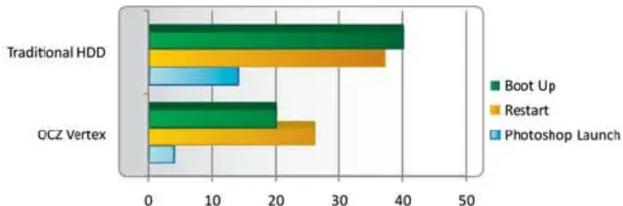
Because they have up to 100x more throughput than 15K RPM spinning hard drive disks, SSDs allow more to get done in less time for a state-of-the-art computing experience. Boot up quicker, open applications in half the time, and transfer files faster than you thought possible.
Time in Seconds (Lower is Better)

SSDs are more responsive
Random Read Latency

Systems with SSDs feel snappier and more responsive thanks to their incredibly fast access latencies. While HDDs are fastest when the data you want is in the vicinity of the read/write heads, all parts of a SSD are accessed the same way...fast.

SSDs require less power
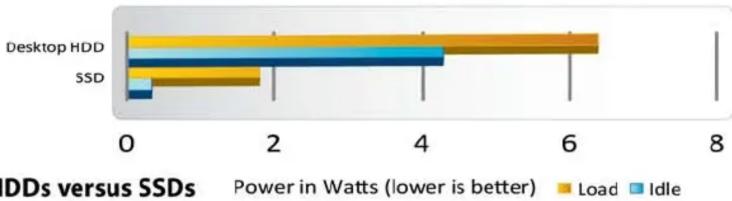
A good SSD delivers an order of magnitude better performance per watt than even a very efficient hard drive
- Longer battery life
• Less power strain on system - Cooler computing environment
- Leads to a quieter notebook or desktop
Power requirements are exceedingly higher for HDDs versus SSDs
Desktops

SSDs are quieter, cooler, and lighter
With no moving parts, SSDs are able to stay cooler and quieter and because of their architecture weigh much less than hard drives

SSDs can save businesses money in the long run
Significantly more HDDs are required to complete the same amount of Input/Outputs


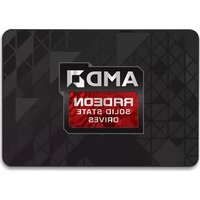

Brand : OCZ
Model : Agility 2 SATA II 2.5
Category : Computer accessory