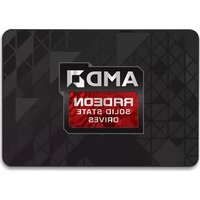
Radeon R7 - SSD OCZ - Free user manual and instructions
Find the device manual for free Radeon R7 OCZ in PDF.


| Product Type | SSD (Solid State Drive) |
| Brand | OCZ |
| Model | Radeon R7 |
| Interface | SATA III (6.0 Gbps) |
| Form Factor | 2.5-inch |
| Capacity | 240 GB |
| Read Speed | Up to 550 MB/s |
| Write Speed | Up to 530 MB/s |
| NAND Flash Type | MLC |
| Controller | Indilinx Barefoot 3 |
| Power Consumption (Active) | 2.5 W typical |
| Power Consumption (Idle) | 0.5 W |
| Operating Temperature | 0°C to 70°C |
| Dimensions (L x W x H) | 100 x 69.85 x 7 mm |
| Weight | 77 g |
| Features | Silent operation, shock resistant, TRIM support, S.M.A.R.T., low latency |
| Maintenance | No defragmentation needed; firmware updates available |
| Safety | Lead-free, RoHS compliant |
| Spare Parts & Repairability | No user-serviceable parts; warranty covers defects |
| General Information | Designed for desktop and laptop upgrades; warranty 3 years |
Frequently Asked Questions - Radeon R7 OCZ
User questions about Radeon R7 OCZ
0 question about this device. Answer the ones you know or ask your own.
Ask a new question about this device
Download the instructions for your SSD in PDF format for free! Find your manual Radeon R7 - OCZ and take your electronic device back in hand. On this page are published all the documents necessary for the use of your device. Radeon R7 by OCZ.
USER MANUAL Radeon R7 OCZ
Some of the best gaming PCs and workstations use AMD Radeon™ graphics, and now there is finally a storage solution to match. Prepare yourself for a new level of performance with Radeon™ Solid State Drives. Superior gaming, system responsiveness, and application performance are now at your fingertips with cutting-edge SSD technology designed to deliver a storage experience second to none. If you are saying good-bye to your hard drive, expect faster boot-ups, insane speed, and scorching fast load times from your new AMD Radeon™ SSD. Enjoy!
Please be sure to check www.ocz.com/consumer/download/firmware for the latest firmware updates.
Note: The following instructions are a general guideline for the SSD installation and should act as a complement to your system's owner manual.
SSD HANDLING PRECAUTIONS
- Store the SSD in the included anti-static bag until it is ready for installation.
- To minimize static electricity, touch a metal surface before handling the SSD.
- Do not open or tamper with the SSD enclosure; doing so will result in the voiding of your warranty.
- Keep the drive away from direct sunlight, moisture, and extreme temperatures.
LAPTOP INSTALLATION
- Power off the system, disconnect all power cables, and remove the battery.
- Locate the hard drive access panel; unscrew and remove the access panel.
- Disconnect and remove the current storage drive from the drive bay (refer to your system's user manual)
- Remove all brackets and connectors from your HDD and install it on the SSD (if necessary).
Note: If a proprietary connector and/or bracket are present on the HDD, carefully remove it and connect it to the SSD. Systems will vary and these items may or may not be present.
-
Insert the SSD into the drive bay carefully aligning the SSD with the SATA* connectors.
-
Secure the SSD in the drive bay. Reinstall the access panel and insert the battery back into the system.
-
Power on your system to verify a successful installation. For a boot drive, this is signified by the BIOS prompting OS installation. For a secondary drive, follow the format instructions below.
Note: If the SSD will be your primary boot drive, please refer to your operating system's user manual for further OS installation instructions. If this SSD will be used as a secondary drive, formatting the drive is required before use.
*SATA III is backwards compatible with SATA II. However, connecting a SATA III device into a SATA II connection will result in reduced performance.
DESKTOP INSTALLATION
-
Power off the system and disconnect all power cables.
-
Remove the system's outer panel (refer to your system's user manual).
-
If your system provides a 2.5-inch drive bay(s), there is no need for a 3.5-inch adapter bracket.
-
If your system does not provide a 2.5-inch drive bay(s), you will need to mount the SSD into the included 2.5-inch to 3.5-inch adapter bracket
-
Install the SSD into an available drive bay.
-
Connect one end of both the SATA* data cable and power cable to the SATA connectors on your motherboard and the remaining ends to your SSD.
-
Reinstall the outer panel and reconnect the power cable to your PC.
-
Power on your system to verify a successful installation.
Note: If the SSD will be your primary boot drive, please refer to your operating system's user manual for further OS installation instructions. If this SSD will be used as a secondary drive, formatting the drive is required before use.
*SATA III is backwards compatible with SATA II. However, connecting a SATA III device into a SATA II connection will result in reduced performance.
FORMATTING THE SSD IN WINDOWS
1a. For Windows 8:
- Enter the shortcut key "Windows key + X".
- Select "Disk Management".
1b. For Windows 7 and older:
- Click on the Windows Start Button, right-click "Computer" and select "Manage". The "Computer Management" window will pop up.
-
On the left-hand menu (under "Storage") select "Disk Management". Note: If a popup window appears asking you to initialize the disk. Click "OK"
-
Right-click the newly "unallocated" disk, then select "New Simple Volume" and follow the on-screen instructions.
Note: No change is needed to default Simple Volume settings.
- Click "Finish" when prompted.
- The SSD is now formatted and ready for OS installation.
FAQ
Q: Is TRIM supported on my AMD Radeon™ SSD?
A: Yes, your AMD Radeon™ SSD features TRIM support, but your operating system must also natively support TRIM for this feature to function properly.
Q: Why does my drive seem to be running slow?
A: Even though your SSD is compatible with previous generations of the SATA interface, it must be attached to a SATA III 6Gb/s connection for maximum performance.
Q: Where can I find the Radeon™ Toolbox to update my firmware, secure erase, and check drive information?
A: You can download the Radeon™ Toolbox for your product at www.ocz.com/consumer/download/firmware
Q: Do I need to align my partition(s)?
A: Windows 7/8/Vista aligns partitions by default, but older operating systems such as Windows XP will require manual alignment.
Q: What operating systems are compatible?
A: Windows, Linux and MAC OS X.
NEW PRODUCT: LIMITED FOUR (4) YEAR WARRANTY
PURCHASED AS REFURBISHED PRODUCT: LIMITED 6 MONTH WARRANTY
REFURBISHED PRODUCT RECEIVED AS RMA REPLACEMENT: ORIGINAL WARRANTY OR GREATER OF 30 DAYS FROM THE DATE OF REPAIR/REPLACEMENT, WHICHEVER IS LONGER.
**PLEASE READ THIS LIMITED WARRANTY AGREEMENT ("AGREEMENT") CAREFULLY BEFORE YOU INSTALL OR OTHERWISE USE THE AMD RADEON™ SATA III SOLID STATE DRIVE (THE "PRODUCT").**
This Agreement is a binding legal agreement between OCZ Storage Solutions, Inc. ("OCZ") and the person or company that purchased the Product ("you"). BY INSTALLING OR USING THE PRODUCT, YOU ARE AGREEING TO BE BOUND BY THIS AGREEMENT. If you do not agree to this Agreement and you have not installed or used the Product, you may return the unused Product to the authorized OCZ retailer from which you purchased the Product, for a refund of the purchase price that you paid for the Product, provided that (i) you return the Product within the time period required by the authorized OCZ retailer (but in any event no later than thirty (30) days after the date of your purchase), (ii) you include with your return the original purchase receipt (or a valid copy thereof) and all packaging, documentation and other accompanying items, and (iii) you otherwise comply with all of the requirements of the authorized OCZ retailer's return policy. If, and only if, the authorized OCZ retailer from which you purchased the Product has a final sale policy whereby the retailer does not accept product returns under any circumstances, you may contact OCZ. In such circumstances, OCZ may, but will not be obligated to, accept the return of, and issue a refund for, the Product.
As part of our ongoing commitment to excellence for our customers, OCZ warrants, for a period of four (4) years from the date of your purchase of the Product (the "Warranty Period"), that the Product, under normal use, will be free from material defects in material and workmanship and will conform to OCZ's published specifications (this "warranty"). This warranty covers only genuine OCZ products purchased from OCZ or an authorized OCZ retailer; excluded are products that OCZ, in OCZ's sole discretion, determines are counterfeit or not made by or for OCZ. This warranty is only for the benefit of the original direct purchaser of the Product from OCZ or an authorized OCZ retailer. No warranty is made to any subsequent purchaser or other user of the Product; this warranty is not transferable.
Exclusions From Warranty
This warranty will not apply to, and OCZ will have no liability or obligation with respect to, problems or damage resulting from, but not limited to, any of the following: (i) accident, modification, neglect, abuse, careless or incorrect handling, misuse or improper operation, disassembly, misapplication or use in unusual physical environments or under operating conditions not approved by OCZ (including, but not limited to, use of the Product with an improper voltage supply); (ii) normal wear and tear; (iii) removal of label(s) or sticker(s) provided on or with the Product (including all warranty or quality-control stickers, product serial or electronic numbers); (iv) problems relating to or residing in non-OCZ hardware, software or other items with which the Product is used; (iv) use in an environment, in a manner or for a purpose for which the Product was not designed or not in accordance with OCZ's published documentation; (v) installation, modification, alteration or repair by anyone other than OCZ or its authorized representatives; (vi) problems that do not relate to materials or workmanship or that have an insignificant impairment on the use or operation of the Product; or (vii) problems related to consumables. Additionally, OCZ will have no liability or obligation to recover any data lost due to the failure of a flash memory device.
Obtaining Warranty Service
Prior to submitting a warranty claim, you should contact OCZ technical support or visit www.ocz.com for technical assistance in resolving the problem. You should submit your warranty claim directly to OCZ. Our customer service contact information can be found on the web at www.ocz.com/consumer/support/faqs or in the documentation included with the Product.
Remedies
If you submit to OCZ written notice of a valid claim during the Warranty Period, OCZ will take one of the following actions (as determined by OCZ in its sole discretion): (i) repair the Product using new or refurbished parts; (ii) replace the Product with a product that is new or used but made with serviceable refurbished and at least functionally equivalent parts; or (iii) issue a pro-rated refund of the purchase price for the Product based on the length of time (in years) remaining in the Warranty Period and/or current market value. If your Product is obsolete or discontinued and OCZ determines, in its sole discretion, that the Product cannot be repaired, OCZ will replace the Product with another product, selected at OCZ's sole discretion, with the same or similar features and which is of greater or equal value as the original product's current value. If OCZ provides you with a repaired or replaced product, such repaired or replaced product will be covered by this warranty for the balance of the original Warranty Period or thirty (30) days from the date of repair or replacement, whichever is longer.
The foregoing obligations of OCZ are contingent upon you, at your own expense, returning to OCZ the Product in accordance with OCZ's instructions, together with your return the original purchase receipt (or a valid copy thereof) and all packaging, documentation and other accompanying items. You may be required by OCZ to pay handling and transportation charges, as well as any applicable tariffs, duties, taxes, or other fees (“Return Costs”). In addition to Return Costs, if OCZ determines that a returned product is not subject to a valid warranty claim, OCZ may require you to pay the costs of providing any replacement products or repair services.
In order to obtain a replacement product prior to returning a defective Product (an “Advanced Replacement”), OCZ requires that you provide a valid credit card authorization, which will be charged for the manufacturer's suggested retail price of the replacement product(s) as security for OCZ providing you the replacement unit. If you return the replaced product in accordance with OCZ's instructions, and OCZ receives the replaced product within thirty (30) days from the date of credit card authorization, OCZ will reverse the charge to your credit card for the amount charged for the replacement unit. However, if you fail to return the replaced product in the condition represented in the original replacement request and/or OCZ does not receive the replaced product as so instructed by OCZ, OCZ will not reverse the charge on your credit card for the authorized amount.
You acknowledge and agree that (A) repairs or replacements of products may be provided using new or used or refurbished parts, and (B) as a condition to receiving any refund, you must return to OCZ (or to a location designated by OCZ) the Product for which the refund is requested, and (C) all returned products become OCZ's property or the property of OCZ's authorized distributor, as applicable. OCZ reserves the right to modify its service options and policies at any time without notice to you.
No Other Warranties
TO THE MAXIMUM EXTENT PERMITTED BY APPLICABLE LAW, (A) THE OBLIGATIONS OF OCZ SET FORTH HEREIN WILL BE OCZ'S SOLE OBLIGATIONS, AND YOUR EXCLUSIVE REMEDY, FOR ANY BREACH OF THIS WARRANTY AND FOR ANY OTHER CLAIM ARISING OUT OF OR RELATING TO THE OPERATION, QUALITY, CONDITION, PERFORMANCE OR DESIGN OF THE PRODUCT, AND (B) THIS WARRANTY IS THE EXCLUSIVE WARRANTY GIVEN BY OCZ AND IS IN LIEU OF, AND OCZ HEREBY DISCLAIMS, ALL OTHER REPRESENTATIONS, WARRANTIES AND GUARANTEES OF ANY KIND, EXPRESSED OR IMPLIED, STATUTORY OR OTHERWISE, INCLUDING WARRANTIES OF MERCHANTABILITY OR FITNESS FOR A PARTICULAR PURPOSE, TITLE, NON-INFRINGEMENT AND ANY WARRANTIES THAT MAY ARISE FROM A COURSE OF CONDUCT, TRADE USAGE OR TRADE PRACTICE. No OCZ reseller, agent, or employee is authorized to make any modification, extension, or addition to this Agreement or the warranty provided herein. Some states or other jurisdictions do not allow the exclusion of an implied warranty, so the above disclaimers may not apply to you, and you may have other legal rights that vary by jurisdiction. Where applicable, all implied warranties shall be limited to the Warranty Period.
Limitations of Liability
To the maximum extent permitted by applicable law, OCZ's cumulative liability for all losses and damages under this Agreement or in any way relating to the Product, whether arising out of contract, tort (including actions based on negligence, strict liability, and willful and/or intentional conduct), warranty, indemnity, or other theory of liability and whether related to the design, performance, use, defect or failure of a product, will not exceed the net purchase price paid by you to OCZ or OCZ's authorized retailer for the specific Product giving rise to the claim for such liability. TO THE MAXIMUM EXTENT PERMITTED BY APPLICABLE LAW, IN NO EVENTWILL OCZ OR ITS DISTRIBUTORS, RESELLERS OR SUPPLIERS BE LIABLE FOR ANY INDIRECT, CONSEQUENTIAL, INCIDENTAL, COLLATERAL, EXEMPLARY, PUNITIVE, RELIANCE OR SPECIAL DAMAGES (INCLUDING, WITHOUT LIMITATION, BUSINESS INTERRUPTION OR LOSS OF DATA (DIRECT OR INDIRECT), GOODWILL, REPUTATION, REVENUE, OR PROFITS), EVEN IF OCZ OR ANY OF ITS DISTRIBUTORS, RESELLERS OR SUPPLIERS HAS BEEN ADVISED OR MADE AWARE OF THE
POSSIBILITY OF ANY SUCH LOSSES OR DAMAGES AND REGARDLESS OF WHETHER THE CLAIM IS BASED ON CONTRACT, TORT (INCLUDING NEGLIGENCE, STRICT LIABILITY, AND WILLFUL AND/OR INTENTIONAL CONDUCT), WARRANTY, INDEMNITY, OR OTHER THEORY OF LIABILITY. Some states or other jurisdictions do not allow limitations of liability, so the above limitations may not apply to you, and you may have other legal rights that vary by jurisdiction.
Miscellaneous
This Agreement can only be modified in writing signed by you and an authorized officer of OCZ, except as otherwise provided herein. Should any term of this Agreement, for any reason, be held to be illegal or unenforceable by a court of competent jurisdiction, the remaining terms of this Agreement shall continue in full force and effect, and the offending term shall be limited or modified to the extent necessary to make it enforceable. This Agreement shall be construed in accordance with the internal laws of the State of California, without application of conflict of law principles. The United Nations Convention on Contracts for the International Sale of Goods (CISG) will not apply. In any action to enforce this Agreement or arising out of this Agreement, you hereby consent to the jurisdiction of and venue in the courts of the State of California and the federal courts located within Santa Clara County, California, for the adjudication of all matters relating hereto or arising hereunder. You agree not to bring suit against OCZ in any jurisdiction other than Santa Clara County in the State of California.
Special Terms for Customers Purchasing the Product in Australia -- Australia ACCC Warranty Regulation
If and only if you purchased the Product in Australia, the following special terms apply to you: the Product so purchased comes with guarantees that cannot be excluded under the Australian Consumer Law. You are entitled to a replacement or refund for a major failure and for compensation for any other reasonably foreseeable loss or damage. You are also entitled to have the Product repaired or replaced if the Product fails to be of acceptable quality and the failure does not amount to a major failure. The warranty starts from the data of purchase. Proof of purchase that includes the original data is required for the warranty services. If the Product is defective and not caused by accident or improper usage please properly package and return the Product at your expense to the place of purchase, or kindly contact us.
For additional support, log on to www.ocz.com/consumer/support
OCZ Storage Solutions- A Toshiba Company product. AMD brand, technology names and logos used under license from Advanced Micro Devices, Inc.

STORAGE SOLUTIONS
A Toshiba Group Company



- SSD HANDLING PRECAUTIONS
- LAPTOP INSTALLATION
- DESKTOP INSTALLATION
- FORMATTING THE SSD IN WINDOWS
- 1A. FOR WINDOWS 8
- 1B. FOR WINDOWS 7 AND OLDER
- FAQ
- EXCLUSIONS FROM WARRANTY
- OBTAINING WARRANTY SERVICE
- REMEDIES
- NO OTHER WARRANTIES
- LIMITATIONS OF LIABILITY
- MISCELLANEOUS
- SPECIAL TERMS FOR CUSTOMERS PURCHASING THE PRODUCT IN AUSTRALIA -- AUSTRALIA ACCC WARRANTY REGULATION
Brand : OCZ
Model : Radeon R7
Category : SSD