
PG-P4013 - Drill IPEGA - Free user manual and instructions
Find the device manual for free PG-P4013 IPEGA in PDF.


| Product Type | Game Controller Extension Key Converter |
| Brand | IPEGA |
| Model | PG-P4013 |
| Compatibility | PS4, PC, Android, iOS |
| Dimensions (approx.) | 120 mm x 60 mm x 20 mm |
| Weight (approx.) | 50 g |
| Power Supply | USB powered, 5V DC |
| Working Current | 20 mA |
| Standby Current | < 100 μA |
| Wireless Protocol | Bluetooth 4.0 |
| Key Function | Extends controller buttons, programmable macros |
| Cleaning Method | Wipe with soft dry cloth; avoid liquids |
| Storage Temperature | -20°C to 60°C |
| Operating Temperature | 0°C to 40°C |
| Material | ABS plastic |
| Warranty | 1 year |
Frequently Asked Questions - PG-P4013 IPEGA
User questions about PG-P4013 IPEGA
0 question about this device. Answer the ones you know or ask your own.
Ask a new question about this device
Download the instructions for your Drill in PDF format for free! Find your manual PG-P4013 - IPEGA and take your electronic device back in hand. On this page are published all the documents necessary for the use of your device. PG-P4013 by IPEGA.
USER MANUAL PG-P4013 IPEGA
-
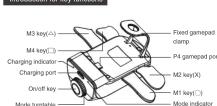
This product is mainly suitable for P4 game controller
-
This product can convert P4 Game controller to be compatible with P4, P3, N - 8, PC Android and iOS devices for game operation:
-
The product supports the TURBO function, and also supports the function of
four paddle user-defined setting keys (the factory default is X/□/□/△ function);
- This product has the function of power interrupt & 5. Economic structure, comfortable bond feeling
★ Due to the official game platform software upgrade or source code changes
and other not resist factors caused of some games can not be played or
connected with our game pad. iPega has no responsibility, iPega reserves
the right of final interpretation.

Electrical Parameter
-
Working voltage: DG3.7V
-
Working current ≤50 mA/
access P4 gamepad ≦100 m vibration working current ≦20
-
Static current: <20uA
-
Continuous gameplay time:
-
Input voltage/current: DC5V/500mA
-
Charging time: almost 4 hours
-
BT3.0, transmission distance: GBM
-
Battery capacity: 1000mAh
-
Standby time: up to 30 days once
fully charged
广力云智慧零售收银系统
dian:
-
connecting each mode for the first time,
responding mode and press the middle data cable to connect the device to the
successful, connect the device to the P4
data cable to enter the wireless mode;
a button can be wireless connection;
HON TO THE SHUTDOWN POSITION AND PRESS
ole for the first time, you need to connec
s for the mode light to go out, unplug the
ssful, you can enter the wireless mode;





Instruction of Android / iOS device wireless connection:
(iOS only supports 13.0 or above system)
-
Turn the product in each switch to Mobile phone model: ☐ is
-
Turn the product knob switch to mobile phone mode; 2. Press the middle button to turn on:
-
Connect the product to the P4 gampad, and then press the PS but
P4 gamepad, the LED light flashes quickly;
- Turn on the wireless mode of the phone, find the name of Android device (wireless controlless) wireless nameof iOS device /DUN SHOCK 4 wireless
(limited) controller: limited monitor 100 device (DUALSHOLDER controller) click on the pairing connection:
- When using Android devices, it is recommended to use the grape game has
connection IOS device, recommend the use of Clamevica Live game platform, game iOS NFI name director Apple Ann Star star arcb diviunled
some iOS MFI game directory: Appli App Store store search download "3emeryine Lives" name platform or search MEL - Gemeloft and most names or
be supported;













At the same time clear 4 dial key method:
When the gamepad is connected to the console, dial the mode switch to the
key mapping position block all function(s) lono press the top button 3 seconds to clear all dial
button function (gamepad long vibration once prompt):
Tube function
TURBO FUNCIONA
Setting method:
- If the gamepad is connected to the game console, dial the mode switch to
the turbo setting position and press the top switch to enter the setting mode (temporarily blank all functions of the namespace (when setting):
-
Press the button need to set (such as the X button), after clearing is
-
It has the bottom line to devise (such as the Warden), after stopping it completed, the gamepad will vibrate once and it will automatically save and e
-
key can be set at the same time
Single key clearing method:
I turn the mode switch to turbo setting position and press the top switch to an the setting mode (all functions of the handle are temporarily shielded during
setting; Press the set key (e.g. x key), after clearing, the handle vibrates on
and automatically saves and exits;
All key clearing methods:
I am the mode switch to turbo setting position (sim portionally shield all functions the handle when clearing):
Press and hold the top button for 3 seconds to clear all turbo functions (after
clearing, the handle will vibrate for a long time and will automatically save an
(###),
On/off keys long press function:
(五)
In addition to restore factory settings and shutdown, the rest of the mode has long press function:
Remove the wireless address stored in the current mode P4, P3.
N · 8 , PC , Android/ iOS and shut down; keys mapping, TURBO delete
the build map settings and TURBO settings stored in the current
Restore factory s
1.2.1.1.
Dial the mode switch to restore the factory setting position, press the
top switch to restore the factory setting
Power down and saving function
The Ground Truth image displays a single, solid horizontal line. According to Rule 2 (UNDERSCORE & LINE RULES), if the GT contains lines used for stylistic emphasis or as background elements (like ruled paper), the OCR result must ignore them. The provided OCR content is "____", which consists of four underscores. This is incorrect because underscores are not equivalent to a solid line and are not permitted under the “Stylistic/Background Lines (Ignore)” rule. Outputting underscores for a stylistic line violates the rule and constitutes an error. Therefore, the OCR result is inconsistent with the Ground Truth.
Product with power-down saving function, various m
separate (button preset), will be saved when setting
Other instructions
Other instructions
- When the device is in P3 mode, it will shut down when plugged into the
P4 game console. Others are the same
-
Boot directly into the build map or turbo mode will shut down;
-
Before setting the key map or TURBO change mode please sh
first;
-
Unconnected devices will automatically shut down within 30 seconds;
-
Too low battery power will cause the wireless connection but the button
data cannot be upload
gameped is inserted
- It is recommended to fully charge of the original P4 gamepad when using
2.1.1.3.
Operation Instructions
(No text to output)
P4 game P3 game N-S game PC Android iOS games
Console Console Console Computer device device Only
Paring mode | Only supports | Support wireless and divided | Only supports | Only support wireless
Wireless connection and wired connection wired connection wireless connection
FOR: Blue, Green Red, Grey White
RGB indicators Blue Green Red Cyan Purple
color After each mode is successfully connected, the color of indicator is controlled by the game console
(1) 2017年1月1日
Charging function
Charging function
When charging in ON/OFF state, the bule indicator will be flash quickly
Fully charged, the blue indicators will be off;
Notes:
-
-
Please do not store this product in wet or high-temperature areas.
-
The product has built-in batteries, please do not place near fire and other
dangerous locations
- Don't knap, beat, drub, pierce, or try to decompose this product, to avoid unnecessary demand to the product.
unnecessary damage
- Non professional personnel should not disassemble the product, otherwise it will not be saved in the after-sale warranty service.
It will not be covered in the after-sales warranty service. 5. Due to the official name platform software upgrade or
- Due to the official game platform software upgrade of source code changes and other not assist factors caused of some games can not be
Change and other non-hatilitators called of some games can not be played as posted with six games. iRosa has no responsibility. iRosa reserves
the right of final interpretation
The Right of the Interpretation



ípega
红蝎子手柄扩展按键转换器
产品说明书 PG-P4013
广西特点.
m = 311
开/关机按键长按功能:

- Electrical Parameter
- Instruction of Android / iOS device wireless connection:
- Tube function
- TURBO FUNCIONA
- (###),
- On/off keys long press function:
- Restore factory s
- 1.2.1.1.
- Power down and saving function
- Other instructions
- 2.1.1.3.
- Charging function
- Notes:
- ípega
- 红蝎子手柄扩展按键转换器
- 产品说明书 PG-P4013
- 广西特点.
- m = 311
Brand : IPEGA
Model : PG-P4013
Category : Drill