B-5000 Sparkling - Faucet Billi - Free user manual and instructions
Find the device manual for free B-5000 Sparkling Billi in PDF.


| Product Type | Under-sink sparkling and chilled water faucet |
| Brand | Billi |
| Model | B-5000 Sparkling |
| Dimensions (Faucet) | Approx. 200 x 50 x 300 mm (WxDxH) |
| Weight (Faucet) | Approx. 1.5 kg |
| Power Supply | 220-240V AC, 50/60Hz |
| Power Consumption | Max 100 W (standby: <1 W) |
| Water Temperature Range | Chilled: 4-10°C; Sparkling: 4-10°C; Ambient: room temperature |
| Carbonation System | Integrated CO2 cylinder (external, user-replaceable) |
| Filtration | Built-in carbon filter (replaceable every 6 months) |
| Tank Capacity (Chilled/Sparkling) | 1.5 L |
| Installation Type | Under-sink unit with separate faucet on countertop |
| Recommended Water Pressure | 2-6 bar |
| Safety Features | Child-proof lock on boiling button; automatic shut-off if overheating |
| Maintenance | Clean nozzle monthly; descale every 3-6 months; replace filter and CO2 as needed |
| Included Accessories | Faucet, under-sink unit, CO2 cylinder (first), filter cartridge, installation kit |
| Warranty | 2 years parts and labor |
| Compliance | CE, WRAS (UK), NSF 42/53 (filter) |
Frequently Asked Questions - B-5000 Sparkling Billi
User questions about B-5000 Sparkling Billi
0 question about this device. Answer the ones you know or ask your own.
Ask a new question about this device
Download the instructions for your Faucet in PDF format for free! Find your manual B-5000 Sparkling - Billi and take your electronic device back in hand. On this page are published all the documents necessary for the use of your device. B-5000 Sparkling by Billi.
USER MANUAL B-5000 Sparkling Billi
natural_image
Close-up of a modern stainless steel faucet with a handle and top blade (no text or symbols visible)Contents
Warnings & Important information ..... 2
General Maintenance....3
Features and Modes 4
Tap Options & Operation XL Tap....5
Dispenser Icon Codes XL Tap....6
Filtration Information 7
Changing the filter 8
Changing the CO_2 cylinder 9
Service Support 11
Warnings & Important information
- For continued safety of this appliance it must be installed, operated and maintained in accordance with the manufacturer's instructions.
- Your appliance should be installed by a suitably qualified tradesperson.
- For correct operation of this appliance it is essential to observe the instructions as outlined in this booklet.
- Do not use this appliance with water that is microbiologically unsafe or with water of unknown quality without adequate disinfection before or after the system. Systems certified for cyst reduction may be used on disinfected water that may contain filterable cysts.
- Filter replacement must be performed at intervals of not more than 12 months.
- Use this appliance only as directed in these instructions and only for its designed purpose.
- This appliance is not intended for use by persons (including children) with reduced physical, sensory or mental capabilities, or lack of experience and knowledge, unless they have been given supervision or instruction concerning use of the appliance by a person responsible for their safety.
- This appliance is not suitable in an area where a water jet could be used.
- Children should be supervised to ensure that they do not play with the appliance.
- DANGER: The operation of the thermal cut-out indicates a possibly dangerous situation. Do not reset the thermal cut-out until the water heater has been serviced by a suitably qualified person.
- WARNING: Do not connect any restrictor or pressure relief device to the vent pipe of this water heater if installed.
- If the supply cord is damaged, it must be replaced by the manufacturer, its service agent or similarly qualified persons in order to avoid creation of a hazard.
- Billi hose sets as supplied with the appliance are to be used. Old or other manufacturer's hose sets should not be re-used.
- If the appliance is located where the ambient air temperature could fall below 4°C when the heater is not in use, do not turn off the power supply to the appliance. This safeguard does not offer the same protection to the connecting pipework and fittings.
- The ambient temperatures this unit should operate within are 4^ to 45^ .
- Turn off power to unit, by unplugging the power cord from the power point, if water supply is turned off
Caution and safety
Boiling water is dangerous and can cause severe burns, particularly with young children. Boiling water must always be handled with caution. Use this appliance only as directed in these instructions and only for the purpose for which it has been designed. Your Billi B-5000 is designed to be safe and practical. In an environment with young children, it is recommended that the boiling water safety switch is activated.
The following safety features have been included:
- Ergonomic levers
- Levers/touch activations located safely above water outlet.
- Smooth electronically controlled boiling water flow rate. Flow is briefly reduced as water first enters cup to prevent splashing.
- Dispenser remains cool to touch.
- Childproof safety switch.
- Boiling water Safety Isolation mode.
General Maintenance
Your B-5000 Sparkling has been designed to require minimal maintenance other than replacement of filter cartridges. During each filter change, check all water connection fittings for signs of leakage. Check all tubing for any signs of damage. Check the cupboard area around the base of unit for any signs of moisture. Ensure side vents of the under bench module are kept clear and airflow is not obstructed. Restricted airflow will cause inefficient operation of the refrigeration system.
—Cleaning the dispenser
Your B-5000 Sparkling Dispenser is fabricated from solid zinc casting material with tough protective chrome plating. Proper care of the Billi Electronic dispenser crucial; Avoid using abrasive cleaners. Wipe clean using a damp cloth. Use of a non-solvent, non-smearing cleaner such as Windex is recommended. Do not pour water over dispenser.
Cupboard ventilation requirements
Your B-5000 Sparkling underbench module requires cupboard ventilation, refer to install guide for details. Care should be taken when using the cupboard space, to avoid stretching or damaging plastic pipe work. Check fittings and tubing at each filter change for signs of damage or leakage. Always ensure access to power switch and water supply tap is not restricted.
Features and Modes
Dispenser Swivel
The B-5000 dispenser incorporates a swivel function, allowing the dispenser to be swung out of the way if more sink space is required. A central position stop provides positive location during normal usage.
Safety Timeout
Your B-5000 Sparkling incorporates a water delivery Safety Timeout to prevent an uncontrolled flow of water. Water flow stops automatically after a set time interval. Flow can be started again by releasing and pressing the dispenser lever or buttons.
Boiling water timeout - 10 secs;
Chilled water - 1 minute.
Childproof safety switch
Your B-5000 Sparkling is fitted with a childproof safety lock-out feature to protect against accidental dispensing of boiling water and the risk of burns. Please refer to safety switch settings on page 5.
Self learning timer (Ecolntelligence)
Your Billi B-5000 incorporates an energy saving self learning timer. This timer learns the users behaviour over a period of time (up to one month) and pre-empts the need for water throughout each 24-hour period over a week. Data is lost when the power is removed however learnings from the first days use is applied to the entire learning cycle so the unit will quickly resume intelligent timer operation. When the self-learning timer is enabled the unit will enter standby if no water is expected to be used for a 3 hour or more period. The unit will shutdown completely if no water is expected to be used for a 6 hour or more period. In office environments this feature will typically cause the unit to turn off outside normal business hours, ie: overnight and on weekends. In domestic environments with no one home during working hours the unit will turn off through each weekday but may remain on at night and during weekends. See page 6 for dispenser icons. To activate, refer to Options, page 5.
Standby Mode
Standby operation may be optionally enabled to reduce power consumption. In standby mode the hot water set point is reduced to 72°C. When enabled, standby is invoked after two hours from the time of last use. When a tap lever or button is pressed in standby no water is dispensed. The indicators will flash to indicate the water is not ready. The lever or button can be repressed to dispense water. During Standby mode the moon & star icon will flash. See page 6 for dispenser icons. To activate, refer to Options, page 5.
Boiling water disabled mode
Your B-5000 Sparkling features an additional boiling water safety isolation feature. Once activated, delivery of boiling water becomes totally disabled. Chilled water can be dispensed normally.
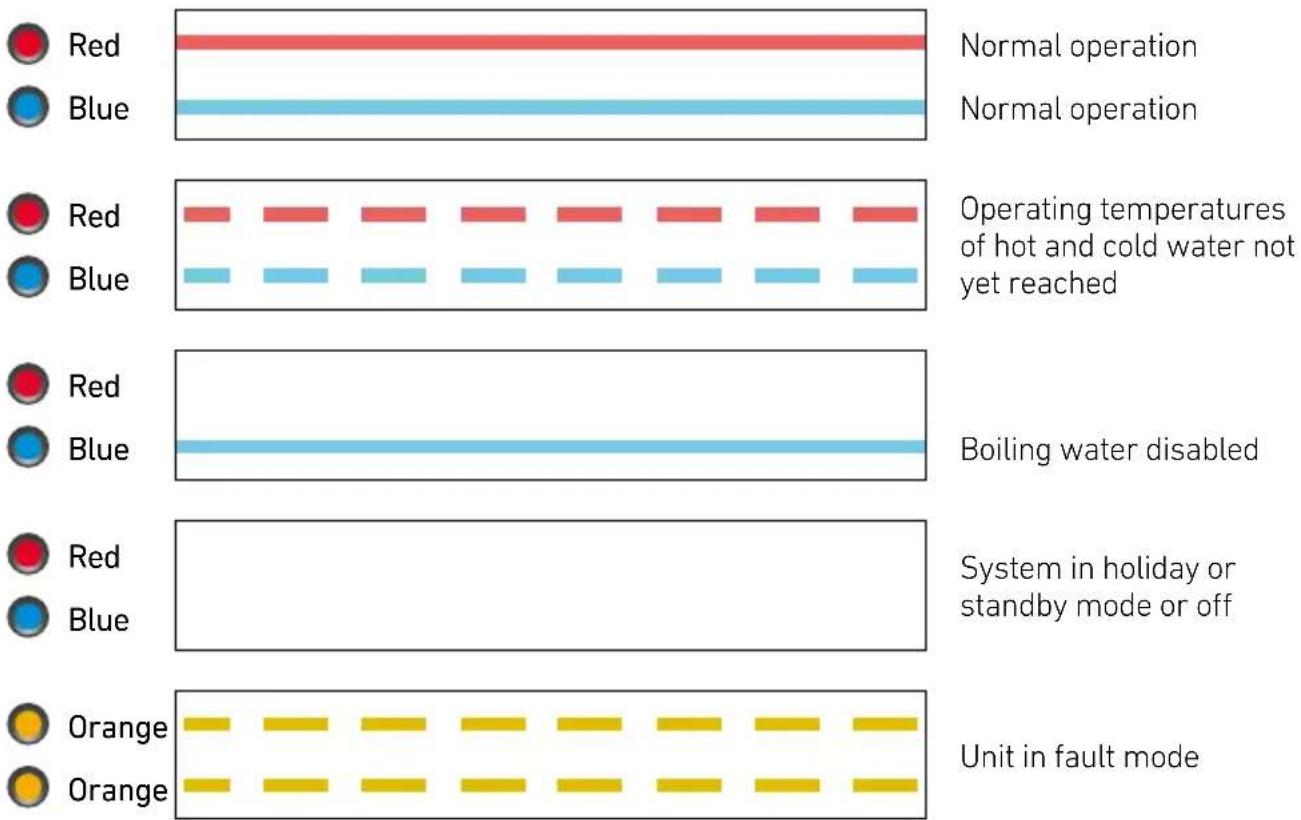
During this mode, the red, hot, icon will remain off. To activate, refer to Options & Operation, Safety Switch Settings, page 5.
Holiday mode
Holiday Mode is provided to save energy when the unit will not be used for long periods. In this mode both the water chiller and water heater are disabled and the unit will use very little power. Pressing the Pressure Relief button places the unit in Holiday Mode. The unit will exit Holiday Mode if either the power is turned off then on or if any of the levers are pressed. The Self Learning Timer will ignore user behaviour while the unit is in Holiday Mode and resume normal operation when the mode is terminated. Holiday Mode is indicated by the star & moon icon being illuminated. See page 6 for icon images.
Options and Operation
To operate, simply press the left lever to dispense boiling water and the right lever to dispense chilled. Pressing both levers will dispense sparkling water. When lifted the levers will latch for continual delivery, until released with a light press.
Operating modes can be selected by the user by entering Options Mode.
Within the options mode, you can set the safety switch through the hot water lever and power save mode through the cold water lever.
To enter the options mode:
- If the following sequence malfunctions, remove the sparkling unit control box and try again.
- Turn on the unit and wait for normal operation (red & blue icons are both illuminated constantly).
- Touch the safety switch indent at the back of the black panel and push both the hot and cold levers down. Hold both levers and safety switch for 3 seconds.
- Icons will flash yellow.
- Release both the levers & safety switch.
- Unit is now in options mode.
- If you wish to change or set the safety switch mode, follow the safety switch settings procedure below. If you wish to change or activate the power saving mode follow the power save mode settings procedure below.
Safety Switch settings
The Red padlock indicates the different safety settings enabled. To change or activate a setting once in options mode as above, press and release the hot (left) lever to scroll through the following options;
- Red Icon Off: indicates the hot tap is disabled.
- Padlock icon on, Red icon on: indicates safety switch is enabled
- Red Icon On: indicates normal operation with safety switch not enabled.
To save new setting and exit Options Mode, touch the safety switch and release. Wait 10 seconds for unit to return to normal operation, with the desired settings.
To dispense boiling water once the safety switch is activated simply touch the indent on the black panel, at the back of the tap. You will be able to dispense boiling water for 8 seconds. After 8 seconds the safety switch will automatically reactivate, and the red padlock icon will appear again.
Power save mode settings (EcoIntelligence, standby or on 24/7)
The Green icons on the tap indicate the power save level that is selected. To change or activate a setting once in options mode press and release the cold(right) lever to scroll through the following options;
- Green Leaf icon: indicates Eco Intelligence™ self learning timer is enabled.
- Moon & Star Icon on: indicates Standby Mode is enabled.
- Blue Icon On, no green icons: indicates system is in 24 hour continuous mode
To save new setting and exit Options Mode, press the safety switch and release. Wait 10 seconds for unit to return to normal operation, with the desired settings.
Holiday mode
To set press the pressure relief valve located under the unit cover beside the filter housing.
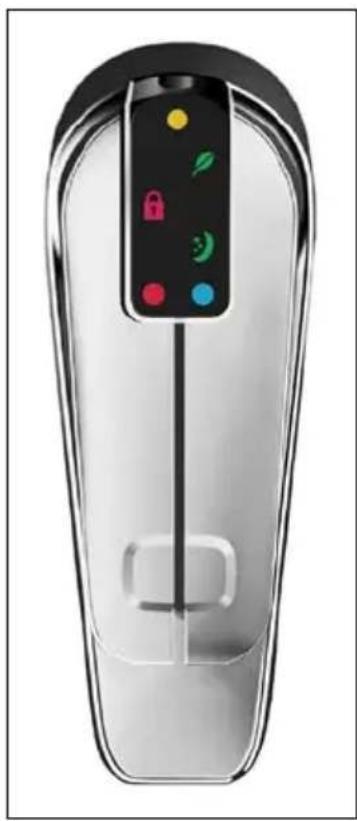
natural_image
Transparent smart car with a control panel and function buttons (no text or symbols visible)Dispenser Icon
Orange dot.
Flashes when filter change due. On constant when overdue.
Red lock illuminated.
Safety button activated. To use, press the indent on the back of the tap momentarily & lift or press the boiling lever.
Green leaf illuminated.
Eco intelligence.
Green moon & stars illuminated.
In holiday mode. Red & blue icons will not be displayed in this mode.
Green moon & stars flashing
In standby mode. Red & blue icons will not be displayed in this mode.
Red dot.
Flashes when heating up to temperature. On constant when boiling water ready. Off when in holiday or standby mode.
Blue dot.
Flashes when chilling. On constant when chilled water ready. Off when in holiday or standby mode. Red & blue dots will flash yellow if the unit goes into fault.
Dispenser Icon codes
Billi Filter Cartridges
The B-5000 Sparkling is fitted with single dual action filter incorporating sediment and chemical removal elements. All Billi B-5000 filters are manufactured using bacteria and biofilm resistant materials for improved water quality.
Premium filters provide better tasting water due to the high quality, carbon chemical removal filter. Sub micron rated, these filters have excellent chemical absorption, removing or reducing chlorine, volatile organic compounds (VOCs), chemicals, tastes and odours. Use only genuine filters as designed for this system. All drinking water filtration systems should be flushed after a period of non-use. If your B-5000 Sparkling has not been used for a period of 48 hours or more, flush the system for 1 minute.
Filter Change Due Monitor
The B-5000 Sparkling filter change due monitor operates by counting the number of cups dispensed and the number of days elapsed until a pre-set level is reached. Once reached, the yellow filter icon as pictured above will turn on. The B-5000 Sparkling will continue to operate while the filter indicator is flashing. Water filters installed in areas with higher levels of sediment will experience a reduced service life. It may be necessary to change filters before the change filter indicator flashes. If particularly dirty water is noticed coming through the water supply, e.g. from other tap ware, immediately place your B-5000 Sparkling into Holiday Mode by pressing the Pressure Relief button. This will help prevent premature blocking of the filter cartridges.
Replacement of Billi Filter Cartridge
Periodic replacement of your Filter Cartridge is necessary to maintain the cleanliness of your drinking water. Billi recommends a filter replacement every 6 months. A replacement filter change service is available. If you wish to install the replacement filter cartridges yourself, your Billi representative will provide genuine Billi replacement filter cartridge sets.
Billi Filter Cartridges – Reduces & Removal
| Filter Type | Order Part No. | Suits Micr. | Filters Sediment | Chlorine VOCs | Chemicals | Taste Odour | Fluoride Minerals | Expected Life | |||||
| Prem. | 994002 | B-5000 Sparkling | 0.2 Single | ✓ | ✓ | ✓ | ✓ | ✓ | Slight | 6 - 12 months | |||
| Stand. | 994001 | B-5000 Sparkling | 5.0 Single | ✓ | ✓ | ✘ | ✓ | ✓ | ✘ | 6 - 12 months |
Filter removal and replacement instructions
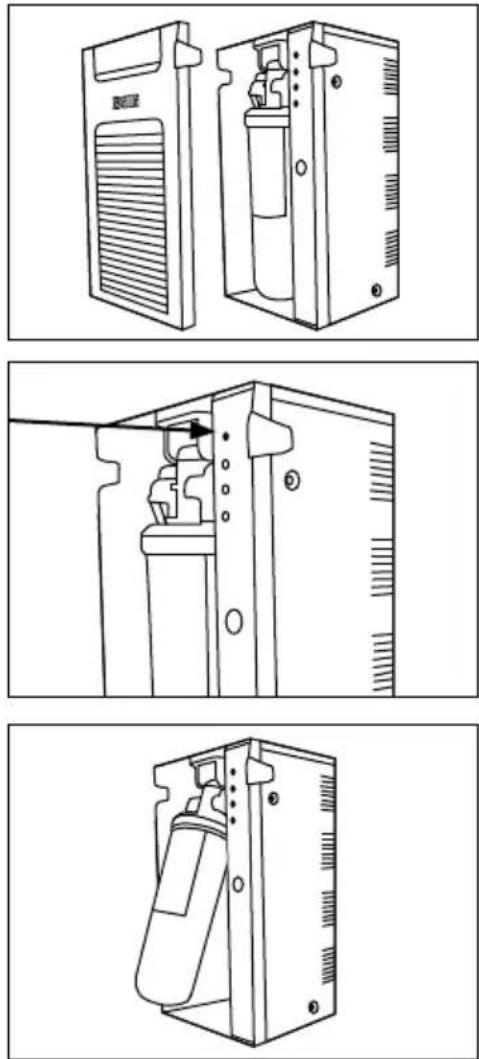
Important note: Please ensure you remove the foam packing under the filter before installing.
- Remove the front panel.
- Place the unit in Holiday Mode by pressing the Pressure Relief button once. The lights on the dispenser will alternate and then go off
- Hold filter and swing towards you slowly. The top of the filter is in a hinged cradle assembly. It should stop after approximately 30 degrees of travel.
- The filter can now be released from the holding cradle by pulling down on the filter.
- Take care not to spill water in the base of the tray. If so wipe gently with absorbent paper.
- Install new filter into the same location by pushing all the way up into the cradle.
- Push filter back into the unit until it locks into place. Power light should come back on.
- Flush chilled side until water flow stops. Wait 10 minutes. Repeat these steps 2 times.
- Check for any leaks from around the filter, hosing or pipeworks.
- Replace the front cover.
natural_image
Three-step line drawings of a device interior showing front, side, and top views (no text or symbols)Removing the CO_2 cylinder
- Isolate the water supply and turn off the power.
- This will prevent the internal pump from pressurizing the system.
-
Turn off the CQ regulator by turning the black knob anti-clockwise.
-
Drain any remaining pressure by activating the sparkling water option on the dispenser installed.
Ensure the pressure gauge shows near to zero pressure – if the pressure is less than one bar, and the dial is fully anti-clockwise, then the cylinder can be removed with only a small amount of CO_2 escaping
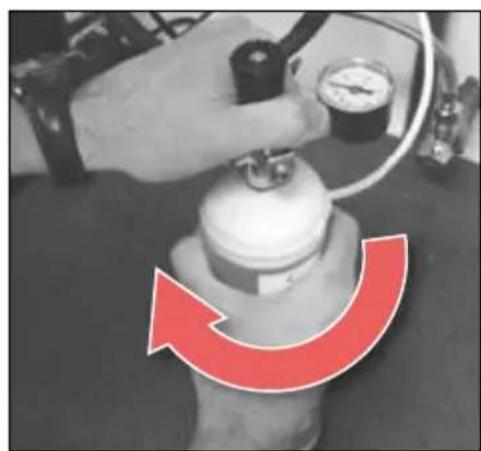
- Hold the regulator and rotate the Cylinder clockwise to remove.
- If the bottle is not empty, CQ may escape while you are turning the bottle. The bottle will self-seal prior to the thread being free from the regulator.
- Avoid breathing air containing CO_2 or contact with the cold escaping gas as per the Safety Data Sheet.
natural_image
Close-up of a hand adjusting a metallic pipe fitting with a valve, mounted on a wall (no text or symbols visible)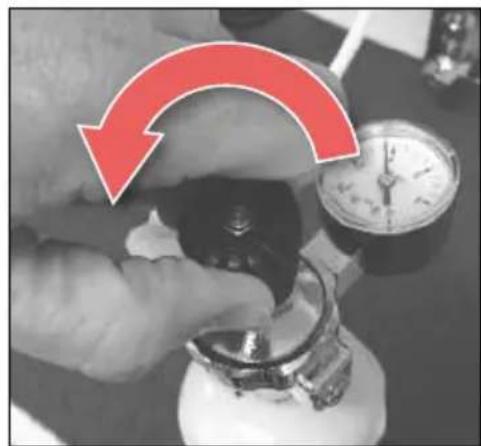
natural_image
Close-up of a hand holding a small object with a red arrow indicating rotation, next to a stopwatch (no visible text or symbols)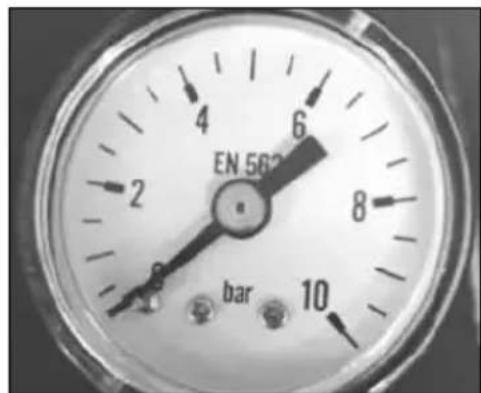
natural_image
Close-up of a hand adjusting a pressure gauge on a valve, with a red curved arrow indicating clockwise motion (no text or symbols)Installing the CO_2 cylinder
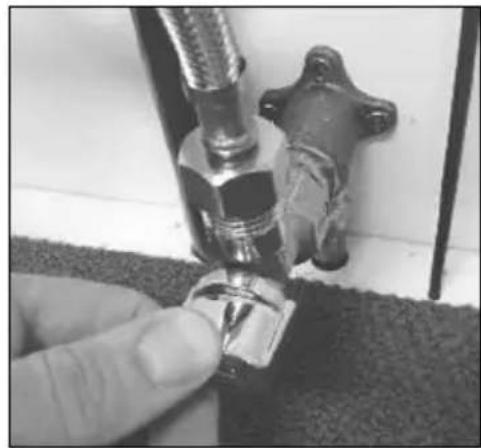
-
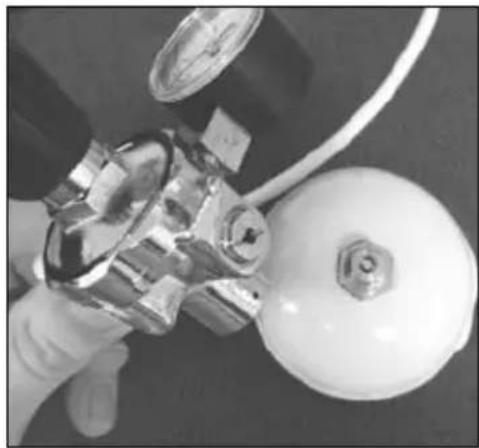
Ensure all connections between the regulator and unit are secure. Position the regulator on top of the CO_2 cylinder.
-
Tighten the bottle by rotating anti-clockwise.
-CO _2 will escape while you are turning the bottle. Continue to turn the bottle to form a seal with the regulator.
-
Open the pressure regulator by turning the black knob clockwise.
-
Set the initial pressure to around 3 Bar.
- Turn on the unit power and water supply.
-
Wait for the unit to come back to temperature.
-
Check bottle and connections for leaks using soapy water to test for bubbles.
NOTE: the 14 " tube and pushfit fittings may settle when the pressure is turned on.
- Increase the pressure to set your level of carbonation.
Initial set point may vary once the unit is running, you may need to reset the pressure once the system has stabilised.
WARNING: do not set the pressure above 5 bar.
natural_image
Close-up of a hand holding a metallic valve and a white spherical object, with a pressure gauge visible (no text or symbols)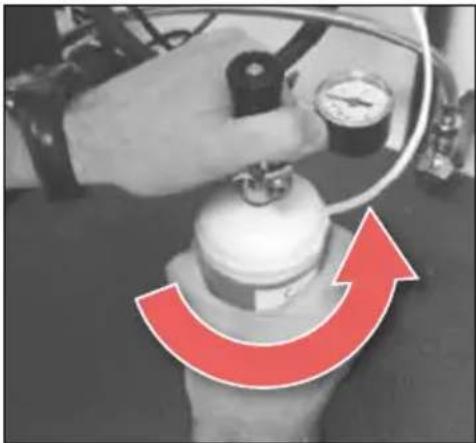
natural_image
Close-up of a robotic arm with a red curved arrow indicating rotational motion (no text or symbols)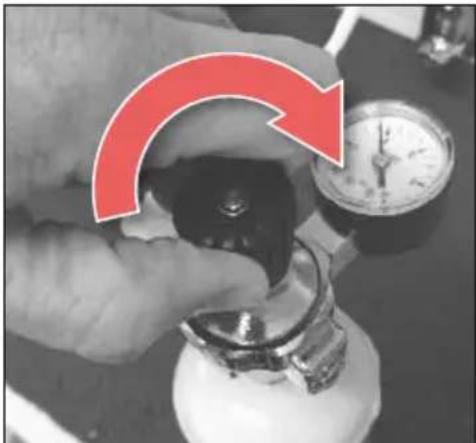
natural_image
Close-up of a hand holding a small mechanical component with a red arrow indicating rotation, next to a stopwatch (no text or symbols visible)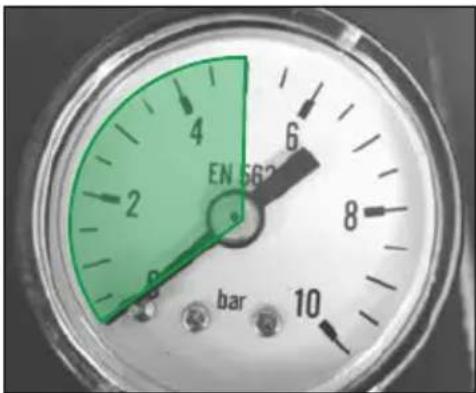
Thank you for choosing to install a Billi B-5000 Drinking Water Appliance. Your B-5000 is manufactured to exacting standards using high quality materials and with proper maintenance and care, should function for many years.
For information on our filtration and service contract please contact Billi Head Office on 1800 812 321 or email us at service@billi.com.au.
For technical support please call 1800 812 321 and speak to one of Billi's experienced technician's.
To book a service call out request a filter change or please contact the Billi Service Centre on 1800 812 321 or book online at www.billi.com.au
Filter cartridges are also available for purchase online at www.billi.com.au
Billi™
Billi Australia Pty Ltd
42 Lucknow Crescent, Thomastown
Victoria 3074 Australia
Telephone +61 3 9469 0400
Facsimile +61 3 9469 0499
www.billi.com.au
Designed and manufactured in Australia.
As Billi Australia Pty Ltd has a policy of continual improvement, all details are subject to change without notice. All goods are sold subject to our published terms and conditions. Billi is a
registered trademark. 0618