
100505 - Receiver MuxLab - Free user manual and instructions
Find the device manual for free 100505 MuxLab in PDF.


| Product Type | Receiver |
| Brand | MuxLab |
| Model | 100505 |
| Category | AV Receiver / Extender |
| Dimensions (L x W x H) | 4.5 x 2.8 x 1.0 inches (approx.) |
| Weight | 0.3 lbs (approx.) |
| Power Supply | DC 5V / 1A (via USB or power adapter) |
| Power Consumption | 2.5W (max) |
| Video Input Interface | 1x HDMI (Type A female) |
| Video Output Interface | 1x HDMI (Type A female) |
| Supported Resolutions | Up to 1080p @60Hz, 4K @30Hz |
| Signal Type | HDMI with HDCP 2.2 |
| Maximum Bandwidth | 10.2 Gbps |
| Operating Temperature | 32°F to 104°F (0°C to 40°C) |
| Storage Temperature | -4°F to 140°F (-20°C to 60°C) |
| Humidity | 10% to 85% RH (non-condensing) |
| Housing Material | Metal (aluminum alloy) |
| Color | Black |
| Mounting | Desktop or wall-mountable (bracket included) |
| LED Indicators | Power, Signal, Link |
| Warranty | 2 years limited |
| Included Accessories | Power adapter, user manual |
Frequently Asked Questions - 100505 MuxLab
User questions about 100505 MuxLab
0 question about this device. Answer the ones you know or ask your own.
Ask a new question about this device
Download the instructions for your Receiver in PDF format for free! Find your manual 100505 - MuxLab and take your electronic device back in hand. On this page are published all the documents necessary for the use of your device. 100505 by MuxLab.
USER MANUAL 100505 MuxLab
| Environment | HDMI 2.0a |
| Devices | Ultra HD Blu-Ray, projectors, monitors, TV, PC, laptops. |
| Transmission | Transparent to the user. |
| Video Bandwidth | 18 Gbps |
| Frequency Range | 25 to 600 MHz |
| Signals | HDMI 2.0a protocol. |
| HDCP | Revision 1.4 & 2.2 compliant. |
| Connectors | HDMI receptacle. |
| Rotary Switch | For setting the EDID to be sent to the source |
| LEDs | Power: BlueInput & Output Link: Blue |
| Resolution | 480i to 1080p @ 50/60 FPS1080p @ 24/50/60 FPS3840 X 2160 @ 24/25/30/60 FPS |
| Color | 8, 10 & 12 bit |
| Audio | LPCM 7.1CH, Dolby TrueHD, Dolby Atmos, DTS-HD Master Audio and DTS:X |
| Cable | HDMI cable of appropriate length for video resolution selected. |
| Power Supply | One (1) 110-240V/5VDC , 1A power supply |
| Temperature | Operating: 0^ to 40^ Storage: -20^ to 60^ Humidity: up to 90% non-condensing |
| Enclosure | Metal enclosure |
| Dimensions | 3.74" x 3.27" x 0.95" (95 mm x 83 mm x 24 mm) |
| Weight | 0.87 lbs (0.33 Kg) |
| Compliance | Regulatory: FCC, CE, RoHS |
| Warranty | 1 year |
| Order Information | 100505 1X2 HDMI Splitter, 4K/60 |

1X2 HDMI Splitter, 4K/60 (100505) Quick Installation Guide
Overview
The HDMI 1x2 Splitter (100505) allows one (1) HDMI source to be distributed to up to two (2) HDMI displays. The splitter supports up to 4K (3840 X 2160) video and HD audio. The splitter is HDCP 1.4 & 2.2 compliant, supports EDID management and features LED diagnostics. Additionally, all connectors are on the rear panel for neater cabling. Applications include; commercial and residential AV systems, classroom projector systems, digital signage, boardroom systems, collaborative PC systems, medical information systems.
Pre-Installation Check
Identify the connectors as indicated on the product diagram above. LEDs are located on the front and the connectors and mode switch on the rear.

2321 Cohen St, Saint-Laurent, QC Canada H4R 2N7
Tel:(514)905-0588 Fax:(514)905-0589
Toll Free (North America): (877) 689-5228
E-mail: info@muxlab.com URL: www.muxlab.com
Installation
In order to install the 1X2 HDMI Splitter, please follow the steps below:
- Connect the HDMI video source to the input HDMI connector of the splitter with an appropriate HDMI cable.
- Connect the HDMI display equipment to the output HDMI connectors of the splitter with appropriate HDMI cables.
- Use the Rotary switch to select the EDID that will be sent to the HDMI source device as indicated on the Rotary switch table.
- Connect the 5 VDC power supply to the splitter first, and then plug the power supply into an AC power outlet.
- Power on the HDMI equipment and verify the image quality.
- The following diagram shows the final configuration.

flowchart
graph LR
    A["HDMI Source"] -->|HDMI Cable| B["1x2 HDMI Splitter 100505"]
    B -->|HDMI Cable| C["HDMI HDTV 1"]
    B -->|HDMI Cable| D["HDMI HDTV 2"]
Mode Switch Selection
Use the Rotary switch to select the EDID that will be sent to the HDMI source device.
| Position | Function |
| 0 | Auto (Mix EDID) |
| 1 | EDID Ultra-HD (3840X2160@60Hz) – 7.1 Audio |
| 2 | EDID Ultra-HD (3840X2160@60Hz) – 2.0 Audio |
| 3 | EDID Ultra-HD (3840X2160@30Hz) – 7.1 Audio |
| 4 | EDID Ultra-HD (3840x2160@30Hz) – 2.0 Audio |
| 5 | EDID Full-HD (1080p, 3D, 12bit) – 7.1 Audio |
| 6 | EDID Full-HD (1080p, 8bit) – 2.0 Audio |
| 7 | EDID 1080i – 7.1 Audio |
| 8 | EDID 1080i – 2.0 Audio |
| 9 | Learn EDID of the device connected to Output 1 and send it intact to the input port |
Troubleshooting
The following table describes some of the symptoms, probable causes and possible solutions in regard to the installation of the 1X2 HDMI Splitter.
| Picture/ Sound | Probable Cause | Possible Solution |
| No Image | Wiring | Check continuityCheck correct wiring |
| No Image | Synchronization | Power off the source and displays, then power them back on. |
| Flickering Image | Synchronization | Check HDMI cable length against industry standards. |
| Choppy Sound | Synchronization | Check HDMI cable length against industry standards. |
| Noise in image | Weak signal | Check HDMI cable length against industry standards. |
| Green or pink hue | HDMI cables | Check HDMI cables and replace as needed. |
If you still cannot diagnose the problem, please call MuxLab Customer Technical Support at 877-689-5228 (toll-free in North America) or (+1) 514-905-0588 (International).
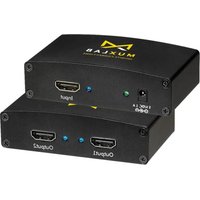
Brand : MuxLab
Model : 100505
Category : Receiver