MXO6AUWH - Vacuum Cleaner MIDEA - Free user manual and instructions
Find the device manual for free MXO6AUWH MIDEA in PDF.


User questions about MXO6AUWH MIDEA
0 question about this device. Answer the ones you know or ask your own.
Ask a new question about this device
Download the instructions for your Vacuum Cleaner in PDF format for free! Find your manual MXO6AUWH - MIDEA and take your electronic device back in hand. On this page are published all the documents necessary for the use of your device. MXO6AUWH by MIDEA.
USER MANUAL MXO6AUWH MIDEA
natural_image
Exterior view of a black and white Midea vacuum cleaner (no text or symbols visible on body)Floor Washer
USER MANUAL
MXO6AUWH
All the contents of this Guide have been checked carefully. If there are any printing errors OR misunderstanding, please contact with Midea Customer service team.
NOTE: It will be compiled into the new version of the guide without any notice if involve the technical improvements.
Thank you for choosing Midea! Please read this user manual be carefully before start use this new appliance. To ensure that you know the operate knowledge and understand more about the product features and functions in a safe way.
CONTENTS
INDEX 01
SAFETY INSTRUCTIONS 02
PRODUCT INTRODUCTION 06
OPERATING INSTRUCTIONS 09
WASTE WATER DETECTION ALARM 14
CLEANING WASTE WATER TANK 16
CLEANING FRONT COVER OF BRUSHROLL 18
TROUBLESHOOTING 20
TRADEMARKS, COPYRIGHTS AND LEGAL STATEMENT 21
DISPOSAL AND RECYCLING 22
DATA PROTECTION NOTICE 23
SAFETY INSTRUCTIONS
Intended Use
The following safety guidelines are intended to prevent unforeseen risks or damage from unsafe or incorrect operation of the appliance. Please check the packaging and appliance on arrival to make sure everything is intact to ensure safe operation. If you find any damage, please contact the retailer or dealer. Please note modifications or alterations to the appliance are not allowed for your safety concern. Unintended use may cause hazards and loss of warranty claims.
Explanation of Symbols

Danger
This symbol indicates that there are dangers to the life and health of persons due to extremely flammable gas.

Warning of electrical voltage
This symbol indicates that there is a danger to life and health of persons due to voltage.

Warning
The signal word indicates a hazard with a medium level of risk which, if not avoided, may result in death or serious injury.

Caution
The signal word indicates a hazard with a low degree of risk which, if not avoided, may result in minor or moderate injury.

Attention
The signal word indicates important information (e.g. damage to property), but not danger.

Observe instructions
This symbol indicates that a service technician should only operate and maintain this appliance in accordance with the operating instructions.
Read these operating instructions carefully and attentively before using/commissioning the unit and keep them in the immediate vicinity of the installation site or unit for later use!
Safety Instructions
Please carefully read and properly keep this manual. If you pass this appliance to the third party, please ensure to include this manual at the package.
To avoid the product damage or serious personal injury, please ensure to follow the instructions to install or use the appliance.
This product for indoor household use only. Not for industrial or outdoor use.
Products are not intended for use by persons with physical, sensory or intellectual impairments or persons lacking experience and common sense (including children) unless supervised or instructed to ensure that they can be used safely.
- This product is suitable for hard floors in the indoor environment, including waxed floors, stone floors, rubber floors, marble floors, granite floors, terrazzo floors, solid wood floors, composite floors, bamboo floors, as well as glazed tiles, ceramic facing tiles and other flat ground. It may not achieve the best results if the product is used on uneven ground surface.
- Do not use this product near or on the surface of flammable and explosive objects, which may cause fire and explosion. Do not use this product near a working fireplace or heater to prevent deformation of the machine casing.
- Do not use it to clean high-temperature substances (unextinguished cigarette butts, matches or hot ash, etc.), ultra-fine substances (such as lime, cement, wood chips, gypsum powder, ashes, charcoal, etc.), dangerous substances (such as solvents, descaling agents, etc.), chemical substances (such as acidic substances, detergents, etc.) and other substances with uncertain physical properties.
- Do not use this scrubber to absorb detergent, kerosene, gasoline, alcohol, paint or perfume, or else it may cause short-circuit, fire or explosion.
- Do not use this scrubber to absorb toner used in laser printers and copiers, or else it may cause fire or explosion.
- Do not use this scrubber to absorb sharp or large objects, such as glass shards, small toys, pins, paper clips, stones, plaster and large pieces of paper, or else it may block up and damage the machine.
- Do not use this scrubber to absorb any burning or smoking objects, such as soot from the unextinguished heat source, burning cigarette butts or matches. This product can't be used to clean stains of strong grease, strong viscosity, or strong dyeing properties such as shoe polish, paint, and pigments.
- Do not touch the plug or any live part of the product with wet hands to avoid the risk of electric shock. Stop using it if the plug is damaged. Please call our service personnel for replacement in order to avoid hazards.
- Please keep the airflow channels and moving parts of this product away from long hair, loose clothing, fingers and other parts of the body. Do not point the suction tube, accessory tip or tool to the eyes or ears, or put them in the mouth.
Safety Instructions
- Please use the floor washer detergent produced by our company and the manufacturer approved by us. Do not add other solutions to avoid generating toxic and harmful gases. If electric leakage, motor over-temperature, abnormal noise, peculiar smell or weak suction is found during use, stop using it immediately and contact to our customer service center. After using the machine, please clean the waste water tank in time to avoid peculiar smell, and keep the ventilation path unobstructed, so as to avoid obstruction, or else it will cause the suction power to drop, the motor to heat up, and will affect the service life of the scrubber. After using the machine, please store it in a dry place. A humid place will affect the insulation and service life of the appliance. Do not soak or rinse the scrubber or floor brush in water.
- Please check the suction nozzle regularly. If there is a blockage, please clear it in time to avoid decrease in suction and affecting the performance of the machine.
- Turn off the power before replacing the brush.
-
In the following situations, do not use the machine, and contact to our customer service center for inspection and repair in time:
-
Obvious damage or abnormal operation caused by drop;
- Power cord is damaged.
- Do not disassemble the enclosed machine without permission. There are no user serviceable parts.
Do not try to change the performance of the machine, or else it will cause danger.
- Using a voltage that does not match the specifications will cause damage to the product and more likely to cause harm to the user. The correct rated voltage is marked on the nameplate.
- When cleaning the stairs, be extra cautious to prevent falling.
- Do not shake or impact the machine up and down to prevent waste water from flowing into the motor.
- When the motor is working, do not lift or carry the appliance up and down, and do not put the machine on its side to prevent the waste water from entering the motor.
- To prevent tip-over, place the machine against the wall after use.
Warning
- Read the manual before use
- This appliance can be used by children aged from 8 years and above and persons with reduced physical, sensory or mental capabilities or lack of experience and knowledge if they have been given supervision or instruction concerning use of the appliance in a safe way and understand the hazards involved.
Cleaning and user maintenance shall not be made by children without supervision.
Children should not play with the appliance.
- The instructions for appliances incorporating a battery that contains materials that are hazardous to the environment shall give details on how to remove the battery and shall state that
- the battery must be removed from the appliance before it is scrapped;
- the appliance must be disconnected from the supply mains when removing the battery;
- the battery is to be disposed of safely.
- The instructions for appliances incorporating batteries that are intended to be replaced by the user shall include the following:
- the type reference of the battery;
- the orientation of the battery with regard to polarity;
- the method of replacing batteries;
- details regarding safe disposal of used batteries;
- warning against using non-rechargeable batteries;
- how to deal with leaking batteries.
READ CAREFULLY AND KEEP FOR FUTURE REFERENCE
PRODUCT INTRODUCTION
Product Overview

text_image
ON/OFF Mode Brush-roll self-cleaning Clean water tank Clean water tank release button Waste water tank release button Waste water tank Brush-roll Handle Waste water tank handle Brush front coverDescription of LED

text_image
Power mode ON/OFF Brush-roll self-cleaningAccessories List

Base x 1 Adapter x 1 Cleaning
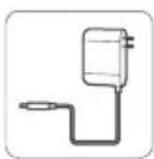
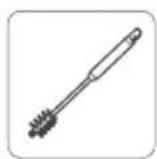
brush x 1
Manual x 1 Accessory
rack x 1
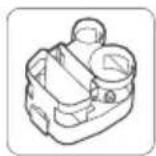
rack x 1
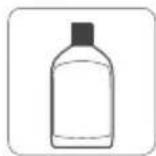
Cleaning fluid x 1
Accessories Description
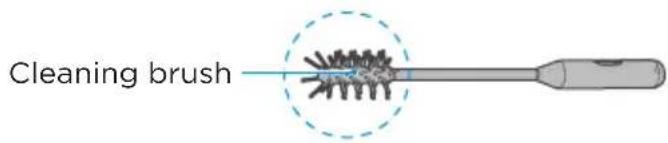
- Cleaning brush
- A hair brush at one end, which is used to clean stubborn dirt attached to the waste water tank and pipes below.
text_image
Cleaning brush- A rotating blade at the other end, which is used to clear tangled hairs from the brush-roll.

text_image
Rotating bladeAccessories Description
2. Accessory rack
- Insert the accessory rack protrusion against the base recess.
• Used to store brush-roll, cleaning brush and filter.

text_image
Cleaning brush Brush-roll FilterRecess (both left and right)
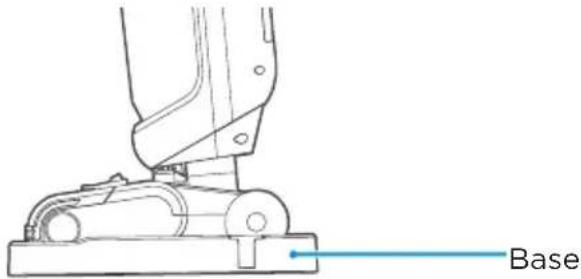
3. Base
• Used to store the floor cleaner and to be used in conjunction with the self-cleaning function of the cleaner.
text_image
BaseOPERATING INSTRUCTIONS
Preparation for Use
Installation
Insert the end of the handle into the port of the main unit in the vertical direction until there is a click sound, which indicates that the installation is successful.
Removal
To remove and store, find the round hole on the back of the unit, insert a screwdriver or other tool into the round hole to the bottom, and pull out the handle in the vertical direction at the same time.

text_image
Insert
text_image
Pull out Handle removal holeCharging the machine

Attention
Charge full battery before first use.
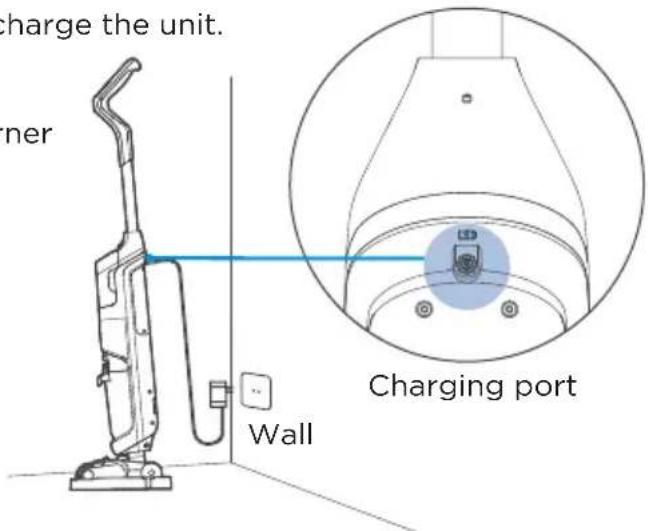
- Place the machine on the base.
- Insert the charging end of the adapter into the charging port (as shown in the figure), and connect to the power supply. The ON/OFF key indicator is always ON and stays blue during charging.
- It takes approximately 5 hours to fully charge the unit.
When the battery is fully charged, the ON/OFF key indicator goes out.
- When charging, keep it close to the corner of the wall to avoid tripping and other injuries.
text_image
charge the unit. ner Wall Charging portFilling clean water tank

Attention
Only the clean water tank needs to be filled.
-
Put the machine in upright state, hold down the release button of the clean water tank with one hand, and remove the tank with the other hand.
-
Open the cover of the clean water tank, pour tap water into the tank, and then put on the cover.

text_image
Clean water tank release key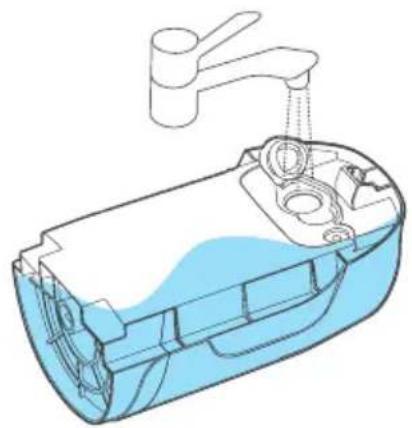
natural_image
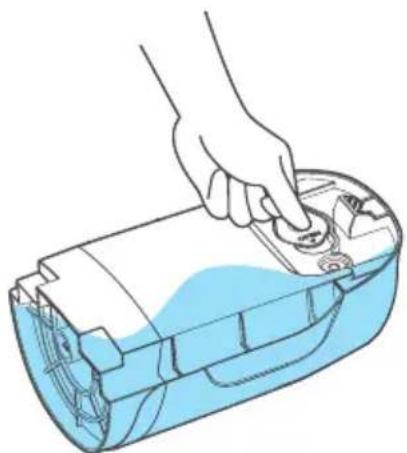
Cross-sectional diagram of a water dispenser with faucet and spray bottle (no text or labels)- Put on the cover of the clean water tank. 4. Install the clean water tank on the machine with the cover side inward until there is a click sound, which indicates that the installation is successful.
natural_image
Illustration of a hand inserting a component into a blue plastic device (no text or symbols)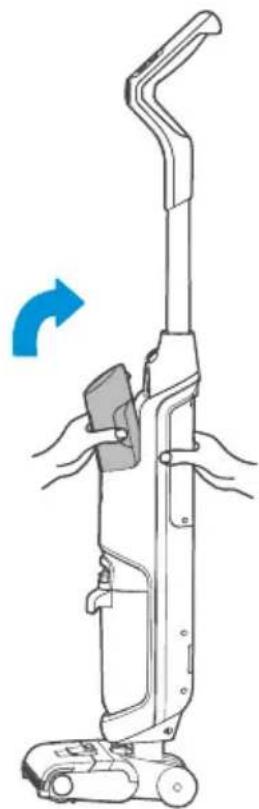
natural_image
Line drawing of a vacuum cleaner with hand blades and handle, showing motion direction (no text or symbols)Clean and operation
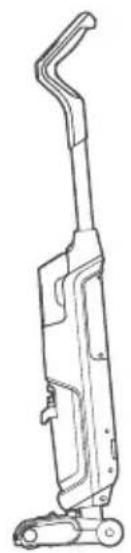
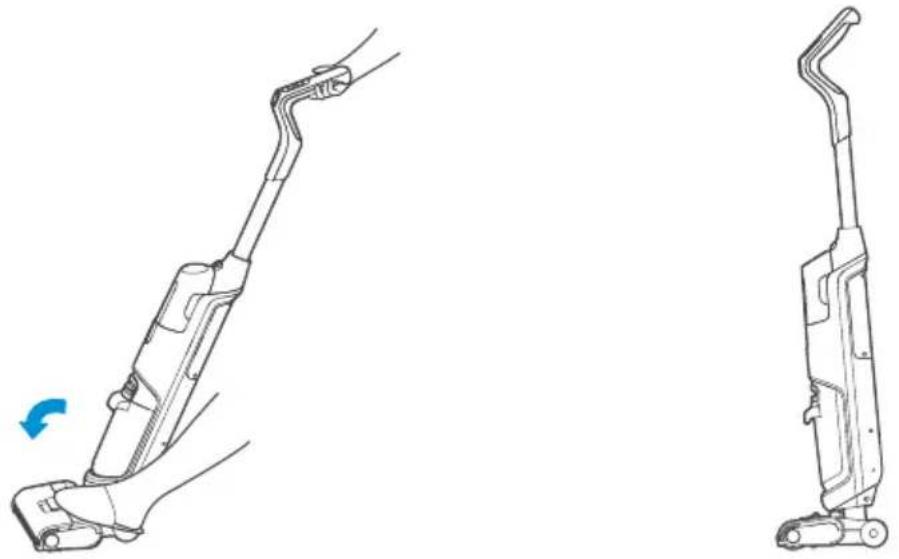
- Step on the brush-roll cover and pull the handle to be 'Standby mode'.
natural_image
Line drawing of a mechanical device with articulated arm and base (no text or symbols)
natural_image
Line drawing of a hand holding a handheld vacuum cleaner with a blue arrow indicating rotation (no text or symbols)-
Turn the machine with Power button. (There will be a 3s delay when the machine is switched off; please do not repeat this step.)
-
Standard mode by default; press the 'Mode' button to switch between 'TURBO' mode and 'FAST SUCTION' mode.

text_image
ON/OFF
text_image
POWER MODEModes and Application Scenarios
| SuctionStatus | Water Volume Application | |
| Standard Mode Low | Small Cleaning of lightly stained floors | |
| High Mode High Large Cleaning of stained floors | ||
| Fast Suction Mode High / Cleaning of dry rubbish or residual water on the floor |
Upright and Pause
When you step on the brush and put the handle upright in the working state, the machine stops working and enters standby mode; if there is no operation within three minute of standby, the machine will enter the shutdown state.
natural_image
Technical line drawing of a vacuum cleaner with left and right views, showing handle and arm assembly (no text or symbols)Self-cleaning
Place the machine at the base before start use the "brush-roll self cleaning" function.
Press the "Self-clean" button and hold in 3 seconds, it will start the "self-cleaning" function.
Please clean the waste water tank after used in every time. This is normal if the water left at the base after use the self-cleaning function, please clean up the base in time.
If this is necessary to STOP the process of self-cleaning function to press "Self-Clean" or "ON/OFF" button.

natural_image
Diagram showing a device with a left-side panel and an inset view of a circular component with concentric rings (no text or symbols)'Self-Clean'

Attention
- To avoid the human injuries, please place the machine at the base to use 'Self-Clean' function.
- There will be a 3 second delay when the machine stops self-cleaning. Please do not repeat the operation.
- For better cleaning of the brush, the side walls of the suction port and the pipes, a large volume of water is used, and it is normal for a small amount of water to be left in the base when the self-cleaning is finished.
WASTE WATER DETECTION ALARM
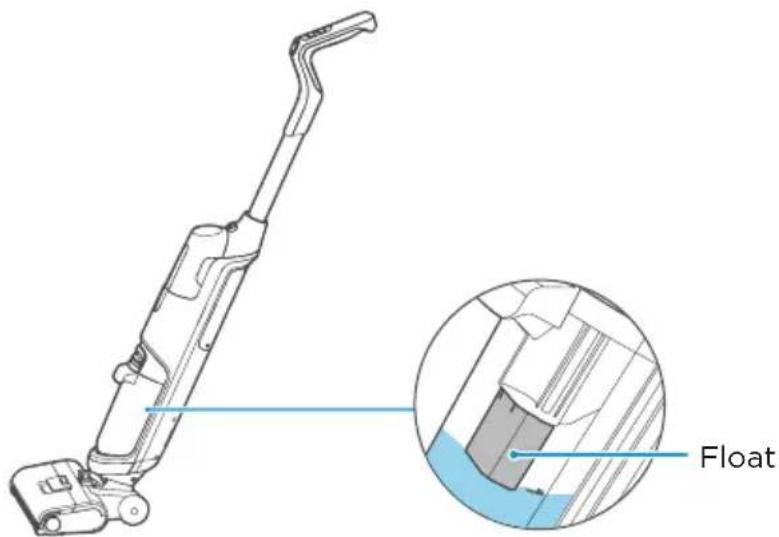
If the waste water tank FULL and the float block at the suction port, the 'Self-Clean' LED flash in Blue.
Ensure to clean the waste water tank every time.
text_image
FloatLED Instructions

Attention
- The machine must not be tilted so much that the brush is lifted off the ground, as this will cause waste water to be sucked in by the vacuum motor and then sprayed out and back onto the ground.
- It is prohibited to suck in larger pieces of rubbish when the machine is working, so as not to block the suction port or the pipe and cause a weakening of the suction power or stop the machine from working properly.
- Before handling or transporting the machine, make sure that both the clean water tank and the waste water tank are emptied of water, otherwise the machine will be damaged by water ingress.
| ON/OFF LEDMachine Status Mode LED | Self-Clean LED | |
| Standard mode Display according to remaining battery level | Blue LED always ON | / |
| Turbo mode Display according to remaining battery level | Blue LED flash | / |
| Fast suction mode Display according to remaining battery level | / | / |
| Self-cleaning / / Blue LED always ON | ||
| Abnormal reminder / / Blue LED flashes and | goes out after 10 seconds | |
| Charging (adapter connected) | Blue LED always ON / / | |
| Charging finished (adapter connected) | / / / | |
| Fault alarm Red LED flashes and light out after 10 sec | / | / |
| Battery level alert Blue - 40% or above Purple - 10%-40% Red - 10% or below | / | / |
CLEANING WASTE WATER TANK

Attention
- Cut off the power supply and allow the machine to stop working before cleaning the waste water tank.
- Scrub with water or a neutral detergent; always wring out the cleaning cloth before scrubbing and do not allow water to penetrate inside the electrical components of the machine.
- After cleaning, it is recommended to leave the machine on its base. Take care not to place it in direct sunlight or in a humid place.
- It is advisable to maintain the machine's components regularly in order not to affect its performance.
-
It is recommended to replace the filter every 6 months.
-
Push the button of the waste water tank downwards with the thumb and pull it out at the same time to remove the tank.

text_image
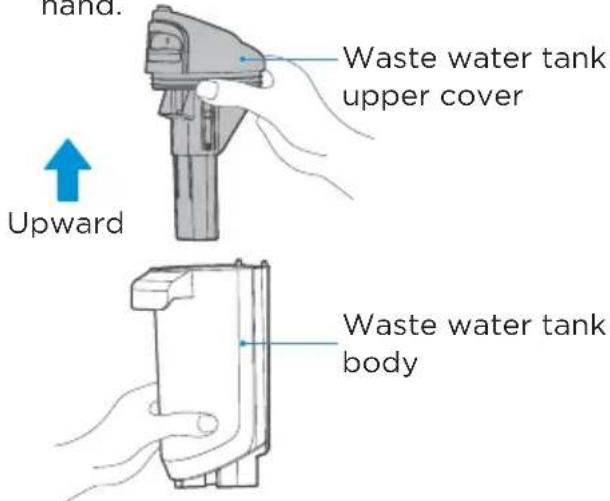
Pull out- Hold the tank with one hand and pull out the upper cover of the tank with the other hand.
text_image
hand. Waste water tank upper cover Upward Waste water tank body- When pour out the waste water, if there is stubborn dirt on the inner wall of the tank, please clean it directly with the cleaning brush.

natural_image
Line drawing of a mechanical component with a handle and internal gear-like structure (no text or symbols)- Take out the filter from the waste water tank and check whether the float is stuck by foreign objects.

text_image
Upward Filter Float-
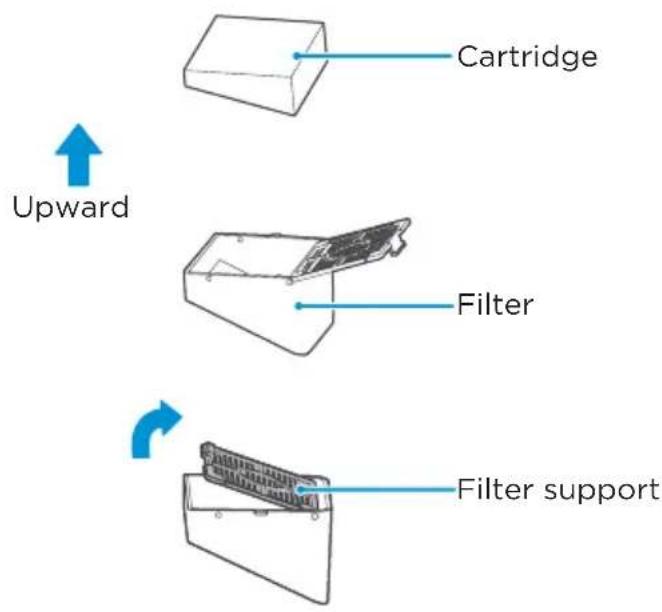
Open the filter holder, and take out the sponge from the filter.
-
Rinse with clean water after taking it out, dry it thoroughly and put it back into the waste water tank as it is.
text_image
Upward Cartridge Filter Filter support
text_image
Cleaning Drying- Install the waste water tank back into the machine after you hear a click, which indicates that the installation is successful. (It is recommended to hold the machine with the other hand to avoid tipping when installing the waste water tank.)
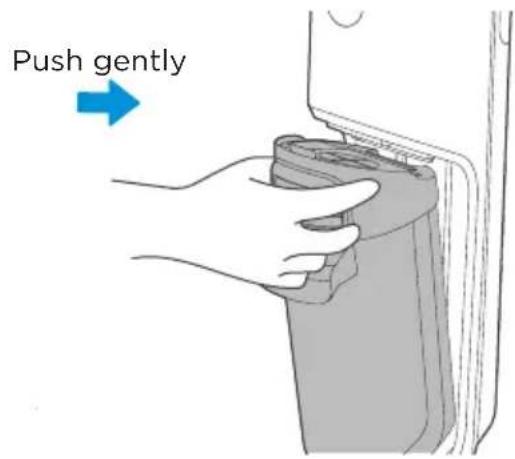
text_image
Push gentlyCLEANING FRONT COVER OF BRUSHROLL

Attention
- If any residual stains are found on the spout, wipe with a damp rag and do not rinse with water.
-
It is recommended to clean and dry the roller brush cover and brush after each use to keep it clean and tidy.
-
Press the buckle as shown in the figure and remove the front cover of the roller brush.
-
Pull up the handle on the left end of the roller brush and remove the roller brush, and then place it in a cool and dry place to keep it dry and avoid unpleasant odors.
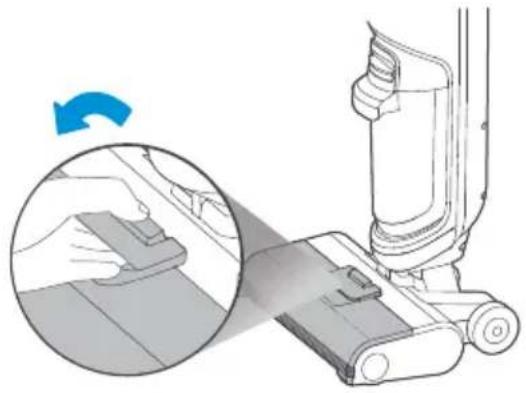
natural_image
Illustration of a hand using a vacuum cleaner to lift a component, showing a blue circular arrow indicating rotation (no text or symbols present)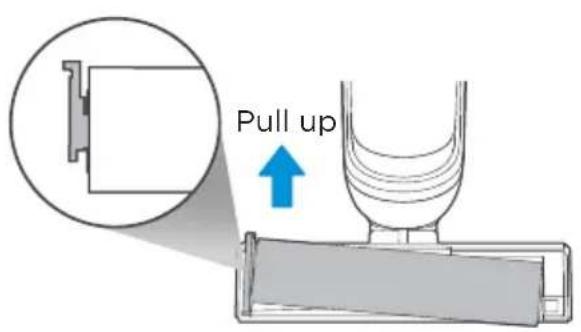
text_image
Pull up3 a. After self-cleaning, if there is any entanglement such as hair on the roller brush, clear with scissors or a blade. b. For heavy dirt cleaning (such as ketchup, soy sauce, etc.), if there are still dirt residues on the roller brush after self-cleaning, perform self-clean again, or take out the roller brush and rinse it with water.

natural_image
Diagram of a tool interacting with a cylindrical object, showing internal structure and motion lines (no text or symbols)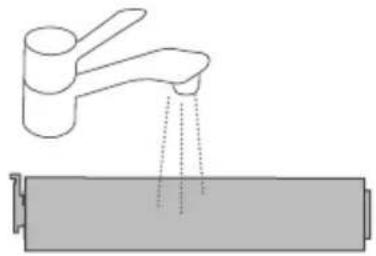
natural_image
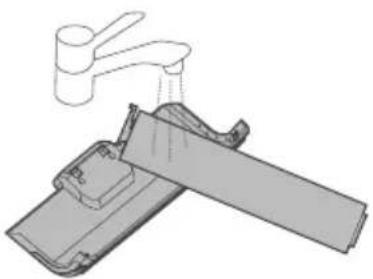
Diagram showing a faucet releasing liquid into a cylindrical container (no text or symbols)- After self-cleaning, if the front cover of the roller brush is found to have stains and residues, rinse it with clean water, and place it in a ventilated place to dry thoroughly.
natural_image
Diagram of a faucet lifting a mechanical component (no text or symbols)Clean Air dry

natural_image
Illustration of a mobile phone on a checkered floor next to a rectangular device (no text or symbols)- After self-cleaning, if there is any residual stain on the nozzle, please wipe it with a damp cloth, and do not rinse with water.

text_image
Nozzle- After cleaning, hold the handle of the roller brush with your hand, align the other side of the roller brush with the right cover, then put the handle end into the slot; if not used immediately, put the brush in a ventilated place to dry before installation.

text_image
Handle end Driven wheel- After cleaning, align the clips at both ends of the front cover of the roller brush with the slots at both ends of the brush, rotate and press the handle of the flip cover of the brush until there is a click, which indicates that the installation is successful.

natural_image
Two-step diagram showing hand positioning of a vacuum cleaner's base, with blue arrows indicating motion (no text or symbols)TROUBLESHOOTING
Please check the following table in case of any abnormal conditions when using the product.
| Possible cause SolutionProblem | ||
| The scrubber does not work | ·The brush-roll is entangled withhair and other objects | Clean the brush-roll |
| ·The waste water tank is full Clean up the waste water tank | ||
| ·Low battery Charge | ||
| ·The pipe is blocked Clean up the pipe under the waste water tank | ||
| Suction power is weakened | ·Brush-roll, Brush-roll cover, and waste water tank are not installed properly | Re-install |
| ·The rolling brush is entangled with hair and other objects | Clean the rolling brush | |
| ·The nozzle or pipe is blocked Clean up obstacles in the nozzle or pipe | ||
| ·Waste water tank filter is dirty or missing | Clean or install the filter | |
| Noise during fan running | ·The nozzle is blocked Clean up obstacles in the nozzle | |
| Noise during water pump running | ·The clean water tank is lack of water | Add water to the clean water tank |
| ·The clean water tank is not installed in place | Reinstall the clean water tank | |
| Floor brush doesn't have water | ·The clean water tank is not installed in place | Add water to the clean water tank |
| ·The clean water tank is not installed in place | Reinstall the clean water tank | |
| ·The machine is in quick suction mode | Press the mode button once again | |
| Water leaking from air outlet | ·The waste water tank float is stuck by foreign objects | Clean up foreign objects at the float |
| Water leakage at the bottom of the floor brush | ·Waste water tank or waste water tank filter isn't installed | Install waste water tank and filter |
TRADEMARKS, COPYRIGHTS AND LEGAL STATEMENT
Midea logo, word marks, trade name, trade dress and all versions thereof are valuable assets of Midea Group and/or its affiliates (“Midea”), to which Midea owns trademarks, copyrights and other intellectual property rights, and all goodwill derived from using any part of an Midea trademark. Use of Midea trademark for commercial purposes without the prior written consent of Midea may constitute trademark infringement or unfair competition in violation of relevant laws.
This manual is created by Midea and Midea reserves all copyrights thereof. No entity or individual may use, duplicate, modify, distribute in whole or in part this manual, or bundle or sell with other products without the prior written consent of Midea.
All the described functions and instructions were up to date at the time of printing this manual. However, the actual product may vary due to improved functions and designs.
DISPOSAL AND RECYCLING
Important instructions for environment
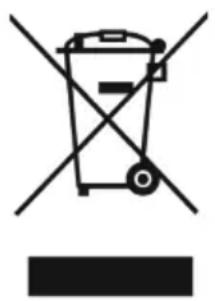
Compliance with the WEEE Directive and Disposing of the Waster Product: This product complies with EU WEEE Directive (2012/19/EU). This product bears a classification symbol for waster electrical and electronic equipment (WEEE).
This symbol indicates that this product shall not be disposed with other household wastes at the end of its service life. Used device must be returned to official collection point for recycling of electrical electronic devices. To find these collection systems please contact to your local authorities or retailer where the product was purchased. Each household performs important role in recovering and recycling of old appliance. Appropriate disposal of used appliance helps prevent potential negative consequences for the environment and human health.
natural_image
Symbol of a trash bin crossed with no text or numbers, representing waste sorting or restriction (no text present)Compliance with RoHS Directive
The product you have purchased complies with EU RoHS Directive (2011/65/EU). It does not contain harmful and prohibited materials specified in the Directive.
Package information
Packaging materials of the product are manufactured from recyclable materials in accordance with our National Environment Regulations. Do not dispose of the packaging materials together with the domestic or other wastes. Take them to the packaging material collection points designated by the local authorities.

natural_image
Recycling symbol with three chasing arrows forming a triangle (no text or labels)DATA PROTECTION NOTICE
For the provision of the services agreed with the customer,
we agree to comply without restriction with all stipulations of applicable data protection law, in line with agreed countries within which services to the customer will be delivered.
Generally, our data processing is to fulfil our obligation under contract with you and for product safety reasons, to safeguard your rights in connection with warranty and product registration questions. In some cases, but only if appropriate data protection is ensured, personal data might be transferred to recipients located outside of the European Economic Area.
Further information are provided on request. You can contact our Data Protection Officer via MideaDPO@midea.com. To exercise your rights such as right to object your personal date being processed for direct marketing purposes, please contact us via MideaDPO@midea.com. To find further information, please follow the QR Code.

text_image
Mideamake yourself at home
