MPO7AUBK - Vacuum Cleaner MIDEA - Free user manual and instructions
Find the device manual for free MPO7AUBK MIDEA in PDF.


| Product Type | Stick Vacuum Cleaner |
| Model | MPO7AUBK |
| Brand | Midea |
| Color | Black/Red |
| Dimensions (L x W x H) | 11.0 x 9.5 x 45.0 inches |
| Weight | 7.5 lbs |
| Power Source | Corded Electric |
| Voltage | 120 V |
| Power Consumption | 600 W |
| Suction Power | 15 kPa |
| Dust Capacity | 0.8 L |
| Filtration System | HEPA Washable Filter |
| Bagless | Yes |
| Cord Length | 16 ft |
| Noise Level | 75 dB |
| Attachments Included | Crevice Tool, Brush Tool, Extension Wand |
| Surface Type | Carpet, Hard Floor, Upholstery |
| Motor Type | Digital Motor |
| Maintenance | Washable Filter, Easy Empty Dustbin |
| Safety Features | Auto Shut-off, Thermal Protection |
| Repairability | Replaceable Filter and Parts Available |
Frequently Asked Questions - MPO7AUBK MIDEA
User questions about MPO7AUBK MIDEA
0 question about this device. Answer the ones you know or ask your own.
Ask a new question about this device
Download the instructions for your Vacuum Cleaner in PDF format for free! Find your manual MPO7AUBK - MIDEA and take your electronic device back in hand. On this page are published all the documents necessary for the use of your device. MPO7AUBK by MIDEA.
USER MANUAL MPO7AUBK MIDEA
natural_image
Line drawing of a handheld vacuum cleaner with attached device (no text or symbols)2 IN 1
CORDLESS HANDSTICK
USER MANUAL
MPO7AUBK
Warning notices: Before using this product, please read this manual carefully and keep it for future reference. The design and specifications are subject to change without prior notice for product improvement. Consult with your dealer or manufacturer for details. The diagram above is just for reference. Please take the appearance of the actual product as the standard.
THANK YOU LETTER
Thank you for choosing Midea! Before using your new Midea product, please read this manual thoroughly to ensure that you know how to operate the features and functions that your new appliance offers in a safe way.
CONTENTS
THANK YOU LETTER 01
SAFETY INSTRUCTIONS 02
PRODUCT OVERVIEW 06
OPERATION INSTRUCTIONS 07
CLEANING AND MAINTENANCE 08
TROUBLESHOOTING 14
TRADEMARKS, COPYRIGHTS AND LEGAL STATEMENT 15
DISPOSAL AND RECYCLING 16
DATA PROTECTION NOTICE 17
SAFETY INSTRUCTIONS
Intended Use
The following safety guidelines are intended to prevent unforeseen risks or damage from unsafe or incorrect operation of the appliance. Please check the packaging and appliance on arrival to make sure everything is intact to ensure safe operation. If you find any damage, please contact the retailer or dealer. Please note modifications or alterations to the appliance are not allowed for your safety concern. Unintended use may cause hazards and loss of warranty claims.
Explanation of Symbols
 | DangerThis symbol indicates that there are dangers to the life and health of persons due to extremely flammable gas. |
 | Warning of electrical voltageThis symbol indicates that there is a danger to life and health of persons due to voltage. |
 | WarningThe signal word indicates a hazard with a medium level of risk which, if not avoided, may result in death or serious injury. |
 | CautionThe signal word indicates a hazard with a low degree of risk which, if not avoided, may result in minor or moderate injury. |
 | AttentionThe signal word indicates important information (e.g. damage to property), but not danger. |
 | Observe instructionsThis symbol indicates that a service technician should only operate and maintain this appliance in accordance with the operating instructions. |
Read these operating instructions carefully and attentively before using/commissioning the unit and keep them in the immediate vicinity of the installation site or unit for later use!
SAFETY INSTRUCTIONS
- Do not place the vacuum cleaner close to heat sources, radiation sources or burning cigarette butts.
Sucking in the following objects is strictly forbidden:
- All liquids such as water and solvent;
- Construction dust and trash such as lime and cement dust.
- Heat sources, such as carbon butts and cigarette butts that have not been put out.
- Sharp fragments, such as glass.
- Flammable and explosive articles, such as gasoline and alcohol products. external timer or a separate remote control.
- This product can only be disassembled by authorized technical personnel. Disassembling without guidance is strictly forbidden.
- Children, persons with reduced phycial, sensory or mental capabilities, and persons who lack knowledge and/or experience of using household appliances are strictly forbidden to use this product without special guidance!
- This product is an indoor household product, please do not use it outdoors.
- The vacuum cleaner is an electric appliance that must be used under normal use conditions. Do not leave it unattended while running.
- Do not touch the power cord, socket or power adapter with wet hands.
- Clean the dust cup when it is full before using this product.
- Turn off the power when cleaning, repairing or not using the vacuum cleaner.
- Do not immerse the vacuum cleaner in water or place it near heat sources or in the sun, so as to avoid fire.
- Use only the original power adapter that comes with the package for this product. Use of other adapters may damage this product.
- Turn off the power when taking out the battery. Do not disassemble the battery by yourself. If you need Please contact the after-sales maintenance personnel for replacement if needed. Please properly dispose of the battery when discarding the product.
- Do not touch the pole piece or jack with conductors to avoid short circuit.
- Power cut-off: Do not pull the power cord, hold the plastic part of the plug with your hand and unplug the plug.
- Do not pass the power cord of the vacuum cleaner through sharp objects, so as not to damage the power cord.
- Do not drag the power cord to move the charging base.
- Check the power supply voltage to ensure the same voltage as the charging voltage of the vacuum cleaner.
- Avoid running for a long time when the suction inlet is blocked, so as to avoid motor damage and heating deformation of the vacuum cleaner.
- Do not use the vacuum cleaner and send it to the maintenance department designated by Midea for maintenance in time under the following circumstances:
- The vacuum cleaner has obvious damage or abnormal operation condition after falling to the floor
- The power cord is damaged.
TIPS
- Longer charging time may be needed in the following circumstances.
- When charging in a place where the indoor temperature exceeds 30^ C;
-
When charging immediately after stopping running.
-
Please charge the vacuum cleaner after using no matter how long it is used.
- When not charging, it is recommended to unplug the power plug in time.
- If the vacuum cleaner is not in use for a long time (more than 2 months), please unplug the power plug, but in order to ensure the battery life, please fully charge it every 2 months.
- During charging, the machine or the power adapter may heat up, which is a normal phenomenon. Please rest assured to use it.
PRODUCT OVERVIEW
Installation And Parts
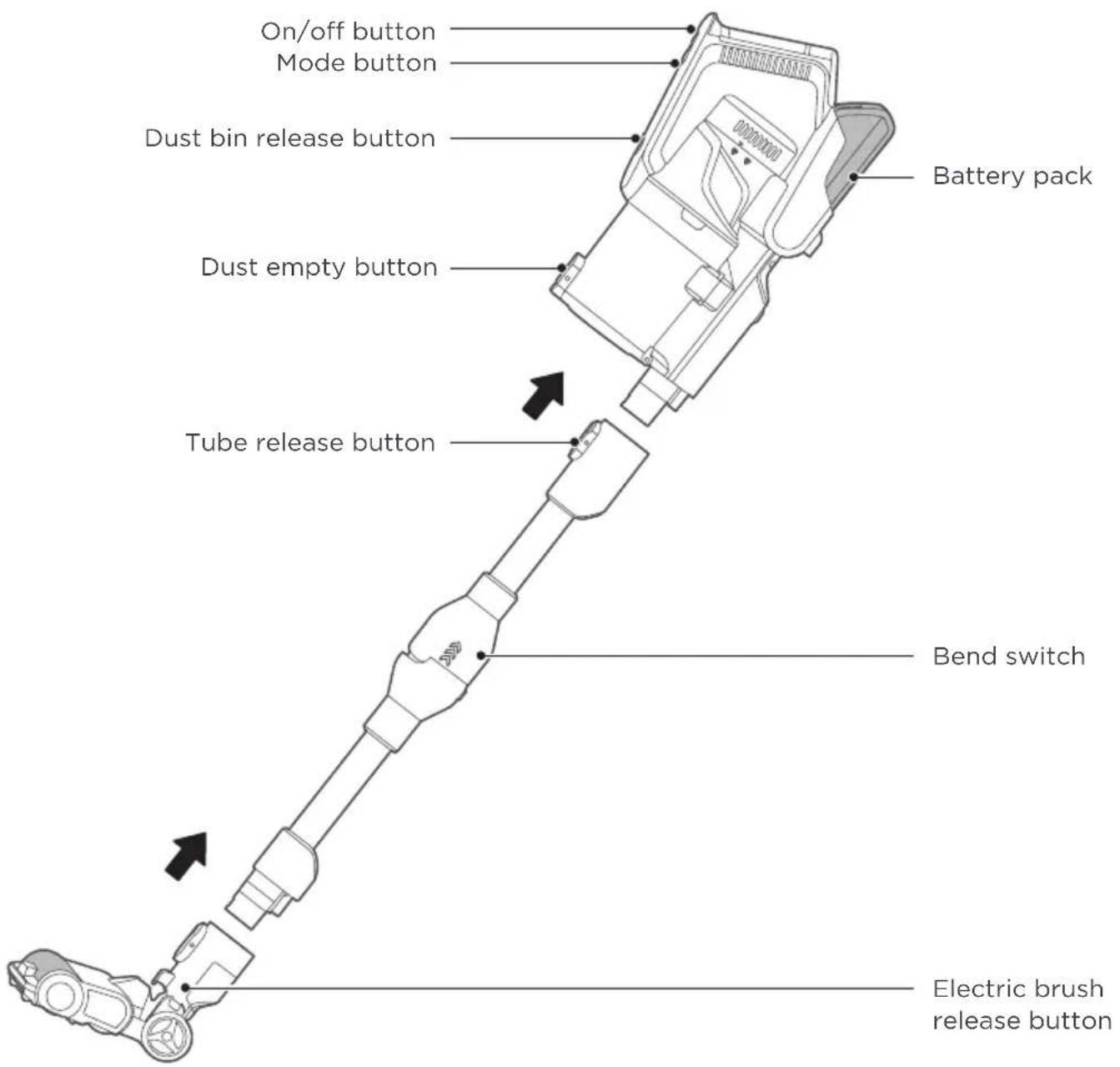
text_image
On/off button Mode button Dust bin release button Dust empty button Battery pack Tube release button Bend switch Electric brush release buttonList Of Accessories
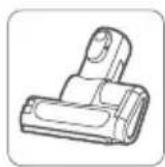
Motorized
bed brush
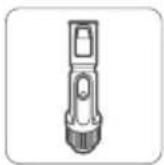
Upholstery brush

storage buckle
assembly

le Crevice
nozzle
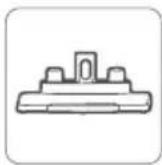
Storage rack assembly

Adaptor

Instructions
OPERATION INSTRUCTIONS
Use of bendable tube
Pull upwards the upper sleeve of the bendable tube, and the bendable tube automatically rotates and bends.

natural_image
Technical line drawing of a mechanical device with a black arrow indicating direction (no text or symbols)
natural_image
Technical line drawing of a mechanical device with no visible text or symbolsBattery Charging

NOTE
- The battery is not charged when leaving the factory, so please fully charge the battery before use;
- Do not charge under 5^ C or above 40^ C;
- During the operation, the battery power indicator flashes when the battery runs low;
- When the battery life of the machine is obviously shortened and the charging time is prolonged, please replace the battery with professionals. Do not disassemble and assemble the machine by yourself to avoid danger.
| Operation InstructionsS/N | |
| 1 | Place the machine on the storage rack stably; |
| 2 | Plug one end of the power cord into the socket and insert the other end into the charging port at the tail of the handle on the a period of full power, the indicator will go out. |
| 3 | Charging time: 5-7 hoursDischarge time: About 10 minutes for High mode About 20 minutes for Intermediate mode About 70 minutes for Low-mode |

natural_image
Technical line drawing of a vacuum cleaner device with side and top views (no text or symbols)CLEANING AND MAINTENANCE
Cleaning
NOTE
- To avoid blocking the air duct, please clean up large pieces of garbage (such as large pieces of paper and packaging film) in the area first;
- Do not use and store batteries under 5^ C or above 40^ C;
- When discarding this product, please remove the battery from the complete machine;
- It is strictly forbidden to remodel the complete machine, accessories and replace the power
- Battery model: BP28825A
Press the "On/Off button" once to start;
Press the "On/Off button" again to stop;
When Indicator 1, 2 and 3 flashes simultaneously, it is an alarm that requires professional maintenance.
It defaults to the Intermediate mode when powered on with a full battery (Indicator 1, 2, and 3 are on simultaneously). Press the "Mode button" once for High mode (Indicator 1 and 2 is on and Indicator 3 is blue), and press the "Mode button" again for Low mode (Indicator 1 and 2 is on and Indicator 3 is off);
Energy indication during charging.
When one of the Indicator 1 and 2 flashes, the battery power is low, and it needs to continue charging. When Indicator 1 and 2 are onthe battery is fully charged, and the indicator will go out after a period of full charge.
Energy indication during operation(discharge): When Indicator 1 and 2 are on it shows that the 6 battery power is sufficient. When indicator 1 flashes or Indicator 2 goes off, it shows that the battery power is low. Please charge in time.
Mode Indicator button
Indicator 2
Indicator 1
Indicator 3
On/Off button
Mode On/Off buttonbutton
Storage And Use Of The Cleaner

NOTE
-
When the cleaner is placed on the storage station or when the storage station is placed alone, it must be placed on a horizontal ground to avoid falling and damage to the cleaner.
-
The cleaner should be used with care whether it is in work or placed on the storage station, so as not to damage the machine.
-
Installation of storage station
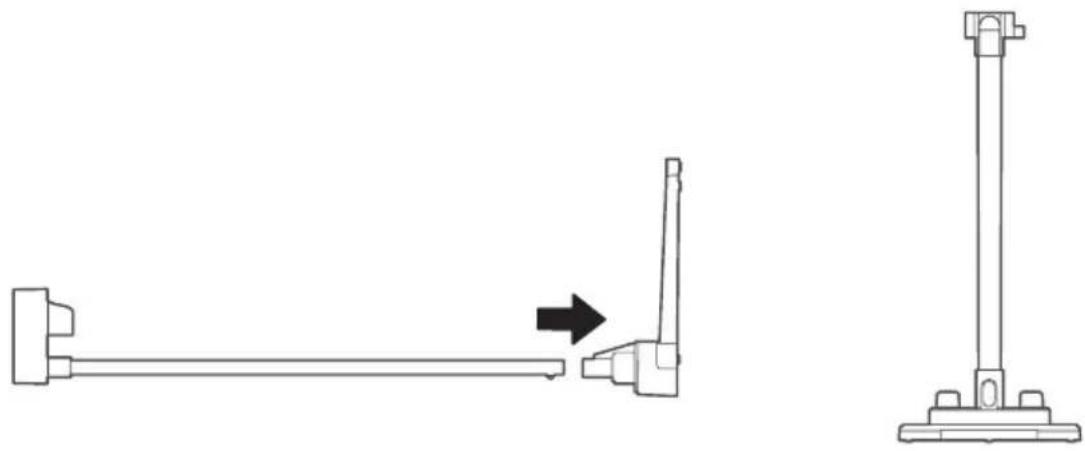
Install the storage rack assembly and the storage base as shown in the figure, and place the storage station vertically on the horizontal ground as shown in the right figure.
natural_image
Technical line drawing showing a mechanical assembly with a lever and a vertical support post, both without any text or symbols.- Storage of the cleaner
Before placing the cleaner on the storage station, please make sure once again whether the ground is horizontal and the cleaner has been turned off. Gently place the cleaner on the rack of storage station as the position shown on the below figure, then leave after the cleaner is placed stably.

natural_image
Line drawing of a vacuum cleaner with a downward arrow indicating motion (no text or symbols)Disassembling And Cleaning Of Dust Cup

NOTE
- To keep the suction of the vacuum cleaner, please clean the dust regularly, remove the main unit as shown in the figure, and then press the lock on the bottom cover of the dust cup to dump the dust.
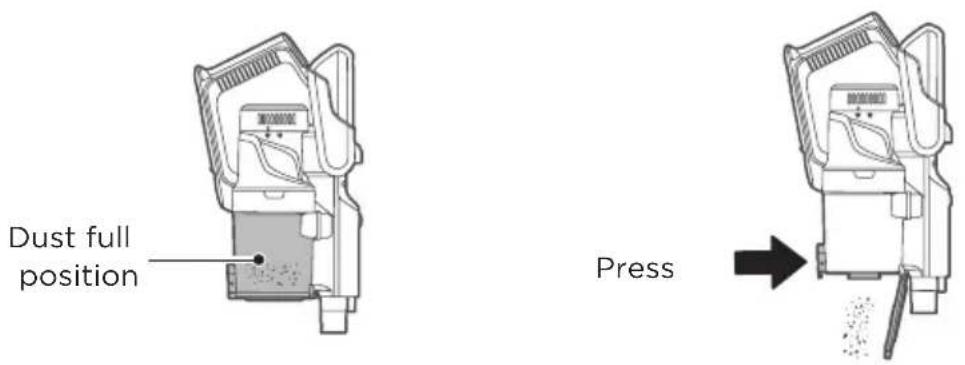
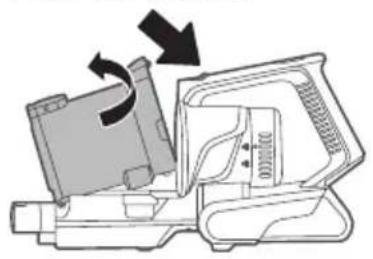
After the machine is laid flat as shown in the figure, press the lock button with one hand and take out the dust cup assembly with the other hand.
Push the button
natural_image
Mechanical assembly diagram showing a rotating component with directional arrows indicating motion (no text or symbols)
natural_image
Simple line drawing of a mechanical component with an arrow pointing to it (no text or symbols)Disassembling And Cleaning Of Filter

NOTE
- The parts in the dust cup are washable
- Please make sure that every part has been dried after cleaning and before mounting it back!
Removal of the filter from the dust cup
-
Remove the dust cup assembly from the machine and lay it flat vertically;
-
Take out the filter sponge and filter assembly in turn.

natural_image
Pure mechanical component diagram without any text, numbers, or symbols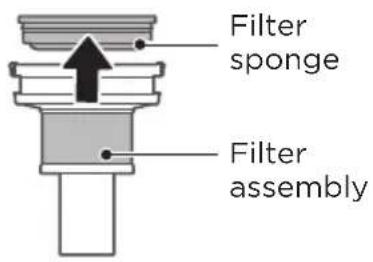
text_image
Filter sponge Filter assemblyDisassembling And Cleaning Of Dust Cup
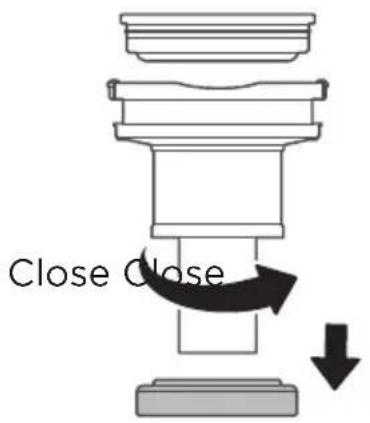
After taking out the filter assembly, remove the cyclone cone by rotation as shown in the figure, clean it, dry it thoroughly, and then mount it back according to the disassembly procedure.
text_image
Close CloseDisassembling And Cleaning Of Electric Scrubbing Brush

NOTE
- To avoid affecting the operation of the electric scrubbing brush, please clean and maintain the roller brush and wheels when they are entangled or dirty;
- When disassembling and maintaining, be sure to stop the operation of the electric scrubbing brush;
- It is not recommended to wash the scrubbing brush with water. The entangled hair can be cleaned with scissors or blades, and the dust stuck on the roller brush can be cleaned with a brush.
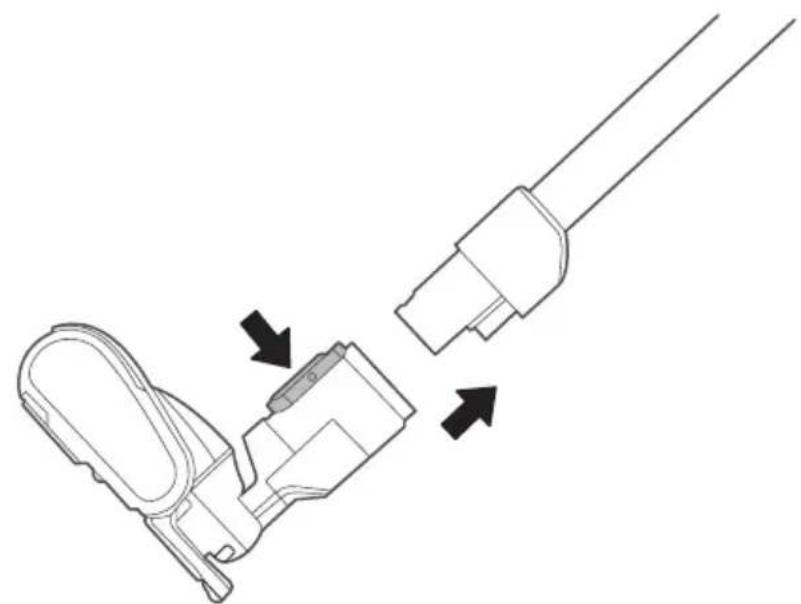
- Press the button to remove the electric scrubbing brush;
natural_image
Technical line drawing of a mechanical connector with two arrows indicating assembly or movement (no text or symbols)Disassembling And Cleaning Of Electric Scrubbing Brush
- Unscrew the gland of the roller brush according to the instructions, draw the roller brush assembly to one side and clean it. Mount it back according to the disassembly procedure after cleaning.
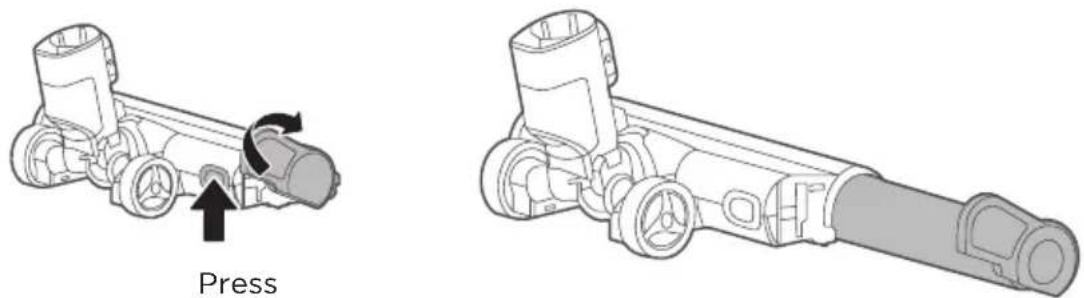
Release the gland of the roller brush Draw out the roller brush assembly
Disassembling And Cleaning Of Electric Scrubbing Brush

NOTE
- When dust blocks the air duct of the bed brush, please use disposable chopsticks to remove the dust.
- Except for the roller brush, other parts cannot be cleaned with water;
- During operation, do not touch the roller brush that rolls at the bottom.
-
To avoid affecting the operation of the electric bed brush, please clean and maintain the roller brush when it is entangled or dirty.
-
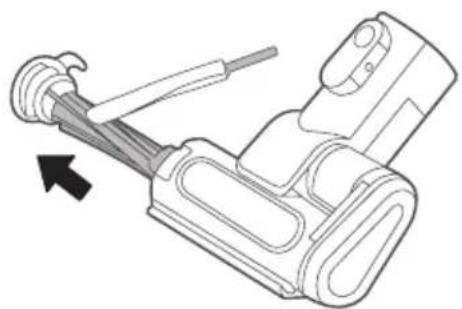
Press the button to remove the electric bed brush;
-
Pull the lock in the direction shown below, and then rotate to take out the roller brush assembly;

text_image
① Press ②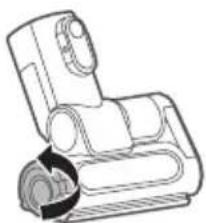
natural_image
Line drawing of a mechanical device with a curved handle and circular component (no text or symbols)- Wipe the inside clean with a cloth strip. If the roller brush is wrapped with hair, cut it along the roller brush with scissors and clean it up. After cleaning, mount the roller brush back according to the above disassembly steps.
natural_image
Mechanical device diagram showing a lever mechanism with a black arrow indicating direction (no text or symbols present)Disassembling And Cleaning Of Vent Hepa Filter

NOTE
- Please pay attention to sharp objects such as glass to prevent injury;
- All parts must be completely dried before they can be mounted and used;
- Do not rub or exert brute force on the HEPA filter;
- When assembling, please make sure that the HEPA filter is mounted in place;
- Do not continue to use the HEPA filter when it is damaged or insufficiently cleaned and maintained.
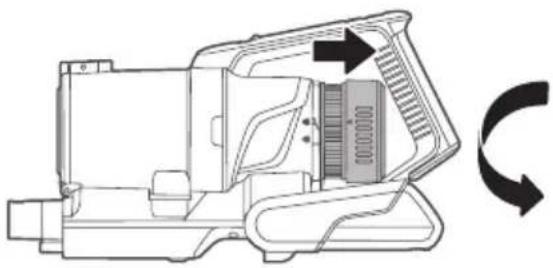
- After the machine is laid flat as shown in the figure, hold the machine with one hand, rotate the air vent cover with the other hand counterclockwise, and then take off the cover vertically to the right;
natural_image
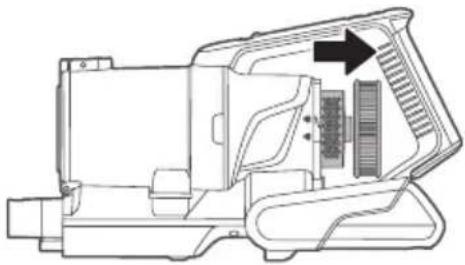
Technical line drawing of a mechanical device with directional arrows indicating rotation or cycle (no text or symbols)- Remove the air vent cover, and remove the vent HEPA filter vertically to the right. The HEPA filter can be washed gently with water, but not rubbed by brute force. After being fully dried, mount it back according to the above disassembly steps.
natural_image
Technical line drawing of a mechanical device with internal components and an arrow indicating direction (no text or symbols)Battery Charging
| Operation InstructionsS/N | |
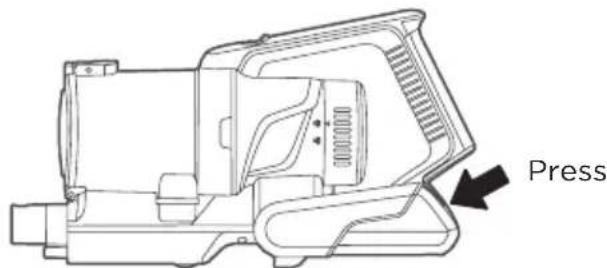
| 1 | Press the battery pack release button |
| 2 | Pull the battery pack backward |
| 3 | Replace the battery pack in reverse order |
text_image
PressTROUBLE SHOOTING
In the case of any abnormalities in the use of this product please refer to the table below first.
| Abnormality Possible Cause Treatment | ||
| 3 indicators flash | Floor brush or mite removal brush entangled during rollingToo high or too low use ambient temperature | Clean floor brush or mite removal brushPlease use in a proper environment |
| Electric floor brush does not work | Large trash rolled in (packaging film, etc.)Rolling brush entangled in hair, etc. | Remove hairs wrapped around rolling brushRemove trash |
| Running time becomes shorter | Battery agesToo high or too low use ambient temperatureBattery not fully charged | Contact the seller or after-sales service personnel to purchase a new batteryUse in a proper environmentCharge the vacuum cleaner |
| Suction loss | Excessive dust in dust cupDust cup cotton filter cloggedFloor brush or accessory suction inlets cloggedNot fully dried after washing | Clean up trash in timeClean cotton filterRemove blockageDry the washed parts in a cool place for use |
| Unable to charge | Too low or too high ambient temperature when charging | Charge the vacuum cleaner in an environment with proper temperature (5°C-40°C) |
| Battery leakage | Battery not used for a long time | Replace the battery |
TRADEMARKS, COPYRIGHTS AND LEGAL STATEMENT
Midea logo, word marks, trade name, trade dress and all versions thereof are valuable assets of Midea Group and/or its affiliates (“Midea”), to which Midea owns trademarks, copyrights and other intellectual property rights, and all goodwill derived from using any part of an Midea trademark. Use of Midea trademark for commercial purposes without the prior written consent of Midea may constitute trademark infringement or unfair competition in violation of relevant laws.
This manual is created by Midea and Midea reserves all copyrights thereof. No entity or individual may use, duplicate, modify, distribute in whole or in part this manual, or bundle or sell with other products without the prior written consent of Midea.
All the described functions and instructions were up to date at the time of printing this manual. However, the actual product may vary due to improved functions and designs.
DISPOSAL AND RECYCLING
Important instructions for environment
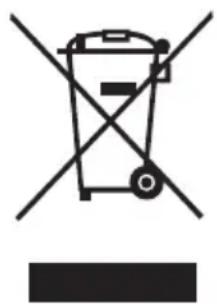
Compliance with the WEEE Directive and Disposing of the Waster Product: This product complies with EU WEEE Directive (2012/19/EU). This product bears a classification symbol for waster electrical and electronic equipment (WEEE).
This symbol indicates that this product shall not be disposed with other household wastes at the end of its service life. Used device must be returned to official collection point for recycling of electrical electronic devices. To find these collection systems please contact to your local authorities or retailer where the product was purchased. Each household performs important role in recovering and recycling of old appliance. Appropriate disposal of used appliance helps prevent potential negative consequences for the environment and human health.
natural_image
Symbol of a trash bin crossed with no text or numbers, representing waste sorting or disposal (no text present)Compliance with RoHS Directive
The product you have purchased complies with EU RoHS Directive (2011/65/EU). It does not contain harmful and prohibited materials specified in the Directive.
Package information
Packaging materials of the product are manufactured from recyclable materials in accordance with our National Environment Regulations. Do not dispose of the packaging materials together with the domestic or other wastes. Take them to the packaging material collection points designated by the local authorities.

natural_image
Recycling symbol with three arrows forming a triangle (no text or labels)DATA PROTECTION NOTICE
For the provision of the services agreed with the customer,
we agree to comply without restriction with all stipulations of applicable data protection law, in line with agreed countries within which services to the customer will be delivered, as well as, where applicable, the EU General Data Protection Regulation (GDPR).
Generally, our data processing is to fulfil our obligation under contract with you and for product safety reasons, to safeguard your rights in connection with warranty and product registration questions. In some cases, but only if appropriate data protection is ensured, personal data might be transferred to recipients located outside of the European Economic Area.
Further information are provided on request. You can contact our Data Protection Officer via MideaDPO@midea.com. To exercise your rights such as right to object your personal date being processed for direct marketing purposes, please contact us via MideaDPO@midea.com. To find further information, please follow the QR Code.

text_image
Mideamake yourself at home