ZKW700PSNSS - Warming Drawer Monogram - Free user manual and instructions
Find the device manual for free ZKW700PSNSS Monogram in PDF.


| Product Type | Electric Warming Drawer |
| Brand | Monogram |
| Model Number | ZKW700PSNSS (also ZKW700S/P, ZTW900S/P) |
| Available Widths | 27-inch and 30-inch (custom panel kits available) |
| Power Supply | 120 V, 60 Hz, AC |
| Power Rating | Approximately 1400 W |
| Maximum Load | 50 lb (22.7 kg) |
| Temperature Settings | PROOF (75-95°F), LOW (140-160°F), MED (160-195°F), HIGH (195-230°F) |
| Control Type | Rotary knob with ON/OFF switch and moisture selector |
| Moisture Selector | Open vent (crisp) or closed vent (moist) |
| Preheat Time | LOW: 8 min, MED: 15 min, HIGH: 20 min (not needed for proofing) |
| Interior Features | Removable wire rack for double stacking |
| Proofing Function | Yes, for yeast dough at 75-95°F |
| Surface Material | Stainless steel (black stainless steel available on some models) |
| Cleaning | Soap and warm water; stainless steel cleaner for exterior; dishwasher-safe rack |
| Safety Features | Anti-tip bracket required, auto shut-off (when switched off), signal light |
| Installation | Built-in, requires anti-tip brace, must be installed by qualified technician |
| Warranty | Limited 2-year parts and labor (in-home service) |
| Certifications | UL listed |
| User Manual | Free PDF download available |
Frequently Asked Questions - ZKW700PSNSS Monogram
User questions about ZKW700PSNSS Monogram
0 question about this device. Answer the ones you know or ask your own.
Ask a new question about this device
Download the instructions for your Warming Drawer in PDF format for free! Find your manual ZKW700PSNSS - Monogram and take your electronic device back in hand. On this page are published all the documents necessary for the use of your device. ZKW700PSNSS by Monogram.
USER MANUAL ZKW700PSNSS Monogram
Electric Warming Drawer
Español
USING THE WARMING DRAWER ....4
CARE AND CLEANING .... 10
ACCESSORIES ....10
TROUBLESHOOTING 11
LIMITED WARRANTY 12
MODEL INFORMATION
MODEL NUMBERS
ZTW900S, ZTW900P, ZKW700S, ZKW700P
WRITE DOWN THE MODEL AND SERIAL NUMBERS
You can find them on a label located on the backside of the lower drawer front.
Use these numbers in any correspondence or service calls concerning your appliance.
Please write these numbers here:
Model Number
Serial Number
CONSUMER SUPPORT
MONOGRAM WEBSITE
Have a question or need assistance with your appliance? Try the Monogram website 24 hours a day, any day of the year! You can also shop for more great Monogram products and take advantage of all our on-line support services designed for your convenience. In the US: monogram.com
REGISTER YOUR APPLIANCE
Register your new appliance on-line at your convenience! Timely product registration will allow for enhanced communication and prompt service under the terms of your warranty, should the need arise. You may also mail in the pre-printed registration card included in the packing material. In the US: monogram.com/register
SCHEDULE SERVICE
Expert Monogram repair service is only one step away from your door. Get on-line and schedule your service at your convenience any day of the year.
In the US: monogram.com
PARTS AND ACCESSORIES
Individuals qualified to service their own appliances can have parts or accessories sent directly to their homes
(VISA, MasterCard and Discover cards are accepted). Order on-line today 24 hours every day.
In the US: monogram.com/use-and-care/parts
Instructions contained in this manual cover procedures to be performed by any user. Other servicing generally should be referred to qualified service personnel. Caution must be exercised, since improper servicing may cause unsafe operation.
CONTACT US
If you are not satisfied with the service you receive from Monogram, contact us on our website with all the details including your phone number, or write to:
In the US: General Manager, Customer Relations | Monogram Appliances, Appliance Park | Louisville, KY 40225 monogram.com/contact
IMPORTANT SAFETY INFORMATION READ ALL INSTRUCTIONS BEFORE USING THE APPLIANCE
WARNING
Read all safety instructions before using the product. Failure to follow these instructions may result in shock, serious injury or death.
WARNING
IMPORTANT SAFETY NOTICE
All warming drawers can tip and injury could result if not properly installed.
To prevent accidental tipping of the warming drawer, attach it to the wall with an anti-tip brace as described in the Installation Instructions.
WARNING
GENERAL SAFETY INSTRUCTIONS
- Use this appliance only for its intended purpose as described in this Owner's Manual.
■ Be sure your appliance is properly installed and grounded by a qualified installer in accordance with the provided installation instructions.
■ Do not attempt to repair, replace or clean any part of your warming drawer unless it is specifically recommended in this manual. All other servicing should be transferred to a qualified technician.
■ Before performing any service, disconnect the power supply at the household distribution panel by removing the fuse or switching off the circuit breaker.
■ Do not leave children alone—children should not be left alone or unattended in an area where an appliance is in use. They should never be allowed to climb, sit or stand on any part of the appliance.
CAUTION
Do not store items of interest inets above a warming drawer - on the warming drawer to reach seriously injured.
■ Use only dry pot holders—moist or damp pot holders on hot surfaces may result in burns from steam. Do not let pot holders touch hot heating elements. Do not use a towel or other bulky cloth in place of pot holders.
■ Never use your appliance for warming or heating the room.
- Do not touch the heating elements or the interior surface of the warming drawer. These surfaces may be hot enough to burn even though they are dark in color. During and after use, do not touch, or let clothing or other flammable materials contact any interior area of the warming drawer; allow sufficient time for cooling first. Other surfaces of the appliance may become hot enough to cause burns. Potentially hot surfaces include the warming drawer vent opening, surfaces near the opening and crevices around the warming drawer door.
■ Do not heat unopened food containers. Pressure could build up and the container could burst, causing an injury.
- Do not use aluminum foil to line the warming drawer bottom. Foil can trap heat or melt, resulting in damage to the product and a shock or fire hazard.
■ Avoid scratching or impacting glass doors or control panels. Doing so may lead to glass breakage. Do not cook on a product with broken glass. Shock, fire or cuts may occur.
■ The purpose of the warming drawer is to hold hot cooked foods at serving temperature (greater than 140^ F). Bacteria will grow in food while it is below 140^ F. Therefore, always start with hot food; cold food cannot be heated or cooked in the warming drawer.
READ AND SAVE THESE INSTRUCTIONS
IMPORTANT SAFETY INFORMATION READ ALL INSTRUCTIONS BEFORE USING THE APPLIANCE
WARNING
KEEP FLAMMABLE MATERIALS AWAY FROM THE WARMING DRAWER Failure to do so may result in fire or personal injury.
- Do not store or use flammable materials in or near a warming drawer, including paper, plastic, pot holders, linens, wall coverings, curtains, drapes and gasoline or other flammable vapors and liquids.
■ Never wear loose-fitting or hanging garments while using the appliance. These garments may ignite if they contact hot surfaces, causing severe burns.
- Do not let cooking grease or other flammable materials accumulate in or near the warming drawer. Grease in the warming drawer or near the warming drawer may ignite.
WARNING
IN THE EVENT OF A FIRE, TAKE THE FOLLOWING STEPS TO PREVENT INJURY AND FIRE SPREADING
■ Do not use water on grease fires. Never pick up a flaming pan.
If there is a fire in the warming drawer, smother the fire by closing the warming drawer door and turning the warming drawer off or by using a multi-purpose dry chemical or foam-type fire extinguisher.
WARNING
WARMING DRAWER SAFETY INSTRUCTIONS
■ Stand away from the warming drawer when opening the warming drawer door. Hot air or steam which escapes can cause burns to hands, face and/or eyes.
- Keep the warming drawer vent unobstructed.
- Keep the warming drawer free from grease buildup. Grease in the warming drawer may ignite
■ Place warming drawer racks in desired location while warming drawer is cool. If rack must be moved while warming drawer is hot, do not let pot holder contact hot heating element in warming drawer.
■ Do not leave items such as paper, cooking utensils or food in the warming drawer when not in use. Items stored in a warming drawer can ignite.
How to Remove Protective Shipping Film and Packaging Tape
Carefully grasp a corner of the protective shipping film with your fingers and slowly peel it from the appliance surface. Do not use any sharp items to remove the film. Remove all of the film before using the appliance for the first time.
To assure no damage is done to the finish of the product, the safest way to remove the adhesive from packaging tape on new appliances is an application of a household liquid dishwashing detergent. Apply with a soft cloth and allow to soak.
NOTE: The adhesive must be removed from all parts. It cannot be removed if it is baked on.
READ AND SAVE THESE INSTRUCTIONS
USING THE WARMING DRAWER
Features
Not all features are on all models. Appearance may vary.
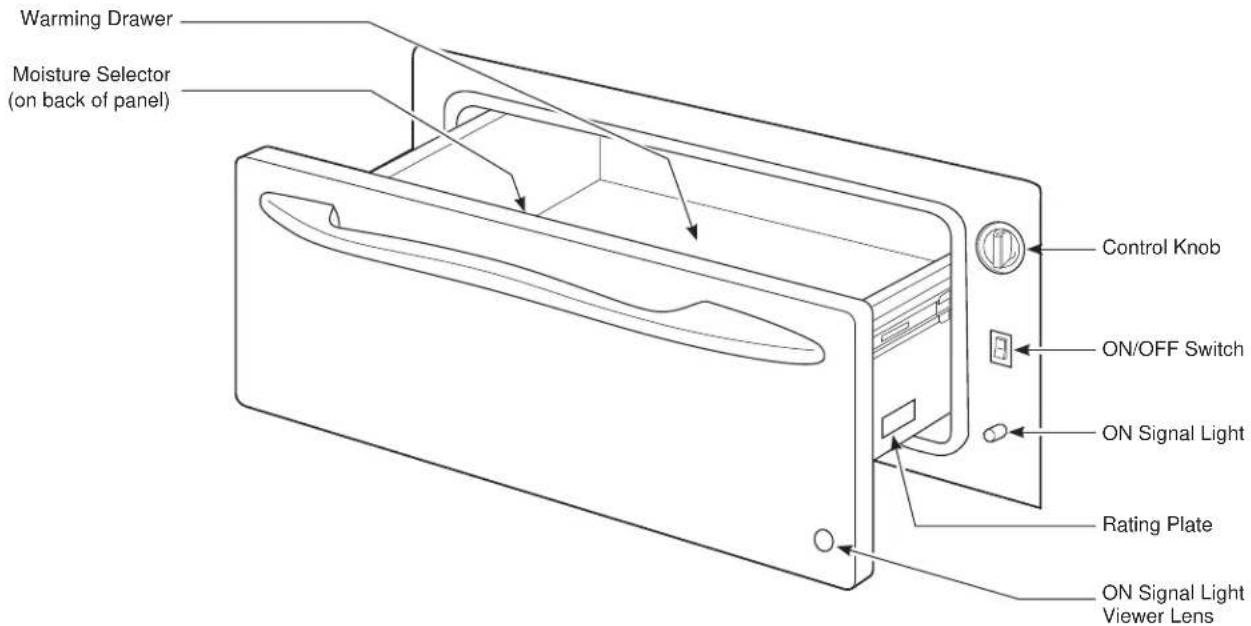
The warming drawer will keep hot, cooked foods at serving temperature. Always start with hot food. Do not use to heat cold food other than proofing yeast dough, crisping crackers, chips or dry cereal.
Control Knob
The warming drawer controls are hidden with the drawer shut. Open the drawer. The controls are on the right side of the front frame.
To use the warming drawer, press the ON/OFF switch to the ON position.
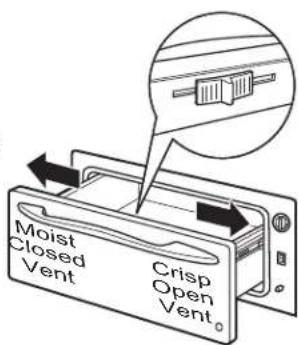
Slide the moisture selector control to the open or closed setting (See the Moisture Selector section).
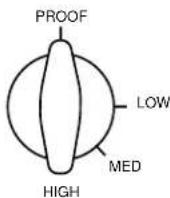
Turn the control knob to the desired setting.
| PROOF | 75-95°F |
| LOW | 140-160°F |
| MED | 160-195°F |
| HIGH | 195-230°F |
ON Signal Light
The ON signal light is located below the ON/OFF switch and glows when the ON/OFF switch is in the ON position. It stays on until the ON/OFF switch is moved to the OFF position.
The ON signal light is visible through the light viewer in the drawer front panel when the drawer is closed. This is a reminder that the heat is on.
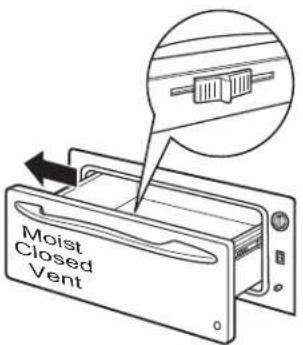
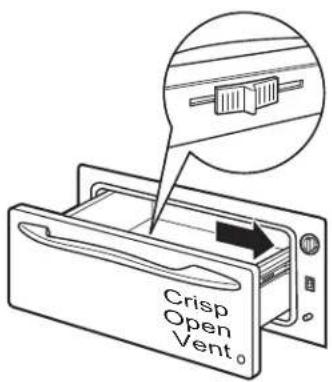
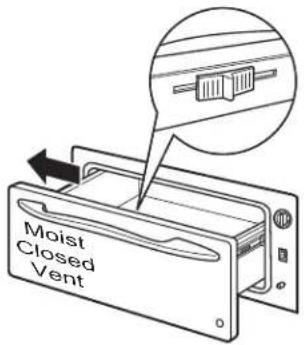
Moisture Selector
The moisture selector is located on the inside front of the drawer.
To keep foods moist, slide the moisture selector control away from the control knob. This closes the vent and seals the moisture inside the drawer. With the vent closed hot foods stay moist and soft.
In this setting condensation may occur around the inside edge of the drawer.
To keep foods crisp, slide the moisture selector control to the right towards the control knob. This opens the vents and allows the moisture to escape.
With the vents open, it is normal for moisture to collect on surfaces above the warming drawer.
USING THE WARMING DRAWER
Operating Tips
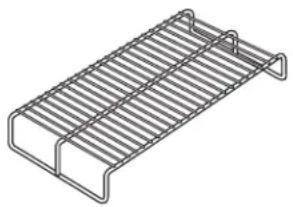
Rack
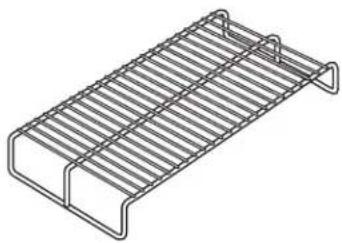
■ Rack will fit from front to back.
■ Preheat with the rack in place.
■ Using the rack allows for double stacking of items.
natural_image
Line drawing of a metal grate or rack structure with no text or symbols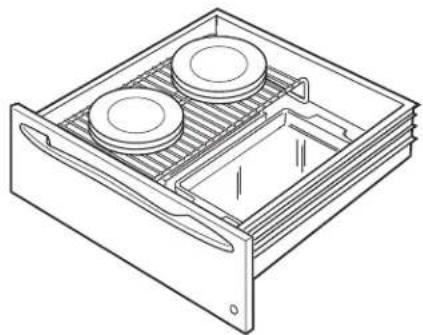
natural_image
Line drawing of a technical diagram of a multi-chamber heating unit with two circular components (no text or symbols)Double stacking items with the rack in position.
When Using The Warming Drawer
Do not line the warming drawer with aluminum foil.
■ Allow time for the drawer to be preheated:
LOW 8 minutes
MED 15 minutes
HIGH 20 minutes
NOTE: It is not necessary to preheat the drawer for proofing.
Food in heat-safe glass and glass ceramic pans may need higher thermostat setting as compared to food in metal pans.
■ Repeated opening of the drawer allows the hot air to escape and the food to cool. Allow extra time for temperature inside the drawer to stabilize after adding items.
■ With large loads it may be necessary to use a higher thermostat setting and cover some of the cooked food items.
■ Food should be kept hot in its cooking container or transferred to a heat-safe serving dish.
■ Aluminum foil may be used to cover food to prevent it from drying out.
CAUTION
Plastic containers or plastic wrap will melt
if in direct contact with the drawer. Melted plastic may not be removable and is not covered under your warranty.
■ Remove serving spoons, etc., before placing containers in warming drawer.
To Warm Serving Bowl And Plates
To warm serving bowls and plates set the control on LOW.
■ Use only heat-safe dishes.
- Place the empty dishes on the rack to raise them off the bottom of the drawer. If you want hotter dishes or want to heat fine china, please check with the manufacturer of the dishes for their maximum heat tolerance.
■ Preheat empty serving dish while preheating the drawer.
■ When holding hot, cooked foods and warming empty serving dishes at the same time, place the serving dishes on the high rack position and the food on the bottom of the drawer.
CAUTION
Dishes may be hot. Use pot holders or
mitts when removing hot dishes.
USING THE WARMING DRAWER
Operating Tips
To Proof Yeast Bread Dough
Yeast dough can be proofed in the warming drawer.
■ Place your dish on the warming drawer bottom.
■ Close the vent.
■ Lightly oil the top of the dough in a bowl large enough to double the dough size. Cover with a cloth.
■ Preheating not required for proofing.
- Check the dough height in 40 minutes. Add time as needed. The dough should remain in the drawer until it has doubled in size and a slight depression remains when the surface is touched gently with a finger.
To Crisp Stale Items
■ Place food in low sided dishes or pans.
■ Preheat on LOW setting and open the vent.
■ Check crispness after 45 minutes. Add time as needed.
Temperature Selection Chart for Crisp Foods
To keep several different foods hot, set the temperature to the food needing the highest setting. Place the items needing the highest setting on the bottom of the drawer and items needing less heat on the rack.
| Food Type Control Setting | Moisture Selector Setting |
| Bacon HIGH OPEN | |
| Bread, hard rolls MED OPEN | |
| Fried foods HIGH OPEN | |
| Pies, two crusts MED OPEN | |
| Pizza HIGH OPEN | |
| Potatoes, baked HIGH OPEN | |
| Tortilla Chips LOW OPEN |
Tips:
Leave food uncovered.
■ Do not use plastic containers or plastic wrap.
■ Preheat prior to use according to recommended times.
USING THE WARMING DRAWER
Operating Tips
Temperature Selection Chart for Moist Foods
To keep several different foods hot, set the temperature to the food needing the highest setting. Place the items needing the highest setting on the bottom of the drawer and items needing less heat on the rack.
| Food Type Control Setting | Moisture Selector Setting | |
| Beef, medium and well done* MED CLOSED | ||
| Bread, soft rolls MED CLOSED | ||
| Casseroles MED CLOSED | ||
| Cooked cereal MED CLOSED | ||
| Eggs MED CLOSED | ||
| Fish, seafood MED CLOSED | ||
| Fruit MED CLOSED | ||
| Gravy, cream sauces MED CLOSED | ||
| Ham MED CLOSED | ||
| Lamb | MED CLOSED | |
| Pancakes, waffles | HIGH | CLOSED |
| Pies, one crust | MED CLOSED | |
| Pork | MED CLOSED | |
| Potatoes, mashed | MED CLOSED | |
| Poultry | HIGH | CLOSED |
| Vegetables MED CLOSED | ||
* USDA/FSIS recommends an internal temperature of 145°F. as the minimum doneness for beef. Use a portable meat thermometer to check internal temperatures.
Tips:
■ Cover food with lid or aluminum foil.
■ Do not put water in the warming drawer.
■ Do not use plastic containers or plastic wrap.
■ Preheat prior to use according to recommended times.
CARE AND CLEANING
Be sure the controls are in the OFF position and all surfaces are cool before cleaning any part of the warming drawer.
Painted Or Enameled Surfaces
Use soap and warm water to thoroughly clean.
Rack
Clean the rack with detergent and water. After cleaning, rinse the rack with clean water and dry with a clean cloth.
natural_image
Isometric line drawing of a rectangular metal grate or rack structure (no text or symbols)Stainless Steel - Excluding Black Stainless Steel (on some models)
Do not use a steel wool pad; it will scratch the surface.
To clean the stainless steel surface, use warm sudsy water or a stainless steel cleaner or polish. Always wipe the surface in the direction of the grain. Follow the cleaner instructions for cleaning the stainless steel surface.
Cleaners with oxalic acid such as Bar Keepers Friend Soft Cleanser™ will remove surface rust, tarnish and small blemishes. Use only a liquid cleanser free of grit and rub in the direction of the brush lines with a damp, soft sponge.
To inquire about purchasing cleaning products including stainless steel appliance cleaner or polish, see the Accessories and Consumer Support sections at the end of this manual.
Control Knob
The control knob may be removed for easier cleaning.
Make sure the knob is in the PROOF position and pull it straight off the stem for cleaning.
The knob should be washed with soap and water. Make sure the inside of the knob is dry before replacing.
Replace the knob in the PROOF position to ensure proper placement.
ACCESSORIES
Looking For Something More?
Monogram offers a variety of accessories to improve your cooking and maintenance experiences!
Refer to the Consumer Support page for phone numbers and website information.
The following products and more are available:
Accessories
| 27" Wide Custom Panel Kit |
| 30" Wide Custom Panel Kit |
Parts
| Wire | Rack |
Cleaning Supplies
| CitruShineTM Stainless Steel Wipes |
| Stainless Steel Appliance Cleaner |
TROUBLESHOOTING
Save time and money! Review the charts on the following pages first and you may not need to call for service.
| Problem Possible Cause | What To Do | |
| Warming drawer will not work | A fuse in your home may be blown or the circuit breaker tripped. | Replace the fuse or reset the circuit breaker. |
| Warming drawer not plugged in. Plug in. | ||
| Controls improperly set. See the Using the warming drawer section. | ||
| Drawer does not slide smoothly or drags | Ball bearings out of alignment. Fully extend the drawer and push it all the way in.See the Care and cleaning section. | |
| Drawer over-loaded or load unbalanced. Reduce weight to less than 50 pounds.Redistribute drawer contents. | ||
| Excessive condensation Liquid in warming drawer. Remove liquid. | ||
| Uncovered foods. Cover food with lid or aluminum foil. | ||
| Temperature setting too high. Reduce temperature setting. | ||
| Incorrect Moisture Selector setting. Set the Moisture Selector to the open vent setting to allow venting. | ||
| No heat in the PROOF setting | Room temperature may prevent the thermostat from tripping on. | Turn the knob to LOW then back to PROOF. |
| Food dries out Moisture escaping. Cover food with lid or aluminum foil. | ||
MONOGRAM LIMITED WARRANTY
Monogram.com
All warranty service is provided by our Factory Service Centers, or an authorized Customer Care® technician. To schedule service online, visit us at monogram.com/contact.
| For the period of Monogram Appliances will replace | |
| Limited two-year warranty | For two years from date of original purchase, we will provide, free of charge, parts and service labor in your home to repair or replace any part of the unit that fails because of a manufacturing defect. |
What Monogram will not cover:
■ Service trips to your home to teach you how to use the product.
■ Replacement of house fuses or resetting of circuit breakers.
■ Failure of the product if it is used for other than its intended purpose or used commercially.
■ Improper installation, delivery or maintenance.
■ Damage to the product caused by accident, fire, floods or acts of God.
■ Incidental or consequential damage caused by possible defects with this appliance.
■ Damage caused after delivery.
■ Product not accessible to provide required service.
■ Installation or service for a makeup (replacement) air system.
EXCLUSION OF IMPLIED WARRANTIES
Your sole and exclusive remedy is product repair as provided in this Limited Warranty. Any implied warranties, including the implied warranties of merchantability or fitness for a particular purpose, are limited to one year or the shortest period allowed by law.
This limited warranty is extended to the original purchaser and any succeeding owner for products purchased for home use within the USA. If the product is located in an area where service by a Monogram Appliances Authorized Servicer is not available, you may be responsible for a trip charge or you may be required to bring the product to an Authorized Monogram Appliances Service location for service. In Alaska, the limited warranty excludes the cost of shipping or service calls to your home.
Some states do not allow the exclusion or limitation of incidental or consequential damages. This limited warranty gives you specific legal rights, and you may also have other rights which vary from state to state. To know what your legal rights are, consult your local or state consumer affairs office or your state's Attorney General.
Warrantor: GE Appliances, a Haier company, Louisville KY, 40225
MONOGRAM
MANUAL DEL
PROPIETARIO
PROOF (Leudar) ..... 75 a 95°F
natural_image
Line drawing of a wire mesh structure with no text or symbols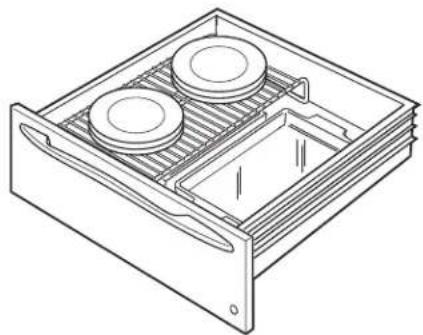
natural_image
Line drawing of a technical diagram of a storage or rack system with two circular components inside a rectangular frame (no text or symbols)natural_image
Isometric line drawing of a rectangular metal grate or rack structure with two side handles (no text or symbols)Acero Inoxidable
- Español
- MODEL INFORMATION
- MODEL NUMBERS
- WRITE DOWN THE MODEL AND SERIAL NUMBERS
- CONSUMER SUPPORT
- MONOGRAM WEBSITE
- REGISTER YOUR APPLIANCE
- SCHEDULE SERVICE
- PARTS AND ACCESSORIES
- CONTACT US
- IMPORTANT SAFETY INFORMATION READ ALL INSTRUCTIONS BEFORE USING THE APPLIANCE
- WARNING
- IMPORTANT SAFETY NOTICE
- GENERAL SAFETY INSTRUCTIONS
- CAUTION
- READ AND SAVE THESE INSTRUCTIONS
- KEEP FLAMMABLE MATERIALS AWAY FROM THE WARMING DRAWER Failure to do so may result in fire or personal injury.
- IN THE EVENT OF A FIRE, TAKE THE FOLLOWING STEPS TO PREVENT INJURY AND FIRE SPREADING
- WARMING DRAWER SAFETY INSTRUCTIONS
- How to Remove Protective Shipping Film and Packaging Tape
- USING THE WARMING DRAWER
- Features
- Control Knob
- ON Signal Light
- Moisture Selector
- Operating Tips
- Rack
- When Using The Warming Drawer
- To Warm Serving Bowl And Plates
- To Proof Yeast Bread Dough
- To Crisp Stale Items
- Temperature Selection Chart for Crisp Foods
- Tips:
- Temperature Selection Chart for Moist Foods
- CARE AND CLEANING
- Painted Or Enameled Surfaces
- Stainless Steel - Excluding Black Stainless Steel (on some models)
- ACCESSORIES
- Looking For Something More?
- TROUBLESHOOTING
- MONOGRAM LIMITED WARRANTY
- Monogram.com
- What Monogram will not cover:
- EXCLUSION OF IMPLIED WARRANTIES
- MANUAL DEL
- PROPIETARIO
- Acero Inoxidable
Brand : Monogram
Model : ZKW700PSNSS
Category : Warming Drawer