
AP2-20N - Motion detector OPTEX - Free user manual and instructions
Find the device manual for free AP2-20N OPTEX in PDF.


| Product Type | Passive Infrared (PIR) Motion Detector |
| Brand | OPTEX |
| Model | AP2-20N |
| Detection Method | Passive Infrared (PIR) using dual element pyroelectric sensor |
| Detection Range | 12 m x 12 m (90° wide angle) at mounting height of 2.0 m |
| Mounting Height | 2.0 m recommended |
| Power Supply | 10 to 30 VDC; current consumption 16 mA max (12 VDC) |
| Output | Relay (NC, N/O selectable) rated 28 VAC/DC, 0.1 A max |
| Alarm Period | Approx. 2 seconds |
| Warm-up Time | Approx. 30 seconds |
| Operating Temperature | -20°C to +50°C |
| Dimensions (W x H x D) | 105 mm x 56 mm x 45 mm |
| Weight | Approx. 100 g |
| Main Functions | Motion detection with adjustable sensitivity; pulse count selectable (1, 2, or 3); tamper switch; LED indicator for alarm |
| Maintenance & Cleaning | Clean lens with soft dry cloth; avoid solvents; check mounting and wiring periodically |
| Safety | Use only with specified power supply; disconnect power before installation; follow local electrical codes |
| Spare Parts & Repairability | No user-serviceable parts; replace entire unit if faulty; contact OPTEX support |
| General Information | Designed for indoor use; wall or ceiling mount; immune to small animals (up to 20 kg) with optional pet alley mask |
Frequently Asked Questions - AP2-20N OPTEX
User questions about AP2-20N OPTEX
0 question about this device. Answer the ones you know or ask your own.
Ask a new question about this device
Download the instructions for your Motion detector in PDF format for free! Find your manual AP2-20N - OPTEX and take your electronic device back in hand. On this page are published all the documents necessary for the use of your device. AP2-20N by OPTEX.
USER MANUAL AP2-20N OPTEX
Motion detection and smart automation
Narrow curtain indoor motion detector providing reliable and stable performance up to a range of 6m (20ft.). Ideal for protecting windows, hallways, doors and a variety of other commercial and residential applications.
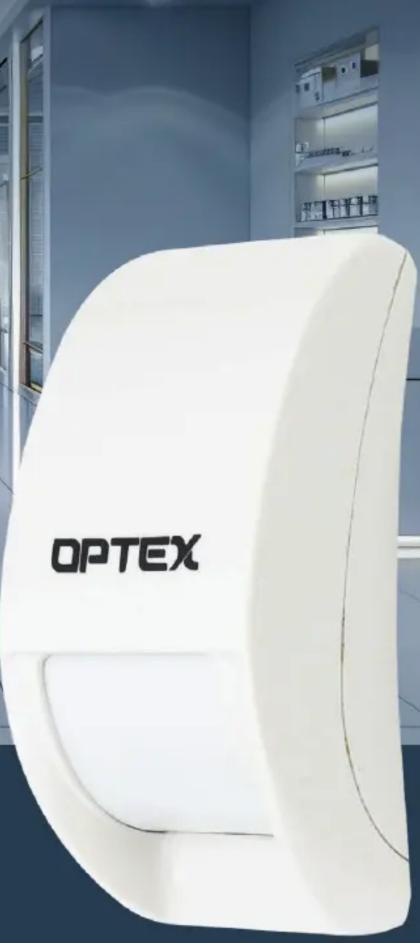

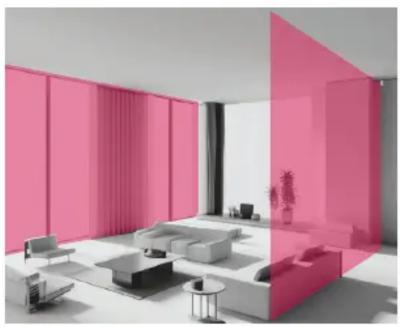
Reliable motion detection with a range of up to 6 m (20ft.)

Easy installation in wall or ceiling creating a curtain detection area

Flexible mounting height between 2.4 - 3.6 m (8ft. to 12ft.)


Wall mountFlexible installation Ceiling mount


Selectable sensitivity
Detection sensitivity can be adapted to the ambience conditions for stable performance.
SENSITIVITY
LOW HIGH
Specifications
| MODEL | AP2-20N |
| Detection Method | Passive Infrared |
| Coverage | 6m x 1m - mounting height at 3.6m (20ft x 3.3ft - mounting height at 12ft) |
| Mounting type | Wall and ceiling |
| Mounting Height | 2.4m - 3.6m (8ft - 12ft) |
| Area Width | 1m max - mounting height at 3.6m (3.3ft max - mounting height at 12ft) |
| Sensitivity | 2°C at 0.6m/s (35.6°F at 2ft/s) |
| Detection speed | 0.3m - 3m/s (1ft - 10ft/s) |
| LED Indicator | Switchable ON/OFF |
| Sensitivity Adjustment | H/L |
| Alarm Output | Approx. 2.5 sec, N.C., 28V DC, 200mA max |
| Tamper Switch | N.C., opens when cover is removed. N.C. 28V DC, 100mA (max) |
| Warm-up Period | Approx. 60sec |
| Power Input | 9.5 - 16V DC |
| Current Draw | 12mA (max) |
| Weight | Approx. 1.75oz (Approx. 50g) |
| Operating Temperature | -20°C - +50°C (-4°F - +122°F) |
| Environmental Humidity | 95% max |
| RF Interference | No alarm 10V/m at 80MHz - 1GHz |
| Application Environment | Indoor |
*Specifications and designs are subject to change without prior notice.
Double conductive shielding
OPTEX patented double conductive shielding allows the AP2-20N sensor to block RFI and visible light disturbance from sunlight or strong lamps.

Dimensions

Installation Parameters
| Installation Height (H) 2.4m (8ft) | 3.0m (10ft) | 3.6m (12ft) | |
| Max. area width | 0.6m (2ft) | 0.8m (2.5ft) | 1m (3ft) |
| Max. area length | 6m (20ft) | 6m (20ft) | 6m (20ft) |
| Recommended Distance Adjacent to Wall or Ceiling | 0.5m (1.5ft) | 0.6m (2ft) | 0.7m (2.5ft) |


Web Based Manual


Brand : OPTEX
Model : AP2-20N
Category : Motion detector