KASHFH18WGA - Heating Kogan - Free user manual and instructions
Find the device manual for free KASHFH18WGA Kogan in PDF.


| Brand | Kogan |
| Model | KASHFH18WGA |
| Product Type | Electric Fireplace Heater with Flame Effect |
| Power Supply | 220-240V ~ 50Hz AC |
| Rated Power | 1800W (Max) / 900W (Low) |
| Heating Element | Fan-forced, 2 power levels |
| Flame Effect | LED simulated flame, 5 brightness levels |
| Control Methods | Touch control panel, remote control (2x AAA not included), SmarterHome™ app |
| Smart Home Compatibility | Kogan SmarterHome™ app (iOS/Android), 2.4GHz Wi-Fi |
| Dimensions (approx) | Width: 600 mm, Height: 450 mm, Depth: 300 mm |
| Weight (approx) | 10 kg |
| Material | Metal body, glass front |
| Safety Features | Overheat protection with manual reset, tip-over switch (not specified but common), thermal cut-out |
| Placement | Hard, level, heat-resistant surface; minimum 150mm clearance from walls/alcoves; keep 1m from flammable materials |
| Assembly Required | Yes, attach feet (4 feet, 12 screws included) |
| Cleaning | Unplug and cool; wipe with dry cloth; no abrasive chemicals |
| Warranty | Refer to help.kogan.com |
| Spare Parts Availability | Contact Kogan support for replacements |
| User Manual | Downloadable from help.kogan.com |
Frequently Asked Questions - KASHFH18WGA Kogan
User questions about KASHFH18WGA Kogan
0 question about this device. Answer the ones you know or ask your own.
Ask a new question about this device
Download the instructions for your Heating in PDF format for free! Find your manual KASHFH18WGA - Kogan and take your electronic device back in hand. On this page are published all the documents necessary for the use of your device. KASHFH18WGA by Kogan.
USER MANUAL KASHFH18WGA Kogan
natural_image
Black metal portable stove with visible flames and a side panel, no text or symbols present.KOGAN SMARTERHOME™ ELECTRIC FIREPLACE HEATER
(1800W)
KASHFH18WGA
Safety & Warnings 3
Components 5
Installation 5
Overview 7
Connect to SmarterHome™ App 8
Operation 13
Specifications 16
Notes 17
SAFETY & WARNINGS
When using this appliance, basic precautions should be followed to reduce the risk of fire, electric shock and injury to person, including the following:
- Read all instructions before installing and operating this appliance. Retain this user guide for future reference.
- This appliance is not intended for use by persons (including children) with reduced physical, sensory or mental capabilities, or lack of experience and knowledge, unless they have been given supervision or instruction concerning use of the appliance by a person responsible for their safety.
- If the power cord is damaged, cease use immediately and contact help.Kogan.com for support. It must be replaced by the Kogan.com, its service agent or similarly qualified persons in order to avoid a hazard.
- Do not use this heater if it has been dropped.
- Do not use if there are visible signs of damage to the heater.
- WARNING: To reduce the risk of fire, keep textiles, curtains, or any other flammable material a minimum distance of 1 m from the air outlet.
- This heater must be used on an AC supply only and the voltage marked on the heater must correspond to the supply voltage.
- Do not switch the appliance on until it is properly installed as described in this user guide.
- The heater must not be located directly below an electrical outlet.
- Do not leave the appliance switched on when leaving your home or going to sleep.
- Do not leave unattended when plug in to the mains supply.
- This heater is not intended for use by children. Never leave unsupervised children where the heater is left switched ON (I) or unguarded.
- Only use the appliance for domestic purposes and in the way indicated in these instructions.

Warning: To avoid overheating, do not cover or obstruct the heater in any way.
- Do not use this heater in the immediate surroundings of a bath, a shower, or a swimming pool.
- Ensure the power cord is kept away from any sources of heat.
- Keep the appliance at least 100cm from walls and any other combustible materials.
- Do not use the appliance outdoors.
- Do not use this appliance with wet hands.
- Never move the appliance by pulling the cord.
- Before cleaning the appliance, ensure it is unplugged from the power and that it is completely cool.
- Do not clean the appliance with abrasive or harsh chemicals.
- Do not use any accessories that are not supplied by Kogan.com.
- Never route the mains cable beneath carpet.
- Do not use aerosols near the heater.
- Never use the heater to dry clothes or other similar items.
- To avoid a hazard due to inadvertent resetting of the thermal cut cut-out, this appliance must not used with an external switching device, such as a timer or connected to a circuit that is regularly switched on and off by utility.
- This heater must not be used with an extension lead.
- Do not use this heater with a programmer, timer or any other device that switches the heater on automatically, since a fire risk exists if the heater is covered or positioned incorrectly.
- Children should be supervised to ensure that they do not play with the appliance.
- This appliance can be used by children aged from 8 years and above and persons with reduced physical, sensory or mental capabilities or lack of experience or knowledge if they have been given supervision or instruction concerning use of the appliance in a safe way and understand the hazards involved.
- Cleaning and user maintenance shall not be made by children without supervision.
- Children of less than 3 years should be kept away unless continuously supervised.
- Children aged from 3 years and less than 8 years shall only switch on/off the appliance if it has been placed or installed in its intended normal operating position and they have been given supervision or instruction concerning use of the appliance in a safe way and understand the hazards involved. Children aged from 3 years and less than 8 years shall not plug in, regulate and clean the appliance or perform user maintenance.
- Warning: This heater is not equipped with a device to control the room temperature. Do not use this heater in small rooms when they are occupied by persons not capable of leaving the room on their own, unless constant supervision is provided.
- Caution: Some parts of this product can become very hot and cause burns. Particular attention must be given where children and vulnerable people are present.
- This heater (where used with the stand) must be placed on a hard, level, heat resistant surface or attached to a wall.
- Please retain all packaging until you have checked and counted all the parts and the contents of the fixing pack against the component list.
- The fixing pack contains small items which should be kept away from young children.
- Never cover the heater or obstruct the opening at the base of the heater, this could cause overheating and consequently risk of fire.
COMPONENTS
- Heater
- Feet x4
- Screws x12
- Remote control
- User guide
ASSEMBLY
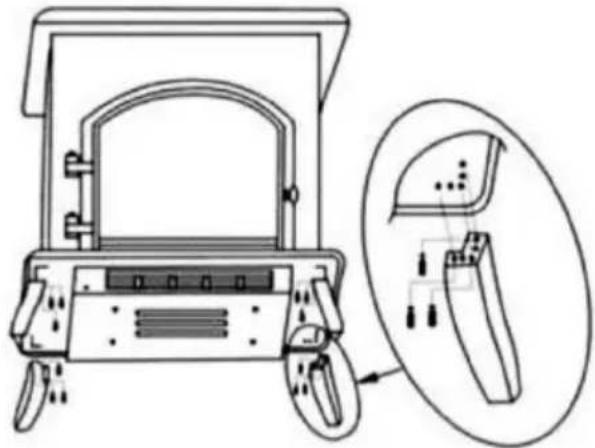
Attaching the Feet
- Ensure that the heater is not plugged in and is completely cool before attaching the feet.
- Carefully turn the heater over so that the underside is facing upwards. Place it on a soft surface to not scratch the top.
- Place one of the heater feet against a corner of the underside of the heater, ensuring that the screw holes are aligned with the thread in the heater.
- Secure the foot to the heater using 3 screws. Tighten them evenly to avoid the foot becoming skewed.
- Repeat steps 3-4 for each of the 3 remaining feet, until all 4 are securely attached.
- Carefully turn the heater upright and check the stability of the feet. If there is no excessive wobble once turned upright, then the heater can be placed in the desired position and used normally. If there is wobble, then ensure that the screws are evenly tightened.
natural_image
Technical line drawing of a device with labeled components and an inset view showing internal structure (no text or symbols)Placement
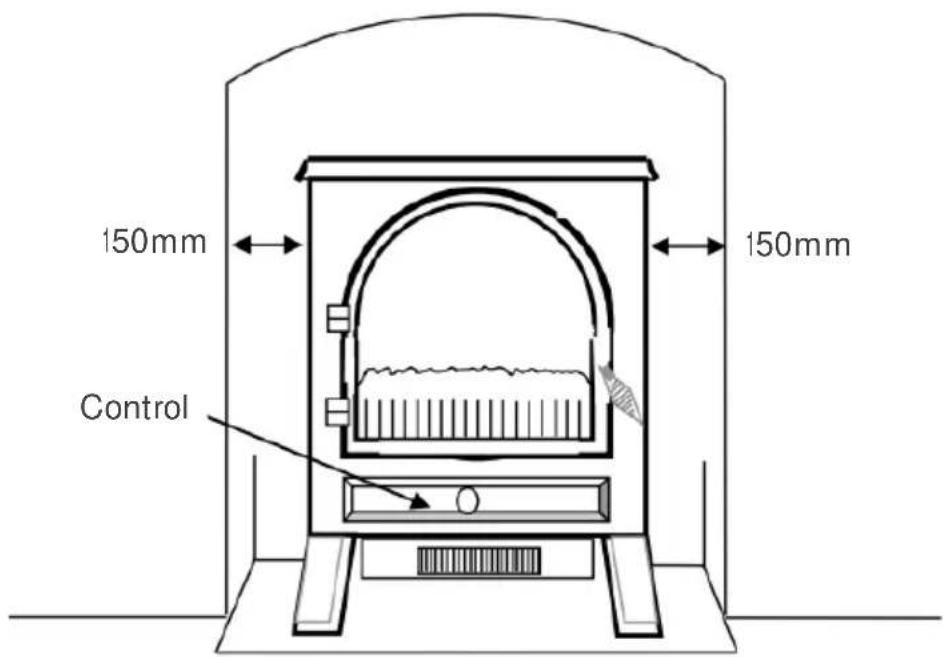
This heater is designed to be placed on a hard, level surface. When positioning, keep the following in mind:
- If you are placing the heater in an alcove, ensure that there is at least 150mm of space on all sides to ensure proper air circulation.
- The heater must not be located over a fixed electrical socket. The socket must always be accessible to disconnect the heater from the electrical supply for maintenance.
- Keep hearth rugs and other soft furnishings away from the front of the heater. They could obstruct the free flow of hot air from the fan and damage both soft furnishings and heater.
OVERVIEW
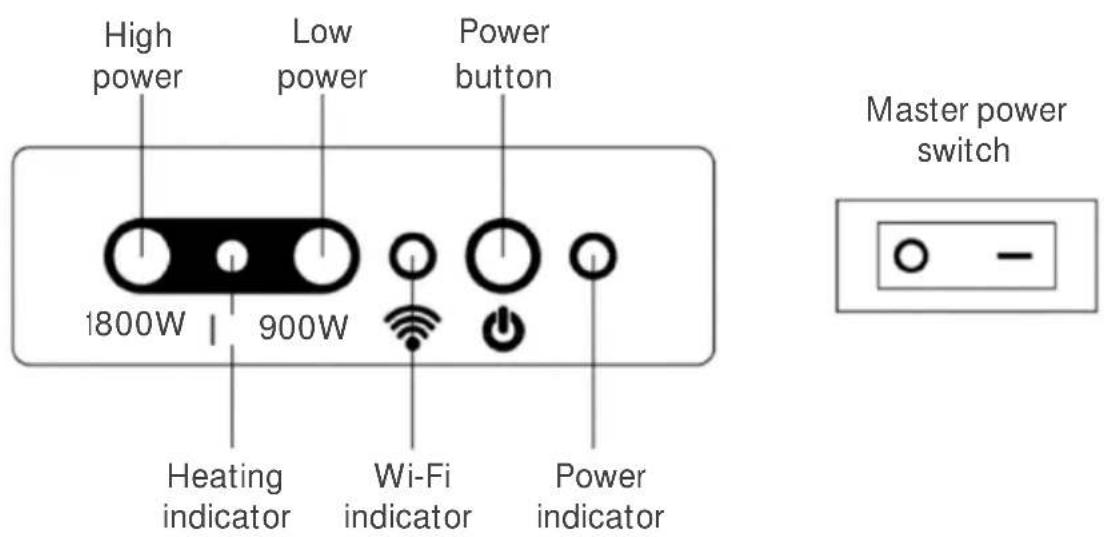
Control Panel
The control panel is located under the cover, on the front of the heater.
Note: The master switch must be switched on firstly for all operations.
Remote
CONNECT TO SMARTERHOME™APP
Install App
Download the "Kogan SmarterHome" app from the Play Store (Android) or App Store (iOS).

Play Store (Android)

App Store (iOS)

To register:
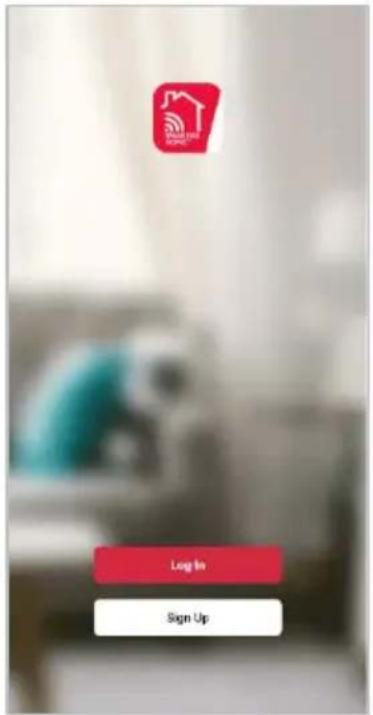
- If you already have a SmarterHome account, select 'Log In'. To register a new account, select 'Sign Up'.
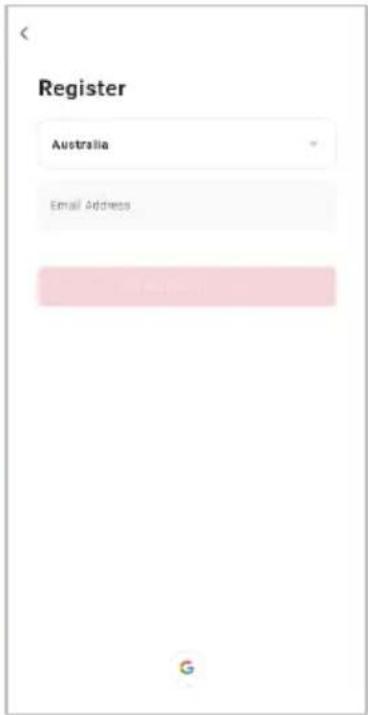
- The system will automatically recognise your country. If needed, you can manually select your country from the drop-down box. Enter your email address and tap 'Get Verification Code' to continue.
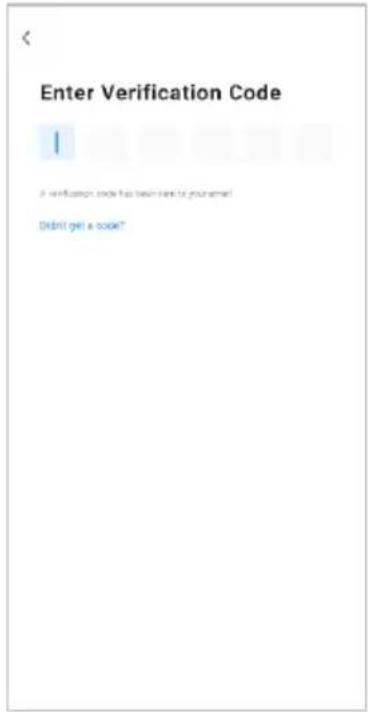
- A 6-digit code will be sent to the submitted email address. Enter this code before the one-minute timer expires.
- Continue to the next page and complete your SmarterHome profile.
Set device in pairing mode
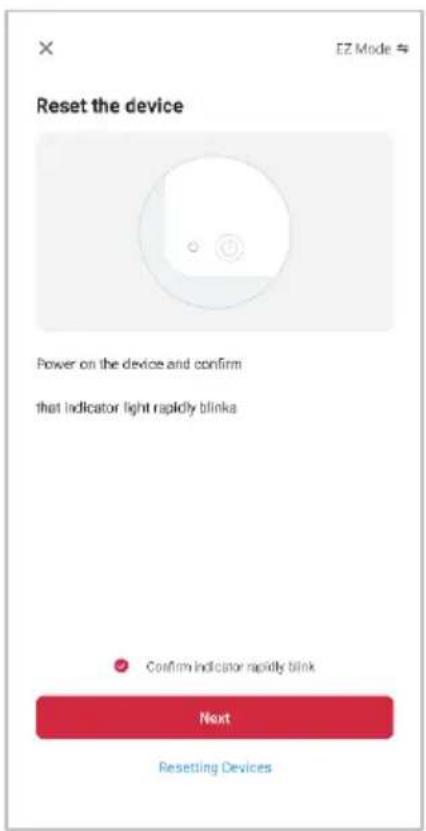
When the device is first turned on, it may automatically enter pairing mode (WI-FI indicator will be flashing rapidly).
If not automatically in pairing mode when powered on, you can manually set the device in pairing mode by pressing and holding the low power (900W) button for 5 seconds until the Wi-Fi indicator begins rapidly flashing blue.
Add device through network
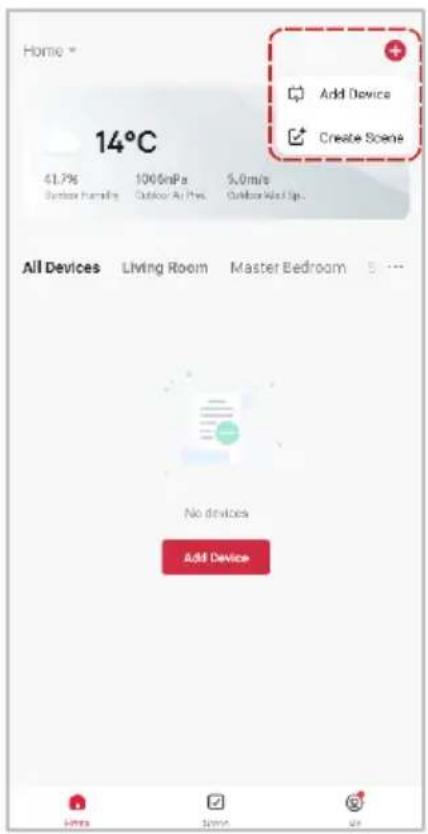
- Once registered, tap "Add Device" on the app's home page, or the "+" in the upper right corner, to add a new device through the network.
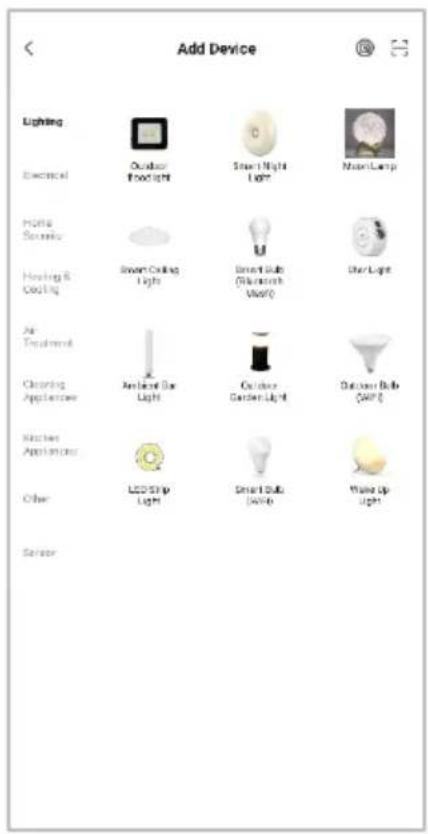
- Select the product type from the list of options in the app (Heating & Cooling → Kogan Smart Fireplace).
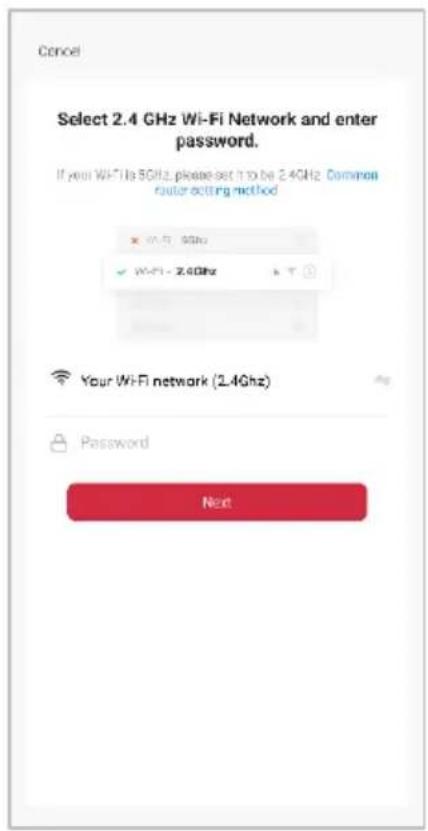
- Enter your Wi-Fi details. It is important that your SmarterHome™ device and the app are connected to the same Wi-Fi network during setup.
Notes:
• The device and the app have to use the same Wi-Fi network.
• The device is only compatible with 2.4Ghz networks.
- Depending on the product, Steps 3 and 4 may be in opposite order.
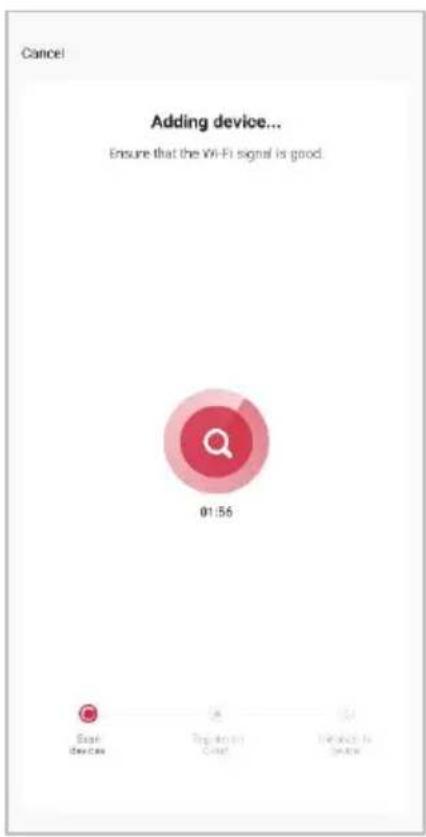
- Ensure that the device is in pairing mode, with the Wi-Fi indicator flashing rapidly, and tap "Indicator rapidly blink".
- The device will commence the pairing process and connect to the app. Ensure your Wi-Fi router, mobile phone, and the SmarterHome™ device are kept close until connection is complete.
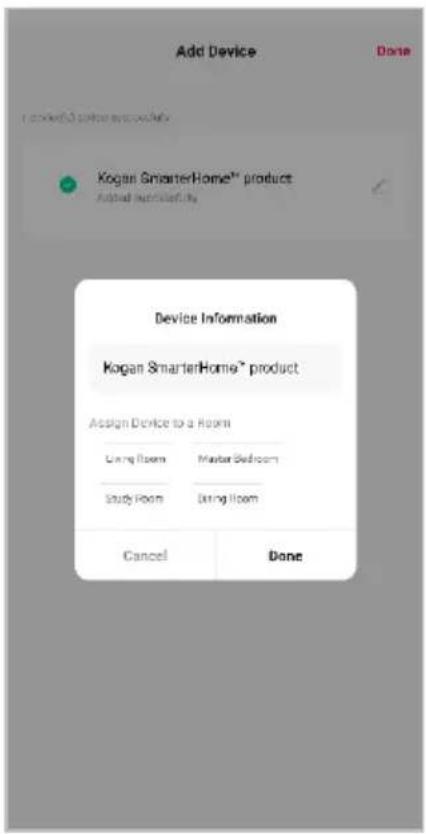
- After successfully being added, you will have the option to rename the device and assign it to a location. It will now be listed on the app's home page. Tap the device listing to enter its control page.
Note:
Once connected, you can select Create Scene from the “+” in the upper right corner (or from the Scene tab) to group connected SmarterHome™ products and automate their functions.
Having trouble connecting?
The prior steps detail the process for "EZ Mode" connection. If that does not work for your connection, we suggest trying it again, and if still no success, attempting the following method for AP Mode connection.
Set device in AP pairing mode
Set the device in pairing mode by pressing and holding the low power (900W) button for 5 seconds until the Wi-Fi indicator begins slowly flashing blue.
Using AP Mode to add device
- Follow the previous steps to select your product type (Heating & Cooling → Kogan Smart Fireplace).
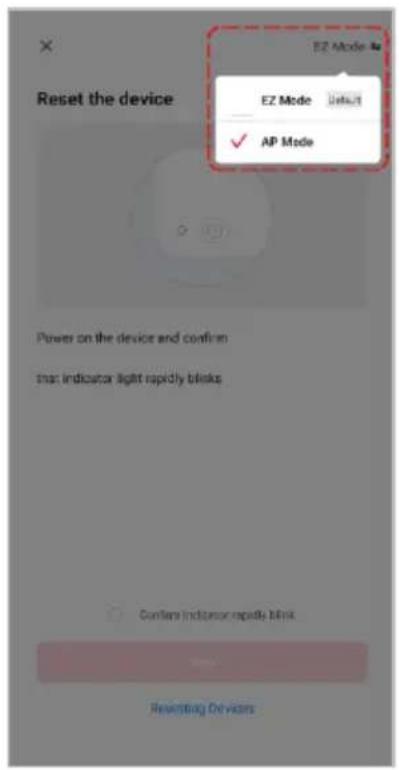
- Adjust your connection method by tapping on the mode type in the top-right corner of the screen. Select "APModel"-up type.
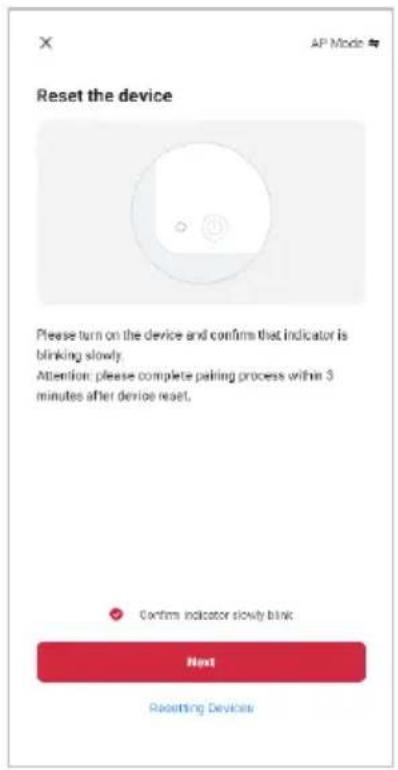
- Ensure that the device is in pairing mode, with the Wi-Fi indicator flashing slowly and tap "Confirm indicator slowly blink".
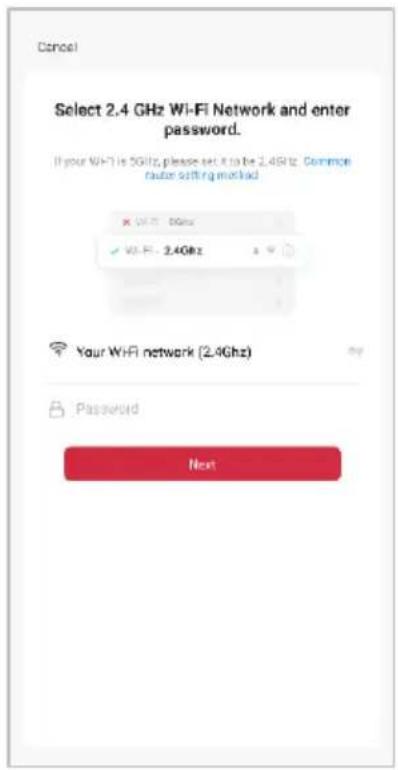
Notes:
• The device and the app have to use the same Wi-Fi network.
• The device is only compatible with 2.4Ghz networks.
- Depending on the product, Steps 3 and 4 may be in opposite order.
- Enter your Wi-Fi details. It is important that your SmarterHome™ device and the app are connected to the same Wi-Fi network during setup.
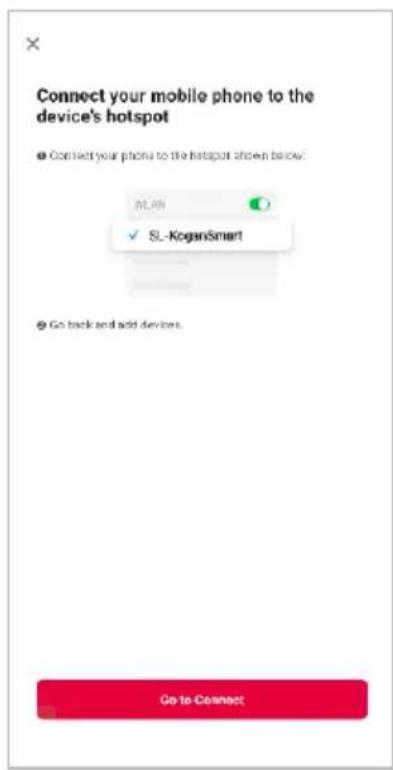
- Follow the in-app prompts to continue AP Mode connection, which will pair your mobile phone to the device's Wi-Fi hotspot to ensure a connection. This may be named "SL-KoganSmart", "SmartLife XXXX", or another similar name.
Note:
If the Wi-Fi hotspot does not appear on your phone in the list of available networks, your device may not be set in AP Pairing Mode correctly. Try repeating the steps outlined above to ensure your device is ready for connection.
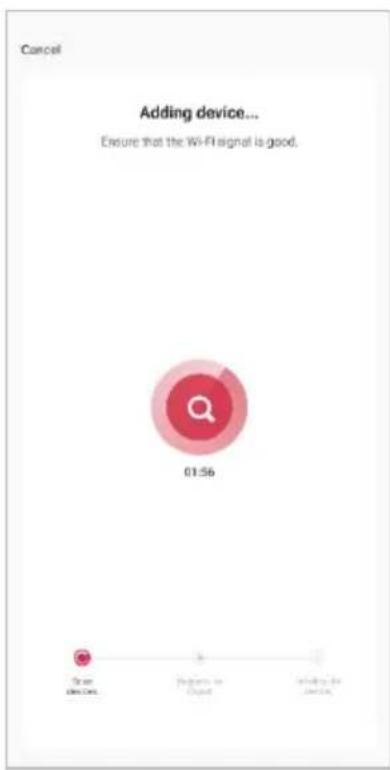
- The device will commence the pairing process and connect to the app. Ensure your Wi-Fi router, mobile phone, and the SmarterHome™ device are kept close until connection is complete.
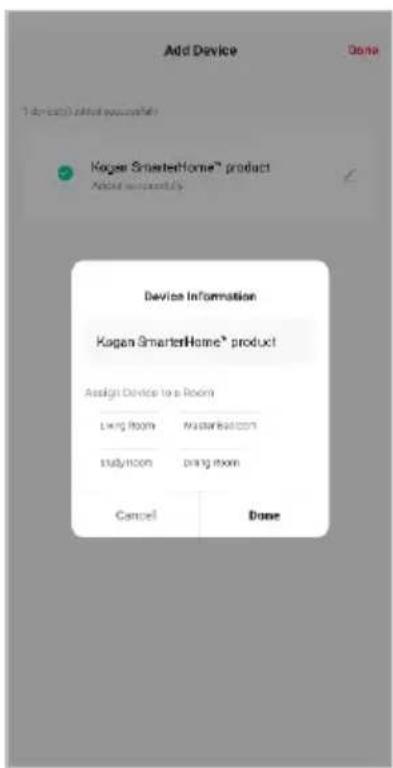
- After successfully being added, you will have the option to rename the device and assign it to a location. It will now be listed on the app's home page. Tap the device listing to enter its control page.
Note:
Once connected, you can select Create Scene from the “+” in the upper right corner (or from the Scene tab) to group connected SmarterHome™ products and automate their functions.
OPERATION
Controls
Once the heater has been connected to the SmarterHome™ App, the smartphone will take control and communicate with the control box. If your home network is not working, it is still possible to operate the heater via the control panel on the heater or with the remote control.
App Interface
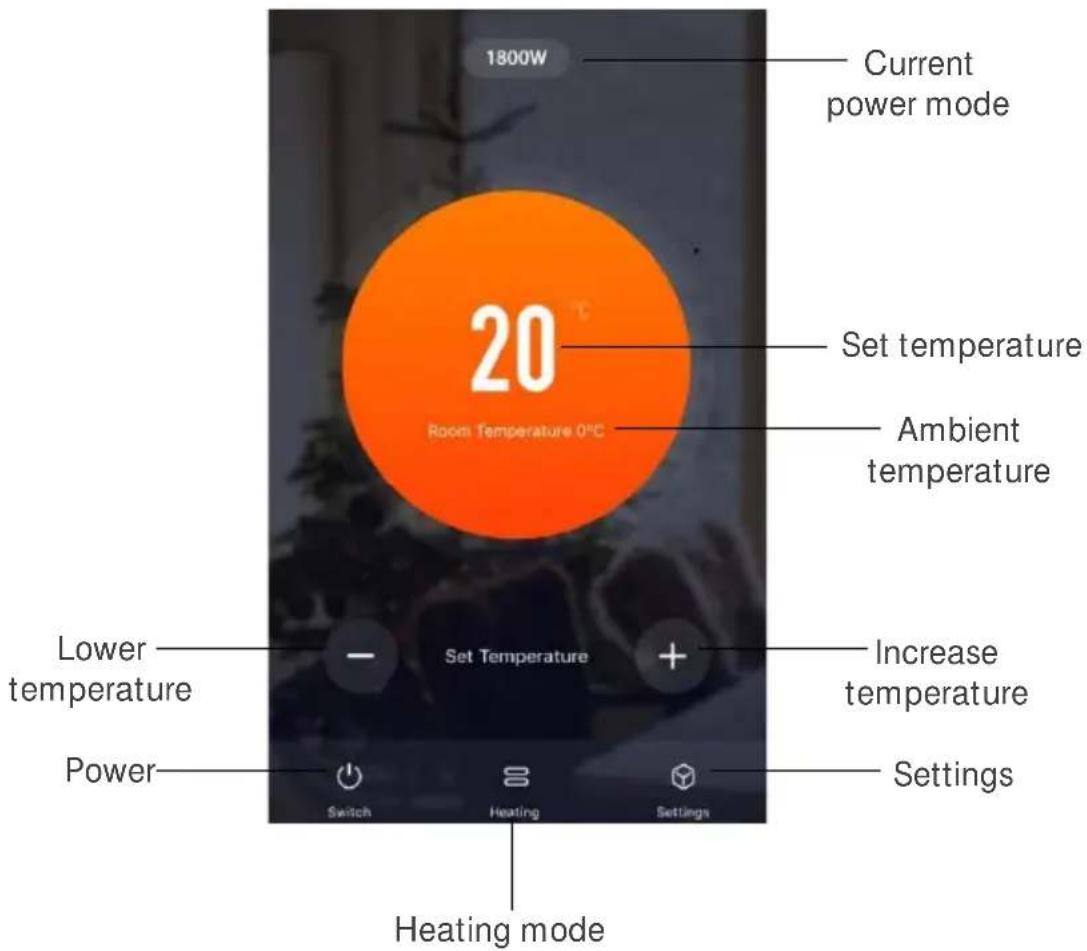
Setting Temperature
This setting is only applicable for the temperature in standard heating mode, not for the temperature in the timer mode. The default set temperature is 30^ C.
- Tap "Switch" to turn the heater and flame effect on.
- +T0eCthe " " or "-" buttons to set the desired temperature (range 15
Changing Power Mode
Tape the "Heating" key to select between 900W (low), 1800W (high) or OFF (No heating). The App and heating indicator will show the heating status.
| Heating Indicator | Mode |
| Green | 900W (low) |
| Red | 1800W (high) |
| Off | Flame effect only |
Note:
The heater only starts working when the set temperature is higher than the room temperature.
Setting Flame Brightness
Tap "Settings → Brightness" to set the desired flame brightness. The default flame brightness is max level. There are 5 flame brightness levels available.
Setting Timer
- Tap → Schedule a new timer to set
- -on time the "Add" key to set switch firstly, then select switch "ON", set the desired temperature and set the desired heating level, finally click "Save" to finish the setting of switch-on time.
-
- Click "Add Schedule" key to set switch off time firstly, then select switch "OFF" and click the "Save" to finish the setting of switch-off time.
- rsRepeat the "Add Schedule" operations to set more time
- Slide the timer settings leftwards to delete unwanted timers.
Viewing Timer Setting
Tap "Settings → Schedule" to view the current timer settings.
Safety Cut-out
This heater is fitted with a safety cut-out which will operate if the heater overheats (e.g. Due to blocked air vents). For safety reasons, the heater will not automatically reset. To reset the heater, disconnect the heater from the mains supply for at least 15 minutes. Reconnect the supply to the mains and switch on the heater.
Control Panel Operation
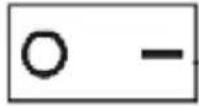 | 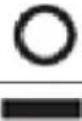 | Turn heater off. |
| Turn heater to standby mode. | ||
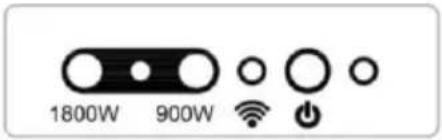 |  | Press to switch the flame effect on/off.Press and hold to toggle between 5 different flame brightness levels. |
| 900W | Press to activate low level heating 900W. The heating pilot light will appear green to indicate that the function is ON. | |
| 1800W | Press to activate high level heating 1800W. The heating pilot light will appear red to indicate that the function is ON. |
Remote Control Operation
Notes:
- The heater should be powered on using the master switch before it can be operated by remote control.
- The heater only starts working if the set temperature is higher than the room temperature.
- The remote control requires 2x AAA size batteries (Not included).
-
There might be a slight delay for the receiver to respond to the transmitter. Do not press the buttons more than once within 2 seconds for the correct operation.
-
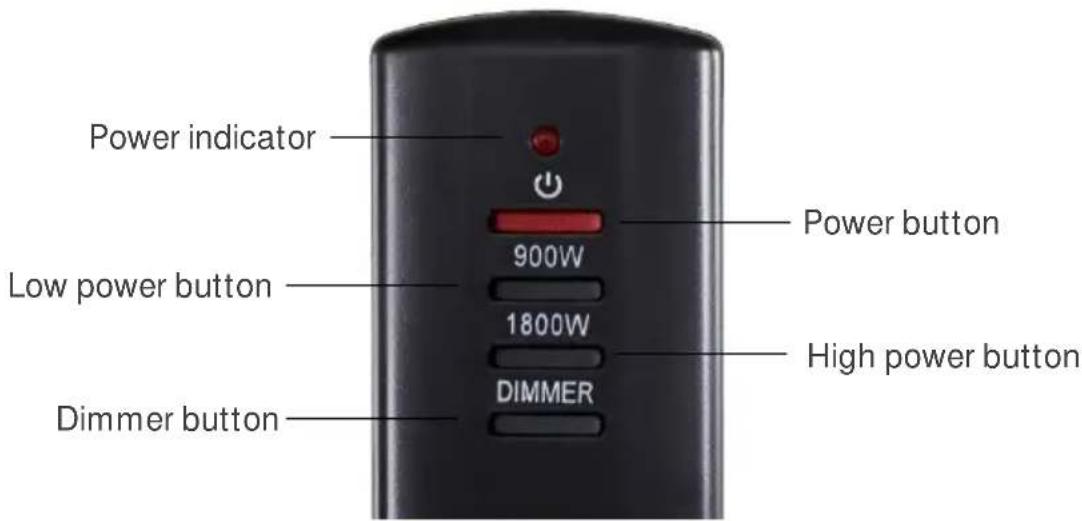
Press the ⏻ button once on the remote control, this turns the heater and the flame effect ON/OFF.
- Press the 900W button once for the low heat settings; press twice to switch off the heat setting.
- The heating pilot light will appear green to indicate that the function is ON.
- Press the 1800W button once for the high heat settings; press twice to switch off the heat setting.
- The heating pilot light will appear red to indicate that the function is ON.
- Press the DIMMER button to toggle between 5 different flame brightness levels.
SPECIFICATIONS
Supply
220-240V\~50Hz
Rated power
1800W
Lighting
LEDs
NOTES
Need more information?
We hope that this user guide has given you the assistance needed for a simple set-up.
For the most up-to-date guide for your product, as well as any additional assistance you may require, head online to help.kogan.com
kogan.com
- KOGAN SMARTERHOME™ ELECTRIC FIREPLACE HEATER
- SAFETY & WARNINGS
- COMPONENTS
- ASSEMBLY
- Attaching the Feet
- Placement
- OVERVIEW
- Control Panel
- Remote
- CONNECT TO SMARTERHOME™APP
- Install App
- To register:
- Set device in pairing mode
- Add device through network
- Notes:
- Note:
- Having trouble connecting?
- Set device in AP pairing mode
- Using AP Mode to add device
- OPERATION
- Controls
- Setting Temperature
- Changing Power Mode
- Setting Flame Brightness
- Setting Timer
- Viewing Timer Setting
- Safety Cut-out
- Control Panel Operation
- Remote Control Operation
- SPECIFICATIONS
- NOTES
- Need more information?
Brand : Kogan
Model : KASHFH18WGA
Category : Heating