D3 - Uncategorized VMV - Free user manual and instructions
Find the device manual for free D3 VMV in PDF.


| Product Type | Uncategorized Electronic Device |
| Brand | VMV |
| Model | D3 |
| Dimensions (approx.) | 200 x 150 x 10 mm |
| Weight (approx.) | 300 g |
| Power Supply | Rechargeable lithium-ion battery, 3000 mAh |
| Connectivity | Bluetooth, Wi-Fi (802.11 b/g/n) |
| Display (if applicable) | 7-inch touchscreen, 1024x600 pixels |
| Processor (if applicable) | Quad-core 1.5 GHz |
| Memory | 2 GB RAM, 16 GB internal storage |
| Operating System | Android (version unspecified) |
| Cameras | Front 2 MP, Rear 5 MP |
| Audio | Built-in speaker, 3.5mm headphone jack |
| Battery Life (approx.) | 6-8 hours of mixed use |
| Charging | Micro-USB port, 5V/2A adapter |
| Key Functions | Web browsing, media playback, apps, e-reading |
| Maintenance & Cleaning | Wipe with a soft, dry cloth. Do not use liquids. |
| Safety Precautions | Avoid exposure to water, extreme temperatures, and direct sunlight. |
| Spare Parts & Repairability | Spare parts not officially available. Repair by qualified technician recommended. |
| General Information | Manual available in English (26 pages). Supports multiple languages via email translation. |
Frequently Asked Questions - D3 VMV
User questions about D3 VMV
0 question about this device. Answer the ones you know or ask your own.
Ask a new question about this device
Download the instructions for your Uncategorized in PDF format for free! Find your manual D3 - VMV and take your electronic device back in hand. On this page are published all the documents necessary for the use of your device. D3 by VMV.
USER MANUAL D3 VMV
Main unit back....19
Operation Instructions....20-23
Factory Reset/Warranty Terms....24
技术参数
输入方式....USB /光纤/同轴/I²S/ AES(EBU)
输出方式 ....单端线路/平衡线路
THD+N 0.001%
动态范围 112dB
信噪比....112dB
USB传输方式 …… 异步传输
USB兼容性....Windows 7 / 8 / 8.1 / 10, Mac OSX, Linux
位深....USB / I²S 1bit, 16\~32bit
光纤/同轴/AES(EBU) 1bit, 16\~24bit
采样率....USB / I²S PCM 44.1\~768kHz
DSD 2.8224\~22.5792MHz
光纤/同轴/AES(EBU) PCM 44.1\~192kHz
消耗功率 10W
待机功耗 ....../<0.8W
- 开关机
- 输入选择按键
- 显示屏
主机背面
The lightning flash with arrowhead symbol, with in an equilateral triangle, is intended to alert the user to the presence of uninsulated “dangerous voltage” within the product’s enclosure that may be of sufficient magnitude to constitute a risk of electric shock to persons.

The exclamation point within an equilateral triangle is intended to alert the user to the presence of important operating and maintenance (servicing) instructions in the literature accompanying the appliance.

Safe use only under elevation 2000m.
WARNING:
TO REDUCE THE RISK OF FIRE OR ELECTRIC SHOCK, DO NOT EXPOSE THIS APPLIANCE TO RAIN OR MOISTURE.
The contents of this manual are updated without prior notice. If the function of the product you are using is inconsistent with the instructions, the function of the product shall prevail!
Features
• Every detail is high end design.
• 4 pieces of legendary R-2R chip PCM1704U-J from BB, 2 pieces per channel, fully balanced design, maximize chip performance!
- USB uses XMOS second generation 16 core processor XU216, supports native DSD512 and 32-bit 768kHz!
• Top digital filter chip SM5847.
• The clock system uses two accusilicon ultra-low phase noise crystal oscillators.
- Using Altera's high-speed CPLD to process the clock and reduce jitter.
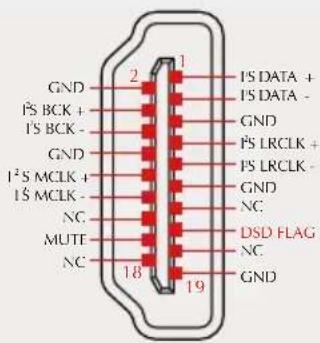
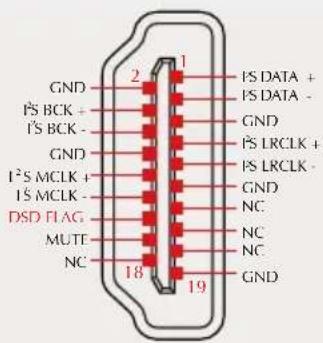
• Support LVDS level I²S transmission (using HDMI interface), can transmit digital audio with the lowest jitter!
• Built in low clock jitter VCXO and PLL, support access to external clock!
• Full function remote control with color LCD and newly developed user interface.
• Use 7 OPA1612 top OP-AMPs from TI.
• High precision, low temperature drift, resistor and capacitor are widely used.
• Low noise discrete component power supply circuit.
- Customized low-noise sealed toroidal transformer manufactured by Noratel, UK,
- All aluminum alloy CNC shell, separate power supply and motherboard design, effectively isolate power interference.
Specification
Input ...... USB / Optical / Coaxial / AES(EBU)
Output ...... RCA /XLR
THD+N 0.001%
Dynamic range 112dB
SNR 112dB
USB transmission ......Asynchronization
USB compatibility ....Windows 7 / 8 / 8.1 / 10, Mac OSX、Linux
Bit depth ....USB / PS 1bit, 16 \~ 32bit
Optical / Coaxial/AES(EBU) 1bit, 16 \~ 24bit
Sampling rate ....USB / I²S PCM 44.1 \~ 768kHz
DSD 2.8224 \~ 22.5792MHz
Optical / Coaxial/AES(EBU) PCM 44.1 \~ 192kHz
Power Consumption ....10W
Standby power .... <0.8W
Size 280X240X51mm (WxHxD)
Weight 3.96kg
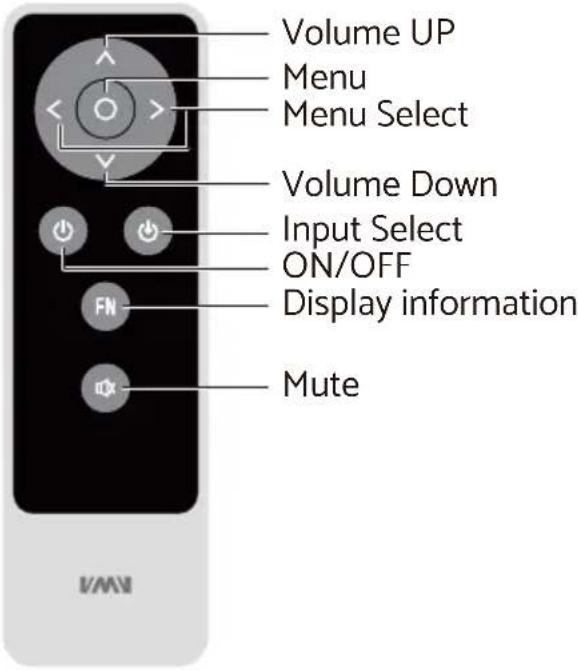
Remote Control
Install 2 x AAA batteries as instructions
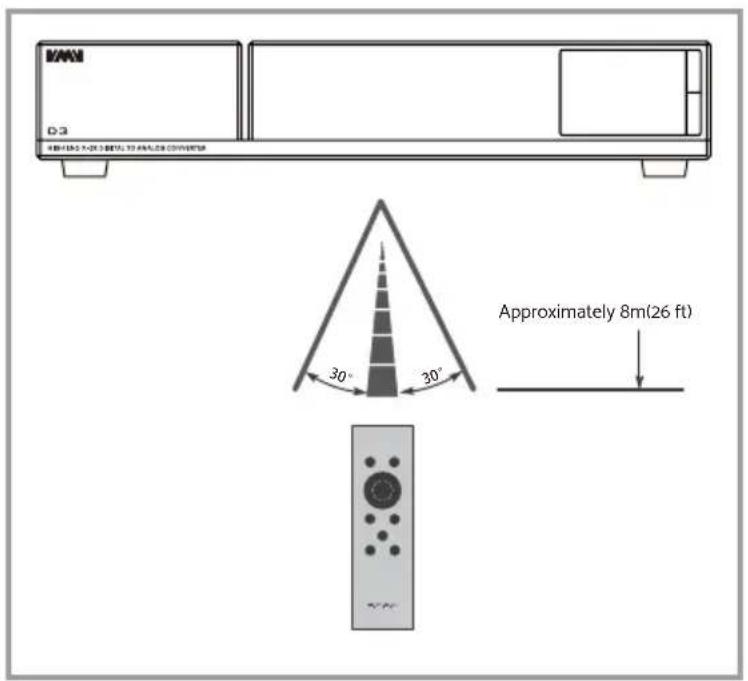
When using the remote control, point it toward the remote con-trol signal receiver on the main unit from a distance of 5 m (16 ft) or less. Do not place obstructions between the main unit and the remote control.
The remote control might not work if the remote control signal receiver on the unit is exposed to direct sunlight or bright light. If this occurs, try moving the unit. Beware that use of this remote control could cause the unin-tentional operation of other devices that can be controlled by infra.
Functions
Main unit front
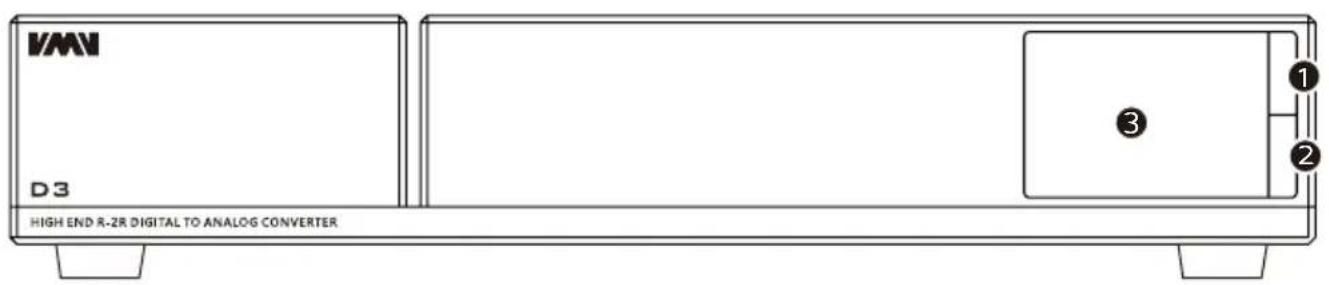
- Turn on/OFF
- Input select knob
- Display
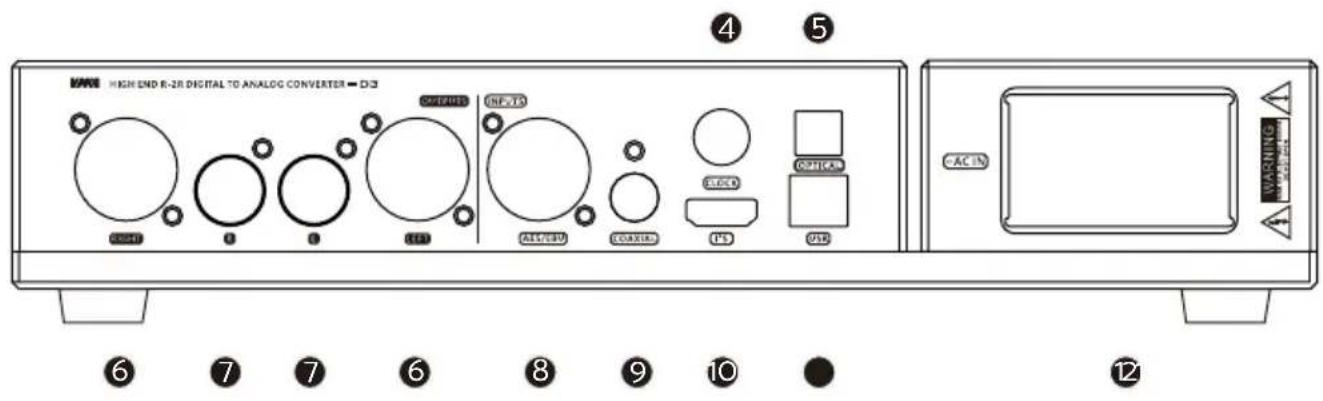
Main unit back
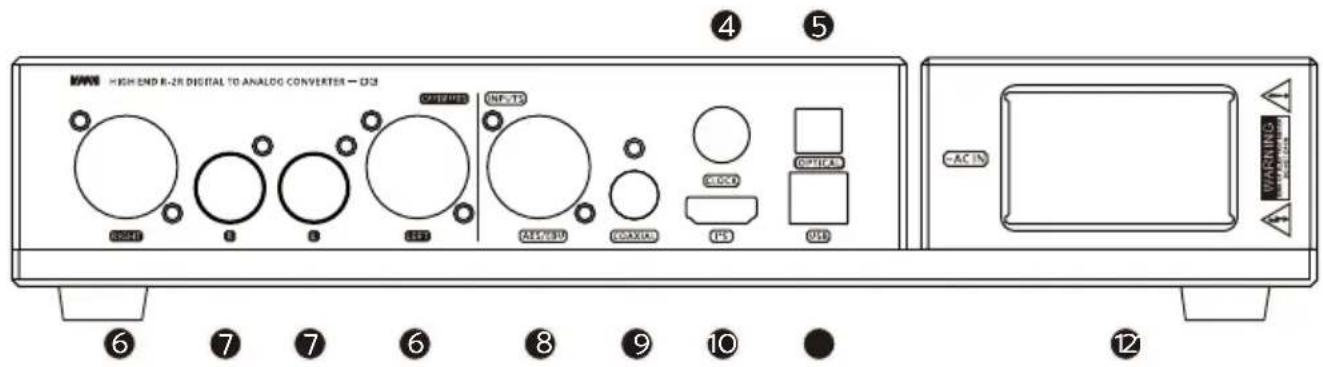
- Clock in 9. Coaxial input
- Optical input 10. I²S input
- Balanced output 11. USB input
- Line output 12. Power input
- AES/EBU input
Operation Instructions
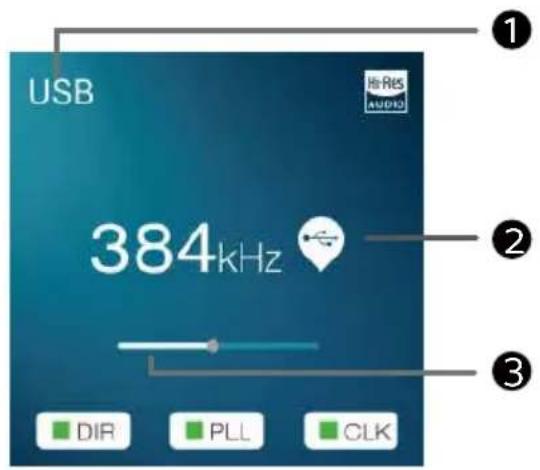
Main Display
- Input selection
- Audio format / Sampling rate
- Volume
1. INPUT
USB AUDIO
■ OPTICAL
COAXIAL
AES/EBU
■ I²S(HDMI)
2. OS Rate
■ OSR4x
■ OSR8x
Note: This setting is to set the SM5847 to work at 4 times oversampling or 8 times oversampling, the sound will be slightly different, 8 times oversampling performance is better
3. CLOCK MODE
■ INTERNAL
■ DIR SYNC
(This setting does not require an external input clock signal, except for the USB input, all are valid. This setting will use the D3 internal VCXO to synchronize with the bit clock of the external input signal, which can greatly reduce the clock jitter generated during digital audio transmission!)
■ EXT 10MHz (USB)
(This setting requires an external input 10MHz clock signal, which only works for the USB input. The internal clock is used for other inputs. At this time, D3 uses a 10MHz clock to generate the clock required for USB playback. This setting can greatly improve the clock accuracy!)
■ EXT 10MHz (ALL)
(This setting requires an external input of 10MHz clock signal, which works on all inputs. When using, the signal source and D3 must use the same 10MHz clock source at the same time to work synchronously, otherwise it will cause noise!)
■ EXT WORD
(This setting requires an external input word clock (frequency 44.1kHz) signal, which works on all inputs. When using, the signal source and D3 must use the same 44.1kHz clock source at the same time to work in synchronization, otherwise it will cause noise!)
4. AUDIO PHASE
■ NORMAL (2+,3-)
■ INVERTED(2-,3+)
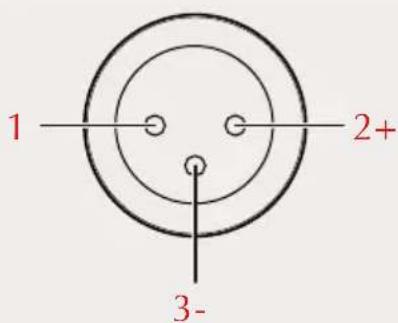
NORMAL INVERTED
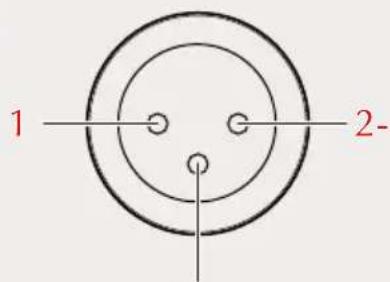
3+
Note: This setting valid for both RCA and XLR output!
5. I²S MODE
■ NORMAL
■ INVERTED
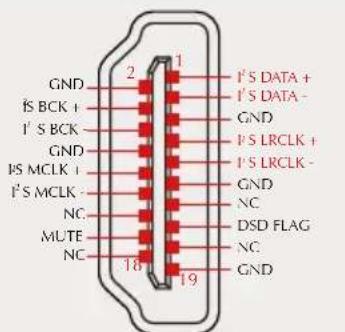
NORMAL INVERTED
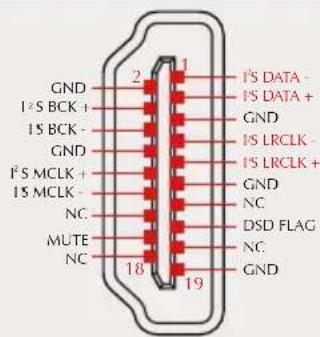
Note: This option is used to match different I²S interface standards, please check the interface definition of the signal source before use
6. I²S DSD CH
■ DSDL=PCM DATA (The DSD left channel using the PCM DATA pin)
■ DSDL=PCM LRCK (The DSD left channel using the PCM LRCK pin)
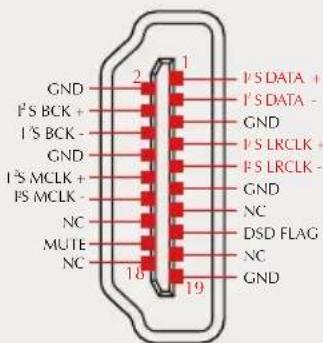
NORMAL INVERTED
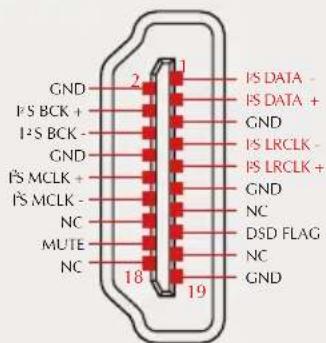
Note: This option is used to match different I ^2 S interface standards, please check the interface definition of the signal source before use
7. I²S DSD FLAG
■ DSD FLAG=PIN15
■ DSD FLAG=PIN14
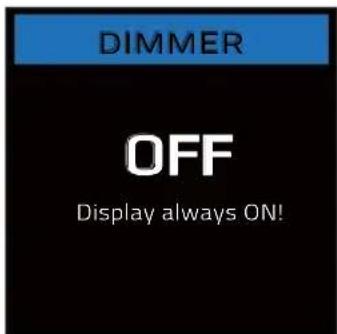
■ The range is 5 seconds-60 seconds. After setting, the screen will automatically go off within this time, and the screen will re-light up if you operate the remote control or the knob at any time.
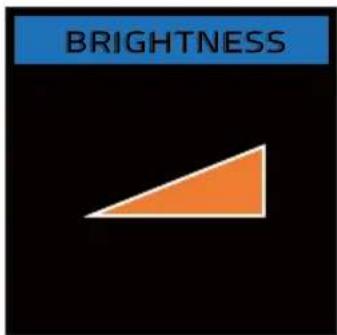
9. BRIGHTNESS
■ LEVEL1-6
Factory Reset
Connect the power cord when pressing the power button, until the screen shows logo.
Warranty Terms
1. The Term of Service
Foshan Shuangmusanlin Technology Co., Ltd promises to offer good-quality products. If the product is broken in 7 days after purchasing when you use it normally, you can choose to send it back for return, replacement or repairing (only the product does not affect the second sales can be returned). Repairing for free in one year if you use it normally.
- Date of purchase is in accordance with the date on invoice or receipt uesd by seller, and if you buy it on line, you can show the screenshot of trade.
3.If an inappropriate usage causes the unit damaged, the warranty will be void. As below.
- All damages by inappropriate use, including using it under non-normal working environment or without following the instructions.
• Dismantling, refitting, repairing by user in private. - Causing damage by using some fittings instead of the designative or accredited ones.
-
Cannot provide credible proof of purchase.
-
Sending it back to our company for repairing.
-
Contact your S.M.S.L Audio reseller for a return or replacement.