
TDM-1 - Drum machine ROLAND - Free user manual and instructions
Find the device manual for free TDM-1 ROLAND in PDF.


| Product Type | Drum Machine |
| Brand | Roland |
| Model | TDM-1 |
| Dimensions (approx.) | 310 x 210 x 55 mm |
| Weight (approx.) | 1.3 kg |
| Power Supply | AC adapter (9V DC) or 6 AA batteries |
| Sound Generation | Analog synthesis with sampled PCM sounds |
| Number of Pads | 12 finger pads |
| Sound Outputs | 1/4" TS mono output, 1/8" headphone jack |
| Pattern Storage | 64 user patterns, 8 preset kits |
| Sequencer | 16-step sequencer with real-time recording |
| Effects | Reverb, delay (adjustable via knobs) |
| Connectivity | MIDI In/Out, Sync In/Out |
| Display | LCD screen for pattern and parameter display |
| Cleaning | Wipe with a soft, dry cloth. Do not use solvents. |
| Safety Instructions | Keep away from moisture and extreme temperatures. Use only specified power adapter. |
| Spare Parts & Repairability | Limited; contact Roland support or authorized service centers. |
| General Information | Vintage drum machine from the 1990s, known for its punchy analog sounds and user-friendly interface. |
Frequently Asked Questions - TDM-1 ROLAND
User questions about TDM-1 ROLAND
0 question about this device. Answer the ones you know or ask your own.
Ask a new question about this device
Download the instructions for your Drum machine in PDF format for free! Find your manual TDM-1 - ROLAND and take your electronic device back in hand. On this page are published all the documents necessary for the use of your device. TDM-1 by ROLAND.
USER MANUAL TDM-1 ROLAND
TDM-1 Owner's Manual
Thank you, and congratulations on your choice of the Roland V-Drums lite Setting Mat TDM-1.
Before using this mat, carefully read the sections entitled: "USING THE MAT SAFELY" and "IMPORTANT NOTES" (this page). These sections provide important information concerning the proper operation of the mat. Additionally, in order to feel assured that you have gained a good grasp of every feature provided by your new mat, Owner's manual should be read in its entirety. The manual should be saved and kept on hand as a convenient reference.
Setting Up
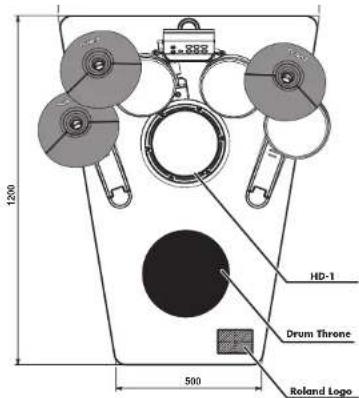
- Place the mat as shown in the figure.
Specifications
Dimensions
TDM-1: 900 (W) x 1200 (D) x 8.5 (H) mm
35-7/16 (W) x 47-1/4 (D) x 3/8 inches
Weight
TDM-10: 1.5kg / 3lbs 5 oz
Materials
File: Nylon
Backing: Polyester felt
Tag: Polyurethane
Manufacturing
fire-retardant
stain-proof
anti-bacterial
tick-proof
and static
Accessory
Owner's Manual
* In the interest of product improvement, the specifications and/or appearance of this mat are subject to change without prior notice.
* This can be used as a setting mat for the Roland V-Drums lite HD-1 and SPD series, the Hand Sonic series, and the RMP series.
Copyright © 2007 ROLAND CORPORATION All rights reserved. No part of this publication may be reproduced in any form without the written permission of ROLAND CORPORATION.
USING THE MAT SAFELY
INSTRUCTIONS FOR THE PREVENTION OF FIRE, ELECTRIC SHOCK, OR INJURY TO PERSONS
About ⚠ WARNING and ⚠ CAUTION Notices
| ⚠ WARNING | Used for instructions intended to alert the user to the risk of death or severe injury should the mat be used improperly. |
| ⚠ CAUTION | Used for instructions intended to alert the user to the risk of injury or material damage should the mat be used improperly.* Material damage refers to damage or other adverse effects caused with respect to the home and all its furnishings, as well to domestic animals or pets. |
About the Symbols
| △ | The △ symbol alerts the user to important instructions or warnings. The specific meaning of the symbol is determined by the design contained within the triangle. In the case of the symbol at left, it is used for general cautions, warnings, or alerts to danger. |
| The △ symbol alerts the user to items that must never be carried out (are forbidden). The specific thing that must not be done is indicated by the design contained within the circle. It means that the unit must never be disassembled. | |
| The △ symbol alerts the user to things that must be carried out. The specific thing that must be done is indicated by the design contained within the circle. In the case of the symbol at left, it means that the power-cord plug must be unplugged from the outlet. |
ALWAYS OBSERVE THE FOLLOWING
WARNING
- Before using this mat, make sure to read the instructions below, and the Owner's Manual.
- Never use or store the mat in places that are: - Subject to temperature extremes (e.g., direct sunlight in an enclosed vehicle, near a heating duct, on top of heat-generating equipment); or are
• Damp (e.g., baths, washrooms, on wet
floors); or are
- Humid; or are
- Exposed to rain; or are
- Dusty; or are
- Subject to high levels of vibration.

- This mat is designed to be used exclusively with Roland products. Do not use this mat for other purposes or applications.
• Make sure you always have the mat placed so it is level and sure to remain stable. Never place it on stands that could wobble, or on inclined surfaces.

• In households with small children, an adult should provide supervision until the child is capable of following all the rules essential for the safe operation of the mat.

- Although this mat has been treated to resist fire, do not use this mat near a fire.

IMPORTANT NOTES
In addition to the items listed under "USING THE MAT SAFELY" on this page, please read and observe the following:
Placement
- Use this mat indoors only.
- Do not expose the mat to direct sunlight, place it near devices that radiate heat, leave it inside an enclosed vehicle, or otherwise subject it to temperature extremes. Excessive heat can deform or discolor the mat.
Maintenance
- For routine cleaning, use a vacuum cleaner to remove any dust that may have accumulated on the surface. In case of more serious soiling, use a commercial carpet cleaner to spot-clean, and wipe to remove stains. Do not launder or wash the entire mal.
- Never use benzine, thinners, alcohol or solvents of any kind, to avoid the possibility of discoloration and/or deformation.
Additional Precautions
- This product is not designed to provide total insulation from sound or vibration.
- This mat may move and slip around over the floor when nothing has yet been placed on top of it. For this reason, you need to be especially careful during setup, when you carry in the equipment you intend to place on the mat.


40679512
1PD


Brand : ROLAND
Model : TDM-1
Category : Drum machine