VSG2101 - Vacuum Cleaner Vacmaster - Free user manual and instructions
Find the device manual for free VSG2101 Vacmaster in PDF.


| Product Type | Canister Vacuum |
| Brand | Vacmaster |
| Model | VSG2101 |
| Color | Red and Black |
| Dimensions (L x W x H) | 445 mm x 305 mm x 305 mm |
| Weight | 5.2 kg |
| Power Supply | 120 V, 60 Hz |
| Power Consumption | 1200 W |
| Dust Capacity | 2.5 L |
| Filtration System | HEPA filter |
| Noise Level | 75 dB |
| Cord Length | 6 m |
| Cleaning Radius | 10 m |
| Attachments Included | Crevice tool, dusting brush, upholstery nozzle |
| Bag Type | Reusable cloth bag |
| Warranty | 2 years |
Frequently Asked Questions - VSG2101 Vacmaster
User questions about VSG2101 Vacmaster
0 question about this device. Answer the ones you know or ask your own.
Ask a new question about this device
Download the instructions for your Vacuum Cleaner in PDF format for free! Find your manual VSG2101 - Vacmaster and take your electronic device back in hand. On this page are published all the documents necessary for the use of your device. VSG2101 by Vacmaster.
USER MANUAL VSG2101 Vacmaster
natural_image
Line drawing of a vacuum cleaner with handle and control panel (no text or symbols)21.6V 2-IN-1 CORDLESS VACUUM
MODEL NO. VSG2101
TABLE OF CONTENTS
SECTION PAGE
Important Safety Instructions....3-5
Warranty....6
Technical Data....6
Getting To Know Your Vacuum....7
General Assembly Instructions....8-10
Operating Instructions....11-13
Maintaining Your Vacuum.... 13-18
Troubleshooting....19-21
Thank you for purchasing this Vacmaster ^® vacuum cleaner. With it you are obtaining a high quality product that is engineered for optimal performance.
FOR YOUR SAFETY
Read and understand this manual before use.
Keep this manual and your sales check (receipt) in a safe place for future reference.
IMPORTANT SAFETY INSTRUCTIONS
When using an electrical appliance, basic precautions should always be followed, including the following:
READ ALL INSTRUCTIONS BEFORE USING THIS VACUUM CLEANER.
Failure to follow the warnings and instructions may result in electric shock, fire and/or serious injury.

WARNING - To reduce the risk of fire, electric shock, or injury:
- Do not use outdoors or on wet surfaces.
- Do not allow to be used as a toy. Close attention is necessary when used by or near children, pets or plants.
- Use only as described in this manual. Use only manufacturer's recommended attachments.
- Do not charge if charging adapter is damaged. If appliance is not working as it should, has been dropped, damaged, left outdoors, or dropped into water, return it to a service center.
- Do not pull or carry the charging adapter by cord, use cord as a handle, close a door on cord, or pull cord around sharp edges or corners. Do not run appliance over cord. Keep cord away from heated surfaces.
- Do not unplug by pulling on charging cord.
- Do not handle charger, including charger plug, and charger terminals with wet hands.
- Do not put any object into openings. Do not use with any opening blocked; keep free of dust, lint, hair, and anything that may reduce air flow.
- Keep hair, loose clothing, fingers, and all parts of body away from openings and moving parts.
- Use extra care when cleaning on stairs.
- Do not use to pick up flammable or combustible liquids, such as gasoline, or use in areas where they may be present.
- Do not pick up anything that is burning or smoking, such as cigarettes, matches, or hot ashes.
- Do not use without dust cup or filter in place.
- Prevent unintentional starting. Ensure the product does not operate before connecting to hand vacuum, picking up or carrying the appliance. Carrying the appliance with your finger on the switch invites accidents.
- Recharge only with the charger specified by the manufacturer. A charger that is suitable for one type of battery pack may create a risk of fire when used with another battery pack.
- Under abusive conditions, liquid may be ejected from the battery; avoid contact. If contact accidentally occurs, flush affected area with water. If liquid contacts eyes, additionally seek medical help. Liquid ejected from the battery may cause irritation or burns.
- Do not use a battery pack or appliance that is damaged or modified. Damaged or modified batteries may exhibit unpredictable behavior resulting in fire, explosion or risk of injury.
- Do not expose a battery pack or appliance to fire or excessive temperature. Exposure to fire or temperature above 130^ may cause explosion.
- Follow all charging instructions and do not charge the battery pack or appliance outside of the temperature range specified in the instructions. Charging improperly or at temperatures outside of the specified range may damage the battery and increase the risk of fire.
- Have servicing performed by a qualified repair person using only identical replacement parts. This will ensure that the safety of the product is maintained.
- Do not modify or attempt to repair the appliance or the battery pack except as indicated in the instructions for use and care.
- Always turn off this appliance before connecting or disconnecting any accessories.
- Do not charge the unit outdoors.
- Do not incinerate the appliance even if it is severely damaged. The batteries can explode in a fire.
- For Household Use Only.
SAVE THESE INSTRUCTIONS

WARNING
Any changes or modifications to this unit not expressly approved by the party responsible for compliance could void the user's authority to operate the equipment.
NOTE: This equipment has been tested and found to comply with the limits for a Class B digital device, pursuant to Part 15 of the FCC Rules. These limits are designed to provide reasonable protection against harmful interference in a residential installation. This equipment generates, uses and can radiate radio frequency energy and, if not installed and used in accordance with the instructions, may cause harmful interference to radio communications. However, there is no guarantee that interference will not occur in a particular installation. If this equipment does cause harmful interference to radio or television reception, which can be determined by turning the equipment off and on, the user is encouraged to try to correct the interference by one or more of the following measures:
- Reorient or relocate the receiving antenna.
- Increase the separation between the equipment and receiver.
- Connect the equipment into an outlet on a circuit different from that to which the receiver is connected.
- Consult the dealer or an experienced radio/TV technician for help.
Product Disposal
This product contains an internal Lithium-ion battery pack formulated from environmentally sensitive materials. This product must be disposed of properly with due care for the environment. Do not dispose of product with household garbage. Consult your local waste authority for information regarding available recycling or disposal options.
WARRANTY
FOR ONE YEAR from the date of sale, this product is warranted against defects in material or workmanship when it is assembled, operated and maintained according to all supplied instructions.
WITH PROOF OF SALE, a defective appliance will be replaced free of charge. For warranty coverage details to obtain free replacement, visit the web page: www.vacmaster.com or call (866) 384-8432.
- This warranty does not cover filters, which are expendable parts that can wear out from normal use within the warranty period.
- This warranty is void if this product is ever used for other than private household purposes.
- This warranty gives you specific legal rights, and you may also have other rights which vary from state to state.
TECHNICAL DATA
2-in-1 Cordless Vacuum
Rated Voltage: 21.6VDC
Model: VSG2101
Battery Charger:
Model: CZH015265050USWH
Input: 100-240VAC, 50/60Hz, 0.5A Max
Output: 26.5VDC, 500mA
GETTING TO KNOW YOUR VACUUM
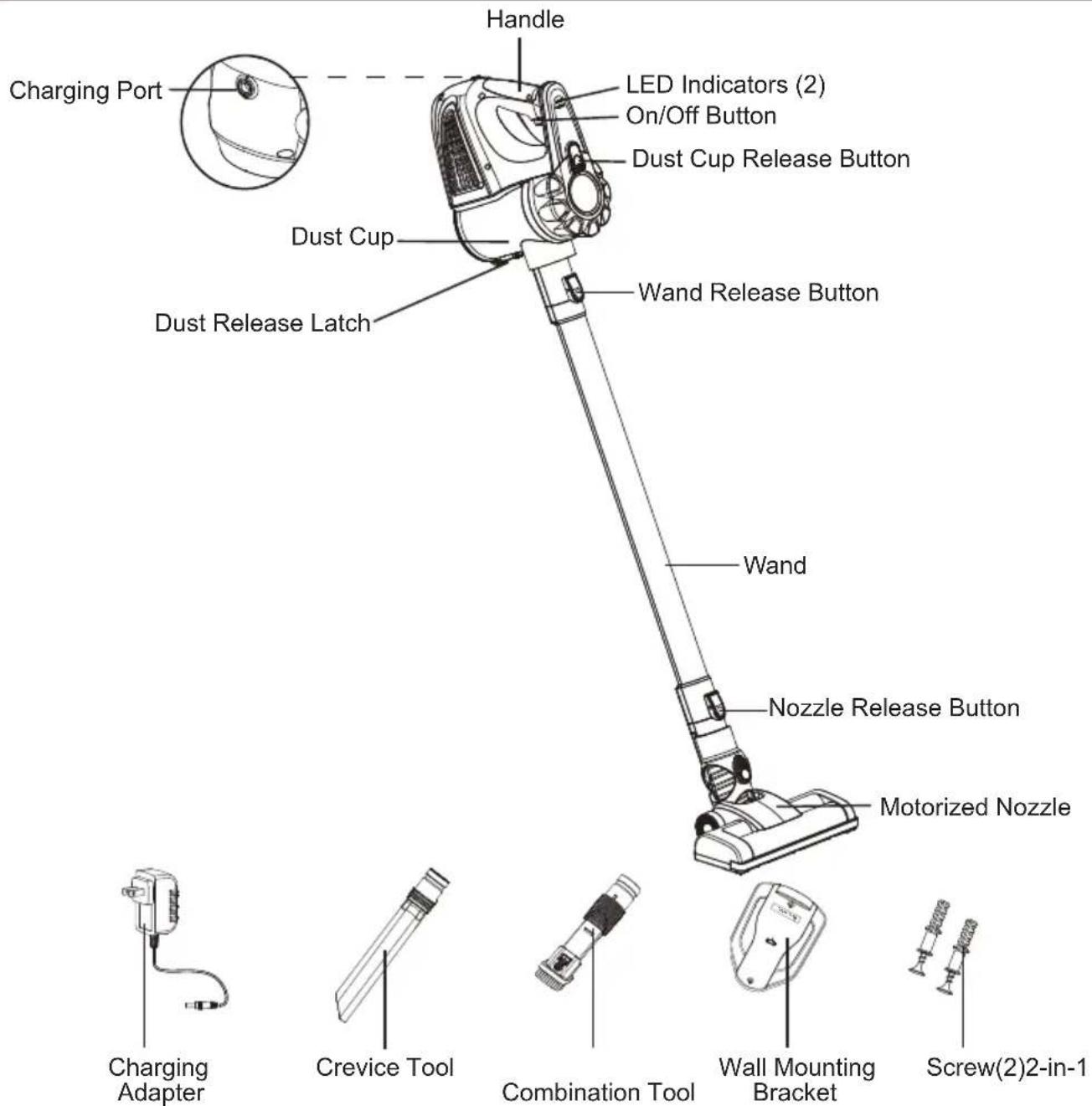
text_image
Handle Charging Port LED Indicators (2) On/Off Button Dust Cup Release Button Dust Cup Wand Release Button Dust Release Latch Wand Nozzle Release Button Motorized Nozzle Charging Adapter Crevice Tool Combination Tool Wall Mounting Bracket Screw(2)2-in-1REPLACEMENT PARTS
| Item Part No. | |
| Filter (2) 561045114 | |
| Brush Roll 561045174 | |
| Charging Adapter 561045194 | |
| Wall Mounting Bracket 561045196 | |
| Screw (2) 561045197 | |
| Crevice Tool 561045198 | |
| 2-in-1 Combination Tool 561045195 |
Available online at www.vacmaster.com or call (866) 384-8432.
GENERAL ASSEMBLY INSTRUCTIONS
Assembly Instructions
- Align and insert the top of the wand into the hand vacuum until you hear a click.
Note: Make sure it fits firmly. To remove the wand, press the wand release button and separate.

natural_image
Technical line drawing of a mechanical device with a pipe fitting and a right-hand arrow indicating direction (no text or symbols)
natural_image
Line drawing of a handheld electric shaver with handle and ventilation slots (no text or symbols)- Insert the motorized nozzle into the bottom of wand until you hear a click.

natural_image
Line drawing of a vacuum cleaner with an arrow indicating motion (no text or symbols)
natural_image
Line drawing of a vacuum cleaner with handle and mounting bracket (no text or symbols)- Make sure the side of wall mounting bracket marked "Upper Side" is outward. Mount the wall mounting bracket on the wall with the arrows pointing up. Do not secure the bracket to drywall only. Secure the screws to a stud. Use the 2 screws provided. Mount at a recommended height of 59" and no less than 44" above the floor. Ensure that no plumbing or electrical cables, wires or ductwork are located directly behind the mounting area.
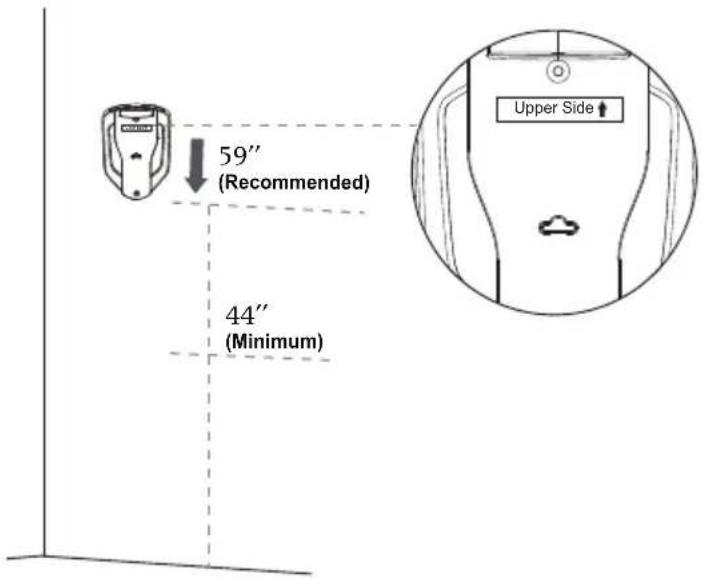
text_image
59" (Recommended) 44" (Minimum) Upper Side ↑- To store, hang the hand vacuum on the wall mount. Align the slot on the bottom of the hand vacuum with the protrusion on the wall mount as shown in the picture below.

natural_image
Technical line drawing of a mechanical device showing front, side, and top views (no text or symbols)- Insert the 2-in-1 combination tool into the right slot on top of the wall mounting bracket for convenient storage. Insert the crevice tool into the left slot.
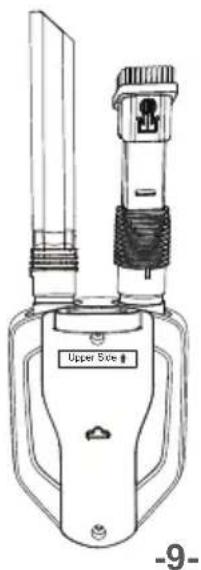
natural_image
Line drawing of a portable electrical fuse with a labeled upper side (no text or symbols on the device itself)Charging Instructions
- Before charging, make sure the cordless vacuum is turned OFF. Insert the charging connector into the charging port of the hand vacuum. Then insert the charging plug into a wall outlet.
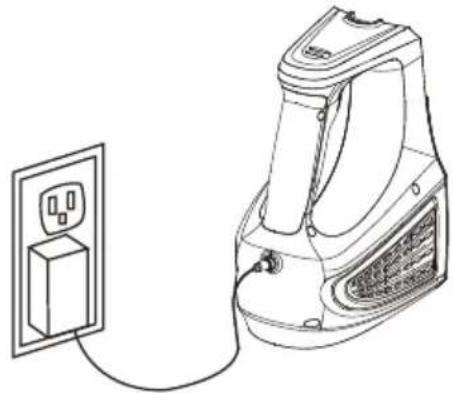
natural_image
Line drawing of a hairdryer connected to a power outlet (no text or symbols)- The LED indicators will show the progress of the charge. While the vacuum is being charged, the LED indicators will be flashing blue alternately. Once fully charged, the LED indicators will show static blue lights. The battery requires approximately 4\~5 hours of charging to regain full capacity.

natural_image
Line drawing of a garment sleeve with measurement lines and stitching (no text or symbols)LED Indicator
| LED Indicator Status | |
| Alternately Flashing Blue Lights Charging | |
| Static Blue Lights Fully Charged | |
- For improved battery performance, keep the vacuum cleaner charging while it not in use. Do not start the vacuum cleaner while it is charging.

Caution: Use only original adapter for charging to avoid damages to vacuum cleaner.

Caution: To optimize the battery longevity, charge the vacuum cleaner for least 5 hours before using for the first time.
Never charge the batteries in temperatures above 104^ F ( 40^ C) or below 39.2^ F ( 4^ C). It is normal for the charger to become warm when charging.
Note: To optimize the battery longevity, it is recommended to let the vacuum cleaner cool down when it is overheated before recharging.
OPERATING INSTRUCTIONS

CAUTION
Operate appliance at room temperature between 39.2^ F ( 4^ C) and 104^ F ( 40^ C) in order to ensure its safety and normal function.
Using Your Vacuum Cleaner
Note: When vacuum cleaner is fully charged, unplug the charging adapter. Make sure the vacuum cleaner is completely assembled and the dust cup is empty before using. Do not operate vacuum cleaner without filters in place.
This vacuum provides two-speed control. Before cleaning, think about the type of flooring you will be vacuuming to determine your desired speed (LOW or HIGH). Once the vacuum is turned on, the LED indicator will be lit.

natural_image
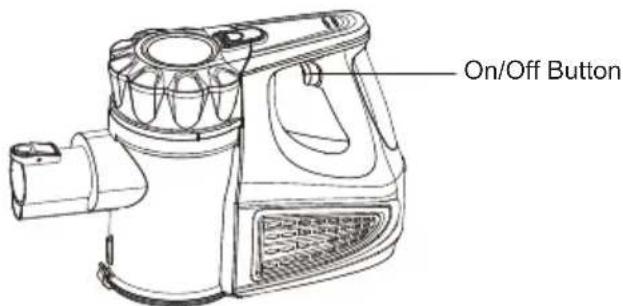
Technical line drawing of a vacuum cleaner assembly with no visible text or symbols- To start the vacuum, press the on/off button. The vacuum starts in the HIGH speed position.
The LED indicator will indicate the HIGH speed with two LEDs illuminated.
text_image
On/Off Button- To switch the speed to LOW, press the on/off button again.
The LED indicators will indicate the LOW speed with one LED illuminated.
- To stop the vacuum, press and hold the on/off button for 1 second for a third time.
Note:
- You will know the battery needs charging once the LED indicators change from blue to red.
- For best performance, empty the dust container once dust reaches the "MAX" level marked on the dust cup while vacuuming. Follow instructions on page 13.

Caution: The suction nozzle must be free of any obstructions at all times.
Otherwise, the motor will over heat and could become damaged.

Caution: Moving parts! To reduce the risk of personal injury, DO NOT touch the brush roll in the motorized nozzle when the vacuum is on. Contacting the brush roll while it is rotating can cause other injuries. Always turn off before servicing. Use caution when operating near children.

natural_image
Illustration of a hand using a magnifying glass to inspect a cylindrical object with a circular crosshair overlay (no text or symbols)Using Your Hand Vacuum
Easily clean messes on furniture, upholstery, stairs, and other hard-to-reach areas with one of the included accessory tools.
- To detach the hand vacuum, press the wand release button and pull the wand from the hand vacuum.

natural_image
Technical line drawing of a mechanical device with a tool and arrow indicating motion (no text or symbols)Wand Release Button
- Insert the motorized nozzle or accessory tools into the end of the hand vacuum until you hear a click.

natural_image
Technical line drawing of a vacuum cleaner assembly with exploded view (no text or symbols)- When finished cleaning, turn the vacuum cleaner off and press the wand release button to remove the motorized nozzle or accessory tools.
MAINTAINING YOUR VACUUM

CAUTION
To reduce the risk of shock, remove vacuum cleaner from the charging adapter, and turn off before performing any service or maintenance.
Note:
- Non-woven filter, foam filter and pre-filter can be cleaned in warm soapy water (<40°C). Rinse and dry them completely before reassembly. Do not immerse hand vacuum, wand or motorized nozzle in water or any other liquids.
- Use only a soft moist cloth to clean the outside of the unit. Do not allow any kind of liquid to enter the unit.
Emptying the Dust Container
Note: For best performance, empty dust cup after every use or once dust reaches MAX fill line. Never operate vacuum cleaner without dust cup and filter in place.
- Position dust cup area of vacuum over a waste receptacle. Press down on the dust release latch to open dust cup lid and allow contents to drop into waste receptacle.

text_image
Dust Release Latch- If necessary, clean off hair and other debris wrapped around the pre-filter. After repeated use, it is necessary to wash the non-woven filter and the foam filter clean of accumulated dust.
Cleaning the Filters
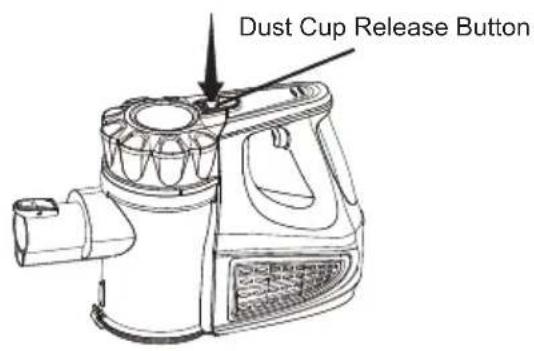
- Press the dust cup release button to separate the dust cup from the hand vacuum.
text_image
Dust Cup Release Button
natural_image
Technical line drawing of two different industrial filter or spray device components (no text or symbols)- To separate the top from the dust cup, hold the top of the dust cup and rotate counterclockwise. Then lift the top and filter from the dust cup.

text_image
Chamber Pre-filter Foam Filter Non-woven Filter- Brush loose debris from filters then rinse with warm water. Rinse and gently squeeze dry the foam filter. Set both filters aside and allow to air dry for 24 hours.
IMPORTANT: The filters must dry completely before reuse.
- There may be debris wrapped around the pre-filter. With the filters removed, remove the pre-filter from the chamber and clean off any debris. Once complete, correctly align the pre-filter back into the chamber (illustrated below).

text_image
Chamber Pre-filter Foam Filter Non-woven Filter
natural_image
Technical line drawing of a mechanical component with cross-sectional view (no text or symbols)- Place the filters back onto the pre-filter. With the dust cup release button facing away from the wand connection on the dust cup, lock the top into place by rotating clockwise.

natural_image
Technical line drawing of a mechanical component with an inset close-up showing internal components (no text or symbols)- To reassemble the dust cup to the hand vacuum, align the slot in the dust cup to the hand vacuum. Once aligned, press down on the dust cup release button until you hear a click.

text_image
Dust Cup Release ButtonCleaning the Motorized Nozzle & Blockages
The brush roll may accumulate debris such as strings, hair and fibers. This type of debris can wrap around the brush and diminish its ability to clean effectively.
To Remove Brush Roll for Manual Cleaning:
- Make sure the vacuum cleaner is turned off. Remove the wand and the hand vacuum from the motorized nozzle and set aside.
- Turn the nozzle over to access the brush roll. As shown below, push the tab on the left hand side of the nozzle to the left. This will unlock the brush roll.

natural_image
Technical illustration of a vacuum cleaner assembly with a close-up view of its internal components (no text or symbols present)- Simply lift the brush roll out of the nozzle housing. Clean off debris and anything wrapped around the brush roll. Use a pair of scissors to remove threads, etc.

natural_image
Technical line drawing of a mechanical device with an arrow indicating motion, next to a hand holding a cable (no text or symbols present)- Place the brush roll back into the housing by aligning the hexagon end into the right end of the nozzle first. Then insert the other end into place and push the tab to the right to lock the brush roll.

natural_image
Technical illustration of a mechanical device with a magnified inset showing internal components (no text or symbols)Hose Blockage Removal
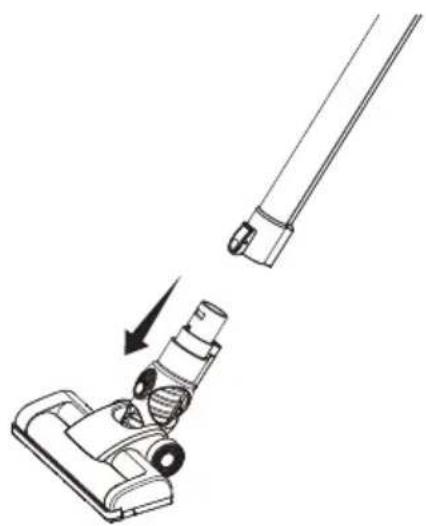
- To clean out the hose, press the release button on the wand and separate the nozzle from the wand.
natural_image
Line drawing of a vacuum cleaner with a lever and handle, showing a step-down view (no text or symbols)-
Carefully remove any debris or blockage from the inside of the nozzle neck.
-
Once the blockage is removed, reattach the wand and hand vacuum to the nozzle. Start the vacuum to confirm air flow through the unit.

Caution: Do not use scissors or other sharp objects to remove a blockage in the nozzle as these may damage the motorized nozzle.
TROUBLESHOOTING
Should you have any problem(s) with your vacuum cleaner, review the table below for solutions to minor performance issues.

WARNING
Disconnect electrical supply before performing maintenance to the vacuum cleaner. Failure to do so could result in electrical shock or personal injury.
| PROBLEM POSSIBLE CAUSE SOLUTION | ||
| Vacuum will not power on. | Battery may be depleted. Charge | the battery as instructed. |
| Wrong charger being used. | Be sure to use only the charger supplied with your product. | |
| Hand vacuum is not installed properly. | Remove hand vacuum and reattach ensuring that it is securely in place. | |
| Hand vacuum or battery is damaged. | Call (866) 384-8432 for assistance. | |
| Battery charge indicator does not illuminate. | Charging adapter is not plugged into outlet firmly. | Be sure the charging plug is plugged in properly to the outlet, and the charging connector is plugged into the charging port on hand vacuum. |
| Debris accumulated on the charging port on the hand vacuum. | Be sure no debris is accumulated on the charging port on the hand vacuum. | |
| No power at electrical outlet. Check circuit breakers. | ||
| The battery is damaged. Call (866) 384-8432 for assistance. | ||
| The battery is overheated. | Let the battery cool down to reach a normal temperature, charge the battery. | |
| The LED indicators are damaged. | Call (866) 384-8432 for assistance. | |
| Brush roll in the motorized nozzle is not turning. | Brush roll is jammed. | Remove obstruction. Follow instructions on page 17. |
| Brush roll needs to be reset. | Turn the unit off and remove the obstruction, then turn back on. | |
| Brush roll is not installed well. | Remove brush roll and reinstall following instructions on page 17. | |
| Debris accumulates on metal contacts connecting the dust cup and the main body of the hand vacuum. | Remove the debris and reinstall following instructions on page 16. | |
| The dust cup is installed incorrectly. | Reinstall the dust cup correctly as instructed on page 16. | |
| Vacuum not picking up or suction power is weak. | Dust cup is full. Empty dust cup. | |
| Filter needs cleaning. Follow filter cleaning instructions. | ||
| Filter needs to be replaced. | Purchase online at www.vacmaster.com or call (866) 384-8432. | |
| Battery may be depleted. | Charge the battery as instructed on page 10. | |
| Dust cup is not installed well. | Check dust cup for correct installation and ensure it is snapped firmly in place. | |
| Dust escapes from vacuum. | Filter is missing or installed incorrectly. | Check filter for correct installation. |
| Filter is damaged and needs to be replaced. | Purchase online at www.vacmaster.com or call (866) 384-8432. | |
| Dust cup is full or is installed incorrectly. | Empty dust cup container or position dust cup correctly and snap firmly into place. | |
| Pre-filter is missing or is installed incorrectly. | Reinstall correctly as instructed on page 15. | |
| Vacuum turns off on its own. | Battery may be depleted. | Charge the battery as instructed on page 10. |
| The battery is overheated. | Let the battery cool down to reach a normal temperature, charge the battery. | |
| Brush roll in the motorized nozzle is jammed causing motor protection system activated. | With the unit turned off, remove obstruction and then re-start. | |
| Excessive loading on brush roll brush. | Turn the vacuum off and re-start. | |
| The battery is damaged. Call (86) | 384-8432 for assistance. | |
For further questions, call our support team at (866) 384-8432.