
GeoVision 5069 - Gps PRESTIGIO - Free user manual and instructions
Find the device manual for free GeoVision 5069 PRESTIGIO in PDF.


| Product Type | GPS Navigation Device |
| Brand | Prestigio |
| Model | GeoVision 5069 |
| Processor | MSB2531 Cortex A7, 800 MHz |
| Memory | 128 MB RAM + 4 GB Flash (expandable via microSD up to 32 GB) |
| Display | 5" LCD, 800×480 resolution |
| Battery | 950 mAh Li-Ion rechargeable |
| Power Source | Built-in battery, car charger (12V cigarette socket) |
| Dimensions (HxWxD) | 135 x 86.5 x 17 mm |
| Weight | 160 g |
| Operating Temperature | -10°C to 60°C |
| Connectivity | Mini USB, Earphone jack, SD card slot |
| Controls | Power button, Reset button |
| Speaker | Built-in speaker |
| Initial Charge | 8 hours for first use; subsequent charges approx. 2 hours |
| Charging Indicator | Red when charging, amber when full |
| Safety Precautions | Do not expose to rain or moisture; avoid heat sources; maintain ventilation |
| Repair | Only Prestigio certified technicians |
| Warranty | 1 year manufacturer warranty; accessories 6 months |
Frequently Asked Questions - GeoVision 5069 PRESTIGIO
User questions about GeoVision 5069 PRESTIGIO
0 question about this device. Answer the ones you know or ask your own.
Ask a new question about this device
Download the instructions for your Gps in PDF format for free! Find your manual GeoVision 5069 - PRESTIGIO and take your electronic device back in hand. On this page are published all the documents necessary for the use of your device. GeoVision 5069 by PRESTIGIO.
USER MANUAL GeoVision 5069 PRESTIGIO
natural_image
Illustration of a medical or laboratory device with a coiled cable, a handheld probe, and a labeled document (no text or symbols on the devices themselves)Device overview
Обзор устройства

natural_image
Line drawing of a computer monitor with a base mount (no text or symbols)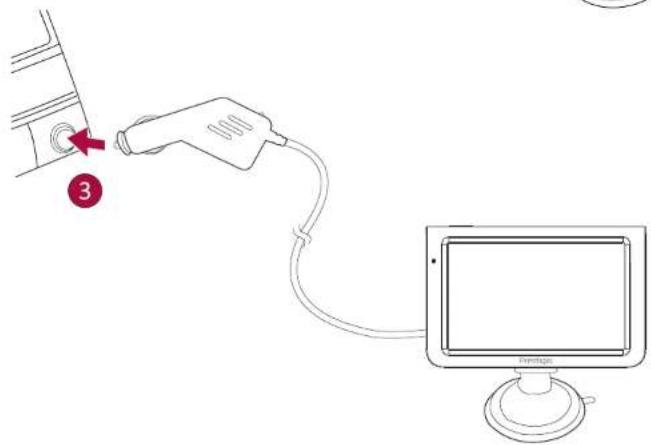
Prestigio
Quick Start Guide
Prestigio GPS
mZ
1. Safety precautions
- Only PRESTIGIO certified technicians are qualified to repair your device.
- To prevent fire or shock hazard, do not expose your device to rain or moisture.
- Do not put, store or leave your device near heat sources, in direct strong sunlight, or in a high temperature location.
- Maintain well-ventilated conditions around the unit to avoid overheating.
- Operating temperature: -10ircC to 60ircC .
2. Device overview
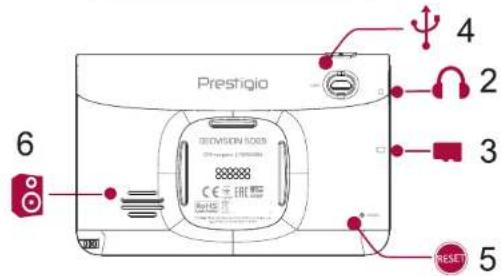
1 Power button 2 Earphone jack
3 SD card slot 4 Mini USB port
5 Reset button 6 Speaker
3. Battery charging
- Please fully charge the battery (for at least 8 hours) before initial use. The battery status indicator glows in red color when charging, and turns bright amber color when charging is complete.
- Charging time is approximately 2 hours after initial use.
- It is not necessary to start charging the device before the battery is fully discharged.
-
Please connect the car charger to vehicle 12V cigarette socket after vehicle engine is started, to protect the device from sudden surges in current.
-
Technical specifications
| Processor | MSB2531 Cortex A7, 800 MHz |
| Memory | RAM 128 MB + 4 GB FlashMicro SDHC/SDXC, up to 32 GB |
| Display | 5" LCD, 800×480 |
| Battery | 950 mAh |
| Power source | Built-in battery, car charger |
| Dimensions | 135 x 86.5 x 17 mm (HxWxD) |
| Weight | 160 g |
5. Disclaimer
As Prestigio continuously updates and improves its products, your device's software and hardware may have a slightly different appearance or modified functionalities than those presented in this quick start guide.
Prestigio hereby states that this device complies to basic requirements and other relevant regulations given by the EU directive 1999/5/EC. Full version of the declaration of conformity is available at: www.prestigio.com/certificates
To download the full-length manual, please visit www.prestigio.com/use
Prestigio
www.prestigio.com/certificates
(only for technical inquiries, news updates and products news)
General Warranty Terms: www.prestigio.com/support/warranty-terms Manufacturer's warranty period is 1 year from date of the sale in retail.
The warranty term for external power devices, remote controls, removable rechargeable batteries, mounts, supports and other accessories is 6 months
You may also have other rights under applicable laws governing consumer goods depending on your country. We hereby confirm that those rights are not affected by this Limited Warranty.
Warranty card is valid for service purposes only if fulfilled completely and stamped by seller.
RU -
Declaration of Conformity
Hereby, Prestigio Plaza Limited declares that the RE type is in compliance with RED
2014/53/EU. The full text of the EU DoC is available at the following internet address:
www.prestigio.com/catalogue
Software: PGPS5069CIS04GBNV.2017mmdd.1.0.xx
Company Name: Prestigio Plaza Limited
Address: Cyprus, Zinas Kanther & Origenous, P.C. 3035, Limassol
08/06/2017

Vyacheslav Arikanov
Chief Technical Officer Prestigio
Brand : PRESTIGIO
Model : GeoVision 5069
Category : Gps