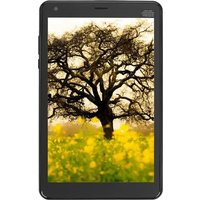
Ursus N380i - Tablet DEXP - Free user manual and instructions
Find the device manual for free Ursus N380i DEXP in PDF.


Pick your language and provide your email: we'll send you a specifically translated version.
| Product Type | Tablet |
| Brand | DEXP |
| Model | Ursus N380i |
| Display Size | 8.0 inches |
| Display Resolution | 1280 x 800 pixels |
| Operating System | Android |
| Processor | Quad-core 1.3 GHz |
| RAM | 1 GB |
| Internal Storage | 16 GB |
| Expandable Storage | microSD up to 32 GB |
| Rear Camera | 2 MP |
| Front Camera | 0.3 MP |
| Battery Capacity | 4000 mAh |
| Battery Life | Up to 6 hours |
| Connectivity | Wi-Fi 802.11 b/g/n, Bluetooth 4.0 |
| Ports | microUSB, 3.5 mm headphone jack |
| Sensors | G-sensor |
| Dimensions | 210 x 125 x 10 mm |
| Weight | 350 g |
| Power Adapter | 5V / 2A |
| Cleaning Instructions | Wipe with a soft dry cloth; avoid liquids. |
| Safety Warnings | Do not disassemble; avoid extreme temperatures. |
| Repairability | Service by qualified personnel only. |
Frequently Asked Questions - Ursus N380i DEXP
How do I turn on the DEXP Ursus N380i tablet?
Press and hold the power button located on the side of the tablet for about 3 seconds until the screen lights up.
How can I charge my tablet?
Connect the included microUSB cable to the charging port and plug the adapter into a power outlet. Charging time is approximately 3-4 hours.
How do I insert a microSD card?
Locate the microSD card slot on the side of the tablet. Gently push the card in until it clicks into place. Ensure the card is formatted as FAT32.
How do I perform a factory reset?
Go to Settings > Backup & Reset > Factory Data Reset. Confirm the action. All data will be erased.
Why is my tablet not connecting to Wi-Fi?
Make sure Wi-Fi is enabled in Settings > Wi-Fi. Restart the router and tablet. Check if the password is correct. If the issue persists, try forgetting the network and reconnecting.
Can I use a Bluetooth keyboard with this tablet?
Yes, the tablet supports Bluetooth 4.0. Pair the keyboard by going to Settings > Bluetooth and selecting the device.
How do I take a screenshot?
Press and hold the Power button and Volume Down button simultaneously for a few seconds. The screenshot will be saved in the Gallery.
What should I do if the tablet freezes?
Press and hold the Power button for 10-15 seconds to force a restart. If it still freezes, try charging the battery or performing a factory reset.
How do I clean the screen?
Use a soft, lint-free cloth slightly dampened with water or a screen cleaner. Do not spray liquid directly on the device.
Where can I find the user manual in PDF?
The user manual can be downloaded from the DEXP website or from notice-facile.com by searching for Ursus N380i.
User questions about Ursus N380i DEXP
0 question about this device. Answer the ones you know or ask your own.
Ask a new question about this device
No questions yet. Be the first to ask one.
Download the instructions for your Tablet in PDF format for free! Find your manual Ursus N380i - DEXP and take your electronic device back in hand. On this page are published all the documents necessary for the use of your device. Ursus N380i by DEXP.
USER MANUAL Ursus N380i DEXP
3G, Wi-Fi, GPS, Bluetooth.
Manual assistant
Powered by Anthropic
Waiting for your message
Product information
Brand : DEXP
Model : Ursus N380i
Category : Tablet