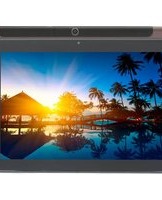
Ursus M110 - Tablet DEXP - Free user manual and instructions
Find the device manual for free Ursus M110 DEXP in PDF.


Pick your language and provide your email: we'll send you a specifically translated version.
| Product Type | Tablet |
| Brand | DEXP |
| Model | Ursus M110 |
| Dimensions | Approx. 250 x 170 x 10 mm |
| Weight | Approx. 500 g |
| Power Supply | Built-in rechargeable Li-Ion battery, 5V DC via USB-C |
| Main Functions | Web browsing, media playback, e-reading, apps, Wi-Fi connectivity, front & rear cameras, audio speaker, headphone jack |
| Display | 10.1-inch TFT LCD, 1280x800 pixels |
| Processor | Quad-core 1.3 GHz |
| Memory | 1-2 GB RAM, 16-32 GB internal storage, microSD card slot |
| Operating System | Android (version may vary) |
| Connectivity | Wi-Fi 802.11 b/g/n, Bluetooth 4.0, micro USB, 3.5mm audio |
| Sensors | G-sensor, light sensor |
| Care and Cleaning | Wipe with a soft dry cloth; do not use liquids or abrasive cleaners |
| Safety | Do not expose to extreme temperatures or moisture; avoid dropping |
| Spare Parts and Repairability | Battery and screen replacement available; contact authorized service center |
| General Information | User manual available for free download in PDF; includes safety instructions and warranty terms |
Frequently Asked Questions - Ursus M110 DEXP
How do I turn on the DEXP Ursus M110 tablet for the first time?
Press and hold the power button (located on the side or top edge) for about 3 seconds until the screen lights up. Follow the on-screen setup wizard to select language, connect to Wi-Fi, and sign in to your Google account.
How can I charge the tablet?
Connect the provided USB-C cable to the tablet's charging port and plug the other end into a USB power adapter (5V, 2A recommended). The battery icon will show charging status. A full charge takes approximately 3-4 hours.
How do I insert a microSD card?
Locate the microSD card slot on the tablet's side (often covered by a flap). Gently push the card into the slot until it clicks. To remove, push the card in to eject. The card supports up to 128 GB (or as specified in manual).
Why is the tablet running slow?
Close background apps by swiping them away from the recent apps list. Clear cache in Settings > Storage. Uninstall unused apps. If still slow, consider a factory reset (backup data first).
How do I connect to Wi-Fi?
Go to Settings > Wi-Fi, toggle Wi-Fi on, select your network from the list, enter password, and tap Connect. The tablet will remember the network for future use.
Can I use Bluetooth headphones with this tablet?
Yes. Go to Settings > Bluetooth, enable Bluetooth, and put your headphones in pairing mode. Select the headphones from the list of available devices to pair.
How do I take a screenshot?
Press and hold the power button and volume down button simultaneously for about 2 seconds. The screen will flash and a screenshot will be saved in the Gallery or Photos app.
The touchscreen is not responding properly, what should I do?
Clean the screen with a soft dry cloth. Remove any screen protector. Restart the tablet. If problem persists, check for software updates or perform a factory reset. If still faulty, contact support.
How do I update the software?
Go to Settings > System > System Update. Tap 'Check for Update'. If an update is available, download and install it over a stable Wi-Fi connection with sufficient battery.
What should I do if the tablet won't turn on?
Charge the tablet for at least 30 minutes using the original charger. Then press and hold the power button for 10 seconds. If still no response, try a hard reset by pressing and holding power + volume up for 10 seconds. If nothing works, contact customer support.
User questions about Ursus M110 DEXP
0 question about this device. Answer the ones you know or ask your own.
Ask a new question about this device
No questions yet. Be the first to ask one.
Download the instructions for your Tablet in PDF format for free! Find your manual Ursus M110 - DEXP and take your electronic device back in hand. On this page are published all the documents necessary for the use of your device. Ursus M110 by DEXP.
USER MANUAL Ursus M110 DEXP
natural_image
Line drawing of a rectangular electronic device with labeled ports (no text or symbols beyond labels)ВАЖНО:
LTE, 3G, Wi-Fi, GPS, Bluetooth.
Table of contents
Click a title to access it
Manual assistant
Powered by Anthropic
Waiting for your message
Product information
Brand : DEXP
Model : Ursus M110
Category : Tablet