HD8100 - Portable CD player Emerson - Free user manual and instructions
Find the device manual for free HD8100 Emerson in PDF.


| Product Type | Personal CD Player |
| Model Number | HD8100 (Silver, Red, Blue) |
| Power Source | 2 x AA batteries (not included) or optional AC adapter (4.5V DC, 500 mA, positive center) |
| Battery Type | Alkaline recommended |
| Audio Output | Stereo headphone jack (3.5 mm, green) |
| Anti-Skip Protection | 60-second Electronic Skip Protection (ESP) |
| Programmable Memory | 20 tracks |
| Playback Modes | Normal, Repeat 1 Track, Repeat All, Intro Scan (10 sec), Shuffle |
| Bass Boost | Yes, ON/OFF switch |
| Hold Switch | Disables all controls to prevent accidental operation |
| Display | LCD showing track number, elapsed time, mode indicators (PROG, SHUFF, INTRO, REPEAT, HOLD, battery low, ESP) |
| Dimensions (Approx.) | 5.5 x 5.5 x 1.5 inches (140 x 140 x 38 mm) |
| Weight (Approx.) | 6 oz (170 g) without batteries |
| Laser Classification | Class 1 |
| Compliance | FCC Part 15 |
| Warranty | 90 days limited (labor and parts) from date of purchase in U.S. |
| Cleaning | Cabinet: soft cloth; Lens: camera brush or cotton swab; Disc: wipe from center out |
| Safety Precautions | Do not expose to rain or moisture; avoid direct sunlight, heat, dust, vibration |
Frequently Asked Questions - HD8100 Emerson
User questions about HD8100 Emerson
0 question about this device. Answer the ones you know or ask your own.
Ask a new question about this device
Download the instructions for your Portable CD player in PDF format for free! Find your manual HD8100 - Emerson and take your electronic device back in hand. On this page are published all the documents necessary for the use of your device. HD8100 by Emerson.
USER MANUAL HD8100 Emerson
with 60 SECOND ANTI-SHOCK
and LIGHTWEIGHT
STEREO HEADPHONES
OWNER'S MANUAL
HD8100 - Silver
HD8100RD - Red
HD8100BL - Blue
Visit our web site at www.emersonradio.com



Thank you......
For purchasing this Emerson Personal CD Player. The CD player has a 20 track programmable memory so you can listen to the songs on your favorite CD's in any order you choose. Or you can use the Random playback feature and let the player select the playback order for you. Use the 3-way Repeat feature to repeat a single track, the entire disc, or a programmed sequence of tracks, indefinitely. We've also included 60 second Electronic Anti-Skip Protection which makes this player virtually skip-free during most active uses.
Please read this instruction manual completely and carefully to make sure you understand the proper operation of this product, and get the maximum enjoyment out of all the features of this state-of-the-art CD player.
Once again, thanks for purchasing this Emerson product.
The serial number of your CD player can be found on the bottom cabinet. We suggest that you record the serial number of your unit in the space below for future reference.
Model Number: HD8100/RD/BL
Serial Number:

IMPORTANT NOTES
WARNING: TO PREVENT FIRE OR SHOCK HAZARD, DO NOT EXPOSE THIS UNIT TO RAIN OR MOISTURE.
Avoid installing the unit in locations described below:
- Places exposed to direct sunlight or close to heat radiating appliances such as electric heaters.
- Dusty places.
- Places subject to constant vibration.
• Humid or moist places.
CLASS 1 LASER PRODUCT
CLASS 1 LASER PRODUCT APPAREIL À LASER DE CLASSE 1 PRODUCTO LASER DE CLASE 1
CAUTION INVISIBLE LASER RADIATION WHEN OPEN AND INTERLOCKS DEFEATED. AVOID EXPOSURE TO BEAM

This product contains a low power Laser Device.
CAUTION
THIS LASER COMPACT DISC PLAYER FUNCTIONS BY HELP OF INVISIBLE LASER LIGHT AND IS EQUIPPED WITH SAFETY SWITCHES TO AVOID EXPOSURE WHEN DOOR IS OPEN AND SAFETY INTERLOCKS ARE DEFEATED. IT IS DANGEROUS TO DEFEAT OR BYPASS SAFETY SWITCHES.

DANGEROUS VOLTAGE
Uninsulated Dangerous Voltage, that may be of sufficient magnitude to constitute a risk of electric shock to persons is present within this product's enclosure.

ATTENTION
The Owner's Manual contains important operating and maintenance instructions.
For your safety, it is necessary to refer to the manual.
This device complies with part 15 of the FCC rules. Operation is subject to the condition that this device does not cause harmful interference.
PREPARATION FOR USE
REMOVE THE TRANSIT CARD
This personal CD player is shipped with a dummy CD 'transit card' inside the CD compartment. The purpose of this card is to prevent the laser from moving during shipment of the product. This card must be removed before using the CD player.
Slide the OPEN switch to the right to unlock the CD door. Remove the 'transit card' from the player and discard it.
POWER SOURCES
This personal CD player is designed to operate on two "AA" batteries, not included. Use a well known brand of Alkaline batteries for longest life and best performance.
This player can also be operated by with an optional AC/DC converter/adapter, not included. If you decide to purchase an optional AC/DC adapter the specification must be as follows:
Input: 120V 60Hz AC
Output: 4.5V DC, 500 mA.
Plug: 1.7 mm Female Type with Positive Center, UL Listed.
Positive (+) —●— Negative (−)
You may also purchase a “Universal” type AC/DC adapter which allows you to select the required output voltage and plug polarity, and normally includes multiple plug sizes to fit most brands of equipment. Always look for the “UL” listing mark when you purchase an adapter.
INSTALLING THE BATTERIES
Note: The battery compartment is located inside the CD compartment.
1.) Slide the OPEN switch to the right to open the CD door. If you have not already done so, remove the dummy CD 'transit card' and discard it.
2.) Press the battery door locking tab in the direction of the 'Arrow' to open the battery door. Lift the door upward as shown.

natural_image
Line drawing of a hand inserting into a CD into a disc (no text or symbols)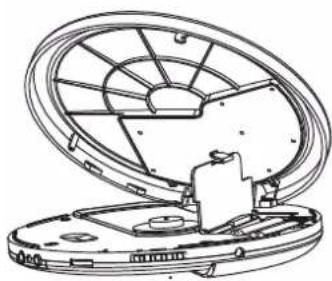
natural_image
Technical line drawing of a mechanical component with an open lid and internal blades (no text or symbols)3.) Insert two alkaline "AA" batteries in the battery compartment. Be sure to observe the polarity markings engraved in the battery compartment. If the batteries are inserted incorrectly the unit will not work.
4.) Fold the battery removal ribbon over the top of the batteries, close the battery door, and push the battery door downward until you hear a 'click' sound to lock the door again.
5.) Close the CD door.
REPLACING THE BATTERIES
When the battery symbol appears in the display the batteries are becoming weak and should be replaced. Always replace both batteries at the same time with new fresh alkaline batteries. Do not mix old and new batteries or different types of batteries together.
If the display remains blank when you press the PLAY/PAUSE button, the batteries are completely dead. Replace them immediately. If dead batteries are left inside the battery compartment for a long period of time they may leak and cause damage to the unit, and such damage or corrosion from leaking batteries is not covered by your warranty.
CONNECTING THE OPTIONAL AC ADAPTER (NOT INCLUDED)
1.) Connect the small female plug of the optional AC adapter to the "DC IN 4.5 V" jack on the right side of the CD player.
2.) Connect the adapter housing to your 120V 60Hz AC outlet.

Notes:
- Never connect or disconnect the adapter from the AC outlet while your hands are wet.
- The housing of the AC adapter may become warm during operation. This is normal.
- The female plug of the AC adapter must be completely disconnected from the CD player in order to operate the player on batteries.
BATTERY PRECAUTIONS
Follow these precautions when using batteries in this device:
-
Use only the size and type of batteries specified.
-
Be sure to follow the correct polarity when installing the batteries as indicated in the battery compartment. Reversed batteries may cause damage to the device.
-
Do not mix different types of batteries together (e.g. Alkaline and Carbon-Zinc) or old batteries with fresh ones.
-
If the device is not to be used for a long period of time, remove the batteries to prevent damage or injury from possible battery leakage.
-
Do not try to recharge batteries not intended to be recharged; they can overheat and rupture (Follow battery manufacturer's directions.)



CONNECTING THE STEREO HEADPHONES
Connect the plug of the supplied stereo headphones to the green-colored headphone jack on the left side of the cabinet.
NOTE: Make sure the headphone plug is inserted into the headphone jack as far as it will go. If the plug is not fully inserted, you may only hear sound from one side of the headphones.

IMPORTANT!
Always set the VOLUME control to a low level before you put the headphones on and begin playing a CD. Then start playback and gradually increase the volume to a comfortable listening level. Do not play the CD at loud volume levels that might prevent you from hearing warning sounds such as car horns, etc.
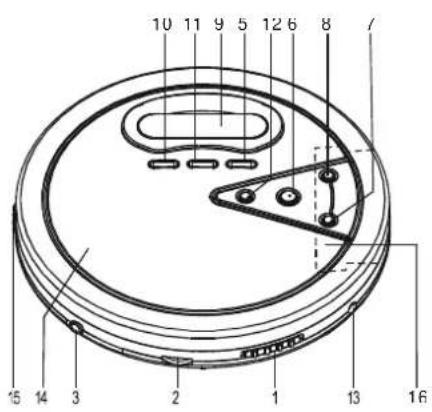
LOCATION OF CONTROLS AND INDICATORS

natural_image
Technical line drawing of a circular mechanical component with internal structural lines and mounting holes (no text or symbols)1.) ▶ OPEN Switch – Slide to the right to unlock and open the CD door.
2.) VOLUME Control – Raises or lowers the volume.
3.) PHONES 📋 Jack - Connect stereo headphones, included, to this jack.
4.) HOLD Switch (Bottom Cabinet).
5.) PROG (Program) Button.
6.) PLAY/PAUSE Button.
7.) SKIP REV Button.
8.) SKIP FWD Button.
9.) LCD Display – Shows Track number, Playing time, Anti-Skip status, Program, Repeat, Shuffle, and Intro modes.
10.) ESP Button.
11.) MODE Button – Selects the playback mode: Repeat 1/All, Shuffle, or Intro.
12.) STOP Button.
13.) DC IN 4.5V Input Jack – Connect an AC adapter (not included) to this jack to use 120V 60Hz house current.
14.) CD Door.
15.) BASS BOOST ON/OFF Switch.
16.) Battery Compartment (Inside CD Compartment).
LCD DISPLAY INDICATORS

1.) Track Number Display.
2.) PROG (Program) Indicator – Appears when programming tracks or playing programmed tracks.
3.) SHUFF (Shuffle) Indicator – Appears when Random playback mode is selected.
4.) INTRO Indicator – Appears when Intro playback mode is selected.
5.) HOLD Indicator – Appears when HOLD switch is set to 'On' position.
6.) ☐ (Repeat 1) /ALL Indicators – Appears when the Repeat playback mode is selected.
7.) Battery Status Indicator – Appears when battery level becomes low.
8.) Elapsed Time (Seconds) Display.
9.) Elapsed Time (Minutes) Display.
10.) ANTI-SHOCK Indicator – Indicates ESP Protection is activated.
OPERATING INSTRUCTIONS
SPECIAL FUNCTIONS
HOLD Switch
The HOLD switch on the bottom of the cabinet must be in the 'Off' (left) position to start the CD player. If you plan to carry the CD player in a handbag, briefcase, school bag, back pack, etc, slide the HOLD switch to the 'On' (right) position. While the HOLD switch is 'On' all of the controls on the CD door are disabled. This prevents the player from starting accidentally by something pressing against the PLAY/PAUSE button.


After you begin CD playback you may also slide the HOLD switch to the 'On' (right) position to disable all the controls on the CD door. You can then place the player in a handbag, backpack, etc, and do not have to worry that the player will be accidentally turned off by something pressing against the STOP button or Track Skip buttons.
BASS BOOST ON/OFF Switch
During CD playback you may slide the BASS BOOST switch to the 'ON' position to activate the Bass Boost function as desired.
Electronic Skip Protection (ESP)
This CD player includes an Electronic Skip Protection circuit that continuously stores 60 seconds of CD music in an electronic memory. If the player is bumped or shaken you will not hear any skipping because the player is reading from the memory, not directly from the disc. Of course if the shaking continues for more than 60 seconds, the ESP memory will be depleted and the player may then skip or stop if the shaking continues.
ESP memory function is automatically activated during playback. The display will show the ESP meter and begin to fill up with bars. Each bar represents
approximately 12 seconds of music in the memory. When all 5 bars appear the memory contains 60 seconds of music. If the player is bumped or shaken one or more of the bars may disappear as the memory is depleted. When the shaking stops the memory will fill up again.
To deactivate the ESP function, press the ESP button and the ESP meter will disappear in the display.
Notes:
- The ESP circuit draws additional current from the batteries. To extend the battery life leave the ESP circuit 'Off' when the unit is used in a stable location not subject to bumps and shakes.
- When the ESP circuit is switched 'On' or 'Off' the sound will be interrupted for 2 to 5 seconds. This is normal and not an indication of any problem with the player.
NORMAL CD PLAYBACK
• Make sure you have installed the batteries.
• Make sure the HOLD switch is set to the 'Off' (left) position.
- Make sure to set the VOLUME control to a low setting before you put on the headphones.
IMPORTANT:
This CD player can play normal CDs plus CD Recordable (CD-R) and CD Rewriteable (CD-RW) discs. However the playability of CD-R and CD-RW discs may be affected by the type of software that was used in 'ripping' the tracks from the original discs and 'burning' the tracks onto the blank media. Playability may also be affected by the quality and condition of the blank media you use for recording. 100% compatibility cannot be guaranteed. This is not an indication of any problems with your player.
1.) Slide the CD door OPEN switch to the right to unlock and open the CD door.
2.) Place your CD on the center spindle with the printed label side facing up. Press downward on the disc near the center hole until the disc is fully seated on the spindle.
3.) Close the CD door and connect the headphones to the headphone jack (green color) by pushing the headphone plug the into headphone jack until a 'click' sound is heard.
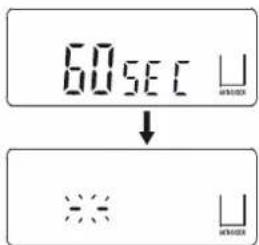
4.) Press the PLAY/PAUSE button to begin playback. The display will briefly show "60 SEC", then "--" flashes
while the player reads the disc. The total tracks and playing time will appear briefly in the display and then the playback will begin on track 1. The display will show the elapsed playing time of the track being played.
5.) Adjust the VOLUME, and BASS BOOST controls as desired.




6.) Playback will continue until the end of the disc, then the player will stop automatically and the display will again show the total tracks and playing time on the disc. After approximately 30 seconds the power switches 'Off' automatically to conserve the batteries and the display goes blank. To stop playback before the disc ends press the STOP button at any time. Press the STOP button after the disc has stopped to shut the power 'Off' completely.
PAUSE CONTROL
To pause momentarily during playback press the PLAY/PAUSE button again. The elapsed time display flashes. The sound stops but the disc continues to spin. Press the PLAY/PAUSE button once more to cancel Pause mode and resume normal playback. The elapsed time dis

SKIP/SEARCH CONTROLS
Press the SKIP FWD or SKIP REV buttons repeatedly during playback to skip to higher or lower numbered tracks. Playback will begin on the selected track.
To search within a track at high speed to locate a specific musical passage depress and hold either the SKIP FWD or SKIP REV controls. The player will search rapidly forward or backward as long as the buttons are depressed. The volume is automatically muted during high speed search. Watch the elapsed time display. When the time display reaches the desired point, release the buttons. Normal playback will resume at that point and the volume returns to normal level.
PLAY MODE BUTTON
Pressing the MODE button during playback cycles the player through the following four special playback modes:
(Repeat 1 Track) → ALL (Repeat All Tracks) → INTRO
→ SHUFF (Shuffle) Playback.
REPEAT PLAYBACK
The player can be programmed to continuously repeat a single track or the entire disc automatically.
One Track Repeat
During playback press the SKIP FWD or SKIP REV buttons to select the track to be repeated, then press the MODE button once. The 📋 indicator appears in the display and the selected track will be repeated continuously.
Press the STOP button to cancel Repeat 1 playback.

All Tracks Repeat
Press the PLAY/PAUSE button to begin playback, then press the MODE button twice. The ⬆ ALL indicator will appear in the display and the entire disc will be repeated continuously.
Press the STOP button to cancel All Track Repeat playback.

INTRO (Intro Scan) PLAYBACK
The Intro Scan feature plays only the first 10 seconds of each track on the disc. This feature is useful when you are trying to find a particular song but you cannot remember the title.
1.) Load your disc in the player as usual and press the PLAY/PAUSE button to begin playback.
2.) When playback begins press the MODE button 3 times. The INTRO indicator flashes.
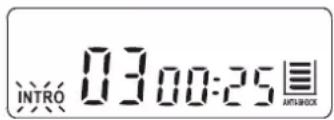
3.) Press the PLAY/PAUSE button once more. The INTRO indicator stops flashing and remains 'On'. The player backs up to the beginning of track 1, plays the first 10 seconds of each track on the disc, and then stops.
To cancel Intro Scan playback press the STOP button.
SHUFFLE (Random) PLAYBACK
When Shuffle playback is selected all the tracks on the disc will be played back in random order.
1.) Load your disc in the player as usual and press the PLAY/PAUSE button to begin playback.
2.) When playback begins press the MODE button 4 times. The SHUFF indicator flashes.
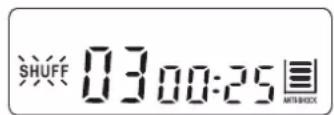
3.) Press the PLAY/PAUSE button once more. The SHUFF indicator stops flashing and remains 'On'. The player randomly selects a track for playback. After each track has played once the player stops.
To cancel Shuffle playback press the STOP button.
PROGRAMMED PLAYBACK
You can program up to 20 tracks on a disc to play in any desired order.
NOTE: You can program a disc either during playback or in Stop mode.
1.) Press the PROG button once. The PROG indicator and the Program Number '01' appear, and the track number '00' flashes.

2.) Press the SKIP FWD or SKIP REV button to select the first track to be programmed. Example: Track 2.
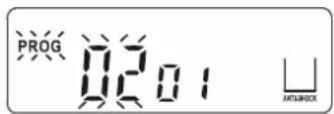
3.) When the desired track number is flashing in the display press the PROG button again to enter the desired track number in Program Number 1. The track number returns to "00" and the Program Number advances to "02".

4.) Repeat Steps 2 and 3 to program additional tracks up to a maximum of 20.
5.) Press the PLAY/PAUSE button to begin programmed playback. The PROG indicator remains in the display and the track display stops flashing.

- Playback begins with the first track you programmed and continues until all programmed tracks have been played, and then the player stops. The programmed sequence will remain in the memory until the power shuts off (approximately 30 seconds) or until the CD door is opened.
- If you press the PROG and PLAY/PAUSE buttons again before the power shuts off the programmed sequence will play again.
CARE AND MAINTENANCE
CLEANING THE CABINET
Wipe with a soft cloth. If the cabinet is very dirty, dampen the cloth with a weak solution of neutral detergent and water, and then wipe clean.
CLEANING THE LENS
A dirty lens will cause sound skipping and, if the lens is very dirty, the CD may not work. Open the disc cover and clean the lens as follows:
DUST OR DRY PARTICLES
Using a camera lens brush/blower, blow on the lens several times, then wipe it lightly with the brush to remove dust. Then, blow on the lens once more.

natural_image
Illustration of hands using a tool to cut or spread a circular object, no text or symbols presentFINGERPRINTS
To remove fingerprints from the lens, use a cotton swab starting in the middle and working to the outside edge. Use only very light pressure on the lens to avoid forcing it out of alignment.

natural_image
Illustration of two hands performing a circular motion with arrows indicating direction (no text or symbols)CLEANING THE DISC
When a disc becomes dirty, clean it with a cleaning cloth. Wipe the disc from the center out.
NOTE:
Do not use solvents such as benzine, thinner, commercially available cleaners or anti-static spray intended for analog discs.
LIMITED WARRANTY
Emerson Radio Corp. warrants manufacturing defects in original material, including original parts and workmanship, under normal use and conditions, for a period of ninety (90) days from the date of original purchase in the U.S. With your dated proof of purchase, we will provide repair service at no charge for labor and parts at an authorized Depot Repair Facility, or replace the product in our discretion. For repair or replacement, pack your unit in a padded box, enclose your check or money order payable to Emerson Radio Corp. in the amount of \$9.00 (not required by California residents) to cover shipping and handling costs, and enclose a copy of your proof of purchase. Send your unit to:
Emerson Radio Corp.
1901 Diplomat Drive.
Farmers Branch, TX 75234.
This warranty does not cover damage from negligence, misuse, abuse, accident, failure to follow operating instructions, commercial use, rental, repairs by an unauthorized facility, or products purchased, used, serviced or damaged outside of the United States.
THIS WARRANTY GIVES YOU SPECIFIC LEGAL RIGHTS, AND YOU MAY ALSO HAVE OTHER RIGHTS WHICH VARY FROM STATE TO STATE.
AU898M

Emerson®
SERVICE
FOR ADDITIONAL SET-UP OR OPERATING ASSISTANCE
PLEASE CALL:
1-800-898-9020
FOR CUSTOMER SERVICE, PLEASE WRITE TO:
Emerson Radio Corp.
Consumer Affairs Dept.
1901 Diplomat Drive,
Farmers Branch, TX 75234.

natural_image
Color palette bar with grayscale gradient and a crosshair symbol (no text or labels)
EMERSON
PART NO. 16-2936
403-02
PRINTED IN CHINA
HD8100_031604.p65 16/3/2004, 11:5618

- Thank you......
- IMPORTANT NOTES
- Avoid installing the unit in locations described below:
- CLASS 1 LASER PRODUCT
- CAUTION
- DANGEROUS VOLTAGE
- ATTENTION
- PREPARATION FOR USE
- REMOVE THE TRANSIT CARD
- POWER SOURCES
- INSTALLING THE BATTERIES
- REPLACING THE BATTERIES
- CONNECTING THE OPTIONAL AC ADAPTER (NOT INCLUDED)
- Notes:
- BATTERY PRECAUTIONS
- CONNECTING THE STEREO HEADPHONES
- IMPORTANT!
- LOCATION OF CONTROLS AND INDICATORS
- LCD DISPLAY INDICATORS
- OPERATING INSTRUCTIONS
- SPECIAL FUNCTIONS
- HOLD Switch
- BASS BOOST ON/OFF Switch
- Electronic Skip Protection (ESP)
- NORMAL CD PLAYBACK
- IMPORTANT:
- PAUSE CONTROL
- SKIP/SEARCH CONTROLS
- PLAY MODE BUTTON
- REPEAT PLAYBACK
- One Track Repeat
- All Tracks Repeat
- INTRO (Intro Scan) PLAYBACK
- SHUFFLE (Random) PLAYBACK
- PROGRAMMED PLAYBACK
- CARE AND MAINTENANCE
- CLEANING THE CABINET
- CLEANING THE LENS
- DUST OR DRY PARTICLES
- FINGERPRINTS
- CLEANING THE DISC
- NOTE:
- LIMITED WARRANTY
- Emerson®
Brand : Emerson
Model : HD8100
Category : Portable CD player